
Quick Answer: AI Agents For Customer Support
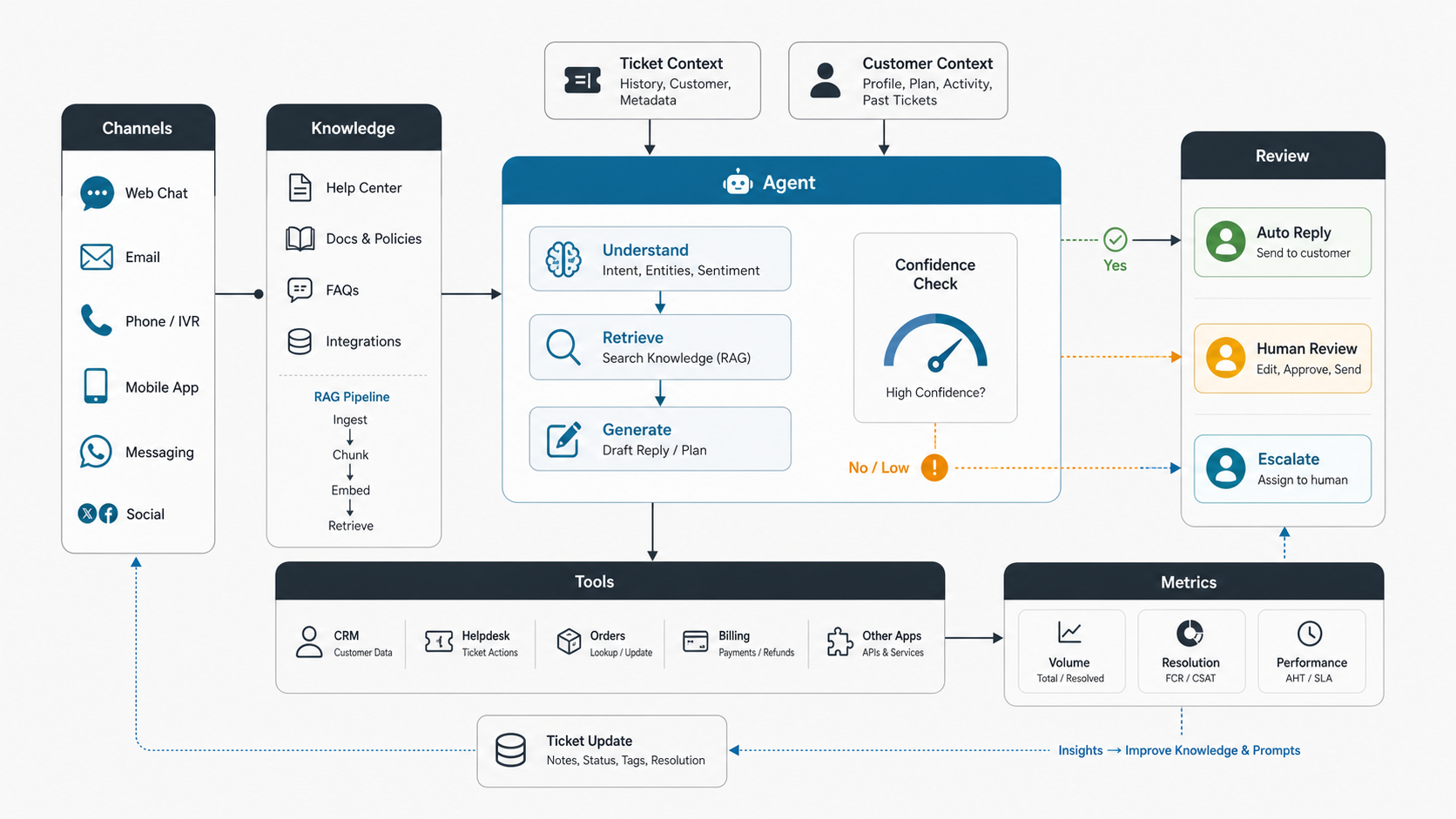
AI agents for customer support are controlled software workflows that can understand a customer request, retrieve approved knowledge, inspect ticket and account context, draft or send a response, call support tools, update records, and escalate with context when the case needs a person. The useful version is not just a chatbot with a new label. It is a support operating system that combines language models, retrieval, permissions, workflow rules, tool calls, human review, quality measurement, and rollback.
The best first use cases are narrow, frequent, documented, and low risk: order status, subscription questions, account troubleshooting, intake triage, knowledge-base answers, returns, onboarding questions, agent-assist summaries, and internal support desk requests. Risk rises quickly when the agent touches refunds, cancellations, access changes, security requests, high-emotion complaints, medical or financial advice, legal exceptions, or commitments that a human team cannot easily reverse.
NextPage usually starts by scoring the workflow, data, integrations, and governance with the AI Agent Readiness Assessment. If the support process is not documented enough for a human team to follow consistently, an AI agent should start in assist or review mode before it sends customer-facing answers or performs tool actions.
Where Support Agents Fit
A support AI agent sits between customer channels, company knowledge, helpdesk records, business tools, and the human support team. It can answer common questions directly, assist agents with drafts and summaries, or perform controlled actions such as tagging a ticket, checking order status, updating a case field, creating a support task, or preparing a refund request for approval.
That makes support agents different from traditional FAQ bots. A basic bot follows a conversation tree or searches help articles. A support agent can combine intent detection, retrieval, ticket context, customer history, tool calls, confidence checks, sentiment signals, policy rules, and escalation logic. In practice, many teams still start with a chatbot-style interface because the first goal is to resolve simple questions without forcing customers through a form.
If the use case is mostly conversation design, website support, lead qualification, and knowledge-base answers, a focused AI chatbot development project may be enough. If the system must act across the helpdesk, CRM, billing, ecommerce, product portal, or internal operations stack, it should be planned as an AI agent workflow with stronger engineering controls.
Current Platform Context For 2026
Customer support AI agents now fall into three practical categories. Helpdesk-native agents, such as AI capabilities inside Intercom, Zendesk, Salesforce, Freshdesk, or similar platforms, are often fastest for teams that already run support from one system. Standalone AI support platforms can sit above the existing helpdesk and handle branded, multi-channel, action-taking workflows. Custom workflow agents are useful when the support process spans proprietary product logic, customer portals, internal admin panels, billing systems, ERP data, or unusual approval rules.
The platform choice should follow the workflow. If the agent only needs approved help-center answers and simple routing, a helpdesk-native agent may be the right first step. If the agent needs custom permissions, product-specific tools, audit trails, evaluation harnesses, or workflow screens for managers, the project starts to look like AI customer service agent development rather than a support-tool configuration exercise.
Current vendor documentation also makes one point clear: human handoff is not optional. Support agents need clear escalation guidance, full conversation context, routing rules, and handback behavior so the customer does not repeat the problem after escalation. A production design should treat handoff quality as a launch gate, not a fallback detail.
High-Value Customer Support Use Cases
Customer support AI agents work best when the request pattern is frequent, the answer source is known, and the fallback path is clear. The goal is not to hide humans from customers. The goal is to remove repetitive work while making the handoff to humans faster and better informed.
| Use case | What the agent does | Human review trigger |
|---|---|---|
| Ticket intake and triage | Classifies intent, urgency, sentiment, product area, account type, and missing fields | High-value account, angry sentiment, unclear request, or policy exception |
| Knowledge-base answers | Retrieves approved help content, cites the source, and drafts an answer | Low retrieval confidence, stale article, or conflicting content |
| Order and account status | Looks up order, subscription, shipment, plan, usage, or entitlement context | Refund, cancellation, access change, or mismatch between systems |
| Agent assist | Summarizes conversation history, suggests replies, and recommends next steps | Human remains the sender for sensitive or complex cases |
| Internal support desk | Answers employee IT, HR, finance, or operations questions from approved policies | Access request, payroll issue, legal topic, or policy exception |
| Post-resolution QA | Checks whether the ticket was resolved, tagged correctly, and linked to useful docs | Customer reopened, negative CSAT, or repeated issue cluster |
For teams comparing several automation candidates, the Workflow Automation Opportunity Finder helps rank which support workflows are repeatable enough to automate first.
Support Agent Architecture
A production support agent needs more than a prompt. The architecture usually includes intake channels, a knowledge layer, context retrieval, an orchestration layer, tool integrations, policy controls, human review, analytics, and a feedback loop.
The intake layer receives messages from chat, email, in-app support, forms, voice transcripts, social channels, or internal portals. The knowledge layer indexes help articles, policies, product docs, previous ticket patterns, release notes, approved macros, and known issue records. The context layer retrieves customer profile, subscription, orders, tickets, entitlements, customer tier, and account rules. The orchestration layer decides whether to answer, ask a clarifying question, call a tool, create a draft, or route to a human.
For retrieval-heavy systems, the underlying work resembles generative AI development for production workflows: ingestion, chunking, embeddings, permissions, citations, prompt design, model routing, logging, and evaluation. A useful support agent should be able to explain which source it used, which context it inspected, what action it proposed, and why a ticket was escalated.
Data And Knowledge Requirements
The agent can only be as useful as the knowledge and context it can safely access. Clean help-center content is a start, but support teams often need the agent to read product plans, billing status, order records, bug reports, historical tickets, internal SOPs, customer-specific entitlements, and release notes.
Before building, separate knowledge into four groups. Public knowledge can be used in customer-facing answers. Internal knowledge can guide drafts but may need redaction. Account data can personalize responses but requires permission checks. Operational data can drive actions but should be logged and reviewed when it changes a record.
Historical tickets are valuable but messy. They contain outdated policies, private data, inconsistent agent behavior, and one-off exceptions. Use them for intent discovery, taxonomy design, and evaluation examples before letting them become a direct answer source. The AI Data Readiness Checklist is a useful companion when permissions, retention, source freshness, and action boundaries are unclear.
Tool Integrations And Actions
Support agents become valuable when they connect to the systems where support work happens. Common integrations include Zendesk, Intercom, Freshdesk, Salesforce Service Cloud, HubSpot, Jira, Linear, Slack, Stripe, Shopify, ERP systems, logistics APIs, internal admin panels, customer portals, and product analytics tools.
Every action needs a boundary. Reading an order status is lower risk than changing a plan. Adding a ticket tag is lower risk than issuing a refund. Drafting a reply is lower risk than sending it. A production build should define which tools the agent can call, what inputs are allowed, what actions require approval, how failures are retried, and how a person can reverse or correct the result.
If the support workflow also needs dashboards, admin queues, approval screens, and audit views, the build may overlap with internal tool development. Those operational screens are often what make the agent usable for support managers, not just impressive in a demo.
Human Review And Escalation Design
Human review is not a sign that the agent failed. It is how the system earns trust while the team learns which cases can be automated safely. Modern support platforms increasingly emphasize handoff, handback, full conversation context, and clear routing because customers punish broken escalation more than they punish honest automation limits.
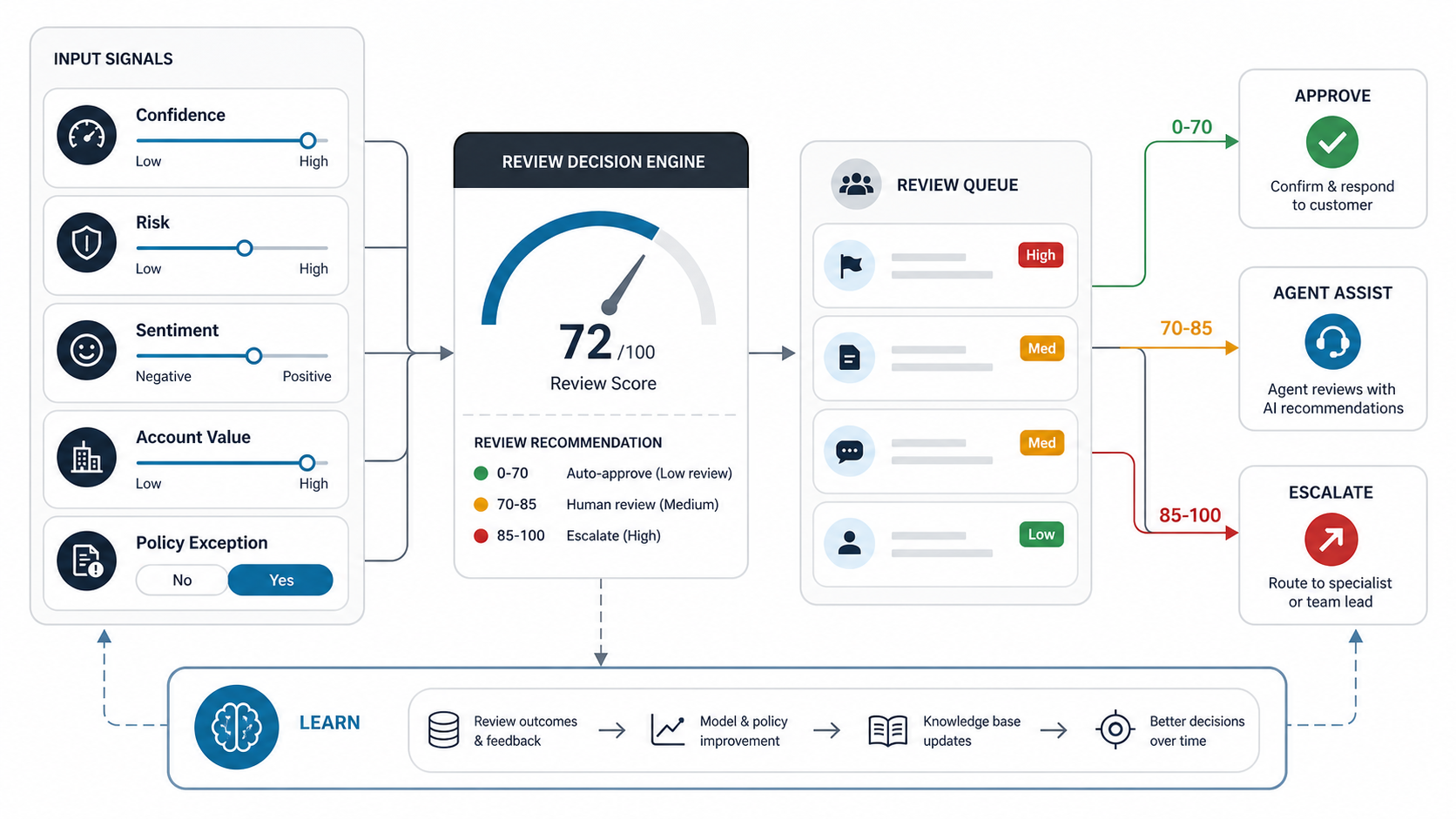
Good review design starts with clear triggers. Escalate when confidence is low, the customer asks for a person, sentiment is negative, the account is high value, the request involves billing or access, the agent detects a policy exception, or the answer requires judgment outside approved guidance. Use approval queues when the answer is probably right but the action is sensitive.
The review interface should show the customer message, retrieved sources, proposed answer, action plan, confidence signal, reason for escalation, suggested next step, and previous human decisions for similar cases. The human should be able to approve, edit, reject, reassign, or convert the case into a training example.
Support Agent Operating Model
Once an agent touches real customer conversations, support teams need ownership beyond the initial build. Assign owners for workflow design, knowledge quality, tool actions, QA review, analytics, and incident response. Without those roles, the agent can quietly drift as product behavior, policies, pricing, and customer expectations change.
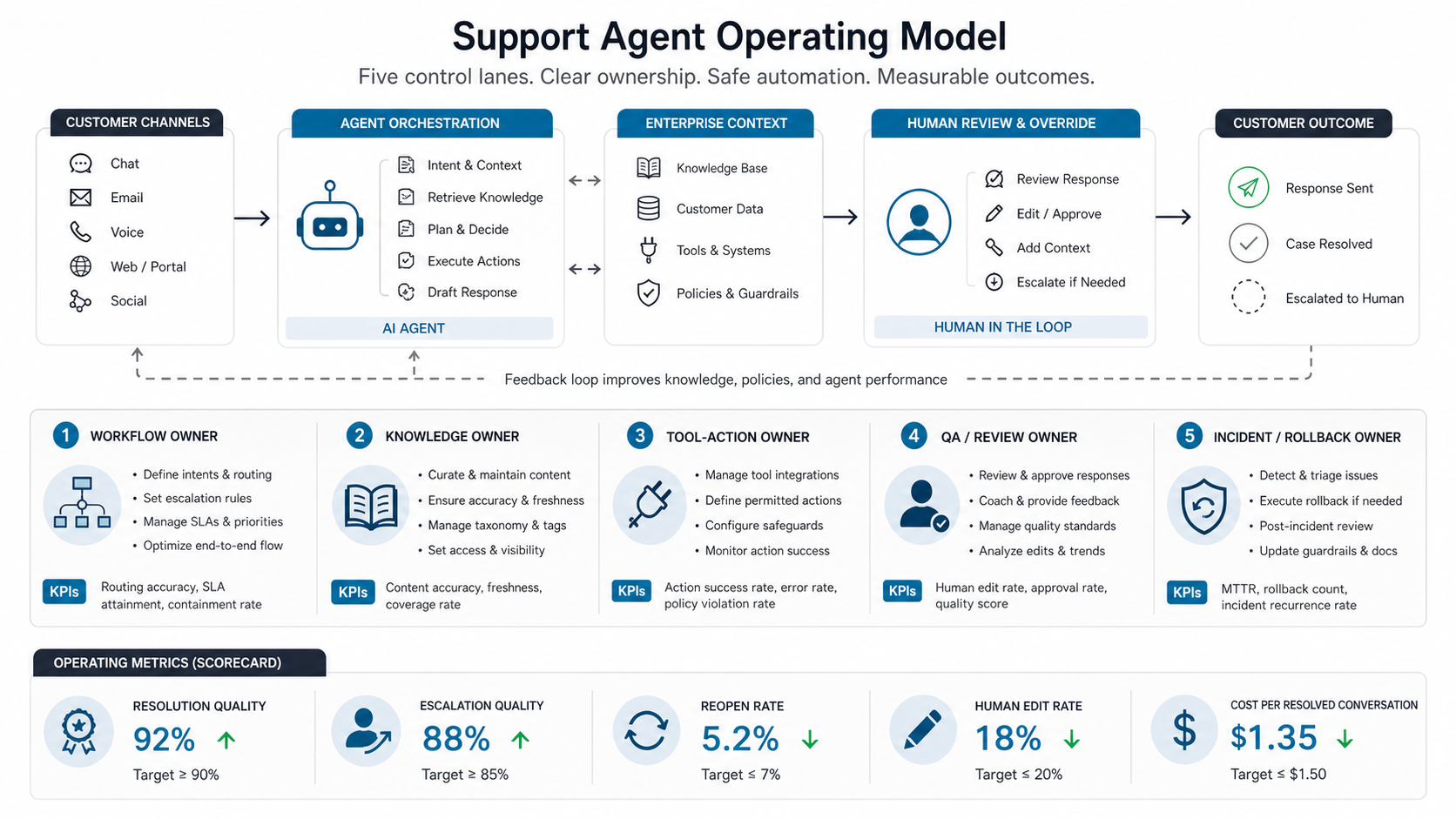
This is where AI automation services should look more like operations design than model tuning. The durable work is content freshness, taxonomy changes, escalation rules, evaluation sets, regression tests, quality audits, and release management for new workflows.
Metrics That Matter
Support AI metrics should measure customer outcomes and operational safety, not only deflection. A high automation rate is not useful if customers reopen tickets, receive wrong answers, or lose trust in the support team.
| Metric | What it tells you | How to use it |
|---|---|---|
| Resolution rate | How often the agent resolves the request without further support work | Segment by intent, channel, product area, and customer tier |
| Escalation quality | Whether handoffs include context, source links, and recommended actions | Audit escalated tickets and agent feedback |
| First response time | How quickly customers get a useful answer or next step | Compare simple questions against complex cases separately |
| Reopen rate | Whether the customer had to come back because the answer was incomplete | Use as a safety check against shallow deflection |
| Human edit rate | How often agents change AI drafts before sending | Identify weak sources, bad prompts, or missing workflow rules |
| Cost per resolved conversation | Model, infrastructure, support labor, and review effort per outcome | Use with the AI Automation ROI Calculator for directional payback planning |
Track failure categories from the start. Common buckets include missing knowledge, wrong policy, stale product information, bad retrieval, poor sentiment handling, integration failure, permission issue, escalation delay, and human override after an unsafe action. For a deeper ROI model, connect this article with the AI Customer Support Automation ROI guide.
Rollout Plan For Support Teams
The safest rollout starts with agent assist, then controlled customer-facing answers, then tool actions with review, then limited automation for proven workflows. Each phase should have acceptance criteria and a rollback path.
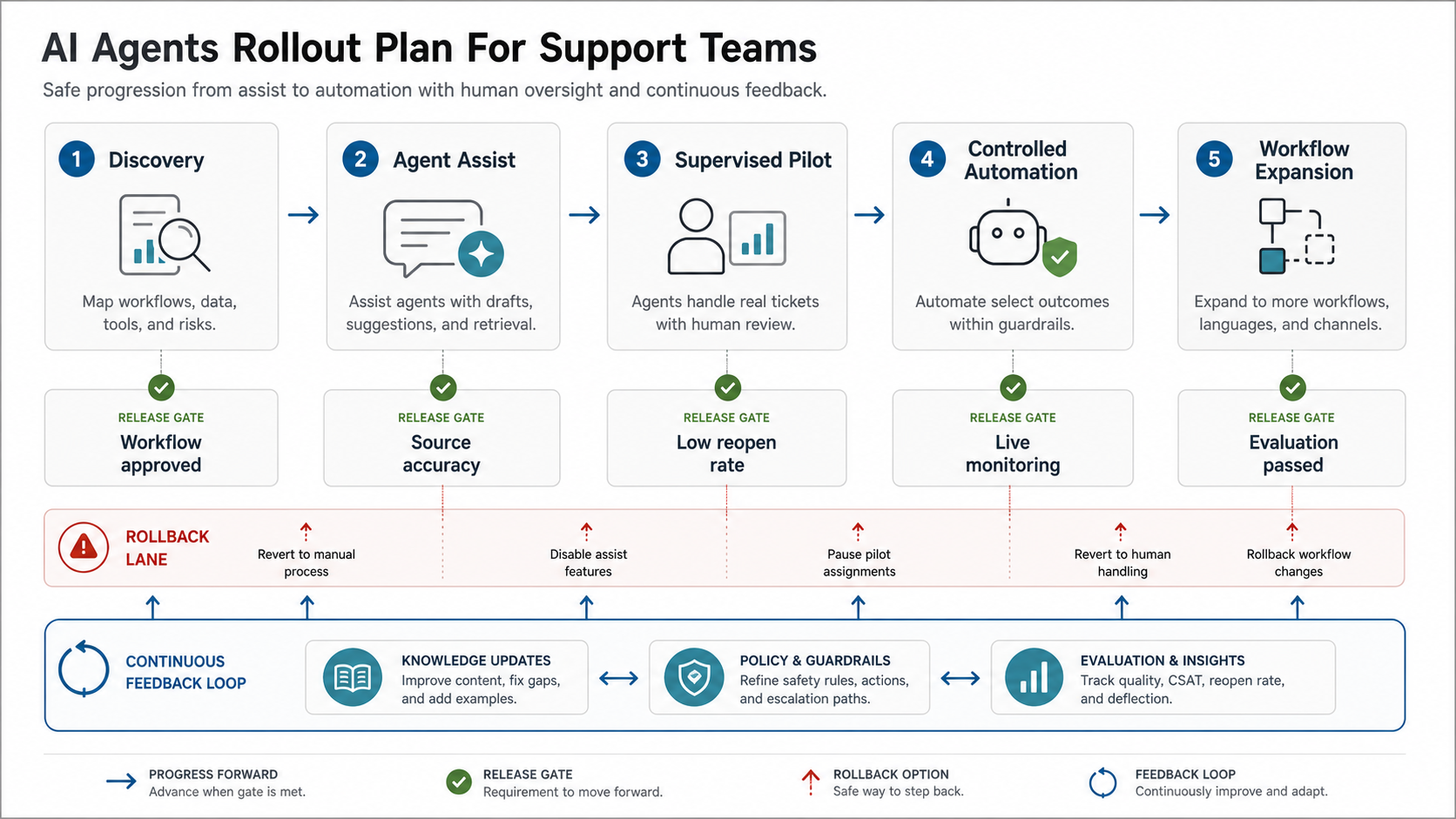
| Phase | Scope | Release gate |
|---|---|---|
| Discovery | Map ticket categories, volume, data sources, tools, risks, and support ownership | Approved workflow list and escalation policy |
| Agent assist | Summaries, suggested replies, source links, and ticket tagging for human agents | Human edit rate and source accuracy meet threshold |
| Supervised pilot | AI drafts or answers in selected low-risk intents with review | Low reopen rate and clean escalation evidence |
| Controlled automation | Direct replies for proven intents and low-risk tool reads | Monitoring, alerts, and rollback path are live |
| Workflow expansion | Add actions, channels, account segments, languages, and internal support workflows | Each new workflow passes evaluation before launch |
Support leaders should avoid launching the hardest channel first. Start where the knowledge is clean, the requests are frequent, and the consequences of a wrong answer are limited. For broader implementation planning, use the AI Agent Development Lifecycle guide to define roles, release gates, metrics, and iteration loops.
Common Mistakes To Avoid
The most common mistake is treating the agent as a support headcount replacement before the workflow is measurable. That usually creates poor handoffs, hidden quality issues, and angry customers. A better goal is to remove repetitive work, improve triage, and help humans resolve complex tickets faster.
- Using stale knowledge. If help articles, macros, and policies are outdated, the agent will scale outdated answers.
- Skipping permission checks. Customer-specific data requires role, tenant, and account-level controls.
- Automating high-risk actions too early. Refunds, cancellations, access changes, and security requests need review until the workflow is proven.
- Measuring only deflection. Reopens, CSAT, escalation quality, and human edit rate show whether automation is actually working.
- Ignoring support operations. Managers need dashboards, audit trails, QA queues, evaluation cases, and feedback loops.
- Forgetting the customer experience. The customer should know when a handoff is happening and should not have to repeat context.
Build Vs. Buy Decision
Many teams should start with the AI capabilities inside their existing helpdesk because the channel, ticket data, routing, and teammate workflow are already there. Helpdesk-native agents can be a practical starting point when the workflow is mostly support conversation, article retrieval, routing, and teammate handoff.
Custom development makes sense when the support workflow spans several systems, needs custom permissions, depends on proprietary product logic, requires special evaluation, or must be embedded into a SaaS product, customer portal, or internal operations platform. In those cases, buying a support AI feature may solve the conversation layer while still leaving integration and workflow gaps.
The build-vs-buy question is not whether an off-the-shelf agent can answer questions. It is whether it can follow your workflow, respect your data boundaries, call the right tools, escalate with context, and improve through measurable feedback. When custom permissions and workflow-specific actions are central, compare the implementation with NextPage's broader AI development services approach.
Readiness Checklist
Use this checklist before investing in a customer support AI agent:
- Ticket taxonomy: The team can identify top intents, volume, priority, and risk by category.
- Knowledge base: Approved answers, policy pages, troubleshooting steps, and macros are current.
- Data access: The agent can read only the customer and ticket context it is allowed to use.
- Action rules: The team knows which actions are read-only, draft-only, approval-only, or automated.
- Escalation policy: Confidence, sentiment, account value, security, billing, and policy exceptions have clear rules.
- Evaluation set: The team has real sample tickets, expected answers, refusal cases, and tool-call checks.
- Operations owner: Someone owns content updates, prompt changes, analytics, QA, and incident response.
- ROI model: The team can compare hours saved, review effort, model cost, and customer experience impact.
If several of these are missing, start with readiness assessment and agent assist before direct automation. If the agent will touch sensitive data, permissions, approvals, or external effects, pair the readiness review with enterprise AI agent governance planning.
How NextPage Designs Support AI Agents
NextPage designs support AI agents by starting with the workflow, not the model. We map the ticket categories, customer channels, data sources, tool actions, permissions, escalation rules, evaluation examples, operating owners, and support metrics. Then we recommend the smallest reliable version that can reduce repetitive work without creating uncontrolled customer risk.
Sometimes that means a customer-facing support bot. Sometimes it means an internal agent-assist tool. Sometimes it means a custom workflow agent connected to your helpdesk, CRM, billing system, portal, and analytics stack. The right answer depends on how much the agent is allowed to know, do, and change.
If you are planning AI agents for customer support, start with one workflow that is frequent, documented, low risk, and measurable. Build the review loop first. Automate only after the system can show where its answers came from, when it escalated, and how the support team can improve it.