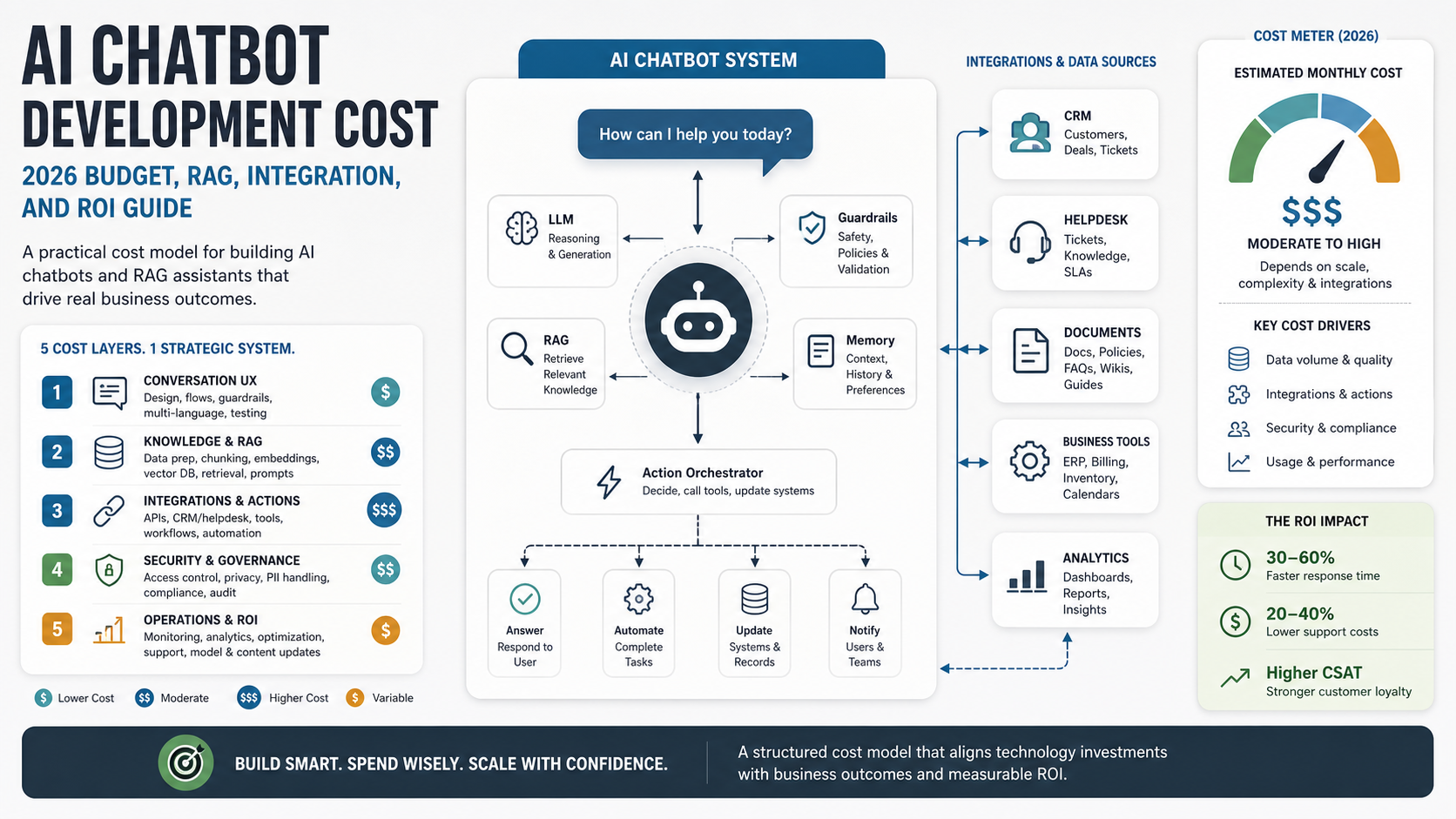

Quick Answer: AI Chatbot Development Cost
AI chatbot development cost depends less on the word "chatbot" and more on what the bot is allowed to know, do, and change. A basic FAQ bot with a fixed knowledge base is a very different project from a RAG support assistant that searches internal documents, escalates cases, updates CRM fields, and reports quality metrics.
As a 2026 planning range, small scoped chatbot builds often start with discovery, conversation design, a web or product chat surface, analytics, and a few controlled intents. Mid-sized builds add retrieval over documents, authenticated user context, human handoff, ticketing or CRM integrations, and evaluation datasets. Larger chatbot systems add multi-role permissions, workflow actions, audit logs, observability, data pipelines, model routing, red-team testing, and ongoing optimization. The best estimate separates one-time build work from monthly model, hosting, monitoring, support, and content-maintenance costs.
If the chatbot must support real customers or revenue workflows, estimate the work as a production software system, not as a prompt. NextPage's AI chatbot development work usually starts by mapping the conversation surface, knowledge sources, integration points, handoff rules, quality evidence, and measurable outcomes before any model choice is finalized.
What Drives Chatbot Cost?
The largest budget drivers are scope clarity, data quality, integration depth, risk, and operating expectations. The model API bill matters, but it is rarely the only major cost in a custom chatbot. The expensive part is making the chatbot reliable inside a real business workflow.
| Cost driver | What changes the budget | Why it matters |
|---|---|---|
| Conversation design | Number of intents, user roles, languages, tone rules, and fallback paths | Defines how much product thinking, copy, QA, and edge-case handling is needed |
| Knowledge and RAG | Document volume, freshness, permissions, citations, chunking, and retrieval quality | Turns a simple bot into a maintained knowledge system |
| Integrations | CRM, helpdesk, ERP, ecommerce, identity, billing, and internal tools | Requires API work, permissions, retries, logging, and data mapping |
| Workflow actions | Create tickets, update records, qualify leads, book meetings, trigger approvals | Adds business logic and human-review design |
| Security and compliance | PII handling, access control, audit logs, retention, and tenant isolation | Protects customers and limits what the chatbot can expose or change |
| Evaluation and monitoring | Golden test sets, hallucination checks, escalation metrics, feedback loops | Keeps quality measurable after launch |
| Operations | Content updates, model changes, incident response, analytics review, cost monitoring | Prevents a launch from becoming a stale chatbot project |
A quick quote without these inputs can be misleading. Two chatbots can share the same UI and model but differ widely in engineering effort because one answers public FAQs while the other reads private data and writes into business systems.
2026 AI Chatbot Budget Ranges By Scope
Use budget ranges as planning bands, not fixed quotes. A chatbot estimate changes after the team reviews the conversation flow, data sources, users, integrations, risk level, expected traffic, launch evidence, and operating ownership. The useful question is not only "How much does a chatbot cost?" It is "Which chatbot system is the lowest-risk version that can prove the business case?"
| Scope band | Typical first-build range | What is usually included | What pushes cost higher |
|---|---|---|---|
| FAQ or guided-flow bot | $8k-$25k | Conversation design, public knowledge, website widget, analytics, basic escalation | Multilingual content, complex routing, brand-heavy UX, many product lines |
| RAG support or sales assistant | $25k-$75k | Document ingestion, retrieval, citations, authenticated context, human handoff, eval set | Permissions, stale-content handling, CRM/helpdesk reads, larger test corpus |
| Workflow chatbot | $60k-$150k | Tool calls, ticket/CRM writes, approval states, audit logs, dashboards, reliability work | Multiple systems, transactional workflows, rollback, high uptime, custom admin tools |
| Agentic assistant | $120k-$300k+ | Multi-step planning, tool orchestration, guardrails, observability, red-team testing, governance | Regulated data, high autonomy, multi-tenant controls, scale operations, strict SLAs |
Monthly operating cost should be estimated separately. Model/API usage, vector database storage, monitoring, analytics, support review, content updates, evaluation runs, and incident response can matter as much as the launch build once traffic grows.
Scope Tiers That Change The Budget
The safest way to estimate an AI chatbot is to choose the lowest tier that can solve the business problem. Teams often overbuy autonomy when they only need better retrieval, routing, or draft generation.

| Tier | Best fit | Typical build complexity | Budget risk |
|---|---|---|---|
| FAQ or guided-flow bot | Known questions, lead capture, simple routing, public help content | Low to moderate | Content completeness and conversation polish |
| RAG support assistant | Answering from docs, policies, manuals, tickets, or internal knowledge | Moderate | Retrieval quality, permissions, citations, and data freshness |
| Workflow chatbot | Support, sales, operations, or employee workflows that need tool actions | Moderate to high | Integration reliability, approval states, and error handling |
| Agentic assistant | Multi-step tasks with planning, tools, memory, and escalation | High | Guardrails, evals, observability, and governance |
For many companies, a RAG assistant plus controlled handoff is enough for version one. If the chatbot must plan tasks, call multiple tools, or make decisions across systems, assess readiness first with the AI Agent Readiness Assessment.
FAQ Bots Versus RAG Assistants
An FAQ bot is usually the cheapest path because the answer set is controlled. It can guide users through common questions, collect lead details, route support inquiries, and point people to static resources. The main work is conversation design, content cleanup, UI integration, analytics, and escalation.
A RAG assistant is more flexible, but it adds engineering and maintenance. The system must ingest documents, split content into retrievable chunks, filter by user permissions, retrieve the right context, produce grounded answers, cite sources when needed, and handle uncertain responses. A RAG chatbot also needs ongoing content operations because stale policies, missing docs, and duplicate content create bad answers.
If your chatbot needs to answer from manuals, policies, product docs, tickets, or internal knowledge, plan it as an LLM development project with retrieval quality, evaluation, latency, cost, and monitoring in scope.
RAG, Integration, And Operating Cost Architecture
A production chatbot has several budget lines behind the chat window. Retrieval has ingestion, chunking, embeddings, vector storage, search tuning, permissions, and freshness work. Integrations have authentication, API limits, error handling, retries, webhooks, field mapping, and audit trails. Operations need logging, quality review, model spend alerts, content ownership, and incident response.

This is why a custom chatbot can cost more than a generic platform setup. The UI may be simple, but the system must know which content a user can see, which actions are allowed, when to escalate, how to prove answer quality, and how to recover when a tool call fails. If the core challenge is choosing between RAG, a smaller domain model, or an action-taking agent, use the Domain-Specific LLM Development guide as a deeper architecture companion.
Support Chatbot Cost Factors
Support chatbots become expensive when they need to understand customer context and route cases correctly. A public support bot might answer product questions from help-center articles. A logged-in support assistant may need order history, plan level, entitlement rules, prior tickets, SLA status, and escalation paths.
Important support cost factors include helpdesk integration, ticket creation, human handoff, transcript summaries, sentiment or urgency flags, multilingual support, protected information handling, and analytics dashboards. If agents will rely on chatbot summaries, the workflow also needs review states and clear evidence so support teams can trust what the system produced. For support-specific automation, compare the scope with NextPage's AI customer service agent development workflow before assuming a generic chatbot widget is enough.
Start with a narrow support workflow. For example, deflect repetitive "how do I" questions, create cleaner tickets, or summarize account context before a human reply. Broader automation can follow after answer quality and escalation behavior are measured.
Sales Chatbot Cost Factors
Sales chatbots are often judged by lead quality, response speed, and handoff quality. A simple lead capture bot asks qualifying questions and routes the visitor. A more advanced sales assistant can answer product questions, recommend service fit, book meetings, enrich a lead record, and notify the right owner.
Costs increase when the chatbot needs CRM writes, calendar booking, account matching, pricing rules, product eligibility, or personalized follow-up drafts. The risks also increase because incorrect promises, wrong routing, or noisy CRM updates can damage the sales process.
A practical first version should qualify intent, collect context, explain what happens next, and hand the conversation to a person. When the workflow is stable, teams can add CRM updates and follow-up drafts with human review.
Integration And Workflow Costs
Integrations are where many chatbot budgets move from simple to custom. A chatbot connected only to a website and analytics tool is easier to build than one connected to Salesforce, HubSpot, Zendesk, Intercom, Stripe, Shopify, an ERP, a data warehouse, and an internal admin panel.
Every integration needs authentication, API limits, field mapping, error handling, retries, observability, and permission design. If the chatbot can write data, the system also needs audit logs and rollback thinking. For complex internal workflows, NextPage often treats the work as generative AI development or custom workflow software rather than a standalone chatbot widget.
Before estimating, list the systems the chatbot must read, the systems it must write, and the actions that require human approval. That simple map will reveal most of the real engineering cost.
Model API And Infrastructure Costs
Model usage is an operating cost, not just a launch cost. Current public pricing from OpenAI and Anthropic shows why model selection, caching, prompt length, retrieval size, output length, and provider choice matter. As of June 4, 2026, OpenAI lists GPT-5.5, GPT-5.4, and GPT-5.4 mini pricing with lower cached-input rates, while Anthropic lists Claude Opus, Sonnet, and Haiku pricing with separate cache-write and cache-hit rates. Do not copy a vendor price table into your estimate once and forget it; model pricing, context windows, caching behavior, and routing options should be checked during discovery.
Those numbers do not translate directly into total chatbot cost because a production chatbot also uses hosting, vector storage, logging, analytics, human review, monitoring, and support. A high-volume bot may need model routing, response caching, short prompts, retrieval limits, and batch analysis jobs to control spend.
For planning, estimate monthly conversations, average turns per conversation, retrieved context size, expected output length, peak concurrency, and any tools that add per-call costs. Then add room for testing, evals, monitoring, and retraining or content refresh work.
Build Vs Platform: Which Cost Model Fits?
A chatbot platform can be the right starting point when the workflow is mostly public FAQs, lead capture, or standard helpdesk deflection. A custom build makes more sense when the chatbot must use private business context, enforce permissions, coordinate multiple systems, provide audit evidence, or become part of a product experience.
| Decision point | Platform-first is usually enough when... | Custom build is safer when... |
|---|---|---|
| Knowledge | Answers come from public help content and simple FAQs. | Answers depend on private docs, account state, policies, or changing internal data. |
| Actions | The bot only routes, captures leads, or opens simple tickets. | The bot updates CRM, books meetings, changes orders, triggers workflows, or drafts regulated responses. |
| Governance | Risk is low and escalation is simple. | Permissions, audit logs, human review, rollback, or compliance evidence are required. |
| Product fit | The chatbot is an add-on website or support channel. | The chatbot is embedded inside a SaaS, portal, mobile app, or internal operations platform. |
| Economics | Subscription pricing is acceptable at expected volume. | Usage, routing, caching, custom UX, integrations, or ownership changes total cost of ownership. |
When the chatbot is part of a larger system, pair the estimate with a broader custom software development cost review so admin tools, analytics, integrations, and support workflows are not hidden outside the chatbot line item. Teams comparing workflow candidates can also use the AI workflow automation guide to separate simple routing from processes that need orchestration and human review.
Security, Governance, And Human Review
Governance is not optional when a chatbot touches customer records, private documents, regulated information, or revenue workflows. The budget should include access control, role-based retrieval, data retention rules, prompt and response logging, redaction, abuse prevention, and incident review. For agentic workflows, use an enterprise AI agent governance plan before giving the chatbot more autonomy.
Human review design also changes cost. A bot that only answers public FAQs may escalate uncertain questions. A support workflow bot may need draft states, approval queues, case notes, supervisor review, and QA sampling. An agentic chatbot that takes actions needs stricter controls: allowed tools, action limits, confirmation prompts, audit trails, and fallback rules.
The right question is not "Can the model do this?" It is "Can the system do this reliably, with evidence, permissions, and recovery paths?"
How To Estimate Chatbot ROI
ROI depends on the workflow the chatbot improves. Support teams may measure ticket deflection, faster first response, cleaner ticket creation, and agent handle-time reduction. Sales teams may measure lead response time, qualification quality, meeting bookings, and CRM completeness. Operations teams may measure fewer repeated internal questions and faster task routing.
Use realistic adoption assumptions. A chatbot that handles 20 percent of repetitive questions well can be more valuable than one that claims broad autonomy but constantly escalates. The AI Automation ROI Calculator can help turn weekly hours, team size, hourly cost, and automation potential into a directional business case. Support teams can also compare metrics with the AI customer support automation ROI guide before scaling to more intents or channels.
If the workflow is still unclear, use the Workflow Automation Opportunity Finder to rank support, sales, and operations tasks by repeatability, data readiness, and risk before engineering begins.
Budget Planning Checklist
Use this checklist before asking for an estimate. It makes the scope concrete and prevents hidden assumptions from turning into change requests later.
- Define the primary user. Is the bot for prospects, customers, support agents, sales reps, employees, or admins?
- List the source knowledge. Static FAQs, help center, product docs, private policies, tickets, CRM data, or multiple systems?
- Decide what the chatbot can do. Answer only, draft responses, create tickets, update CRM, book meetings, trigger workflows, or escalate?
- Mark approval points. Which answers or actions need human review?
- Map integrations. Which systems are read-only and which systems can be changed?
- Set quality targets. Accuracy, citation rate, escalation rate, response time, CSAT, conversion, or time saved?
- Plan ongoing ownership. Who updates content, reviews failures, monitors cost, and approves new capabilities?
For broader software budgets, the Custom Software Cost Estimator is useful when the chatbot is part of a larger portal, SaaS product, or operations platform.
AI Chatbot Readiness Scorecard
Before funding a full build, score the workflow honestly. A low readiness score does not mean the idea is bad; it means the first paid sprint should focus on discovery, data cleanup, prototype testing, or workflow design instead of a full production chatbot.
| Readiness area | Green | Yellow | Red |
|---|---|---|---|
| Use case | One primary workflow and outcome are clear. | Several related workflows compete for scope. | The chatbot is described only as "AI support" or "AI sales." |
| Knowledge | Content is owned, current, and permissioned. | Useful content exists but is duplicated or stale. | Answers depend on undocumented tribal knowledge. |
| Integrations | Systems, APIs, owners, and write permissions are known. | Read-only integrations are clear, writes need discovery. | Critical systems have unclear access or no sandbox. |
| Governance | Escalation, review, logging, and rollback are defined. | Human review is planned but not operationalized. | The bot is expected to act without evidence or owner review. |
| Measurement | Baseline cost, response time, conversion, or CSAT is known. | Some metrics exist but are not tied to the bot workflow. | No baseline or success threshold exists. |
If several rows are yellow or red, use the AI Agent Readiness Assessment or the Workflow Automation Opportunity Finder before committing to an autonomous assistant.
How NextPage Estimates Chatbot Builds
NextPage estimates chatbot projects by separating the visible conversation layer from the system behind it. We map user journeys, content sources, retrieval design, integrations, permissions, human review, evaluation, analytics, and operating support. Then we recommend a version-one scope that can produce measurable value without adding uncontrolled risk.
Sometimes that is a focused support assistant. Sometimes it is a lead-qualification chatbot. Sometimes the right first step is a RAG prototype, workflow automation assessment, or internal admin tool before the chatbot UI is built. For production AI systems, NextPage's AI development services and generative AI development work focus on practical workflows, measurable outcomes, and maintainable software rather than chatbot novelty.
If you are planning a chatbot for support, sales, or operations, start with the work the chatbot must improve. The budget will follow from the knowledge, integrations, risk controls, and launch plan required to make that workflow reliable.