
Quick Answer: AI Implementation Roadmap
An AI implementation roadmap is the plan that turns a promising AI idea into a controlled production workflow. The best roadmap does not start with a model choice. It starts with one business workflow, the decision it should improve, the data it needs, the integrations it touches, the risks it creates, and the evidence required before rollout.
For most companies, the practical sequence is: select a valuable use case, check data readiness, design the workflow, build a narrow prototype, evaluate outputs against real examples, add governance and human review, integrate with business systems, pilot with a small user group, then scale only after monitoring proves the workflow is reliable. NextPage's AI Agent Readiness Assessment is a useful first step because it scores workflow clarity, data readiness, integration access, and governance before budget is committed.
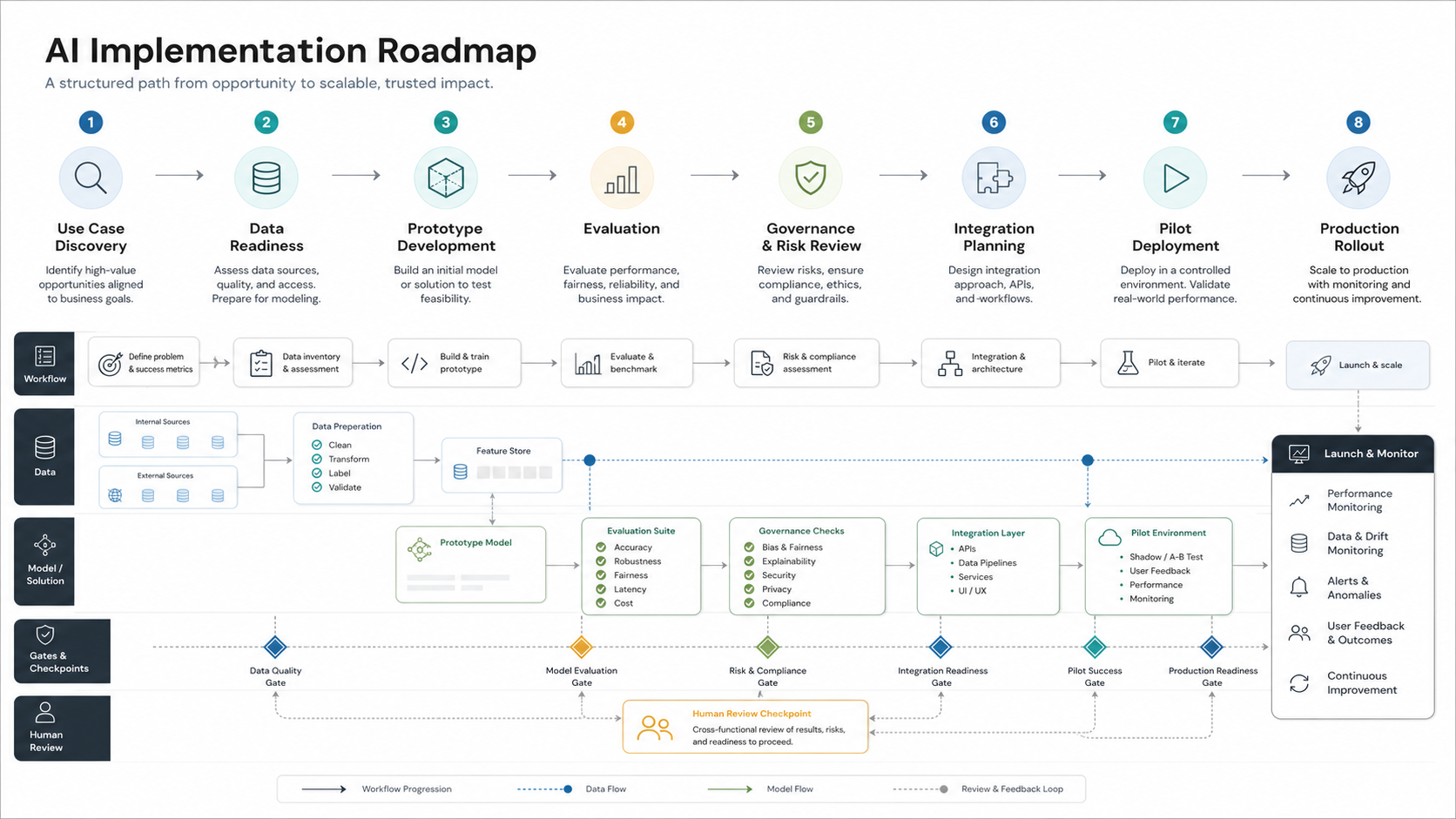
Why AI Implementation Fails After the Demo
Many AI projects look convincing in a demo because the demo avoids messy production conditions. Real workflows have incomplete data, edge cases, permissions, latency limits, exception handling, audit needs, user behavior, and downstream systems. A prototype that answers a sample question is not the same thing as a workflow that safely supports customers, staff, or revenue operations every day.
The roadmap must close that gap. It should describe what the AI system is allowed to do, what it is not allowed to do, which data it can use, which tools it can call, who reviews risky outputs, how quality is measured, and how the business will respond when the system is uncertain. That is why production AI development services usually combine product discovery, data engineering, software integration, evaluation, security, and change management rather than model integration alone.
Phase 1: Pick One Workflow Worth Implementing
The strongest AI implementation starts with one repeated workflow, not a broad ambition to "use AI." Good candidates have enough volume to matter, enough structure to evaluate, and enough business value to justify implementation. Weak candidates are vague, rarely used, poorly documented, or too risky to automate without a mature control model.
| Question | Good signal | Risk signal |
|---|---|---|
| What decision or task should AI improve? | A repeated task with clear inputs, outputs, and owner | A general productivity idea with no workflow owner |
| How will success be measured? | Time saved, quality lift, faster response, fewer errors, or higher throughput | Unclear value or only a novelty demo |
| Can humans review exceptions? | Risky cases can route to a person before action | The AI must act autonomously before quality is proven |
| Does the workflow have usable examples? | Past tickets, documents, chats, orders, cases, or decisions are available | The team cannot provide real examples or expected answers |
| Does it connect to existing systems? | Required APIs, databases, and permissions are known | Critical systems are inaccessible or undocumented |
If the workflow is repetitive but the ROI is unclear, estimate the business case before building. The AI Automation ROI Calculator helps screen whether a candidate workflow is worth prototyping based on hours saved, task volume, and operating cost.
Phase 2: Check Data Readiness Before Model Choice
AI implementation often slows down because the required data is scattered, stale, sensitive, inconsistent, or missing ownership. Before choosing a model, document the data the workflow needs and how the system will retrieve it. For LLM and RAG workflows, that means source documents, permissions, metadata, freshness, chunking strategy, retrieval quality, and evaluation examples.
For predictive, classification, or scoring workflows, it means historical labels, feature quality, bias checks, explainability needs, retraining expectations, and data drift monitoring. For agentic workflows, it also means tool permissions, available actions, API reliability, and audit logging. NextPage's enterprise AI readiness checklist expands this step across data, workflows, security, and governance.
Use the data check to decide whether the first release should be a copilot, a RAG assistant, an automation workflow, or a supervised agent. If the company is still organizing knowledge sources, a focused LLM development project may be the right starting point before broader automation.
Phase 3: Design the Human-AI Workflow
AI should fit into a real operating flow. Define the trigger, input, AI action, user decision, system update, exception route, and audit record. A good workflow design says where the AI assists, where it recommends, where it acts, and where a human must approve. It also explains what happens when confidence is low, source data is missing, or the model output conflicts with policy.
For example, a support workflow may let AI draft a response but require human approval for refunds, account changes, or regulated claims. A sales workflow may let AI summarize a lead and suggest next steps but keep pricing approval with the account owner. An operations workflow may let AI classify incoming work and route it, while exceptions go to a queue.
This is where generic AI strategy becomes implementation architecture. If the roadmap includes content generation, copilots, RAG, or workflow agents, generative AI development should include retrieval design, prompt and tool boundaries, evaluations, and monitoring from the beginning.
Phase 4: Build a Narrow Prototype With Real Examples
The prototype should test the riskiest assumption, not the prettiest interface. For an AI assistant, that may be retrieval quality. For a classification workflow, it may be label accuracy on historical cases. For an AI agent, it may be whether tool calls stay inside approved permissions. For an executive dashboard, it may be whether users trust the explanation behind a recommendation.
Keep the prototype narrow enough to learn quickly. Use real examples, real policies, and representative edge cases. Avoid proving the system only against hand-picked prompts. The prototype should create evidence for a build decision: proceed, narrow scope, fix data, add controls, or stop.
| Prototype type | What it should prove | What not to overbuild |
|---|---|---|
| RAG assistant | Can users get grounded answers from approved knowledge? | Full UI, role system, or large document coverage too early |
| Workflow classifier | Can the model classify real cases with acceptable precision and recall? | Automated downstream actions before confidence is known |
| AI copilot | Can it reduce drafting, research, or decision prep time? | Autonomy before user trust is established |
| Tool-using agent | Can it call approved tools safely and produce auditable steps? | Broad permissions or multi-step actions without review |
Phase 5: Evaluate Quality, Risk, and Business Value
Evaluation is the discipline that separates a production roadmap from an experiment. Create a test set from real examples and define what a good answer or action means. For LLM workflows, evaluate groundedness, completeness, policy compliance, citation quality, refusal behavior, privacy handling, and user usefulness. For automation workflows, evaluate precision, recall, failure handling, latency, and escalation quality.
Current AI risk guidance from NIST emphasizes managing risks across the lifecycle, including mapping, measuring, managing, and governing AI risks. In practical implementation terms, this means the roadmap needs quality gates before rollout, not only a final demo. Security guidance for LLM and agentic systems also reinforces least privilege, input handling, tool boundaries, and monitoring because AI systems can be influenced through prompts, retrieved content, and connected tools.
Budget also changes at this stage. A simple prototype may be inexpensive, but production evaluation, monitoring, integration, and maintenance add real work. For planning context, compare the roadmap with NextPage's LLM app development cost and AI agent development cost guides.
Phase 6: Add Governance and Production Controls
Governance should be proportionate to the workflow. An internal drafting assistant may need lighter controls than an agent that updates records, triggers payments, sends customer messages, or handles sensitive data. The roadmap should define model access, data access, user permissions, human review thresholds, logging, retention, incident response, and ownership.
| Control | Why it matters | Implementation example |
|---|---|---|
| Permission boundaries | Prevents the AI from using data or tools outside its role | Role-based retrieval, scoped API keys, tenant-aware access checks |
| Human review | Stops risky actions before the system has enough evidence | Approval queue for refunds, policy exceptions, financial actions, or customer-facing messages |
| Evaluation gates | Creates objective launch criteria | Test set pass thresholds, red-team prompts, regression checks, source-grounding scores |
| Audit logs | Supports debugging, compliance, and accountability | Input, retrieved sources, model response, tool call, reviewer, final action |
| Monitoring | Finds drift, failures, cost spikes, and user trust issues | Quality feedback, latency, token cost, escalation rate, exception volume |
For agentic systems, the governance model needs extra care because the system can plan steps and call tools. Start with supervised actions, narrow permissions, and strong auditability before allowing broader autonomy.
Phase 7: Integrate, Pilot, and Roll Out
Production AI is software. It needs authentication, permissions, APIs, queues, observability, fallback behavior, deployment environments, support workflows, and user training. The pilot should run with a small group, a known workflow, and clear measurement. Track whether users accept recommendations, override outputs, escalate exceptions, and trust the result.
Rollout should happen in stages. First, launch the narrow workflow. Then improve data coverage, expand user groups, add integrations, reduce manual review where evidence supports it, and only then consider more autonomy. This is usually more reliable than trying to launch a company-wide AI platform in one release.
A practical AI implementation partner should help translate roadmap decisions into architecture, prototype evidence, production controls, and a rollout plan that business users can actually adopt.
AI Implementation Roadmap Template
Use this roadmap as a planning structure for the first production workflow.
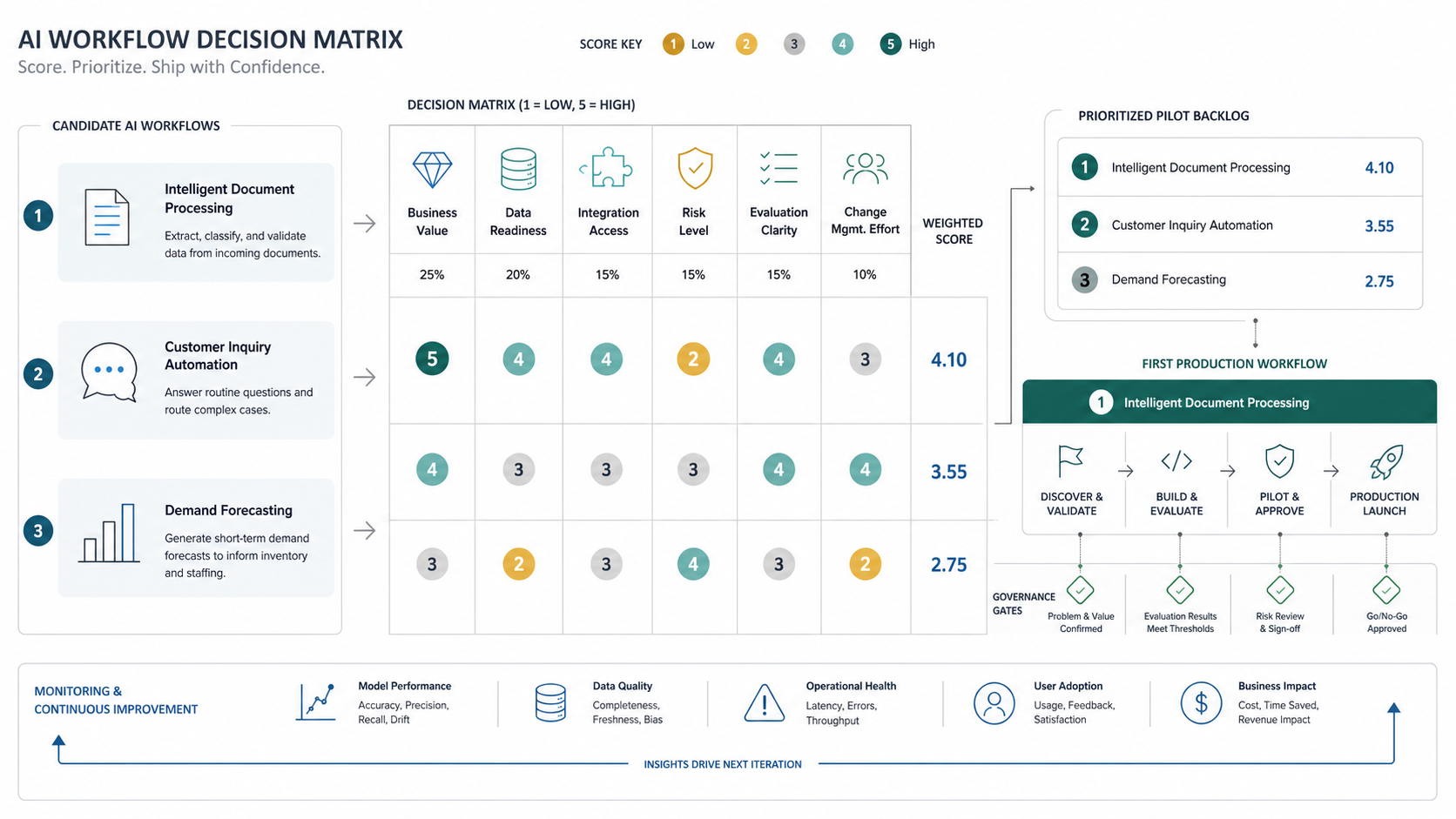
| Roadmap stage | Main decision | Evidence to collect |
|---|---|---|
| Use-case discovery | Which workflow is valuable and narrow enough? | Workflow owner, task volume, current pain, expected ROI, user group |
| Readiness check | Can the workflow be implemented safely now? | Data access, integration access, risk level, human review path |
| Prototype | Can AI improve the task with real examples? | Prototype results, edge cases, user feedback, quality gaps |
| Evaluation | What launch threshold proves reliability? | Test set, pass/fail criteria, red-team findings, regression checks |
| Production build | What controls and integrations are required? | Permissions, logs, monitoring, fallback, deployment plan |
| Pilot | Does the workflow work with real users? | Adoption, overrides, escalations, cost, latency, satisfaction |
| Scale | What can expand without increasing unmanaged risk? | New user groups, extra data sources, reduced review, new automations |
How NextPage Helps Build the Roadmap
NextPage helps companies turn AI interest into a buildable implementation plan. That can mean selecting the first workflow, scoring readiness, designing a RAG or agent architecture, building a prototype, creating evaluation sets, connecting business systems, adding governance controls, and supporting rollout after launch.
If you are still choosing a first workflow, start with the AI Agent Readiness Assessment. If the workflow is already clear, NextPage can help design and build the production path through AI development services, LLM and RAG implementation, workflow automation, and supervised agent development.