
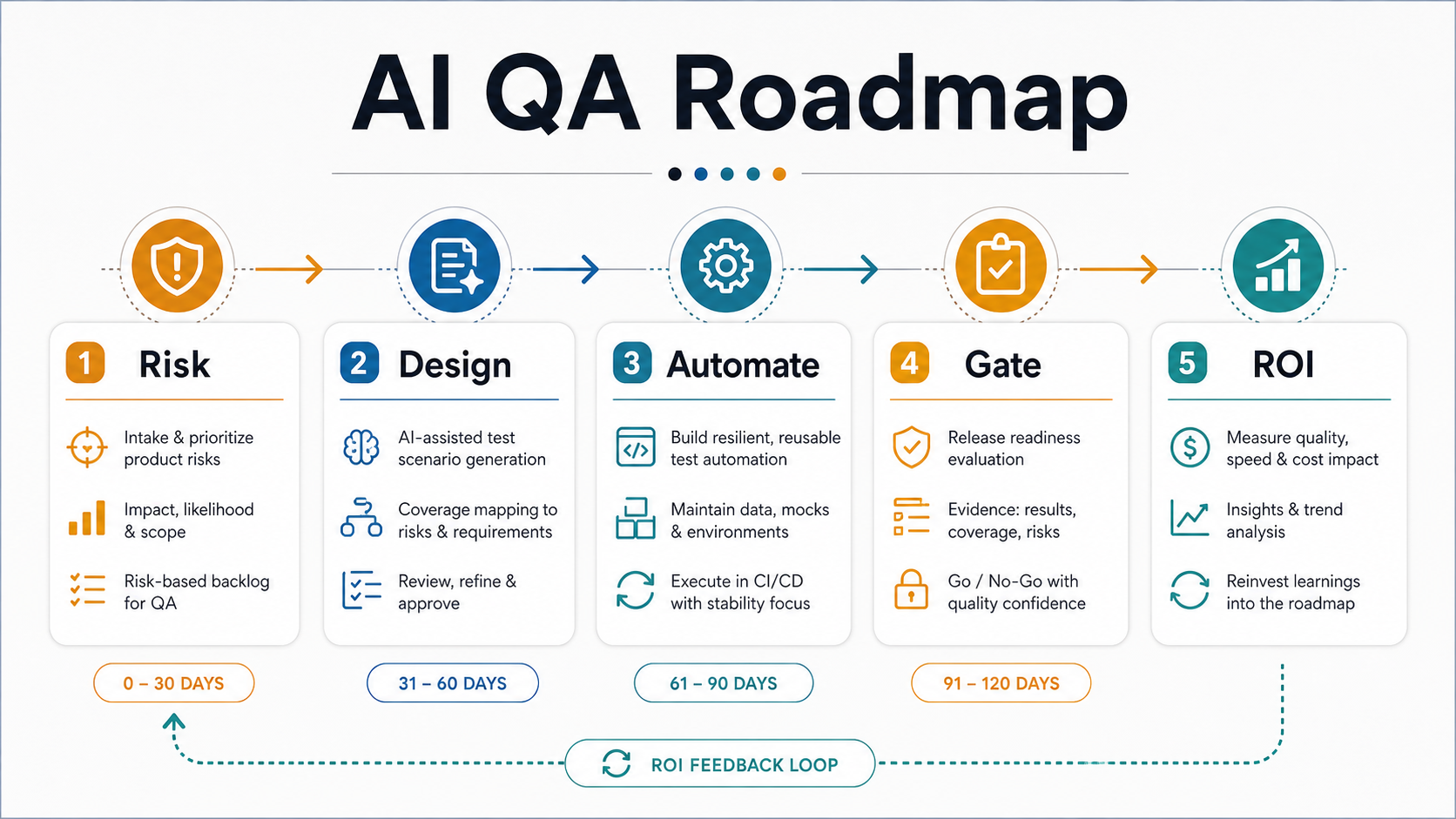
Quick Answer: What Should An AI QA Automation Roadmap Include?
An AI-powered QA automation roadmap should start with product risk, not tooling. Product teams should map critical user journeys, defect history, release bottlenecks, flaky tests, test data gaps, and compliance needs first. Then they can use AI to accelerate test case design, requirement coverage checks, test data suggestions, visual review, anomaly detection, and prioritization while keeping deterministic automation, CI/CD gates, and human review responsible for release decisions.
The practical sequence is: identify high-risk repeatable workflows, stabilize the test environment, automate smoke and regression checks, add AI assistance where it improves coverage or triage, measure cycle-time and defect outcomes, and only then expand into broader self-healing, visual, performance, and security intelligence. If the business case is unclear, start by estimating repeatable QA effort with the AI Automation ROI Calculator before buying another testing platform.
Why AI QA Roadmaps Go Wrong
AI QA initiatives fail when teams treat AI as a shortcut around test strategy. A tool can draft test cases, summarize failures, suggest selectors, or flag visual changes, but it cannot decide which customer journey carries revenue risk, which edge case matters for compliance, or whether a release is acceptable for the business. Those decisions still need product, QA, engineering, and support context.
The OrangeMantra software testing reference page emphasizes AI-powered quality engineering, automation, performance intelligence, security testing, and broad test coverage. That reflects a real buyer need: teams want faster releases without losing confidence. The NextPage angle is more operational. The question is not whether AI can help QA. The question is how to phase AI-assisted QA so it improves release confidence instead of creating a brittle, noisy automation layer.
A good roadmap separates three layers: repeatable checks that should run predictably in automation, AI assistance that helps humans design and triage faster, and human review that handles ambiguity, business impact, accessibility nuance, and exploratory judgment.
In 2026, the tool market is also more AI-heavy than the last refresh of this article. Self-healing locators, natural-language test creation, visual AI, and AI-assisted triage can reduce maintenance work, but they also make reviewability more important. Treat every AI suggestion as an auditable change: who accepted it, what risk it covers, which evidence it produced, and whether it changed the release decision. Teams building AI-heavy products should pair this roadmap with an AI automation services review so model behavior, workflow exceptions, and QA evidence are designed together instead of handled as separate tool decisions.
Phase 1: Map Product Risk And QA Readiness
Start with the product surfaces where defects would hurt customers or revenue. For a SaaS product, that may include onboarding, billing, permissions, data import, reporting, and admin workflows. For an ecommerce platform, it may include search, product pages, cart, checkout, payments, refunds, inventory, and order status. For an internal tool, it may include approvals, exports, integrations, and role-based access.
Document each workflow with the expected user outcome, data dependencies, environments, known fragile areas, recent production incidents, and release frequency. This gives AI-assisted QA a useful boundary. Without that boundary, generated tests often become broad but shallow checklists that look productive while missing the flows that actually block releases.
Readiness also means checking whether automation can run consistently. If environments are unstable, test data is hard to reset, selectors change every sprint, or CI runs are slow, adding AI will mostly generate more noise. Teams with pipeline issues should pair AI planning with a CI/CD testing strategy for release gates so automated checks land at the right stage. When the internal team needs implementation help, a QA automation testing services roadmap can turn the risk inventory into Playwright, Cypress, API, mobile, and CI/CD coverage that supports release decisions.
Phase 2: Prioritize What To Automate First
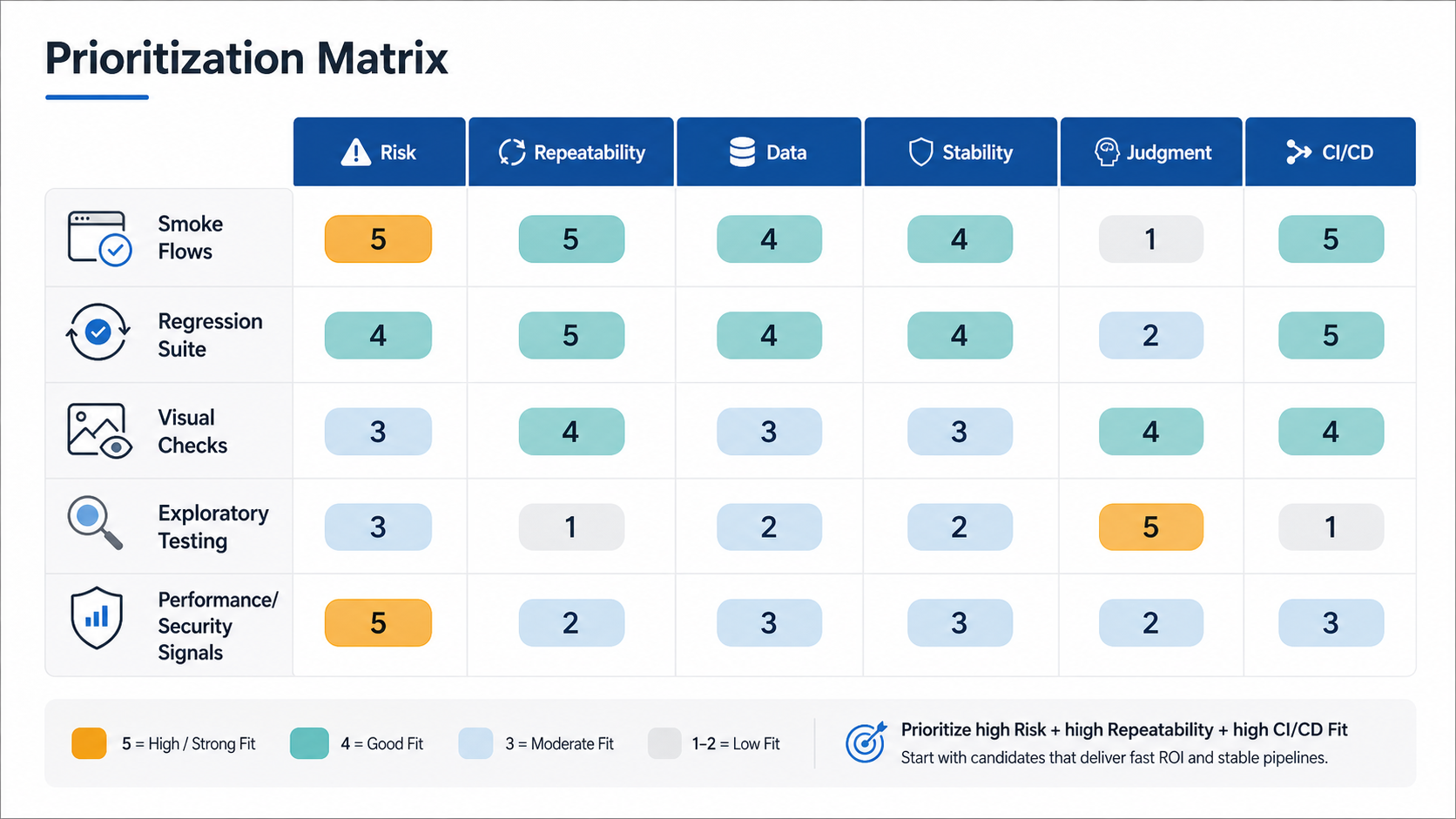
The best first automation targets are high-risk, repeatable, stable, and easy to validate without subjective judgment. Login, permissions, checkout, subscription changes, data import validation, API contract checks, and critical smoke paths often fit this pattern. They are valuable because failures are expensive and expected outcomes are clear.
Lower-value targets should wait. A complex exploratory workflow with constantly changing UI, unclear acceptance criteria, and heavy human judgment may benefit from AI-assisted note taking or test ideas, but it should not become the first automated suite. A low-risk workflow that rarely changes may not justify immediate automation either.
| Testing Target | AI Role | Automation Role | Human Role |
|---|---|---|---|
| Critical smoke flows | Suggest edge cases and missing assertions | Run stable checks in CI/CD | Approve priority and failure thresholds |
| Regression suites | Cluster failures and recommend coverage gaps | Run scheduled and pre-release checks | Review flaky tests and risk exceptions |
| Visual changes | Flag likely layout or content anomalies | Capture baselines and compare screens | Decide whether visual differences are intended |
| Exploratory testing | Draft charters and summarize observations | Record repeatable follow-up checks | Investigate usability, accessibility, and edge cases |
| Performance and security signals | Highlight anomalies and suspicious patterns | Run thresholds and scans at release gates | Assess business impact and remediation urgency |
Phase 3: Use AI For Test Design, Not Blind Test Generation
AI is useful for expanding test thinking. It can turn requirements, user stories, support tickets, analytics events, API contracts, and product notes into draft test scenarios. It can propose boundary cases, negative paths, role variations, localization concerns, and data combinations that a busy team might miss.
But generated test cases still need review. Product teams should require each AI-assisted test to map to a user risk, acceptance criterion, defect pattern, or release gate. Tests that do not map to a real decision should be deleted or parked. This keeps the suite lean and prevents the common problem where AI creates many low-signal checks that nobody trusts.
For teams building AI features inside products, the same discipline applies to QA tooling. A production AI development services approach should include evaluation, monitoring, integration depth, data sensitivity, and operating cost. QA copilots and test-generation workflows deserve that same engineering standard.
Phase 4: Build Stable Automation Around Release Decisions
Automation should support a release decision. That means every automated suite needs an owner, a trigger, an expected runtime, a failure threshold, and a response path. Smoke tests may run on every pull request or deployment. Broader regression suites may run nightly or before release candidates. Visual, performance, and security checks may run at targeted gates where they have enough environment fidelity to be meaningful.
The automation architecture matters. Use resilient selectors, controlled test data, API-level setup where possible, parallel execution, clear artifacts, and quarantining rules for flaky tests. AI-assisted self-healing can help suggest selector updates, but it should not silently change what the test proves. Any self-healing behavior should create a reviewable diff so the team understands whether the test adapted correctly or masked a real defect.
If the business case is cycle-time reduction, read the automation plan alongside the test automation ROI guide for regression cycle time. The target is not maximum test count. The target is fewer release blockers, faster feedback, lower defect leakage, and higher confidence in the workflows that matter.
Release Evidence Gate For AI-Assisted QA
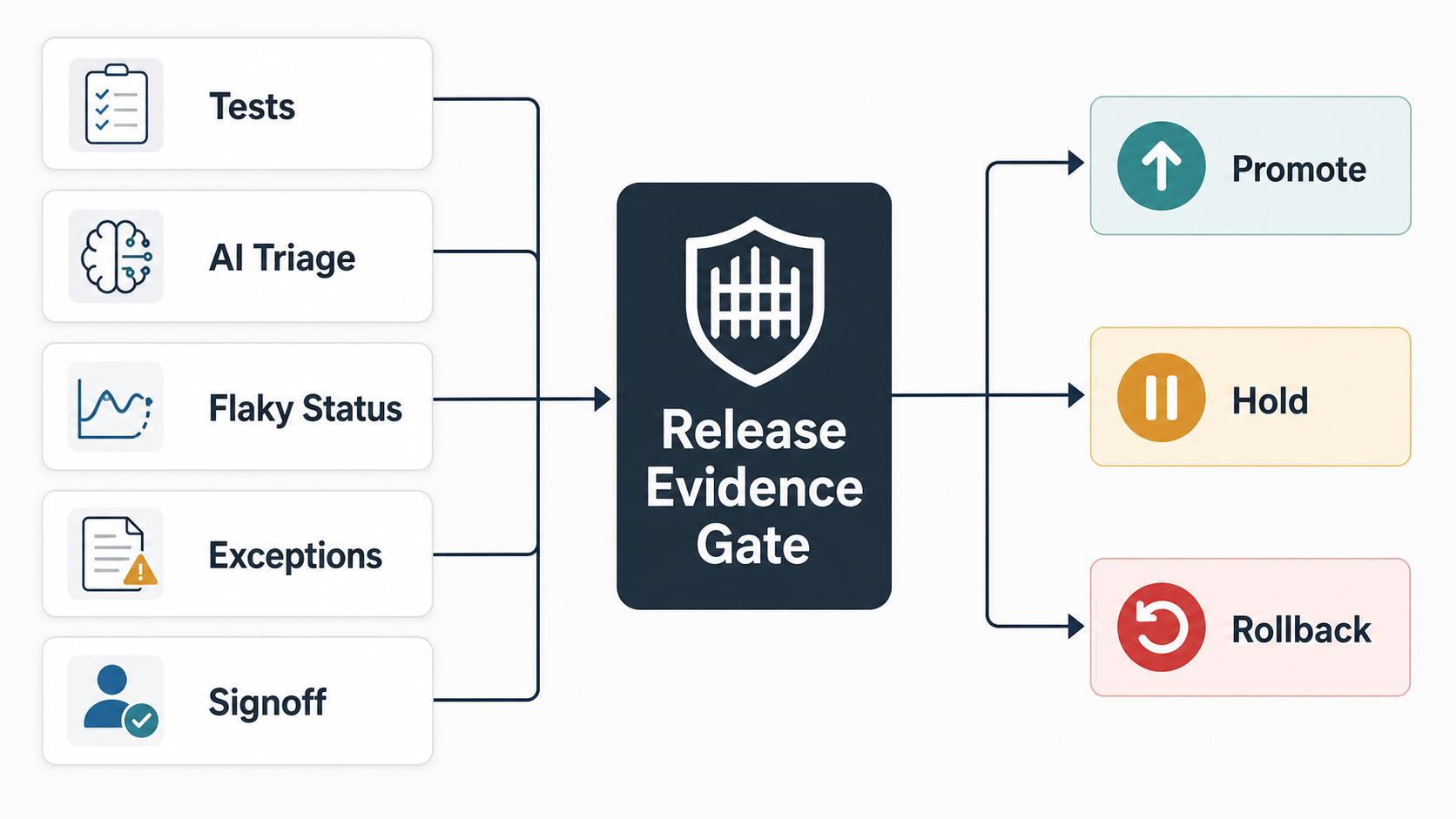
Before AI-assisted QA can influence a launch decision, the team needs a release evidence gate. That gate should combine deterministic pass/fail results, AI-assisted triage, flaky-test status, defect leakage history, accepted exceptions, and product-owner signoff. The point is to make the release decision auditable instead of letting a generated test report become the decision.
Use three outcomes at the gate. Promote when critical journeys pass, flaky tests are understood, false positives are within tolerance, and AI-generated suggestions have been reviewed. Hold when coverage gaps, unstable environments, unresolved visual differences, or high-risk defects still need owner review. Rollback or hotfix when production evidence shows a broken critical path, unsafe data behavior, severe performance regression, or security exposure.
This is where AI testing tools should be treated as decision support, not release authority. If teams need a broader release checklist, pair this gate with the regression testing checklist and the UAT, functional testing, and regression testing comparison.
Phase 5: Add Visual, Performance, And Security Intelligence
Once the core suite is stable, AI can help with signals that are harder for deterministic scripts to interpret. Visual review tools can flag layout shifts, missing content, unexpected UI changes, or accessibility-adjacent issues for human inspection. Performance intelligence can detect latency patterns, regressions, and unusual behavior across builds. Security-focused analysis can help triage scan results, summarize suspicious changes, and prioritize remediation.
These signals should not all block every build. Fast checks belong early. Slower or noisy checks belong in release candidates, nightly runs, or high-risk change paths. Use clear thresholds: block for critical customer journeys, authentication, payment, data exposure, broken authorization, severe performance regression, or high-confidence security findings. Track lower-risk anomalies with ownership and service-level expectations.
This mirrors broader AI workflow automation patterns: keep humans in the loop for judgment, log decisions, monitor outcomes, and improve the workflow when the system produces repeated false positives or misses.
Agentic QA Evaluation Loop: From AI Draft To Release Decision
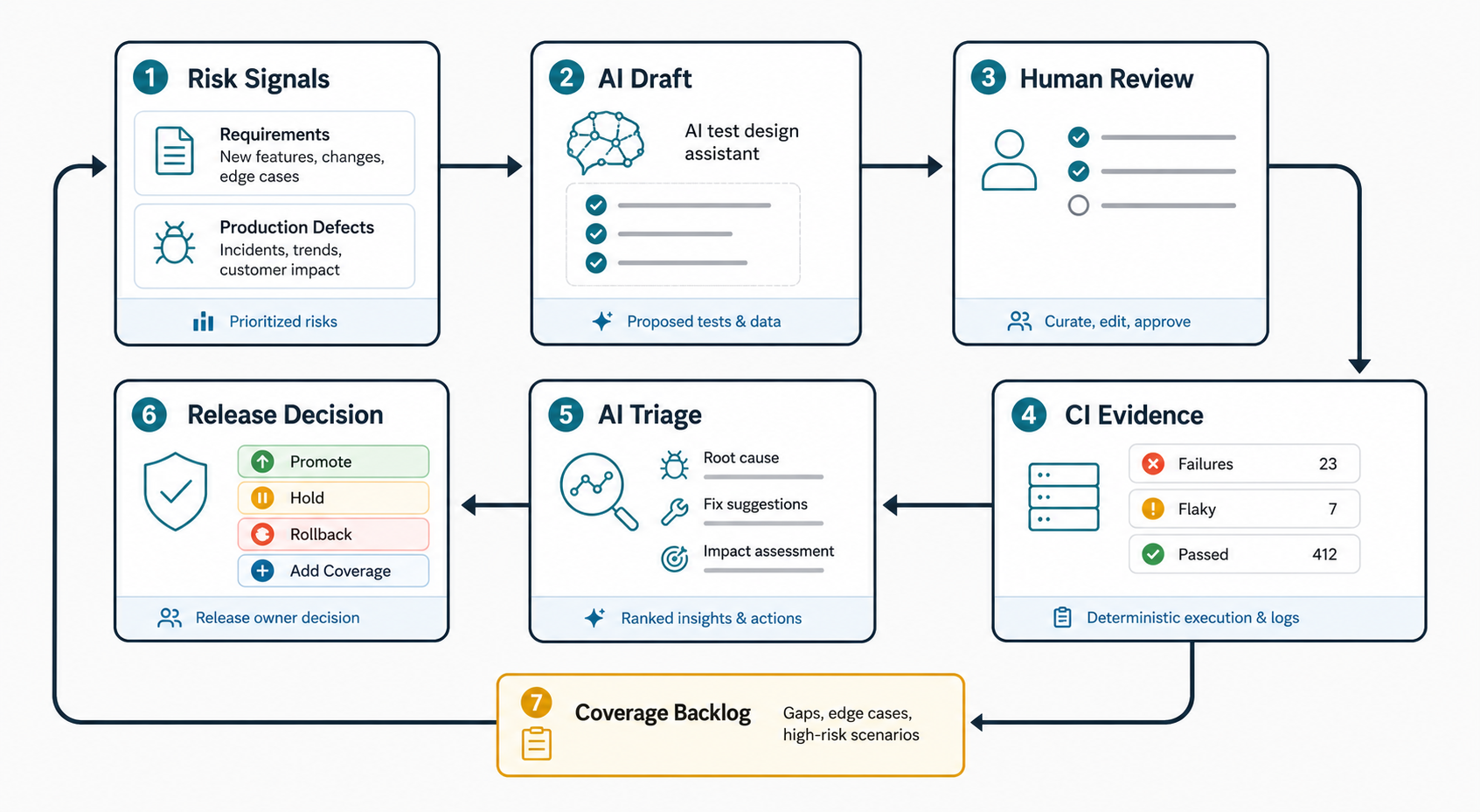
Agentic testing is useful when it works as a closed feedback loop, not as a one-shot test generator. Requirements, user analytics, support tickets, defect history, and production incidents should feed the AI assistant. The assistant can draft test ideas, edge cases, data combinations, and failure hypotheses, but a QA lead or product owner still needs to curate what becomes executable coverage.
After review, deterministic CI execution should produce the release evidence: pass/fail status, flaky-test quarantine, environment notes, screenshots, logs, performance budgets, accessibility checks, and known exceptions. AI triage can summarize likely root causes and suggest fixes, but it should not silently rewrite the release decision. The release owner should choose promote, hold, rollback, or add coverage based on evidence that the team can audit later.
This loop is especially important for SaaS, portals, dashboards, and internal tools where workflows change every sprint. If the product also needs a broader delivery plan, connect QA automation with SaaS development services or web app development planning so test data, observability, environments, and release gates are designed into the product roadmap.
Governance Controls For AI-Assisted QA
AI-assisted QA introduces governance questions that normal test automation may not expose. What source material can be sent to the model? Are production logs or customer data allowed? Who reviews generated tests? Can the tool change locators automatically? How are prompts, outputs, exceptions, and model-driven decisions recorded? What happens when AI suggestions conflict with product intent?
At minimum, define these controls:
- Approved data sources for AI-assisted test design and triage.
- Rules for excluding secrets, credentials, customer data, and sensitive logs from prompts.
- Review requirements for generated test cases, updated selectors, and changed baselines.
- Version control for prompts, evaluation examples, and reusable test-generation templates.
- Exception handling when AI flags an issue that the team accepts for release.
- Metrics for false positives, missed defects, flaky-test reduction, and cycle-time impact.
The goal is not paperwork. The goal is traceability. When a release fails, the team should be able to explain which checks ran, which AI-assisted suggestions were accepted, which exceptions were approved, and what evidence supported the decision.
A Practical 30-60-90 Day AI QA Roadmap
First 30 Days: Baseline The System
- Map the top revenue, customer, compliance, and operational workflows.
- Inventory current manual regression effort, flaky tests, incident patterns, and release delays.
- Choose 5-10 high-risk repeatable flows for smoke and regression automation.
- Define prompt/data rules for AI-assisted test design.
- Measure the baseline: regression hours, defect leakage, release wait time, and reopen rate.
Days 31-60: Pilot AI Assistance
- Use AI to draft test scenarios from requirements, tickets, support issues, and analytics.
- Review, prune, and map each generated case to a product risk.
- Add stable checks to CI/CD with clear pass/fail thresholds.
- Use AI to summarize failures, cluster flaky tests, and propose missing edge cases.
- Keep a decision log for generated tests accepted, rejected, or deferred.
Days 61-90: Expand With Evidence
- Add visual regression, performance anomaly checks, API contract checks, or security triage where release risk justifies it.
- Review ROI against baseline metrics and remove low-value tests.
- Create a release-readiness dashboard with pass rates, flaky tests, blocked releases, and accepted exceptions.
- Document the operating model: owners, review cadence, escalation paths, and suite maintenance budget.
- Plan the next wave only after the pilot proves better feedback or lower regression effort.
Metrics That Prove AI QA Value
AI QA automation should be measured by release outcomes, not demo appeal. Track metrics that show whether the roadmap is improving quality and speed:
- Manual regression hours saved per release.
- Regression cycle time before and after automation.
- Critical flow coverage by workflow, not just by test count.
- Defect leakage into staging or production.
- Flaky-test rate and mean time to repair.
- False-positive rate for visual, performance, security, or AI triage signals.
- Percentage of generated tests accepted after review.
- Release blocks prevented before production.
If AI generates many tests but cycle time and defect leakage do not improve, the roadmap needs pruning. If automation finds issues but nobody trusts the results, the team needs better ownership, artifacts, and failure explanations. If the suite is stable but coverage is thin, AI can help identify missing scenarios from incidents, support tickets, and product analytics.
Common AI QA Automation Mistakes To Avoid
- Starting with tools before risk. Tool choice matters less than knowing which workflows deserve release gates.
- Accepting generated tests without review. AI can draft useful scenarios, but product and QA teams must verify intent, assertions, and data assumptions.
- Automating unstable UI too early. Brittle flows create false failures and erode trust in the suite.
- Letting self-healing hide defects. Locator repair and baseline updates should be reviewable, not invisible.
- Ignoring test data. AI-generated scenarios still need controlled, resettable, privacy-safe data.
- Blocking every build with every signal. Place checks where they match speed, reliability, and risk.
- Measuring test volume instead of release confidence. Fewer high-value checks are better than a large suite nobody maintains.
How NextPage Helps Build AI-Powered QA Roadmaps
NextPage helps product and engineering teams turn AI-assisted QA from a tool experiment into a practical release-readiness system. A QA automation readiness audit usually covers workflow risk, current regression effort, flaky tests, CI/CD gates, test data, release evidence, AI assistance opportunities, governance rules, and a phased roadmap. For teams that need broader release coverage before a launch, NextPage also provides software QA testing services across functional testing, regression planning, test automation, UAT support, performance checks, and release-readiness reporting. If the roadmap uncovers deeper product delivery risk, the work can extend into custom software development remediation so fragile workflows are fixed instead of only tested around.
The output is a plan your team can execute: what to automate first, where AI should assist humans, which checks belong in CI/CD, what metrics define ROI, and how to keep generated tests, prompts, baselines, and exceptions reviewable.
If your regression suite is growing, releases are slowing down, or AI testing tools are being evaluated without a clear operating model, start with a focused roadmap sprint. Request a QA automation readiness audit to identify the highest-value automation targets and the safest places to introduce AI assistance.