
Quick Answer: What Is A Cloud Migration Strategy?
A cloud migration strategy is the practical plan for moving applications, data, integrations, infrastructure, security controls, and operating processes into a cloud environment without creating avoidable downtime, cost drift, or compliance gaps. A strong strategy does not start with a provider logo. It starts with workload facts: what each system does, who depends on it, what data it uses, what can break, what must stay available, and what business outcome the move should improve.
For most companies, the safest cloud migration plan combines several paths. Some workloads can be rehosted quickly. Some should be replatformed onto managed services. Some need refactoring before the move is worth it. Some should be retired, retained, replaced, or moved later. The strategy is the decision framework that assigns the right path, wave, owner, test plan, cutover window, rollback trigger, and cost guardrail to each workload.
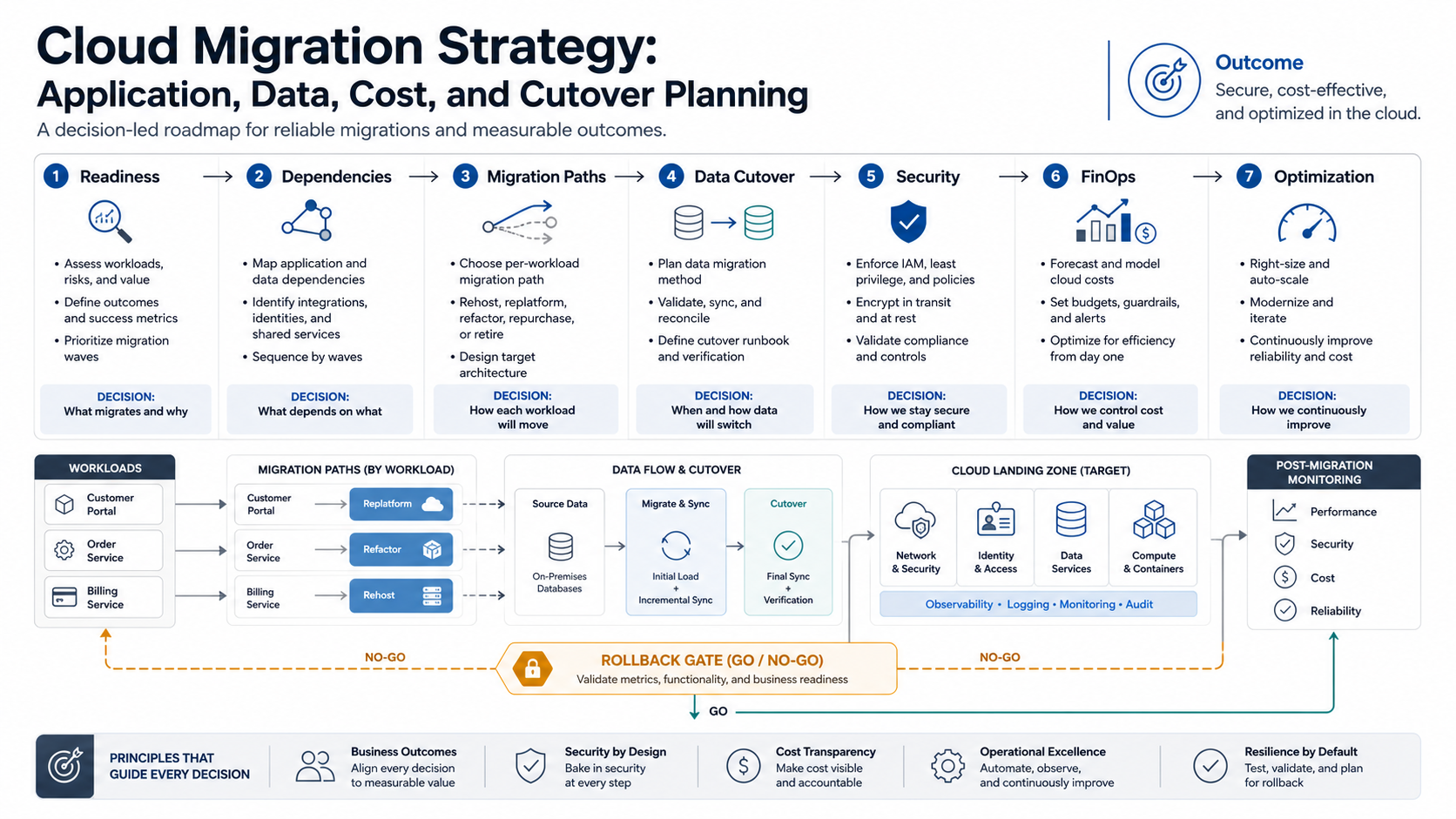
Cloud Migration Strategy Framework
A useful strategy turns cloud adoption into a governed operating program. Start with business outcomes, inventory the application estate, score each workload, prepare the landing zone, sequence migration waves, rehearse cutover, and then improve cost, reliability, and delivery after go-live. AWS migration guidance uses the 7 Rs to frame workload treatment, while Microsoft frames adoption as a lifecycle across strategy, plan, ready, migrate, govern, secure, and manage. The practical takeaway is that migration is both an engineering move and an operating-model change.
For teams with mixed legacy, SaaS, internal-tool, and customer-facing systems, NextPage usually treats cloud migration as three linked workstreams: portfolio decisions, migration delivery, and cloud operations. Portfolio decisions decide what moves and why. Migration delivery covers application, data, integration, and cutover execution. Operations covers security, monitoring, incident response, cost ownership, and continuous improvement. If your team needs delivery support, application migration services should start with this evidence model instead of jumping straight into server movement.
| Strategy layer | Key decision | Output |
|---|---|---|
| Business outcome | What must improve after migration? | Success metrics, risk tolerance, and executive owner |
| Portfolio readiness | Which workloads are ready, risky, or not worth moving? | Application inventory, dependency map, and migration backlog |
| Migration path | Which 7 Rs path fits each workload? | Per-workload treatment, wave plan, and effort estimate |
| Landing zone | What security, network, identity, and operations foundation is required? | Target architecture, policy baseline, and environment model |
| Cutover | How will the team switch safely and recover if needed? | Runbook, validation checklist, go/no-go gate, and rollback plan |
| Optimization | How will the cloud environment stay efficient? | Monitoring, FinOps ownership, rightsizing, and improvement cadence |
Start With A Cloud Readiness Assessment
The first deliverable should be an evidence-backed readiness assessment. Inventory applications, databases, storage, integrations, batch jobs, user groups, owners, SLAs, compliance constraints, release cadence, current cost, performance baselines, and incident history. Then map dependencies between them. This prevents a team from moving an application while leaving behind the identity provider, file transfer, report, data pipeline, vendor allowlist, or nightly job it needs to run.
NextPage's cloud migration services start with application, infrastructure, data, traffic, dependency, security, and operating cost review before choosing a migration path. That assessment should produce a migration backlog, dependency map, wave plan, and risk register rather than a generic slide deck.
| Readiness area | Questions to answer | Migration output |
|---|---|---|
| Applications | Which systems are business-critical, fragile, or near end-of-life? | Workload groups and migration waves |
| Data | What data moves, what stays, and what must be synchronized? | Data migration and validation plan |
| Integrations | Which APIs, queues, file drops, reports, and vendor connections can break? | Dependency map and integration test plan |
| Security | Which controls, policies, identities, and audit logs must exist on day one? | Landing zone and access model |
| Cost | What is the current run cost and what can change after migration? | Budget guardrails and FinOps ownership |
| Operations | Who monitors, patches, responds, and improves the environment? | Runbook, alerts, and support model |
Choose The Right Migration Pattern For Each Workload
Cloud migration patterns are commonly described as the 7 Rs: rehost, relocate, replatform, repurchase, refactor or re-architect, retain, and retire. The names matter less than the decision behind them. A stable internal app with limited users may be rehosted first to reduce data center dependency. A database-heavy application may be replatformed onto managed database services. A customer-facing system with scale, resilience, or release bottlenecks may need refactoring before migration creates real value.
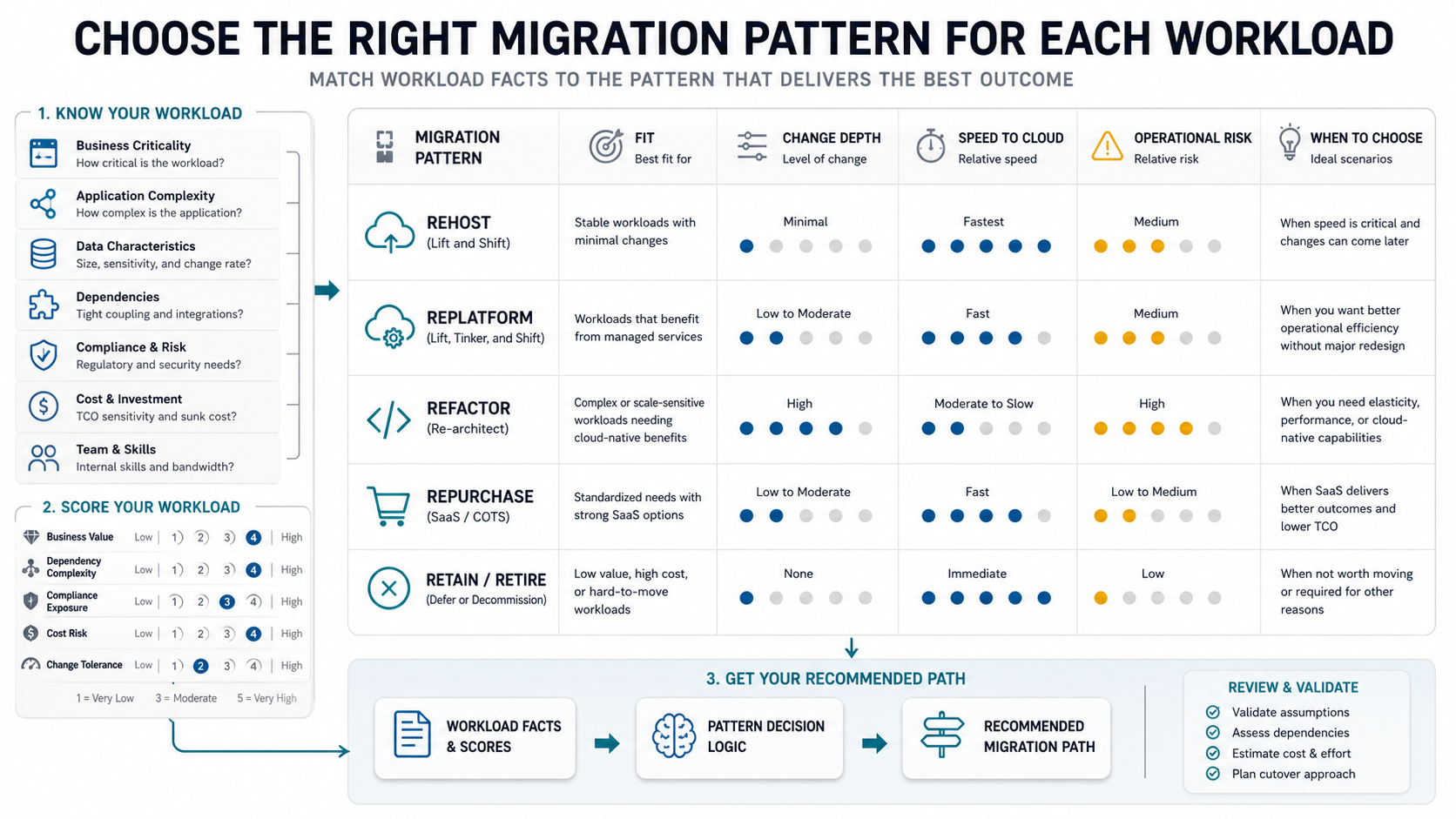
The mistake is choosing one pattern for the whole portfolio. That creates either too much risk or too little value. Score every workload by business value, technical health, dependency complexity, compliance exposure, cost risk, and change tolerance. Then assign the path and wave that fit the workload's constraints. For older systems where rehosting is the right first step, legacy application rehosting services can reduce infrastructure risk without pretending every application needs a full rewrite on day one.
When the assessment shows that a workload is too fragile or expensive to move as-is, pair migration with modernization. The enterprise application modernization roadmap is a useful companion for deciding when cloud migration should be sequenced with refactoring, API extraction, database cleanup, or user workflow redesign.
Plan Application, Data, And Integration Migration Together
Application migration and data migration cannot be separated for long. An app may be easy to move, but the database, file store, analytics pipeline, message queue, scheduled job, identity provider, or third-party integration may create the real cutover risk. Data planning should cover volume, transfer windows, schema changes, encryption, retention, reconciliation, backup, restore tests, and whether the old and new environments must run in parallel.
For transactional systems, decide how you will handle freeze windows, delta sync, validation, and rollback. For analytics systems, decide whether historical data is moved in full, staged in phases, or retained in an archive. For regulated data, document where data is stored, who can access it, how keys are managed, and how audit trails are preserved. The strategy should identify the highest-risk data paths before the first production move, not during the cutover weekend.
Build Cost Controls Before The Move
Cloud migration does not automatically reduce cost. It can expose waste faster, but it can also make waste easier to create. Flexera's 2026 State of the Cloud reporting says estimated wasted cloud spend rose to 29%, reversing a five-year downward trend. That is why cost controls belong in the migration strategy, not in a clean-up project six months later.
Start with a baseline of current infrastructure, licensing, labor, support, backup, disaster recovery, and scaling costs. Then model the target environment with realistic utilization assumptions. Add budgets, tagging, workload owners, reserved capacity decisions, anomaly alerts, shutdown schedules, and review cadence. A rehosted workload that keeps old sizing assumptions may cost more than expected; a refactored workload may cost less at runtime but require more engineering investment. Use the custom software cost estimator when modernization effort needs to be considered alongside infrastructure spend.
FinOps should connect engineering choices to business value. Preview environments, over-provisioned databases, untagged resources, duplicate logs, and unmanaged backups can all become recurring waste. The cost planning section in our DevOps consulting for SaaS teams guide is relevant when migration and delivery practices need to mature together.
Design The Cutover And Rollback Plan
Cutover planning is where a strategy becomes operational. Define the migration window, ownership, communication plan, release freeze rules, validation checklist, monitoring dashboard, support channel, rollback criteria, and executive decision owner. The plan should state what happens if a test fails, if latency increases, if data reconciliation does not match, if a vendor integration times out, or if a key user group cannot complete its workflow.
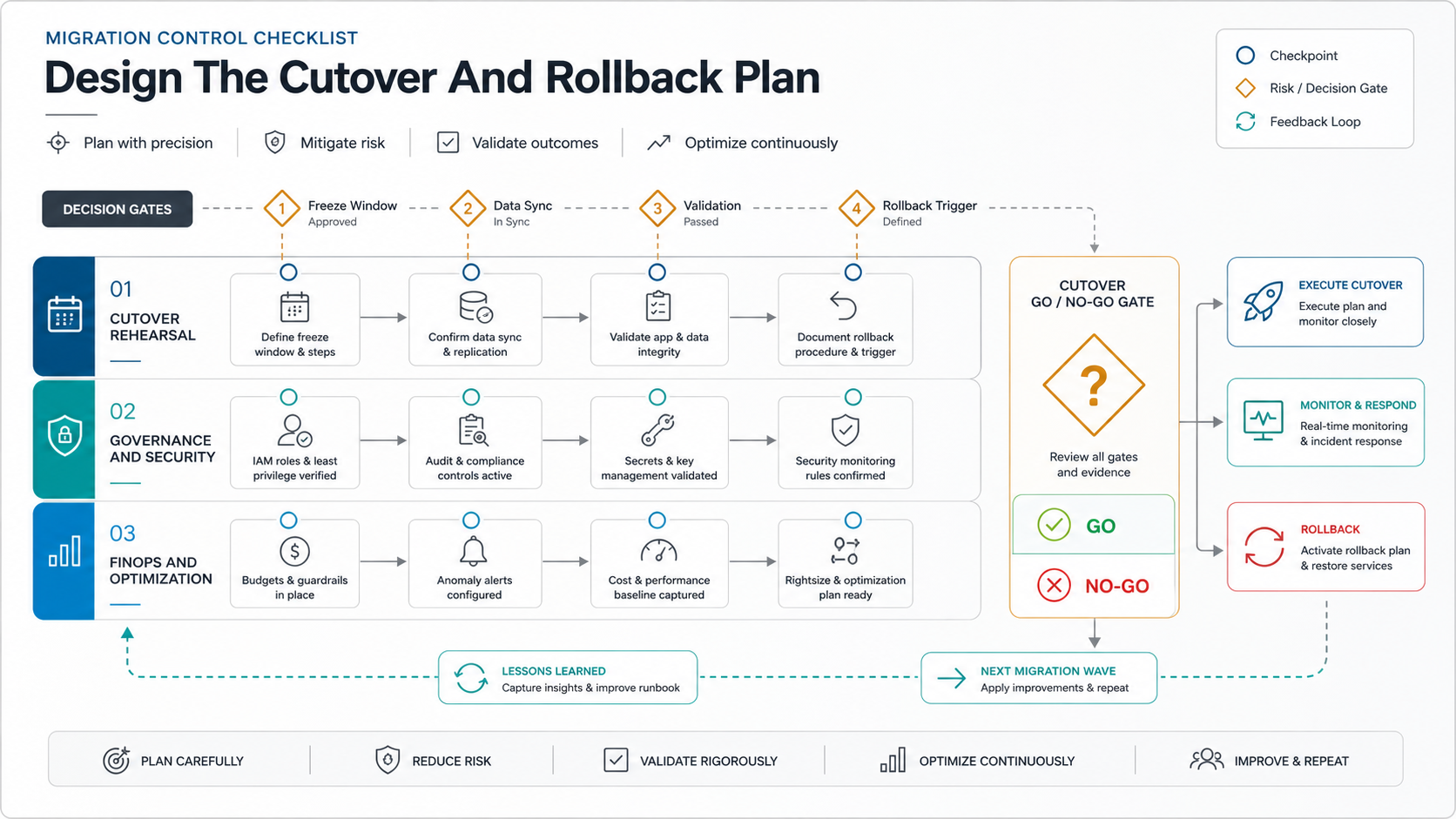
Run a pilot before the high-risk wave. A pilot should be large enough to test the real migration process, but small enough to recover quickly. After the pilot, update the runbook, automation, access model, dashboards, and training before moving more critical workloads. If rollback would lose data or create inconsistent records, the strategy is not ready for production cutover.
Security, Governance, And Landing Zones Are Day-One Requirements
Cloud security is not a final review step. Identity, least privilege, network segmentation, secret management, encryption, backup policies, logging, vulnerability management, and incident response should be in place before workloads move. Teams should also define who can create resources, which regions are allowed, how policy violations are detected, and how exceptions are approved.
Microsoft describes Azure landing zones as a standardized foundation for security, compliance, and operational efficiency at scale. The same principle applies across cloud providers: prepare the foundation before the migration wave. If your destination is Google Cloud, Google Cloud migration services should include landing-zone decisions around identity, networking, environments, logging, backup, policy, and deployment automation.
For regulated industries, the migration plan should map controls from the old environment to the new one. Evidence matters: audit logs, access reviews, vulnerability reports, backup tests, and change records should be available after migration. If the existing application is old enough that basic controls are difficult to enforce, the migration may need modernization rather than a simple hosting move.
Post-Migration Optimization Is Part Of The Strategy
The migration is not finished when the workload runs in the cloud. The first few weeks after go-live should focus on performance, cost, observability, incident response, backup validation, access review, and user feedback. Track technical metrics such as latency, error rates, recovery time, resource utilization, deployment frequency, and cloud spend by workload. Track business metrics such as process cycle time, customer experience, team productivity, and release lead time.
Optimization also shapes the next wave. If the first wave shows that a dependency was missed, a cost assumption was wrong, or the support model is unclear, slow down and fix the playbook before moving more workloads. The managed cloud services checklist is a useful reference when the migration team also needs a long-term operating model for monitoring, security, backup, cost review, and incident response.
Cloud Migration Strategy Checklist
- Define the business outcomes the migration must improve.
- Inventory applications, data, integrations, users, owners, and current costs.
- Map dependencies before grouping workloads into migration waves.
- Select the right 7 Rs migration pattern for each workload, not one pattern for everything.
- Prepare the landing zone, identity model, network, monitoring, backup, and security baseline before production migration.
- Build data migration, reconciliation, backup, and rollback plans.
- Set cost ownership, budgets, tagging, anomaly alerts, and review cadence before production use.
- Run a pilot, update the runbook, and then scale wave by wave.
- Measure post-migration performance, resilience, cost, and business outcomes.
- Use each wave to improve the next migration wave instead of repeating the same assumptions.
How NextPage Helps With Cloud Migration Strategy
NextPage helps teams turn migration goals into a practical roadmap: readiness assessment, workload grouping, architecture decisions, data planning, security baseline, cost controls, staged migration, and post-migration optimization. We can help with portfolio assessment, target architecture, cloud landing zones, migration automation, integration planning, QA, observability, rollback runbooks, and post-migration improvement.
Start with cloud migration services when the priority is planning a safer application, data, and infrastructure move. If the assessment shows that old systems need product or platform changes before cloud migration makes sense, combine the migration roadmap with modernization planning instead of forcing a lift-and-shift that only moves the risk to a new bill.