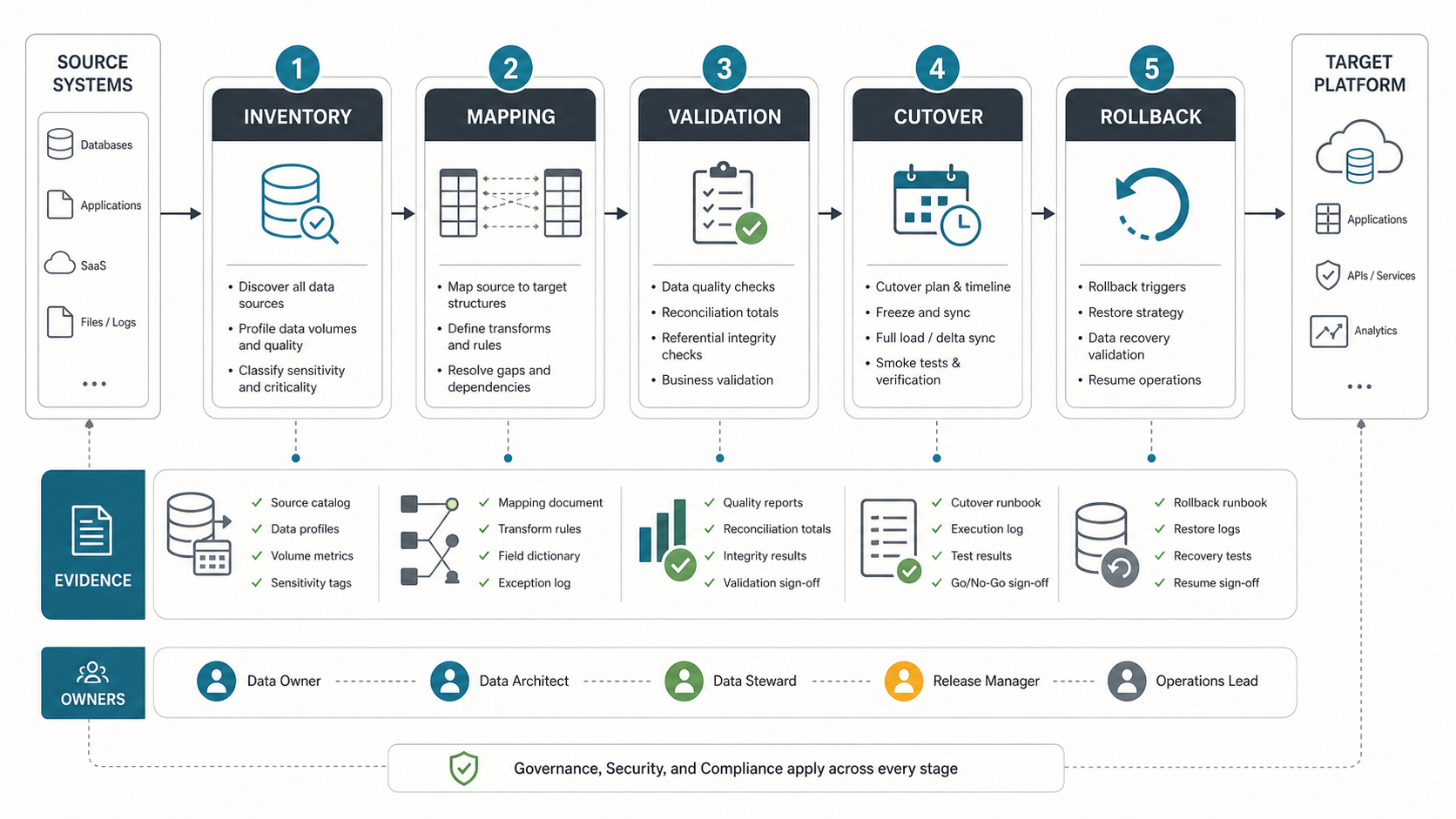

A data migration checklist should do more than confirm that files moved from one system to another. It should prove that the right data was moved, transformed correctly, protected properly, validated by the business, and backed by a rollback path if the cutover does not hold.
The safest migrations are planned around evidence. Before a production move, the team should know which sources exist, who owns each dataset, which fields and dependencies matter, how quality issues will be corrected, what counts as validation proof, who can approve go-live, and exactly what happens if the target system cannot take over.
This checklist is platform-neutral. Use it for database migrations, application data moves, SaaS consolidations, legacy modernization, analytics platform migrations, and cloud migration programs where data accuracy matters as much as infrastructure readiness. If you need delivery help, NextPage offers data migration services that turn this evidence into an executable migration plan.
Data Migration Checklist Summary
Start with the full migration path, then turn each phase into an owner-backed evidence trail. A migration that cannot show its inventory, mapping, reconciliation, approval, and recovery evidence is not ready for production cutover.
| Checklist Area | What To Confirm | Evidence To Capture |
|---|---|---|
| Inventory | Source systems, datasets, file stores, reports, APIs, owners, volumes, quality risks, and dependencies are known. | Source catalog, data profiles, volume reports, dependency map, owner matrix. |
| Mapping | Source fields, target fields, transformations, defaults, retired fields, and exception rules are approved. | Mapping workbook, field dictionary, transform rules, exception log. |
| Cleansing | Duplicates, invalid formats, missing values, stale records, and conflicting identifiers have a treatment plan. | Data-quality report, cleansing rules, unresolved issue list, business signoff. |
| Validation | Counts, sums, referential integrity, business workflows, reports, and sample records match agreed tolerances. | Reconciliation totals, test cases, UAT evidence, approval notes. |
| Cutover | Freeze window, final sync, smoke tests, traffic switch, monitoring, communications, and decision gates are defined. | Cutover runbook, release calendar, go/no-go checklist, execution log. |
| Rollback | Rollback triggers, backups, restore steps, ownership, communications, and recovery validation are ready. | Rollback runbook, backup proof, recovery test results, owner signoff. |
Choose The Right Migration Phase And Cutover Pattern
The checklist should change based on the migration pattern, not only the tool. AWS Prescriptive Guidance describes cutover work around ingestion freeze, final backup, data sync, routing changes, testing, and rollback checkpoints. Microsoft Azure migration guidance also recommends test migrations before the full move so teams can estimate timing and find blockers before production. The practical takeaway is simple: choose the lowest-risk pattern your downtime, data consistency, and rollback constraints can support.
| Migration Pattern | Best Fit | Extra Checklist Items |
|---|---|---|
| Offline migration | Small datasets, planned outage windows, or systems where writes can pause safely. | Approved downtime, final backup proof, source freeze, restore test, and clear user communications. |
| Phased migration | Large programs where modules, regions, tenants, or business units can move in waves. | Wave criteria, dependency map, parallel reporting, exception ownership, and cutover calendar. |
| CDC or replication-led migration | Production databases that need a short final cutover window. | Replication lag monitoring, consistency checks, dual-run reports, final delta validation, and drain criteria. |
| Fail-forward rollback | Systems where the old source may become stale after go-live. | Target-to-recovery replication, decision owner, transaction replay plan, and recovery validation. |
| Dual-write transition | Rare cases where both old and new systems must receive writes during transition. | Conflict handling, idempotency, source-of-truth rules, reconciliation jobs, and stop conditions. |
For platform-specific planning, pair this article with the AWS database migration checklist. For operating-model and legacy dependency work, connect the migration plan to legacy software modernization services so the data move does not ignore the application and workflow changes around it.
1. Inventory Every Source, Owner, And Dependency
Most migration problems start before the first extract. Teams underestimate hidden data sources, informal reports, old integrations, batch files, manual exports, and downstream dependencies that are still operationally important. Build the inventory before choosing tooling or dates.
A useful inventory includes every production database, application table, SaaS object, file share, spreadsheet, analytics feed, API dependency, report, scheduled job, and audit source that either feeds the migration or depends on migrated data. For legacy environments, use a risk lens similar to a legacy software modernization scorecard so brittle systems, unsupported databases, manual processes, and fragile integrations are visible early.
| Inventory Item | Questions To Answer | Owner |
|---|---|---|
| Source systems | Which databases, applications, SaaS tools, files, logs, and archives are in scope? | Application owner and data architect |
| Data volumes | How many records, how much storage, what growth rate, and what historical range are required? | Database or platform owner |
| Data sensitivity | Which fields contain customer data, financial data, health data, credentials, secrets, or regulated records? | Security and compliance owner |
| Dependencies | Which integrations, reports, automations, queues, search indexes, and BI dashboards rely on this data? | Integration owner |
| Business ownership | Who can approve rules for ambiguous records, missing values, duplicates, and historical exceptions? | Business process owner |
Inventory is also where cloud migration and modernization planning should connect. If the target is cloud-hosted, a cloud migration assessment should map workload dependencies, data flows, security controls, traffic patterns, and operating cost assumptions before the final migration architecture is locked.
2. Map, Transform, And Clean Data Before The Move
Data mapping is the contract between source reality and target behavior. It should describe how every important field moves, transforms, merges, splits, defaults, validates, and appears in the target system. Do not treat mapping as a spreadsheet made only for developers. It is a business agreement.
For each critical entity, create a field-level mapping with source field, target field, data type, transformation rule, default behavior, accepted values, validation rule, owner, and open questions. Include retired fields and unmapped data so the team can decide whether to archive, migrate, transform, or intentionally exclude them.
| Mapping Risk | Why It Breaks Migrations | Checklist Action |
|---|---|---|
| Duplicate identifiers | Customers, products, vendors, or assets may merge incorrectly or create duplicates in the target. | Define survivorship rules, matching logic, manual review thresholds, and deduplication evidence. |
| Field meaning changed over time | A column may have different business meaning across regions, product lines, or historical periods. | Document semantic differences and map by time period, business unit, or source version where needed. |
| Missing required target fields | The target may reject records or create incomplete workflows. | Define default values, enrichment sources, exception queues, and business approval for gaps. |
| Invalid reference data | Statuses, categories, tax codes, locations, and IDs may not match target dictionaries. | Map reference tables, normalize values, and test referential integrity before load. |
| Unclear historical requirements | Teams may migrate too much stale data or lose data needed for audit and reporting. | Define retention, archival, reporting, and legal hold requirements before extraction. |
Data readiness should be treated as a delivery workstream. The same principle applies in AI and analytics programs: teams need to understand what data exists, who owns it, how reliable it is, and whether it supports the target process. NextPage covers this operating idea in its manufacturing AI data readiness checklist, and the discipline is just as important for migration programs.
3. Define Validation Evidence Before The First Load
Migration validation fails when teams define success after the load. Decide the evidence before you run the first rehearsal. That evidence should include technical reconciliation and business validation, because record counts alone can pass while workflows, reports, permissions, or customer-facing details are broken.
Set validation tolerances by risk. Some totals should match exactly. Some historical fields may allow documented exclusions. Some low-value attributes can be sampled. Regulated, financial, customer, consent, inventory, billing, and operational workflow data usually need stricter proof.
| Validation Layer | What To Test | Evidence |
|---|---|---|
| Completeness | Record counts, required objects, historical ranges, file counts, and skipped records. | Source vs target count report and exception list. |
| Accuracy | Balances, sums, dates, statuses, IDs, references, attachments, and calculated fields. | Reconciliation report with approved tolerances. |
| Integrity | Parent-child relationships, foreign keys, lookup tables, and workflow states. | Integrity test output and failed relationship report. |
| Business process | Critical user journeys, approvals, reports, searches, notifications, and downstream integrations. | UAT scripts, screenshots or logs, and business signoff. |
| Security | Roles, permissions, masking, encryption, retention, audit trails, and access logs. | Security review evidence and access validation. |
In regulated integration-heavy environments, validation must include consent, interoperability, auditability, and downstream context. The same failure pattern appears in healthcare data exchange software, where a connector can appear successful while care workflows fail because consent, identifiers, and system context were not validated together.
4. Plan Cutover, Rollback, And Hypercare Together
Cutover is not only the final import. It is the controlled moment when source changes pause, final deltas move, validation runs, users switch, integrations point at the target, and support teams watch the system under real use. Rollback planning belongs in the same runbook because teams need to know the decision point before pressure rises.
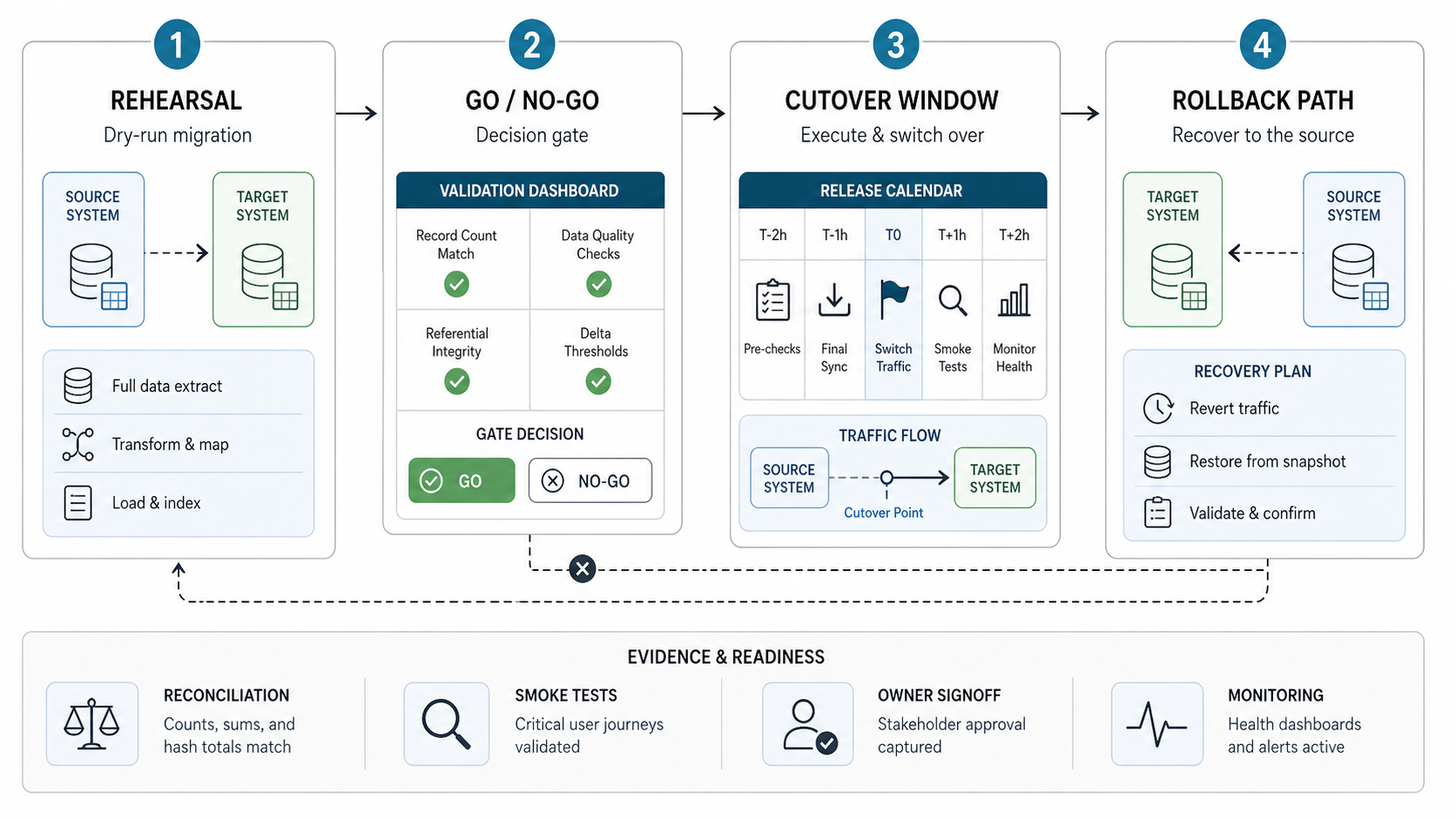
| Cutover Step | Checklist Question | Required Proof |
|---|---|---|
| Freeze window | When do source-system changes stop, and who can approve exceptions? | Freeze notice, exception policy, owner confirmation. |
| Final delta sync | How will last-minute source changes be captured and loaded? | Delta export log, import log, record count comparison. |
| Smoke tests | Which critical workflows prove the target is operational? | Smoke test checklist and pass/fail evidence. |
| Go/no-go decision | Who has authority to launch, delay, or roll back? | Named decision owner and approval record. |
| Rollback trigger | What exact failures require rollback instead of hotfix? | Trigger list tied to business risk and recovery time. |
| Hypercare | Who monitors issues after go-live, and how fast are defects triaged? | Support rota, escalation path, dashboard, issue log. |
If the migration is part of a broader modernization effort, plan waves instead of a single high-risk switch. A legacy application modernization roadmap should include migration waves, integration contracts, acceptance tests, rollback criteria, training, and success metrics.
Data Migration Cutover And Rollback Plan: A Decision Record
A cutover checklist becomes executable when each gate has a measured result, a named decision owner, and an action for failure. Copy this record into the migration runbook and fill it during rehearsal. Set thresholds from your workload and business recovery objectives; there is no universal safe replication lag or rollback window.
| Decision gate | Record before the switch | If the gate fails |
|---|---|---|
| Source writes controlled | Freeze time: ___; application, job, queue, and integration owners: ___; exceptions: ___. | Keep the target closed to business writes until the remaining writers are accounted for. |
| Final data reconciled | Final sync/checkpoint: ___; counts and business totals: ___; failed or excluded records: ___; approved tolerances: ___. | Resolve discrepancies or explicitly defer the switch. A successful copy job alone is insufficient evidence. |
| Target accepted | Critical workflow and permissions evidence: ___; dependency checks: ___; decision owner/time: ___. | Keep traffic on the agreed source of truth while the issue is assessed. |
| Recovery still feasible | Last tested recovery duration: ___; latest decision time: ___; acceptable data loss: ___; treatment of new target writes: ___. | Escalate to the incident owner before choosing rollback or forward repair; do not assume the old source is current. |
| Service stable after switch | Monitoring window: ___; error and latency limits: ___; reconciliation owner: ___; handover decision: ___. | Apply the rehearsed response and preserve transaction evidence needed for recovery. |
Rollback before and after new writes are different operations. Before the target accepts business writes, returning traffic to an unchanged source may be feasible if routing, jobs, and integrations can be restored safely. Once the target accepts new orders, payments, or updates, that source can be stale. Restoring an older backup or switching a connection string can discard accepted work.
For the second case, rehearse how you will pause writers, preserve new transactions, reconcile or replay them without duplicates, validate the recovery destination, and reopen service. Reverse replication is an option only when your chosen engines, mappings, and conflict-handling design support it and have been tested. If a safe return path cannot meet the recovery objectives, define a forward-repair plan and the decision authority before launch.
Use the AWS DMS readiness record for engine-specific replication evidence. For a cross-system move, a data migration assessment can identify missing writer inventories, reconciliation rules, and recovery steps before the rehearsal.
5. Add Security, Compliance, And Audit Controls
Data migration creates temporary risk because extracts, staging databases, transformation scripts, test loads, logs, backup files, and access grants may exist outside normal operating patterns. Security controls should cover both the target state and the temporary migration environment.
| Control | Checklist Action | Evidence |
|---|---|---|
| Access | Limit migration access to named users, roles, and service accounts. | Access list, approval record, post-migration revocation proof. |
| Encryption | Encrypt exports, staging data, backups, and transfer paths. | Storage settings, transfer logs, key-management notes. |
| Masking | Mask or tokenize sensitive data in non-production rehearsal environments. | Masking rules, sample validation, environment review. |
| Audit trails | Log extraction, transformation, load, validation, approvals, and changes. | Execution logs and immutable evidence archive. |
| Retention | Define how long extracts, staging data, backups, and rollback copies remain. | Retention policy and deletion confirmation. |
The security review should also ask whether migration tooling is writing sensitive data into logs, error queues, screenshots, local folders, temporary cloud buckets, or third-party services. These are common gaps because teams focus on the final database and forget migration artifacts.
6. Stabilize After Go-Live
A migration is not finished when the target system opens. Hypercare should verify data quality under real usage, watch failed jobs, monitor reporting gaps, track user issues, and confirm that downstream systems remain healthy. Keep the migration team available until the system has passed a defined stabilization period.
| After Go-Live | What To Monitor | Why It Matters |
|---|---|---|
| Exception queue | Rejected records, failed integrations, missing references, duplicate creation, and bad formats. | Shows whether migration defects are still entering workflows. |
| Business reports | Revenue, inventory, customers, tickets, transactions, balances, and operational KPIs. | Confirms stakeholders can trust the target system. |
| User workflows | Search, create, update, approve, invoice, fulfill, notify, export, and report actions. | Finds process-level failures that counts may miss. |
| Performance | Query speed, batch duration, sync latency, queue depth, and dashboard refresh time. | Validates that the target can handle production usage. |
| Cleanup | Temporary access, staging data, old jobs, obsolete integrations, and decommissioning plans. | Reduces cost, risk, and operational confusion. |
Document unresolved issues with severity, owner, target date, workaround, and business impact. The best migration teams leave behind a clean operational record: what moved, what changed, what was excluded, what was archived, and what still needs attention.
How NextPage Helps With Data Migration
NextPage helps teams plan and execute data migration with the same discipline used for software delivery: discovery, source inventory, mapping, data-quality triage, integration review, rehearsal, validation, cutover planning, rollback design, and post-go-live support.
A practical first engagement can audit the current data landscape, identify migration risks, score source-system readiness, define the target mapping approach, create validation evidence, and turn the migration into a phased runbook. That gives stakeholders a clearer path before committing to a high-pressure production move. If the migration supports a field, operations, or inspection workflow, review how the ClearRoute case study connected structured field evidence, processing, and operational review loops.
If your team is preparing a database, SaaS, analytics, or legacy-system data migration, start with the checklist evidence. NextPage can help turn inventory, mapping, validation, cutover, rollback, and hypercare into an executable migration plan. For early budget framing, use the custom software cost estimator before a deeper migration discovery call.