
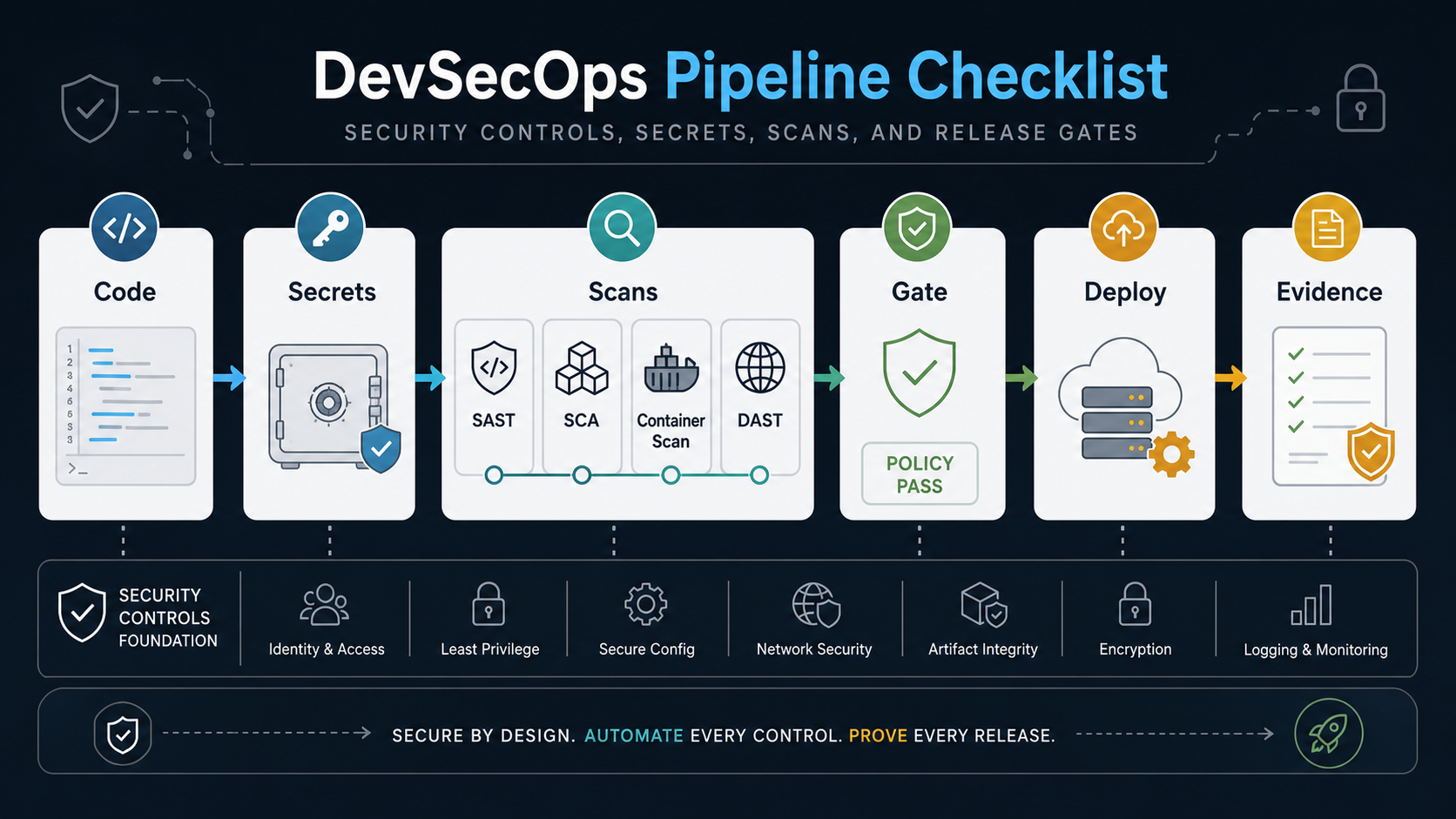
Quick Answer: What Belongs In A DevSecOps Pipeline?
A DevSecOps pipeline should include code review rules, branch protections, secret scanning, dependency review, SAST, SCA, container image scanning, infrastructure-as-code checks, DAST or API security tests, environment configuration checks, release gates, rollback criteria, and an evidence package for each meaningful production release. The goal is not to run every security tool on every commit. The goal is to put the right control at the right pipeline stage, with clear ownership and a decision rule.
For most software teams, the practical sequence is simple: start with source control and secrets hygiene, add fast code and dependency scans in pull requests, add deeper container and runtime checks before release, and require a short evidence review for high-risk changes. Teams that already have CI/CD issues should pair this checklist with a broader DevOps consulting plan for SaaS teams so security controls do not sit on top of an unreliable delivery process.
Why DevSecOps Pipelines Fail
DevSecOps fails when security is treated as a late manual approval, a disconnected scanner dashboard, or a set of warnings nobody owns. A pipeline can have SAST, SCA, DAST, container scanning, and secrets detection and still ship risky releases if findings are noisy, exceptions are untracked, or release managers cannot explain what changed.
The most useful DevSecOps checklist is therefore operational. It should answer five questions before a release moves forward:
- What security controls are mandatory for this type of change?
- Which checks block the pipeline, and which create a ticket for follow-up?
- Who can approve a risk exception, and when does that exception expire?
- Where is the evidence stored for audit, customer review, or incident response?
- How quickly can the team roll back or disable a risky release?
The OrangeMantra DevOps reference page reinforces a common market need: companies want faster release cycles, better reliability, infrastructure automation, and smoother cloud operations. A DevSecOps pipeline keeps those DevOps benefits while adding security and compliance evidence to the same delivery motion instead of creating a second process.
The DevSecOps Pipeline Checklist
Use this checklist as a baseline. Adjust severity thresholds for your industry, customer contracts, data sensitivity, and deployment frequency.
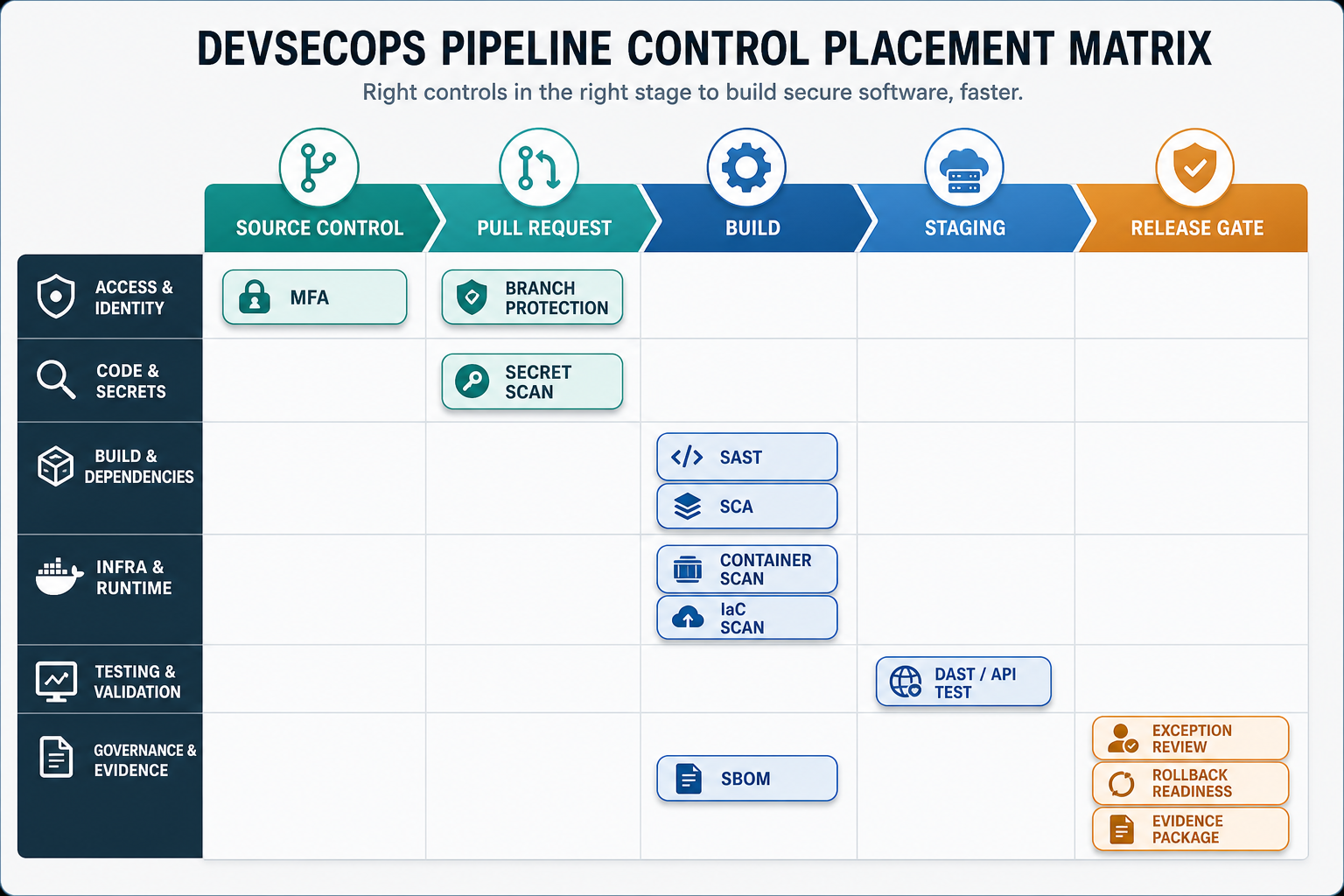
1. Source Control And Identity Controls
- Require single sign-on and multi-factor authentication for source control, CI/CD, cloud, package registries, and secrets platforms.
- Protect main and release branches with required reviews, passing checks, signed commits where appropriate, and restricted force-push rights.
- Review service accounts, deploy keys, and CI tokens quarterly, then remove stale credentials.
- Separate duties for code merge, production deployment, and emergency override when compliance requires it.
This is the foundation. If attackers can push code, modify workflows, or steal CI tokens, later scanning steps become weaker. Teams modernizing older systems should also assess release and repository risk with a tool such as the Legacy Software Modernization Scorecard before they retrofit controls into a fragile release process.
2. Secrets Management
- Scan commits, pull requests, and historical repositories for exposed API keys, passwords, tokens, certificates, and private keys.
- Move runtime secrets into a managed vault or cloud secrets service instead of environment files committed to repositories.
- Use short-lived credentials for CI jobs where possible.
- Rotate any secret found in code. Deleting it from Git is not enough because commit history, build logs, and forks may preserve it.
- Block releases when high-risk production secrets are detected or when a critical secret rotation is incomplete.
Secrets controls should be fast and unforgiving. A secret leak is not a documentation issue; it is a production risk. Keep the process simple enough that developers can fix the problem inside the normal pull request flow.
3. SAST, SCA, And Dependency Review
Static application security testing looks for insecure code patterns. Software composition analysis checks open-source dependencies, licenses, and known vulnerabilities. Both belong early in the pipeline because they are most useful before code reaches a release branch.
- Run lightweight SAST and SCA checks on pull requests.
- Fail builds only for agreed severity thresholds, exploitable paths, banned licenses, or critical package issues.
- Generate or update an SBOM for releases where customer, regulator, or internal policy requires software-component transparency, then connect it to vulnerability intake and release evidence.
- Track exceptions with an owner, reason, compensating control, expiry date, and a retest condition before the exception can close.
- Review repeated findings during sprint retrospectives so the team improves secure coding patterns instead of fighting the same alerts.
OWASP's DevSecOps guidance treats SAST, SCA, DAST, and secrets management as pipeline concerns, while NIST's Secure Software Development Framework gives teams a governance lens for secure development, vulnerability management, and software supply-chain risk. Keep those frameworks practical: translate them into pull request checks, release gates, exception records, and evidence that product and security leaders can actually review.
When dependencies, build systems, vendors, and AI-assisted coding tools become part of the release path, pair this section with the software supply chain security checklist so SBOMs, vendor risk, package provenance, recovery planning, and AI dependency controls do not live outside the DevSecOps workflow.
4. Container, Infrastructure, And Cloud Checks
If your application ships as a container or depends on cloud infrastructure, scan beyond application code. A safe build can still be deployed onto a risky base image, permissive network rule, public storage bucket, or misconfigured identity role.
- Scan container images for critical operating-system and package vulnerabilities.
- Check base image freshness and ban unapproved images.
- Scan infrastructure-as-code for exposed ports, public buckets, overbroad IAM roles, missing encryption, weak logging, and insecure defaults.
- Validate Kubernetes manifests, Helm charts, and runtime policies before deployment.
- Link cloud migration and infrastructure changes to security acceptance criteria, especially for regulated workloads.
When teams are moving workloads or rebuilding environments, cloud controls should be planned early. A cloud migration assessment can map dependencies, security controls, data flows, and operating costs before CI/CD starts pushing releases into the new environment.
5. Runtime, DAST, And API Security Checks
Dynamic tests belong after the app is deployed into a controlled test or staging environment. They are slower than pull-request checks, but they catch issues that static tools miss: authentication gaps, broken authorization flows, unsafe redirects, exposed endpoints, and environment-specific misconfigurations.
- Run DAST or API security checks against staging for release candidates.
- Validate authentication, authorization, session handling, file upload, rate limits, and sensitive endpoints.
- Include smoke tests and regression checks for login, checkout, payments, reporting, admin workflows, or any workflow that would create business or compliance risk if broken.
- Run deeper tests nightly or before major releases instead of blocking every commit.
- Feed production monitoring and incident data back into future pipeline checks.
For highly regulated products, security testing should be designed alongside product architecture. The same discipline used when choosing a healthcare software development company applies here: prove how sensitive data, integrations, access controls, audit logs, and support obligations will be handled before launch.
The DevSecOps Release Gate Checklist
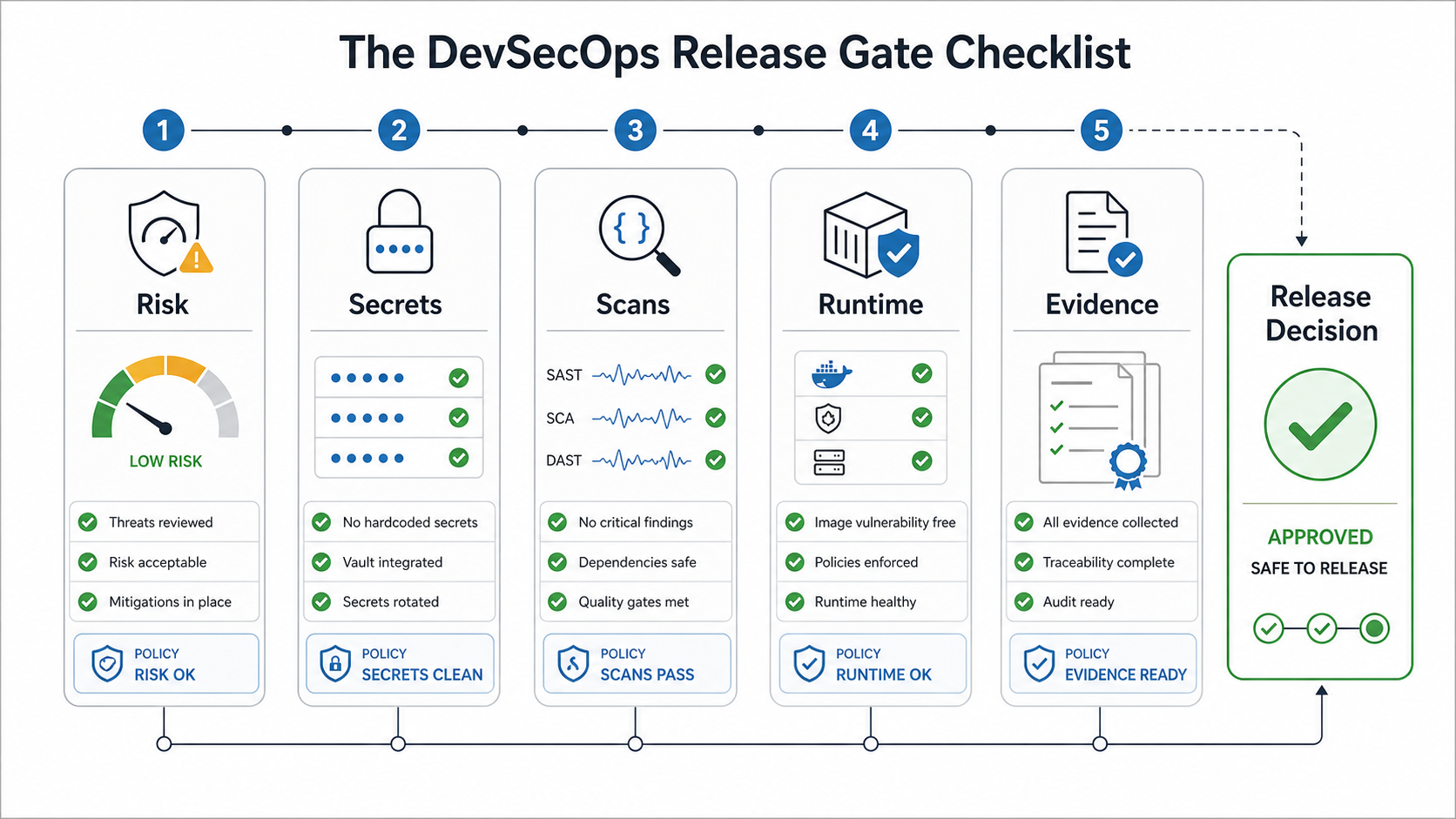
A release gate is not a meeting where everyone re-reads scanner output. It is a decision point with known criteria. Use a short gate for routine releases and a deeper gate for high-risk changes.
| Gate Area | Pass Criteria | Hold Criteria | Evidence To Keep |
|---|---|---|---|
| Risk triage | Change type and data exposure are understood | Unknown data impact or unreviewed privileged workflow | Risk note, ticket link, reviewer |
| Secrets | No active secrets in code, logs, or build output | Production credential found or rotation incomplete | Secrets scan result, rotation record |
| SAST and SCA | No critical findings above agreed threshold | Critical exploitable vulnerability or banned package | Scan summary, exception approvals |
| Container and IaC | Approved base images and compliant infrastructure config | Critical image issue, public exposure, weak IAM, missing encryption | Image scan, IaC scan, policy output |
| Runtime tests | Critical workflows and API security checks pass | Auth, authorization, payment, data, or admin issue | DAST/API result, smoke-test run |
| Rollback | Rollback, feature flag, or disable path is ready | No reversal path for risky change | Release note, rollback owner |
Software Supply Chain And Provenance Gates
Modern DevSecOps pipelines need one more checkpoint beyond scanner pass/fail status: can the team prove what was built, where it came from, who approved the risk, and how the artifact can be trusted later? That evidence matters for enterprise buyers, incident response, regulated launches, and any product that depends on open-source packages, container images, managed AI services, or third-party SDKs.
| Control | Where It Belongs | Release Decision | Evidence To Keep |
|---|---|---|---|
| SBOM generation | Build or release candidate | Hold if critical components are unknown or unsupported | SBOM file, dependency report, owner |
| Build provenance | CI build and artifact registry | Hold if the artifact was built outside the approved pipeline | Signed provenance, builder identity, commit reference |
| Package integrity | Dependency review and registry intake | Hold if package source, license, or maintainer risk is unclear for high-impact software | Package review, license note, exception record |
| AI-assisted code review | Pull request and secure coding review | Track or hold based on data exposure, generated-code risk, and reviewer confidence | Reviewer note, test coverage, sensitive-data check |
| Vendor and SaaS dependency review | Architecture and release gate | Hold when a vendor dependency affects auth, data, payment, regulated workflow, or uptime without an owner | Vendor risk note, SLA/security evidence, rollback plan |
Use SLSA-style provenance expectations when build integrity matters: record the source, builder, build steps, materials, artifact identity, and attestation location so a release can be traced back to the approved pipeline. CISA's 2025 SBOM minimum-elements update makes the same point for component transparency: an SBOM is useful only when teams can identify the product, supplier, component names, versions, identifiers, dependency relationships, author, timestamp, and tool context well enough to act during vulnerability triage. The release question is simple: if a package, image, SDK, AI-generated code path, or build runner is compromised tomorrow, can the team find affected releases and respond quickly?
For buyer-facing products, this is also a services decision. A DevSecOps review should connect pipeline controls with security testing services, QA automation testing services, cloud controls, and recovery planning so security proof is visible before the customer asks for it.
What To Block Vs What To Track
Not every security issue should fail a build. If the pipeline blocks on every low-confidence warning, developers learn to bypass the process. If it blocks on nothing, the process becomes theater. Define severity rules that reflect business risk.
Block the release for hardcoded production secrets, actively exploited critical vulnerabilities, unauthenticated access to sensitive data, broken authorization, missing rollback for high-risk changes, untrusted build artifacts, unknown critical dependencies, and infrastructure changes that expose private systems. Track and remediate medium issues, older dependencies without known exploitability, low-risk configuration warnings, and documentation gaps with SLA-based tickets.
For a new product or major refactor, include these rules in the delivery plan. A secure build is part of custom software development, not a separate phase after engineering is done.
A Practical 30-60-90 Day Rollout Plan
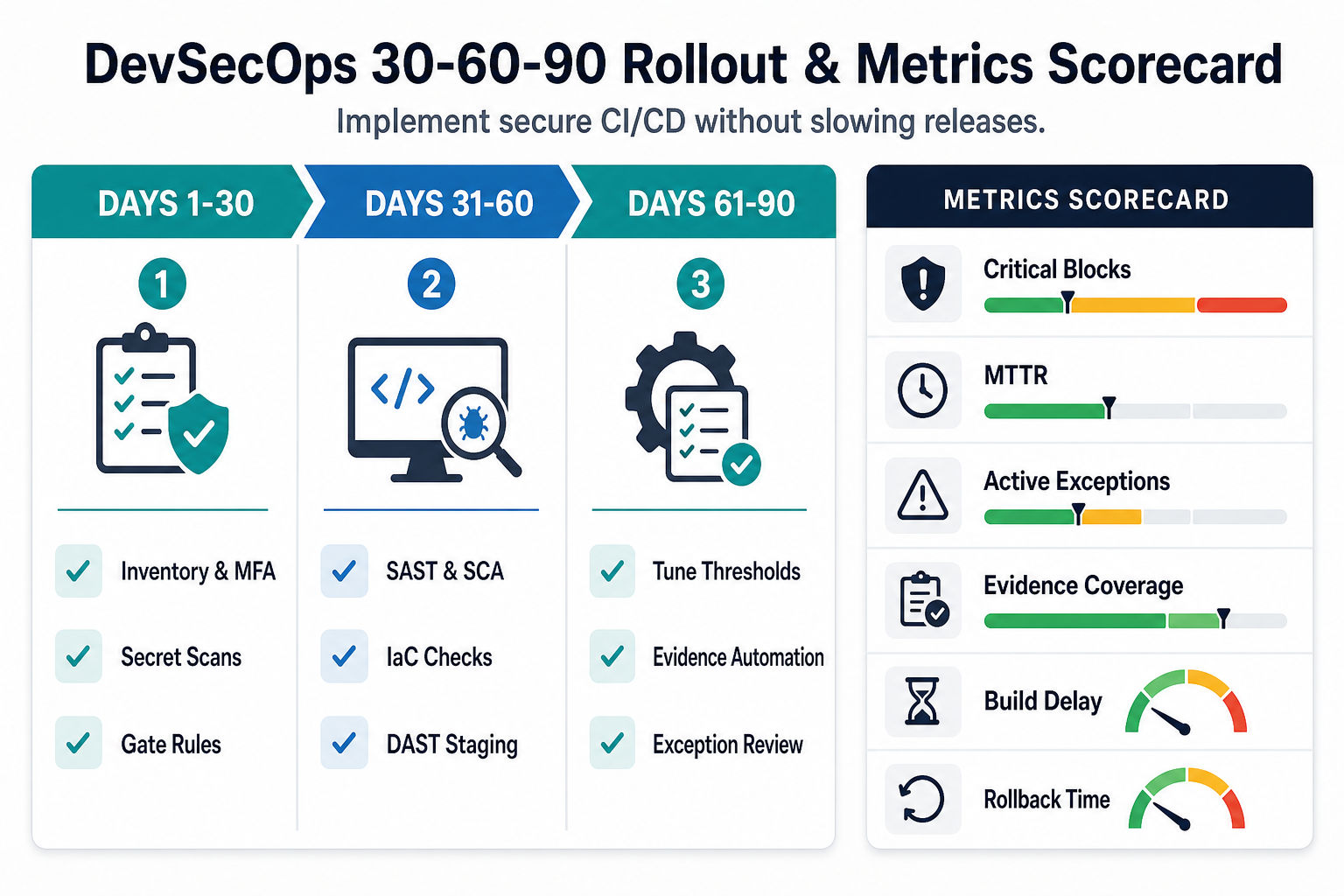
First 30 Days: Stabilize The Foundation
- Inventory repositories, CI workflows, package registries, environments, and deployment paths.
- Turn on MFA, branch protections, required reviews, and secret scanning.
- Pick severity definitions and exception rules.
- Create one evidence folder or release record template.
Days 31-60: Add Security Checks Where They Fit
- Add SAST and SCA to pull requests with practical thresholds.
- Add container and IaC checks to release candidates.
- Run DAST or API security checks against staging for critical flows.
- Start collecting SBOM, package provenance, and dependency evidence where customers, compliance teams, or enterprise security reviewers need it.
Days 61-90: Improve Governance And Speed
- Measure false positives, build duration, blocked releases, open exceptions, and time to remediate.
- Move noisy or slow checks to nightly runs when they do not need to block every commit.
- Automate release notes, SBOM storage, provenance records, and evidence collection.
- Review incidents and production defects, then add targeted checks for repeat failure modes.
Use cost planning for the rollout rather than guessing. The Custom Software Cost Estimator can help size the engineering, DevOps, QA, and remediation effort needed to make this checklist real.
Metrics That Show The Pipeline Is Working
A DevSecOps pipeline should improve security posture without hiding delivery problems. Track both protection and flow:
- Critical findings blocked before production.
- Mean time to remediate vulnerabilities by severity.
- Number of active risk exceptions and expired exceptions.
- Percentage of releases with complete evidence packages, SBOMs, and approved provenance records.
- Build duration added by security checks.
- False-positive rate by tool or rule set.
- Rollback time and failed deployment rate.
If the metrics show the pipeline is slow but not catching meaningful issues, tune the rules. If the pipeline catches issues but teams ignore them, fix ownership. If the pipeline produces evidence nobody can explain, simplify the release gate.
Common DevSecOps Mistakes To Avoid
- Buying tools before defining gates. Tools cannot decide which risk is acceptable for your product, customers, or contracts.
- Running every scan on every commit. Fast checks belong early; deeper checks belong before release, nightly, or on high-risk changes.
- Ignoring secrets after detection. A leaked secret needs rotation and blast-radius review, not only removal from code.
- Approving exceptions forever. Exceptions should have an owner, reason, compensating control, and expiry date.
- Separating DevOps and security ownership. The release owner, security reviewer, and engineering lead should share the same evidence trail.
- Forgetting vendor and partner controls. If a vendor influences architecture, cloud, or release process, use a custom software development company checklist to validate how they handle scope, security, cost, and delivery governance.
How NextPage Helps With DevSecOps Pipeline Reviews
NextPage helps software teams turn a loose security wish list into an operating release pipeline. A secure release pipeline review typically covers repository and CI/CD access, secrets handling, scan placement, cloud and infrastructure controls, runtime checks, release-gate criteria, evidence collection, and a phased implementation roadmap.
If your team is preparing a regulated launch, modernizing an older system, or adding security controls to a fast-moving product, start with the question this checklist is built around: what should block a release, what should create a remediation ticket, and what evidence will prove the decision later?
Request a secure release pipeline review to map your current CI/CD process, identify the highest-risk gaps, and sequence DevSecOps improvements without slowing every deployment.