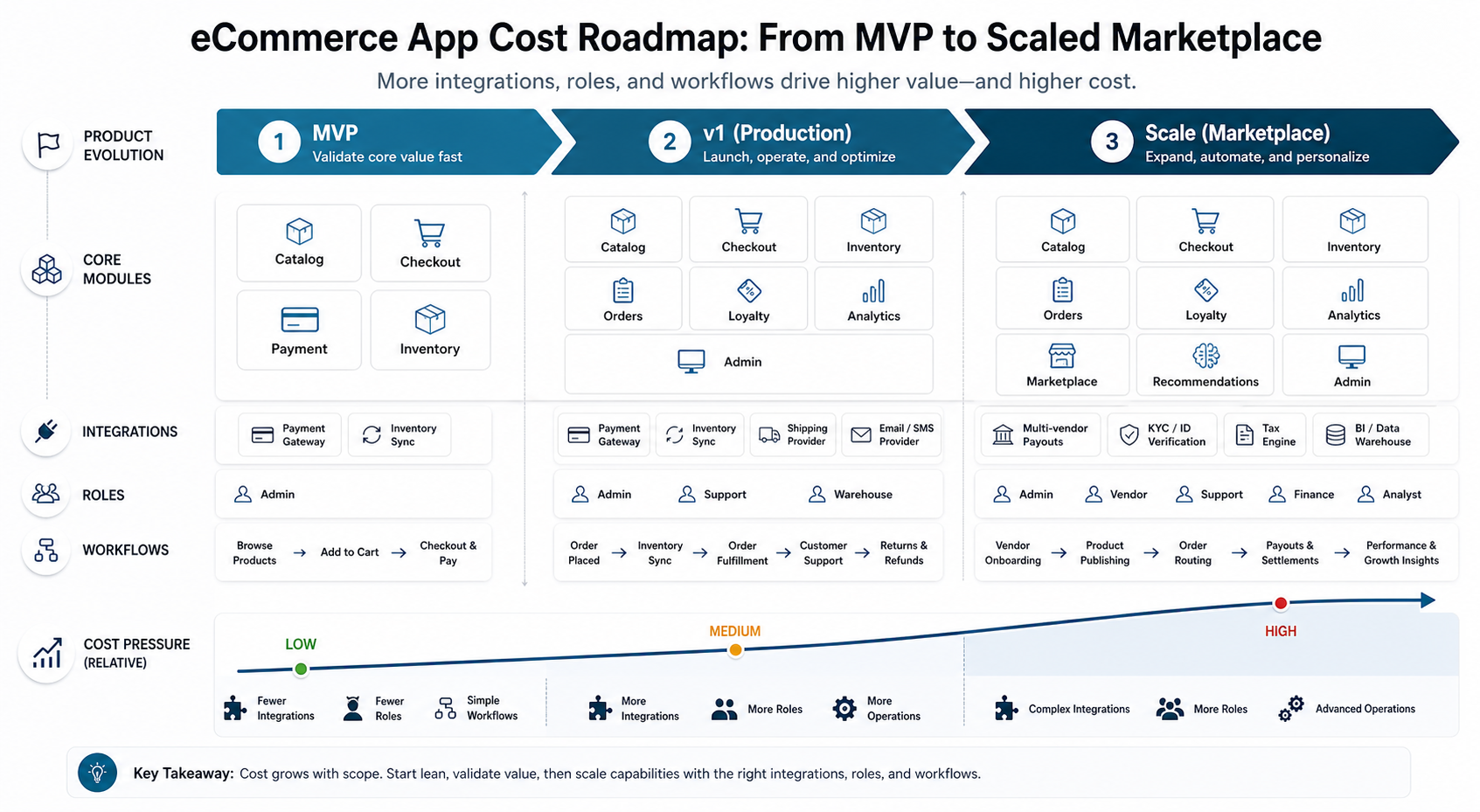

eCommerce app development cost is controlled by the commerce workflow behind the screens: catalog depth, checkout risk, payment methods, inventory accuracy, admin operations, integrations, and marketplace roles. A lean mobile storefront can be planned as a focused MVP, while a multi-vendor commerce platform with vendor payouts, ERP/POS sync, loyalty, returns, fraud controls, and operational dashboards needs a larger product, backend, QA, and support budget.
For planning in 2026, use three working bands. A commerce MVP usually proves product discovery, cart, checkout, order confirmation, and basic admin. A production v1 adds inventory rules, promotions, analytics, notifications, returns, support visibility, and release-grade QA. A scaled platform adds marketplace roles, multi-warehouse logic, personalization, ERP/POS integrations, and stronger automation.
If you already know the product type and must-have workflows, use the custom software cost estimator to convert scope into a directional budget, timeline, and likely team shape before asking for a full proposal.
Quick Answer: eCommerce App Development Cost
A realistic ecommerce app estimate starts with the product model, not the number of screens. A single-brand D2C store, B2B ordering portal, grocery delivery app, subscription product, and multi-vendor marketplace each need different data models, user roles, payment flows, operations, and support processes.
| Build Type | Typical Scope | Directional Planning Range | Timeline Signal |
|---|---|---|---|
| Commerce MVP | Catalog, PDP, cart, checkout, payment gateway, customer accounts, order confirmation, basic admin, and analytics | $25,000-$70,000 | Often 8-14 weeks when integrations are narrow |
| Production v1 | Polished mobile or web app, inventory rules, coupons, notifications, order management, returns, dashboards, and support tools | $70,000-$180,000 | Often 3-6 months depending on backend and QA depth |
| Marketplace or Advanced Platform | Vendor onboarding, commissions, multi-warehouse inventory, ERP/POS sync, loyalty, recommendations, fraud checks, and advanced admin | $180,000-$400,000+ | Often 6-12 months for enterprise or multi-vendor complexity |
These are planning ranges, not fixed quotes. Current public ecommerce cost guides still vary widely because some count a mobile app on top of an existing Shopify store, while others describe a custom marketplace backend or headless commerce platform. The reliable estimate is the one that names workflows, integrations, release risk, and operating responsibilities.
eCommerce App Cost by Scope
Scope is the main budget lever. A basic storefront can reuse more standard commerce patterns. A production commerce product needs performance, observability, admin tooling, payment reconciliation, error handling, and customer-support visibility. A marketplace adds multiple sellers, money movement, disputes, commissions, payout timing, and role-specific dashboards.
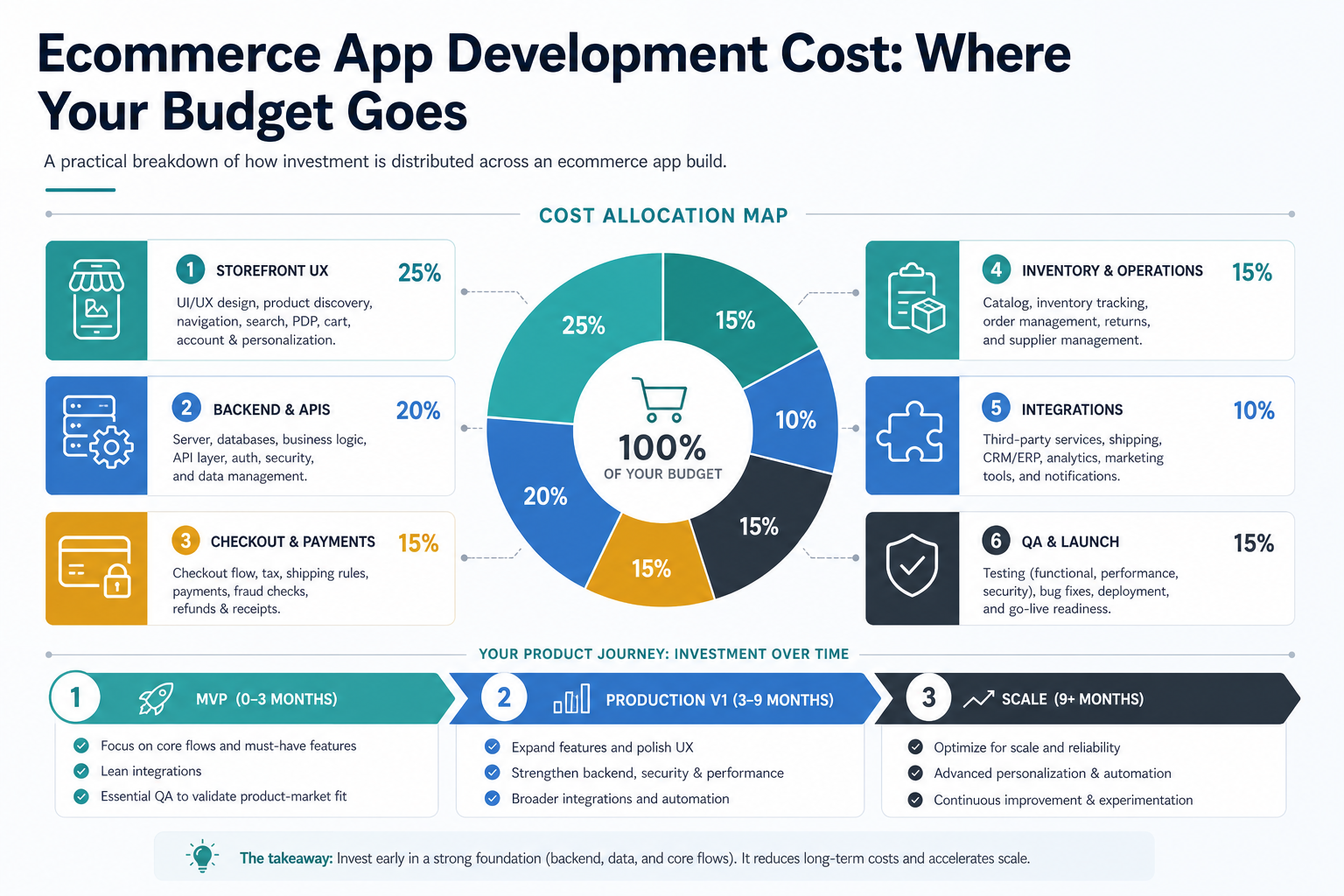
A useful planning model separates customer-facing experience from operational systems. Storefront UX, backend APIs, checkout and payments, inventory operations, integrations, and QA all need budget. Underfunding backend, admin, or QA work may keep the first quote low but often creates higher support cost after launch.
Features That Drive Budget
Commerce features look familiar, but implementation depth varies sharply. A product catalog can be a simple table with images, or it can include variants, bundles, filters, merchandising rules, inventory thresholds, SEO pages, import tools, moderation, and search tuning. Checkout can be a basic gateway form, or it can include coupons, wallets, saved addresses, shipping rules, taxes, invoices, abandoned-cart recovery, and fraud handling.
| Feature Area | Lower-Cost Version | Higher-Cost Version | Why It Changes Cost |
|---|---|---|---|
| Catalog | Manual products, categories, images, and prices | Variants, bundles, bulk import, rich filters, merchandising, and search ranking | Catalog logic affects data model, admin UX, and performance |
| Cart and checkout | Basic cart, one gateway, simple address flow | Coupons, wallets, COD, split payments, taxes, fraud rules, and saved checkout | Checkout has many edge cases and revenue risk |
| Inventory | Manual stock updates | ERP/POS sync, multi-warehouse stock, reservations, low-stock rules, and backorders | Inventory mistakes create operational and customer-support costs |
| Orders and returns | Order list and status updates | Routing, fulfillment, shipment tracking, returns, refunds, exchanges, and support notes | Post-purchase workflows need admin, customer, and integration logic |
| Loyalty and promotions | Coupon codes and simple discounts | Points, tiers, referrals, personalized offers, campaign analytics, and segmentation | Marketing logic multiplies QA scenarios |
| Marketplace | Single seller with internal admin | Vendor onboarding, catalogs, payouts, commissions, disputes, SLAs, and seller dashboards | Multiple roles and money flows make the platform much larger |
A practical first release should avoid pretending every commerce workflow must be automated from day one. Start with the workflows that create orders, protect revenue, and reduce manual operations. Use supporting content such as NextPage's guide to e-commerce app development features to sanity-check the feature list before it becomes a build estimate.
Platform Choice: Mobile, Web, PWA, or Both?
Many teams assume ecommerce means native mobile first. That is not always true. A responsive web app or PWA can launch faster when the first goal is catalog discovery, checkout, and admin operations. Native or cross-platform mobile becomes more valuable when repeat buying, push notifications, camera workflows, location behavior, offline usage, or app-store presence directly affect conversion.
Cross-platform frameworks can be a strong fit for commerce because catalog browsing, carts, accounts, and checkout often share most logic across iOS and Android. Native development may be justified for heavy AR try-on, advanced camera use, deep platform integrations, or performance-sensitive experiences. The right answer comes from buyer behavior and the operating model, not a generic technology preference.
For NextPage projects, mobile app development planning usually includes the backend, admin console, analytics, integrations, QA, and release process. If the product needs a complex admin portal, vendor console, or operations dashboard, the estimate should also include the web app development layer instead of treating it as an afterthought.
Payment and Checkout Costs
Payment gateway work is not just adding a payment button. A production commerce app needs successful payment handling, failed payment recovery, refunds, webhooks, order reconciliation, security, invoices, payment-method coverage, and support visibility. In India, Razorpay's current public pricing still frames standard payment gateway usage around a 2% platform fee plus GST, while Stripe India and other providers vary by payment method, country, and custom pricing terms.
Payment costs affect both build budget and operating margin. A low transaction rate is not useful if checkout success drops, reconciliation is weak, or support teams cannot debug failed orders. The estimate should include gateway integration, webhook testing, refund flows, settlement reporting, failed-payment handling, and the admin tools needed to resolve payment issues.
Integrations and Operations
Integrations are where many ecommerce estimates expand. A standalone store with internal admin is straightforward. A connected commerce platform may need Shopify, WooCommerce, ERP, POS, PIM, CRM, warehouse, shipping, tax, invoice, SMS, email, WhatsApp, analytics, CDP, and support desk integrations. Each external system adds credentials, rate limits, data mapping, retries, failure states, monitoring, and support procedures.
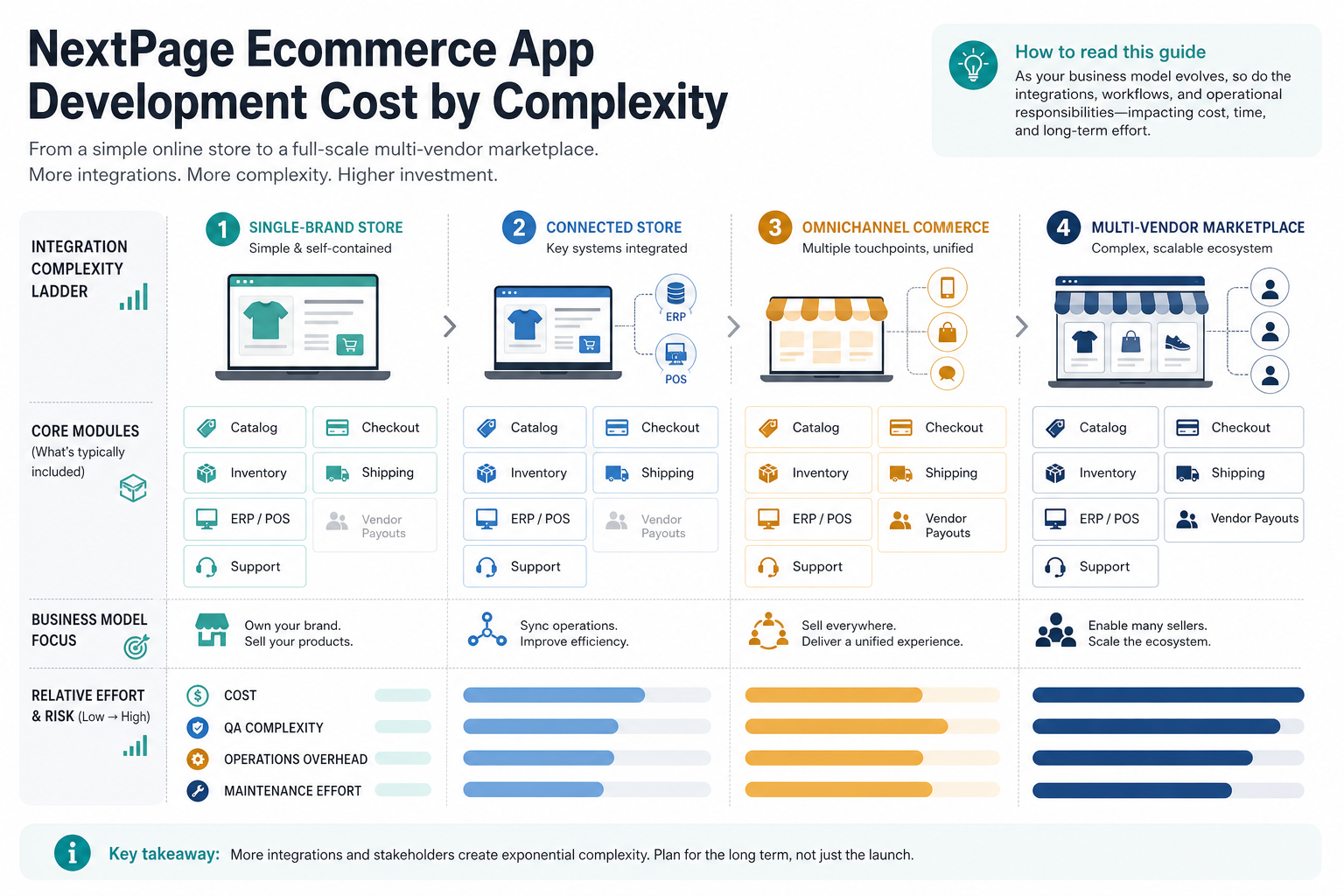
Inventory and order management deserve special attention. A product can look simple to customers while requiring complex back-office logic: stock reservation, cancellation windows, partial fulfillment, delayed shipping, returns, exchanges, refunds, customer notifications, and exception handling. Delivery-heavy products can borrow planning lessons from delivery app order-flow planning, where status changes and fulfillment visibility are part of the core product.
For a real-world commerce-style operating model, the VenueCart portfolio case study shows why checkout, orders, vendor tools, dashboards, notifications, and admin workflows need to be designed as one product system.
MVP Roadmap for an eCommerce App
A good ecommerce MVP is not the smallest possible shopping app. It is the smallest release that can process real orders, teach the team where buyers drop off, and keep operations manageable. That means the MVP needs enough admin, analytics, and support visibility to run the business after launch.
| Release | Include | Defer | Success Measure |
|---|---|---|---|
| MVP | Core catalog, product detail pages, cart, checkout, payment, order confirmation, basic admin, analytics, and support email | AI personalization, complex loyalty, multi-vendor payouts, deep ERP sync | Completed orders, checkout conversion, support load, repeat purchase signal |
| Version 1 | Inventory rules, coupons, notifications, returns, dashboards, better search, customer accounts, and richer admin controls | Multi-region complexity, advanced automation, marketplace disputes | Conversion lift, order accuracy, repeat purchase, admin time saved |
| Scale | Marketplace roles, ERP/POS integration, loyalty, segmentation, personalization, fulfillment automation, and advanced reporting | Anything not tied to margin, growth, or operating leverage | Gross merchandise value, retention, fulfillment speed, support cost per order |
If the feature list is getting crowded, use the MVP Scope Builder to separate first-release essentials from later-phase improvements. Then compare the scope against NextPage's older primer on e-commerce mobile apps. The useful question is still simple: what makes the buying journey easier, and what makes operations easier after the order is placed?
Hidden Costs to Plan For
Early estimates often miss the costs that keep the app healthy after launch. Hosting, image storage, search infrastructure, monitoring, payment gateway fees, SMS/email usage, app store accounts, OS updates, dependency maintenance, bug fixing, security patches, analytics review, and customer-support tooling all belong in the first-year plan.
Maintenance is not optional for commerce. Payment providers change rules, mobile operating systems release updates, third-party APIs fail, products change, promotions expire, and customer expectations rise. A sensible plan reserves budget for post-launch support and conversion improvements, not only the initial build.
Build Custom, Adapt a Platform, or Start Headless?
Not every ecommerce app should start as fully custom software. If the business model is a standard storefront and differentiation is mostly brand, catalog, and marketing, adapting Shopify, WooCommerce, or another commerce platform may reduce launch cost. If differentiation sits in marketplace rules, B2B pricing, approval workflows, subscriptions, vendor operations, fulfillment logic, or custom integrations, a custom or headless approach is easier to defend.
| Approach | Best Fit | Cost Advantage | Watchout |
|---|---|---|---|
| Platform theme or app | Standard D2C storefronts and simple catalogs | Lower initial build cost | Customization limits and app/plugin dependency |
| Headless frontend | Brands needing custom UX with an existing commerce engine | Reuse backend commerce capabilities | Integration and performance ownership shift to the build team |
| Custom commerce platform | Marketplaces, B2B portals, complex operations, or differentiated workflows | Better long-term fit for unique workflows | Higher discovery, engineering, QA, and maintenance scope |
The decision should be made during discovery, before UI production starts. Changing from a platform extension to a custom commerce backend mid-project is usually more expensive than choosing the right architecture early.
How to Reduce eCommerce App Development Cost
- Start with one commerce model. Single-brand D2C, B2B ordering, subscription commerce, grocery delivery, and marketplace products should not share the same MVP.
- Keep version-one integrations narrow. One payment gateway and one inventory source are easier to stabilize than a full omnichannel stack.
- Use admin tools before automation. Manual review is often cheaper than custom automation until order volume proves the need.
- Choose cross-platform mobile or PWA when it fits. Native builds should be justified by user behavior or platform-specific needs.
- Defer marketplace complexity. Vendor onboarding, commissions, payouts, disputes, and seller dashboards can double the operational scope.
- Measure checkout early. Cart abandonment, payment failures, and support tickets reveal which improvements matter most.
How NextPage Estimates Commerce Apps
NextPage estimates ecommerce products by mapping the business workflow first: product model, buyer journey, admin roles, checkout, inventory, order operations, integrations, analytics, launch platform, and post-launch support. Then we separate the MVP from the workflows that belong in v1 or scale.
That matters because ecommerce app development cost is rarely controlled by UI alone. The serious budget drivers are money movement, data accuracy, fulfillment, returns, support, and the administrative system behind the storefront. A clear workflow map makes the estimate more defensible and reduces mid-project surprises.
Bring the planned product type, platform preference, must-have integrations, catalog size, payment methods, shipping model, admin roles, and launch deadline. From there, NextPage can turn a broad ecommerce app idea into a practical release roadmap and budget range.