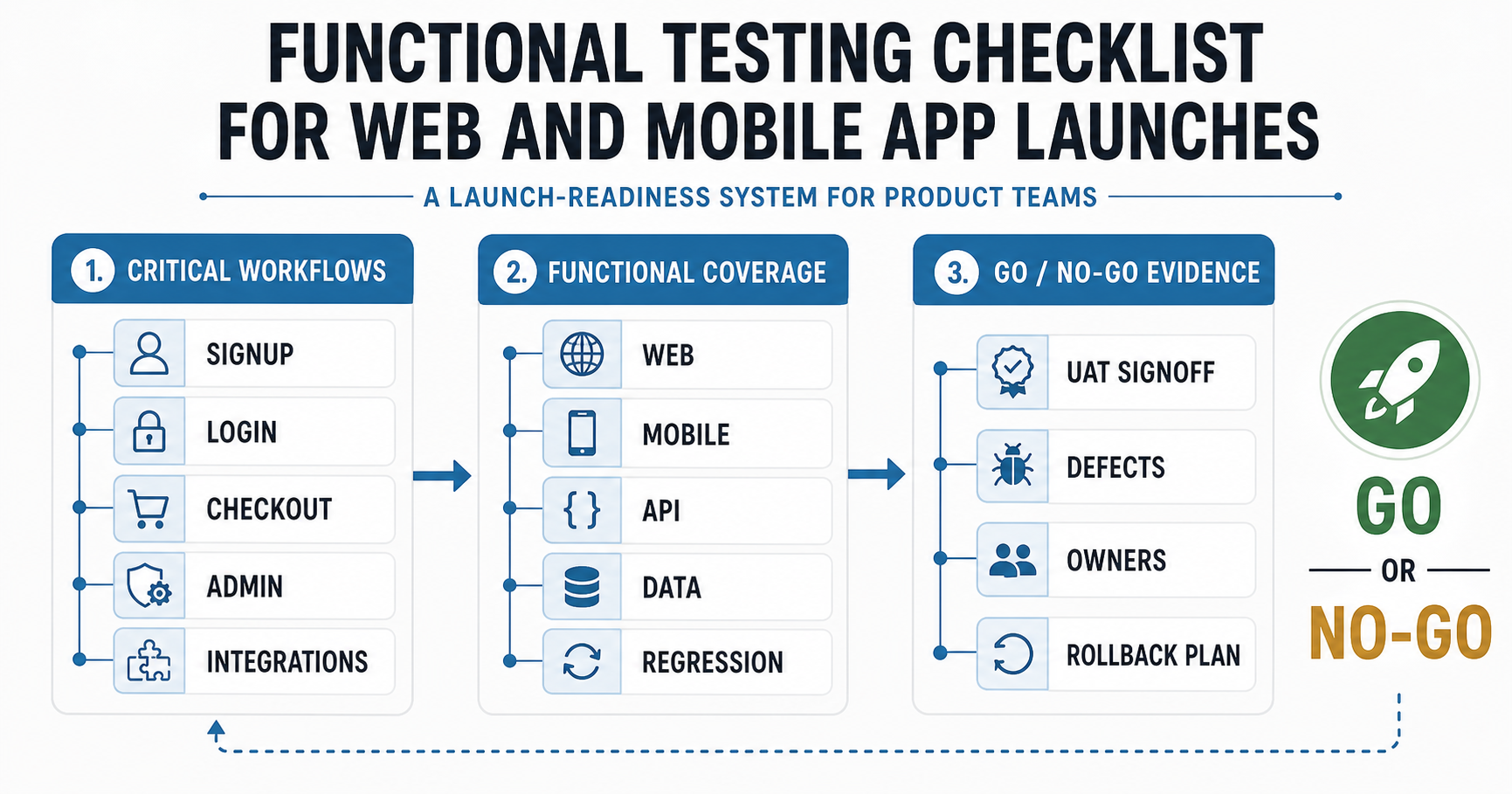

Quick Answer: What Should A Functional Testing Checklist Cover?
A 2026 functional testing checklist should prove that the product works for the people, roles, workflows, data states, integrations, supported browsers, real devices, and failure paths that matter before launch. For a web or mobile app, that means more than clicking every button. It means testing the business-critical journeys end to end: signup, login, permissions, onboarding, search, forms, checkout, payments, notifications, reports, integrations, error handling, and the handoff between systems.
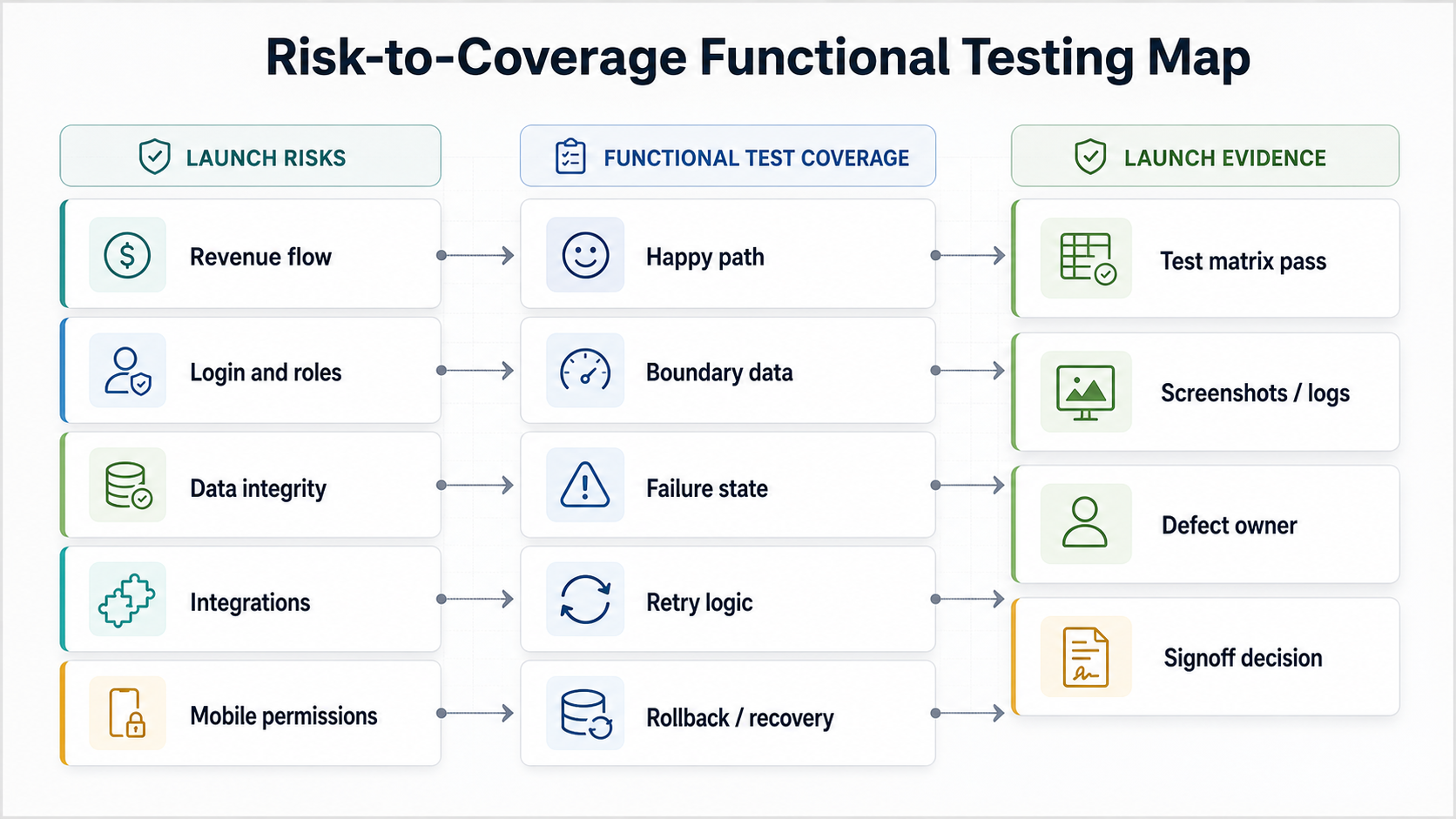
The fastest way to make functional testing useful is to connect every test to a launch risk and a release decision. If a broken flow would stop revenue, block onboarding, corrupt data, expose the wrong information, or overload support after release, it belongs on the checklist. If a test only proves a cosmetic detail that does not change the user outcome, it can wait until the critical workflows are covered. Treat this as a launch decision system, not a generic QA inventory: every critical workflow should have an owner, evidence, defect threshold, rollback rule, and final signoff path.
Start With The Workflows That Must Not Break
Functional testing should start from real user journeys, not from the screen list alone. A screen can look correct while the workflow behind it fails: a user submits a form but the CRM record is incomplete, a payment succeeds but the confirmation email never sends, or an admin changes a role but the user still sees restricted data.
Before the team writes detailed test cases, rank the workflows by business impact, regulatory or security exposure, support volume, and revenue dependency. For many apps, the highest-risk flows are account creation, authentication, role-based access, checkout or payment, profile changes, booking or ordering, document upload, notifications, search, dashboards, and admin actions. NextPage already uses this risk-first approach in its pre-launch QA checklist, but this post narrows the focus to functional behavior, acceptance evidence, and the go/no-go threshold that release owners can defend.
If scope is still moving, separate must-pass launch workflows from backlog polish before QA begins. The custom software development cost guide is a useful companion because the same workflow complexity that increases build effort also increases test coverage and regression effort.
| Workflow Type | Functional Risk | Checklist Question | Evidence To Capture |
|---|---|---|---|
| Authentication | Users cannot enter, reset access, or remain secure | Can every supported role sign up, log in, recover access, and log out safely? | Role matrix, reset email, MFA result, session log |
| Revenue flow | Orders, subscriptions, payments, or invoices fail | Can the user complete the transaction and receive the correct system record? | Order ID, payment status, receipt, admin record |
| Operational workflow | Teams cannot process the work the app was built for | Does each status, approval, assignment, and handoff behave as expected? | Status history, owner, audit trail, exception result |
| Admin action | Wrong changes affect customers or internal users | Are permissions, audit records, and validation rules enforced? | Permission screenshots, audit row, restricted-access proof |
| Integration | External systems receive incomplete or incorrect data | Does the app handle success, delay, duplicate, and failure responses? | Payload sample, webhook log, retry result, reconciliation note |
Build A Functional Test Matrix Before Writing Test Cases
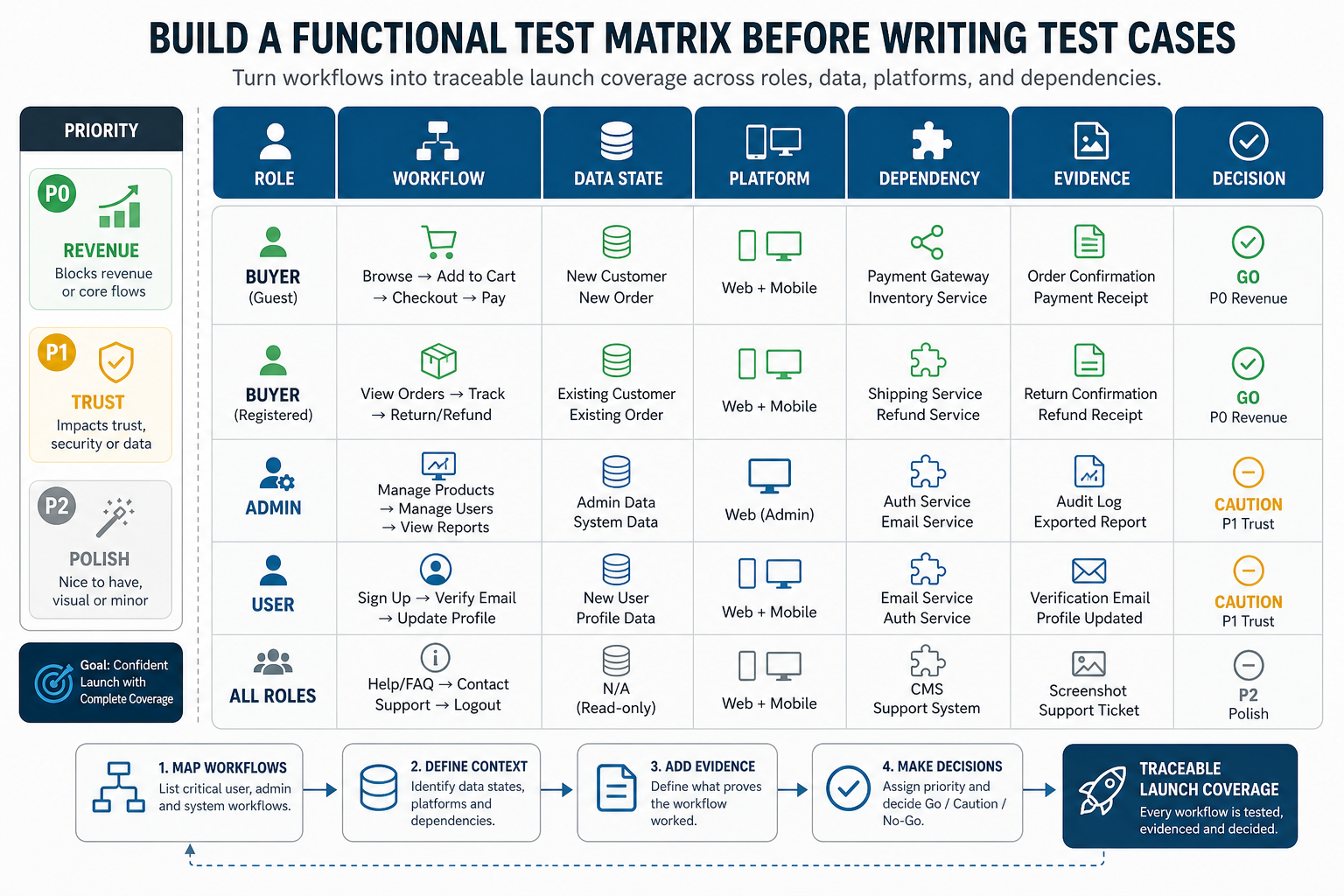
A test matrix keeps functional testing from becoming a loose collection of tickets. It shows the relationship between roles, workflows, devices, data states, dependencies, expected results, evidence, and launch decisions. This is especially important when a founder, product manager, QA lead, and engineering team all need to agree on what is ready.
The matrix should include at least seven dimensions: user role, workflow, precondition, test data, platform or device, expected result, and evidence. For complex apps, add browser/device, API dependency, payment mode, network state, feature flag, localization, accessibility-impacting states, and rollback rule. The goal is not bureaucracy. It is traceability: when someone asks why the app is ready, the team can show which high-risk flows passed and what remains open.
Web App Functional Testing Checklist
Web app functional testing should cover the full browser-based customer and admin experience. For teams planning web app development, QA should be scoped with the product roadmap instead of treated as a final browser pass. Start with the supported browsers and screen sizes, then validate each workflow with realistic user data. Pay special attention to forms, search, filters, dashboards, file uploads, role permissions, session behavior, and integrations that depend on cookies, redirects, or third-party scripts. For SaaS, FinTech, and workflow-heavy products, pair functional coverage with the account and role mapping used in a web application penetration testing checklist so QA does not miss sensitive states that also matter for security review.
- Confirm that signup, login, password reset, email verification, MFA, logout, and session timeout work across supported browsers.
- Test every required form with valid data, missing data, boundary values, duplicate submissions, and server-side validation errors.
- Verify search, filters, sorting, pagination, saved views, exports, and report totals against expected records.
- Check admin actions, approvals, role changes, and restricted pages with each permission level.
- Validate file uploads for size, type, preview, replacement, download, deletion, and failed upload recovery.
- Test payment, booking, quote, checkout, or lead forms through success, decline, abandoned, duplicate, and retry paths.
- Confirm notification triggers for email, SMS, in-app messages, or webhooks without sending duplicates.
- Review error pages, empty states, loading states, expired links, blocked access, and retry messages.
For business apps, also verify that each successful action creates the correct downstream record. A completed form may need a CRM lead, support ticket, invoice, dashboard event, or admin alert. Functional QA is only complete when the user-facing result and the operational record both match the requirement.
Mobile App Functional Testing Checklist
Mobile functional testing has the same workflow discipline as web QA, but the failure modes are different. A mobile app may work in the simulator and still fail on older OS versions, small screens, permission-denied states, push notification paths, deep links, app restarts, or poor network conditions. If the app is part of a broader mobile app development engagement, QA should be planned before the store submission window, not after the build is feature-complete.
- Test supported iOS and Android versions, device classes, screen sizes, notch/safe-area behavior, orientation rules, background/resume behavior, and permission changes after first launch.
- Verify onboarding, login, biometric access, password reset, account switching, and session recovery after app restart.
- Check permissions for camera, location, contacts, notifications, photos, Bluetooth, microphone, and storage when allowed, denied, or changed later.
- Validate offline, slow network, airplane mode, API timeout, retry, queued action, and sync conflict behavior.
- Test push notifications, deep links, universal links, referral links, and app-to-web handoffs.
- Run payment, subscription, in-app purchase, booking, order, upload, and chat workflows on real devices when those flows matter to revenue or support.
- Confirm analytics, crash reporting, feature flags, remote config, privacy/consent prompts, and release-channel toggles fire correctly.
- Review store-readiness items such as app permissions, screenshots, support links, privacy labels, and release notes.
The Mobile App Development RFP Checklist is a useful companion when you need vendor evidence for device coverage, store-readiness support, crash monitoring, and post-launch maintenance. For release-specific coverage, compare this section with the mobile app QA and launch checklist and the mobile app testing checklist before freezing the device matrix.
Validate Integrations, Data States, And Business Rules
Many functional defects happen at system boundaries. A user action may look successful in the app while the CRM, ERP, payment gateway, email provider, inventory system, analytics platform, or internal dashboard receives the wrong payload. Integration testing should therefore be part of the functional checklist, not a separate afterthought.
Map each integration to the user workflow that triggers it. Then test success, failure, duplicate, retry, delayed callback, partial response, and permission-denied scenarios. For payment and order flows, reconcile the app state, payment provider state, invoice or receipt, notification, and admin view. For CRM or helpdesk flows, compare field mapping, lead source, owner, status, tags, consent, and duplicate handling.
| Integration Area | Functional Test | Evidence To Keep |
|---|---|---|
| Payment gateway | Success, decline, retry, timeout, refund, webhook replay | Transaction ID, app order status, receipt, admin record |
| CRM or helpdesk | Lead or ticket creation, field mapping, duplicate handling | Created record, payload sample, owner/status match |
| Notifications | Email/SMS/push trigger, template variables, unsubscribe rules | Message sample, event log, recipient and timing |
| Analytics | Conversion event, funnel step, source attribution, consent state | Event log, dashboard check, consent evidence |
| Admin dashboard | Data totals, filters, exports, approval actions | Expected record set and exported output |
Regression And Automation: What To Run Before Every Release
Regression testing protects already-working value from new changes. The mistake is trying to automate everything at once. Start with a lean regression pack for the workflows that create revenue, customer trust, or operational continuity. Then automate the flows that are stable, repeated often, and expensive to test manually.
A practical 2026 release regression pack usually includes smoke tests for login and navigation, critical path tests for transaction or workflow completion, API contract checks for integrations, permission checks for sensitive roles, and a small set of data validation tests. Keep the pack useful by pairing automated smoke and regression checks with managed test data, emulator coverage, real-device validation for revenue or permission-heavy mobile flows, and manual UAT for workflows where stakeholder judgment still matters. Exploratory testing still matters for new features, edge cases, interrupted sessions, network changes, and usability gaps that scripted tests miss.
When the team is deciding what to automate, estimate the value of saved regression time and reduced defect leakage. NextPage’s test automation ROI guide explains how to prioritize automation around release risk instead of tool excitement.
UAT And Launch Evidence: What Product Teams Should Sign Off
User acceptance testing should prove that the product supports the real business process, not just that QA can execute test cases. Give stakeholders focused scenarios with realistic accounts, roles, data, and acceptance criteria. Ask them to validate workflow fit, language, approvals, reports, exception handling, and support readiness.
- Each critical workflow has an owner who signs off the expected behavior.
- Known defects are ranked by launch risk, workaround, owner, and fix date.
- Open issues have a launch decision: block, fix before release, accept with workaround, or move to backlog.
- Support, operations, sales, or admin teams know what will change on launch day.
- Rollback criteria and escalation contacts are clear before production release.
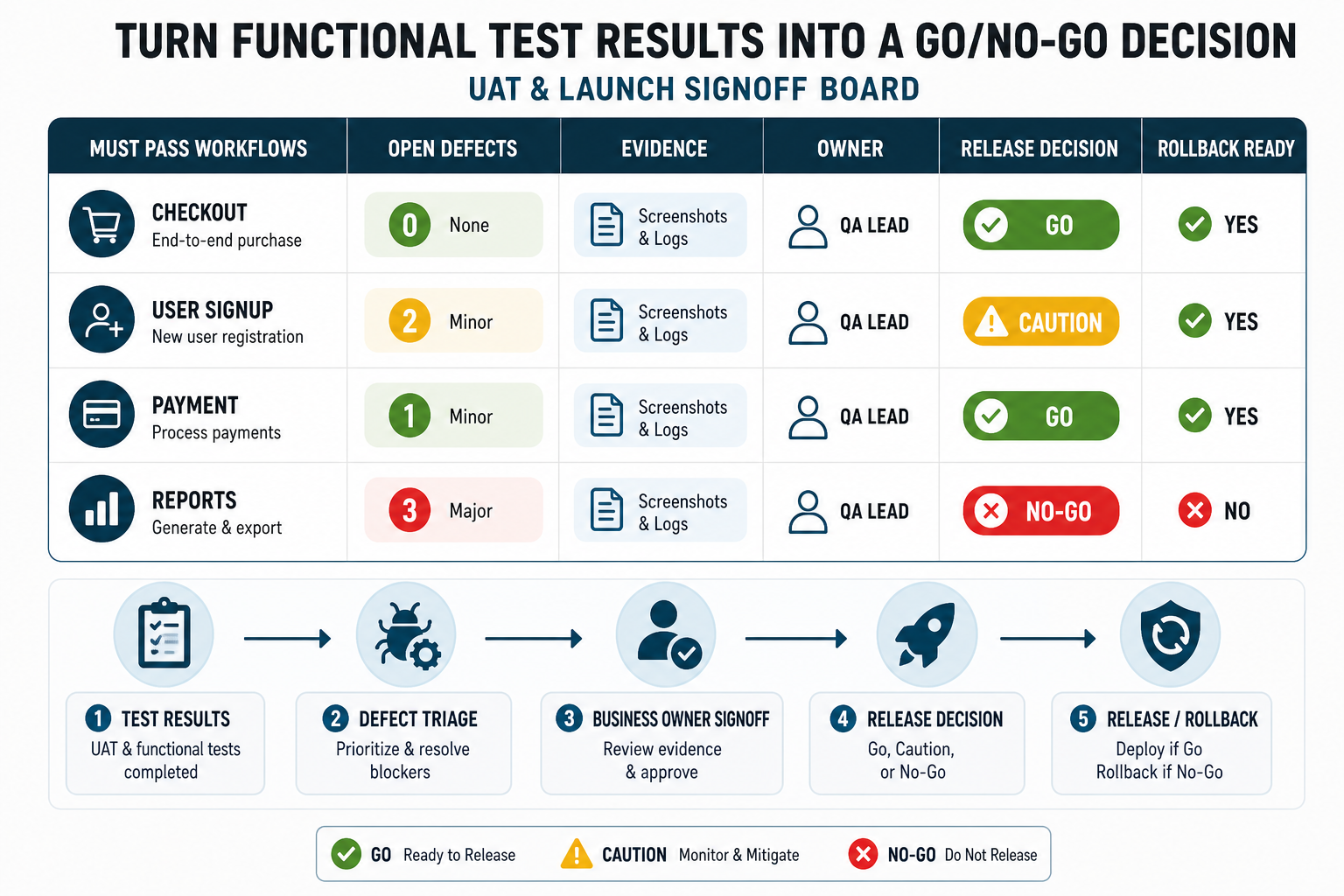
- QA evidence includes test matrix status, screenshots or logs for critical flows, defect summary, and final signoff.
Do not treat UAT as a ceremonial final meeting. If stakeholders find workflow gaps in UAT, that evidence should change the launch decision. A checklist is only useful when it gives the team permission to delay or narrow a release that is not ready.
Turn Functional Test Results Into A Go/No-Go Decision
A functional testing checklist should end with a decision record. Group remaining issues into four buckets: block launch, fix before release, accept with workaround, or move to backlog. Each bucket needs an owner, evidence, customer impact note, rollback rule, and date for review.
Use one release owner for the final call, but require evidence from product, QA, engineering, support, and operations. If a defect affects revenue, permissions, data integrity, payments, or customer communication, do not hide it inside a long bug list. Pull it into the signoff board so the launch decision is visible.
After Launch: Turn Functional Testing Into A Maintenance Habit
Functional testing does not end on launch day. New operating system versions, browser changes, API updates, payment-provider changes, analytics changes, and support feedback can all break important flows after release. Keep the launch checklist as the seed for ongoing maintenance: monitor defects, update regression coverage, review failed support cases, and retest workflows affected by product changes. A role-heavy product such as NextPage’s FieldIQ portfolio case study shows why permissions, mobile workflows, media paths, and admin operations need recurring functional checks after launch.
Plan the recurring QA budget alongside hosting, support, cloud, security, and improvement work. The software maintenance cost guide explains why post-launch stability requires ongoing funding, not only one final QA pass before go-live.
How NextPage Can Help
NextPage helps product teams turn launch risk into a practical QA plan: workflow mapping, test matrix design, manual testing coverage, regression planning, automation priorities, release evidence, and post-launch monitoring. The goal is not a giant checklist for its own sake. The goal is a focused launch decision backed by evidence.
If you are preparing a web or mobile app release, a custom software development partner can turn product scope, integration risk, and QA effort into a practical release plan before the final sprint. The Custom Software Cost Estimator can help frame the build and support budget, and a functional testing review can turn that scope into a release-readiness checklist your team can actually use.