
IT process automation is the disciplined use of software to run repeatable IT and operations work with less manual effort, fewer handoffs, and clearer accountability. The goal is not to automate every task. The goal is to remove avoidable delay from the work that is predictable enough to trust and valuable enough to measure.
For IT leaders, the practical question is where to start. A password reset flow, alert triage rule, invoice reconciliation step, cloud provisioning request, or customer escalation workflow may all be automation candidates, but they do not need the same pattern. Some need a script. Some need a workflow engine. Some need integration middleware. A smaller set may need a supervised AI agent that can reason over context, call tools, and escalate exceptions.
If your team has a backlog of manual work but no clear first candidate, start with the Workflow Automation Opportunity Finder. It helps rank workflows by repetition, data quality, integration access, risk, and expected savings before you commit engineering time.
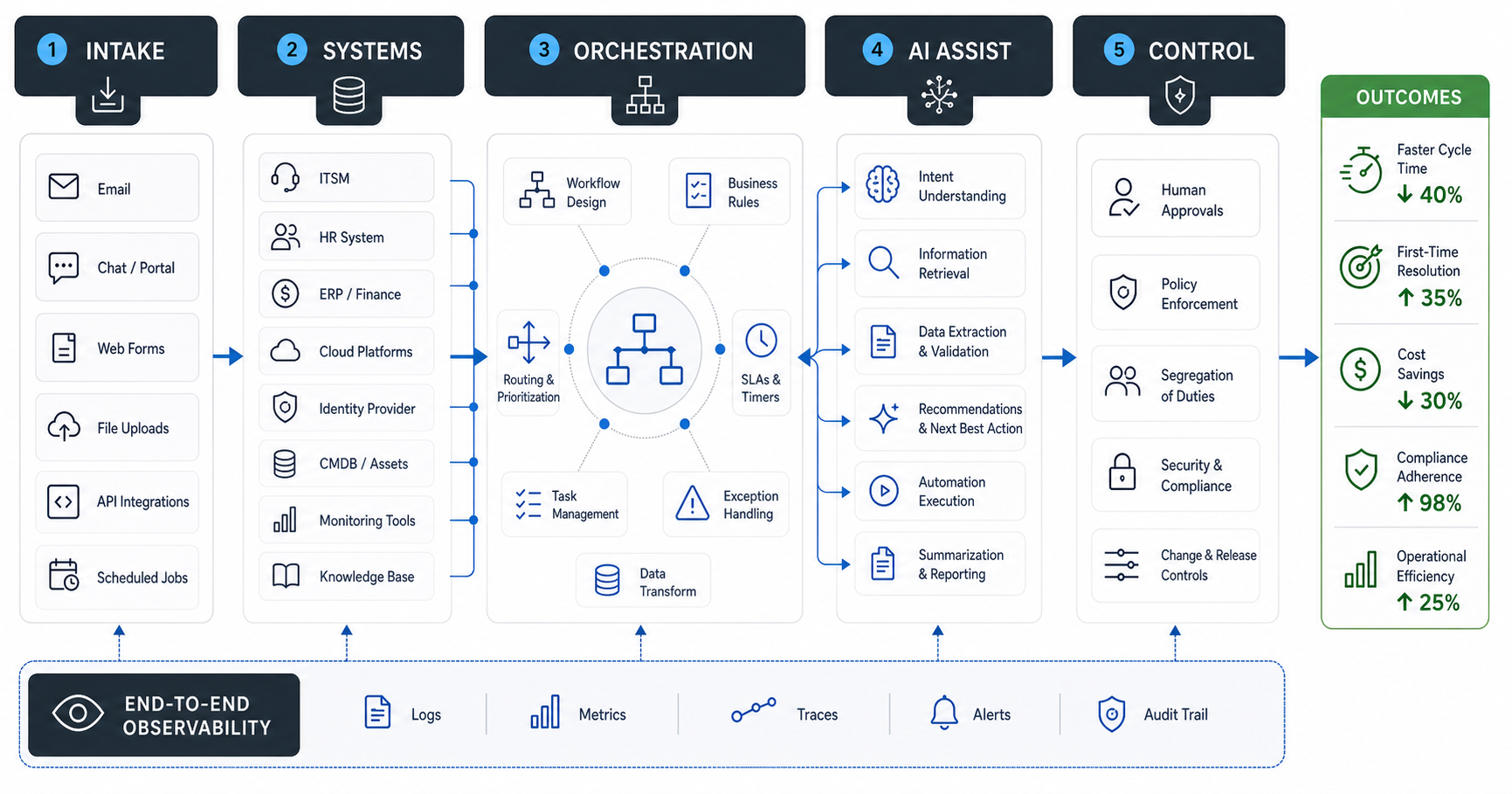
What Is IT Process Automation?
IT process automation means using software rules, scripts, workflow engines, APIs, bots, or AI systems to execute operational tasks that would otherwise depend on manual steps. It can cover infrastructure, service management, customer operations, finance operations, compliance checks, software delivery, reporting, and internal business systems.
The best automation does three things at once. It standardizes the process, connects the systems involved, and creates evidence of what happened. That evidence matters because a faster process is not enough if nobody can explain why a record changed, why an alert was closed, or why a customer-facing action happened.
Basic automation follows defined rules. Intelligent automation adds classification, prediction, language understanding, or anomaly detection. AI agents go further by interpreting a goal, choosing tools, using context, remembering state, and deciding whether to continue, retry, ask for approval, or stop. That makes agents useful in variable workflows, but only when the guardrails are clear.
Benefits of IT Process Automation
The first benefit is speed. Automated routing, provisioning, notifications, checks, and updates reduce waiting time between steps. This is especially useful when a process crosses teams, tools, or time zones.
The second benefit is consistency. Manual processes depend on who is working, how busy they are, and which detail they remember. Automation can enforce the same validation, approval, naming, tagging, security, or escalation rule every time. That improves quality and reduces rework.
The third benefit is visibility. A good automation design records inputs, outputs, ownership, exceptions, approvals, and timing. That gives leaders better operational data than a chain of messages or spreadsheets.
The fourth benefit is capacity. Repetitive work no longer consumes the same amount of human attention. Teams can spend more time on design, incident prevention, customer conversations, security review, architecture improvement, and process cleanup.
The fifth benefit is scalability. A manual workflow that works for 20 requests a week often fails at 200. Automation lets teams absorb more volume without adding proportional headcount, as long as exceptions are handled deliberately.
Common IT Process Automation Use Cases
Service desk automation is often the first category. Password resets, access requests, ticket classification, status updates, SLA reminders, escalation routing, and knowledge base suggestions can all reduce repetitive support load.
Infrastructure and cloud automation are another strong fit. Teams can automate provisioning, backups, patch checks, environment setup, cost alerts, tagging policies, compliance evidence, and incident response playbooks. The most valuable versions include approvals and rollback paths rather than just faster execution.
Software delivery automation covers CI/CD workflows, release approvals, environment promotion, testing triggers, dependency checks, deployment notifications, and post-release monitoring. This work has a natural audit trail, which makes it a good candidate for structured automation.
Business operations automation connects IT systems to finance, HR, sales, and customer workflows. Examples include vendor onboarding, employee onboarding, invoice matching, CRM hygiene, customer escalation routing, reporting preparation, contract review intake, and recurring compliance checks.
Legacy process automation can be useful when critical work still lives across old portals, spreadsheets, email approvals, or brittle internal systems. Before automating around a weak legacy system, use the Legacy Software Modernization Scorecard to decide whether stabilization, refactoring, or replacement should come first.
How to Choose the Right Automation Pattern
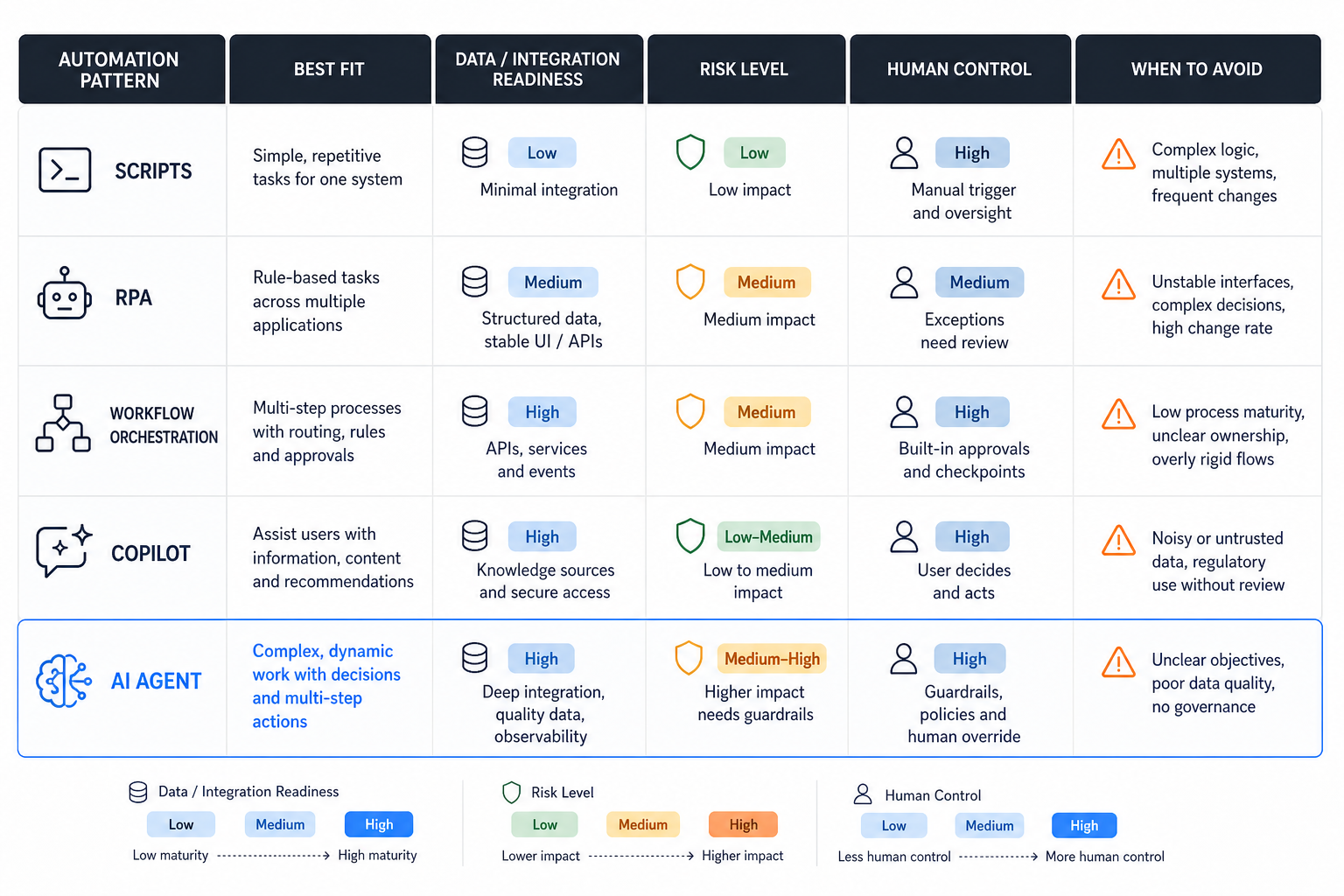
Do not start with a tool category. Start with the process shape. Ask five questions: how repeatable is the workflow, which systems need access, how often exceptions happen, how risky the action is, and who owns the outcome when automation fails.
Use scripts for stable technical tasks with clear inputs and outputs. Use RPA when you must automate a legacy interface that lacks reliable APIs, but treat it as a bridge rather than the long-term architecture. Use workflow automation when the process has states, approvals, deadlines, owners, and handoffs. Use integration platforms when the main challenge is moving data between systems with predictable transformations.
Use AI copilots when people still need to make the decision but benefit from drafting, summarization, retrieval, classification, or recommendation. Use AI agents when the workflow needs reasoning across context, tool selection, multi-step execution, memory, and exception handling. The more autonomy a system has, the more governance it needs. For teams comparing payback before committing engineering time, the AI Workflow Automation ROI Guide is a useful companion to the pattern matrix.
Where AI Agents Fit in IT Process Automation
AI agents fit best when a workflow is repeatable in goal but variable in path. For example, an incident triage agent may read an alert, inspect recent deployments, query logs, compare runbook guidance, create a ticket, suggest severity, and ask for approval before remediation. A procurement agent may review a request, check vendor data, identify missing fields, route approval, and prepare a system update for human confirmation. The same constraints also apply when teams connect agents to older systems, which is why the AI agents for legacy systems guide separates UI automation, RPA, APIs, and modernization paths.
An agent is not required for simple rule execution. If the workflow is deterministic, a workflow engine or script is often cheaper, safer, and easier to test. Agents become useful when the workflow needs language understanding, context retrieval, prioritization, tool use, and escalation logic.
Production AI development services should treat agents as software systems, not chat demos. That means scoped credentials, prompt and policy versioning, test scenarios, audit logs, cost controls, fallback behavior, and human review queues. For document-heavy or knowledge-heavy workflows, an LLM development layer may be needed so the agent can retrieve reliable context before acting.
Implementation Roadmap
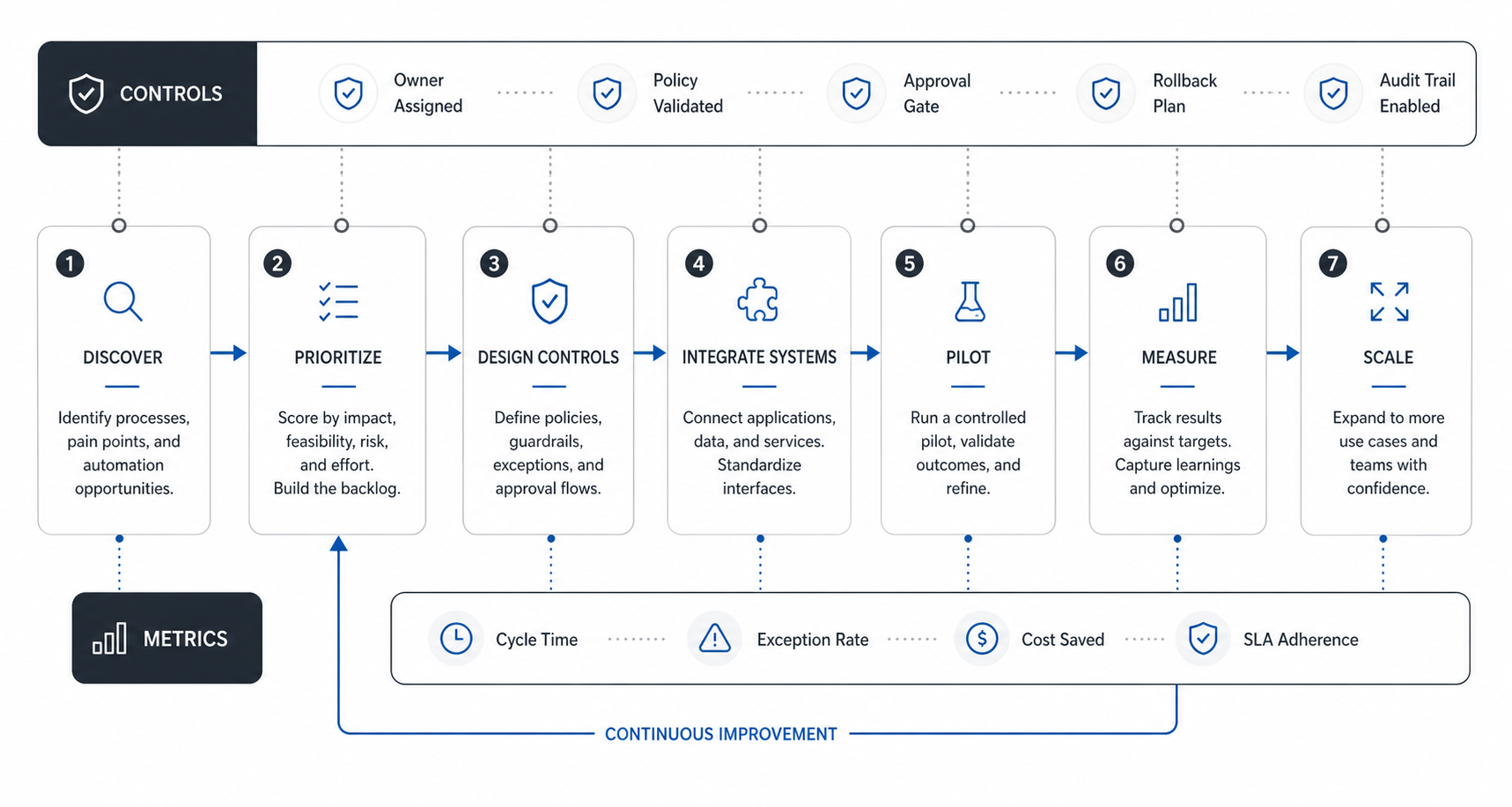
Start with workflow discovery. List repeated tasks, request volumes, cycle times, error patterns, systems touched, handoffs, and owner pain. Separate annoying tasks from valuable tasks. A workflow that saves five minutes but creates review burden may not be worth automating.
Next, map the current process. Document the trigger, required inputs, decision rules, systems, permissions, exceptions, approvals, and success criteria. If nobody can explain the current workflow, automation will encode confusion.
Then choose a first release. The first release should be narrow enough to measure and reversible enough to trust. A good starting point is read-only automation, recommendations, draft preparation, routing, or supervised execution. Direct write access should come after the team sees reliable performance. The AI Agent Development Lifecycle is a practical reference when the roadmap includes evals, release gates, monitoring, and iteration loops.
After that, build integration and governance together. Connect only the systems the workflow needs. Create audit logs. Define retry limits. Set approval thresholds. Add exception queues. Decide who can change rules and who owns incidents.
Finally, measure outcomes. Track time saved, manual touches reduced, rework avoided, SLA improvement, error reduction, user adoption, escalation rate, and automation cost. The AI Automation ROI Calculator can help estimate whether a candidate workflow has enough value before a prototype.
Risks and Governance Controls
The most common automation risk is speeding up a bad process. If the workflow has unclear rules, missing owners, stale data, or fragile integrations, automation can amplify the problem. Process cleanup often creates more value than technology during the first phase.
The second risk is hidden failure. A manual process often fails visibly because someone gets stuck. Automation can fail quietly unless monitoring and alerts are designed in. Every important automation should have success metrics, error metrics, exception routing, and ownership.
The third risk is over-autonomy. If an AI agent can change records, send customer messages, grant access, approve expenses, or trigger remediation, the system needs least-privilege permissions and approval rules. High-impact actions should require human confirmation until the workflow has enough evidence.
The fourth risk is poor context. AI-enabled automation is only as reliable as its data, retrieval layer, and policy instructions. If documents conflict, systems are stale, or business rules are informal, the agent should ask for review rather than guessing.
Readiness Checklist Before You Build
Use this checklist before investing in automation. The workflow should be frequent enough to matter. It should have a clear trigger and a known owner. Inputs should be structured or retrievable. Decision rules should be explainable. Required systems should have APIs, stable interfaces, or acceptable integration paths. Exceptions should be known and routable. The expected business value should be measurable.
For AI agents specifically, also check whether the workflow has safe tool access, reliable context, clear approval boundaries, rollback options, and audit requirements. If these signals are weak, start with a copilot or supervised workflow instead of autonomous execution.
The AI Agent Readiness Assessment is the right next step when your workflow needs reasoning, tool use, and human guardrails. It helps score whether the process is ready for an agent or should start with simpler automation.
How NextPage Helps
NextPage helps teams move from automation ideas to working systems. The WorkLoom case study shows how workflow, approvals, collaboration, and operational dashboards can be shaped into a governed work-management platform. We evaluate workflow value, process readiness, integration depth, data quality, risk level, and governance needs before recommending a build path. The answer may be a workflow engine, a custom internal tool, an integration layer, a supervised copilot, or a governed AI agent.
When the workflow requires business-specific logic or deep system integration, custom software development is often the right foundation. When the workflow needs AI reasoning, retrieval, and controlled tool use, we design the agent around permissions, evaluation, observability, and review.
Final Takeaway
IT process automation works when it is selective, measurable, and governed. Start with a workflow that is frequent, painful, and clear enough to automate. Choose the smallest pattern that can solve it reliably. Add AI agents only when the workflow needs reasoning, context, tool use, and exception handling. The best automation program does not replace operational judgment. It gives teams a controlled system for using that judgment where it matters most.