
Quick Answer: What Is a Legacy Application Modernization Roadmap?
A legacy application modernization roadmap is a phased plan for improving or replacing aging software without disrupting the business workflows that depend on it. It should identify the applications that create the most risk, compare modernization options, define migration waves, protect data and integrations, and measure whether the new system actually improves cost, speed, security, and user adoption.
The roadmap matters because legacy modernization is rarely one decision. A company may rehost one workload, replatform another, refactor a brittle module, rebuild a customer portal, replace a commodity back-office tool, and use a strangler pattern around the most sensitive core system. The right plan chooses the smallest stable move that removes the largest business constraint while keeping rollback, data integrity, security, and user adoption measurable.
If your current application blocks reporting, integrations, security updates, cloud readiness, or customer experience improvements, start with a focused legacy software modernization assessment before funding a broad rebuild. For larger portfolios, compare this plan with an enterprise application modernization roadmap so each system gets the right treatment instead of the same blanket mandate.
When Legacy Software Needs Modernization
Legacy software is not only old software. It becomes a modernization candidate when its architecture, runtime, data model, vendor dependency, or user experience prevents the business from operating safely and efficiently. Some older systems are stable and should be left alone. Others quietly create compounding operational risk.
Common signals include high maintenance cost, slow releases, unsupported frameworks, hard-coded business rules, manual data exports, limited APIs, unclear ownership, security gaps, fragile integrations, poor mobile usability, and a growing backlog of changes that the current system cannot absorb.
The strongest business case usually appears when several signals overlap. For example, an outdated customer portal may require manual support work, prevent self-service, fail accessibility expectations, and make new product launches slow. In that case, modernization is not a technology refresh. It is an operating improvement program.
Start With a Portfolio Assessment
Before choosing a migration path, map each application against business value, technical health, risk, and dependency. This avoids the common mistake of modernizing the loudest system rather than the one that limits the business most.
The assessment should answer practical questions: Who uses the system? Which revenue, compliance, customer, or operational workflow depends on it? What data does it own? Which integrations would break if it changed? Which components are unsupported? What workarounds have teams created? What would improve if the system changed?
A simple scoring model is often enough for the first pass. Score each application on business criticality, change frequency, cost to maintain, security exposure, integration difficulty, user friction, and cloud readiness. The output should be a ranked modernization backlog, not a vague inventory.
For a structured first pass, the legacy software modernization scorecard can help turn pain points into a prioritized discussion.
Choose The Right Modernization Option
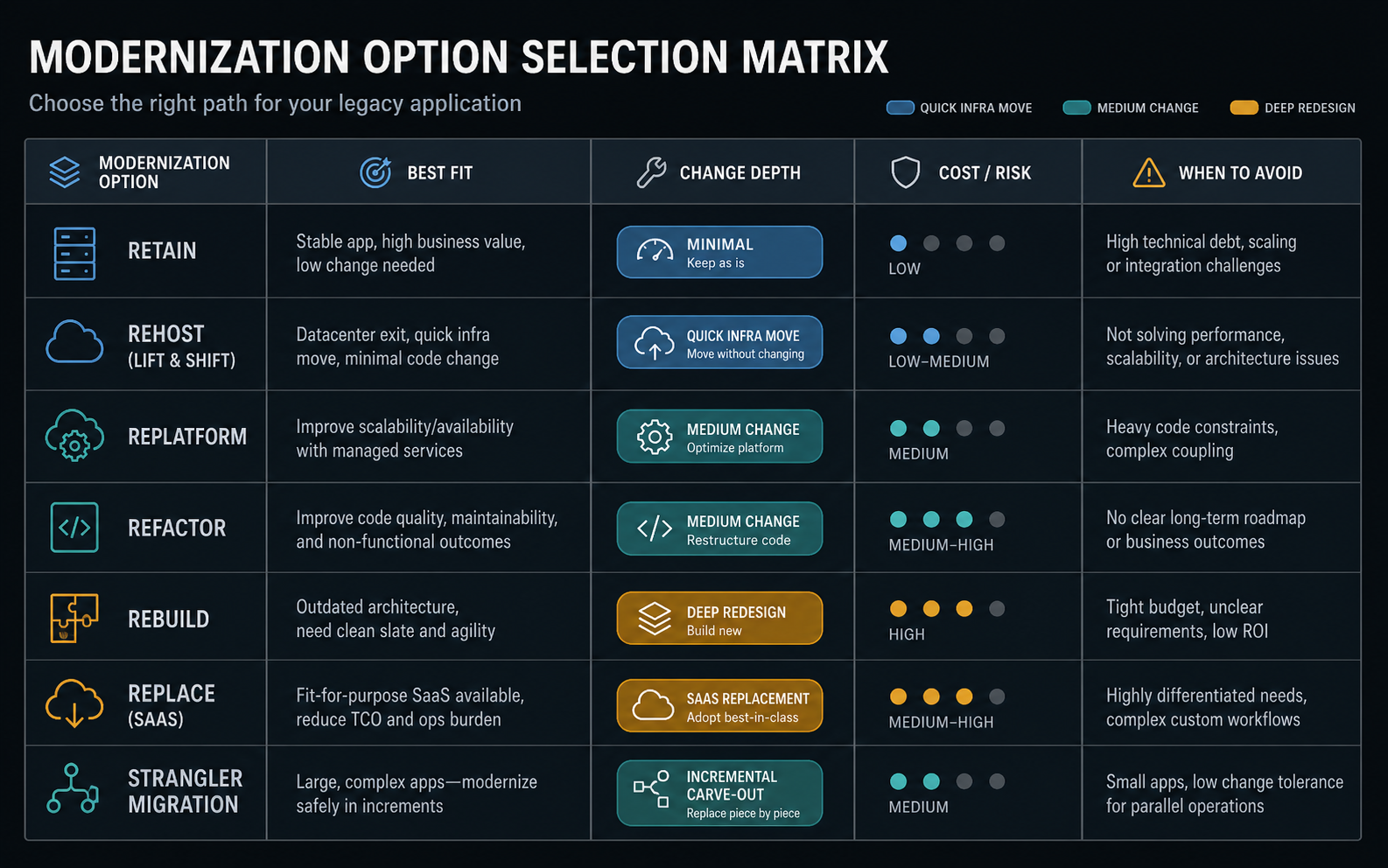
The best modernization option depends on the constraint you are trying to remove. A rehost may reduce infrastructure risk quickly, but it will not fix poor architecture. Application replatforming can improve reliability and operations without a full rewrite, while a rebuild may unlock a new customer experience when the old workflow is the actual blocker. A replacement can be the right answer for commodity workflows, but only after data, integrations, reporting, contract risk, and change management are understood.
| Option | Best when | Watch out for |
|---|---|---|
| Rehost | The application mostly works, but infrastructure is expensive, unsupported, or hard to scale. | You may move technical debt into a new environment without improving the application. |
| Replatform | The runtime, database, hosting, or deployment model needs an upgrade with limited code change. | Compatibility issues can appear late if dependencies are not tested early. |
| Refactor | The business logic is valuable, but the codebase needs cleaner structure, APIs, tests, and maintainability. | Scope can expand if teams refactor without clear module boundaries. |
| Rebuild | The workflow, user experience, or business model has changed enough that the old design is the blocker. | A full rebuild needs disciplined scope control and staged delivery. |
| Replace | The process is not unique and a SaaS platform can handle it with acceptable fit. | Data migration, integration, permissions, and process mismatch can erase expected savings. |
| Strangler migration | A critical system must be replaced gradually while the business keeps running. | Integration complexity and duplicated logic need careful governance. |
Most practical roadmaps combine paths. You might replatform the database, refactor the order module, rebuild the customer interface, and replace a reporting tool. The roadmap should explain why each move exists and which dependency it unlocks.
Use the option table as a portfolio filter, not as a one-time architecture vote. A stable but expensive application may start with legacy application rehosting, then move into replatforming or refactoring after monitoring and cost data are visible. A high-risk customer workflow may need a strangler approach so the team can carve out one bounded capability, prove it, and retire the old path gradually.
A Practical Modernization Roadmap
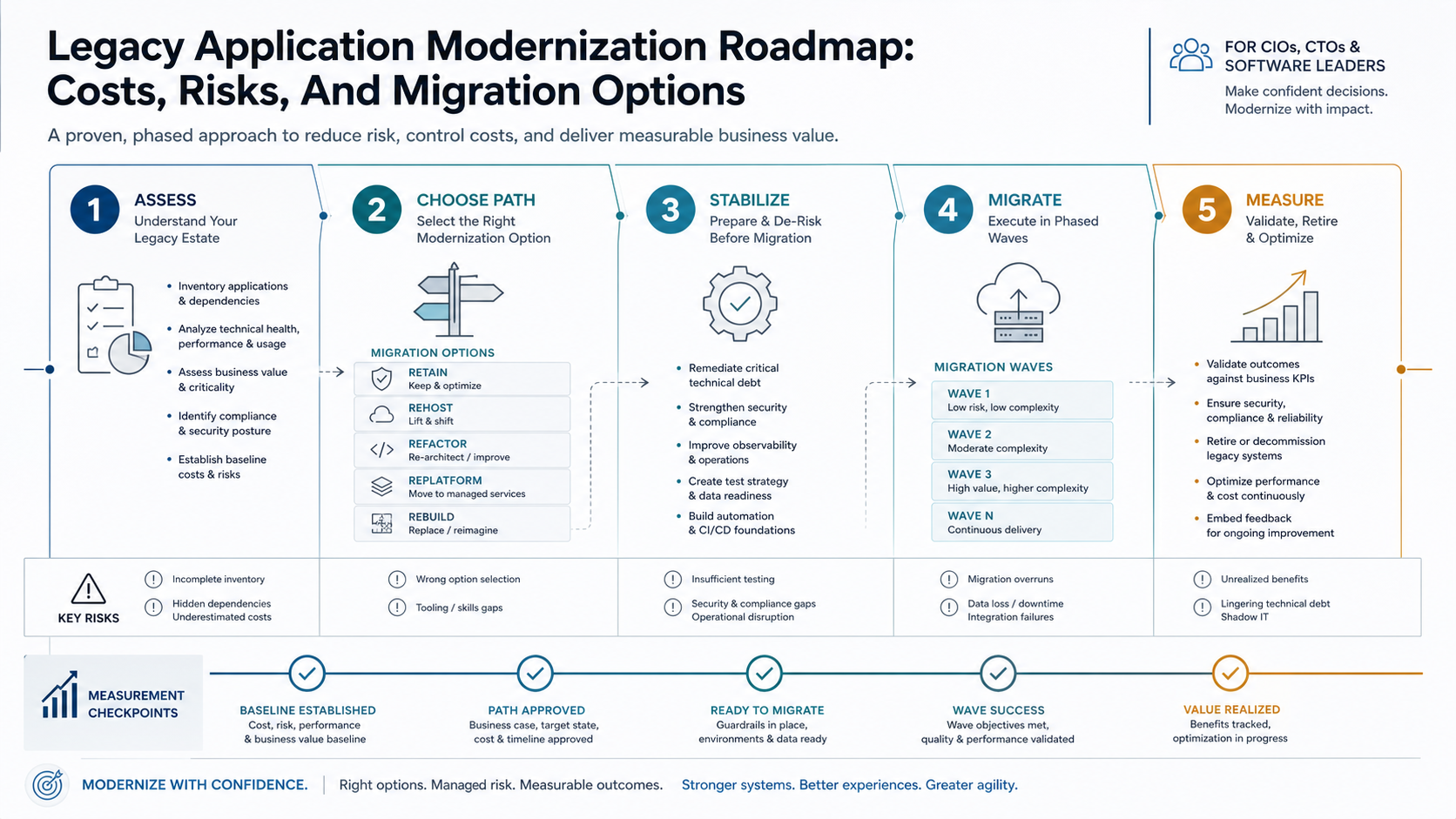
A useful roadmap turns modernization into a sequence of decisions and delivery waves. It should keep business operations stable while each release reduces a specific risk or unlocks a measurable improvement.
Phase 1: Map Outcomes And Risk
Start with the business outcome: faster release cycles, lower support load, cleaner reporting, better uptime, stronger security, cloud readiness, improved customer self-service, or lower maintenance cost. Then map the risks that could block that outcome: old dependencies, missing tests, undocumented workflows, weak access control, manual data movement, or vendor lock-in.
Phase 2: Stabilize The Current System
Modernization work is safer when the current system is observable and recoverable. Add logging, monitoring, backups, smoke tests, dependency documentation, data ownership, and rollback procedures before making deeper changes. Stabilization may feel unglamorous, but it lowers the chance that modernization creates business disruption.
Phase 3: Pick The First Modernization Slice
The first slice should be valuable, bounded, and testable. Good candidates include a reporting layer, a customer-facing workflow, a high-friction admin process, an API wrapper, or a module that blocks other planned work. Avoid starting with the most complex core transaction unless the business risk demands it.
Phase 4: Migrate In Controlled Waves
Each wave should include data migration rules, integration contracts, acceptance tests, user training, deployment plan, rollback criteria, and success metrics. If cloud is part of the path, connect modernization to cloud migration services decisions such as network design, backup strategy, observability, scaling, and cost controls.
Phase 5: Measure And Retire
After each wave, compare the result with the baseline. Did support tickets drop? Did the release cycle improve? Did manual work shrink? Did performance or uptime improve? Once a replacement slice is stable, retire the old component instead of letting two systems run forever.
Cost Drivers In Legacy Application Modernization
Modernization cost depends less on the age of the application and more on uncertainty. The largest drivers are discovery effort, codebase condition, data quality, integration count, compliance needs, test coverage, user workflow complexity, deployment environment, and whether the team is changing behavior or only infrastructure.
Rehosting is usually the lowest-change path, but it can still require environment work, dependency fixes, networking, monitoring, and backup design. Refactoring costs rise when code is tightly coupled and lacks automated tests. Rebuilds and replacements require deeper product decisions, data migration, user acceptance, permissions, training, and rollout planning.
Budget in stages. Fund discovery and architecture first. Then fund one modernization slice. Expand only after that slice proves the delivery model and business value. This keeps modernization tied to evidence instead of a large, speculative transformation budget.
Risk Controls That Should Be In The Plan
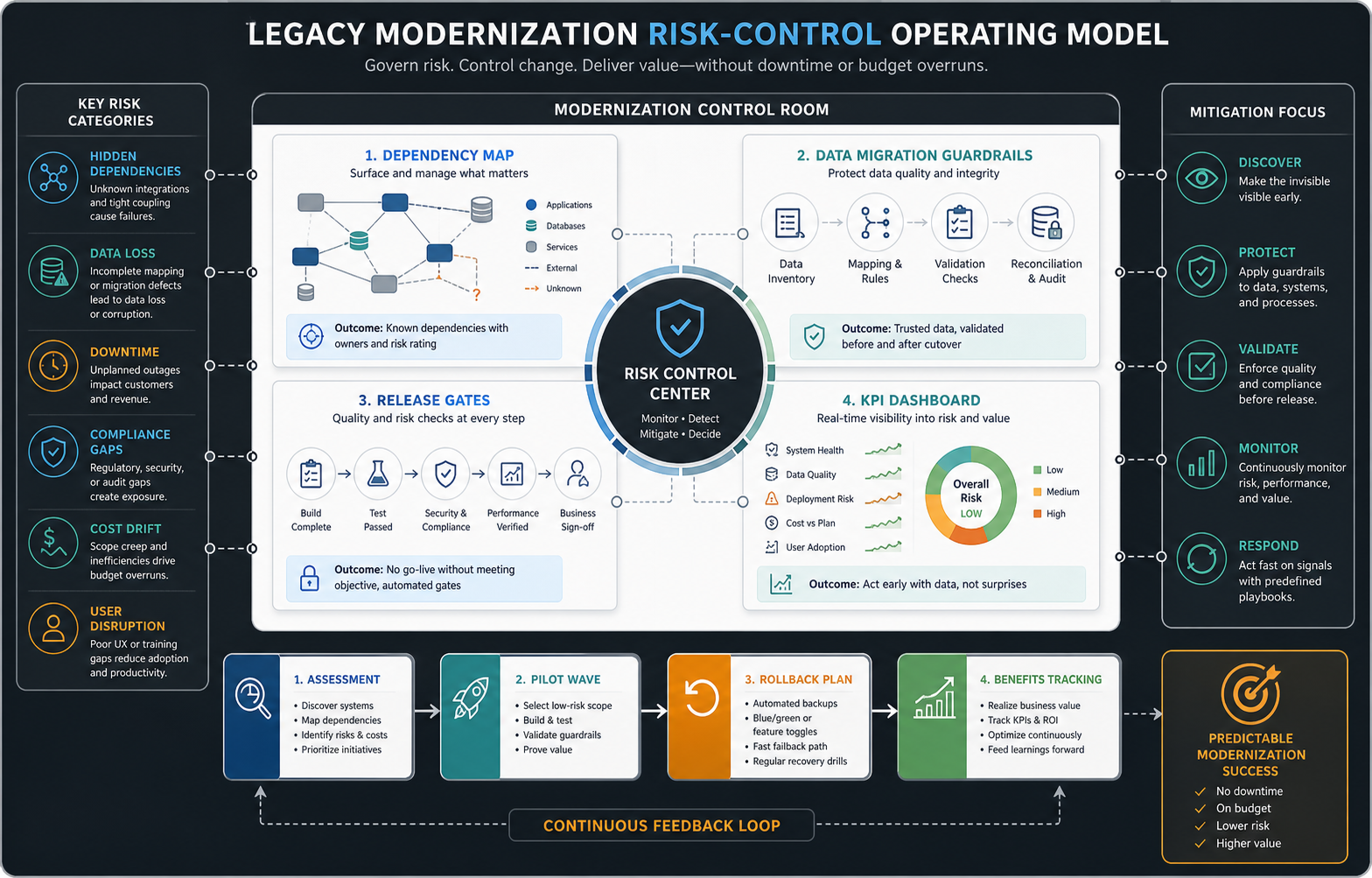
Legacy modernization risk is manageable when the roadmap treats reliability, data, and adoption as first-class work. The plan should include environment parity, backup and restore testing, access control review, dependency mapping, audit logging, performance baselines, security review, data reconciliation, cutover rehearsal, and rollback criteria.
Data deserves special attention. Older systems often contain inconsistent formats, duplicate records, undocumented fields, and business rules that live in user habits rather than code. Migration planning should define what moves, what gets cleaned, what gets archived, who validates it, and how the team proves the new system matches expected business outcomes. For high-control environments, use a regulated application migration checklist to capture audit evidence before cutover instead of reconstructing it after problems appear.
Adoption is another risk. A technically successful modernization can still fail if employees return to spreadsheets or old workflows. Include training, role-based permissions, feedback loops, and visible success metrics in the rollout plan.
Modernization Vs Replacement: How To Decide
Replacement fits when the workflow is standardized and the market has a mature product that can support your data, controls, integrations, and user needs. Modernization fits when the workflow is core to your differentiation, when the data model is specific to your business, or when the system must connect deeply with other operational tools.
If the system contains unique pricing rules, operational knowledge, customer experience logic, or compliance-specific workflows, custom software development may be safer than forcing the business into a generic SaaS process. If the process is commodity, replacement can reduce maintenance cost and free the team for more strategic systems. When the decision depends on infrastructure readiness, security posture, and cutover risk, pair the modernization plan with a cloud migration strategy and an application migration readiness checklist.
The decision should not be ideological. Compare total cost, workflow fit, migration complexity, integration needs, ownership, vendor risk, and time to value.
Metrics That Prove Modernization Is Working
Modernization success should be measured against the problem that justified the work. Useful metrics include release frequency, lead time for changes, support ticket volume, manual processing time, uptime, page or API performance, defect rate, infrastructure cost visibility, audit findings, user adoption, and customer task completion.
Set baselines before modernization starts. If the team cannot describe the current release cycle, support load, performance, and manual effort, it will be hard to prove that the investment worked. The best roadmap identifies the metric each wave is expected to improve.
Common Mistakes To Avoid
- Starting with a full rewrite by default. Rebuild only when the old design prevents the outcome you need.
- Skipping discovery. Undocumented workflows and hidden integrations are where modernization budgets usually break.
- Moving to cloud without changing operations. Cloud value comes from architecture, monitoring, deployment, security, and cost discipline.
- Ignoring data quality. Bad data in a modern system still creates bad decisions.
- Modernizing without user adoption. The new system has to fit how teams actually work, or the old workarounds will return.
- Keeping both systems forever. Retirement is part of modernization, not an optional cleanup task.
How NextPage Helps Plan The Modernization Path
NextPage approaches modernization as a sequence of practical decisions. We start by understanding the business workflow, the technical constraints, the data and integration map, and the risk behind the current system. Then we help choose a path that can produce value without turning the entire operation upside down. For teams with old portals or dashboards, legacy web app UI modernization can be a useful first slice because it exposes workflow debt while improving adoption quickly.
For some teams, the right first move is a small refactor and API layer. For others, it is a cloud-ready rebuild of a customer portal, a strangler migration around a core workflow, or a replacement decision backed by clean data migration. The roadmap should fit the business constraint, not a generic modernization playbook.
If your application is becoming expensive to change, hard to secure, or difficult to connect with newer tools, review a modernization path with NextPage. The goal is to identify what to modernize now, what to defer, and which migration option will reduce risk fastest.