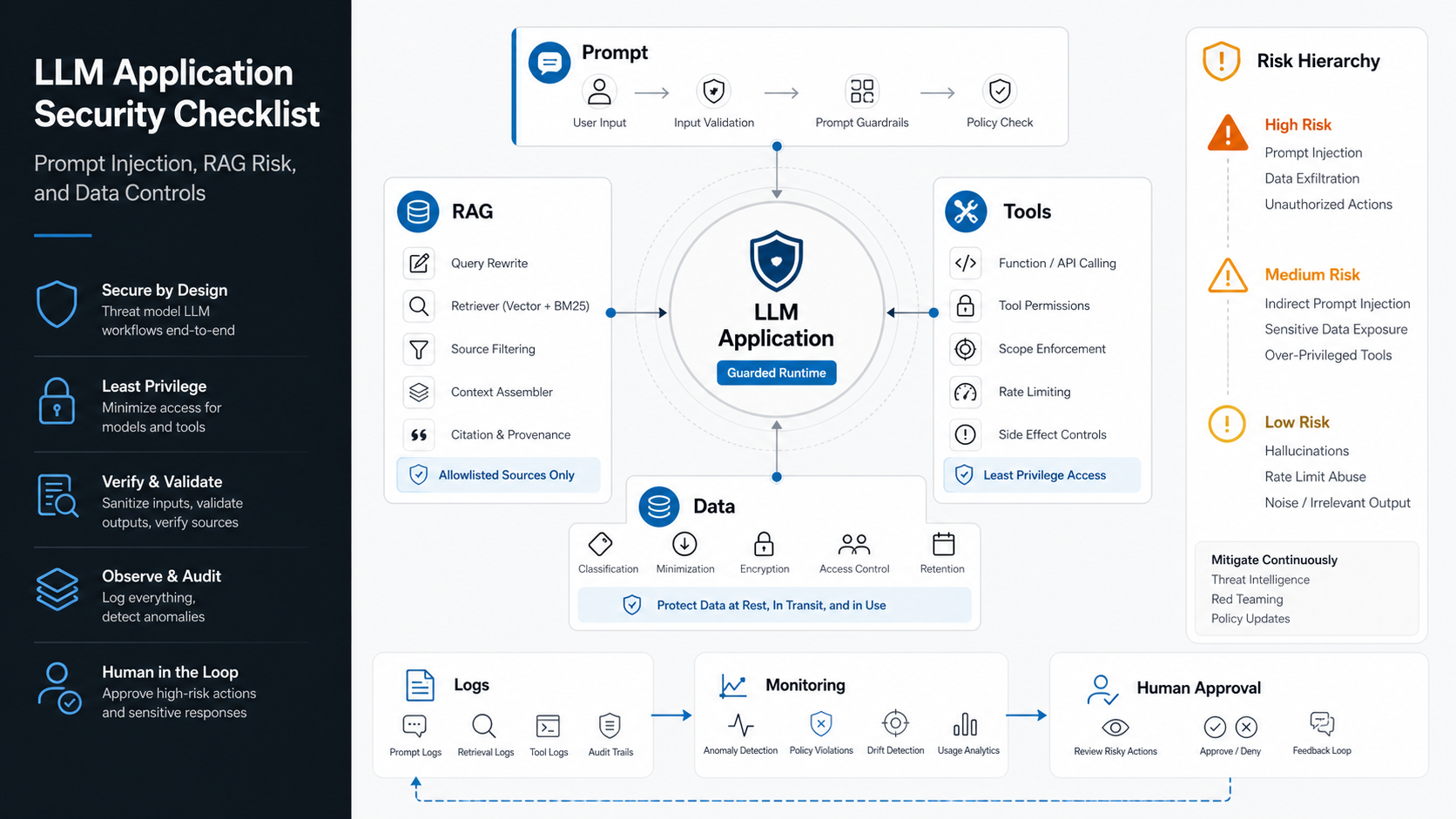

An LLM application security checklist should treat prompts, retrieved content, private data, model outputs, tools, and logs as separate control surfaces. The practical goal is not to make a model impossible to trick. The goal is to design the surrounding system so a bad instruction, poisoned document, or overconfident response cannot quietly cross trust boundaries.
OWASP's Top 10 for LLM Applications 2025 is useful because it names the risks teams actually meet when LLMs move from demos into customer support, internal operations, copilots, and RAG workflows. This guide turns that taxonomy into an engineering checklist for teams planning a secure LLM development project.
Use it before a model gets access to private documents, customer records, browser actions, support workflows, or production APIs. If the work is closer to an autonomous workflow than a simple assistant, pair this checklist with NextPage's AI agent development planning so permissions, review gates, observability, and rollback are part of the first architecture decision.
Why LLM Security Needs a Build Checklist
Traditional application security usually starts with inputs, authorization, storage, network boundaries, dependency hygiene, and monitoring. LLM applications still need all of that, but they add two new complications: language becomes an execution surface, and retrieved context can become an instruction source.
A user message can attempt prompt injection. A document retrieved by RAG can carry hidden instructions. A model output can be copied into a database, browser, API call, SQL query, shell command, or human workflow. A tool-enabled agent can take real actions before a reviewer notices the reasoning was wrong. That is why secure generative AI development needs product, engineering, data, and security decisions to be made together.
Threat Model Before You Tune Prompts
Prompt hardening helps, but it should not be the first or only security control. Start by mapping users, assets, retrieval sources, tools, model providers, output destinations, and irreversible actions. Then decide which controls belong in the application layer, retrieval layer, model gateway, tool layer, and human-review workflow.
A practical threat model should answer five questions: who can ask the model for help, what data can be retrieved, what instructions can override normal behavior, what tool calls can change business state, and what evidence a reviewer can inspect after a suspicious answer. This keeps the checklist grounded in architecture instead of prompt wording alone.
For teams modernizing an existing internal workflow, the same discipline used in internal tool development applies here: define roles, audit trails, validation rules, and operational ownership before the assistant is treated as a trusted coworker.
The OWASP 2025 Risk Map
The OWASP 2025 list includes prompt injection, sensitive information disclosure, supply chain vulnerabilities, data and model poisoning, improper output handling, excessive agency, system prompt leakage, vector and embedding weaknesses, misinformation, and unbounded consumption. For a build team, these categories can be grouped into four design questions.
| Security Question | Relevant OWASP Risk Areas | Build Decision |
|---|---|---|
| What can the model see? | Sensitive information disclosure, system prompt leakage, vector and embedding weaknesses | Classify data, segment retrieval, filter context, and remove secrets from prompts. |
| What can influence the model? | Prompt injection, data and model poisoning, supply chain vulnerabilities | Treat user input, third-party content, plugins, model dependencies, and indexed documents as untrusted. |
| What can model output do? | Improper output handling, excessive agency, misinformation | Validate output before execution, limit tool permissions, and require review for high-impact actions. |
| How do we detect failure? | Unbounded consumption, misinformation, data leakage, excessive agency | Log decisions, monitor costs, test adversarial prompts, and define incident playbooks. |
LLM Security Control Matrix
The easiest way to turn the risk map into engineering work is to assign each control to a system boundary and an owner. Product, data, platform, security, and support teams should be able to see which checks are automated, which checks need human review, and which risks are intentionally out of scope for the first release.
| Control Surface | Required Control | Owner | Release Evidence |
|---|---|---|---|
| Prompt and policy layer | System prompt versioning, refusal criteria, adversarial prompt tests, and secret-free instructions. | Product and security | Prompt changelog, test set, and review signoff. |
| Retrieval layer | Tenant filters, role filters, document provenance, freshness rules, and source allowlists. | Data and backend | Access-control tests and sampled citation checks. |
| Tool layer | Typed function contracts, allowlisted actions, rate limits, dry-run modes, and approval gates. | Backend and operations | Tool-call logs and blocked-action examples. |
| Output layer | Schema validation, safe rendering, policy checks, citations, and escalation routes. | Application engineering | Validation failures, escalation logs, and QA cases. |
| Monitoring layer | Prompt version, model version, retrieval IDs, tool calls, refusals, cost, latency, and reviewer overrides. | Platform and support | Dashboard, alert thresholds, and incident playbook. |
If you need a wider readiness view before implementation, the AI Agent Readiness Assessment can help score workflow clarity, data readiness, integration access, governance, and review needs before the build starts.
A Practical LLM Application Security Checklist
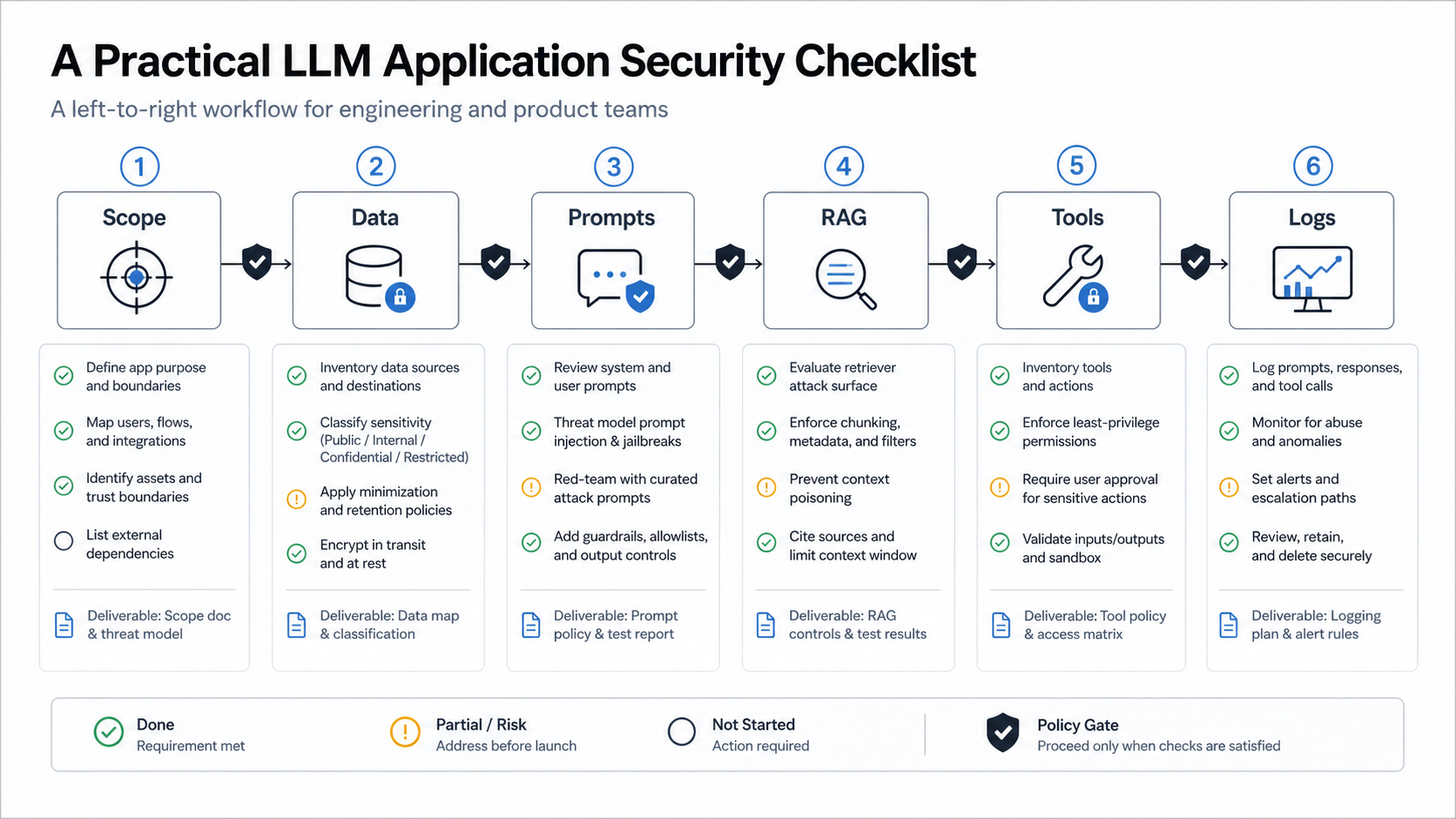
Start with scope. Write down what the LLM feature is allowed to answer, what it must refuse, which systems it can access, which user roles it supports, and which decisions require a human. A support chatbot, internal policy assistant, code copilot, and procurement agent should not share the same permission model.
Classify data before it touches prompts or embeddings. Identify public content, customer data, employee data, regulated data, secrets, and operational metadata. If a value should never be shown to a user, it should not be casually placed in a system prompt, tool result, vector record, or debug log.
Test prompts as untrusted input. Create adversarial cases for direct prompt injection, indirect prompt injection through retrieved documents, jailbreak attempts, role-play attempts, tool misuse, and attempts to extract hidden instructions. Prompt tests should run before release and again when models, retrieval sources, or tool permissions change.
Harden retrieval. RAG is not just search plus generation. It is a data access layer. Apply tenant filters, role filters, document provenance, freshness checks, deduplication, chunk-level metadata, and source allowlists. For teams still shaping architecture, NextPage's AI development services page outlines how model choice, data sensitivity, integration depth, and monitoring fit into production AI systems.
Limit tools. If an LLM can send email, refund an order, update a CRM, query a database, or execute code, give it the minimum permission needed for the workflow. Use allowlisted functions, typed arguments, deterministic validators, rate limits, dry-run modes, and approval gates for irreversible actions.
Monitor logs. Keep enough trace data to investigate failures without turning logs into a data leak. Useful records include prompt template version, model version, retrieval source IDs, tool call attempts, validation failures, reviewer decisions, and cost metrics.
Prompt Injection Testing Checklist
Prompt injection testing should become a regression suite, not a one-time red-team exercise. Keep test cases for direct jailbreaks, indirect instructions hidden in retrieved documents, requests for secrets, attempts to override policies, tool-call manipulation, and requests that try to move private data into an unsafe channel.
Run the suite whenever the prompt template, model, retrieval source, chunking strategy, tool permission, or business policy changes. A useful test result records the input, retrieved context, model output, blocked tool calls, validator failures, reviewer decision, and expected behavior. Failed prompts should become tracked defects with owners, not screenshots in a chat thread.
Teams building support or sales assistants should connect these tests to customer-facing fallback design. A production AI chatbot development workflow needs safe escalation, abuse handling, PII controls, and audit records in addition to friendly conversation design.
RAG Security Controls
RAG security fails when teams treat the vector database as a neutral memory instead of a governed data store. The retrieval layer can leak private content, amplify poisoned instructions, mix tenant context, or produce confident answers from stale documents.
Use separate indexes or strict metadata filters for different tenants and permission groups. Store source IDs, owners, classifications, timestamps, and ingestion paths with every chunk. Do not rely on a final prompt instruction such as "only answer from allowed documents" as the main security boundary. Enforce access before retrieval results are added to the prompt.
For externally sourced documents, add ingestion review. Strip hidden text where practical, record source provenance, reject suspicious files, and quarantine documents that contain instruction-like content aimed at the assistant. For internal knowledge assistants, pair retrieval controls with answer citations so reviewers can see why the model responded.
Source governance is also a product workflow. In the SignalWise portfolio case study, source management and AI analysis are treated as operational controls rather than invisible backend details. RAG systems need the same mindset: the team should know which sources are active, paused, stale, restricted, or under review.
Tool Permissions, Output Handling, and Logs
Improper output handling is where a model response becomes an application vulnerability. Treat model output as untrusted until it passes the same kind of checks you would apply to user input: schema validation, encoding, authorization, business-rule checks, and safe rendering.
Tool calls should be narrower than human roles. A human support manager might have broad refund permissions, but an LLM workflow may only need to draft a refund recommendation, retrieve order history, or prepare a support note for approval. Teams building agentic workflows can use the AI Agent Readiness Assessment to pressure-test workflow clarity, data readiness, integration access, and human-review controls before giving an agent operational access.
For chat and support experiences, connect security controls to conversation design. A production AI chatbot development workflow should include fallback routes, escalation criteria, audit records, PII handling, abuse rate limits, and response review for high-risk intents.
Implementation Roadmap
Week 1: threat model the workflow. Define users, assets, retrieval sources, tools, model providers, fallback paths, and high-impact actions. Include product owners and security reviewers, not only prompt engineers.
Week 2: build control boundaries. Add role-aware retrieval filters, secret scrubbing, schema validators, output encoders, function allowlists, and approval gates. Document the policy choices in a form engineers can test.
Week 3: test with adversarial cases. Run direct and indirect prompt injection tests, poisoned-document tests, data exposure tests, tool misuse tests, and cost spike tests. Keep failed prompts as regression cases.
Week 4: launch with observability. Track model version, prompt version, retrieval source IDs, tool calls, refusals, reviewer overrides, latency, and cost. For internal systems that touch sensitive workflows, pair this with the same security planning you would use for internal tool development.
Governance and Release Readiness
Before launch, decide what the system is allowed to do on day one and what must wait for evidence. A secure release plan should include model and prompt versioning, test coverage, role-aware retrieval, tool-call limits, output validation, human-review rules, incident response, cost controls, and rollback triggers.
For agentic workflows, governance is not paperwork after development. It is part of the architecture. NextPage's supporting guide to enterprise AI agent governance covers the permission envelopes, evaluation sets, audit logs, and escalation patterns that keep autonomous workflows bounded.
The final release gate is evidence. If the team cannot show adversarial test results, access-control checks, tool-call logs, reviewer workflows, and monitoring dashboards, the LLM app is still a pilot even if the interface looks production-ready.
When to Get Help
Bring in help when your LLM feature touches private customer data, employee data, regulated workflows, financial actions, code execution, multi-tenant retrieval, or autonomous tool use. Those are the places where a prompt mistake becomes a business risk.
NextPage can review an LLM app security plan, map the feature against OWASP-style risks, and design the control layer around your actual workflow. If you are planning a RAG assistant, AI chatbot, copilot, or tool-calling agent, start with the LLM development service path and bring the checklist into architecture planning before implementation begins.