
Quick Answer: Manual vs Automation Testing
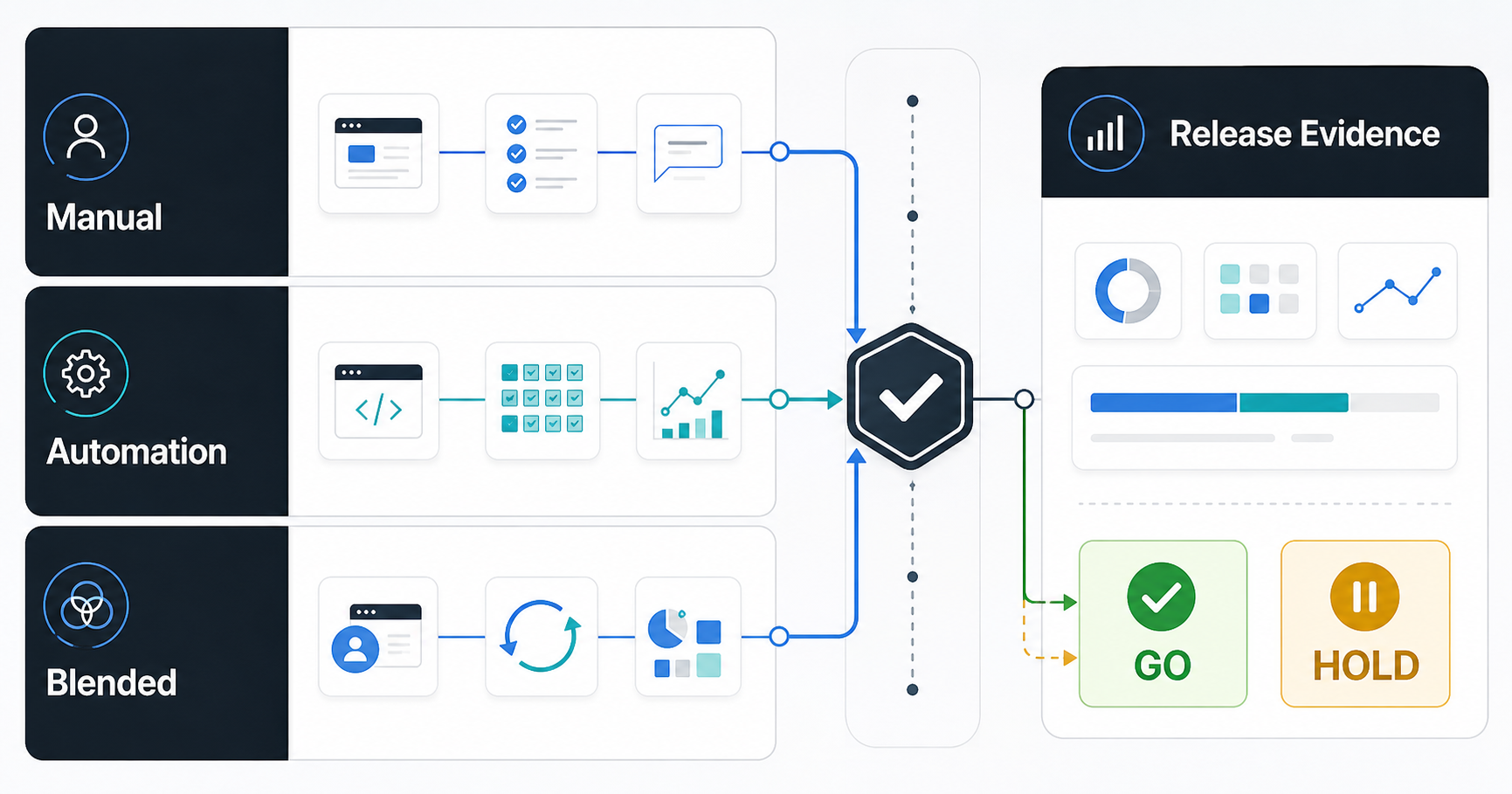
Manual testing and automation testing solve different QA problems. Manual testing is best when the team needs human judgment: exploratory checks, usability review, accessibility signals, confusing edge cases, new product flows, and release scenarios that are still changing. Automation testing is best when the team needs repeatable evidence: smoke checks, API contracts, regression coverage, role permissions, payment or checkout paths, and CI/CD gates that must run every time the product changes.
The right answer before launch is usually a blended QA plan. Use manual testing to discover risk and validate real user experience, then automate stable, high-value checks that will protect future releases. Do not automate a workflow simply because it is important. Automate it when the expected behavior is stable enough, the failure would matter, and the script will create more confidence than maintenance cost.
If you need a practical starting point, map each launch risk to one of three coverage choices: manual first, automate first, or blend both. NextPage's software QA testing services use that same risk-first approach so testing supports release decisions instead of becoming a disconnected checklist.
Why The Manual vs Automation Choice Matters Before Launch
QA coverage affects launch risk, release speed, engineering focus, and post-launch support cost. Too much manual repetition creates slow regression cycles and tired testers who stop seeing important patterns. Too much early automation creates brittle scripts around workflows that are still changing. Both mistakes hide risk until the product reaches real users.
The goal is not to prove that one method is better. The goal is to decide what evidence the business needs before shipping. A founder may need confidence that onboarding, payment, and account recovery work. A CTO may need evidence that API changes do not break core workflows. A product manager may need feedback on copy, navigation, empty states, and confusing permissions. A QA lead may need a coverage model that can scale across sprints without becoming impossible to maintain.
That is why manual and automation decisions should sit inside a broader pre-launch QA checklist for custom software. The checklist should make ownership, risk, evidence, and release gates visible before the team starts debating tools.
Map Launch Risk Before You Pick A QA Method
Start by listing the risks that would make the launch fail. Common risks include a critical user journey breaking, a payment or subscription flow failing, role permissions exposing the wrong data, a mobile app behaving differently on real devices, an integration returning unexpected data, accessibility issues blocking users, or a confusing workflow creating support tickets.
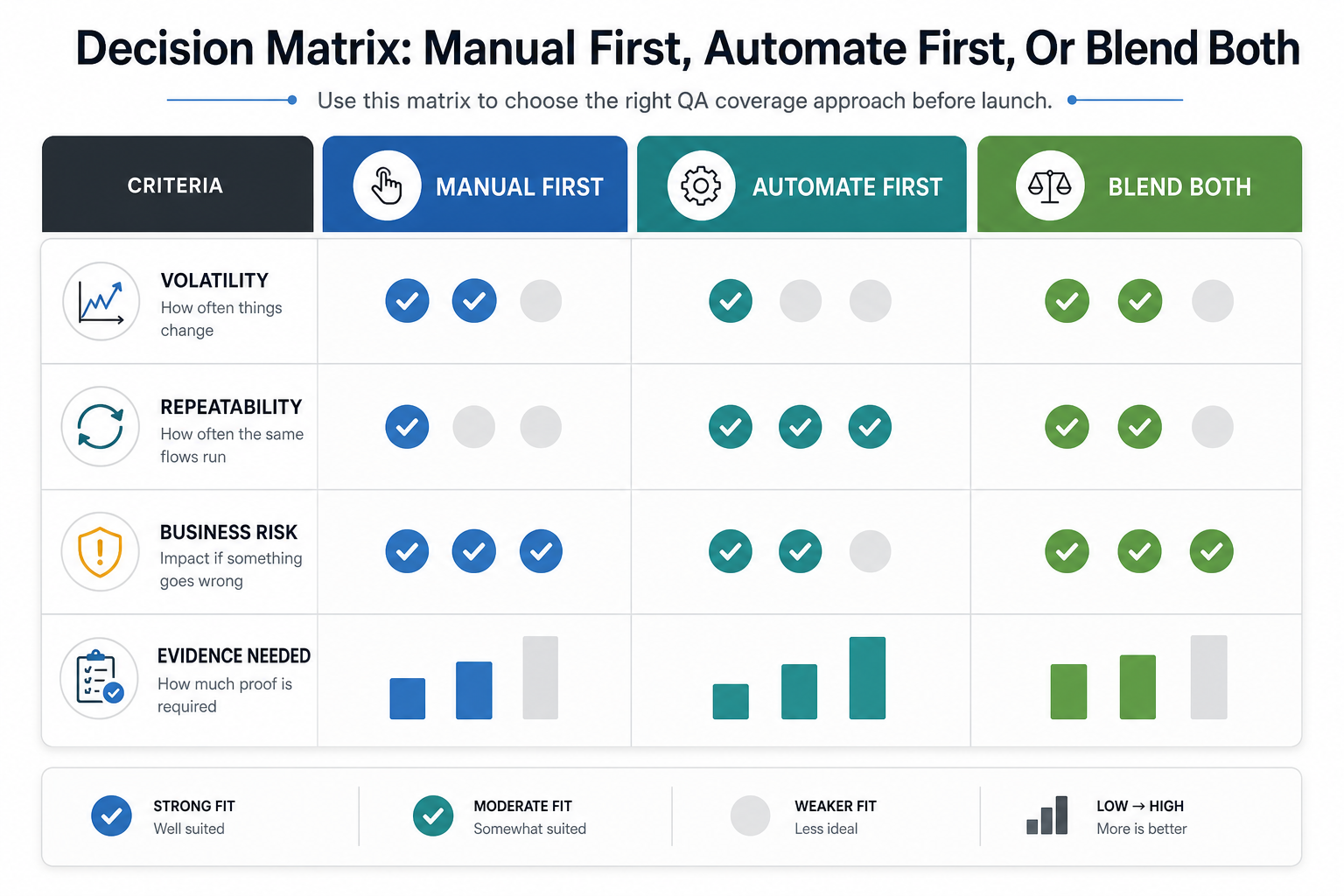
For each risk, ask four questions:
- How often will this flow change? High-change areas usually need human review before they need scripts.
- How repeatable is the expected behavior? Stable paths are better automation candidates.
- What happens if it fails? High-impact failures deserve repeatable evidence and a clear release gate.
- What evidence would change the release decision? Some risks need screenshots, notes, and exploratory feedback; others need a passing automated check in CI.
This risk map also helps budget discussions. If the team is trying to estimate QA investment, the software QA budget guide explains how manual coverage, automation, performance checks, security testing, and release risk costs fit together.
When Manual Testing Is The Better First Choice
Manual testing is the better first choice when the product is still learning what the correct behavior should be. Human testers can notice ambiguity, confusing states, missing copy, broken mental models, awkward keyboard flows, unclear errors, visual hierarchy problems, accessibility concerns, and workflows that technically pass but feel wrong.
Use manual testing first for new features, redesigned screens, workflows with many edge cases, localization and copy review, complex business rules, support-heavy journeys, and areas where stakeholders still disagree about what "done" means. Manual QA is also valuable for exploratory sessions after a bug fix because testers can follow adjacent risk instead of only checking the original ticket.
Manual testing is not a license for vague testing. Good manual QA still needs charters, risk notes, device/browser coverage, defect severity, reproducible evidence, and clear release recommendations. If the team needs extra capacity during release windows, QA testing staff augmentation can help cover manual, exploratory, and automation-support work without forcing a long hiring cycle.
When Automation Testing Is The Better First Choice
Automation testing is the better first choice when the expected behavior is stable, repeatable, high-value, and expensive to check manually every release. Good candidates include login, signup, checkout, subscription management, account permissions, API contracts, data validation, smoke checks, critical regression paths, and configuration-heavy workflows that must not break silently.
Automation is especially useful when the release cadence is high. A team shipping multiple times per week needs quick feedback from CI/CD, not a manual checklist that blocks every small change. Automated checks also create audit-friendly evidence for regulated, financial, healthcare, operational, and enterprise software where release decisions need a documented trail.
The strongest automation plans separate high-value regression checks from low-value scripts. NextPage's QA automation testing services focus on Playwright, Cypress, API, mobile, and CI/CD coverage where automation reduces release risk rather than adding a fragile maintenance burden.
Decision Matrix: Manual First, Automate First, Or Blend Both
Use this decision matrix before creating tickets for QA coverage:
| Signal | Manual First | Automate First | Blend Both |
|---|---|---|---|
| Workflow stability | Requirements, copy, UX, or business rules are still changing. | The flow is stable and expected behavior is clear. | The core path is stable, but edge cases still need discovery. |
| Business impact | Failure creates confusion but not immediate financial or trust damage. | Failure blocks revenue, access, compliance, or operations. | Failure risk is high, but product judgment is still needed. |
| Repeatability | The scenario is rare, subjective, or data-dependent. | The same check must run on every meaningful change. | Core assertions repeat, but humans review unusual states. |
| Evidence needed | Stakeholders need notes, screenshots, usability feedback, and examples. | Stakeholders need pass/fail evidence in CI or a release report. | Stakeholders need both confidence metrics and qualitative findings. |
For web products, pair this with a dedicated test automation strategy for web apps so automation choices match the application architecture, test pyramid, and maintenance capacity.
Launch-Stage Examples For Web, Mobile, And SaaS Products
A SaaS onboarding flow usually needs blended coverage. Manual testing can review copy clarity, trial-state behavior, billing expectations, permissions, and edge cases. Automation can protect the stable path: signup, email verification, plan selection, login, and first workspace creation.
A mobile app launch needs more manual attention across real devices, OS versions, permissions, poor-network behavior, push notifications, app updates, and store-readiness flows. Stable checks can later move into mobile automation, but exploratory device coverage remains important. The mobile app testing services page explains how device and OS matrices fit into release planning, while the mobile app testing checklist gives a launch-specific support guide.
An admin dashboard or workflow portal often benefits from automation earlier. Role permissions, filters, exports, approvals, and workflow state transitions can regress quietly. Manual testing should still review awkward states, data quality, and operational fit. The QualityHub supplier quality and field service platform case study is a useful example of why operations-heavy software needs both workflow evidence and human review.
What Not To Automate Yet
Do not automate unstable UI experiments, one-off campaign pages, speculative features, low-value screens, brittle visual assertions, workflows without reliable test data, or checks where a human observation is the actual value. These scripts often fail for reasons that do not matter and teach the team to ignore automation results.
Also avoid automating every bug reproduction immediately. Fix verification is useful, but a permanent test should usually protect a broader user journey or known risk class, not only a tiny implementation detail. Before adding a script, ask whether it will catch a meaningful future failure, whether it can run reliably, and who will maintain it when the product changes.
For teams trying to quantify the payoff, use a test automation ROI model. Automation should reduce regression effort, shorten feedback loops, improve release confidence, or catch expensive defects earlier. If it does none of those, keep the coverage manual or remove it.
How To Keep Automation Useful After Launch
Automation is not a one-time project. Every meaningful product change can make a test more valuable, less relevant, or brittle. A healthy automation loop reviews product changes, updates tests, runs CI, investigates flaky failures, analyzes escaped defects, and adjusts coverage based on risk.
Use a small set of release metrics: regression runtime, flaky-test rate, defect leakage, failed-check categories, manual retest hours, escaped severity, and release-blocker frequency. These metrics make the QA mix easier to defend because they show whether automation is improving release confidence or simply creating noise.
Keep the automated suite balanced. The classic test-pyramid idea still matters: put the broadest coverage near unit, service, and API layers where feedback is fast, then reserve UI and end-to-end checks for business-critical paths that prove the product works from a user's point of view. That mix keeps CI useful without turning every visual or copy change into a release blocker.
When automation becomes part of deployment, align it with broader release controls. NextPage's DevOps consulting services help teams connect automated checks, CI/CD workflows, release gates, observability, and rollback planning so quality evidence appears before production risk.
Where AI-Assisted QA Fits In 2026
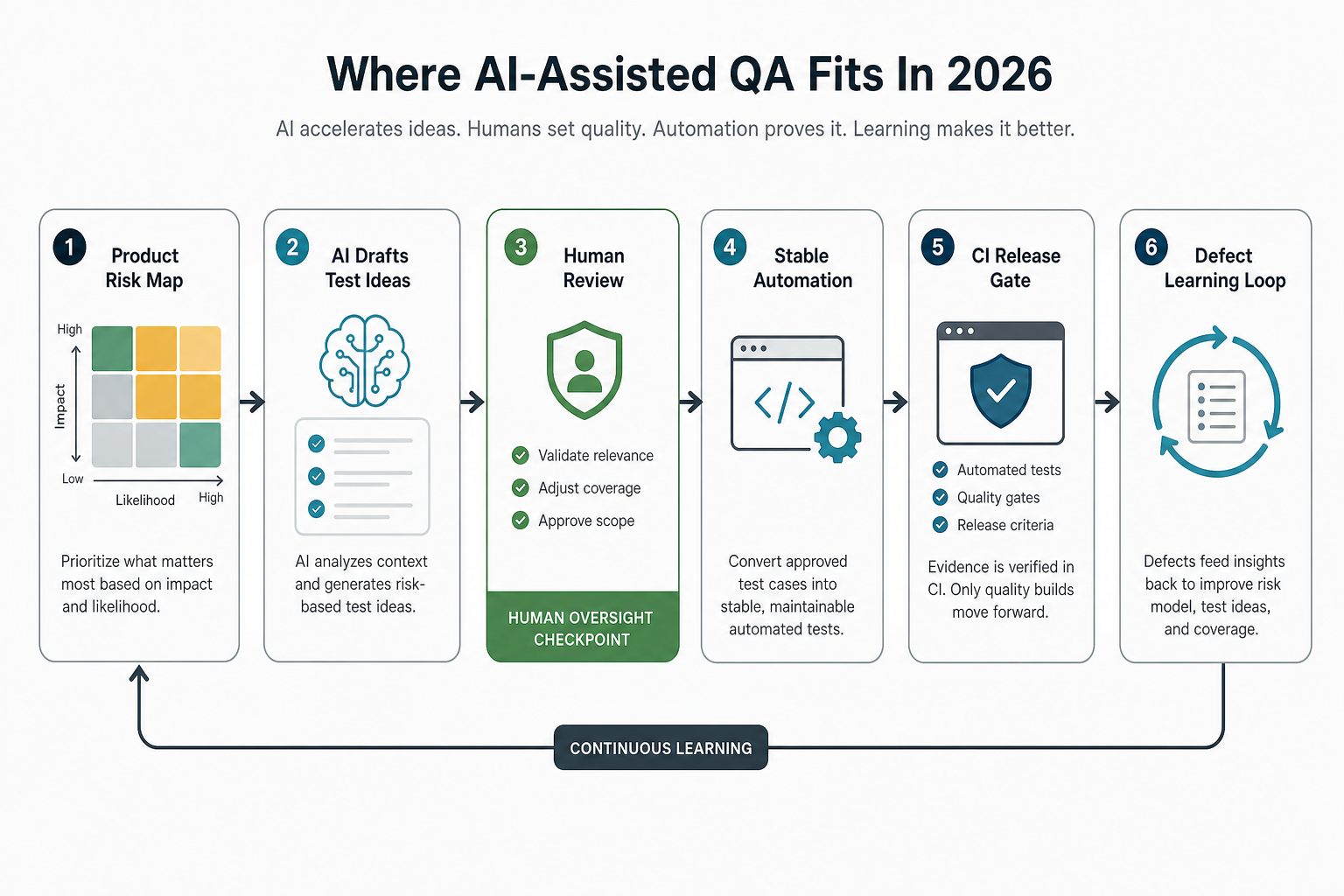
AI-assisted QA can help generate test ideas, summarize defects, propose edge cases, analyze logs, write draft test scripts, and review coverage gaps. In 2026, teams are also using agentic testing workflows to explore screens, draft Playwright-style test plans, generate code, and suggest repairs for failing checks. That makes QA faster, but it does not remove the need for deterministic checks on high-risk workflows or human judgment for usability, accessibility, and product fit.
The safest use of AI in QA is as an accelerator around a disciplined test strategy. Let AI suggest scenarios, but require humans to approve risk coverage. Let AI draft automation, but require engineers or automation specialists to review selectors, assertions, fixtures, data cleanup, and CI behavior. Let AI summarize failures, but keep release decisions tied to reproducible evidence, not a model's confidence.
A practical rule is simple: AI can expand the candidate test list, humans decide which risks matter, and automation proves the stable checks repeatedly. When that governance is missing, teams often create more scripts without improving release confidence.
If your team is exploring this path, the AI-powered QA automation roadmap separates AI assistance from deterministic automation, CI gates, and human release decisions.
QA Coverage Checklist Before Launch
Before launch, confirm the QA mix can answer these questions:
- Have the highest-risk user journeys been mapped to manual, automated, or blended coverage?
- Are stable critical paths protected by smoke, API, UI, mobile, or integration checks?
- Are exploratory sessions planned for usability, accessibility, confusing copy, edge cases, and unusual states?
- Does the team know which automated failures block release and which create warnings?
- Is there a device, browser, role, data-state, and integration coverage matrix?
- Are flaky tests reviewed instead of ignored?
- Are UAT, functional testing, and regression testing owned by the right teams?
- Will QA findings feed the post-launch backlog, support plan, and maintenance budget?
If ownership is unclear, use the UAT vs functional testing vs regression testing guide to separate who validates business acceptance, who verifies functional behavior, and who protects against repeat defects. For teams that need independent workflow validation before launch, functional testing services can turn those ownership boundaries into repeatable release evidence.
How NextPage Can Help
NextPage helps teams plan and execute the QA mix for web apps, mobile apps, SaaS platforms, ecommerce systems, dashboards, workflow software, and enterprise tools. That can include manual QA, exploratory testing, functional testing, regression planning, Playwright or Cypress automation, API checks, mobile device coverage, CI/CD quality gates, and release-readiness reporting.
The most useful starting point is a short risk assessment: which flows matter most, what evidence the release needs, what can be automated now, and what should stay human-led until the product stabilizes. If the first release scope is still moving, use the MVP Scope Builder to separate launch-critical workflows from later roadmap items before locking the QA plan.
If you already have a product in motion, NextPage can add focused QA capacity, create an automation roadmap, repair brittle tests, or connect quality gates to the delivery pipeline. The outcome should be simple: fewer surprises after launch, faster feedback before release, and a QA system the team can keep improving.