
A reliable mobile app development process is not just a sequence of discovery, design, development, testing, and launch. It is a decision system that protects budget, validates the first release, and keeps the product useful after it reaches real users.
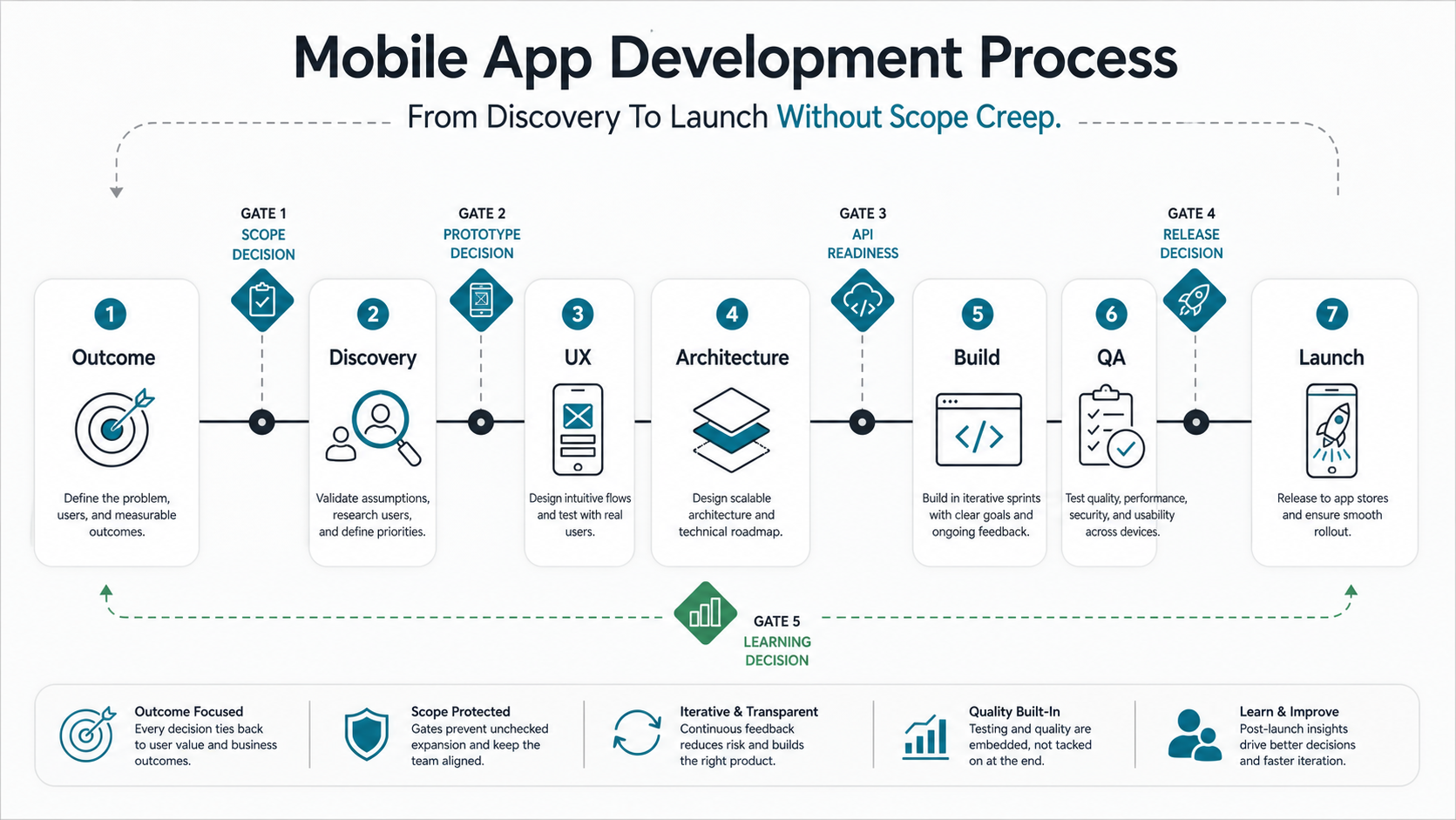
For founders, product leaders, and engineering teams planning iOS, Android, Flutter, React Native, or backend-connected mobile apps, the practical process is: define the outcome, scope the first workflow, prototype the experience, choose the platform and architecture, build in controlled sprints, test on real devices, prepare the store launch, and use post-launch evidence to decide release two.
If you already have a rough feature list, use the custom software cost estimator before asking for a quote. It helps convert broad ideas into scope, integration, platform, and QA assumptions that a delivery team can actually estimate.
Quick Answer: What Is The Mobile App Development Process?
The mobile app development process is the structured path from business goal to launched product: discovery, scope definition, UX design, technical architecture, sprint delivery, quality assurance, app-store release, and post-launch improvement. The useful version connects those phases with approval gates so teams can decide what belongs in version one, what should wait, and what evidence is required before launch.
A weak process treats each phase as a handoff. A strong process makes each phase prove something: discovery proves the problem and user, UX proves the workflow, architecture proves the platform plan, sprints prove working software, QA proves release readiness, and launch proves whether the market response justifies the next investment.
Start With The Outcome, Not The Feature List
Many mobile projects begin with a long list of screens and ideas. That feels productive, but it often hides the real question: what user outcome must the first release prove? Until that outcome is clear, the team cannot distinguish launch-critical scope from later roadmap ideas.
Discovery should define the first audience, the main job to be done, the business metric, the launch constraint, and the no-scope list. For example, a booking app may need search, availability, payments, admin review, notifications, and support workflows. It may not need loyalty points, referrals, AI recommendations, or a second marketplace role in version one.
This is where a delivery partner should push for clarity. NextPage's mobile app development work is strongest when the first release has a clear user, a measurable outcome, and a practical path to release two.
Phase 1: Discovery And Scope Control
Discovery turns an app idea into delivery assumptions. The team should document the audience, core workflow, business rules, data needs, integrations, compliance constraints, device needs, and success metrics. The output should not be a vague brief. It should be a scope baseline that can be estimated and defended.
- User decision: who is the first real user and what action must they complete?
- Business decision: what metric makes the first release successful?
- Scope decision: what is explicitly inside version one, later, or out?
- Risk decision: what could delay launch if it is discovered too late?
Scope control starts here. If a feature is not needed to prove the primary workflow, reduce operational risk, or support launch, put it in a later release. For teams still debating whether to build custom, buy a platform, or launch a lighter MVP, the Build Vs Buy Decision Tool can make the tradeoff more concrete.
Mobile App Discovery Scorecard
Before UX or engineering begins, score the project against six discovery inputs. Low scores do not mean the app should not be built. They mean the first phase should resolve uncertainty before the team commits to detailed sprint estimates.
| Discovery Area | Green Signal | Risk Signal | First Action |
|---|---|---|---|
| User and job | One primary user and job are clear | The app tries to serve every audience at once | Pick the first user and workflow |
| Release outcome | A measurable activation, booking, order, task, or retention metric exists | Success is described as "launch the app" | Name the metric and baseline |
| Workflow evidence | Current process, edge cases, and exceptions are visible | Scope is based only on stakeholder opinions | Interview users and map real scenarios |
| Integration access | APIs, data owners, and test accounts are known | The build assumes third-party systems will be easy | Validate API and data assumptions early |
| Platform constraints | Device, OS, offline, performance, and native-feature needs are explicit | The stack is chosen before constraints are clear | Compare native, cross-platform, and web paths |
| Launch ownership | Store, support, analytics, and maintenance owners are assigned | Post-launch work is treated as optional | Define operating ownership during discovery |
Phase 2: UX Flows And Prototype
UX work should convert the scope baseline into real user flows. This includes onboarding, sign-in, primary tasks, empty states, error states, notifications, payments, admin actions, and support handoffs. A mobile app prototype is not only for visual approval. It is a way to find hidden workflow gaps before engineering time is spent.
For consumer apps, the team should test clarity, speed, trust, and re-entry after interruption. For internal or operational apps, the team should validate task flow, permission rules, offline or low-connectivity behavior, and exception handling. When the app supports field teams or enterprise workflows, compare the first release with enterprise mobile app development services patterns so admin tooling, identity, dashboards, and rollout support are not forgotten.
Phase 3: Architecture And Platform Choice
Platform choice should follow product constraints. Native iOS and Android can be the right fit when performance, hardware access, platform-specific UX, or security expectations are high. Cross-platform frameworks such as React Native or Flutter can be better when the team needs shared code, faster iteration, and consistent behavior across iOS and Android. A progressive web app can fit content, booking, ecommerce, or internal workflows when app-store distribution is not essential.
| Approach | Best Fit | Watchout |
|---|---|---|
| Native iOS and Android | Performance-heavy apps, advanced device features, regulated workflows, polished platform-specific UX | Higher cost and two delivery tracks |
| Cross-platform app | MVPs, marketplaces, booking apps, field tools, and products needing iOS and Android parity | Native modules may still be needed for complex device features |
| Progressive web app | Content, ecommerce, dashboards, lightweight service booking, or internal workflows | Limited app-store presence and some device capability constraints |
Architecture also covers backend APIs, authentication, analytics, push notifications, admin tooling, observability, and storage. When the app is part of a larger operating system, the work often overlaps with custom software development rather than mobile UI alone.
Phase 4: Sprint Delivery With Change Control
Sprints should produce working increments, not just status updates. The team should keep a release backlog, acceptance criteria, demo cadence, risk log, and change-control rule. If a new feature enters version one, another item should be removed, moved to the next release, or re-estimated. Without that rule, scope creep becomes invisible until the schedule slips.
Useful sprint reviews answer three questions: what is working, what changed, and what decision is needed now? This keeps stakeholders involved without turning every review into a new feature workshop.
Delivery Gates That Prevent Scope Creep
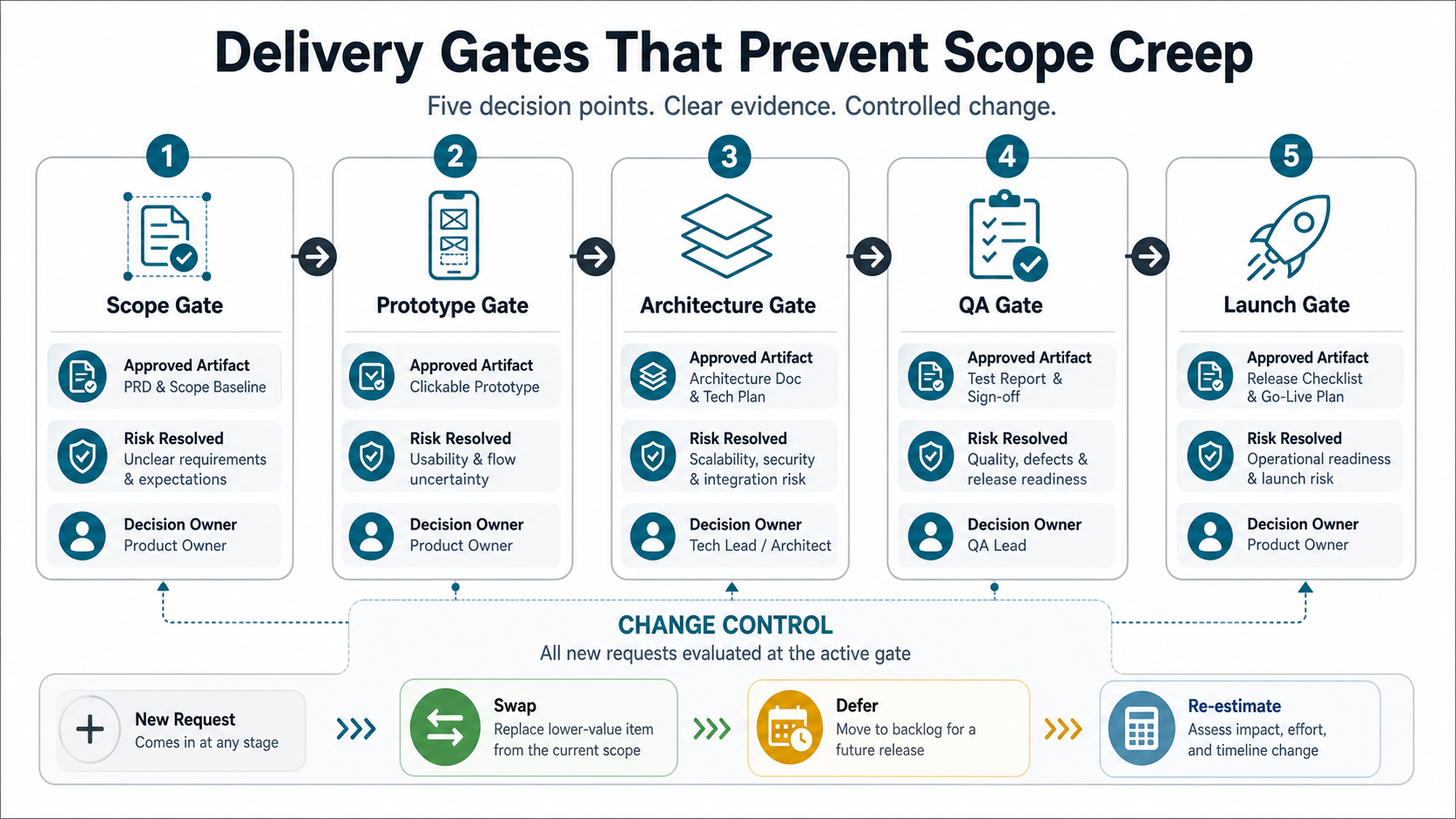
A mobile app project should not move from phase to phase only because the calendar says so. It should move forward when the right artifact is approved.
- Scope gate: approve user, outcome, risks, budget band, and no-scope list.
- Prototype gate: approve core flows, roles, edge states, and copy expectations.
- Architecture gate: approve platform strategy, API contracts, data model, analytics plan, and acceptance criteria.
- QA gate: approve regression results, device matrix, crash checks, accessibility notes, and release-risk list.
- Launch gate: approve store metadata, privacy disclosures, rollback plan, monitoring, and support ownership.
This structure gives stakeholders room to make decisions without letting every discussion become hidden scope expansion. If the first release is meant to validate demand, use an MVP development path before committing to a larger platform build.
Phase 5: QA, Device Testing, And Release Hardening
Mobile QA should cover more than whether the happy path works. Test across operating systems, device sizes, network conditions, interrupted sessions, permissions, app updates, login state, payments, push notifications, accessibility, and analytics events. If the product includes offline workflows, location, camera, Bluetooth, wallets, or background tasks, those scenarios need explicit test coverage.
Release hardening should also verify backend behavior under expected traffic, error monitoring, crash reporting, audit logs, and support workflows. A polished interface cannot compensate for missing observability or unclear operational ownership. For a deeper QA pass, compare the release against mobile app testing services coverage and the supporting mobile app testing checklist.
Mobile QA And Store Launch Readiness Map
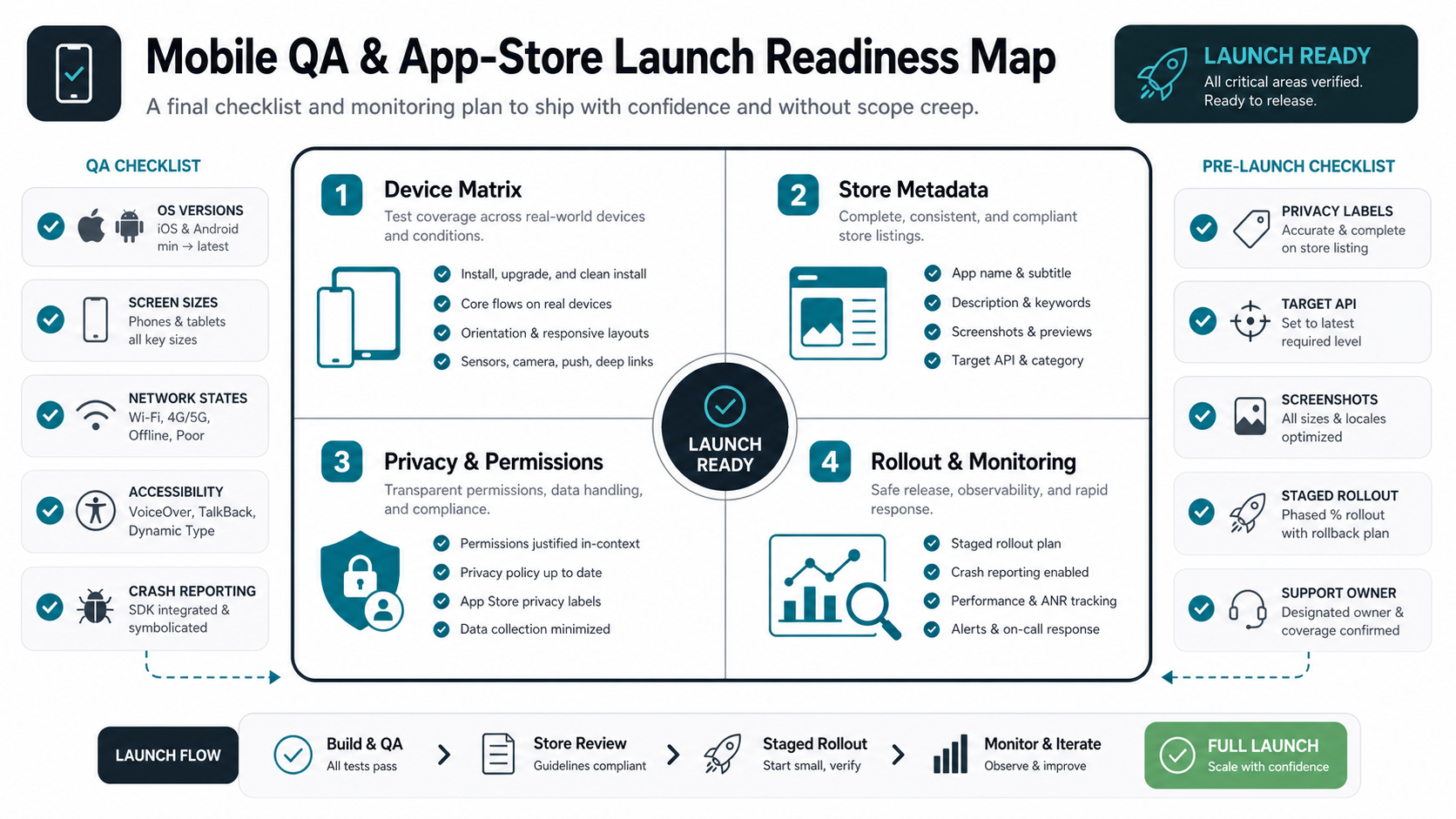
Store launch risk often appears late because teams focus on feature completion and leave release operations until the final sprint. Apple requires accurate app privacy details in App Store Connect, including data practices from third-party partners and SDKs. Google Play target API requirements also change over time; Android Developers documentation currently states that new apps and updates submitted after August 31, 2025 must target Android 15/API 35 or higher, with specific exceptions for Wear OS, Android Automotive OS, and Android TV.
Plan these items before the last sprint:
- Device matrix: supported OS versions, screen sizes, network states, orientation, permissions, and critical native capabilities.
- Beta testing: TestFlight and Google Play testing tracks with clear test instructions, feedback routing, and build status monitoring.
- Store assets: app name, subtitle, descriptions, screenshots, category, release notes, support URL, privacy policy, and review notes.
- Privacy and security: declared data collection, SDK behavior, permission rationale, authentication, secure storage, API protection, and logging boundaries.
- Rollout control: staged release, crash monitoring, analytics, rollback plan, customer support owner, and incident response path.
If the app handles sensitive data, payments, healthcare workflows, location, media, or account access, add a release security pass using mobile app security hardening services and the mobile app security checklist.
Phase 6: App Store Launch And Rollout
Launch is a workflow, not a button. The team should prepare app store listings, screenshots, privacy disclosures, support URLs, version notes, analytics dashboards, and rollback options. For higher-risk products, staged rollout, beta groups, or limited geography can reduce launch risk.
TestFlight lets teams distribute beta builds, collect feedback, and continue improving builds before submitting for review. Google Play staged rollouts can release an update to a percentage of users and increase that percentage over time. Those platform capabilities are useful only when the team has crash reporting, user feedback review, and a clear decision rule for halting, fixing, or expanding the rollout.
Phase 7: Post-Launch Maintenance And Learning
The first release should create learning. Track activation, completion, retention, crashes, support tickets, app-store reviews, funnel drop-off, and feature usage. Those signals should shape release two more than pre-launch opinions.
Post-launch work usually includes bug fixes, OS updates, dependency patches, performance tuning, accessibility improvements, analytics review, customer support feedback, and roadmap sequencing. If the app proves demand, the next decision may be to expand features. If it reveals friction, the next decision may be to simplify the workflow before adding anything new. The mobile app maintenance checklist is a useful companion once the first version is live.
How Long Mobile App Development Takes
Timeline depends on scope, platform, integrations, backend complexity, design depth, QA depth, and approval speed. A focused MVP or proof-oriented app can often be planned and delivered faster than a multi-role product with deep integrations and complex compliance needs. The point is not to chase the shortest timeline; it is to make the first release small enough to finish honestly.
| App Type | Typical Shape | Planning Range |
|---|---|---|
| Lean MVP | One audience, one core workflow, limited integrations, simple admin coverage | 8-14 weeks |
| Growth-stage app | Multiple roles, stronger backend, payments or notifications, richer operations | 4-8 months |
| Complex product | Native depth, advanced security, heavy integrations, multi-tenant rules, regulated workflows | 9 months or more |
For budget and schedule ranges by feature depth, compare this process with the mobile app development cost guide or run the custom software cost estimator with your expected roles, integrations, platform count, and QA needs.
What Drives Mobile App Development Cost?
Cost is driven less by the number of screens and more by the complexity behind those screens. Role-based permissions, backend workflows, integrations, native device features, admin tooling, analytics, migration, security, and testing depth can change the estimate quickly.
- Platform count: iOS, Android, web admin, and backend all add delivery surface.
- Feature complexity: real-time chat, maps, payments, media, AI, or offline sync increase build and QA needs.
- Operational tooling: admin panels, approvals, support views, and reporting are often underestimated.
- Integration depth: CRM, ERP, payment, identity, logistics, healthcare, or inventory systems add dependency risk.
- Security and compliance: regulated data, audit logs, consent, encryption, secure storage, and access controls require more planning.
For an early estimate, start with the cost estimator instead of asking for a quote against an unprioritized feature list.
Portfolio Patterns For Mobile Delivery
Mobile delivery becomes clearer when it is mapped to real operating patterns. A music discovery app, field operations platform, betting product, or service marketplace may all need mobile UI, but their scope drivers are different: media behavior, offline work, payments, compliance, admin review, support, data sync, and launch risk.
The SoundCrate case study is a useful reference for native product surfaces around discovery and personal library workflows. The OpsLink case study shows how mobile field workflows connect to tickets, forms, work orders, fleet data, and operational ownership. The LinePilot case study shows why account, wallet, bet-history, support, and risk operations often matter as much as the mobile front end.
Use these patterns to make scope specific. Ask which workflows must work on day one, which operational surfaces must exist behind the app, and which evidence is needed before the release expands.
Mobile App Development Process Checklist
- Define the first user, core outcome, business metric, and no-scope list.
- Turn requirements into user flows, edge states, and a prototype before engineering starts.
- Choose native, cross-platform, or PWA based on product constraints, not trend preference.
- Document API contracts, auth, data model, analytics, admin needs, and release backlog.
- Use sprint reviews for decisions and change control, not uncontrolled feature expansion.
- Test devices, OS versions, network conditions, permissions, interruptions, accessibility, and analytics events.
- Prepare app store metadata, privacy disclosures, screenshots, rollout plan, and support ownership early.
- Use post-launch data to decide release two instead of expanding from assumptions.
How NextPage Runs Mobile App Projects
NextPage treats mobile app development as a product delivery system, not a handoff from design to code. The work starts by narrowing the first release, choosing the right platform strategy, and mapping the backend, integrations, analytics, security, QA, store, and support workflows needed for launch. That keeps the build practical and gives stakeholders clearer budget and timeline expectations.
If you are planning a mobile app now, start with the custom software cost estimator to frame scope and cost. When the product needs hands-on delivery, the mobile app development, MVP development, and custom software development services can turn that plan into a shipped product.