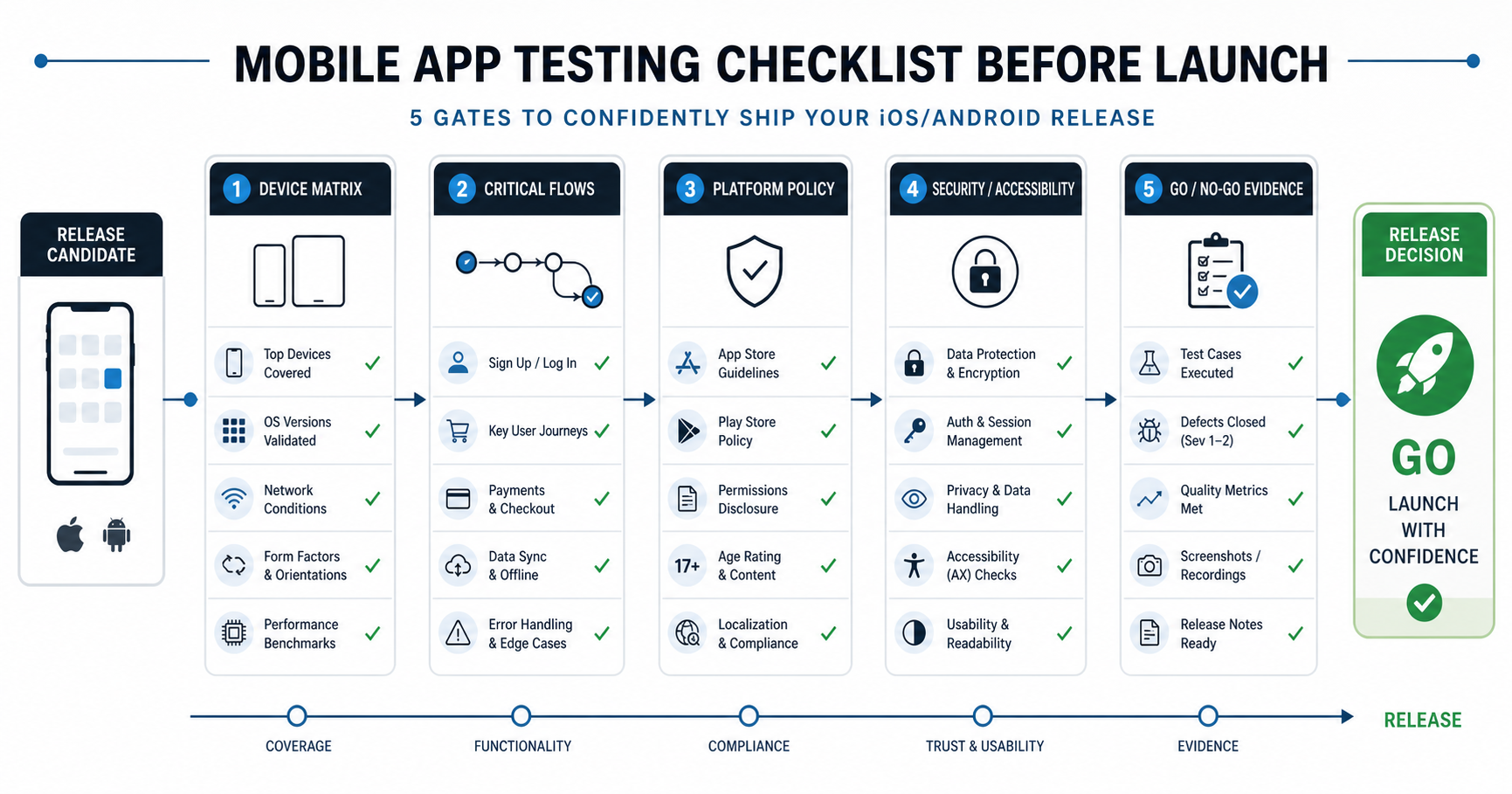

Quick Answer: What Should Mobile App Testing Cover Before Launch?
A mobile app testing checklist should prove that a release candidate is safe to put in front of real users, not just that the happy path works on one simulator. Before launch, test the supported devices and operating systems, onboarding, authentication, permissions, poor-network behavior, notifications, payments or subscriptions, accessibility, performance, security, analytics, crash reporting, store review materials, and final go/no-go evidence.
For 2026 launches, the checklist also needs platform-policy coverage. iOS teams should verify App Review requirements, privacy disclosures, SDK privacy manifest expectations, TestFlight evidence, subscription metadata, and permission prompts before the final submission build. Android teams should verify current Google Play target API requirements, Play Console declarations, device form factors, runtime permissions, deep links, production signing, and staged rollout controls. Treat these as release gates, not paperwork left until submission week.
The useful output is a decision record: what passed, what failed, what evidence exists, who owns each risk, and whether the team should ship, narrow scope, or delay. If the app handles payments, sensitive data, healthcare, financial workflows, location, children, or regulated work, raise the evidence bar before release rather than after support tickets arrive. A practical launch gate should combine real-device proof, policy readiness, crash and performance thresholds, security findings, accessibility checks, analytics verification, and support handoff in one signed-off record.
1. Build The Device, OS, And Platform Policy Matrix First
Mobile QA starts with a device matrix because a release that works on one simulator can still fail on real hardware. Define supported iOS and Android versions, target API levels, device classes, screen sizes, memory bands, chipsets, regions, languages, and app store territories before test execution begins. If the app uses camera, Bluetooth, location, biometrics, NFC, background tasks, push notifications, payments, or third-party SDKs, include real-device testing in the plan. Teams that need an independent readiness pass can use NextPage’s mobile app testing services to turn those assumptions into a concrete device, OS, workflow, and evidence matrix.
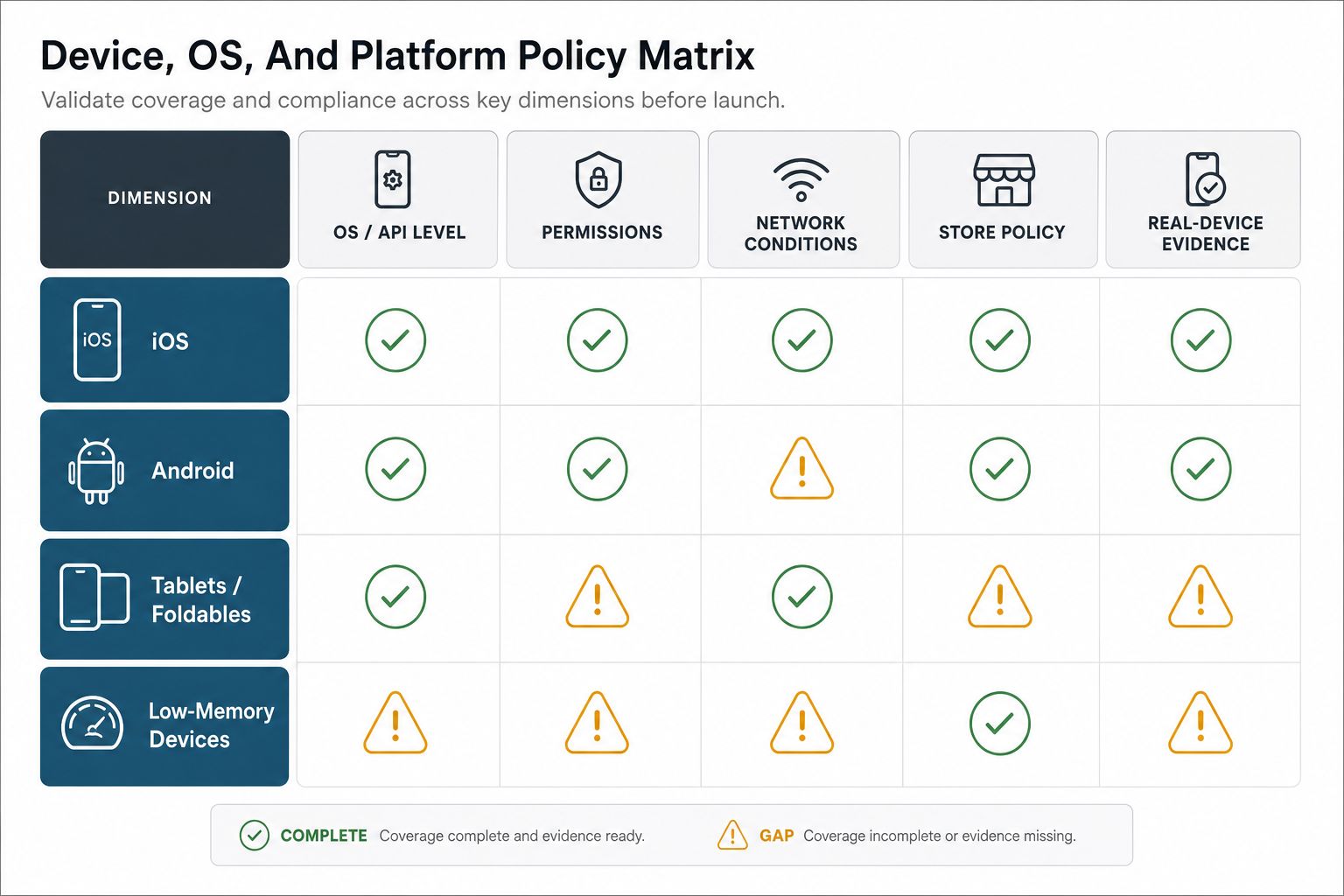
| Matrix Area | What To Include | Release Evidence |
|---|---|---|
| Operating systems and API levels | Current major OS, previous supported major OS, minimum supported version, Android target API level, iOS SDK/Xcode baseline, and any beta OS risk. | Test run by build number, OS version, device, owner, date, and known gaps. |
| Device classes | Small phone, large phone, tablet if supported, foldable if relevant, older low-memory model, and high-end model. | Layout screenshots, crash-free sessions, performance readings, and any unsupported-device decision. |
| Build and configuration | Production signing, release candidate, feature flags, remote config, API environment, store build, and analytics/crash SDK configuration. | Evidence that the exact release candidate, not only a debug or staging build, was tested. |
| Policy and privacy | App Review notes, Play Console declarations, privacy policy, SDK privacy manifests, permissions copy, data deletion, age rating, subscriptions, and tracking prompts. | Submission checklist, reviewer credentials, privacy copy review, and screenshots of completed store fields. |
If budget limits real-device coverage, prioritize audience devices, the oldest supported OS versions, revenue-critical flows, and hardware capabilities tied to the product promise. Record what was not tested so the release decision is honest. For teams still planning the broader delivery cycle, NextPage’s mobile app development process guide shows where QA, device testing, and release hardening should sit in the build plan.
2. Test The Functional Flows That Must Not Break
Functional testing should follow real launch journeys. A mobile app can pass screen-by-screen checks while the end-to-end workflow still fails: signup works, but verification messages do not arrive; payments complete, but entitlement state does not update; a booking confirms in the app, but the admin dashboard never receives it.
Start with workflows that carry the most user or business risk: onboarding, login, password reset, biometric access, account switching, profile updates, search, booking, checkout, payments, uploads, chat, notifications, admin actions, and support contact paths. For wider workflow coverage, pair this article with NextPage’s functional testing services approach, then narrow the test cases to mobile-specific failure modes.
Test every supported user role and permission level, including blocked, expired, invited, returning, upgraded, downgraded, and deleted accounts. Run onboarding from fresh install, update install, invited user, returning user, and abandoned user states. Verify validation messages, empty states, duplicate submissions, expired links, server errors, background/foreground transitions, app restart, forced logout, and OS update recovery.
3. Validate Permissions, Network States, Notifications, And Deep Links
Mobile launches often fail around conditions that teams do not see during desk testing. Users deny permissions, change permissions later, move between Wi-Fi and mobile networks, open the app from a push notification, or return after the app was killed in the background. The checklist should include allowed, denied, limited, revoked, and changed-later states for every permission the app requests.
| Risk Area | Checklist Questions | Evidence To Keep |
|---|---|---|
| Permissions | Does the app explain why it needs camera, location, photos, contacts, notifications, microphone, Bluetooth, or storage before requesting access? Does it recover when access is denied? | Screen recordings for first request, denial, settings change, and recovery path. |
| Network states | What happens on airplane mode, slow 3G, packet loss, API timeout, duplicate tap, retry, and interrupted upload? | Logs, screenshots, retry behavior, and data-integrity check after reconnection. |
| Notifications and deep links | Do push notifications deep-link to the correct screen, respect consent, avoid duplicates, and behave correctly when the user is logged out? | Notification payload, device state, destination screen, and analytics event. |
| Background behavior | Does the app preserve state, refresh stale data, handle background tasks, and avoid silent failures after backgrounding? | Before/after app state, session state, sync logs, and crash/non-fatal error review. |
When the product depends on field conditions, such as IoT, logistics, healthcare, travel, or on-site sales, add real-world tests outside the office. The IoT Mobile App Development Roadmap explains why hardware, cloud, mobile app, permissions, and field conditions need one connected QA matrix.
4. Prove Payments, Accounts, And Data Integrity
Any workflow that changes money, identity, inventory, access, or compliance status needs deeper evidence than a pass/fail note. Test success, failure, retry, duplicate, cancellation, refund, webhook delay, and reconciliation paths. For subscriptions and in-app purchases, verify the store state, app state, backend state, invoice or receipt, entitlement, expiry, renewal, grace period, cancellation, and account deletion behavior.
Account testing should include email verification, phone verification, social login, password reset, MFA if present, session expiry, account deletion, data export, role changes, and consent changes. Data-integrity testing should compare the app result with backend records, CRM or helpdesk entries, analytics events, admin dashboards, and payment provider logs. If the business team cannot reconcile what happened, the launch is not ready.
5. Check Performance, Accessibility, Privacy, And Security
Pre-launch mobile QA should include more than functional correctness. Slow startup, broken screen-reader labels, battery drain, excessive network calls, weak session handling, insecure storage, and sensitive values in logs can make a technically working app unsuitable for release.
Measure cold start, warm start, key screen load times, API latency, memory use, battery behavior, and crash-free sessions on representative devices. Check touch target sizes, text scaling, contrast, screen-reader labels, focus order, dynamic type, reduced motion, keyboard behavior, and landscape or split-view states when supported. WCAG 2.2 adds a clear minimum touch-target expectation that is especially relevant for mobile release QA. If performance risk is high, pair this launch checklist with the mobile app performance optimization checklist so speed, API latency, crashes, ANRs, hangs, battery drain, and monitoring become release gates instead of after-launch diagnostics.
Security testing should include secure storage for tokens and sensitive values, session expiry, certificate handling, jailbreak/rooted-device policy if required, API authorization checks, SDK permissions, dependency versions, privacy disclosures, logging, crash payloads, and whether sensitive data appears in analytics or error reports. Use OWASP MASVS and MASTG as a security evidence framework when the app handles sensitive data, and keep traceable evidence for the controls you actually tested. For launch, audit, or remediation work, NextPage’s mobile app security hardening services provide a practical review path.
6. Confirm Analytics, Crash Reporting, And Store Submission Readiness
Analytics and crash reporting must be validated before launch because they are how the team sees first-week problems. Confirm that key events fire once, use the right naming convention, include allowed properties, respect consent, and appear in dashboards. Confirm that crash reporting captures symbolicated crashes, non-fatal errors, device context, app version, build number, release channel, and user-impact context without leaking sensitive data.
Store submission readiness should be treated as its own QA stream. Review screenshots, descriptions, age rating, support URL, privacy policy, permission disclosures, data safety or nutrition labels, test accounts, app tracking prompts, subscription metadata, review notes, and release notes. A technically stable app can still miss a launch window if store materials are inconsistent, the target API or SDK baseline is stale, privacy answers do not match the app, or reviewers cannot access the required test path. For Android-specific modernization and Play-readiness concerns, see the Android app migration checklist; for iOS codebase updates, review the Swift 6 migration checklist for iOS apps.
7. Keep QA Evidence That Supports The Launch Decision
A checklist is most useful when it creates launch evidence. Product, engineering, support, marketing, and leadership should be able to see which devices were covered, which workflows passed, which defects remain, what workarounds exist, and who accepted the risk.
| Evidence Item | What To Capture | Launch Use |
|---|---|---|
| Device and OS matrix | Device, OS/API level, app build, date, tester, region, and result. | Shows supported coverage and known gaps. |
| Critical-flow proof | Screenshots, recordings, logs, transaction IDs, backend records, and analytics events. | Proves that user-facing and operational systems agree. |
| Defect triage | Severity, affected users, workaround, owner, fix date, retest result, and launch decision. | Prevents unresolved bugs from becoming vague launch risk. |
| Store readiness | Review notes, privacy policy, test account, screenshots, release notes, permissions, and declarations. | Reduces app review rejection and release-window surprises. |
This evidence also helps evaluate development partners. The Mobile App Development RFP Checklist explains how to ask vendors for QA, launch, and maintenance proof before signing. If stakeholders need a broader launch-readiness model across web, backend, integrations, and mobile surfaces, the pre-launch QA checklist for custom software provides the companion release-risk framework.
8. Decide What To Automate Before Release
Mobile automation is valuable when it protects stable, repeated, high-risk flows. Manual testing is still better for new experiences, visual judgment, exploratory edge cases, store materials, accessibility review, and first-time workflow validation. Use automation for smoke tests, login, critical navigation, API contract checks, entitlement checks, and repeatable regression flows that run before every release candidate.
The practical question is not manual testing versus automation. It is which evidence the team needs before release and which checks will be repeated often enough to justify automation. NextPage’s Manual vs Automation Testing guide gives a release-stage framework for choosing the right coverage mix, and the mobile test automation strategy guide explains how to plan Appium and CI coverage without turning the device matrix into an unmaintainable queue.
9. Use The Checklist To Make A Go/No-Go Decision
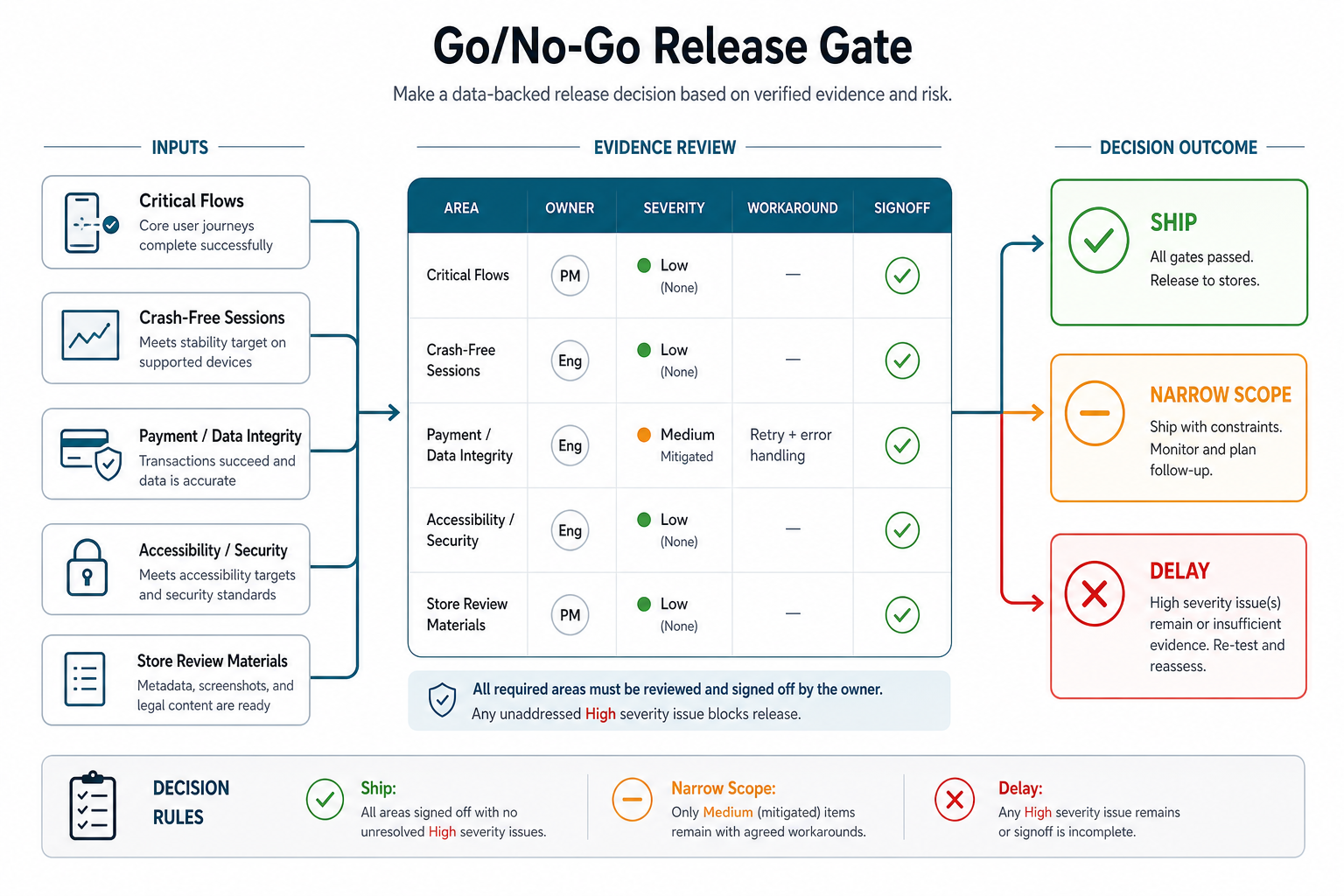
The final checklist should create a clear release decision. Ship when critical workflows pass on supported devices, known defects have owners and acceptable workarounds, crash and analytics tools are active, store materials are ready, support is briefed, and rollback or hotfix paths are understood. Narrow scope when medium-risk issues are contained by feature flags, market limits, staged rollout, manual review, or documented workarounds. Delay when payment, account, data integrity, security, privacy, accessibility, platform-policy, or crash risks are unresolved.
| Launch Gate | Pass Signal | Delay Signal |
|---|---|---|
| Critical journeys | Onboarding, login, checkout, booking, payments, support, and admin workflows pass on supported device classes. | Any money, identity, entitlement, or operational handoff flow has unresolved defects. |
| Platform readiness | App Store and Play Console privacy, target API, screenshots, test accounts, subscriptions, review notes, and declarations are complete. | Reviewers cannot access a flow, store data is inconsistent, or policy checks are left for submission day. |
| Reliability signals | Crash reporting, analytics, performance dashboards, staged rollout monitoring, and hotfix ownership are ready. | The team cannot see crashes, slow paths, API errors, or conversion-impacting failures after release. |
| Risk acceptance | Open issues have severity, owner, workaround, retest plan, support note, and explicit business acceptance. | Known issues are described vaguely, lack an owner, or affect security, privacy, accessibility, payments, or data integrity. |
Also plan what happens after launch. A release checklist should hand off to monitoring, support review, app store feedback, crash triage, dependency updates, OS compatibility planning, and rapid patch workflows. The Post-Launch Mobile App Maintenance Checklist covers the operating rhythm after users are live.
How NextPage Can Help
NextPage helps teams plan, build, test, launch, and improve mobile apps with realistic QA coverage: device matrices, release checklists, workflow testing, analytics and crash reporting, store-readiness support, mobile security review, and post-launch maintenance planning. If your team is still shaping the product, our mobile app development work includes the backend, QA, analytics, and launch support needed for reliable app releases. If you need a budget starting point, use the Custom Software Cost Estimator to frame build, integration, QA, and support effort. Then turn the scope into a practical mobile app testing checklist before the release window is already at risk.