
Quick Answer: Mobile Test Automation Strategy
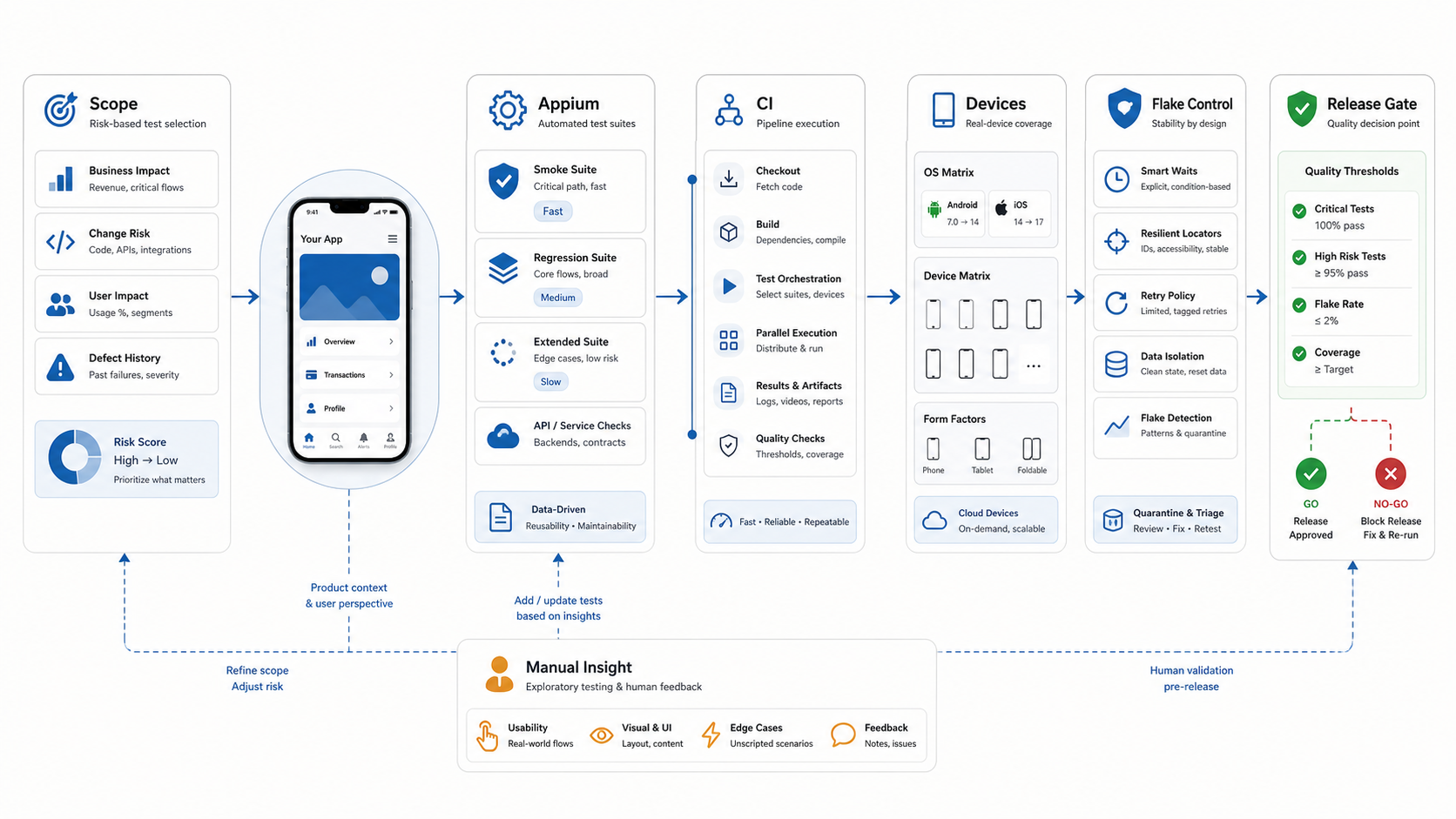
A mobile test automation strategy defines which app checks should run automatically, where they should run, how often they should block release, and which risks still need human judgment. For most iOS, Android, Flutter, and React Native teams, the right strategy is not "automate everything." It is a layered plan that uses Appium for stable end-to-end mobile flows, API and unit tests for faster feedback, a practical real-device matrix for launch risk, and manual exploratory testing for usability, edge cases, and new behavior.
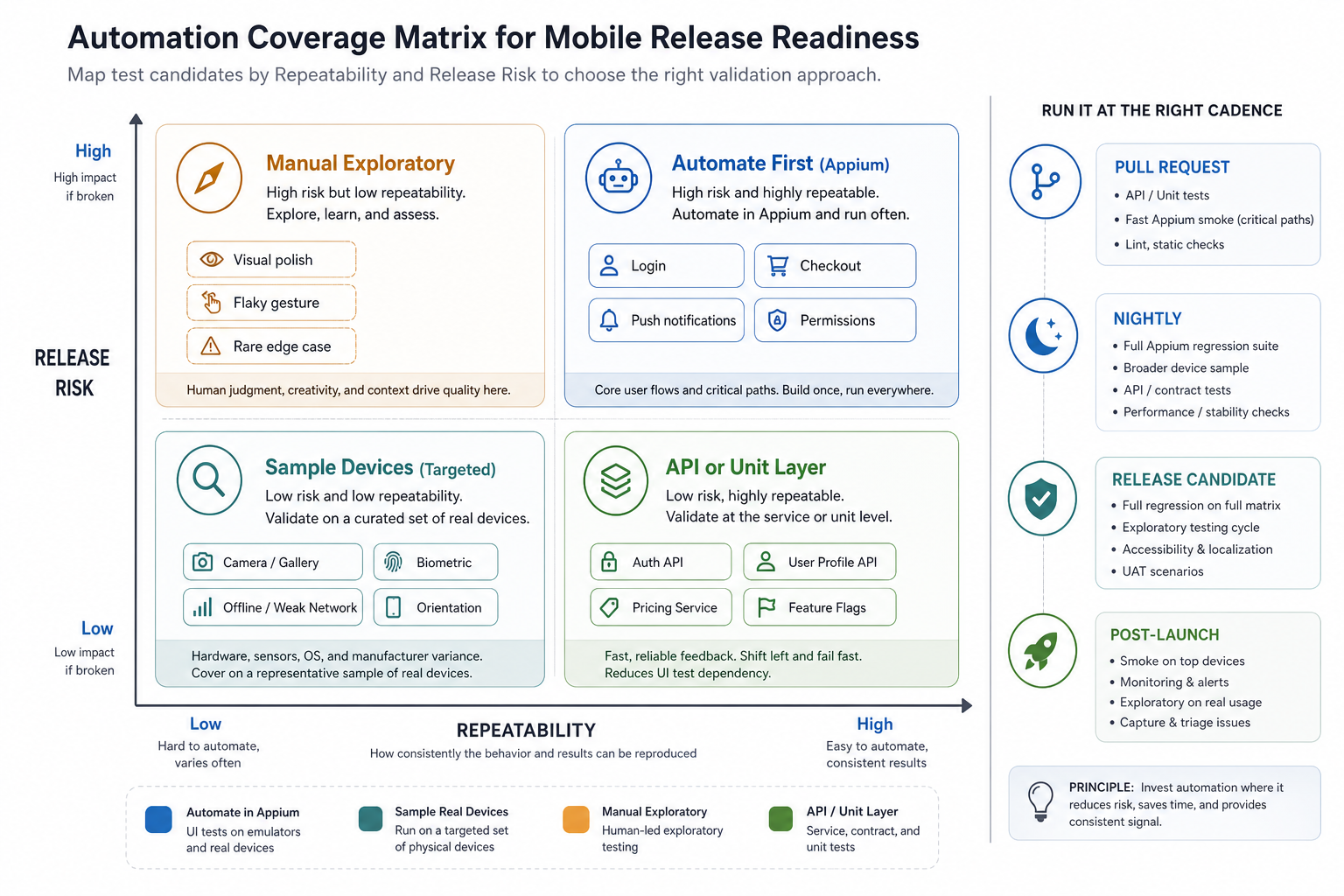
Start with business risk. Automate repeatable workflows that would break revenue, access, trust, or operations if they failed: login, onboarding, account recovery, checkout, booking, push deep links, subscriptions, permissions, and critical admin handoffs. Then decide the cadence: pull request smoke, nightly regression, release-candidate full matrix, and post-launch monitoring. A good strategy tells the team what blocks a release, what creates a warning, what gets quarantined as flaky, and what should stay manual until the product stabilizes.
Why Mobile Automation Needs A Strategy
Mobile automation is valuable because mobile releases carry repeated risk. The same login, payment, permission, notification, and data-sync flows must work across app builds, operating systems, devices, app store channels, and backend changes. Without automation, regression testing expands until every release feels slow. Without strategy, automation expands until the suite becomes slow, brittle, and ignored.
Appium is a strong fit when the goal is cross-platform end-to-end validation. The Appium project describes it as an open-source framework for native, hybrid, and mobile web apps that drives iOS and Android apps through the WebDriver protocol. That makes it useful for workflows where the app UI, OS-level behavior, and backend state must be exercised together. It also means tests need disciplined locators, data isolation, waiting rules, device planning, and maintenance ownership.
Use NextPage's Mobile App Testing Checklist Before Launch for tactical launch coverage. This article focuses on the automation layer: how to decide what deserves Appium coverage, what belongs in faster layers, and how to make CI results trustworthy enough to influence release decisions.
1. Start With Risk, Not Tool Choice
Teams often begin with a framework debate: Appium, Espresso, XCUITest, Maestro, Detox, or a device-cloud vendor. The better first question is: which failures would hurt the business if they reached users? Build a ranked list before choosing the automation layer.
| Risk Signal | Automate When | Keep Manual When |
|---|---|---|
| Revenue or conversion | The flow is stable and repeated in every release, such as checkout, subscription status, or booking confirmation. | Pricing, offers, or user experience are still changing every sprint. |
| Access and identity | Login, password reset, MFA, role switching, and session expiry can be expressed with reliable data. | New account flows still need judgment around copy, recovery, and edge cases. |
| Permissions and OS behavior | Camera, location, push, biometrics, or file access must be proven on supported OS versions. | The team is evaluating first-time prompts, trust cues, or UX wording. |
| Operational handoff | Mobile actions must create backend records, admin updates, notifications, or support events. | Business rules are still being negotiated with operations or support teams. |
This risk-first approach also protects the budget. The Test Automation ROI guide explains why saved regression effort, avoided escaped defects, faster releases, and test maintenance should be modeled together before building a large suite.
2. Define The Mobile Automation Layers
A mobile automation strategy should not push every check into Appium. UI automation is closer to real user behavior, but it is slower and more sensitive to device state, animations, network timing, and locator changes. Use Appium where UI and platform behavior matter. Move cheaper checks down to API, unit, component, or contract layers when the same risk can be validated faster and more reliably.
- Unit and component tests: validation rules, formatting, calculations, reducers, view models, and utility logic.
- API and contract tests: authentication states, entitlement rules, pricing, inventory, booking availability, notifications, and backend transitions.
- Appium smoke tests: install, launch, login, navigation, one critical happy path, logout, and crash-free sanity checks.
- Appium regression tests: stable high-value journeys across target devices, roles, and OS versions.
- Manual exploratory tests: new flows, visual judgment, accessibility, real-world interruptions, confusing states, and unusual device behavior.
For a broader planning model, NextPage's Test Automation Strategy for Web Apps uses the same principle: automate stable, repeatable, high-risk workflows instead of chasing maximum test count.
3. Choose What To Automate With Appium
Appium coverage should prove that the installed app, OS permissions, UI flow, backend state, and supported platform behavior work together. Good first candidates are smoke paths that every build must pass: fresh install, launch, login, primary navigation, core transaction, push deep link, account state, and logout. Then add regression tests for critical flows that are stable enough to maintain.
Avoid automating fragile visual exploration too early. If a flow changes weekly, test it manually until the structure settles. If a scenario mostly validates backend logic, test it through an API or contract layer. If a flow depends on visual polish, judgment, tone, or accessibility nuance, use manual review plus targeted automation around the underlying state changes.
For 2026 planning, treat Appium as a modular ecosystem rather than one fixed binary. The current Appium documentation frames the project around a server, platform drivers such as UiAutomator2, XCUITest, and Espresso, language client libraries, and optional plugins. That matters for roadmap planning: pin the server and driver versions, document which capabilities each platform lane uses, and test driver updates in a separate maintenance lane before they become part of the release gate.
Appium-related MCP tooling is emerging for mobile test development, but it should be treated as an authoring accelerator, not a release authority. Let AI or MCP-assisted workflows help draft tests, inspect selectors, or summarize failures only after the deterministic suite, device logs, and human release owner still provide the final evidence.
4. Build A CI Cadence That Matches Feedback Speed
Mobile CI is different from web CI because app builds, signing, emulators, simulators, physical devices, and device-cloud queues add time and failure modes. Android Developers notes that instrumented tests in CI require device provisioning and can run through managed devices, emulator integrations, or device farms. It also recommends scheduled runs for expensive performance regression coverage instead of putting every benchmark on every commit.
Use separate gates instead of one huge pipeline:
| Cadence | Run | Release Meaning |
|---|---|---|
| Pull request | Unit tests, API/contract checks, lint, static checks, and the fastest Appium smoke path if stable. | Protects code review without making developers wait on a full device matrix. |
| Nightly | Broader Appium regression, selected devices, API checks, and stability metrics. | Finds drift before release-candidate testing starts. |
| Release candidate | Full critical-flow regression on the target OS/device matrix plus manual exploratory cycle. | Creates go/no-go evidence for product, QA, and engineering leads. |
| Post-launch | Smoke on top devices, crash monitoring, analytics checks, and issue triage. | Confirms the release works outside the lab and informs the next automation backlog. |
Real-device clouds and managed device pools can reduce local lab overhead, but they do not remove release judgment. BrowserStack publicly positions its platform around large real-device and browser coverage, while Appium documentation still requires teams to install and maintain the correct drivers for the platforms they test. Use cloud scale for breadth, then keep a smaller, stable smoke lane that developers can understand when it fails.
The Mobile App QA and Launch Checklist is a useful companion when those CI results need to become release evidence, rollback criteria, and first-week support ownership.
5. Define Release-Gate Evidence Before The Suite Grows
Before adding more mobile tests, decide how evidence will be read. A release gate should separate blockers, warnings, and observation signals so the team does not debate every red build from scratch. For mobile apps, the strongest gate usually combines automated results, device coverage, manual owner sign-off, crash or analytics checks, and a clear rule for known flakes.
| Gate Signal | Blocks Release When | Warns When | Owner |
|---|---|---|---|
| PR smoke | Install, launch, login, or primary navigation fails on the smoke device. | Non-critical smoke check is flaky with a linked quarantine issue. | QA automation lead |
| Nightly regression | High-risk payment, booking, account, or data-sync flow fails repeatedly. | Medium-risk journey fails on one device class and has manual evidence. | Feature team |
| Device matrix | Target OS or top audience device cannot complete a critical journey. | Low-traffic device has a visual or performance concern. | QA lead and product owner |
| Flake policy | A critical smoke test is marked known flaky without owner, expiry, or replacement evidence. | Non-critical regression test is quarantined with a repair date. | Automation owner |
| Release candidate | Open blocker exists in identity, payment, notification, privacy, or operational handoff. | Accepted defect has support notes and rollback criteria. | Engineering and product |
This is where mobile automation should connect to the wider QA plan. Use a CI/CD testing strategy to decide what must run before every release, and use the Regression Testing Checklist for Software Releases to make sure critical existing workflows do not disappear from the gate.
6. Plan The Device Matrix With Evidence
A mobile automation plan needs a supported device and OS matrix. Do not run every Appium test on every device by default. That creates cost and queue time without necessarily improving confidence. Instead, choose device coverage based on audience usage, minimum OS support, known device families, hardware capabilities, and release risk.
- Smoke matrix: one representative iOS device, one representative Android device, and one older supported OS where practical.
- Release matrix: top audience devices, oldest supported OS versions, important screen sizes, and device classes tied to core workflows.
- Capability matrix: real hardware for camera, Bluetooth, NFC, location, biometrics, push, background behavior, payments, and performance-sensitive flows.
- Exploratory matrix: devices that historically expose layout, memory, performance, or permission issues.
When teams are still selecting a delivery partner, the Mobile App Development RFP Checklist explains how to ask vendors for QA, launch, device coverage, and maintenance evidence before the project starts.
7. Control Flaky Tests Before They Control Release
A flaky mobile test is more than an inconvenience. It teaches the team to distrust CI. Once that happens, a red build stops being a release blocker and becomes a debate. A mobile automation strategy needs a clear policy for preventing, measuring, quarantining, and fixing flakes. Treat flake rate as a release-health metric, not a background maintenance chore.
Use stable accessibility IDs or test IDs instead of brittle visual or XPath selectors wherever possible. Add explicit waits for real app states rather than sleeps. Reset test data and app state between runs. Avoid shared user accounts for parallel tests. Capture logs, screenshots, videos, device details, build numbers, network conditions, and backend correlation IDs. Tag flakes separately from product defects so both can be tracked honestly.
AI-assisted failure analysis from device-cloud vendors can help cluster repeated failures, but it should not become the only flake policy. Keep the raw evidence attached to every quarantined case: selector used, command log, app build, OS and device, network condition, backend trace, retry behavior, and the owner/date for repair. If that evidence is missing, the failure is not release intelligence yet.
Set thresholds. For example: a critical smoke test cannot be "known flaky" and still block release. A regression test that fails intermittently gets quarantined only with an owner, expiry date, and replacement evidence. A suite with rising flake rate gets maintenance capacity before new automation is added.
8. Keep Manual Testing In The Loop
Mobile automation does not replace manual testing. It changes what manual testing should focus on. Once repeatable checks are automated, human testers should spend more time on product judgment: confusing onboarding, permission trust, visual layout, accessibility behavior, interrupted flows, unusual network states, app update behavior, and device-specific surprises.
NextPage's Manual vs Automation Testing guide frames this decision well: automation is best when the workflow is repeatable and the expected result is clear; manual coverage is better when the team is still learning, exploring, or judging quality that cannot be reduced to a stable assertion.
9. Turn CI Results Into Release Gates
Automation only helps release quality when results change decisions. Define the gate before the build runs. Which failures block release? Which warnings require product owner acceptance? Which failures trigger a manual retest? Which tests are advisory because they run on a small sample of devices?
A practical release gate might require 100 percent pass on smoke tests, a minimum threshold for high-risk regression paths, zero open blockers in payment or identity, a documented device matrix, active crash and analytics monitoring, and clear owner acceptance for known defects. For flow-level coverage, connect those gates to the Functional Testing Checklist for Web and Mobile App Launches and separate ownership with UAT vs Functional Testing vs Regression Testing before the release meeting starts.
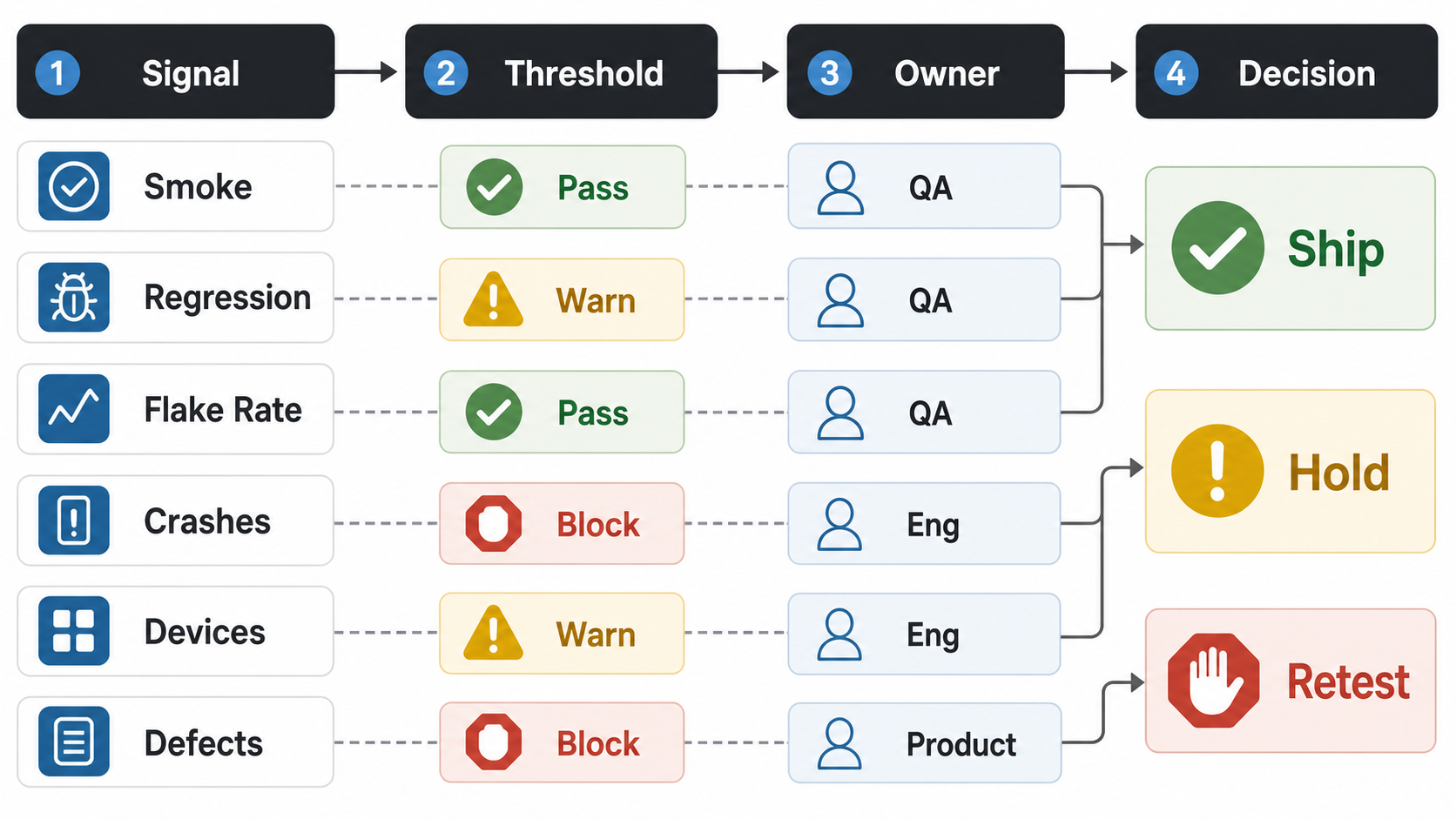
Make the threshold visible in the CI summary, not buried in a spreadsheet. A release manager should be able to see whether smoke checks passed, which regression paths are advisory, whether the Appium flake rate is below the team threshold, whether crash monitoring is clean enough for rollout, and who owns each warning. That prevents automation from becoming a noisy report that everyone reads differently.
| Gate Signal | Release Decision | Owner |
|---|---|---|
| Smoke and login/payment paths pass | Required before any production or staged rollout | QA lead |
| High-risk regression paths meet the agreed threshold | Warn or block based on affected flow and user impact | QA plus engineering |
| Appium flake rate stays below the quarantine threshold | Retest or quarantine before counting the failure as product risk | Automation owner |
| Crash, analytics, and device coverage evidence is complete | Hold release when observability or device evidence is missing | Engineering manager |
| Known defects have product acceptance | Ship only when severity, workaround, and owner are documented | Product owner |
How NextPage Can Help
NextPage helps product teams plan, build, test, and release mobile apps with QA built into the delivery path. Our mobile app development, mobile app testing services, and QA automation testing services work includes release planning, Appium-friendly app structure, API validation, QA matrices, TestFlight and Android release support, analytics, crash monitoring, and post-launch iteration.
If your regression cycle is slowing releases, start with an automation readiness review: critical flows, current QA effort, supported devices, CI constraints, flaky-test causes, release gates, and maintenance ownership. For early budget framing, use the Custom Software Cost Estimator to size build, QA automation, integration, and release-support effort before the suite grows without a clear return.