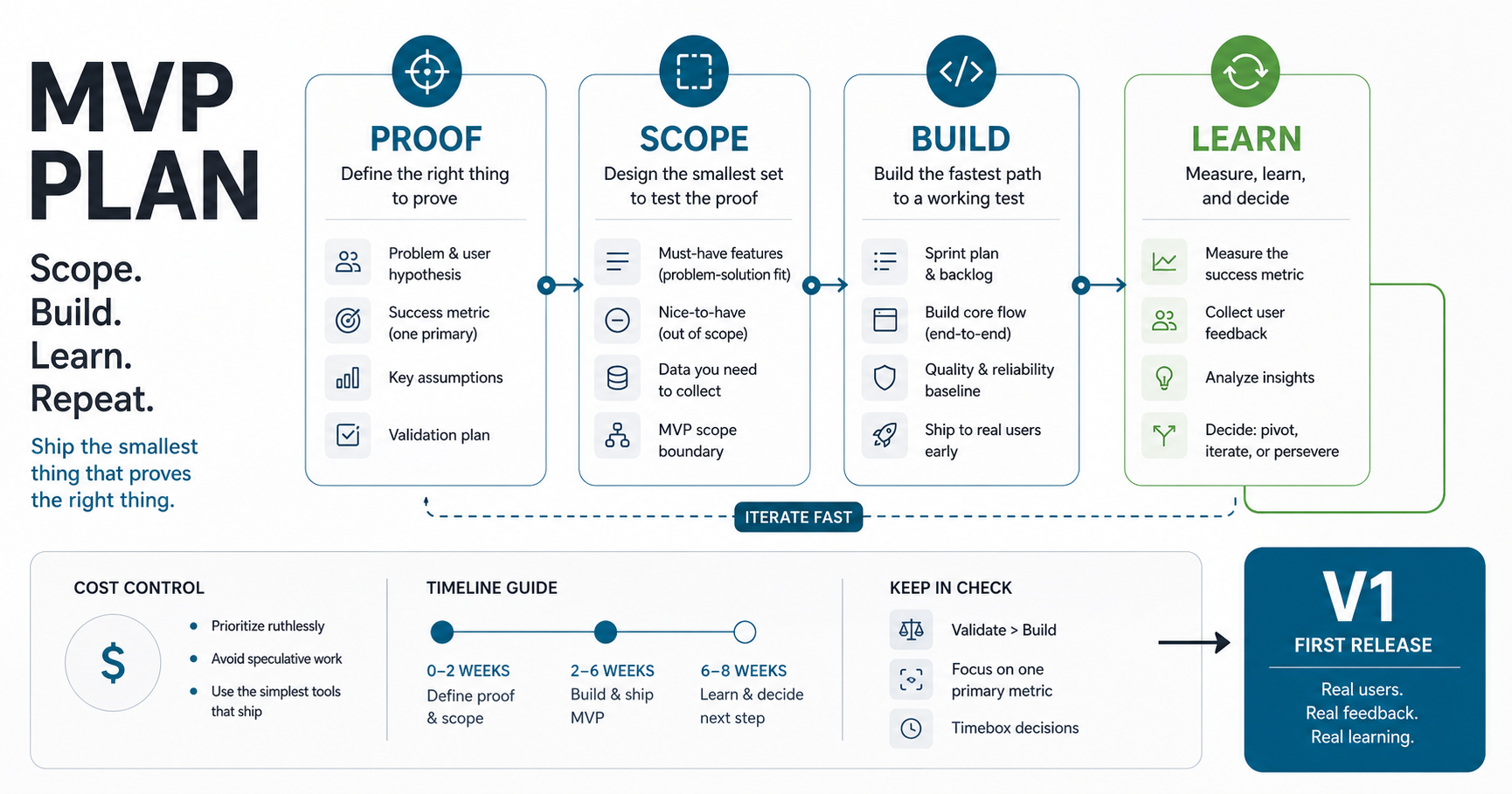

Quick Answer: What Should An MVP Include?
An MVP should include only the features required to prove one clear user outcome, support a real launch, and generate useful learning for the next release. That usually means one first audience, one primary workflow, a narrow admin surface, and only the integrations, permissions, analytics, and support controls that materially affect launch safety.
The fastest way to make an MVP expensive is to treat version one like a smaller full product instead of a focused proof. If you need help trimming scope before you estimate, start with the MVP Scope Builder. It is built for deciding what belongs in the first release and what should wait.
For most software products, a focused MVP is useful when it can answer three questions: will the first user complete the workflow, what operational support is required, and what evidence justifies the next release? If the answer depends on several user groups, deep integrations, strict compliance, or high-volume automation from day one, the project may need a broader custom software development plan rather than a lean MVP estimate.
MVP Readiness Before You Build
Before writing a feature list, decide whether the team is ready to build. A good MVP starts with a proof goal, not a backlog. The proof goal should name the first user, the job they need to complete, the business assumption being tested, and the metric that will trigger a stronger investment decision.
| Readiness Question | Good Answer | Risky Answer |
|---|---|---|
| Who is the first user? | A named role, segment, or operating team with a real workflow | Everyone who might use the product later |
| What must they complete? | One measurable workflow with a clear success state | A broad platform experience with several parallel journeys |
| What will prove progress? | Activation, completion, support load, retention, or commercial signal | General feedback or stakeholder satisfaction |
| What can stay manual? | Exceptions, reports, approvals, or admin work that does not block learning | Every process must be automated before launch |
This step is where a product discovery before development review earns its value. It reduces false precision in estimates by turning a vague idea into a release boundary, decision metric, and risk list.
What An MVP Is And Is Not
An MVP is not the weakest version of a product. It is the smallest version that can deliver the core value proposition, survive real user interaction, and teach you something worth paying attention to. The goal is not to launch something unfinished. The goal is to launch something intentionally narrow.
That distinction matters because many teams confuse an MVP with a feature-light demo. A demo can look polished and still fail to answer the most important questions: will users complete the key workflow, where do they drop off, what support burden appears immediately, and what has to change before a wider rollout?
A useful MVP does four jobs at once. It proves there is a problem worth solving, checks whether the proposed workflow is usable, reveals where operational friction really is, and gives the team a better basis for release-two planning. That is why MVP work often sits between MVP development and a broader product roadmap.
When An MVP Is The Right Move
An MVP is the right move when the market opportunity looks credible but key product decisions still need validation. That may mean you know the customer pain but not the best workflow, you have a promising sales motion but not enough evidence for a larger build, or you need to test willingness to adopt before investing in richer automation and integrations.
- Use an MVP when the team needs evidence on demand, usage patterns, delivery risk, onboarding friction, support load, or pricing confidence.
- Use a prototype first when the main uncertainty is usability, stakeholder alignment, or whether the workflow makes sense before code is built. The prototype vs MVP guide explains that sequencing in more detail.
- Do not call it an MVP when the product already needs enterprise-grade coverage on day one, such as broad compliance workflows, deep multi-system integration, or multiple user groups with different operational rules.
- Pause before building when the team cannot name the first user, the first job to be done, or the success metric for the first release.
The best MVP plans usually start with one sharp question: what must be true after launch for us to justify expanding this product?
Scope-First MVP Checklist
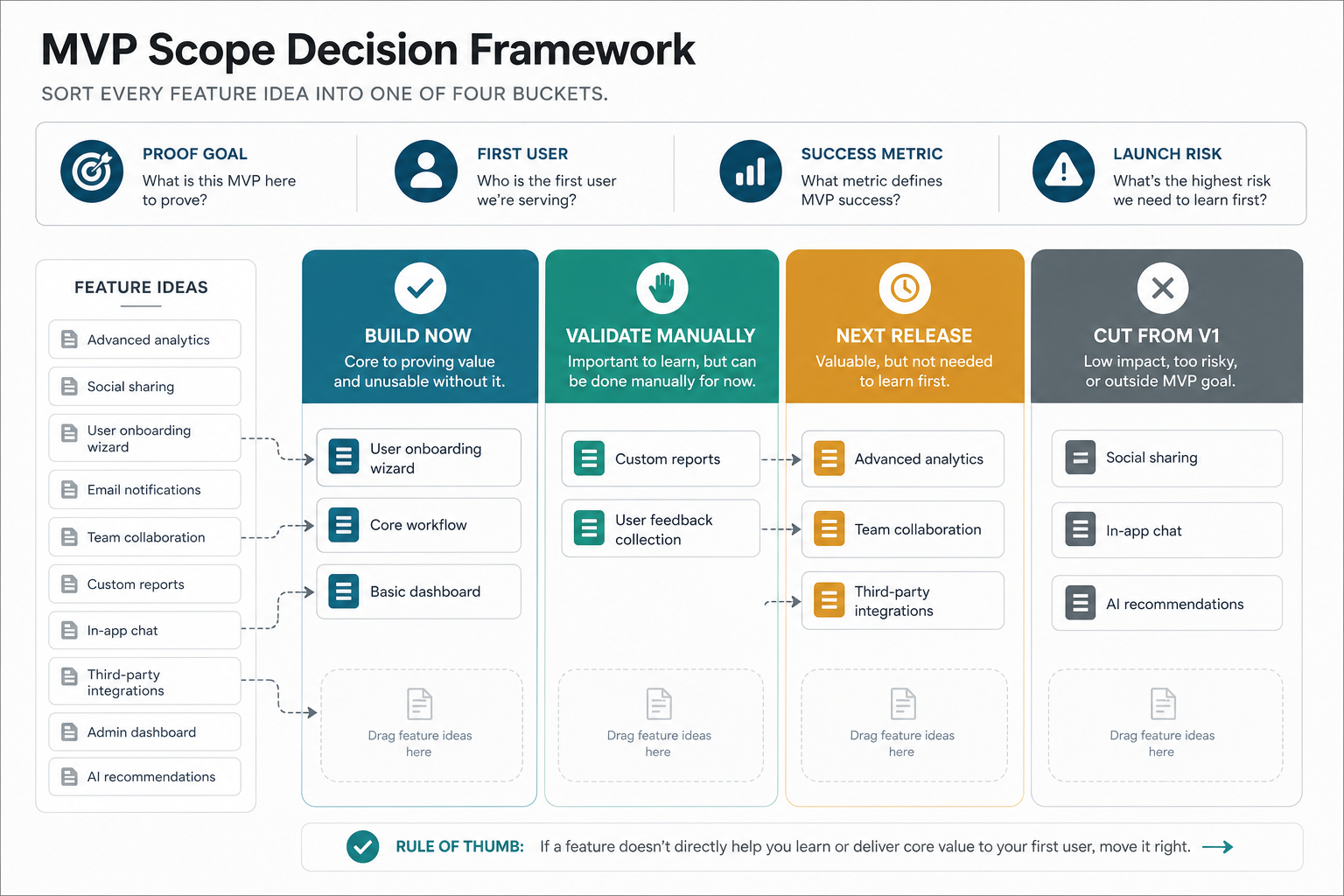
Before anyone estimates the build, answer these scope questions clearly.
- Who is the first real user? If the audience is still broad, the scope is probably too broad too.
- What exact outcome must the user complete? The MVP should revolve around one essential job, not a full future-state platform vision.
- What must happen for launch operations to work? Admin tooling, alerts, support views, or approval steps can matter more than visual polish.
- Which risks must be reduced in version one? Risk can mean compliance, data quality, payments, permissions, fraud, or support overhead.
- Which actions can stay manual for now? A manual handoff is often cheaper than premature workflow automation.
- What will we intentionally exclude? A no-scope list is as important as the feature list.
If a feature does not improve proof, launch readiness, or material risk reduction, it usually belongs outside the first release. That discipline makes estimates more honest and protects the launch date.
What To Build Now Vs Later
| Bucket | What Belongs There | Why It Helps |
|---|---|---|
| Build now | The core user workflow, required onboarding, minimal admin coverage, analytics events, and controls needed to avoid obvious operational failure | These items let the team test the product honestly in the real world |
| Validate manually | Edge-case support actions, early reporting, exceptions, approvals, and workflows operations can still handle outside the product | Manual handling is often faster and cheaper than early automation |
| Next release | Advanced segmentation, richer analytics, broader permissions, deeper integrations, higher-volume automations, and second-audience workflows | These are easier to prioritize after real usage patterns appear |
| Keep out of v1 | Speculative features, cosmetic depth, weak integrations, and stakeholder requests that do not affect the proof goal | These are the most common sources of schedule slip and budget inflation |
This sequencing exercise often changes the project more than any technology choice. It reduces QA surface area, lowers unknowns, and gives the team a better chance of shipping on time.
MVP Development Cost Ranges
MVP cost depends less on how many screens the product has and more on how much complexity sits behind those screens. User-role count, admin tooling, integrations, data migration, security requirements, and operational workflows all change the estimate faster than UI volume alone.
| MVP Band | Typical Shape | Indicative Planning Range | What Pushes It Higher |
|---|---|---|---|
| Lean MVP | One primary workflow, one user role or a very small role set, limited integrations, and a narrow feedback loop | $15,000-$40,000 | Native apps, custom analytics, third-party dependencies, broader admin coverage |
| Growth-stage MVP | More roles, stronger onboarding, better operations, richer reporting, and several meaningful integrations | $40,000-$90,000 | Complex permissions, approval chains, heavier workflow automation, cross-platform parity |
| Complex MVP | Multi-role products, deeper integrations, workflow exceptions, higher security expectations, or more operational tooling | $90,000-$180,000+ | Migration work, compliance requirements, multi-tenant rules, partner APIs, custom data pipelines |
These are planning bands, not quotes. A smaller feature list can still be expensive if the workflow is integration-heavy or permission-heavy. If you want a sharper directional number after trimming scope, the custom software cost estimator is the right next step.
Timeline For A Focused First Release
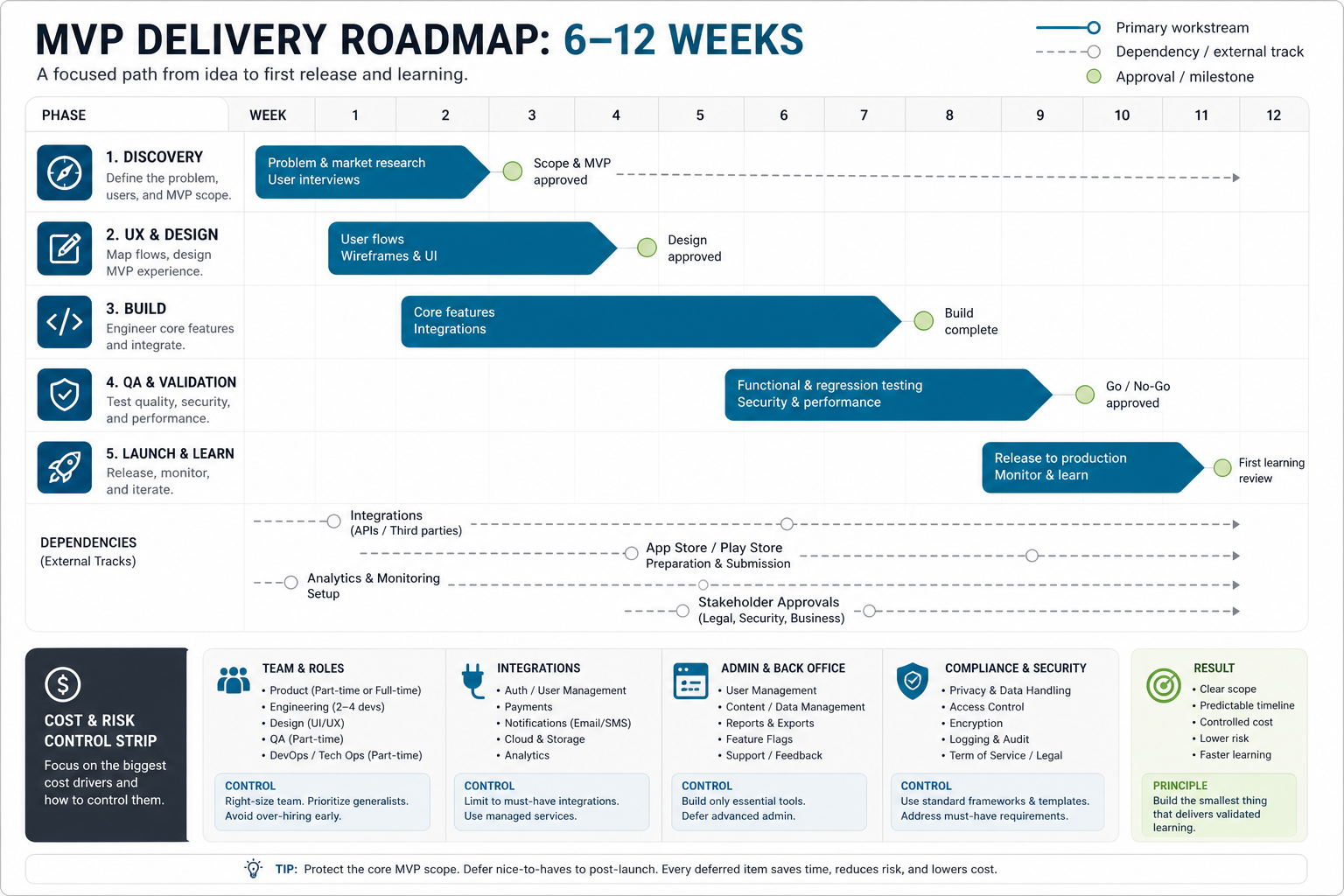
A realistic MVP timeline usually comes from delivery shape rather than calendar optimism. Most projects move through four phases.
- Discovery and scope shaping: 1-3 weeks to lock the first user, first workflow, no-scope list, launch metrics, and delivery assumptions.
- Product design and technical planning: 1-3 weeks for user flows, interface decisions, data model shape, and integration boundaries.
- Build and QA: 4-10 weeks depending on workflow complexity, role count, integrations, and how much admin coverage must ship with v1.
- Launch readiness and learning setup: about 1 week to confirm analytics, support paths, content, onboarding, rollback steps, and issue triage.
Many teams lose time by letting discovery, design, and engineering continue without a stable no-scope list. Once version one starts absorbing version two ideas, every estimate becomes unreliable. For mobile-heavy projects, pair the plan with a practical mobile app development process so store submission, device coverage, release QA, and post-launch monitoring are not treated as afterthoughts.
What Usually Makes An MVP Slower Or More Expensive
- Too many audiences: one product trying to serve founders, operations, managers, and end users equally well in version one.
- Too many roles and permissions: each new role expands QA, edge cases, and workflow exceptions.
- Premature automation: building background workflows before the manual process is proven.
- Heavy integrations early: external systems, migrations, or API dependencies can dominate the schedule.
- No operational design: launch support, approvals, notifications, admin views, and exception handling are ignored until late.
- No kill criteria: the team never defines what would prove the concept weak, so scope keeps growing instead of learning getting sharper.
In practice, an MVP fails less often because it is too small and more often because it tries to become a platform before the first release earns that expansion.
How To Validate An MVP After Launch
Validation should be planned before launch, not invented after the first users arrive. The exact metrics vary by product, but most MVPs should track a mix of adoption, behavior, operations, and learning.
- Adoption: how many qualified users start the intended workflow?
- Activation: how many complete the first meaningful action?
- Completion quality: where do users fail, abandon, or ask for help?
- Support load: what requires manual intervention, clarification, or exception handling?
- Retention or repeat behavior: do users come back or continue using the product after the first success moment?
- Commercial signal: does the MVP create evidence for sales, pricing, investor confidence, or roadmap prioritization?
The best next-release decisions come from evidence tied to these signals, not from whichever stakeholder has the loudest feature request.
Common MVP Mistakes
- Writing a feature list before naming the proof goal. If success is unclear, the scope will drift.
- Skipping admin and support workflows. A customer-facing MVP still needs internal operations to survive launch.
- Treating every request as equally urgent. Version one needs priorities, not democracy.
- Confusing roadmap ambition with launch necessity. A credible long-term vision does not mean every part belongs in the first release.
- Estimating before trimming. Pricing a broad v1 usually creates bad assumptions and false confidence.
A strong MVP creates a smaller but more honest first release. That honesty is what reduces waste.
How NextPage Scopes MVPs That Can Actually Ship
NextPage approaches MVP planning as a scope-control exercise before it becomes a development estimate. The first job is to lock the user, the core outcome, the no-scope list, and the launch risks that cannot be ignored. After that, the build can be shaped around the narrowest version that delivers proof and creates a clean path to release two.
That is why teams often use both the MVP Scope Builder and the custom software cost estimator before a broader build conversation. When the product needs a hands-on delivery partner, NextPage's MVP development service and custom software development work help turn a focused first-release plan into an actual shipped product.
The right question is not, "How much of the product can we fit into version one?" It is, "What is the smallest release that gives us real proof and a better next decision?" Start there, and the budget, timeline, and roadmap usually get clearer.