
Quick Answer: What Should An OWASP Vulnerability Assessment Tell A Product Team?
An OWASP vulnerability assessment should tell a product team which application risks are exploitable, which users or data are affected, what business impact is realistic, who owns the fix, how quickly the work should enter the roadmap, and what evidence will prove the issue is closed. The useful output is not only a list of OWASP categories. It is a remediation plan that engineering, product, compliance, and leadership can act on.
For product teams, the strongest assessment report connects technical findings to product decisions: tenant isolation, role permissions, payment flows, file access, admin actions, third-party integrations, logging, recovery, and customer-facing commitments. If your team is preparing for the test itself, start with NextPage's web application penetration testing checklist. This guide starts one step later: how to turn OWASP-aligned findings into a fix roadmap.
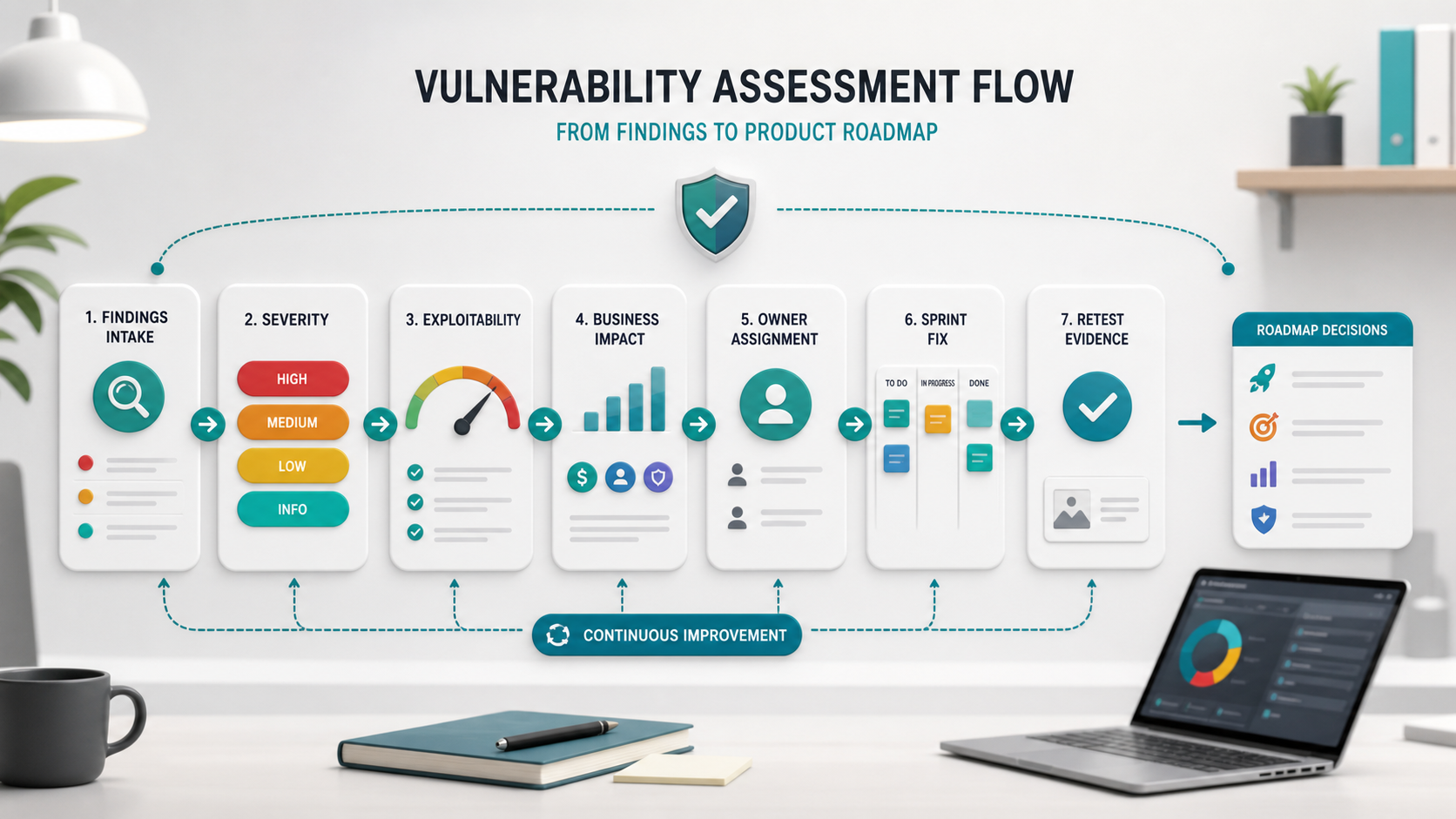
What OWASP Vulnerability Assessment Means In Practice
OWASP is a set of open application-security projects and references, not a vendor badge by itself. In web application work, teams often use the OWASP Top 10 and the Web Security Testing Guide as shared language for issues such as broken access control, security misconfiguration, software supply chain failures, cryptographic failures, injection, insecure design, authentication failures, data integrity problems, logging gaps, and exceptional-condition handling.
That language is useful because it gives product and engineering teams a common risk vocabulary. But OWASP labels alone do not tell you what to build next. A broken access control finding may mean a small route guard fix, a deeper role-permission redesign, a tenant-isolation review, or emergency customer notification depending on exploitability and affected data. The assessment has to be interpreted through the product context.
The reference service page from OrangeMantra positions web application penetration testing around vulnerability assessment, OWASP-oriented checks, discovery, reporting, remediation, and support. The product-team opportunity is to make the report operational: convert risk into backlog items, evidence, owners, and retest criteria.
For 2026 planning, treat OWASP as a decision framework rather than a finished scope. The OWASP Top 10:2025 release gives teams a current web-application risk vocabulary, while the OWASP Web Security Testing Guide remains the practical testing reference for evidence-driven assessment work. Your scope should connect both: risk categories for leadership prioritization and test evidence for engineering closure.
Use the 2025 Top 10 as the board-level risk language and WSTG as the tester-facing evidence language. That distinction keeps the product conversation precise: leadership can understand why broken access control, security misconfiguration, supply chain exposure, cryptographic weakness, injection, insecure design, authentication failure, integrity failure, logging gaps, and exceptional-condition handling matter, while engineering still receives reproducible test steps and acceptance criteria.
Scope The Assessment Before Testing Starts
A useful OWASP vulnerability assessment starts with scope discipline. Define the applications, environments, API surfaces, roles, test accounts, tenant examples, payment or PII workflows, third-party integrations, rate limits, test windows, and out-of-scope systems before scanning or manual testing begins. Without that boundary, teams either miss important business logic or waste time debating whether a finding belongs in the report.
| Scope Area | What To Decide | Why It Matters |
|---|---|---|
| Application surfaces | Web app, admin console, public API, partner API, mobile backend, file uploads, auth flows, and webhooks. | Prevents partial testing that misses the real attack path. |
| User roles | Anonymous, customer, support, manager, admin, tenant owner, and integration user. | Broken access control and role-confusion issues need realistic accounts. |
| Data sensitivity | PII, financial records, healthcare data, source documents, logs, secrets, and customer-owned files. | Severity should reflect business impact, not only scanner output. |
| Evidence rules | Allowed proof-of-concept depth, screenshots, payload limits, redaction, and retest handoff format. | Keeps testing safe while giving engineers enough detail to reproduce and fix. |
This scope note should become part of the final report. It protects the team from overclaiming coverage and gives stakeholders a clean answer when they ask what the assessment actually proved.
If the product includes APIs, AI-assisted workflows, admin dashboards, or partner integrations, include those flows explicitly instead of assuming a browser-only assessment covers them. Product teams planning broader SaaS development services or a platform rebuild should map each sensitive workflow to the roles, tenants, environments, logs, and rollback path the tester can safely use.
Start With Business Impact, Not The Scanner Label
Many reports include severity scores, OWASP categories, proof-of-concept evidence, screenshots, affected URLs, and remediation advice. Product leaders should read those findings through four questions before prioritizing work:
- Can the issue be exploited by an unauthenticated user, normal user, privileged user, or internal actor?
- What data, transaction, workflow, or customer trust promise can be affected?
- How likely is exploitation in the real application context?
- What fix path closes the weakness without creating new product or delivery risk?
This is especially important for custom platforms where security debt sits inside business logic rather than obvious framework mistakes. If the assessment exposes architectural issues, NextPage's custom software development service context is relevant because the fix may require workflow, backend, data-model, or integration changes rather than a one-line patch.
A Practical Triage Model For Product Teams
Use a triage meeting to separate emergency fixes from planned remediation. Include product, engineering, QA, DevOps, and the security owner. For each finding, capture the affected asset, reproduction steps, customer impact, data sensitivity, owner, target sprint, retest condition, and stakeholder note.
Do not let a numeric score make the decision by itself. CVSS v4.0 is useful for communicating vulnerability characteristics, but product teams still need environmental context: which tenant, role, data set, workflow, customer promise, and compensating control changes the real priority. A medium-scored authorization bug in a billing or admin flow may outrank a higher-scored issue in a low-impact demonstration screen.
| Triage Dimension | Product-Team Question | Decision It Drives |
|---|---|---|
| Exploitability | Who can trigger it, and what access do they need? | Emergency fix, sprint fix, or hardening backlog |
| Business impact | Could this expose data, money movement, admin control, or contractual risk? | Severity adjustment and stakeholder escalation |
| Blast radius | Is one record affected, one tenant, all tenants, or a shared integration? | Containment plan and customer-risk review |
| Fix complexity | Is this a config, code, architecture, or process issue? | Owner assignment and roadmap sequencing |
| Evidence | What proof will show the weakness is actually closed? | QA checks, retest request, and audit trail |
Map each finding to the current OWASP Top 10 category, but do not stop there. Broken access control, cryptographic failures, software supply-chain failures, injection, insecure design, security misconfiguration, authentication failures, data integrity failures, logging gaps, and mishandled exceptional conditions can each land in very different product areas. The category helps the team talk clearly; the affected workflow decides the fix priority.
Do not let every medium finding become equal. A medium-rated issue in a public marketing form may be less urgent than a medium-rated issue that exposes billing history across tenants. Conversely, a high-scored vulnerability that is unreachable in production may need careful validation before it interrupts a release.
Map Findings To The Right Owners
Security findings are often assigned to a generic engineering queue and then stall. Ownership should match the root cause. Backend engineers usually own authorization, API validation, session handling, and data isolation. Frontend engineers may own unsafe rendering, token exposure, and client-side state issues. DevOps or platform owners handle headers, secrets, dependency updates, cloud policy, and logging. Product owners handle workflow abuse, role design, acceptance criteria, and customer-risk tradeoffs.
For teams running a web product, these fixes should sit inside the same delivery system as feature work. NextPage's web app development approach treats security, environments, QA, and release planning as part of the application roadmap rather than a separate afterthought.
Prioritize Remediation Across Sprints
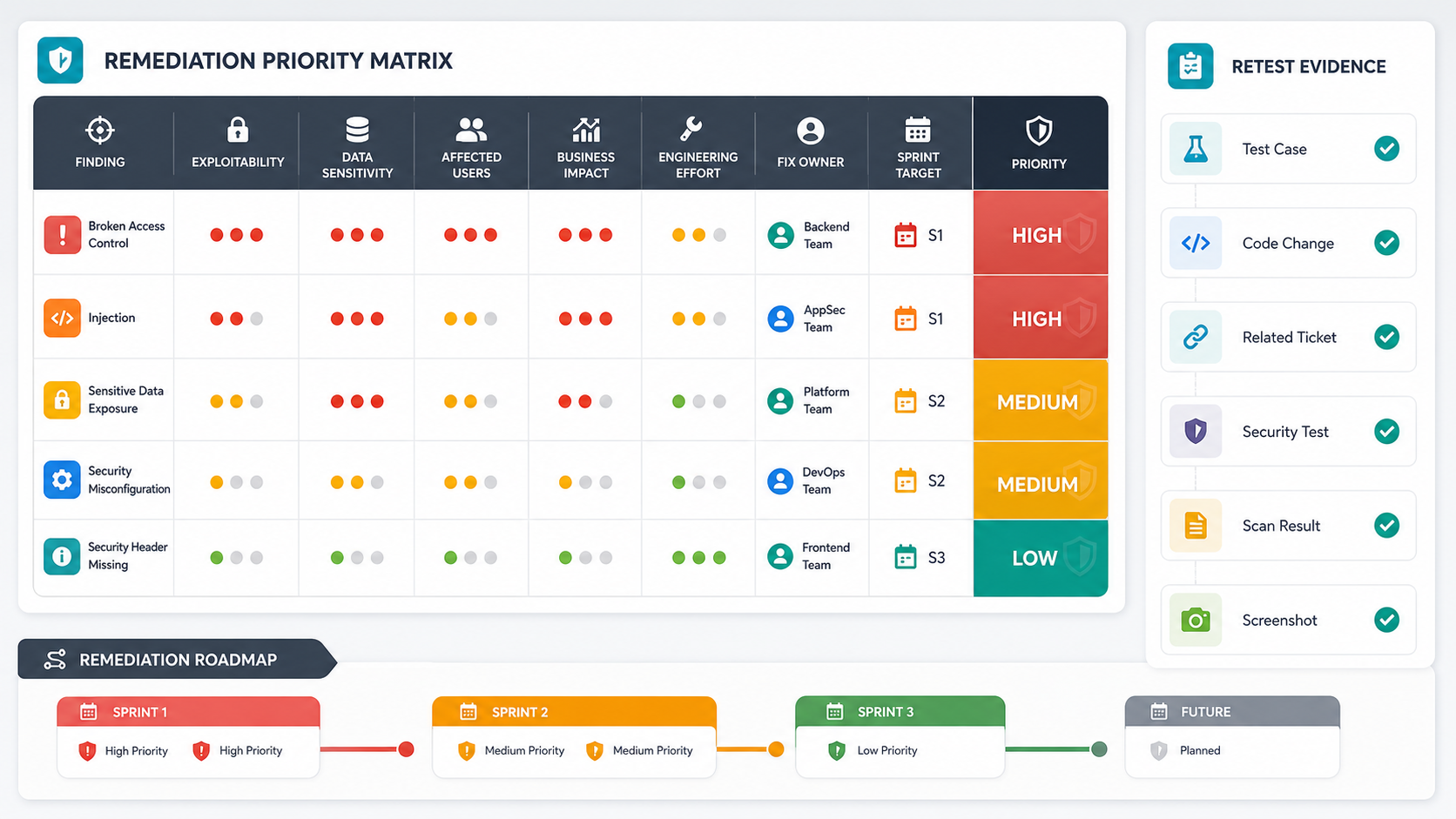
A useful remediation plan has lanes. Critical findings that expose customer data, admin control, payment flows, authentication, or tenant boundaries should move immediately. High findings usually enter the next active sprint with a named owner. Medium findings should be batched by component or risk family so related issues are fixed together. Low findings still matter when they create noisy attack surface or repeat across many pages.
| Remediation Lane | Typical Trigger | Operating Rule |
|---|---|---|
| Emergency fix | Unauthenticated exploit, cross-tenant data exposure, account takeover, payment abuse, or secret leakage. | Interrupt the roadmap, contain the risk, patch, retest, and brief stakeholders. |
| Next sprint | High-confidence exploitable issue affecting sensitive workflows or privileged actions. | Name an owner, write acceptance criteria, and reserve retest time before release. |
| Batched hardening | Repeated medium findings across one component, library, form pattern, or API family. | Fix the pattern once, add regression checks, and review nearby variants. |
| Accepted or deferred risk | Low exploitability, compensating controls, or dependency on a larger redesign. | Record rationale, owner, review date, and customer or compliance implication. |
For regulated or trust-sensitive products, security fixes should be planned alongside operating cost. The software maintenance cost guide is useful when recurring patching, monitoring, dependency upkeep, and retesting need a monthly support model rather than one-off project funding.
Turn Findings Into Fixable User Stories
Security tickets fail when they only restate the vulnerability. Convert each finding into a user story or engineering task with acceptance criteria. For example, "Broken object-level authorization in invoice export" becomes: users can export only invoices belonging to their tenant, API requests with another tenant's invoice ID return a safe error, admin users follow explicit permission rules, logs capture blocked attempts, and automated regression coverage checks the endpoint.
The ticket should include the original evidence, affected endpoint, expected behavior, root cause, fix approach, nearby variants to inspect, test data, and retest steps. This lets QA and engineering verify the real weakness rather than closing the ticket when code merely changes.
If the finding touches an AI or LLM feature, use application-security judgment beyond classic web controls. The LLM application security checklist is a useful adjacent guide for prompt injection, retrieval risk, tool permissions, data exposure, and model-output controls.
Build Verification And Retesting Into The Plan
Retesting should be explicit before remediation starts. A finding is not closed because a pull request was merged. It is closed when the original proof no longer works, nearby variants have been checked, and the system has evidence that the fix did not break the intended workflow.
Combine security retesting with product QA. Some checks can become automated API tests, authorization tests, or browser regression checks. Others require manual review because business logic, exploit chaining, or role behavior is too contextual. NextPage's manual vs automation testing guide helps teams decide which release checks should be repeatable automation and which need human judgment.
For customer-facing releases, connect remediation to broader QA evidence. A vulnerability fix that changes permissions, checkout, account settings, file sharing, admin actions, or reporting should also pass a focused functional testing checklist before release.
Create A Retest Evidence Packet
Security closure needs evidence that can survive a client review, procurement questionnaire, or audit request. For each remediated finding, keep the original finding ID, risk category, affected asset, owner, pull request or deployment reference, test account, negative test result, nearby-variant checks, screenshots or logs where appropriate, and the retest date. Redact sensitive payloads and customer data, but keep enough detail for an independent reviewer to understand why the finding is closed.
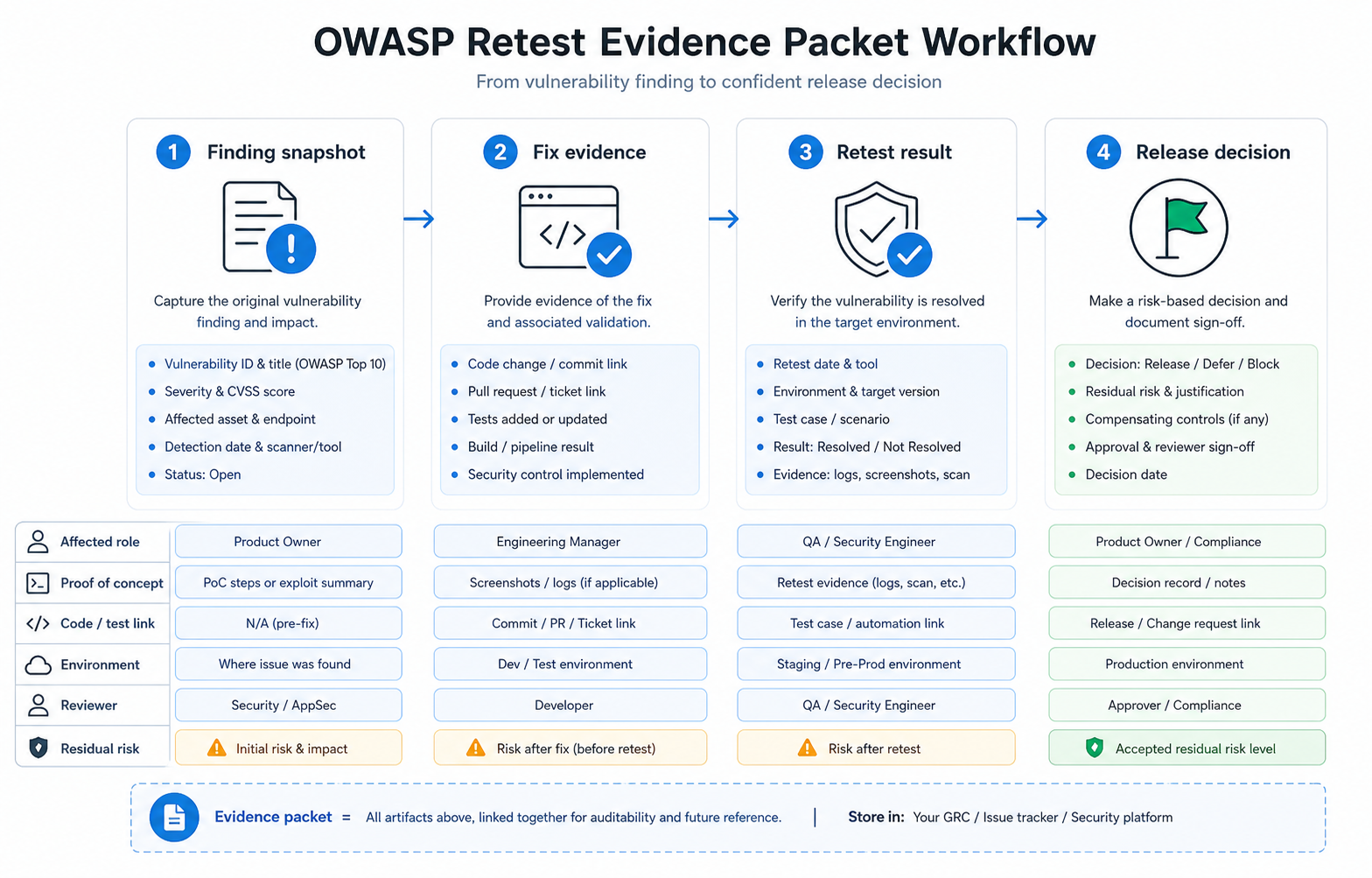
The evidence packet should also note residual risk. If a finding is mitigated with monitoring, rate limits, WAF rules, or workflow restrictions while a deeper fix is planned, label it that way. That is more credible than marking the issue fixed without engineering proof.
Report Progress Without Overclaiming
Executives and clients do not need every technical detail, but they do need a truthful status. Use a simple status model: accepted risk, in remediation, fixed and awaiting retest, retest passed, or deferred with rationale. Avoid claiming "OWASP certified" unless a real certification program and evidence supports it. For most product teams, the honest claim is that an OWASP-aligned assessment was performed, findings were triaged, critical risks were remediated, and evidence is available.
A concise stakeholder update should include the number of findings by priority, the highest-risk business impacts, critical fixes shipped, retest status, remaining work, accepted risks, and the next assessment or monitoring step. This keeps security visible without turning every report into a fear-based interruption.
Common Mistakes To Avoid
- Treating OWASP as a checkbox: The category is a starting point, not the decision.
- Prioritizing by score alone: Business impact and exploitability should adjust urgency.
- Assigning all findings to one engineer: Root causes span backend, frontend, DevOps, product, QA, and process.
- Skipping nearby variants: One authorization issue often indicates a pattern across related endpoints.
- Closing without retest evidence: A merged fix is not the same as verified remediation.
- Ignoring recurring ownership: Security debt returns when maintenance, monitoring, and dependency updates are unfunded.
Make OWASP Assessment Part Of Secure SDLC
The best outcome is not a cleaner one-time report. It is a product system that catches the same class of issue earlier next time. Feed validated findings into secure coding standards, threat-model prompts, pull-request checklists, dependency review, release gates, monitoring rules, and regression tests. When one endpoint has an authorization issue, inspect the pattern across related endpoints before calling the risk closed.
Use the final assessment to improve delivery habits: add a security owner to release planning, define which changes require security review, track repeated root causes, and fund recurring maintenance. That turns OWASP from a periodic audit event into a practical secure SDLC loop.
NIST SP 800-218 frames secure development as repeatable practices across preparation, software protection, secure production, and vulnerability response. Use that lens after the assessment: every repeated OWASP finding should become an engineering-system improvement, such as a reusable authorization test, dependency policy, logging rule, secret-handling guardrail, or release gate.
| Assessment Pattern | Secure SDLC Control To Add | Owner |
|---|---|---|
| Broken object access appears in multiple routes | Reusable role and tenant authorization tests in CI | Backend lead and QA |
| Security misconfiguration appears after deployment | Environment baseline checks and pre-release configuration review | DevOps and security owner |
| Dependency or supply-chain issue is recurring | Dependency update cadence, SBOM review, and exception process | Engineering manager |
| Logging gaps block investigation | Security event schema, alert routing, and incident replay checklist | Platform owner |
How NextPage Can Help
NextPage helps product and engineering teams turn OWASP-aligned vulnerability assessment results into practical remediation plans. That can include vulnerability triage, fix ownership, sprint planning, secure web application development, QA verification, retest preparation, and stakeholder-ready evidence.
If your product has a recent report, an upcoming procurement review, or a release that needs stronger security confidence, start by mapping the findings to business impact and owner-ready tickets. For commercial support, the primary path is web application penetration testing services, with scope and implementation planning available through NextPage's contact team and the Custom Software Cost Estimator.
For teams preparing a larger application security review, pair this guide with NextPage's security testing services so assessment scope, remediation evidence, QA retesting, and release decisions are planned as one workflow.