
Quick Answer: Python Web Development for Business Apps
Python web development is a strong fit when the product needs reliable backend logic, dashboards, admin workflows, APIs, data processing, AI integrations, or internal business tools. It is not just a scripting choice. In the right architecture, Python can power customer portals, SaaS backends, workflow systems, analytics products, machine learning features, and AI-enabled applications that need to connect web UX with data and automation.
The practical decision is not whether Python is popular. The decision is whether Python gives your product a clearer path to the first useful release and easier long-term ownership. For many companies, Python works best as the backend, API, data, or AI service layer while the frontend uses a modern JavaScript framework. That separation lets teams keep the user interface fast while using Python where its ecosystem is strongest.
If you already know the product type, user roles, integrations, and AI or data requirements, use the custom software cost estimator to turn the scope into a directional budget before asking for a full proposal.
Where Python Fits Best in a Web Product
Python is most valuable when the web application has meaningful backend work behind the screens. A marketing site does not need Python. A simple brochure CMS may not need it either. But a product with accounts, permissions, business rules, reports, integrations, queues, data pipelines, or AI features can benefit from Python's mature frameworks and broad package ecosystem.
Good Python web development use cases include B2B portals, internal dashboards, workflow automation, booking or operations platforms, reporting tools, API backends, document processing, data products, ML-powered recommendations, RAG assistants, and admin-heavy systems. These products need more than polished UI. They need reliable state, secure access, integrations, background jobs, observability, and maintainable business logic.
For NextPage buyers, Python often appears inside a broader web app development plan. The final stack may combine a Next.js development frontend, a Python API layer, PostgreSQL or MySQL, background workers, object storage, and third-party APIs. That is usually healthier than forcing one language to do every job.
Django vs FastAPI vs Flask: Which Framework Fits?
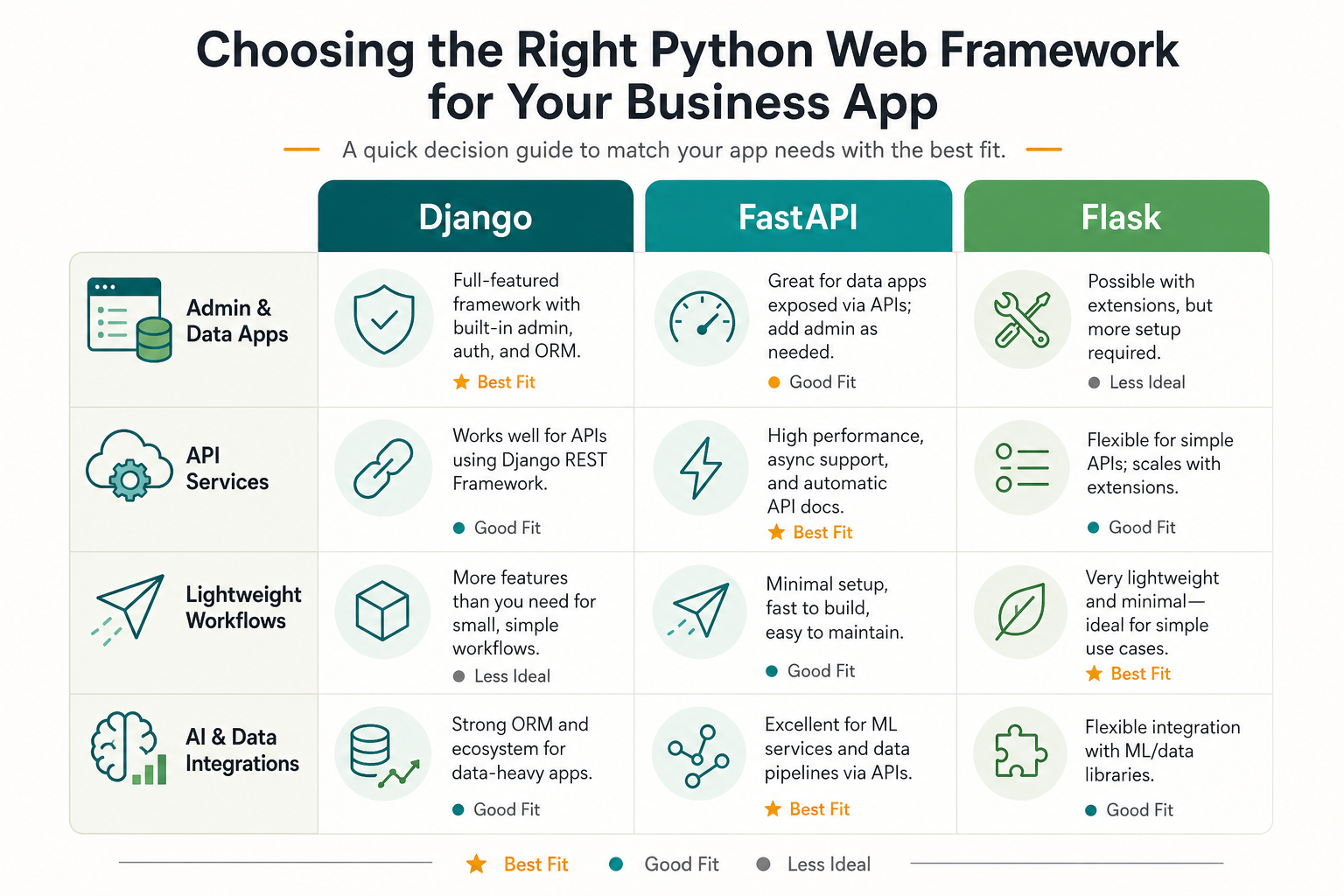
The framework choice should follow the product shape. Django, FastAPI, and Flask can all support production systems, but they optimize for different trade-offs.
| Framework | Best Fit | Why Teams Choose It | Watch-outs |
|---|---|---|---|
| Django | Admin-heavy web apps, portals, content-backed platforms, business workflows | Batteries-included structure, ORM, admin, auth patterns, mature ecosystem | Can feel heavy if the product is mainly small APIs or highly custom services |
| FastAPI | Typed APIs, microservices, async endpoints, AI/data service layers | Modern typing, OpenAPI output, strong developer experience for API contracts | Teams must plan admin tooling, auth, background work, and conventions more deliberately |
| Flask | Small apps, prototypes, custom service boundaries, lightweight backends | Minimal core, flexible extension model, easy to start | Architecture can drift unless the team defines structure early |
Django is often a good choice when the business app needs users, roles, admin operations, forms, reports, and database-backed workflows quickly. FastAPI is often a better choice when the app is API-first, AI-adjacent, or part of a larger service architecture. Flask remains useful for focused services and prototypes where the team wants more control over each component.
Current official releases reinforce that the ecosystem is active, but version awareness should support architecture planning rather than drive it alone. The practical question is whether the team can maintain dependencies, security updates, test coverage, API contracts, migrations, and deployment operations after launch.
Python Framework Readiness Checklist for 2026
The best Python framework decision starts with product risk. Before choosing Django, FastAPI, Flask, or a mixed architecture, score the project against the jobs the backend must own: identity, permissions, admin workflows, API contracts, reporting, background work, integrations, data pipelines, AI features, and release operations.
| Readiness Question | Why It Matters | Framework Signal |
|---|---|---|
| Do admins need to manage records, approvals, and exceptions on day one? | Admin operations can become the hidden product, not a side screen. | Django usually reduces setup risk because auth, ORM, admin, forms, and conventions are already integrated. |
| Is the product mainly an API for a React, Next.js, mobile, or partner frontend? | Contract clarity, validation, and documentation shape delivery speed. | FastAPI is often a strong fit because typed request models and OpenAPI output keep teams aligned. |
| Is this a narrow internal tool or prototype with unusual integration logic? | Small services should not inherit a large framework if the team can own structure. | Flask can work when the team deliberately defines modules, testing, auth, and deployment patterns. |
| Will AI, data processing, or background jobs become central? | Model calls, queues, retries, evaluations, and observability need explicit architecture. | FastAPI plus workers, or Django plus task queues, can both work if operations are planned early. |
| Does the business need enterprise permissions, audit logs, or regulated data controls? | Security scope affects the data model, test plan, and hosting model. | Choose the framework your team can secure, test, monitor, and update consistently. |
Official release context also matters. As of June 3, 2026, Python.org lists Python 3.14.5 as the latest Python 3.14 documentation release, Django 6.0 supports Python 3.12, 3.13, and 3.14, FastAPI release notes show active 2026 updates including 0.136.x, and Flask 3.1.x remains maintained. Treat those facts as upgrade-planning signals, not as a reason to chase every patch version during an MVP.
A Practical Python Web App Architecture
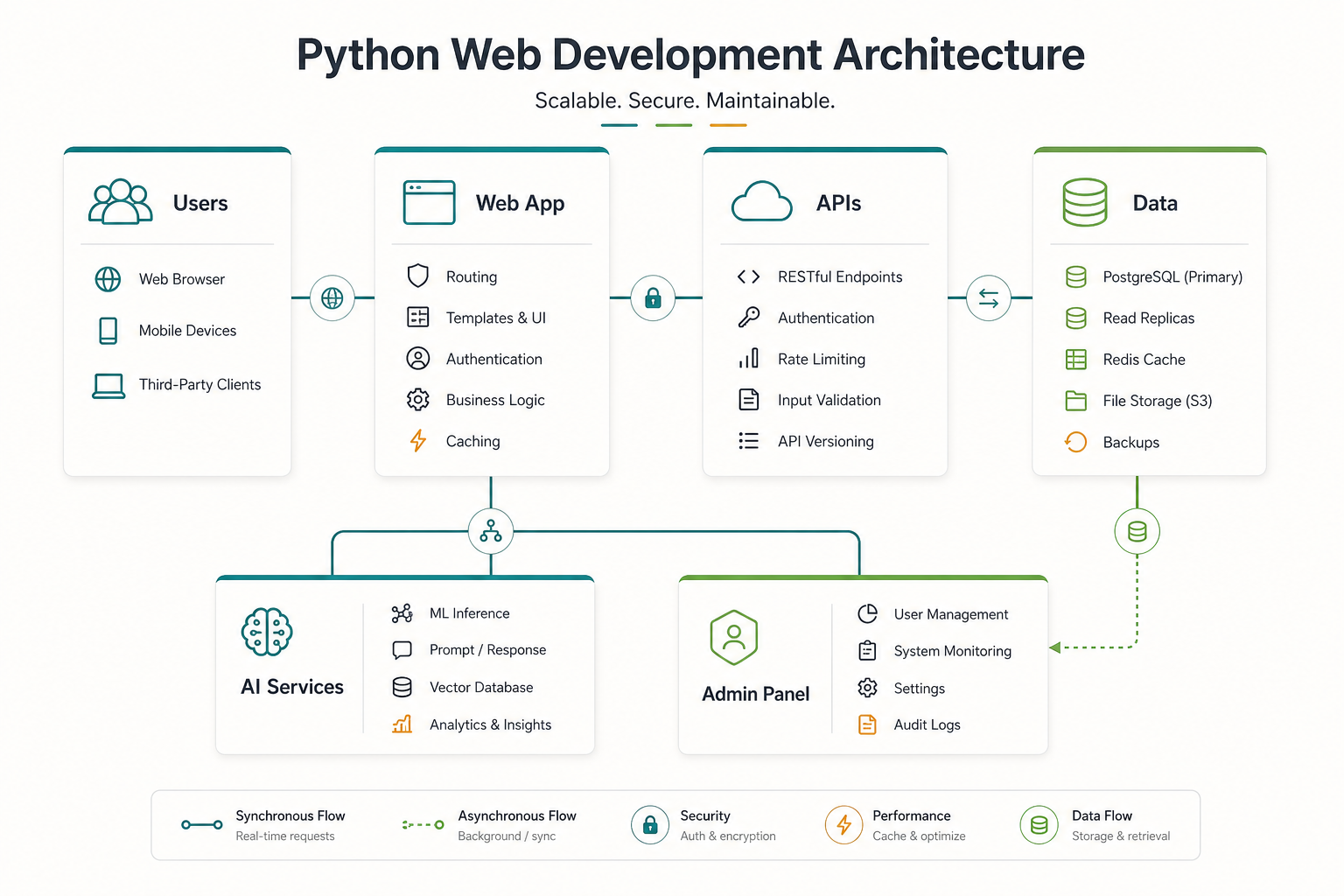
A production Python web app usually needs more than the framework. At minimum, plan the frontend, backend application, database, file storage, authentication, background jobs, email or notification delivery, monitoring, backups, CI/CD, and hosting model. If the product has AI or data features, also plan model providers, vector search, evaluation, rate limits, logging, and human review.
| Layer | Common Responsibility | Planning Question |
|---|---|---|
| Frontend | Customer UX, dashboards, forms, charts, responsive workflows | Is the UI a simple server-rendered app or a separate React/Next.js application? |
| Python backend | Business rules, API endpoints, permissions, admin logic, orchestration | Does Django, FastAPI, Flask, or a hybrid service layout fit the product shape? |
| Data layer | PostgreSQL/MySQL, Redis, object storage, analytics, search | Which system owns each record and how will migrations be handled? |
| Background work | Reports, imports, notifications, AI jobs, syncs, scheduled tasks | Which jobs can fail safely and how are retries, logs, and alerts handled? |
| Integrations | CRM, ERP, payment, support desk, internal APIs, AI providers | Which integrations are launch-critical and which can wait? |
This is where Python web development overlaps with custom software development. The application is not just pages and endpoints. It is a system that must keep workflows, data, security, and operational ownership clear.
Business Use Cases That Benefit From Python
Python is especially useful when the web product sits close to business data. A customer portal may need account-specific documents, support requests, billing data, and admin review. A SaaS dashboard may need reports, role permissions, usage analytics, and third-party integrations. An operations system may need approval queues, file processing, scheduled imports, and exception handling. A data product may need pipelines, model outputs, and explainable results.
AI-enabled apps are another strong fit. Python has a large ecosystem for model orchestration, embeddings, data preparation, evaluation, automation, and analytics. That does not mean every AI product should be all Python. It means the Python layer can handle the data and intelligence work while a web frontend gives users a clean interface. For teams planning RAG, copilots, knowledge assistants, or workflow automation, NextPage often pairs product engineering with LLM development or broader AI development services.
Machine learning products also benefit from Python because training, inference, data validation, notebooks, and production APIs can live in a more coherent ecosystem. If the product depends on predictions, anomaly detection, recommendations, document classification, or analytics, a machine learning development plan should be considered early instead of bolted on after the web app is finished.
Python Web Development Cost Bands
Most buyers ask for a Python web development cost before the scope is clear. A better estimate starts with product class. A workflow MVP, a data-heavy dashboard, an API platform, and an AI-enabled SaaS product may all use Python, but they need different engineering depth.
| Product Class | Typical Scope | Cost Pressure |
|---|---|---|
| Focused internal tool | Login, a small set of roles, CRUD workflows, imports, reports, and admin screens | Usually controlled by workflow clarity, permissions, and data cleanup. |
| Customer or partner portal | Account-specific data, documents, support flows, notifications, integrations, and admin review | Rises with integration count, access rules, and support operations. |
| API-first business platform | Typed APIs, frontend or mobile clients, partner endpoints, rate limits, documentation, and monitoring | Rises with contract complexity, versioning, testing, and production observability. |
| AI or data-enabled product | RAG, model orchestration, data pipelines, evaluation, human review, and analytics | Rises with data quality, model reliability, evaluation loops, and security review. |
| Multi-tenant SaaS product | Subscriptions, tenant isolation, roles, analytics, admin tooling, audit logs, and support workflows | Rises with tenant boundaries, billing, reliability targets, and operational tooling. |
If budget is the primary question, use the custom software cost estimator after mapping the release boundary. The estimate will be more useful if you separate must-have workflows from later reports, automations, mobile apps, and AI enhancements.
Python Web Development Cost Drivers
Python web development cost is driven by scope, not by the language alone. A small admin portal with login, a few workflows, and basic reports is very different from a multi-tenant SaaS product with subscriptions, API integrations, analytics, AI features, audit logs, and enterprise permissions.
| Cost Driver | Why It Matters | How To Control It |
|---|---|---|
| User roles and permissions | B2B products often need account, staff, finance, admin, and partner roles | Define role boundaries and approval rules before UI design expands |
| Integrations | CRM, ERP, payments, support tools, identity, and AI APIs create edge cases | Prioritize launch-critical integrations and document source-of-truth rules |
| Data complexity | Reports, imports, search, dashboards, and analytics require clean data models | Start with the core entities and avoid speculative reporting |
| AI and automation | Model calls, RAG, evaluation, human review, and monitoring add architecture work | Prototype one workflow before automating every process |
| Security and compliance | Permissions, audit logs, encryption, retention, and hosting affect delivery scope | Identify regulated data and access rules during discovery |
As a planning guide, a focused Python web app MVP may land in the same budget class as other custom web apps with similar scope. Costs rise when the app has many roles, sensitive data, heavy integrations, offline needs, advanced analytics, or AI workflows. The safest estimate comes from mapping screens to backend responsibilities and release phases instead of pricing a generic "Python app."
Team and Delivery Model
A Python web project usually needs more than one backend developer. A practical team may include product strategy, UX/UI design, frontend engineering, Python backend engineering, QA, DevOps/cloud support, and a technical lead who owns architecture decisions. If AI or data work is involved, add a data or ML engineer early enough to influence architecture, not after the UI is already built.
Some teams hire one Python developer and expect the full product to follow. That can work for a narrow internal tool, but it is risky for customer-facing software. Business apps need security, UX, testing, deployment, monitoring, and maintenance. If you need long-running capacity, compare a project build with an India-based team model such as your software team in India or software outsourcing in India.
Production Operations for Python Web Apps
A Python web app is not production-ready just because the framework runs on a server. Business applications need release discipline: dependency updates, migration rehearsals, error tracking, logs, backups, queue monitoring, security patching, test coverage, and clear ownership for incidents.
For Django projects, that often means disciplined model migrations, admin permissions, background task strategy, CSP/security settings, and regression tests around business rules. For FastAPI projects, it often means API contract tests, request validation, dependency pinning, async behavior review, observability, and clear worker boundaries. For Flask projects, production readiness depends heavily on conventions the team creates: app structure, extension choices, authentication, configuration, and testing standards.
This is where Python web development overlaps with DevOps and cloud reliability. The most maintainable stack is the one your team can deploy, monitor, patch, and extend without turning every release into a rebuild.
When Python Is Not the Best Choice
Python is not automatically the best choice for every web product. If the application is primarily a highly interactive frontend with light backend work, a JavaScript-first stack may be simpler. If the product requires very low-latency systems programming, real-time media, embedded devices, or specialized mobile behavior, another language or platform may be more appropriate. If the company's existing team is deeply invested in .NET, Java, PHP, or Node.js, switching to Python only makes sense when it solves a clear product or talent problem.
The healthiest stack decision weighs product fit, team capability, ecosystem needs, deployment operations, and long-term support. Python can be a strong backend and AI/data layer, but the final architecture should serve the business workflow first.
How To Plan a Python Web Development Project
Start with the workflow, not the framework. Define who uses the app, what they need to do, which data is visible, what actions require approval, which systems must integrate, and what success looks like after launch. Then decide whether the first release needs Django's built-in admin and conventions, FastAPI's API-first shape, Flask's flexibility, or a combination of services.
Next, define the release boundary. A strong first version usually includes the core user journey, authentication, role permissions, one or two critical workflows, admin controls, analytics, error logging, and the most important integration. Defer secondary reports, complex automation, and AI features until the product proves its core value unless those features are the central reason to build.
Finally, plan ownership after launch. Python web apps need dependency updates, security patches, backups, data migrations, observability, and feature iteration. A product that is easy to demo but hard to maintain is not a successful build.
Common Python Web Development Mistakes
- Choosing the framework before mapping workflows. Framework popularity does not reveal admin needs, integration risk, reporting depth, or ownership after launch.
- Underestimating frontend complexity. Python can power the backend, but dashboards, portals, and SaaS products still need strong frontend architecture and UX decisions.
- Treating AI as a plugin. RAG, copilots, and automation need data permissions, evaluation, logs, fallbacks, and human review, especially when paired with AI development services.
- Skipping operational tooling. Queues, retries, migrations, monitoring, and incident workflows should be planned before launch.
- Hiring only for syntax. Business apps need product thinking, security, database design, QA, deployment, and long-term maintenance, not only Python language familiarity.
How NextPage Approaches Python Web Development
NextPage plans Python web development around the product outcome first. We map the user roles, workflows, data model, integrations, AI or automation needs, admin operations, and launch metrics before choosing the framework. That keeps the technology decision tied to delivery risk instead of preference.
If Python is the right fit, we define the backend architecture, API contracts, database model, background jobs, deployment plan, testing approach, and release phases. If another stack is cleaner, we call that out early. The goal is not to sell Python as a default. The goal is to build a maintainable business app that can grow without trapping the team in avoidable complexity.
When you are ready to compare scope options, start with the custom software cost estimator. It will help separate the first release from later enhancements before a full build estimate.