
Quick Answer: Real Estate App Development Cost In 2026
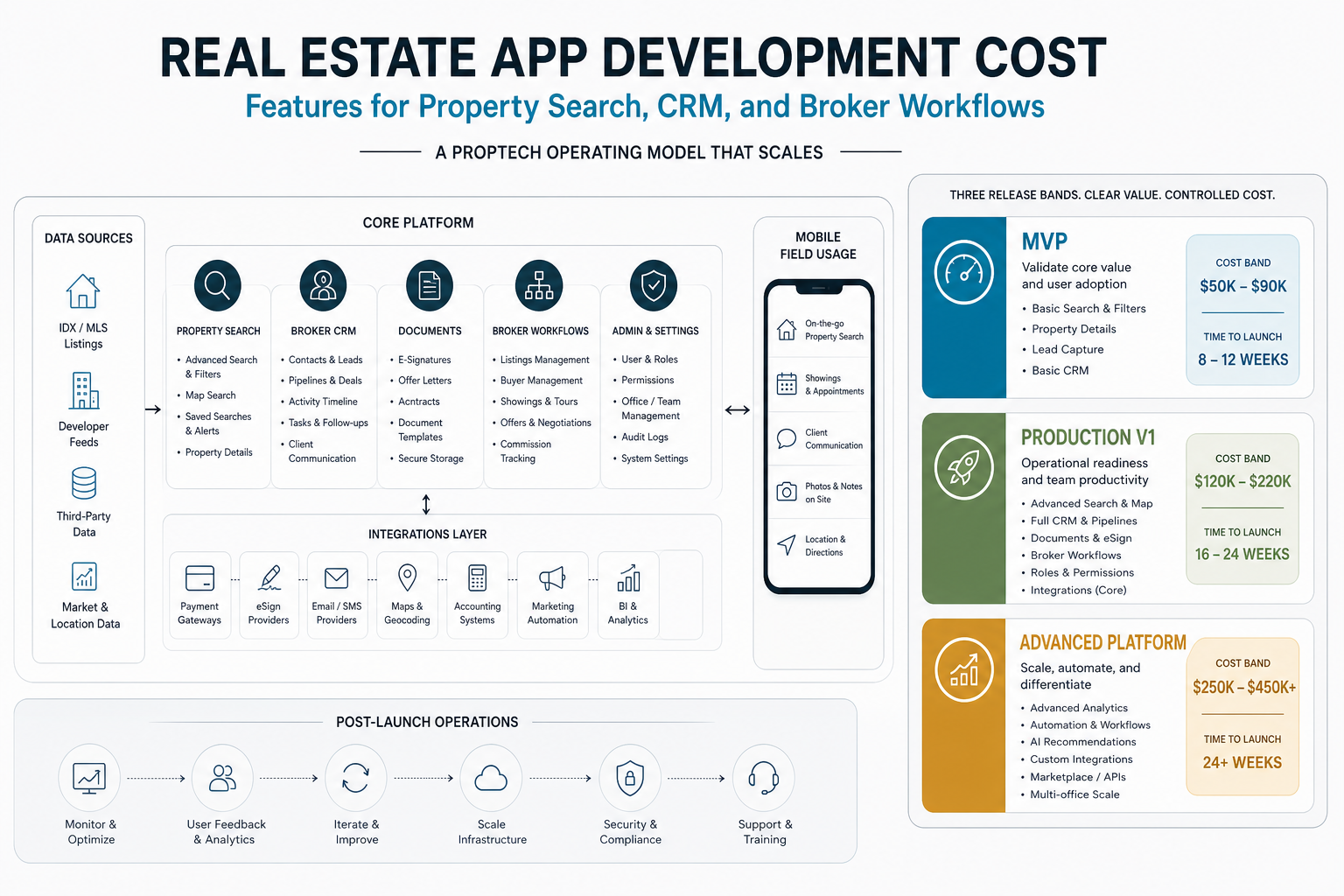
Real estate app development cost usually depends less on the phrase "real estate app" and more on the operating model behind the product. A focused listing MVP with search, property pages, inquiry capture, basic admin, and analytics can often be planned as a lean responsive web app development project. A brokerage platform with map search, lead routing, CRM workflows, document handling, role-based dashboards, mobile field usage, data feeds, and post-launch operations becomes a larger custom software development investment.
For 2026 planning, treat the budget as three release bands: a validation MVP that proves search and inquiry demand, a production v1 that supports brokers and back-office teams every day, and an advanced proptech platform with automation, AI recommendations, data integrations, multi-branch permissions, marketplace depth, or transaction workflows. Most teams should not fund all three at once. The better estimate starts with the smallest release that can prove one business loop.
If you already know the target audience, markets, and feature list, use the custom software cost estimator to translate scope into a directional budget and timeline before asking vendors for full proposals.
What Counts As A Real Estate App?
A real estate app can be a buyer-facing listing portal, broker CRM, rental management system, tenant portal, investor dashboard, internal property operations tool, or marketplace that connects buyers, sellers, tenants, agents, lenders, and service providers. These products share a domain, but they do not share the same cost structure.
A listing app is mostly about discovery: property cards, search filters, maps, saved listings, inquiries, media, and alerts. A brokerage app adds operational depth: lead ownership, follow-up tasks, viewing schedules, team permissions, document collection, and reporting. A property management platform adds tenancy, maintenance, payments, notices, vendor coordination, support workflows, and compliance records. A marketplace adds trust, payments, inventory quality, ratings, dispute handling, and service-provider workflows.
This is why generic app cost ranges can mislead. The expensive part is not always the screen count. It is often the hidden workflow behind each screen: who can edit a listing, how property data is verified, how leads move between agents, how documents are stored, how permissions change by branch, and what happens when a user cancels, duplicates, or escalates a request.
Real Estate App Cost By Scope
Use these ranges as planning bands, not fixed quotes. Final cost changes with geography, team model, product maturity, integrations, data quality, design depth, QA coverage, DevOps, and how much post-launch support the team expects.
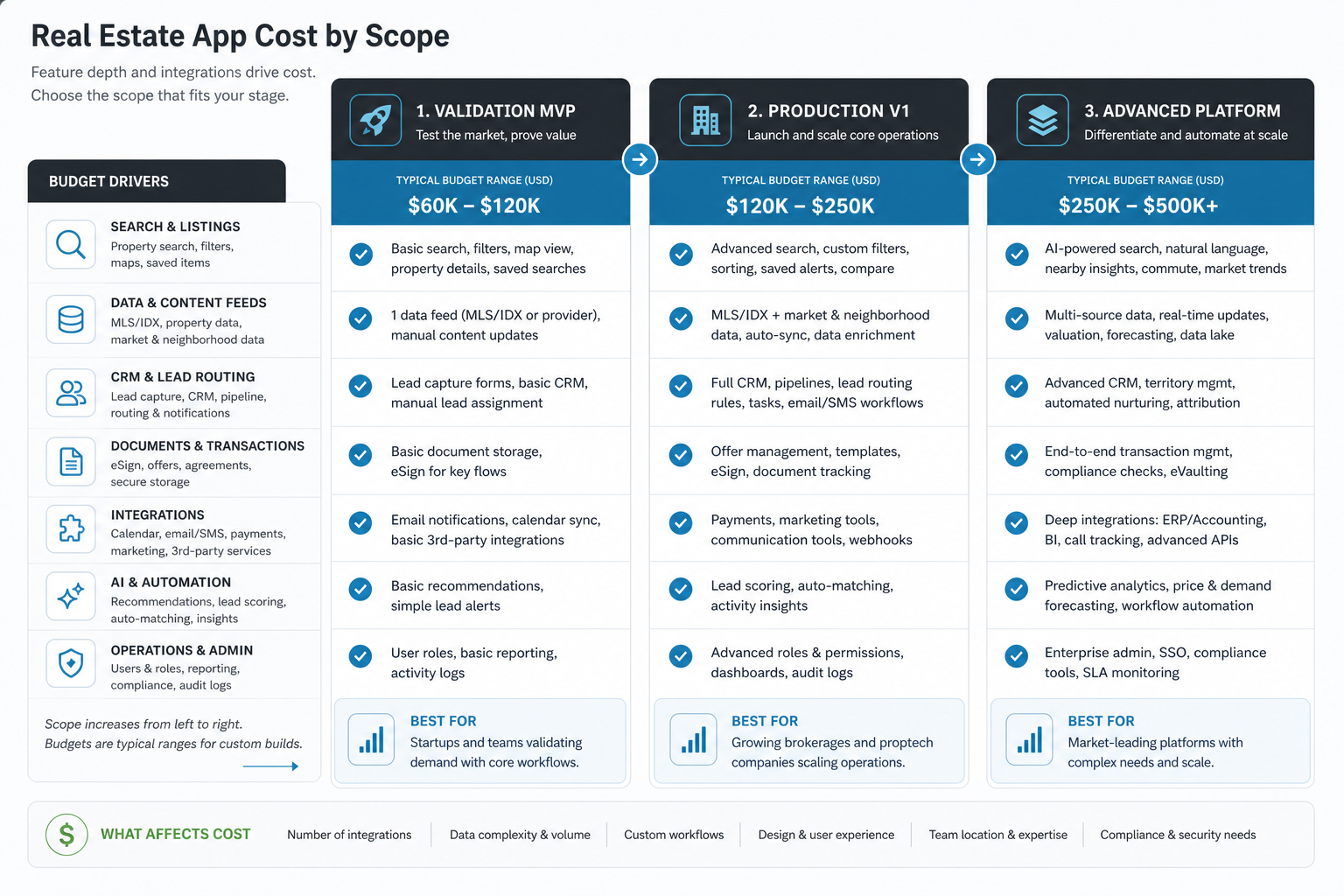
| Scope | Typical Build | Directional Planning Range | Good Fit |
|---|---|---|---|
| Validation MVP | Responsive web app or cross-platform app with listings, search, property pages, favorites, inquiries, basic admin, analytics, and manual listing operations | $30,000-$80,000 | Founders and agencies testing a focused property workflow or market |
| Production v1 | Polished customer app, broker dashboard, lead routing, listing media workflows, maps, notifications, roles, CRM handoff, and operational reporting | $80,000-$200,000 | Brokerages, proptech startups, and teams that need software for daily operations |
| Advanced platform | Multi-role marketplace, CRM depth, document workflows, payments or bookings, property data integrations, AI recommendations, branch permissions, analytics, and automation | $200,000-$500,000+ | Scaled broker networks, marketplaces, enterprise real estate teams, and investor-backed proptech products |
The fastest way to lower cost is not to remove random features. It is to choose one primary transaction for the first release. Examples include helping buyers find verified properties, helping agents manage leads, helping tenants submit maintenance requests, or helping owners manage bookings. A focused workflow is easier to design, build, test, launch, and sell.
Feature Cost Drivers: What Actually Changes The Estimate?
Real estate apps become expensive when they combine high-volume search, rich media, operational workflows, multiple user roles, third-party systems, and compliance-sensitive records. A feature that looks small in a list can require database design, admin controls, moderation, audit history, notification logic, analytics, and edge-case handling.
| Feature Area | Lower-Cost Version | Higher-Cost Version | Why It Changes Budget |
|---|---|---|---|
| Property listings | Manual listings with core fields and images | Verified listings, bulk import, approval workflows, media compression, duplicate checks, and stale listing cleanup | Data quality and moderation add admin logic |
| Search and maps | Keyword, location, price, and category filters | Map clusters, polygons, commute radius, school zones, saved alerts, high-performance geo queries, and provider cost controls | Geo UX and performance need careful engineering |
| Lead capture | Inquiry form and email notification | Lead scoring, ownership rules, round-robin assignment, CRM sync, SLA tracking, and agent follow-up tasks | Sales operations require workflow logic |
| Broker tools | Simple dashboard and listing management | Team hierarchy, agent productivity, pipeline views, branch permissions, manager approvals, and reporting | Multiple roles increase design and QA effort |
| Documents | File upload and secure download | E-signature, version history, permissioned folders, compliance retention, audit trail, and transaction-stage checklists | Security and legal workflows add complexity |
| Media and tours | Photos and short descriptions | Video, floor plans, 3D tours, virtual staging, CDN processing, moderation, and asset lifecycle controls | Media storage, rendering, and upload quality matter |
| AI features | Basic recommendations or FAQ chatbot | Personalized matching, valuation support, lead qualification, agent copilots, quality evaluation, and human review loops | AI needs data readiness, guardrails, and measurement |
Data Feed, IDX, And MLS Costs
Property data is often the biggest unknown in a real estate app estimate. Manually managed listings are straightforward. External feeds, MLS/IDX access, RESO Web API data, CRM sync, map APIs, payment providers, e-signature tools, document storage, email/SMS systems, and analytics pipelines all add cost because every integration has credentials, licensing rules, retries, limits, errors, ownership questions, and support needs.
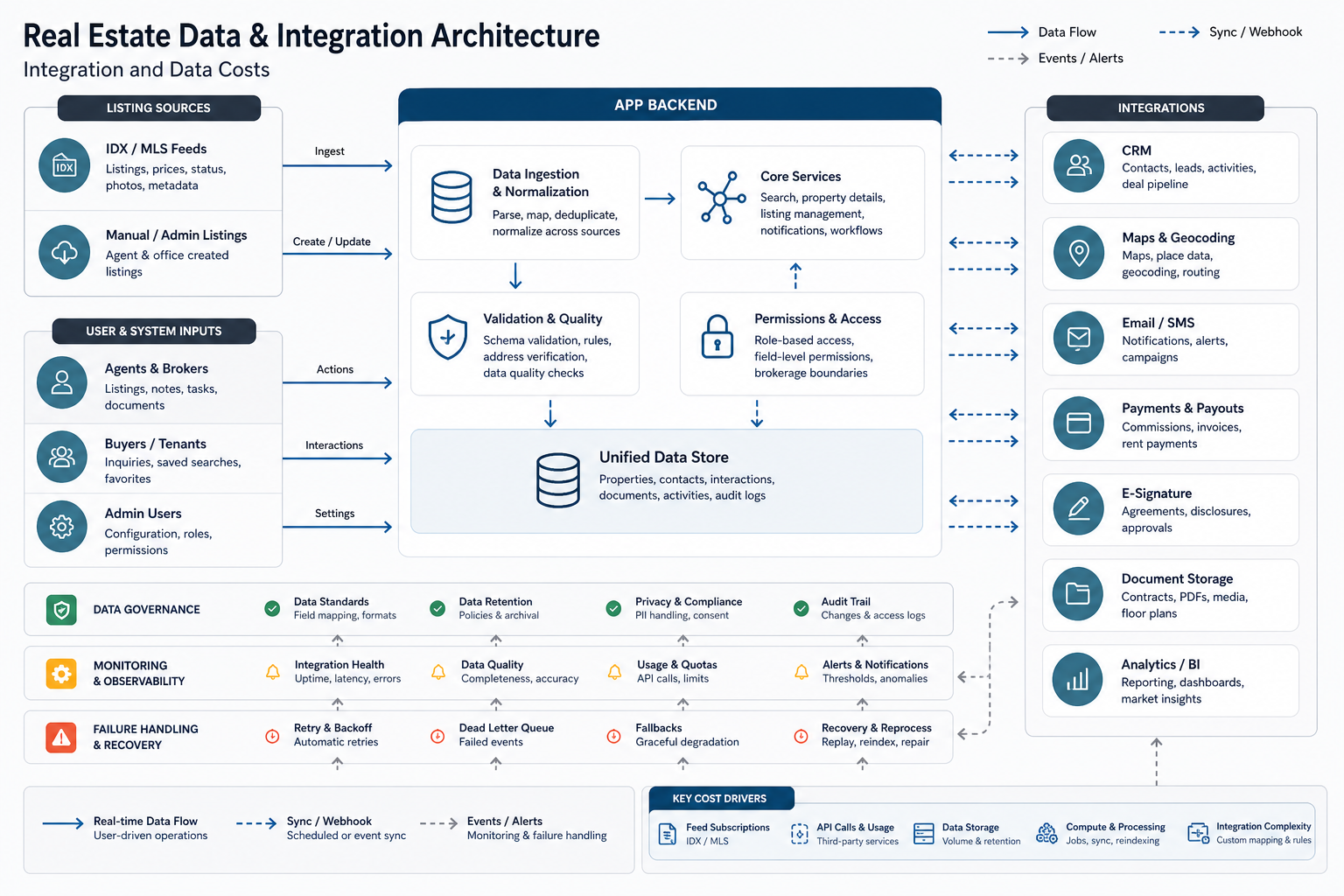
RESO describes its Data Dictionary and Web API as real estate industry standards for data structure and transport. That matters because many brokerages and MLS-connected products need standardized listing fields, permissions, and transport patterns rather than a one-off import. In practice, access still depends on the client’s brokerage relationship, market, vendor approvals, and local data rights. The estimate should include time for API access, sample data review, field mapping, sync strategy, image handling, stale-listing cleanup, and launch monitoring.
Map and location features also deserve explicit planning. Google Maps Platform, Places, geocoding, routes, and autocomplete are billed through product-specific SKUs, so a high-traffic search UX can create ongoing operating cost if every keystroke or map movement triggers paid calls. Good engineering reduces waste through session tokens, cached coordinates, normalized addresses, backend rate controls, and clear decisions about what must be real-time.
Platform Choice: Web, Mobile, Or Both?
For many real estate products, a responsive web app is the best first build because property discovery, dashboards, documents, and admin tools are easier to launch and iterate on the web. Native or cross-platform mobile becomes more important when users need push notifications, location-heavy behavior, camera workflows, offline access, field inspections, or frequent agent use.
A cross-platform mobile app development approach can reduce duplicate UI effort compared with separate native iOS and Android builds, but it does not remove backend, admin, QA, analytics, security, data, or integration work. The cost question is not only "web or mobile?" It is "which platform does the first audience need to complete the core job?"
If the product serves agents in the field, mobile may be part of version one. If it serves buyers browsing listings and brokers managing operations, a strong web app plus mobile-friendly UX may be a cleaner first release. If the business model is closer to lodging or booking, study comparable marketplace flows such as NextPage’s CareStay portfolio case study, where property discovery, host dashboards, booking review, chat, and payments had to work as one operating system.
CRM, Broker, And Admin Workflows
Broker workflow is where many real estate app estimates expand. A public listing experience may look simple, but broker teams need lead assignment, ownership changes, follow-up reminders, viewing schedules, notes, listing status updates, manager visibility, branch permissions, and reporting. These workflows should be designed before the estimate is finalized because they affect the data model, UX, notifications, testing, and support burden.
Decide early whether the app should replace an existing CRM, integrate with one, or only send qualified leads into the current workflow. Replacement is usually more expensive because the new system must support daily sales operations. Integration is still not free: sync direction, conflict handling, duplicate detection, contact ownership, and API limits must be specified.
MVP Roadmap For A Real Estate App
A practical MVP should prove one business loop. For a property search product, that loop might be: publish verified listings, let users search and save properties, capture qualified inquiries, route leads to the right agent, and report what happens next. Everything else should be weighed against that loop.
| Release | Include | Defer | Success Measure |
|---|---|---|---|
| MVP | Core listings, search, property detail pages, inquiry forms, basic admin, analytics, and priority CTA | Advanced AI, complex CRM, marketplace payments, deep document automation, AR tours | Qualified inquiries, listing engagement, lead response time, agent follow-up rate |
| Version 1 | Broker dashboard, lead routing, notifications, saved searches, media workflows, role permissions, CRM handoff, and operational reporting | Multi-market expansion, advanced personalization, investor analytics, complex valuation tools | Lead conversion, response time, operational adoption, listing quality |
| Version 2 | CRM depth, document workflows, integrations, AI recommendations, valuation support, marketplace features, branch-level reporting | Anything not tied to measurable growth or operating leverage | Revenue per lead, retention, team productivity, automation savings, support load |
This roadmap keeps the first build commercially useful without pretending it must become a full Zillow-style marketplace on day one. The budget becomes easier to defend when every feature has a role in a measurable release goal.
Hidden Costs To Plan For
Real estate software has cost categories that are easy to miss in early conversations: data licensing, data cleanup, image storage, map usage, SMS notifications, email deliverability, third-party subscriptions, privacy requirements, search performance, admin support, accessibility, moderation, and content operations.
Post-launch costs matter too. A production app needs monitoring, backups, security updates, bug fixes, dependency maintenance, content moderation, analytics review, uptime checks, and product iteration. A sensible planning model reserves budget for operating the platform after launch, not only building it.
Teams should also decide who owns listing operations. If agents or admins publish listings, the product needs drafts, validation, approvals, image rules, training, and support. If the system imports data, it needs reconciliation, error handling, alerting, and a manual override path.
Build Vs Buy: When Custom Software Is Worth It
Custom real estate software is usually worth considering when the workflow itself creates advantage: unique lead routing, multi-branch operations, proprietary data, specialized listing quality, custom marketplace rules, integrated transaction support, or a differentiated customer experience. Buying or configuring an existing tool is usually better when the workflow is standard and the team mainly needs a brochure site, simple IDX display, commodity CRM, or template-based property management.
Use the build vs buy decision tool before committing to custom development. The right answer may be a hybrid: buy the commodity CRM, build the differentiated search and operations layer, and integrate only the data needed for the first release.
How To Reduce Real Estate App Development Cost
- Start with one primary user journey. Buyer search, broker lead management, tenant support, owner bookings, and investor reporting are different products.
- Choose web-first when it fits. A responsive web app can validate many property workflows before native mobile investment.
- Limit version-one integrations. Every API adds testing, failure states, support overhead, and potential vendor dependency.
- Use admin workflows deliberately. A strong admin panel can replace expensive automation during early launch.
- Define the no-scope list. Make advanced AI, AR tours, payments, or document automation release-two items unless they are central to the first business loop.
- Run discovery before fixed estimates. Data, compliance, CRM, and MLS constraints should be visible before development begins.
Cost control does not mean building a weak product. It means putting the strongest workflow into the first release and delaying features that do not prove demand, improve operations, or unlock revenue.
How NextPage Estimates Real Estate Apps
NextPage estimates real estate app development by mapping the product to workflows first: discovery, listing operations, search, inquiries, lead management, documents, administration, integrations, analytics, and support. Then we shape a release plan that separates MVP proof from production scale.
For custom platforms, the process starts with scope clarity, technical risk, and the operating model behind the software. That helps avoid a common proptech mistake: pricing a feature list while ignoring who will run the platform every day.
If you are comparing budgets, bring a short description of the user roles, must-have workflows, data sources, integrations, launch platform, and release deadline. That is enough to turn a vague real estate app idea into a practical first estimate and roadmap.