
Secure AI agent development starts by limiting what the agent can pursue, see, call, change, remember, and hide. A tool-using agent is not just a chatbot with a better prompt. It is an application workflow that can plan, use credentials, call APIs, store memory, coordinate with other agents, and influence human decisions.
OWASP's Top 10 for Agentic Applications for 2026 gives security and product teams a useful shared language for those risks. This guide turns that framework into a build checklist for teams planning production generative AI development work where agents interact with real systems.
What Makes AI Agent Security Different?
LLM security focuses on prompts, data exposure, retrieval, and output handling. Agent security adds operational authority. The agent may decide which step comes next, select a tool, pass arguments, interpret the result, retry, ask another agent for help, or produce a recommendation that a human trusts too quickly.
That extra agency changes the engineering model. A bad answer is a quality issue. A bad tool call can send an email, change a CRM field, refund an order, delete a record, expose customer data, or trigger a chain of automation. The practical question is not whether the model is smart enough to complete a workflow. It is whether the surrounding system makes unsafe behavior difficult, visible, reversible, and reviewable.
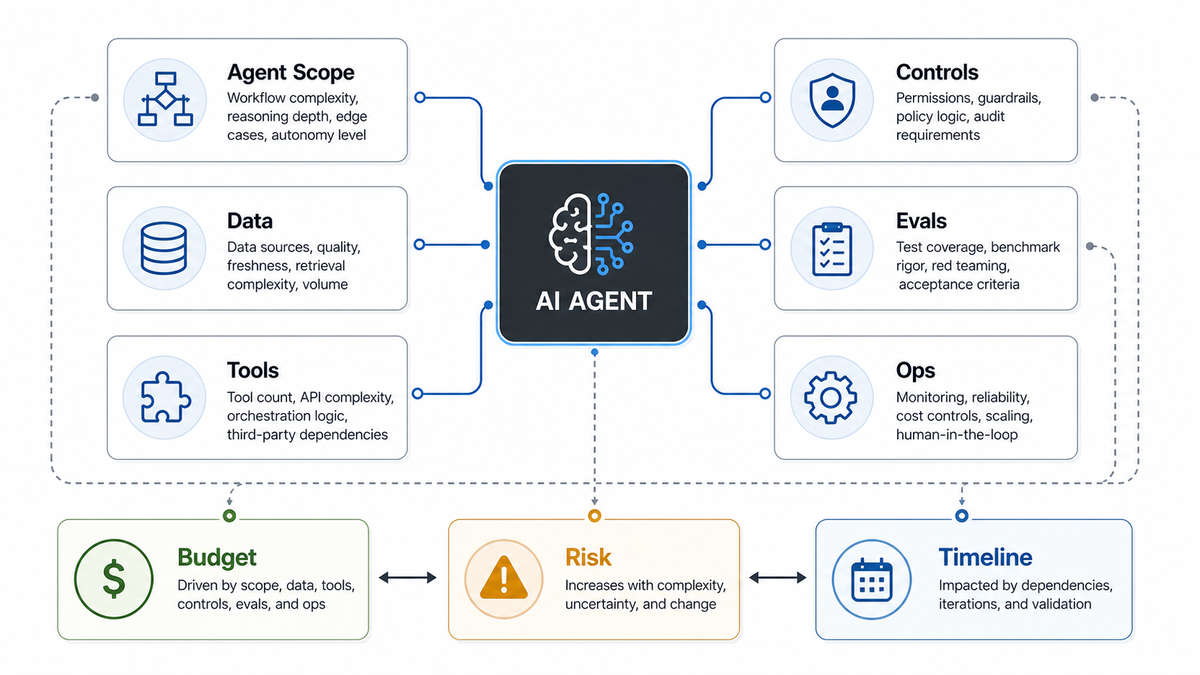
If the build is still in budgeting, pair this checklist with the AI agent development cost guide so scope, controls, evaluation, and operating ownership are estimated together.
The OWASP Agentic Risk Map
The OWASP agentic framework names ten risk areas for autonomous and tool-using AI systems: goal hijack, tool misuse and exploitation, identity and privilege abuse, supply chain vulnerabilities, unexpected code execution, memory and context poisoning, insecure inter-agent communication, cascading failures, human-agent trust exploitation, and rogue agents. For builders, these risks can be grouped into four control questions.
| Build Question | Agentic Risk Areas | Control Decision |
|---|---|---|
| What is the agent allowed to pursue? | Goal hijack, rogue agents, cascading failures | Define bounded goals, stop conditions, escalation rules, and policy checks before execution. |
| What authority can the agent use? | Tool misuse, identity and privilege abuse, unexpected code execution | Use scoped credentials, allowlisted tools, typed arguments, rate limits, and approval gates. |
| What can influence agent behavior? | Memory poisoning, context poisoning, supply chain vulnerabilities, inter-agent communication | Treat memory, retrieved content, tool results, skills, plugins, and agent messages as untrusted until validated. |
| How do humans know what happened? | Trust exploitation, cascading failures, rogue behavior | Keep audit logs, reviewer decisions, trace IDs, action outcomes, and incident playbooks. |
Secure AI Agent Development Checklist
1. Write the agent charter before writing prompts. Define the business workflow, users, systems, allowed actions, forbidden actions, approval requirements, and success metrics. A support triage agent, sales follow-up agent, procurement assistant, and code-review agent should not share one generic permission model.
2. Separate planning from execution. Let the agent propose a plan, then validate the plan before tools run. The validator should check user role, workflow state, allowed tools, data sensitivity, spend limits, irreversible actions, and whether a human approval step is required.
3. Use tool allowlists, not broad credentials. Tools should be narrow functions with typed inputs and explicit business rules. Prefer `createDraftInvoice` over unrestricted database access, `prepareRefundForApproval` over `issueRefund`, and `searchApprovedKnowledgeBase` over arbitrary file or web access.
4. Treat tool outputs as untrusted context. API responses, retrieved documents, browser content, emails, and messages from other agents can contain instructions. Do not let those results silently override system policy, tool permissions, or the original user-approved goal.
5. Add human approval for external effects. Sending messages, spending money, deleting data, changing permissions, updating customer records, publishing content, or executing code should start with confirmation gates. Approval screens should show the reason, source evidence, tool arguments, expected impact, and rollback path.
6. Log decisions, not just messages. Store the prompt template version, model version, policy version, retrieved source IDs, selected tools, rejected tools, validation failures, human approvals, final action results, and cost metrics. Audit logs are part of the product, not an afterthought.
7. Evaluate the control layer. Test prompt injection, malicious tool output, memory poisoning, privilege escalation, unsafe retries, multi-agent confusion, cost spikes, and reviewer over-trust. Keep failures as regression cases so the agent cannot quietly lose controls during model, prompt, or tool changes.
Tool Permissions and Identity Controls
Tool permissions are where agent security becomes application security. The safest pattern is least privilege per workflow, not one shared service account with broad access. Each tool should have a purpose, owner, input schema, validation rule, timeout, retry policy, rate limit, and logging contract.
Use separate read and write tools. Use separate credentials for staging and production. Require idempotency keys for actions that may be retried. Block tools from accepting raw model-generated SQL, shell commands, file paths, or URLs unless a deterministic validator can prove the input is safe for that workflow.
For teams building agents over private knowledge, customer records, or operational systems, the architecture often overlaps with LLM development: retrieval filtering, citations, tenant boundaries, prompt tests, and output validation still matter. The agent layer adds credentials, state, tools, approvals, and action logs.
Memory, Context, and RAG Controls
Agent memory can improve continuity, but it can also preserve poisoned instructions, stale assumptions, or sensitive details longer than intended. Decide what memory can store, who can read it, when it expires, how it is corrected, and which workflows are not allowed to use memory at all.
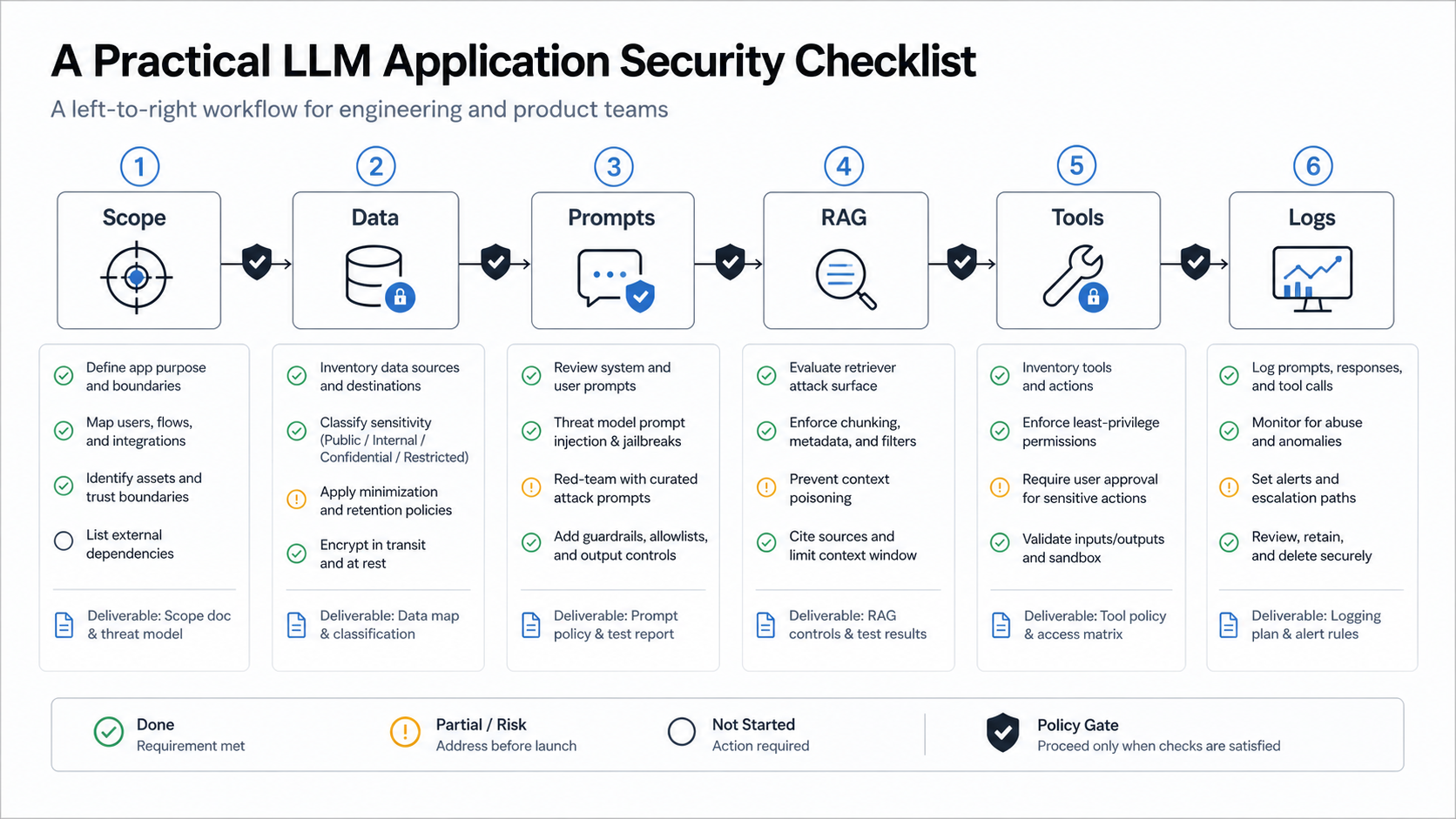
RAG should enforce access before chunks enter the prompt. Store source IDs, tenant metadata, classification, freshness, and ingestion provenance with each chunk. If the agent reads external content, treat that content as hostile until it passes source checks and instruction-stripping where practical. NextPage's LLM application security checklist covers the underlying prompt, RAG, data, and output surfaces in more detail.
Context windows should also have priority rules. System policy, developer instructions, user-approved goals, trusted retrieved evidence, untrusted external content, and tool outputs should not all carry equal authority. A secure agent runtime needs a hierarchy so low-trust context cannot rewrite high-trust constraints.
Human Approval and Trust Design
Human review fails when the interface asks people to approve work without enough evidence. A good approval surface shows what the agent plans to do, why, which data it used, which tool it will call, what fields will change, what could go wrong, and how to reverse or escalate the result.
Use progressive autonomy. Start with draft-only behavior. Move to human-approved actions after the workflow is measurable. Consider limited auto-approval only for low-risk, reversible, high-confidence actions that have strong monitoring and rollback paths.
The AI Agent Readiness Assessment is useful before implementation because it forces teams to document workflow clarity, data readiness, integration access, human-review design, and risk ownership before an agent receives operational authority.
Audit Logs, Monitoring, and Incident Response
Agent logs should answer six questions: who asked, what goal was accepted, what context was used, which tools were attempted, what changed, and who approved or overrode the action. Without that trail, debugging a bad outcome turns into guesswork.
Monitor both technical and business signals. Technical signals include latency, token usage, tool failures, validation failures, retry loops, refusal rates, and policy violations. Business signals include wrong updates, customer complaints, unexpected approvals, cost spikes, manual reversals, and workflow abandonment.
Incident response should be planned before launch. Teams need a way to disable a tool, revoke an agent credential, quarantine poisoned memory, roll back records, export logs, notify affected users, and ship a regression test. Secure AI development services should include these operating controls alongside the agent experience.
Secure Agent Implementation Roadmap
Phase 1: threat model the workflow. Map users, data, systems, tools, credentials, approval points, failure modes, and business impact. Decide what the agent must never do, even if asked politely.
Phase 2: build a narrow pilot. Start with one workflow, one role, a small trusted data set, read-only tools where possible, and approval gates for writes. Capture traces from the first pilot so evaluation is based on real behavior.
Phase 3: harden the tool layer. Add allowlists, schemas, deterministic validators, scoped credentials, rate limits, idempotency, safe retries, and policy checks before every action.
Phase 4: evaluate adversarially. Test direct and indirect prompt injection, malicious documents, dangerous tool arguments, privilege abuse, memory poisoning, multi-agent handoff confusion, and human over-trust.
Phase 5: launch with controls. Release only with dashboards, trace logs, incident playbooks, owner assignments, review cadence, and rollback paths. Expansion should follow evidence, not excitement about autonomy.
When to Get Help
Bring in help when the agent can touch private customer data, financial actions, regulated workflows, production databases, code execution, multi-tenant retrieval, outbound messages, or admin systems. Those are the points where a prompt or planning error becomes an operational risk.
NextPage can help design secure agent workflows, scoped tool layers, RAG controls, approval flows, and audit logging around your real business process. If you are planning a tool-using AI agent, start with a readiness assessment and then scope the smallest reliable version that can create value without uncontrolled authority.