
Quick Answer: Software Maintenance Cost
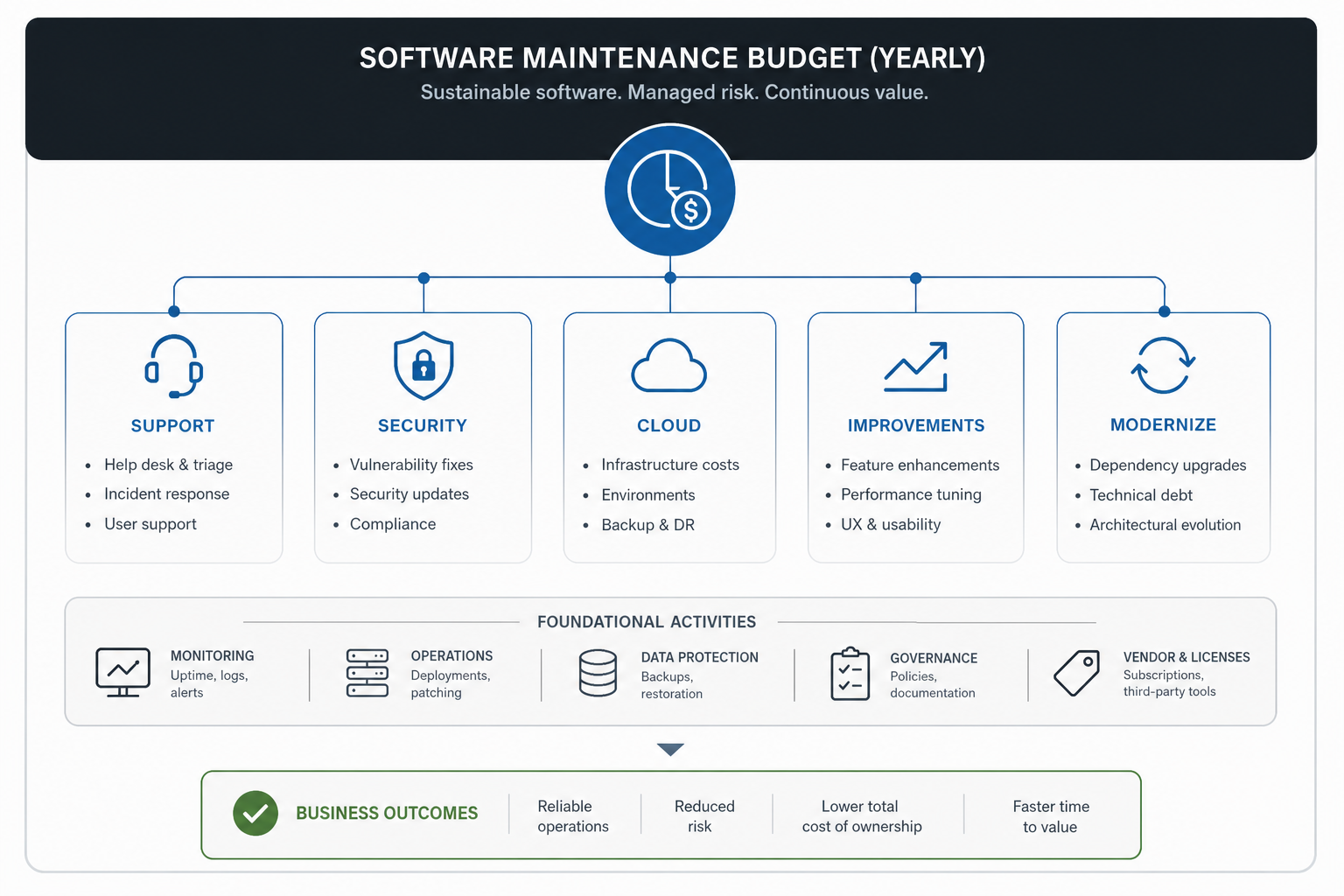
Software maintenance cost is the recurring budget required to keep an application secure, stable, compatible, useful, and economically healthy after launch. For custom software, it usually covers bug fixes, user support, dependency updates, security patches, monitoring, backups, cloud operations, performance work, small product improvements, and periodic modernization decisions.
A practical planning range is often easier than a single number: small internal tools may need a light monthly support budget, active customer-facing apps need a structured maintenance plan, and business-critical platforms need a retained engineering and operations model. The right budget depends on application complexity, uptime expectations, traffic, integrations, compliance exposure, cloud footprint, code health, documentation, and how fast the business wants the product to improve.
If the system is already old, brittle, or expensive to change, estimate maintenance and modernization together. NextPage's Legacy Software Modernization Scorecard is useful when you need to decide whether routine maintenance is enough or whether the application needs a deeper technical reset.
What Software Maintenance Includes
Maintenance is not one task. It is a portfolio of work that protects the original investment while adapting the software to new users, systems, security risks, and business priorities.
| Maintenance type | Typical work | Budget signal |
|---|---|---|
| Corrective | Bug fixes, data corrections, broken flows, failed jobs, API errors | High volume means quality debt, unclear ownership, or poor observability |
| Adaptive | Browser, OS, framework, payment, CRM, ERP, tax, policy, or API changes | Rises when the app depends on many external systems |
| Perfective | Small enhancements, usability fixes, reporting changes, workflow improvements | Healthy when tied to user value; risky when it becomes unplanned feature churn |
| Preventive | Refactoring, test coverage, dependency cleanup, documentation, CI/CD improvements | Underfunding here increases future delivery cost |
| Security | Patching, vulnerability review, access control checks, logging, backups, incident readiness | Business-critical for customer data, payments, health, finance, and multi-tenant systems |
| Operations | Monitoring, cloud cost review, uptime checks, database maintenance, backups, deploy support | Becomes larger when uptime, scale, or data recovery requirements increase |
Monthly and Annual Budget Ranges
Budget ranges should be tied to what the maintenance plan must actually cover. A low-traffic internal app with a modern stack, few integrations, and no strict SLA does not need the same model as a customer-facing SaaS platform with payments, analytics, role-based access, cloud infrastructure, and revenue impact when it goes down.
| Application profile | Planning range | What the budget usually covers |
|---|---|---|
| Small internal tool | Light monthly retainer or periodic review | Bug fixes, dependency updates, basic monitoring, small workflow changes |
| Active business app | Structured monthly support budget | Prioritized fixes, user support, releases, API changes, security updates, reporting improvements |
| Customer-facing platform | Dedicated monthly maintenance and product improvement capacity | Uptime, cloud operations, performance, feature improvements, analytics, QA, incident handling |
| Business-critical or regulated system | Retained engineering plus operations coverage | SLA response, audits, access controls, backups, disaster recovery, modernization backlog, release governance |
Some teams use a percentage of the original build cost as a starting benchmark, but that shortcut can hide the real drivers. A poorly documented application can cost more to maintain than a newer app with a larger feature set. A simple product with many external integrations can become more expensive than a complex but well-isolated internal workflow. The budget should follow risk, usage, stack health, and business impact.
What Drives Maintenance Cost Up?
The fastest way to underestimate maintenance is to count only visible support tickets. The expensive work usually sits behind the scenes: dependency risk, cloud configuration, fragile deploys, missing tests, stale documentation, unclear ownership, slow environments, and integrations that fail without useful logs.
- Legacy stack risk: Unsupported frameworks, old runtimes, abandoned libraries, and hard-to-hire skills raise both maintenance and modernization cost.
- Integration complexity: Payment gateways, CRMs, ERPs, logistics APIs, email providers, analytics systems, and internal databases all need monitoring and change management.
- Weak observability: Without logs, alerts, traces, and dashboards, small problems take longer to diagnose and production fixes become more expensive.
- Manual release process: Fragile deployments, missing rollback steps, and manual QA increase the cost of even small changes.
- Security exposure: Customer data, admin workflows, multi-tenant permissions, file uploads, payments, and regulated data need more frequent review.
- Cloud sprawl: Overprovisioned infrastructure, unused services, poor storage policies, and missing cost alerts turn operations into a hidden budget leak.
- Unplanned product changes: A support budget becomes unstable when every small business idea enters the same queue as urgent fixes.
For applications that need ongoing product development as well as support, NextPage's custom software development work is a better fit than a break-fix-only maintenance model because it combines engineering ownership, backlog prioritization, quality improvements, and release discipline.
Security, Cloud, and Dependency Work
Security and cloud operations are the parts of maintenance that often look optional until they become urgent. Dependency vulnerabilities, expired certificates, broken backups, misconfigured storage, unpatched containers, weak access controls, and noisy cloud bills all create risk even when the product appears to be running normally.
A healthy maintenance plan should include a regular patch cadence, dependency review, backup restore checks, user and admin access review, cloud cost review, basic incident response ownership, and clear rules for emergency fixes. For cloud-hosted applications, the budget should also include monitoring, database health, storage lifecycle policies, environment cleanup, and periodic architecture review.
If cloud operations are a major cost driver, a targeted cloud migration services assessment can identify whether the app needs right-sizing, re-platforming, improved deployment automation, database changes, storage cleanup, or a more resilient hosting model.
Keep, Improve, Modernize, or Rebuild?
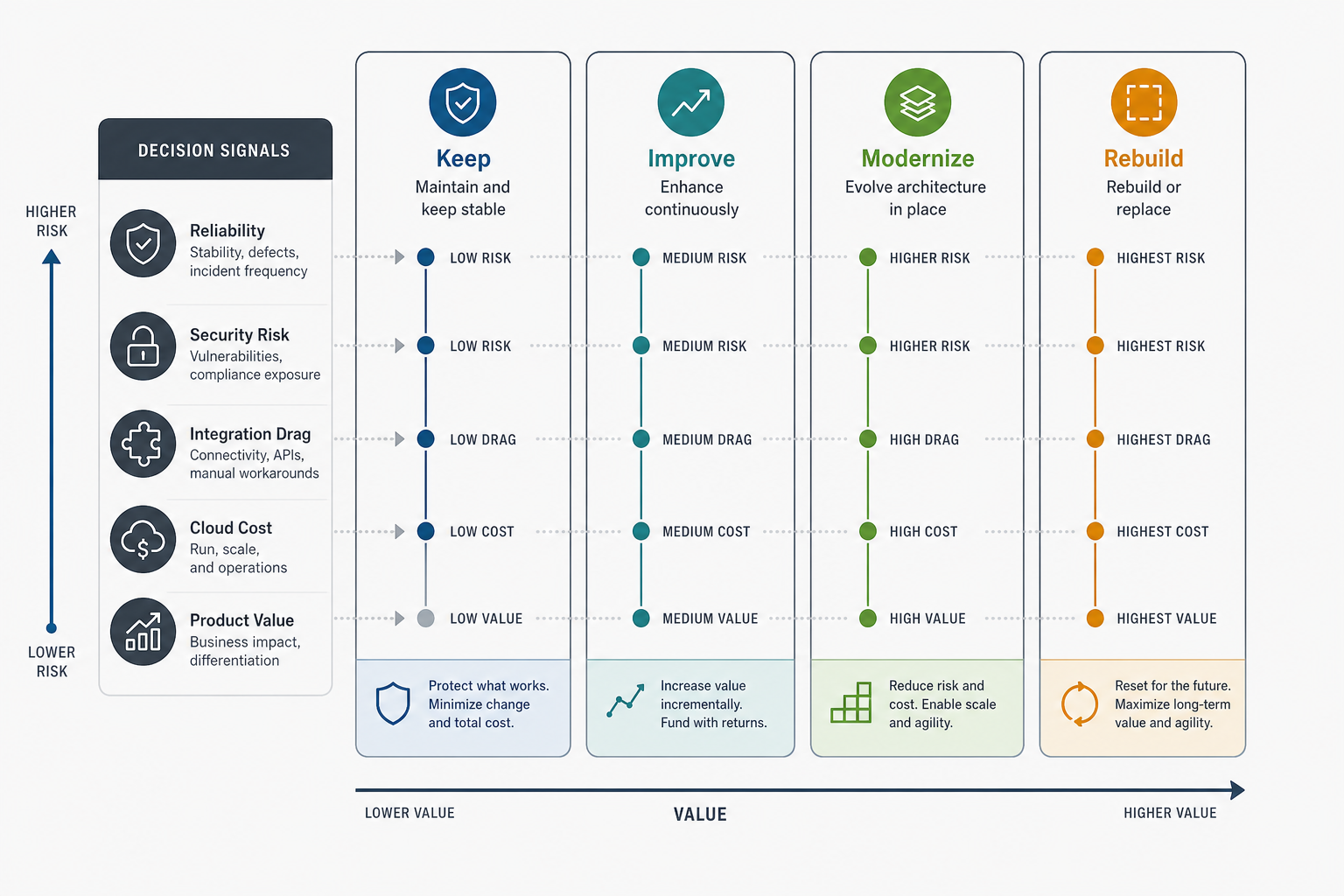
The most important maintenance question is not always how much to spend this month. It is whether the current application deserves the same maintenance strategy for another year. Some systems need routine care. Some need focused improvements. Some need modernization before maintenance becomes wasteful. Some should be replaced because every fix fights the architecture.
| Path | Choose it when | Budget focus |
|---|---|---|
| Keep stable | The app is reliable, low-change, low-risk, and still useful | Monitoring, patches, backups, occasional fixes |
| Improve continuously | The product is valuable and users need ongoing workflow improvements | Support plus a planned enhancement backlog |
| Modernize in place | The app is valuable but slowed by old frameworks, fragile deploys, or integration drag | Refactoring, tests, dependency upgrades, cloud or database improvements |
| Rebuild or replace | The system blocks growth, is unsafe to change, or costs more to preserve than to redesign | Discovery, transition planning, data migration, phased replacement |
The right path can change over time. A system may start with a stabilization sprint, move into preventive maintenance, and then reserve a quarterly modernization budget for the highest-risk components.
How to Build a Maintenance Budget
Start with the system's real operating profile, not a generic retainer. List the application modules, user roles, integrations, data sensitivity, hosting setup, release process, known issues, and business-critical workflows. Then split the budget into four tracks: support response, planned maintenance, product improvements, and modernization reserve.
- Inventory the system. Document modules, repositories, environments, dependencies, databases, integrations, deployment steps, and owners.
- Classify risk. Rank areas by revenue impact, security exposure, user volume, data sensitivity, and failure history.
- Define response expectations. Separate emergency response, business-hours support, planned releases, and low-priority backlog work.
- Reserve preventive capacity. Protect time for dependency updates, refactoring, tests, observability, and documentation.
- Control cloud spend. Review resource utilization, storage, backups, logs, monitoring, and environment cleanup on a schedule.
- Track maintenance signals. Watch defect recurrence, lead time for small changes, incident frequency, support volume, and infrastructure cost trends.
- Review quarterly. Decide whether the app should stay in maintenance mode, move into product improvement, or enter modernization planning.
Maintenance Contract vs. Dedicated Team
A maintenance contract works when the application is stable, the backlog is manageable, and the business mainly needs predictable support. A dedicated or retained team works better when the application is actively evolving, has many integrations, carries revenue risk, or needs modernization while it continues serving users.
For a small app, one accountable maintenance owner may be enough. For a larger platform, the operating model may include backend, frontend, QA, DevOps, and product ownership capacity. The team does not need to be large, but it does need context. Maintenance becomes expensive when every issue is handed to someone who has to rediscover the architecture from scratch.
How NextPage Approaches Software Maintenance
NextPage starts by separating urgent support from the work that keeps the application maintainable. That usually means reviewing the codebase, dependencies, deployment flow, infrastructure, data model, integrations, security controls, monitoring, and known business workflows before recommending a budget model.
For a stable application, the answer may be a lean support plan with scheduled patching and health checks. For a valuable but aging system, the answer may be stabilization plus a modernization roadmap. For a product still growing, the answer may be a retained engineering model that combines support, improvements, and technical debt reduction. The goal is not to keep spending forever; it is to make the system cheaper to operate, safer to change, and more useful to the business.