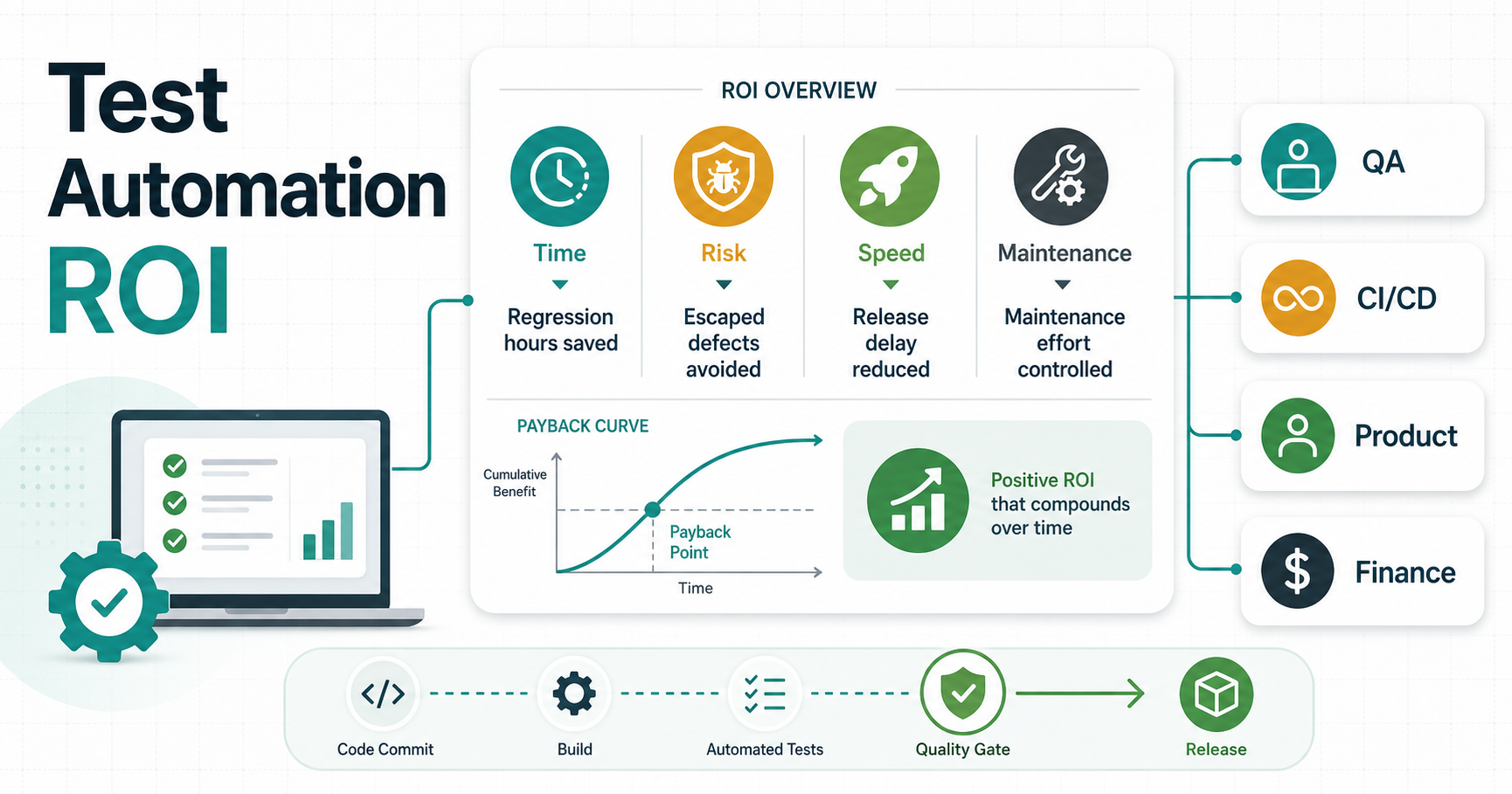

Quick Answer: When Does Test Automation ROI Turn Positive?
Test automation ROI turns positive when a team saves enough repeated regression effort, avoids enough escaped defects, and shortens enough release delay to cover the cost of building and maintaining the automation suite. The fastest payback usually comes from stable, business-critical workflows that run every release: signup, checkout, booking, payments, admin approvals, reports, integrations, and mobile smoke paths.
A useful ROI case should not promise that automation replaces QA. It should show where automation gives product, engineering, and finance leaders better release evidence. Teams still need exploratory testing, UAT, accessibility review, usability judgment, and risk-based manual sampling. The win is that repeatable checks run sooner, defects surface before late release meetings, and humans spend more time on the risks scripts cannot judge.
For teams with slow regression cycles or fragile release gates, NextPage's QA Automation Testing Services page is the closest service path. If the automation decision is part of a wider build or platform improvement, compare the automation slice with the Custom Software Cost Estimator so QA scope is budgeted alongside product, integrations, DevOps, support, and maintenance.
A Practical Test Automation ROI Formula
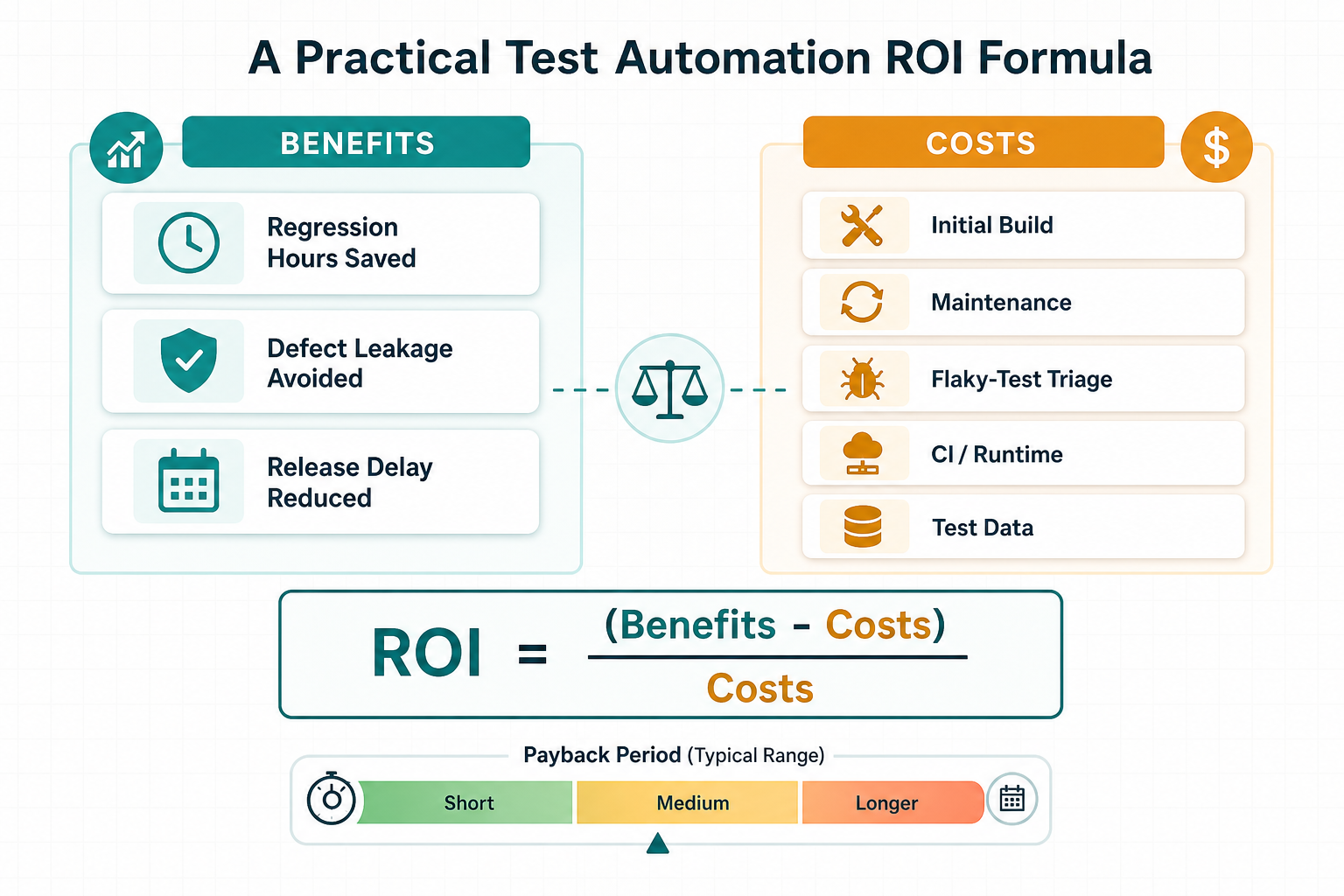
The simplest test automation ROI formula is:
Annual value = regression hours saved + avoided defect cost + release-delay value - annual automation maintenance - allocated build cost.
Then calculate ROI as (annual value - annual cost) / annual cost. The result should be a range, not a single exact number, because defect cost, release delay, flaky-test triage, CI runtime, and test data effort all vary by product maturity.
| ROI Input | How To Estimate It | Why It Matters |
|---|---|---|
| Regression Hours Saved | Manual regression hours per release multiplied by releases per year, minus exploratory checks that remain manual. | This is the most visible capacity recovery for teams that ship often. |
| Defect Leakage Avoided | Escaped defects per quarter multiplied by triage, hotfix, support, churn, SLA, or reputational impact. | Automation protects critical paths before customers or operations teams find issues. |
| Release Delay Reduced | Time blocked by late QA cycles, retesting, handoffs, approval meetings, and release freezes. | Shorter cycles improve throughput and reduce the cost of waiting. |
| Automation Maintenance | Hours spent updating tests, fixing flaky checks, refreshing fixtures, maintaining environments, and reviewing failures. | This is the cost line teams underestimate most often. |
| Initial Build Cost | Framework setup, test authoring, CI wiring, reporting, training, and first-suite stabilization. | Build cost should be allocated across the planning period instead of treated as free engineering time. |
For example, if a product team spends 120 hours on regression every month and ships twice a month, even a narrow smoke and critical-path suite can recover meaningful time. If the same product has unstable requirements, brittle selectors, poor test data, and no CI ownership, automation can become expensive noise. The ROI model should expose that risk before the suite expands.
What Should You Automate First?
Start with checks that are stable, repeated, expensive to run manually, and important enough to block a release. Do not begin with the longest test list. Begin with the flows that create revenue, trust, safety, support load, or operational continuity.
| Candidate | Good Automation Fit | Keep Human-Led For Now |
|---|---|---|
| Login, account access, and permissions | Stable role and session rules that must pass every release. | New access models where product rules are still changing. |
| Checkout, booking, payment, or quote flows | High-value paths with deterministic expected outcomes. | Edge-case UX review, copy clarity, and ambiguous failure messaging. |
| APIs and integrations | Contract checks, webhook behavior, payload validation, and retry rules. | Partner workflows with incomplete sandbox coverage. |
| Reports and dashboards | Known calculations, permission checks, and exported record counts. | Exploratory analysis of whether the report answers the business question. |
| Mobile app smoke paths | Stable launch, login, critical workflow, API response, and crash checks. | Device-specific usability, accessibility, and real-world interruption testing. |
If product scope is still fluid, use the MVP Scope Builder to narrow what the first release must prove before creating broad regression coverage. For teams still choosing the testing mix, the manual vs automation testing guide helps separate repeatable evidence from judgment-heavy testing.
Build The ROI Model Before You Build The Test Suite
A practical automation business case compares saved regression effort, avoided defects, faster releases, and ongoing ownership. Before selecting Playwright, Cypress, Appium, API contract tests, visual regression, or CI quality gates, answer a few operating questions.
- How long does regression take today, and how often does it repeat?
- Which releases are delayed by QA evidence arriving late?
- Which defects repeatedly escape into production?
- Which workflows are too risky to test manually every time?
- Which environments, fixtures, and data states are unreliable?
- Who owns failures, flaky-test triage, and suite maintenance?
Use three layers: baseline for current regression hours, release frequency, defect leakage, retest loops, and support load; target state for which checks run on pull requests, merges, nightly builds, pre-release gates, and post-deployment monitors; and operating cost for authoring, fixtures, environments, CI time, reporting, and ownership.
The output should be a conservative payback range. A conservative model is more useful than an optimistic one because it shows where automation could become wasteful. If the testing strategy sits inside a larger product roadmap, pair this model with custom software development cost planning so quality, support, and release speed are not hidden outside the main budget.
Metrics That Matter More Than Test Count
Counting automated tests is a weak success metric. A thousand shallow checks can miss the workflow that matters. Measure outcomes that support release decisions.
| Metric | Healthy Signal | Warning Signal |
|---|---|---|
| Regression Cycle Time | Release checks finish faster with fewer manual retest loops. | The suite runs so slowly that teams bypass it. |
| Defect Leakage | Fewer customer-facing bugs in automated paths. | Escaped defects keep happening in supposedly covered workflows. |
| Flaky-Test Rate | Failures are trusted and actionable. | Engineers ignore failures because tests are unreliable. |
| Maintenance Effort | Tests change when product behavior changes, not whenever styling changes. | Maintenance consumes the capacity automation was meant to save. |
| Release Frequency | Teams ship smaller changes with better confidence. | Automation exists, but release approval still depends on manual heroics. |
Maintenance deserves special attention. If a product is already in support mode, compare automation upkeep with the recurring budget described in NextPage's software maintenance cost guide. Automation is easier to justify when it reduces support load and protects planned improvement work.
Release Gate Scorecard For Automation ROI
Automation only improves ROI when results change release decisions. A release gate scorecard turns pipeline output into a clear promote, pause, retest, or monitor decision. It should include deterministic test results, known exceptions, flaky-test status, owner signoff, defect leakage history, and production monitoring signals.
| Gate | Evidence To Review | Decision It Supports |
|---|---|---|
| Pull request gate | Unit, API, contract, lint, smoke, and fast browser checks. | Can this change merge without breaking shared branches? |
| Nightly regression | Broader browser, mobile, role, integration, and data-state coverage. | Where is risk growing before the next release window? |
| Release candidate | Critical paths, accepted exceptions, environment status, and owner signoff. | Can this release promote, or does it need a targeted retest? |
| Post-deployment monitor | Synthetic flows, errors, latency, crash signals, support tickets, and rollback triggers. | Did production stay healthy after shipping? |
The CI/CD testing strategy guide is a useful companion when deciding which checks should block a release, run nightly, or stay advisory. The regression testing checklist helps teams decide which workflows belong in the recurring release pack.
A Phased Test Automation Roadmap
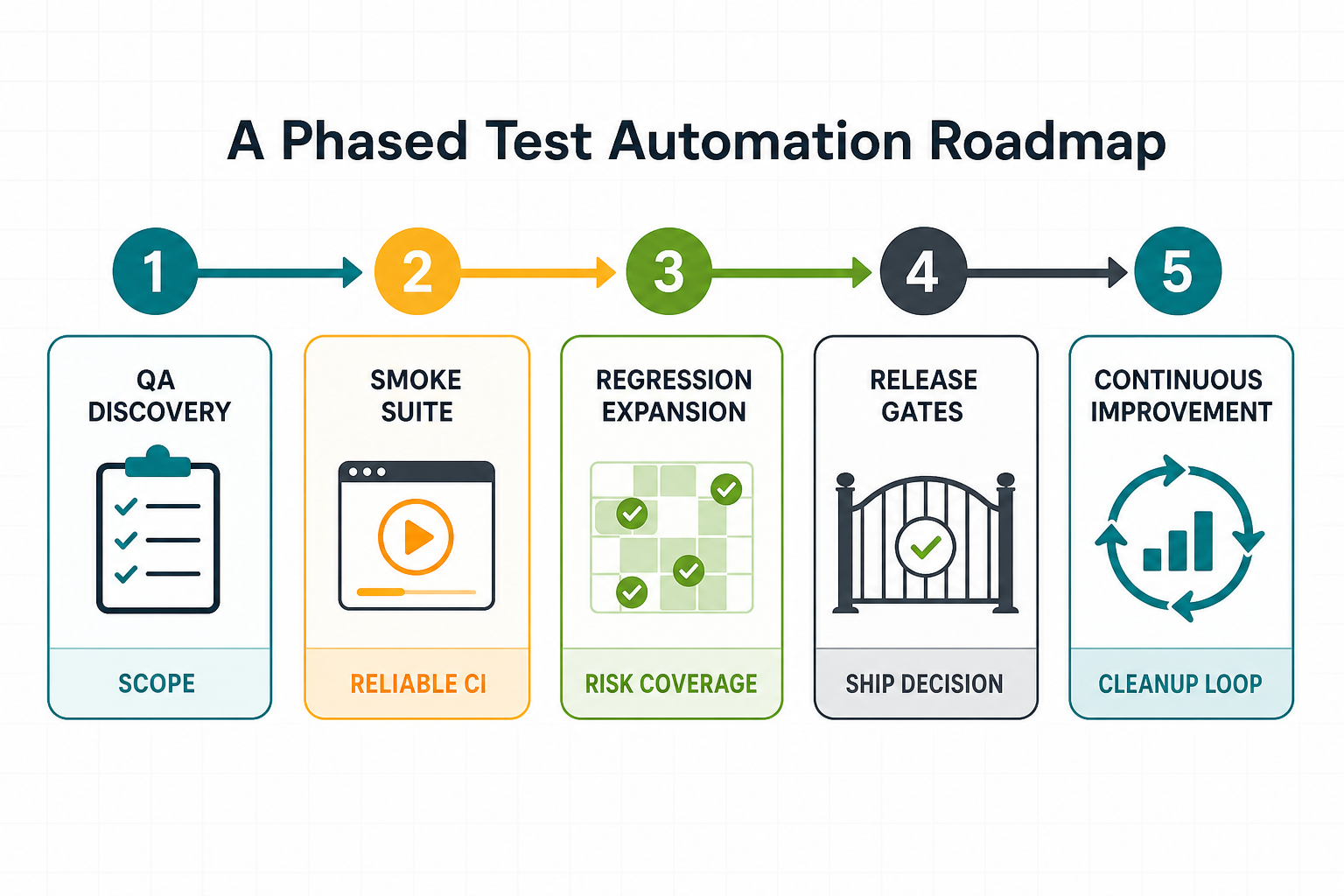
A phased roadmap keeps the team from spending months building a suite nobody trusts. Start with release blockers, add coverage where the product is stable, and keep ownership explicit.
| Phase | What To Build | Exit Criteria |
|---|---|---|
| 1. QA discovery | Regression inventory, defect history, release timeline, tool audit, data and environment review. | ROI hypothesis and first-suite scope are agreed. |
| 2. Smoke suite | Critical path checks for login, core workflow, data save, integration response, and deployment sanity. | Suite runs reliably in CI and failures are actionable. |
| 3. Regression expansion | API, integration, role, payment, reporting, mobile, and edge-case tests chosen by risk and repetition. | Manual regression hours decline without increasing escaped defects. |
| 4. Release gates | Pull-request checks, merge checks, nightly coverage, pre-release dashboard, and failure ownership. | Release managers can use test results as evidence. |
| 5. Continuous improvement | Flaky-test cleanup, coverage review, test data refresh, and maintenance budgeting. | Automation remains trusted as the product changes. |
If the delivery model needs a managed QA pod, offshore engineering support, or a blended DevOps and QA team, compare team shapes with the Dedicated India Team Cost Calculator. For mobile-heavy products, NextPage's mobile app testing services page shows how device coverage, API validation, Appium planning, and store readiness affect the test strategy.
Common Mistakes That Destroy Test Automation ROI
- Automating unstable flows before product decisions are settled.
- Writing end-to-end UI tests for everything instead of using faster API, contract, component, or unit checks where they fit.
- Ignoring test data, environment stability, and CI runtime until the suite becomes unreliable.
- Measuring test count instead of release speed, escaped defects, maintenance effort, and trusted failures.
- Letting no one own flaky-test cleanup.
- Replacing exploratory QA with automation instead of using automation to free humans for better testing.
- Building coverage that does not map to business risk, compliance needs, or release blockers.
Automation should make risk visible earlier. It should not become a second product that the team maintains without a clear business reason. When release readiness is broader than automation, the software QA testing services page is a better starting point because it combines manual QA, automated regression, API, browser, mobile, performance, security-readiness, and UAT support.
Test Automation ROI Checklist
- List the workflows that must work before every release.
- Calculate monthly manual regression hours and release cycles per year.
- Record the last two quarters of escaped defects and hotfix effort.
- Identify stable flows, volatile flows, and flows that still need exploratory human testing.
- Choose the first suite by risk and repetition, not by tool excitement.
- Define who owns test failures, flaky-test cleanup, fixture updates, and reporting.
- Budget for ongoing maintenance, CI runtime, reporting, and test data management.
- Review ROI after three to six release cycles, then expand coverage only where value is proven.
For teams close to launch, the functional testing services page is useful when user journeys, acceptance criteria, integrations, UAT paths, smoke checks, and regression risks need to be mapped before automation expands.
How NextPage Helps Plan QA Automation ROI
NextPage helps teams turn QA automation from a vague tool purchase into a measurable release-confidence system. We map current regression effort, defect leakage, release bottlenecks, toolchain readiness, CI/CD constraints, product volatility, and test-data risk before recommending what to automate first.
The right engagement may be a QA automation maturity audit, a release-readiness review, a smoke-suite implementation, or a phased regression roadmap. The goal is not maximum coverage. The goal is a trusted suite that reduces release risk and gives the team better evidence before production changes ship.
Talk to NextPage about QA automation testing services when regression takes too long, defects keep escaping, or existing scripts are too flaky to support release decisions.