
Quick Answer: A Practical Test Automation Strategy
A strong test automation strategy for web applications starts with business risk, not framework preference. In 2026, that also means deciding where browser automation, API checks, contract tests, component tests, visual review, accessibility checks, and AI-assisted test generation each belong. Automate the stable, repeatable workflows that would damage revenue, trust, operations, or compliance if they broke. Keep manual QA for new features, exploratory checks, visual judgment, accessibility review, and workflows that are still changing.
For most web apps, the first useful automation layer is a small regression suite around login, roles, core navigation, lead forms, checkout or booking, critical integrations, and one or two high-value admin workflows. Use a regression testing checklist to keep that first suite tied to known release risk instead of automating low-value edge cases. Expand only after the team has stable selectors, predictable test data, useful CI reporting, and a clear owner for maintenance. If you need help turning that map into a practical operating model, NextPage's software testing services can pair automation planning with manual QA, release checks, and defect triage; teams that already know they need scripting depth can also use QA automation testing services to turn the first coverage map into stable Playwright, Cypress, API, and CI suites.
Start With A Coverage Map, Not A Tool Debate
Teams often start by asking whether they should use Playwright, Cypress, Selenium, or another browser automation stack. That question comes too early. The first step is to map which workflows deserve automated evidence and which still need human judgment.
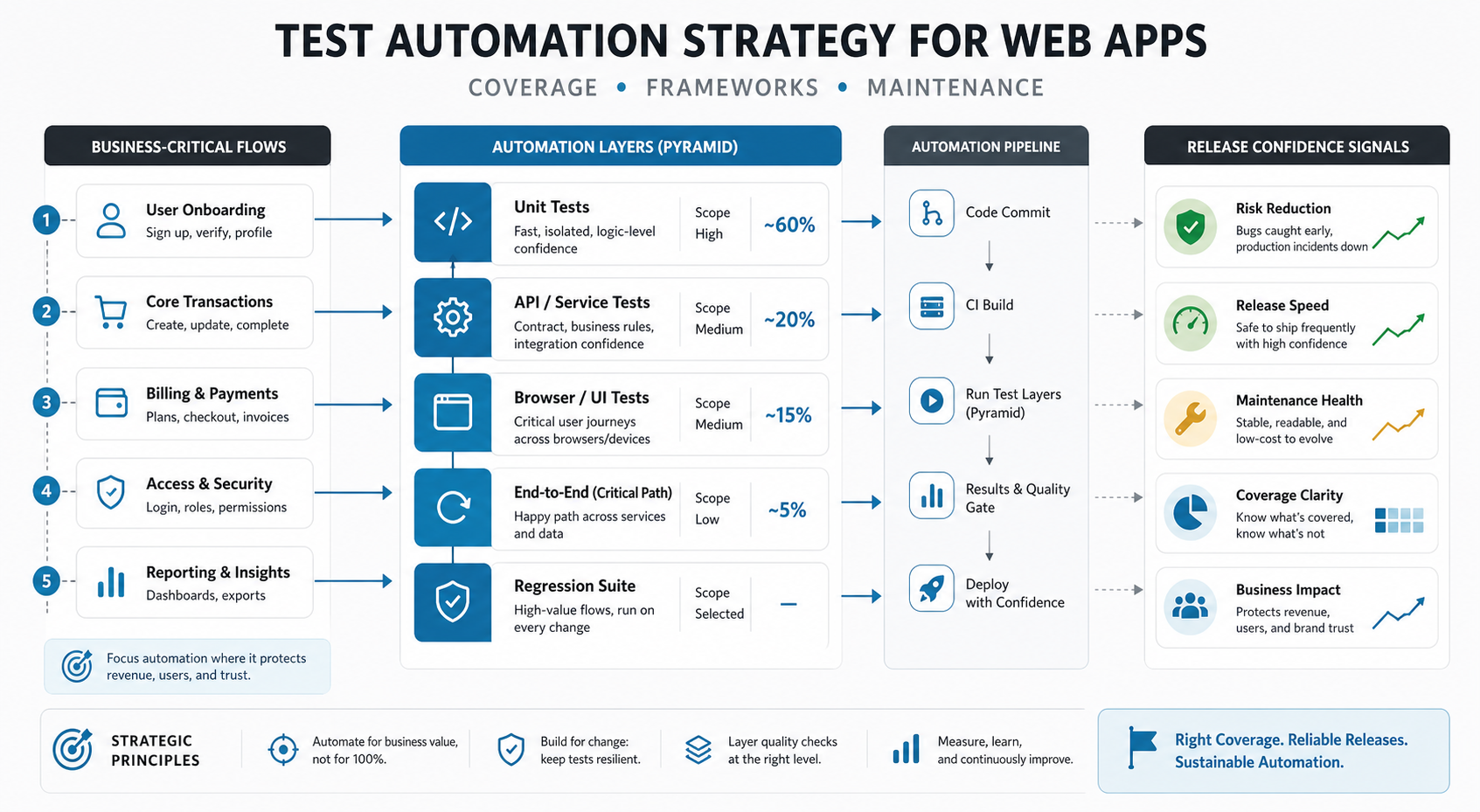
Start with the workflows that matter to the business: signup, authentication, permissions, billing, booking, order placement, lead capture, reporting, exports, notifications, integrations, and administrative controls. If the product includes SaaS dashboards, portals, workflows, or APIs, align the test map with the same architecture decisions that shape web app development: frontend states, backend services, data permissions, third-party dependencies, and operational handoffs.
| Workflow Signal | Automation Priority | Reason |
|---|---|---|
| Stable and used every release | High | Manual repetition creates slow releases and inconsistent evidence. |
| High business impact if broken | High | Revenue, access, data, or operational trust depends on it. |
| Still changing weekly | Low to medium | Manual exploration usually finds more value until acceptance criteria settle. |
| Hard to assert deterministically | Manual or hybrid | Usability, layout, accessibility, and business judgment need human review. |
| API contract is stable | High | API tests are faster and less brittle than browser-only coverage. |
What To Automate First In A Web App
Automate the smallest set of tests that would change release decisions. A compact, trustworthy suite is better than a large brittle suite that the team ignores. The first pass should protect critical paths, not chase 100 percent coverage.
- Smoke tests: app loads, key pages render, user can authenticate, and primary navigation works.
- Role and permission checks: the right users see the right data, actions, and admin controls.
- Transaction flows: lead forms, checkout, booking, quote requests, subscriptions, exports, or workflow approvals.
- Integration checks: payment callbacks, CRM pushes, email triggers, analytics events, and API contracts.
- Regression flows: the few workflows support or product teams most often fear before every release.
Do not begin by automating every validation message, animation, visual pixel, or low-risk edge case. Those tests create noise. Start with high-impact paths and add depth only when failures are actionable.
Where Manual QA Still Matters
Automation is not a replacement for product judgment. Manual QA remains essential when a tester needs to evaluate usability, accessibility, copy clarity, visual hierarchy, confusing states, browser behavior, responsive layout, localization, and unexpected user behavior.
Manual exploratory testing is especially important before automating a new feature. A tester can find broken assumptions, unclear acceptance criteria, and awkward business flows that a script would not notice. The distinction in UAT vs functional testing vs regression testing is useful here: each layer has a different owner, timing, and release decision. Once those findings become stable release checks, move the repeatable parts into automation.
A useful split is simple: use manual QA to discover risk and automation to preserve known behavior. The strategy should let each method do its best work instead of forcing every test through the same process.
Framework Choice: Playwright, Cypress, Selenium, API, Or Unit Tests
Framework choice should follow the coverage map. Playwright-style browser automation is a strong fit for modern cross-browser web app flows, parallel execution, trace evidence, web-first assertions, and end-to-end regression. Cypress-style workflows can be productive for frontend-heavy teams that want fast local feedback, strong network control, and a familiar JavaScript workflow. Selenium or WebDriver grids still matter when an organization has mature infrastructure, legacy browser requirements, language diversity, or cross-platform constraints.
Browser tests should not carry the full testing burden. API tests are usually better for contracts, permissions, payloads, webhooks, and service behavior. Unit and component tests are better for fast feedback around business logic, formatting rules, calculations, validation helpers, and isolated UI behavior. Use a functional testing checklist to decide which expected behaviors need deterministic checks before they graduate into broader regression coverage. The strategy should assign each risk to the cheapest reliable layer.
For 2026 planning, treat framework selection as an operating-model decision. Playwright is usually the strongest default for cross-browser release evidence, traces, parallel runs, and modern CI workflows. Cypress can still be productive for frontend-heavy teams that value local debugging and network control. Selenium/WebDriver remains useful when an enterprise already has grids, language constraints, legacy browser obligations, or vendor-managed device coverage. The wrong move is choosing one tool and forcing every risk through it.
| Layer | Best Use | Watch Out For |
|---|---|---|
| Unit and component tests | Fast checks for isolated logic and UI states | They do not prove full workflows work together. |
| API tests | Contracts, permissions, integrations, payloads, and service rules | They miss frontend usability and browser behavior. |
| Browser end-to-end tests | Critical user journeys and release smoke coverage | They become expensive if overused or poorly maintained. |
| Manual exploratory QA | New, ambiguous, visual, accessibility, and judgment-heavy work | It does not scale well for repeated regression alone. |
| Framework Choice | Best Fit | Governance Rule |
|---|---|---|
| Playwright | Cross-browser regression, CI evidence, traces, parallel runs, and modern web app journeys. | Use durable locators, keep flows short, and review traces before classifying failures. |
| Cypress-style workflows | Frontend-heavy teams that value local feedback, network control, and clear browser debugging. | Avoid over-mocking critical integrations that must fail safely in production. |
| Selenium/WebDriver | Enterprise stacks with existing grids, language requirements, or legacy browser coverage. | Protect maintainability with page objects, explicit waits, and ownership rules. |
| API and contract tests | Permissions, payloads, webhooks, integrations, and service rules that do not need a browser. | Keep these close to CI so browser tests do not carry all release risk. |
AI-Assisted Test Generation Needs Review, Not Blind Trust
AI can speed up test authoring, scenario brainstorming, fixture generation, and failure summarization, but it should not decide release risk on its own. Treat AI-generated tests as drafts that need product context, deterministic assertions, stable selectors, and security review before they enter CI.
The most useful pattern is human-in-the-loop acceleration: QA and engineering teams use AI to propose edge cases, translate acceptance criteria into candidate checks, summarize traces, and highlight coverage gaps. A reviewer still decides whether the test protects a real workflow, whether the assertion is meaningful, and whether the data setup is safe. For product teams already exploring AI-assisted delivery, this automation governance should sit beside broader AI-powered QA automation roadmap planning.
| AI Use | Where It Helps | Required Control |
|---|---|---|
| Scenario generation | Find missing roles, edge cases, and negative paths from acceptance criteria. | Map each scenario to release risk before adding it to the suite. |
| Test drafting | Create first-pass browser, API, or component checks faster. | Review selectors, assertions, data setup, and cleanup before CI. |
| Failure summarization | Turn traces, logs, screenshots, and network errors into triage notes. | Keep raw evidence available so engineers can verify the summary. |
| Coverage review | Compare manual regression lists, production incidents, and automated coverage. | Let a QA or engineering owner approve additions and deletions. |
CI, Test Data, And Environments
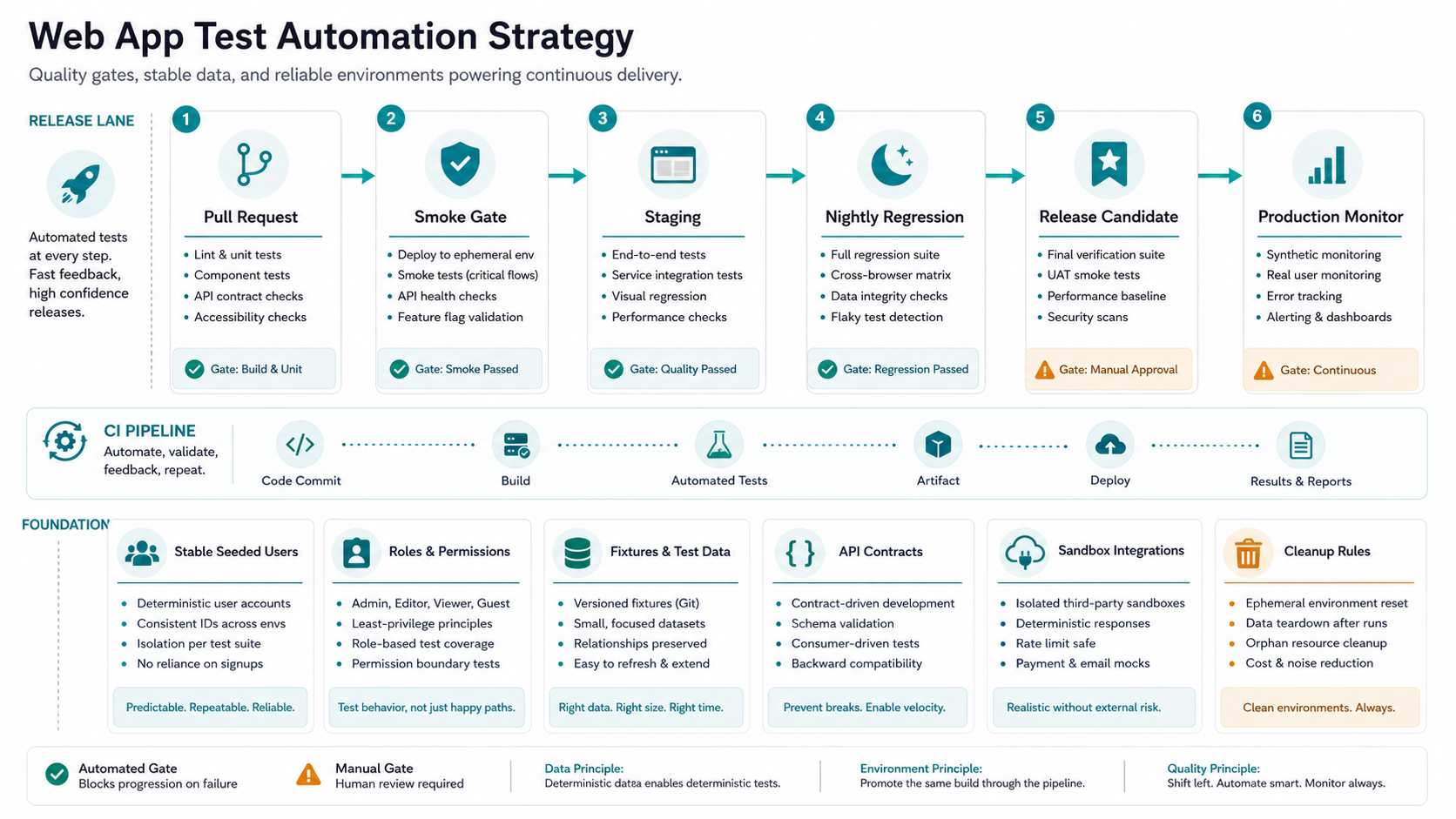
Automation only helps release confidence when it runs at the right time. Put the fastest checks in pull requests, run a critical browser smoke suite before deployment, and reserve broader regression for nightly, pre-release, or release-candidate gates. Running every test on every commit sounds rigorous, but it can slow delivery and train teams to bypass the suite. The goal is a signal ladder: quick checks catch obvious regressions early, deeper checks protect release candidates, and production monitors verify that critical journeys still behave after deployment.
Test data is often the hidden cost. Stable automation needs predictable users, roles, records, products, plans, permissions, and cleanup rules. Use seeded data, factories, fixtures, or isolated test tenants where possible. Avoid tests that depend on production-like records changing under the suite.
Environment design matters too. Teams need enough parity to catch integration risk without making every local run depend on fragile shared systems. Where third-party services are slow or costly, use contracts, mocks, or sandbox integrations for most checks and reserve live integration checks for release gates. Security-sensitive apps should also keep automation separate from manual attack simulation; a web application penetration testing checklist covers threat-led checks that should not be reduced to happy-path browser scripts.
Before a major release, add one explicit evidence review: which automated failures block shipment, which failures are flaky and being quarantined, which manual exploratory findings remain open, and whether any security or compliance checks need a separate gate. The VAPT readiness checklist is a useful companion when release automation touches auth, roles, APIs, file uploads, payments, or sensitive data workflows.
The Maintenance Flywheel That Keeps Tests Useful
The biggest mistake in test automation is treating the first suite as the finished product. Web apps change. Flows evolve. Selectors break. Test data ages. External services change behavior. A strategy needs a maintenance loop from the beginning.
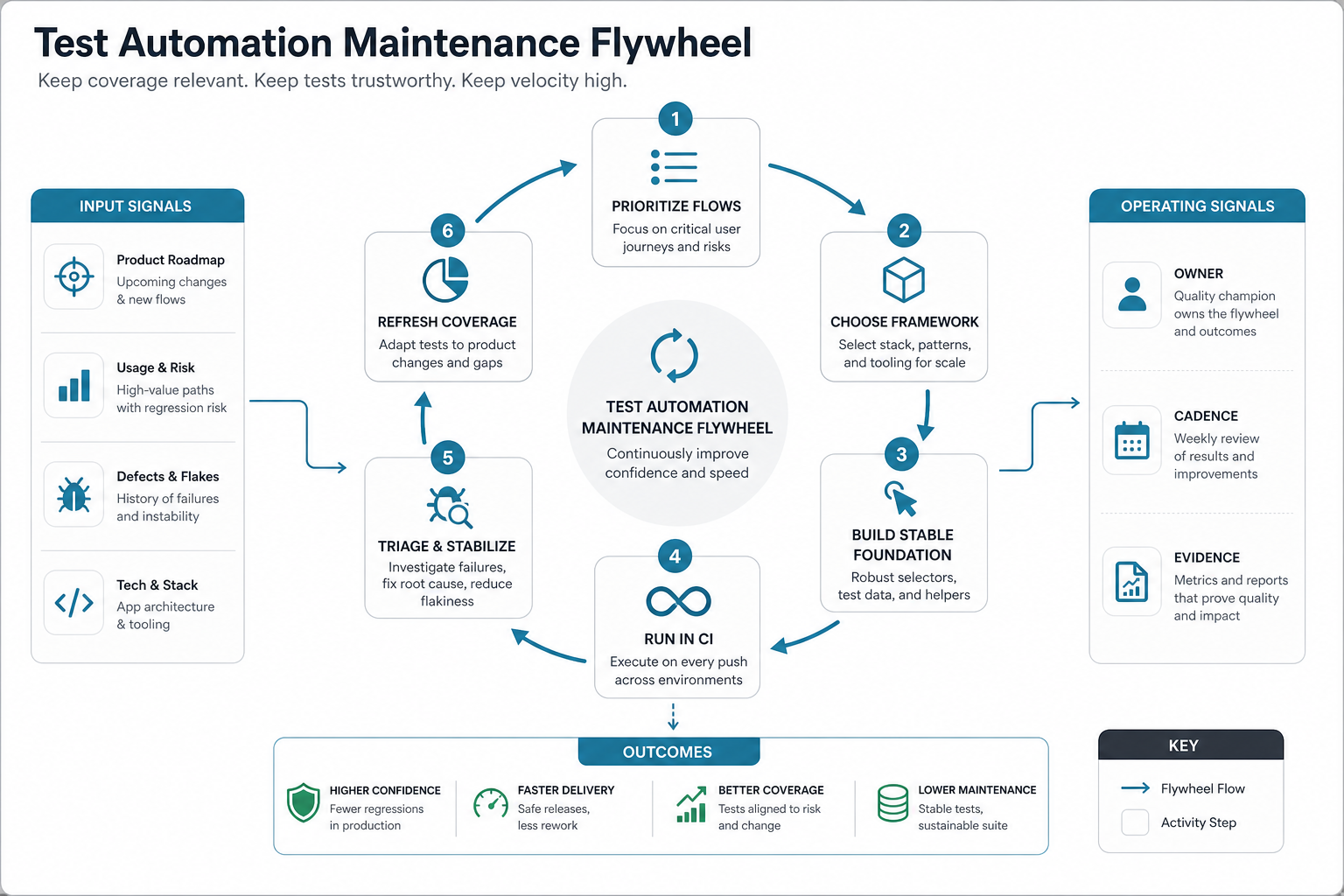
Review the suite after every meaningful product change. If a manual regression check repeats in multiple releases, consider automating it. If an automated test fails frequently without finding product defects, fix it, narrow it, move it to a lower-frequency job, or delete it. A flaky test that nobody trusts is worse than no test because it burns attention without improving decisions.
Use durable selectors, clear page objects or screen models where they reduce duplication, explicit data setup, and failure artifacts that help engineers debug quickly. Screenshots, traces, videos, network logs, and console output should answer why a release is blocked, not just prove that something failed.
Maintenance should also include deletion rules. If a test protects no release decision, duplicates a faster API or component check, or fails mainly because the product changed intentionally, rewrite or remove it. Teams that keep obsolete cases just to preserve a test-count metric usually slow releases without improving confidence.
Reporting And Ownership
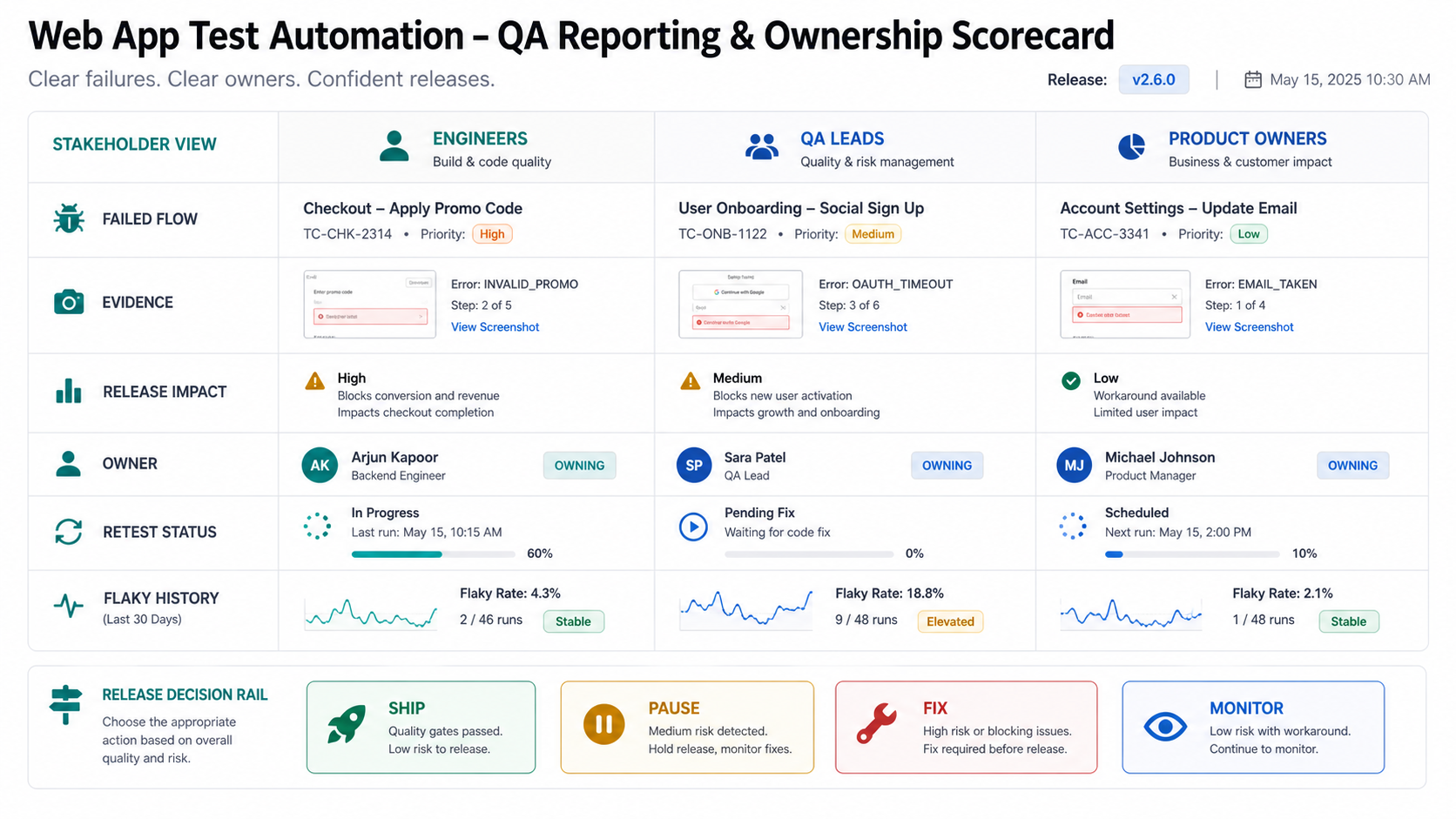
A test automation strategy needs an owner for coverage decisions, maintenance, triage, and reporting. Ownership can sit with QA, engineering, platform, or a shared release group, but it cannot be invisible. When everyone owns the suite abstractly, nobody protects its usefulness.
Reports should show release risk in language product and engineering leaders can act on: which flow failed, what changed, whether the failure blocks release, who owns the fix, and what evidence supports the decision. Raw pass/fail counts are not enough. A suite with 98 percent pass rate can still be unsafe if the failing test covers payment, authentication, admin permissions, or data export.
- For engineers: include trace, logs, changed files, environment, and reproduction steps.
- For QA leads: show failed flow, defect class, retest status, and flaky-test history.
- For product owners: summarize customer impact, release decision, workaround, and acceptance risk.
Budget And ROI Tradeoffs
Automation creates value when it reduces repeated regression effort, shortens release cycles, catches defects earlier, or protects workflows that are expensive to break. It creates waste when the suite is broad, brittle, slow, or disconnected from release decisions.
Estimate ROI by comparing the current manual regression effort, release frequency, defect cost, and maintenance effort. For a deeper model, use the NextPage guide to test automation ROI. The same thinking belongs in broader product budgeting: web app development cost and custom software development cost are driven by workflow complexity, integrations, roles, data, and risk, not just screen count.
A practical starting budget is usually a focused automation slice: one stable CI setup, one critical browser flow, several API or contract checks, seeded data, reporting, and maintenance rules. Expand after the first slice proves that it changes release confidence. For most teams, the right metric is not test count; it is whether releases ship with fewer late surprises, fewer repeated manual checks, and clearer ownership when a critical path fails.
How NextPage Can Help
NextPage helps teams plan durable test automation around business-critical web app workflows. We map risk, identify the first automation candidates, design browser/API coverage, stabilize CI evidence, and keep manual QA where human judgment is still needed. For teams with recurring releases, NextPage can combine software testing services, QA automation, and product engineering so the suite supports real release decisions instead of becoming a separate maintenance burden.
If you are planning a new product or rebuild, use the Custom Software Cost Estimator to scope features and risk before deciding QA depth. If you need a partner across product delivery, QA, automation, and release readiness, NextPage works as a custom software development partner, software QA testing services team, and software, AI, and digital product team for web apps that need maintainable delivery rather than one-off test scripts.