
Quick Answer: VAPT Readiness Checklist
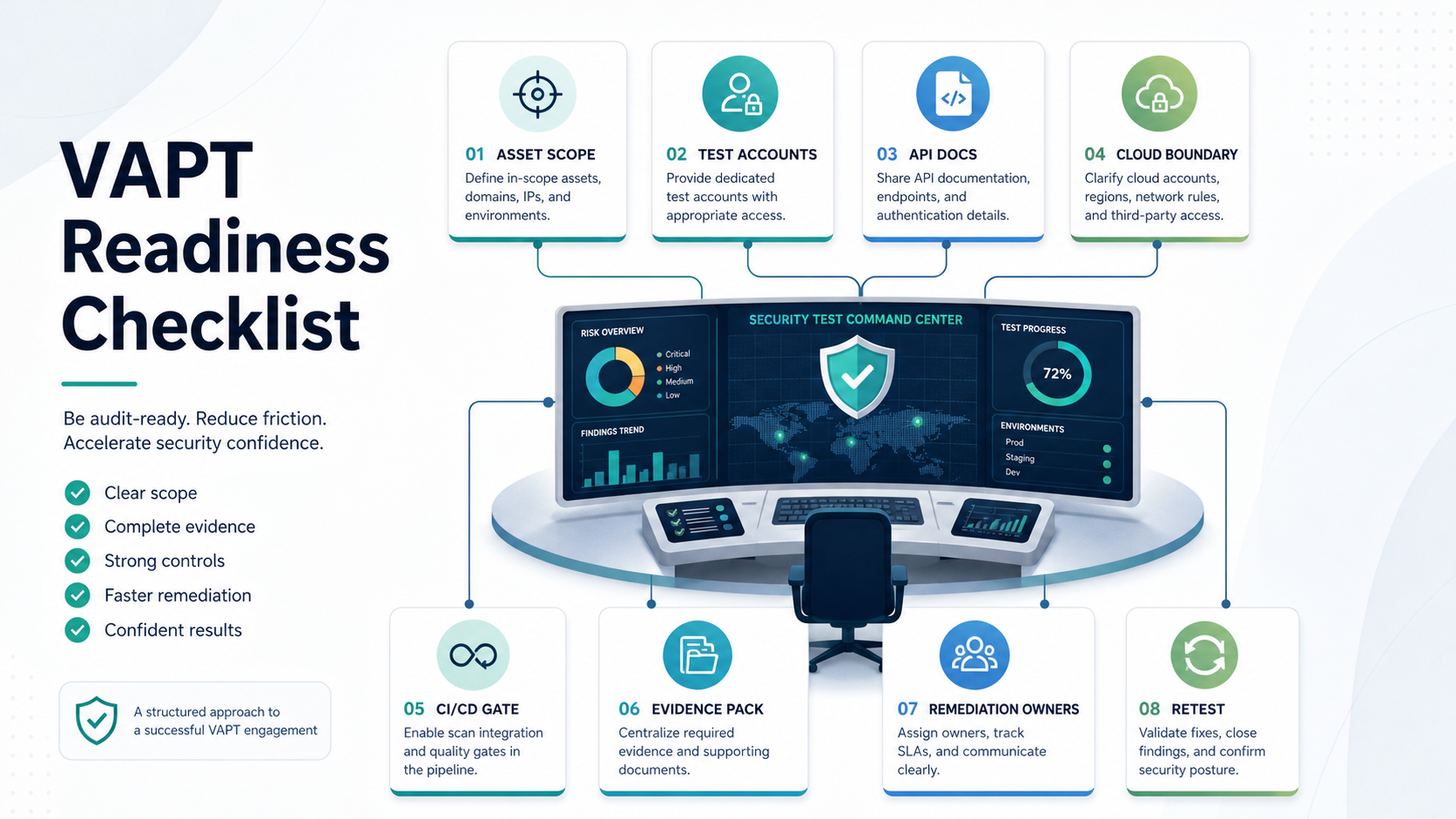
A VAPT readiness checklist helps your team prepare the product, environment, access, evidence, and remediation workflow before vulnerability assessment and penetration testing begins. The goal is not to make the application look perfect for a tester. The goal is to make the scope clear, the test environment stable, the right accounts available, the APIs documented, the cloud boundary understood, and the fix-and-retest process ready before findings arrive.
For web apps, APIs, cloud platforms, and release pipelines, readiness usually means seven things: current asset inventory, agreed test scope, safe test data, role-based test accounts, API and architecture context, cloud and infrastructure access boundaries, and named owners for triage, remediation, and retesting. If those are missing, the VAPT engagement often wastes time on access issues, stale environments, unclear ownership, and findings that nobody can reproduce.
If your team wants a scoped review before booking a test, route the scope through security testing services and compare this checklist with the Web Application Penetration Testing Checklist. Use both guides to confirm what should be tested, what should be excluded, and what evidence the business needs after the assessment.
Align VAPT Readiness To Current Security Standards
In 2026, a useful VAPT handoff should map the product scope to the standards the tester will actually use. Use the OWASP Top 10 2025 as the web-risk awareness baseline for leadership and prioritization, then use OWASP WSTG v4.2 as the stable testing baseline and the OWASP WSTG latest branch as an evolving reference for current testing contributions. Use those references to confirm that information gathering, authentication, authorization, session management, input handling, error handling, API behavior, and business logic testing are represented in the scope.
For APIs, the OWASP API Security Top 10 2023 keeps authorization and inventory issues near the center of readiness. Your handoff should include object-level authorization examples, role matrices, resource identifiers, rate-limit expectations, deprecated endpoint lists, third-party API assumptions, webhook behavior, and sensitive business flows. Those details are what let testers evaluate broken object-level authorization, broken function-level authorization, unrestricted resource consumption, improper inventory management, and unsafe consumption of APIs instead of guessing from the frontend.
For product teams that need a requirements baseline, OWASP ASVS 5.0.0, released in May 2025, provides a current verification standard for web application technical security controls. For mobile apps, OWASP MASVS and MASTG add mobile-specific coverage across storage, cryptography, authentication, network communication, platform interaction, code quality, resilience, and privacy. If your product includes mobile clients, use mobile app security hardening services to connect app-build evidence, backend API scope, and device assumptions before the VAPT window.
Why Readiness Matters Before Security Testing
VAPT is most valuable when the tester can spend time on security risk instead of operational friction. A messy handoff creates avoidable delays: missing staging access, expired test accounts, undocumented APIs, no owner for cloud permissions, unclear rate limits, no safe payment test path, or no decision on whether production can be touched.
Good preparation also protects the business. Security testing can generate traffic, trigger alerts, touch sensitive workflows, or expose fragile dependencies. A readiness process defines when testing happens, who is on call, which systems are in scope, which activities are prohibited, and how incidents or service disruption will be handled.
For cloud-heavy applications, this preparation overlaps with migration and platform controls such as identity, secrets, backups, audit trails, and least-privilege access. The NextPage cloud migration services page is a useful reference when your VAPT scope includes cloud accounts, network boundaries, infrastructure access, and recovery evidence.
Scope The Assets Before You Test
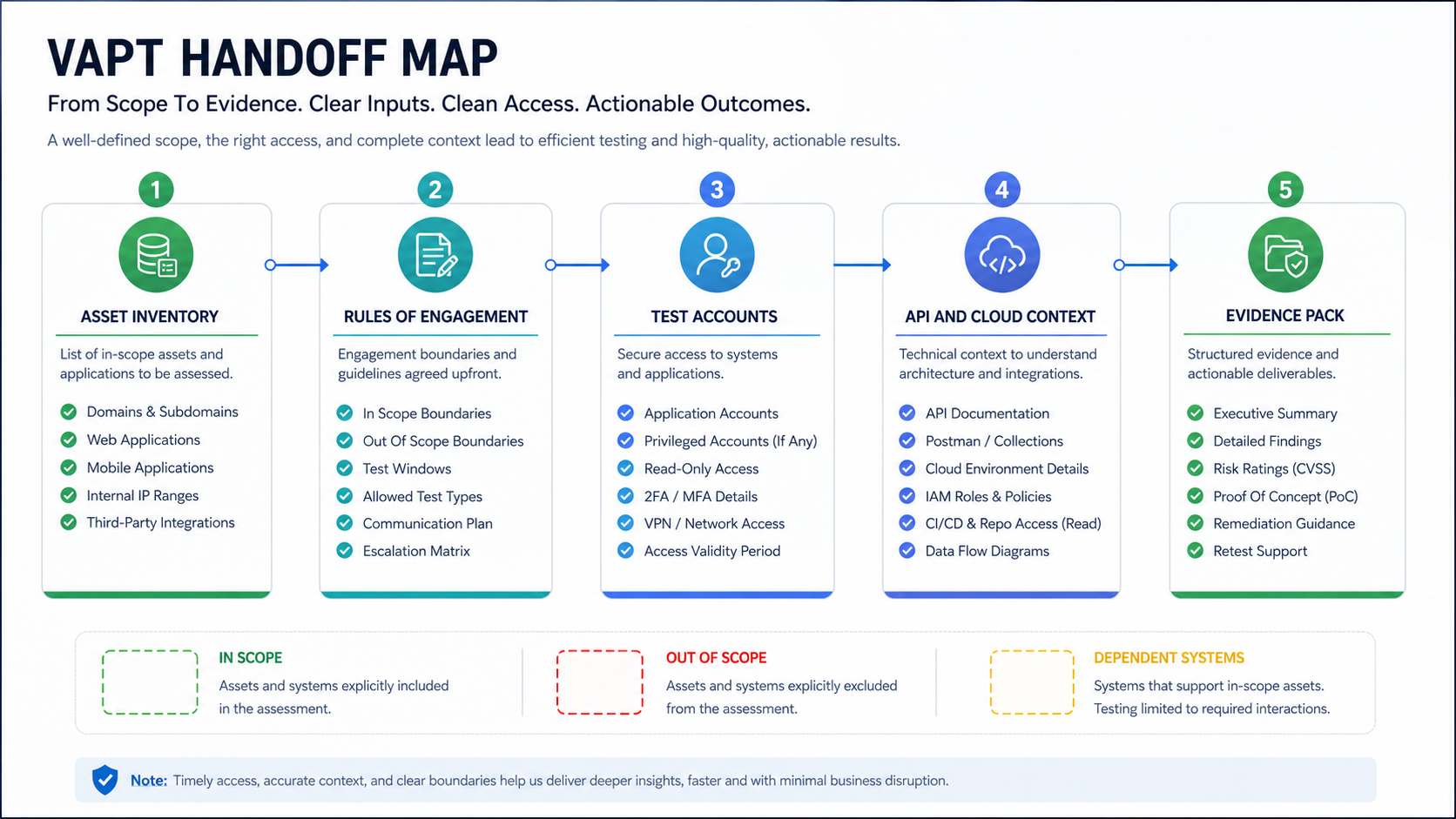
Start with a single source of truth for what exists. When the scope is a customer-facing web portal, pair this handoff with web application penetration testing services so the test plan covers authentication, authorization, business logic, and release evidence rather than only scanner output. The asset list should include public web apps, admin panels, mobile apps, APIs, authentication services, cloud-hosted services, third-party integrations, background jobs, CI/CD pipelines, domains, subdomains, IP ranges, storage buckets, databases, and internal tools that support the product.
Then mark each asset as in scope, out of scope, or dependent. In-scope assets can be actively tested. Out-of-scope assets should be documented so the tester does not waste time or create legal and operational risk. Dependent assets are systems that the application touches, such as payment gateways, identity providers, CRMs, messaging providers, analytics tools, logistics systems, or enterprise customer APIs. If this inventory also includes product readiness checks, align it with a broader pre-launch QA checklist for custom software so security findings do not arrive after functional launch blockers are already being handled.
| Asset Type | Readiness Detail | Why It Matters |
|---|---|---|
| Web app | URLs, environments, user roles, test windows, auth rules | Prevents ambiguity about what can be tested |
| APIs | Base URLs, docs, auth tokens, rate limits, example payloads | Lets testers evaluate real workflows instead of guessing endpoints |
| Cloud accounts | Provider, regions, networks, IAM boundaries, logging access | Clarifies whether the test includes infrastructure posture |
| Mobile apps | Build files, test accounts, backend URLs, device assumptions | Connects app behavior to API and backend risk |
| CI/CD | Branching model, release gates, secrets handling, deployment logs | Shows whether vulnerabilities can re-enter through the pipeline |
Define In-Scope And Out-Of-Scope Behavior
A VAPT scope is not only a list of URLs. It should define test behavior. Can the tester attempt account takeover? Can they test payment flows with sandbox cards? Can they upload files? Can they attempt privilege escalation between roles? Can they fuzz APIs? Can they test rate limits? Can they run authenticated scans? Can they test password reset, invitation, session, and multi-factor flows?
Out-of-scope behavior matters just as much. Many teams exclude denial-of-service testing, destructive payloads, real customer data access, social engineering, production data modification, third-party systems, or high-volume automated scanning unless there is a separate agreement. Write these limits down before testing begins.
For teams building products that include AI features, scope should also define prompt injection, data leakage, retrieval access, tool invocation, and human approval boundaries. The NextPage LLM Application Security Checklist covers those AI-specific controls in more depth.
Prepare Safe Test Environments And Data
The best VAPT environment is realistic enough to expose meaningful risk and controlled enough to avoid harming customers. A staging environment with production-like configuration is often useful, but only if it mirrors authentication, permissions, API behavior, integrations, feature flags, storage rules, and error handling closely enough to make findings valid.
Production testing can be appropriate for some external-facing controls, but it needs stricter windows, monitoring, rate limits, notification paths, and rollback plans. If production is in scope, document which actions are allowed, who is watching logs, which alerts are expected, and how the tester should report a live-impact issue. For launch teams that need broader regression discipline around those windows, the functional testing checklist for web and mobile apps helps coordinate QA evidence with security evidence.
- Test data: Use synthetic users, sample orders, sandbox payments, safe documents, and non-sensitive records.
- Role coverage: Create accounts for unauthenticated users, customers, support staff, admins, managers, vendors, and integration roles where relevant.
- Workflow coverage: Prepare realistic journeys for signup, login, password reset, checkout, file upload, admin actions, exports, invitations, and API calls.
- Logging: Confirm where application, API, WAF, cloud, database, and identity logs can be reviewed during and after testing.
Prepare API Documentation And Integration Context
API testing is weak when testers only see a frontend and have to infer backend behavior. Provide OpenAPI files, Postman collections, endpoint lists, auth flows, example requests, error cases, webhook behavior, role permissions, rate limits, and important business rules. If an API is private, explain how real clients authenticate and which internal systems call it.
Also document integration assumptions. For example, a payment provider may be sandboxed, a shipping API may be mocked, an identity provider may be real but limited to test users, and a CRM integration may be disabled in staging. These details help the tester separate true application risk from environment constraints.
When a custom product has complex integrations, security testing should be planned alongside the product architecture and QA workflow rather than bolted on at the end. The cost and effort drivers are similar to those described in custom software development cost: role complexity, integrations, data sensitivity, admin operations, and release controls shape the work more than screen count.
Map Cloud Security And Access Boundaries
If the VAPT includes cloud assessment, prepare a boundary map before sharing access. Identify cloud providers, regions, accounts, VPCs or networks, subnets, load balancers, storage, managed databases, serverless functions, container clusters, secrets, identity providers, logging, backups, and deployment tools. Mark which areas are read-only, testable, or excluded.
The access model should follow least privilege. A tester may need read-only configuration review, temporary accounts, log visibility, or limited testing credentials. They should not receive broad admin access unless the assessment explicitly requires it and the risk is approved.
Prepare evidence for identity and access management, network rules, encryption, backup and recovery, secrets handling, logging, alerting, patching, vulnerability scanning, and incident response. VAPT findings are easier to triage when the team can quickly compare observed risk against current controls.
Connect VAPT To Release Pipeline Gates
VAPT should not be a one-time event that disappears after the PDF report. Connect it to release gates so fixed issues stay fixed. At minimum, decide how findings become tickets, how severity is assigned, who owns remediation, how fixes are reviewed, when retesting happens, and which issues block a release.
A practical release gate includes static analysis, dependency review, secrets checks, container or infrastructure scans, unit and integration tests, QA regression, and targeted security verification for changed workflows. Use a DevSecOps pipeline checklist to decide which security controls belong in every release and which checks should be reserved for high-risk changes. If your team already runs automated regression in CI/CD, connect these controls to QA automation testing services so high-risk fixes are retested before release. VAPT then becomes the deeper external review that validates the controls around important releases or high-risk changes.
Do not over-automate the gate before the team can sustain it. A small, enforced gate is better than a broad checklist nobody follows. If the team is deciding how much manual, automation, performance, and security coverage to fund, the Software QA Budget Guide gives a useful planning frame before VAPT starts. Start with high-severity vulnerability blocking rules, evidence capture, and owner assignment. Expand once the workflow is predictable.
Prepare The Remediation Workflow
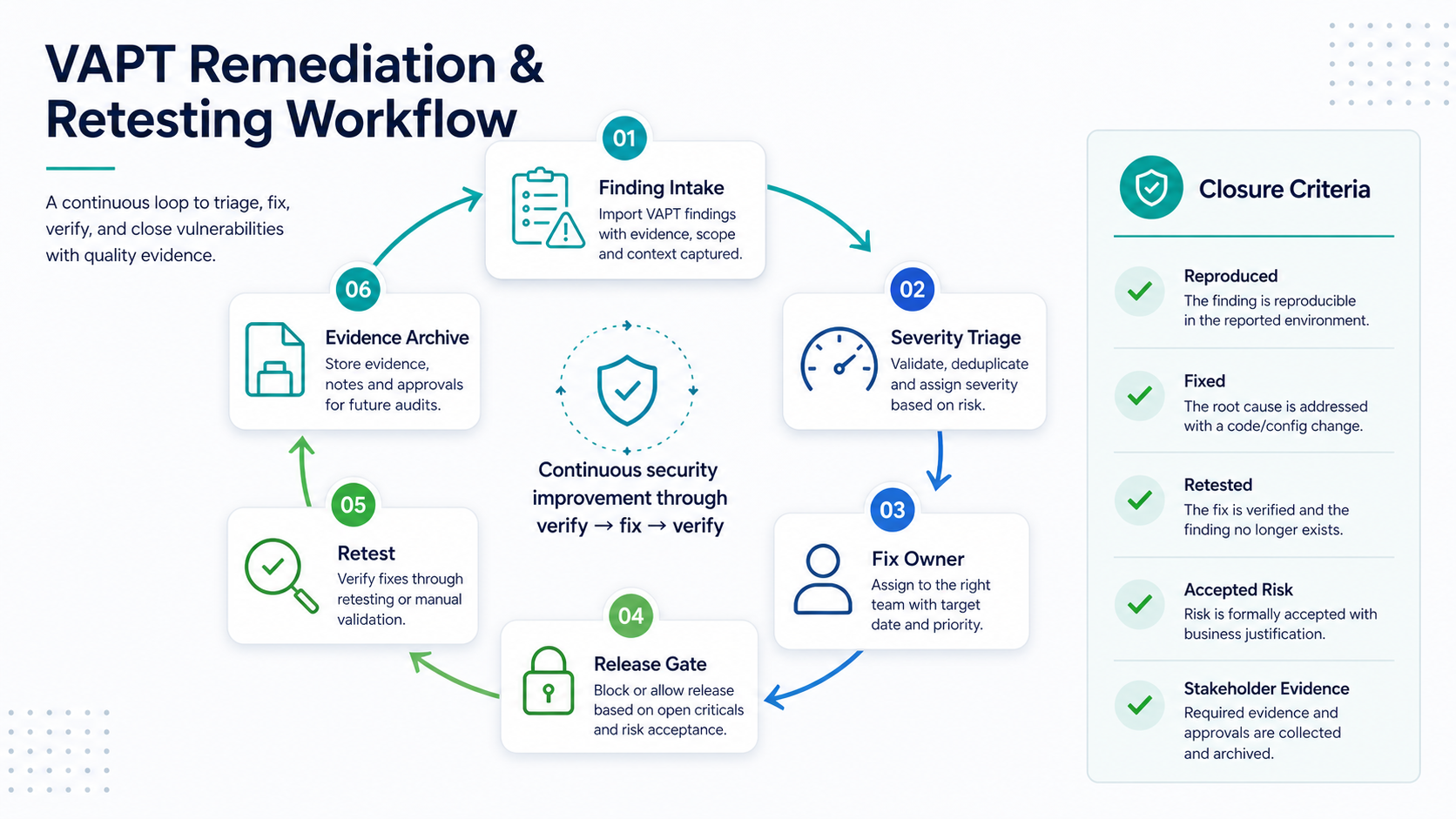
The real value of VAPT appears after findings arrive. Prepare the remediation workflow before the report lands. Decide which tool receives findings, how duplicates are handled, who confirms severity, how product impact is assessed, and how engineering teams reproduce each issue.
| Finding Stage | Owner | Evidence Needed | Exit Criteria |
|---|---|---|---|
| Triage | Security or engineering lead | Finding, affected asset, reproduction steps, severity, business impact | Accepted, duplicate, false positive, or needs clarification |
| Fix planning | Product and engineering owner | Root cause, affected workflows, release risk, rollback plan | Ticket has owner, priority, target release, and test plan |
| Implementation | Engineering team | Code change, config change, migration, dependency update, or policy change | Fix merged and deployed to testable environment |
| Retest | Tester or security reviewer | Original steps, fixed version, logs, screenshots or API responses | Finding closed, downgraded, or reopened |
| Evidence | Security, compliance, or delivery owner | Report, retest result, ticket links, release notes, exception record | Stakeholders can verify what was fixed and what remains accepted risk |
For regulated or customer-facing products, unresolved issues should have explicit risk acceptance, compensating controls, and target dates. If findings are numerous or SLA-sensitive, pair this workflow with an AI-powered vulnerability management workflow so triage, owners, evidence, and retest decisions stay visible after the VAPT report arrives. Do not hide them in a backlog with no owner.
Evidence To Collect Before, During, And After VAPT
Evidence is not only for auditors. It helps engineering teams reproduce issues, product teams understand impact, and leadership decide whether a release is ready. Before testing, collect scope, asset lists, environment details, user roles, API documentation, cloud boundary maps, and test windows. During testing, collect logs, alerts, scanner output, tester notes, reproduction steps, and communication history. After testing, collect the report, triage decisions, fix tickets, pull requests, deployment records, retest results, exceptions, and residual risk notes.
Store evidence somewhere the right people can access later. If the report is separated from tickets, code changes, and release records, teams struggle to prove what changed. A clean evidence trail also makes future testing faster because the next engagement starts from known scope and known decisions.
Common VAPT Readiness Mistakes
- Testing a stale staging environment. Findings may not reflect real production risk if staging is missing recent architecture, permissions, integrations, or configuration.
- Providing only one user role. Many serious issues appear between roles, such as customer-to-admin boundaries, support impersonation, vendor access, or organization switching.
- Ignoring APIs. Frontend testing alone misses direct API misuse, authorization gaps, mass assignment, broken object-level authorization, and rate-limit weaknesses.
- Leaving cloud access vague. Cloud assessment needs clear account boundaries, IAM scope, logging access, and excluded systems.
- No remediation owner. A report without owners, tickets, target dates, and retest criteria rarely changes release risk.
- No retest evidence pack. Teams close tickets but forget to preserve fixed versions, logs, screenshots, API responses, and exception decisions for customer or audit review.
- Confusing compliance with security. Compliance evidence can be useful, but it does not replace fixing exploitable weaknesses in the product.
VAPT Readiness Scorecard
Before a tester starts, score the engagement on five practical dimensions. A low score does not mean the test should be cancelled. It means the team should fix the handoff before paid testing time is spent on access gaps, unclear scope, or missing evidence.
| Readiness Area | Green Signal | Watchout |
|---|---|---|
| Scope clarity | Assets, roles, test windows, and excluded behavior are documented | Only a URL list exists |
| Environment fidelity | Staging or production scope mirrors real auth, data, integrations, and permissions | Test environment is stale or simplified |
| Access and API context | Role-based accounts, tokens, API docs, and sample payloads are ready | Tester must infer endpoints from the frontend |
| Cloud and release controls | IAM boundaries, logs, deployment records, rollback plan, and release gates are visible | Cloud access and CI/CD ownership are unclear |
| Remediation ownership | Findings flow into tickets, owners, target releases, retest criteria, and evidence records | Report delivery is treated as the finish line |
If several rows are weak, treat VAPT readiness as an infrastructure and delivery problem, not only a security task. NextPage's infrastructure planning path is useful when the gaps involve CI/CD, cloud access, backups, deployment evidence, monitoring, and operational runbooks.
VAPT Readiness Checklist By Team
Use this team-by-team checklist before the test starts:
- Product: critical workflows, user roles, business rules, customer-impact areas, launch deadlines, and accepted exclusions are documented.
- Engineering: environments, deployments, code branches, API docs, feature flags, integrations, and technical owners are ready.
- DevOps: cloud boundaries, network rules, secrets, CI/CD gates, logs, monitoring, backups, and rollback paths are understood.
- QA: regression paths, test data, role coverage, known defects, release blockers, and post-fix verification steps are prepared.
- Security: test scope, rules of engagement, severity model, escalation path, evidence format, and retest process are agreed.
- Leadership: release decision rules, budget for remediation, compliance needs, customer communication rules, and residual risk ownership are clear.
How NextPage Helps With VAPT Readiness
NextPage helps teams prepare for VAPT by turning a broad security-testing need into a practical scope and evidence plan. We map the product architecture, roles, APIs, cloud surface, release pipeline, test environments, data boundaries, and remediation workflow before the assessment begins. That makes the engagement easier for testers and more useful for engineering teams.
For a web app, the first readiness step may be role and API mapping. For a SaaS platform, it may be tenant isolation, admin permissions, audit logs, and integration risk. For a mobile product, it may be app builds, backend APIs, device assumptions, and release workflows. For an AI-enabled product, it may include the security controls covered in the LLM Application Security Checklist.
If you are preparing for VAPT, do not wait until the week before launch. For complex products, NextPage can combine security testing, QA evidence, cloud readiness, and release-gate planning into one scope review before the external test window. Start by listing the assets, deciding the scope, preparing test accounts and API docs, confirming cloud boundaries, and naming remediation owners. Then use a short security testing scope review to make sure the assessment will produce findings your team can actually fix, verify, and turn into release evidence.