
Quick Answer: What Does Wearable App Development Involve?
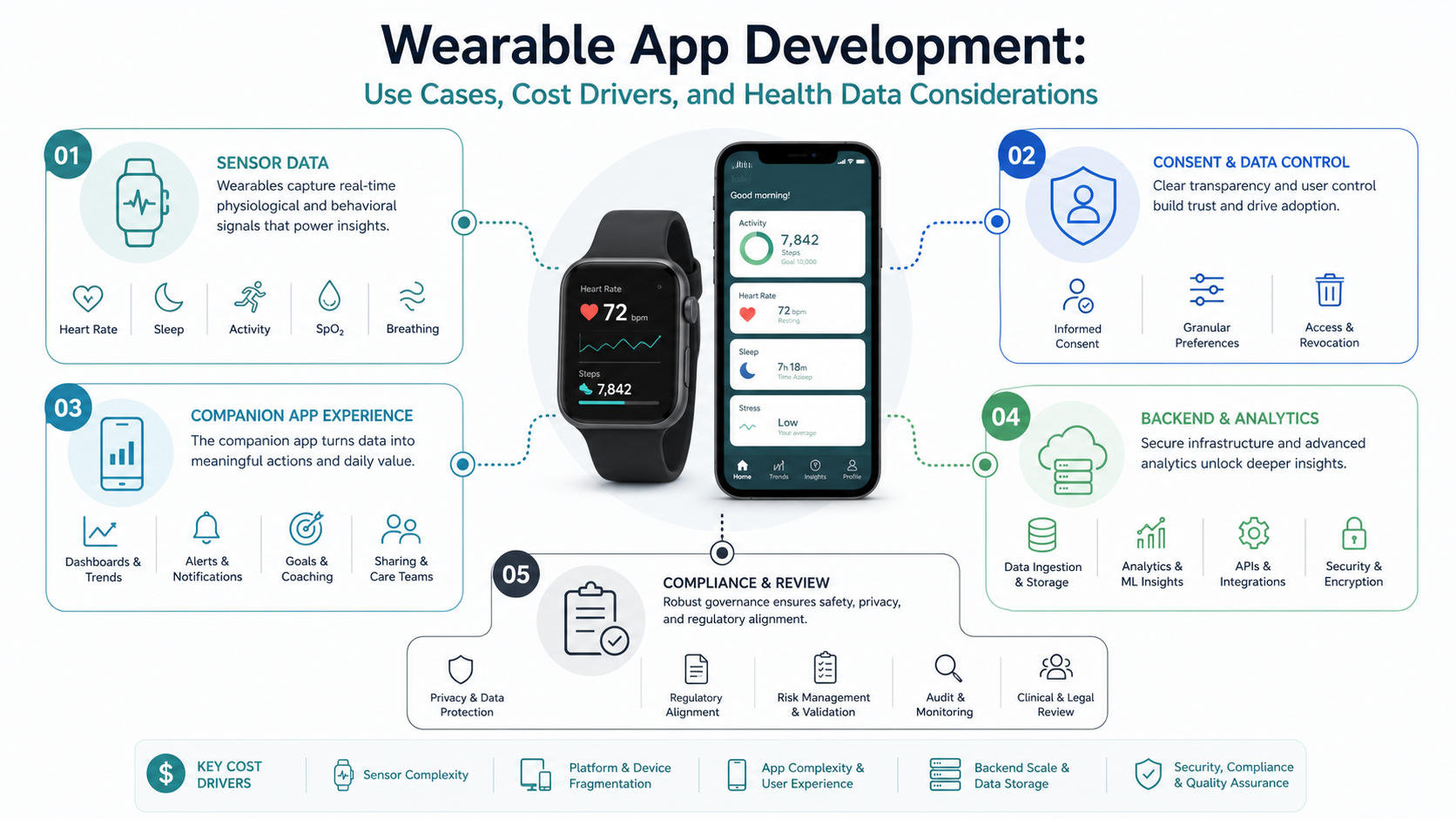
Wearable app development means building the software system around a device people wear: the device experience, companion mobile app, health or sensor permissions, Bluetooth or platform integration, backend data pipeline, alerts, analytics, support tools, and privacy controls. The wearable screen is usually only one part of the product.
For a business, the first decision is whether the product needs continuous or body-adjacent data. If the app can work with occasional manual input, a standard mobile app development path may be enough. If the product depends on heart rate, activity, sleep, motion, location, fall detection, fatigue, or environmental signals, a wearable system can create a better user experience and a stronger operational workflow.
A practical wearable MVP should prove one signal-to-action loop: capture the right signal, ask for only the permissions needed, sync reliably, show a clear insight or alert, and measure whether the workflow improves. Everything else, including richer dashboards, multi-device support, healthcare integrations, and regulated operations, should be sequenced after that loop is proven.
Where Wearable Apps Create Business Value
Wearables create value when proximity matters. Healthtech teams may use wearable data for remote monitoring, rehabilitation, medication adherence, recovery tracking, chronic-care support, or caregiver alerts. Fitness and wellness teams may use it for workouts, sleep insights, behavior coaching, and habit loops. Workplace safety teams may monitor lone-worker risk, falls, fatigue, heat exposure, or location-aware escalation. Industrial and IoT product teams may use a wearable as a hands-free control surface for connected equipment.
The common pattern is not the watch. It is context. The product can detect something useful at the moment it happens and then prompt a user, caregiver, operator, coach, or support team to act. That same proximity also raises the trust bar. A wearable app asking for biometric, location, or health data must explain why the data is needed, how it improves the experience, how it is protected, and what users can change later.
If the product connects people, devices, dashboards, and operating rules, scope it as wearable app development services rather than a small smartwatch add-on.
Choose The Right Wearable Product Model
Different wearable products need different architecture. A consumer habit app can often launch with a narrow companion app and platform health-data integration. A healthcare monitoring product usually needs consent records, audit logs, support workflows, clinical review boundaries, and stronger backend controls. A workforce safety product may need offline behavior, emergency escalation, role-based dashboards, and device fleet management. A custom device product may need firmware coordination, BLE pairing, calibration, and field diagnostics.
| Product Model | Good First Use Case | Architecture Risk | Buyer Decision |
|---|---|---|---|
| Consumer fitness or wellness | Activity, sleep, workout, hydration, or habit coaching. | Permission drop-off, inconsistent device data, weak retention loop. | Prove the insight changes behavior before adding more data sources. |
| Healthcare or remote monitoring | Caregiver alerts, recovery tracking, medication adherence, patient engagement. | Consent, PHI handling, clinical safety, auditability, escalation rules. | Plan the product with healthcare wearable app development controls from day one. |
| Workforce safety or operations | Fatigue, fall, location, check-in, or environmental alerts. | False positives, offline gaps, emergency workflows, worker trust. | Design escalation and override paths before device rollout. |
| Custom IoT device companion | Pairing, status review, alerts, remote diagnostics, or control surface. | BLE reliability, firmware coordination, diagnostics, support burden. | Validate device integration before committing to a broad feature roadmap. |
Platform Choices: HealthKit, Health Connect, And Custom Devices
Wearable scope changes depending on the data source. Apple HealthKit requires fine-grained authorization for each health data type the app reads or writes. Apple also expects custom permission messages and a user experience that explains the value of the request. Android Health Connect uses declared health permissions tied to data types, and publishing requires declaring how the app uses those data types. Google Play health permission guidance also emphasizes asking only for data needed by specific user-facing health features.
That means platform planning is product planning. Do not request broad access just because data is available. A sleep coaching app may need sleep sessions, activity context, and basic profile signals. A workplace safety app may need motion or alert state, not a user's broader health history. A rehabilitation app may need a different consent, clinical review, and retention model than a consumer step counter.
| Data Path | Best Fit | Planning Questions |
|---|---|---|
| Apple HealthKit | iPhone and Apple Watch health and fitness data with user-granted read/write access. | Which data types are required, when should authorization be requested, and how does the app behave if access is denied? |
| Android Health Connect | Android health and fitness data shared across supported apps through declared permissions. | Which permissions map to the feature, what data-use declaration is needed, and does the MVP need background access? |
| Custom Bluetooth or device API | Specialized sensors, safety wearables, medical devices, industrial devices, or proprietary hardware. | How will pairing, firmware, calibration, retries, diagnostics, and support escalation work? |
| Backend and dashboard layer | Care teams, admins, coaches, operations teams, support teams, and analytics users. | Which events need storage, audit trails, role access, alerts, exports, and workflow handoff? |
Architecture: Device, App, Backend, And Dashboard
A wearable app usually has four layers. The device layer captures or displays information. The companion app handles onboarding, permissions, settings, sync, notifications, user education, and support. The backend stores normalized events, applies rules, integrates with third-party systems, and supports analytics. The dashboard or portal helps care teams, coaches, employers, admins, or support staff review trends and act.
Simple consumer products may keep most logic in the phone app. Regulated, multi-user, or operational products need stronger backend ownership: roles, audit logs, data retention, integration queues, monitoring, exports, and support tooling. If wearable data becomes part of a larger workflow, the project is often custom software development, not only a device interface.
For connected-device products, compare the architecture with an IoT app development roadmap. Pairing, retries, firmware assumptions, diagnostic logs, device replacement, and field support can become larger risks than the visible mobile UI.
Privacy, Consent, And Regulatory Risk
Wearable data can be sensitive even when the product is not formally medical. Activity, sleep, heart rate, location, stress signals, and routine patterns can reveal health status, lifestyle, work behavior, and personal habits. The product should collect less data by default, make consent understandable, and let users change permissions without breaking unrelated functionality.
For healthcare workflows, compliance review should happen before architecture is locked. Teams may need HIPAA-aware practices in the United States, GDPR controls for European users, clinical safety review, medical-device classification analysis, data-processing agreements, or partner security reviews. The exact requirement depends on claims, geography, data type, user group, and who acts on the information.
A practical rule: if the app influences care, safety, diagnosis, treatment, insurance, employment, or escalation decisions, treat governance as a core product requirement. Mobile security also belongs in the plan; for high-risk apps, include mobile app security hardening services before launch rather than after the first incident.
Wearable App Development Cost Drivers
Wearable app cost is driven by integration risk, data governance, and testing coverage more than screen count. A basic companion app that shows synced activity data is very different from a remote monitoring product with alerts, dashboards, user roles, audit logs, healthcare integrations, and regulated support operations.
| Scope Tier | Typical Shape | Cost Risk |
|---|---|---|
| Focused MVP | One platform, one wearable data source, companion app onboarding, permission flow, sync, one insight or alert, basic analytics. | Usually lower-risk if device support is narrow and compliance claims are limited. |
| Connected product | Mobile app, backend, dashboard, multi-role access, notifications, reporting, third-party integrations, support workflows. | Backend reliability, dashboard scope, and integration queues become major cost drivers. |
| Regulated or enterprise platform | Healthcare, workforce safety, device fleet, audit logs, compliance controls, advanced analytics, EHR/CRM/ERP integration. | Validation, auditability, security, support, and operational evidence can dominate effort. |
Recent competitor pricing pages show wide 2026 wearable app ranges, from lean MVP budgets in the tens of thousands to multi-system builds well into six figures. Treat those ranges as directional only. A better estimate separates device integration, mobile UX, backend, dashboards, compliance, QA, and launch support. The Custom Software Cost Estimator can help compare those paths before a fixed roadmap is assumed.
MVP Roadmap For A Wearable Product
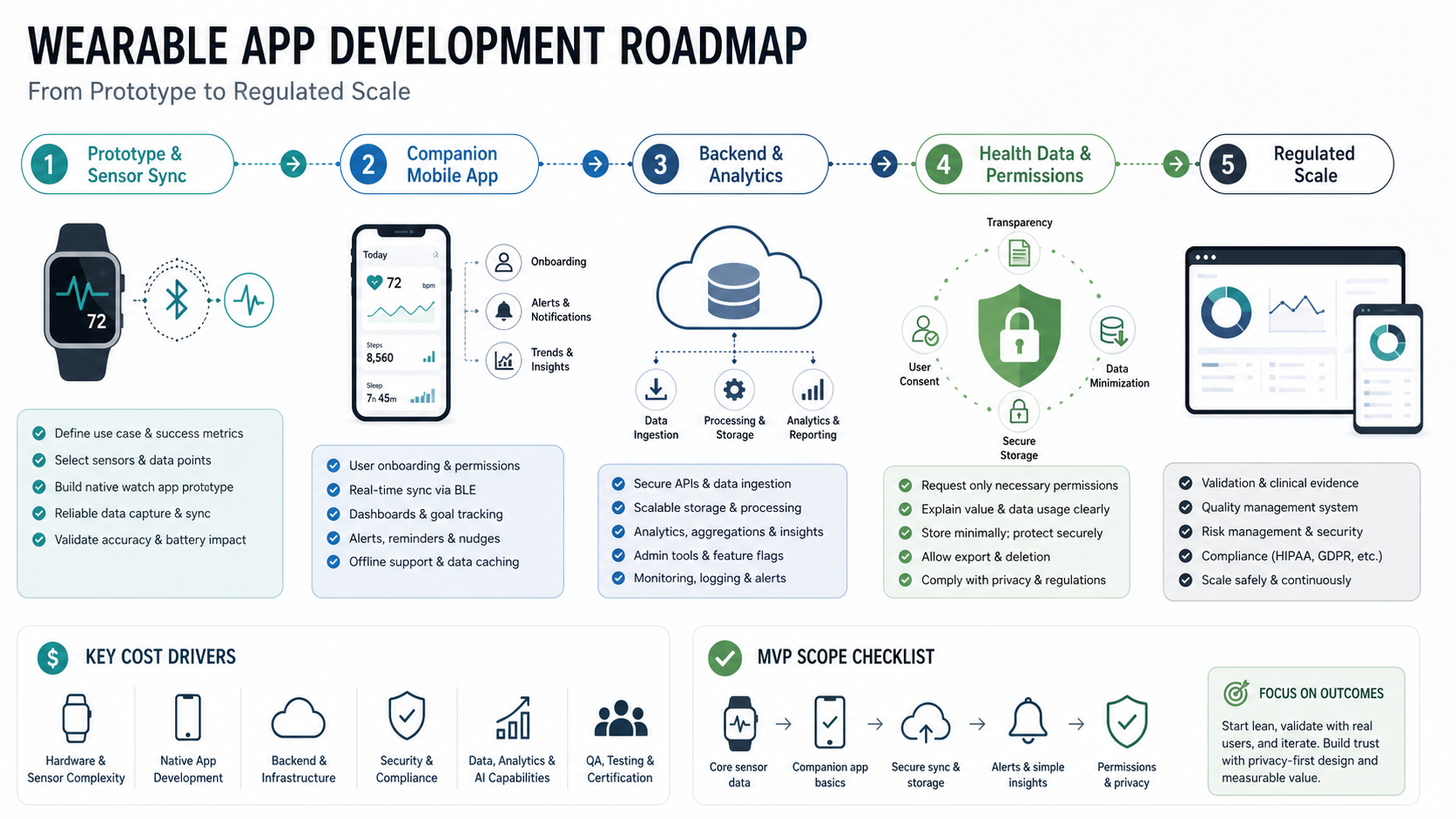
A wearable MVP should prove that device data changes the user outcome. Start with discovery: user problem, device choice, data source, consent model, risk review, and success metric. Then build a small sensor-to-action loop: capture the signal, show it clearly, trigger a useful prompt, and measure whether behavior or operations improve.
Phase one may include one wearable device or platform, a companion app, account setup, permission flows, sync, a narrow insight, notification handling, basic analytics, and support visibility. Phase two can add dashboards, integrations, personalization, richer alert rules, and broader device support. Phase three can expand into enterprise controls, compliance automation, advanced analytics, or clinical operations if the product proves value.
If the first release still feels too large, use an MVP Scope Builder to separate must-prove workflows from later features. The goal is not to build the smallest app; it is to build the smallest evidence-producing product.
Testing And Launch Readiness
Wearable QA must cover more than normal app screens. Test pairing, permission denial, permission changes, background sync, low battery, lost connectivity, duplicate events, stale data, device replacement, time zones, notification settings, accessibility, data export, and data deletion. For health and safety products, test thresholds, escalation delays, false positives, false negatives, support handoffs, and manual overrides.
Analytics should be ready before launch. Track onboarding completion, permission acceptance, sync success, device dropout, alert acknowledgement, feature usage, support tickets, and the core outcome metric. Without instrumentation, the team may know the app was installed but not whether the wearable workflow works.
Use mobile app testing services for realistic device and OS coverage, and keep a mobile app testing checklist beside the release plan so pairing, background behavior, alerts, and privacy flows are not treated as edge cases.
Launch Evidence Checklist
Before a wearable app reaches production, the team should be able to show launch evidence, not just a feature list.
- Use case: one measurable signal-to-action loop is defined.
- Data permission: each requested data type maps to a user-facing feature.
- Device support: launch devices, OS versions, pairing flows, and fallback behavior are documented.
- Consent and privacy: user controls, retention, deletion, and support scripts are ready.
- Backend reliability: sync retries, duplicate handling, monitoring, and alert queues are tested.
- Operational dashboard: admins, coaches, care teams, or support users can see what needs action.
- QA evidence: critical flows pass across device, battery, network, permission, and notification scenarios.
- Security evidence: auth, storage, API, logging, and mobile hardening checks are complete for the risk level.
- Success metric: the launch can measure whether the wearable signal improves the intended outcome.
How NextPage Plans Wearable App Development
NextPage starts wearable projects by mapping the use case, device assumptions, data model, consent flow, integration needs, launch risks, and business outcome. We then decide whether the first release should be a companion app, a mobile-plus-dashboard product, an IoT workflow, or a larger regulated platform.
The goal is to avoid funding device complexity before the product proves value. A strong first release should show that the wearable signal improves a real workflow, whether that is coaching, safety, monitoring, operations, or customer engagement. Once that loop is clear, the roadmap can expand into richer analytics, more devices, integrations, and regulated workflows with less guesswork.
For healthcare and monitoring ideas, review the AI wearable app development guide and the CareKit healthcare portal case study for adjacent planning patterns. If you are ready to estimate, start with the smallest version that can prove the signal-to-action loop, then expand the mobile, backend, dashboard, and support model from there.