
Quick Answer: Web App Development Cost In 2026
Web app development cost in 2026 usually depends on the product type, workflow depth, user roles, integrations, security requirements, data quality, cloud setup, and how much product discovery is still unresolved. A focused internal workflow app can often start in a lower budget band, while a SaaS MVP, customer portal, marketplace, AI-enabled dashboard, or enterprise platform needs a larger budget because the team is building business logic, data flows, QA coverage, and operating controls, not only screens.
Use early ranges as planning bands, not as a fixed quote. For a defensible estimate, separate the project into five buckets: must-have product scope, technical foundation, integration and data risk, launch quality, and post-launch reserve. If you need a fast first-pass range, start with NextPage's Custom Software Cost Estimator, then refine the result around real workflows, integrations, and delivery model choices.
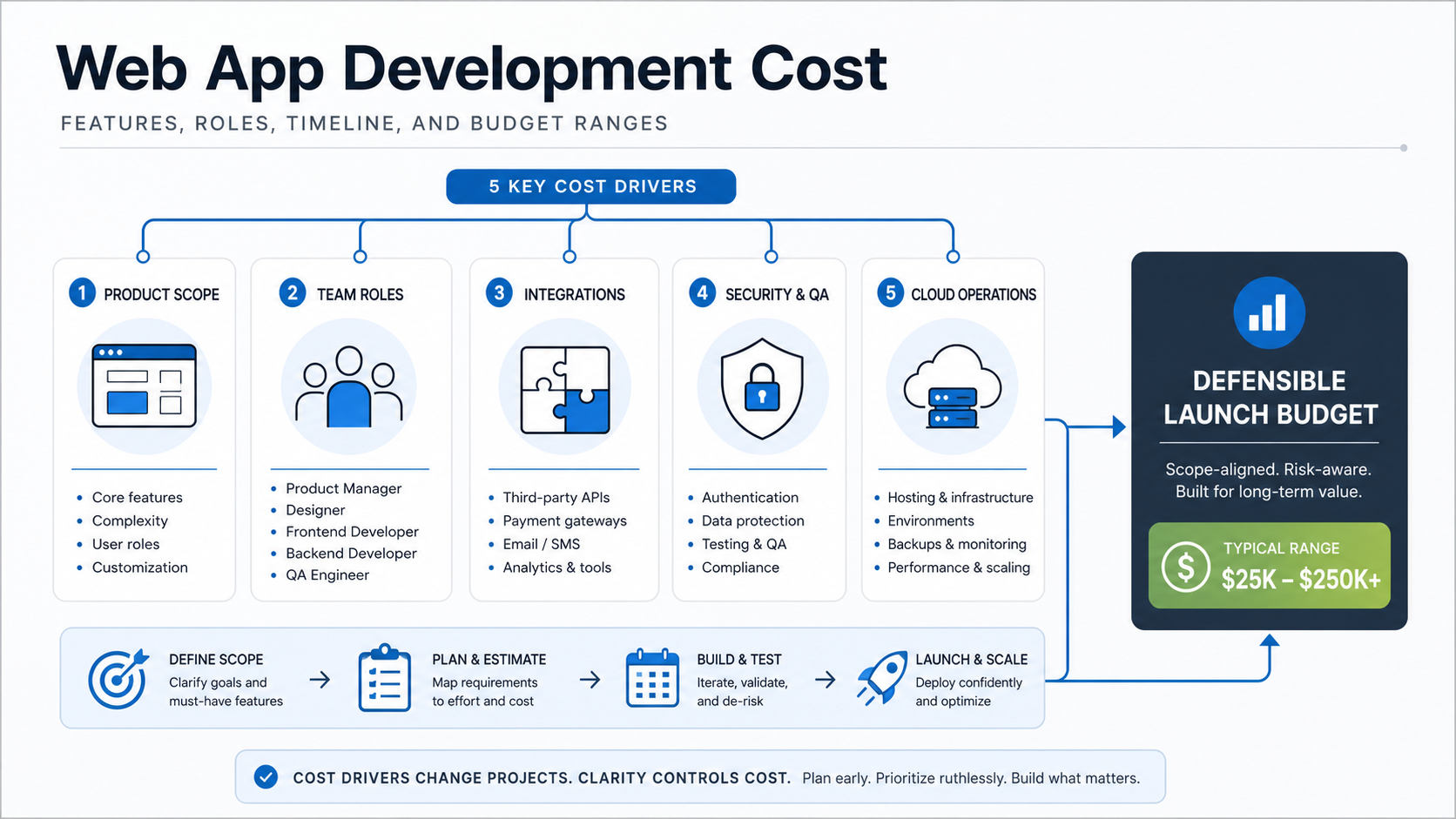
What Counts As Web App Development?
A web app is software users operate through a browser, but the build often includes much more than a responsive interface. Serious web apps include authentication, permissions, dashboards, workflows, admin panels, APIs, databases, file handling, notifications, analytics, integrations, cloud hosting, monitoring, and support tooling.
The estimate changes when the app must support many users, multiple organizations, regulated data, high uptime, subscription billing, complex search, real-time collaboration, AI workflows, or legacy system integration. That is why a single flat price is usually misleading. The better question is: what business process must the web app reliably operate on day one, and what can wait until phase two?
2026 Web App Cost Bands By Scope
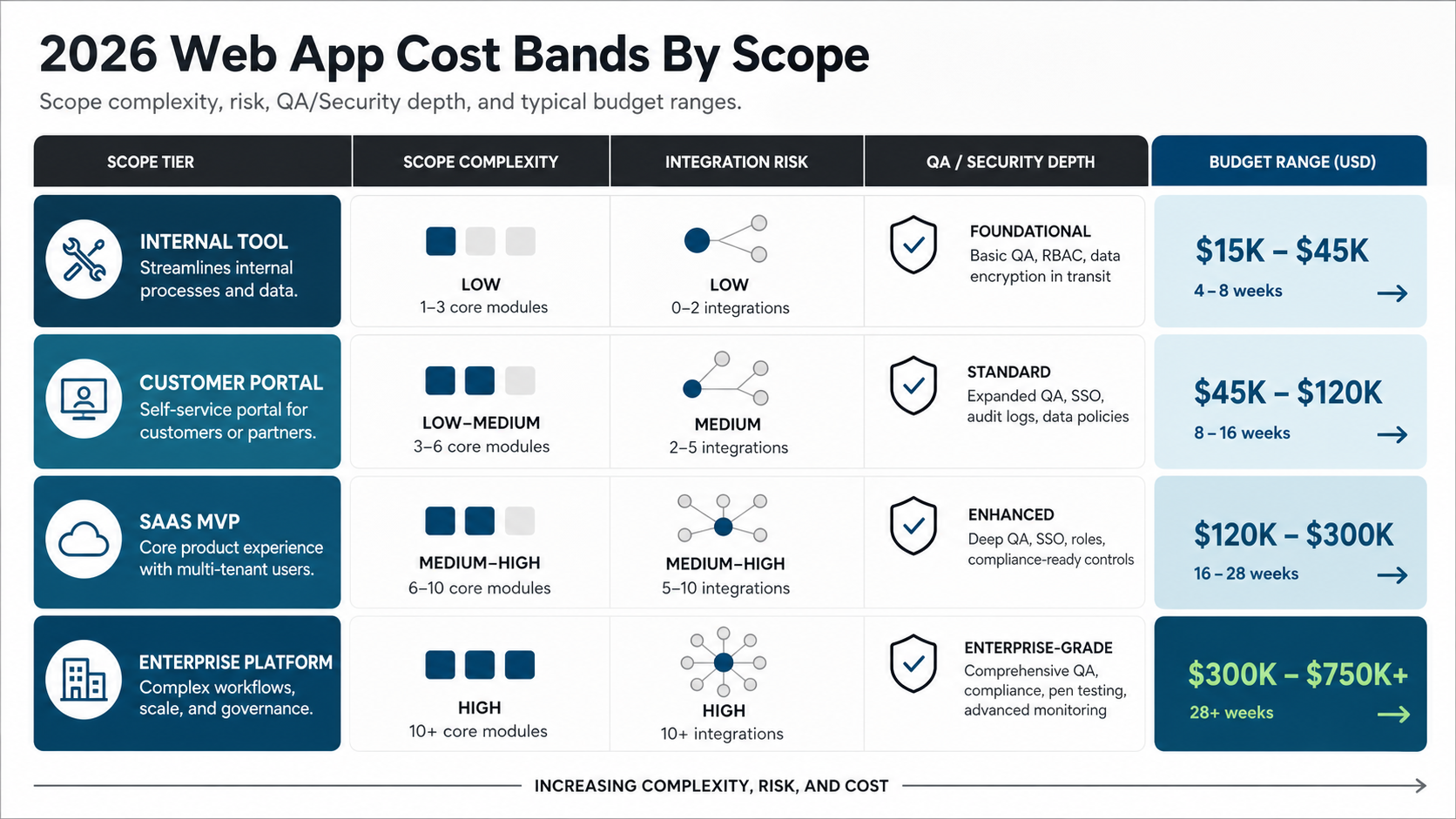
Competitor pricing pages and marketplace rate guides still show wide ranges because "web app" can mean anything from a small internal tool to a multi-tenant SaaS platform. Treat the following ranges as a planning model for 2026 conversations, then validate them against scope, team seniority, location, risk, and ownership model.
| Web app type | Typical scope | Planning budget signal | Timeline signal |
|---|---|---|---|
| Internal workflow app | Login, roles, forms, approvals, reports, basic integrations | Often about $15K-$45K when workflows are known | Often 4-8 weeks for a narrow MVP |
| Customer portal | Accounts, documents, service requests, notifications, admin tools | Often about $45K-$120K because UX, security, and support flows matter | Often 8-16 weeks |
| SaaS MVP | Tenant model, subscriptions, onboarding, billing, analytics, support tooling | Often about $120K-$300K when multi-tenant foundations are real | Often 16-28 weeks |
| Enterprise platform | Complex workflows, permissions, integrations, compliance, monitoring, rollout support | Often $300K+ when reliability, governance, and scale are in scope | Often 28+ weeks or a phased roadmap |
If your idea is closer to a SaaS business than a simple workflow, compare the estimate with NextPage's guide to SaaS application development cost. SaaS work usually needs stronger tenant isolation, billing, onboarding, account management, and operational controls than a one-company internal app.
Features That Change The Estimate
Features change cost when they add product logic, data rules, integration risk, or QA paths. A dashboard card may be cheap if it reads clean data from one table; it may become expensive if it requires permissions, cross-system reconciliation, export logic, historical snapshots, and exception handling.
| Feature area | Lower-cost version | Higher-cost version |
|---|---|---|
| Authentication | Email login and basic roles | SSO, MFA, tenant roles, audit logs, admin impersonation controls |
| Workflows | Simple status changes | Approvals, routing rules, escalations, notifications, exception handling |
| Dashboards | Basic summaries | Real-time analytics, filters, exports, drill-downs, permission-aware reporting |
| Integrations | One stable third-party API | ERP, CRM, payment, logistics, or legacy integrations with retries, logs, and reconciliation |
| Files and documents | Simple uploads | Versioning, scanning, permissions, previews, storage lifecycle, e-signature flows |
| AI features | Assisted drafting or classification | RAG, agents, evaluation, guardrails, human review, monitoring, and data governance |
For commerce-heavy projects, compare feature complexity with NextPage's eCommerce app development cost guide because checkout, catalog, inventory, payment, and promotion logic can quickly change a web app estimate.
Roles Needed For A Web App Build
A small project can share roles across a lean team, but the responsibilities still exist. Skipping them does not remove the work; it moves the cost into rework, unclear decisions, defects, or slow delivery.
| Role | What they protect | When the role becomes important |
|---|---|---|
| Product lead | Scope, priorities, acceptance criteria, tradeoffs | Any project with multiple stakeholders or uncertain workflows |
| UX/UI designer | Usability, information architecture, form flows, dashboard clarity | Customer portals, admin-heavy tools, products with repeated daily use |
| Frontend engineer | Responsive UI, state, accessibility, performance, browser behavior | Any interactive web app |
| Backend engineer | Data model, business rules, APIs, integrations, security boundaries | Workflow apps, portals, SaaS, and apps with sensitive data |
| QA engineer | Regression coverage, edge cases, release confidence | Apps with payments, approvals, roles, integrations, or production users |
| DevOps/cloud engineer | Hosting, environments, monitoring, backups, deploy flow | Production systems with uptime expectations or compliance exposure |
When the app is more than a narrow MVP, a partner with software and web application delivery capability can keep product, frontend, backend, QA, and cloud decisions aligned instead of treating them as disconnected tasks.
Timeline By Phase
Timeline and cost move together because the same team capacity is being spent over time. A clear MVP can move quickly; a vague product with many stakeholders, unknown integrations, or unfinished data decisions needs discovery before development can be estimated responsibly.
| Phase | Typical work | Cost control decision |
|---|---|---|
| Discovery and scope | Workflows, users, constraints, data, integrations, success metrics | Decide what must be true for version one |
| UX and architecture | Flows, wireframes, data model, API plan, cloud plan, risk review | Resolve expensive ambiguity before sprint work starts |
| Build | Frontend, backend, integrations, admin, notifications, reporting | Protect must-have scope from phase-two requests |
| QA and hardening | Regression testing, permissions, performance, security, edge cases | Do not compress quality for business-critical flows |
| Launch and support | Deployment, monitoring, migration, training, bug triage, improvements | Reserve budget for the first real users |
If you are still testing product-market fit, use the MVP Scope Builder to separate must-have launch scope from later-phase ideas before the estimate becomes too broad.
How To Build A Web App Budget You Can Defend
A defendable budget separates what must ship, what can follow, and what uncertainty might cost. This is especially important when the first estimate will be used for board approval, procurement, fundraising, or internal planning.
- Define the primary workflow. Name the user, trigger, input, decision, output, and business result.
- List user roles and permissions early. Role complexity affects UX, backend rules, QA, and admin design.
- Classify features as must-have, phase two, or optional. Do not let every idea enter the MVP.
- Inventory integrations and data sources. API uncertainty is one of the biggest budget risks.
- Decide quality expectations. Uptime, security, auditability, browser support, and performance targets change the build plan.
- Hold a risk reserve. Keep capacity for data cleanup, integration changes, user feedback, deployment hardening, and post-launch fixes.
Estimate Worksheet For Finance And Founders
Before requesting a proposal, turn the idea into an estimate worksheet. It does not need perfect answers; it needs enough structure for a delivery team to find the real cost drivers quickly.
| Worksheet item | What to decide | Why it affects cost |
|---|---|---|
| Product type | Internal tool, customer portal, SaaS, marketplace, dashboard, or AI workflow | Sets the baseline architecture and QA expectations |
| User groups | Admins, staff, customers, partners, vendors, auditors, or tenant owners | Drives permissions, UX paths, testing, and support tools |
| Data sources | New database, legacy database, spreadsheets, APIs, warehouse, or third-party systems | Determines migration, cleanup, sync, and reconciliation effort |
| Critical flows | The 3-5 workflows that must work on launch day | Prevents estimate inflation from low-value features |
| Quality bar | Availability, security, compliance, audit logs, performance, browser support | Changes architecture, testing depth, and cloud operations |
| Launch reserve | Budget for user feedback, data fixes, monitoring, and early improvements | Reduces the chance of a technically launched but operationally weak app |
If the project replaces aging software, run a modernization review before estimating a rebuild. NextPage's Legacy Software Modernization Scorecard helps decide whether to stabilize, refactor, rebuild, replatform, or replace.
Hidden Costs That Surprise Teams
Web app estimates usually fail when the team prices visible screens and ignores operational reality. Watch for these hidden costs before signing off on a number.
- Data cleanup and migration: Old spreadsheets, duplicate records, incomplete IDs, and inconsistent statuses can take real engineering and business time.
- Integration uncertainty: APIs may have missing fields, rate limits, sandbox gaps, brittle documentation, or manual approval steps.
- Admin tooling: Support teams need safe ways to review users, adjust records, retry jobs, and diagnose issues.
- Security and compliance: Access controls, logs, retention, backups, and incident handling are part of production readiness.
- Cloud operations: Environments, monitoring, storage, database backups, CI/CD, and cost controls need ownership.
- Post-launch learning: Real users reveal workflow gaps that no estimate can perfectly predict.
For systems that need to scale beyond a simple MVP, NextPage's scalable software development services can help pressure-test architecture, delivery cadence, and operating constraints before cost assumptions harden.
Fixed Price, Retainer, Or Phased Product Team
A fixed-price model can work when scope is narrow, integrations are known, and acceptance criteria are stable. It becomes risky when the product is still being discovered, stakeholders are changing requirements, or the build has uncertain data and integration work. In those cases, fixed price often pushes teams toward change requests instead of better product decisions.
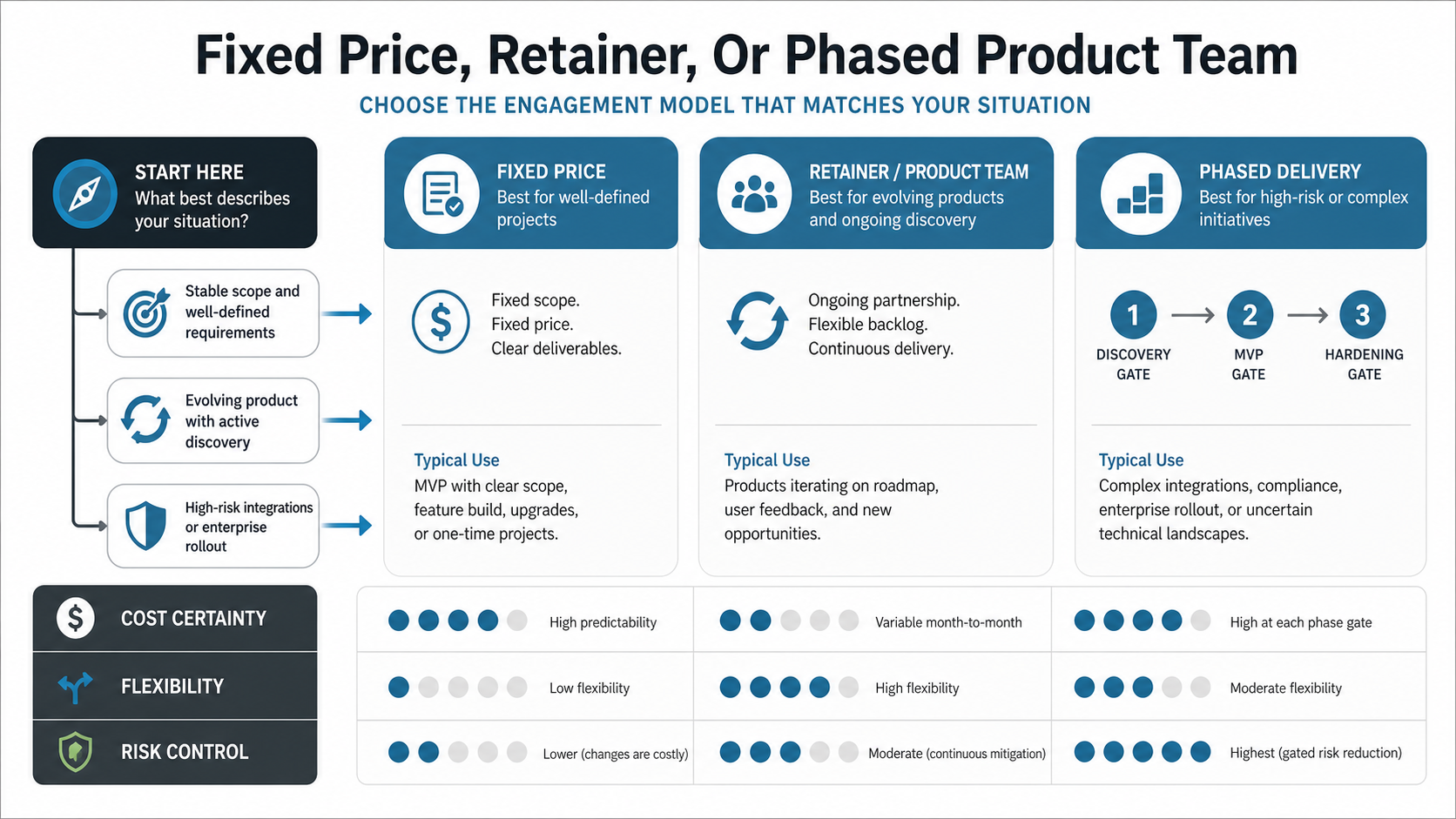
A retained team or staged delivery model works better when you need product discovery, build, QA, launch support, and iteration. You still need budget discipline, but you can make tradeoffs continuously: ship the core workflow, defer low-value features, and use user feedback to decide what deserves the next sprint. When integrations or compliance are high risk, a phased delivery model with discovery, MVP, and hardening gates protects the budget better than pretending all unknowns are already priced.
How NextPage Estimates Web Apps
NextPage estimates web app development by mapping the operating workflow first, then translating it into product scope, technical architecture, team capacity, timeline, risk, and launch readiness. We look at user roles, data, integrations, security, admin needs, reporting, cloud operations, and the business result the app must produce.
That process produces a stronger estimate than a screen count because it exposes the parts of the project that actually change cost. For a small workflow, the answer may be a lean MVP. For a SaaS product, the answer may be a staged platform build. For a business-critical system, the answer may include architecture, QA, cloud, support, and modernization planning from the start.
Use the Custom Software Cost Estimator to create a first-pass range, then review the estimate with a team that can challenge scope, identify hidden risks, and turn the budget into a practical build plan.