
Quick Answer: What Should A Web Application Penetration Testing Checklist Include?
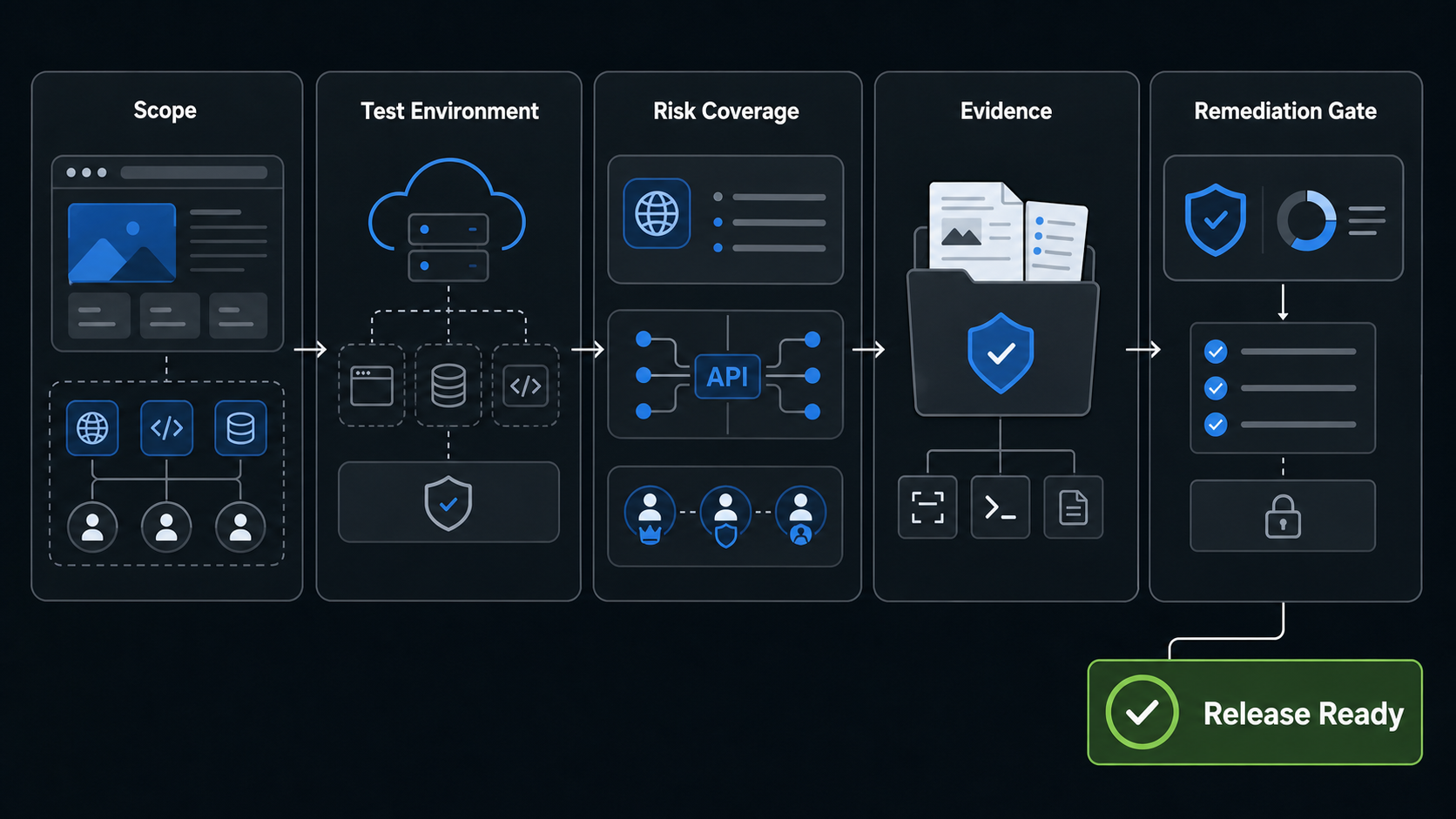
A web application penetration testing checklist should prove that the right application surfaces can be tested safely, that testers have written permission, and that engineering will receive evidence they can fix and retest. For SaaS and FinTech teams, the checklist should cover scope, environments, test accounts, user roles, tenant boundaries, payment and data flows, APIs, authorization rules, OWASP risk areas, severity rules, remediation ownership, and release-gate criteria.
The most useful checklist is not a last-minute scanner handoff. It is a controlled security exercise that tells the tester which domains, APIs, admin portals, dashboards, webhooks, file stores, and third-party integrations are in scope, which actions are prohibited, and what proof is required before a release can move forward. If your team needs a specialist partner for that engagement, NextPage's web application penetration testing services page explains how we scope authorized testing, evidence, remediation, and retest support.
Why WAPT Readiness Matters Before A SaaS Or FinTech Release
Web application penetration testing finds exploitable weaknesses before attackers, auditors, enterprise customers, or procurement teams find them. For teams shipping SaaS products, portals, dashboards, and business workflows, this security gate should sit beside the broader web app development roadmap instead of appearing only at the end. The business value depends on preparation. A rushed test can miss tenant-isolation defects, broken object-level authorization, admin privilege issues, file access mistakes, payment workflow gaps, logging blind spots, and API inventory problems simply because the right accounts and data states were not available.
For SaaS teams, the biggest risk is often access control across plans, tenants, teams, and support roles. For FinTech teams, the risk expands into payment flows, identity checks, consent records, audit trails, sensitive account data, and regulated evidence. Treat the checklist as part of release readiness alongside functional QA, regression coverage, observability, and incident response. The broader security testing services path can help when the scope includes APIs, cloud edges, CI/CD controls, or audit preparation beyond the web app itself.
1. Define Scope, Assets, And Written Permissions
Start with an asset inventory the tester can actually use. List every domain, subdomain, app environment, API base URL, admin portal, mobile web view, webhook endpoint, file storage path, authentication provider, analytics integration, payment sandbox, and third-party callback that belongs to the assessment. Mark each as in scope, limited scope, or out of scope.
Scope should also say what the tester is allowed to do. Can they test privilege escalation, account lockout, password reset flows, file upload, rate limits, SSRF probes, deserialization, or command injection? Can they run authenticated API calls at volume? Can they create tenants or simulate payment failures? Written rules of engagement protect both sides and keep the assessment focused on product risk instead of avoidable operational disruption.
| Scope Item | What To Prepare | Why It Matters |
|---|---|---|
| Domains and APIs | Canonical URLs, API docs, staging endpoints, rate limits | Prevents missed surfaces and accidental testing of the wrong target |
| User roles | Accounts for owner, admin, staff, customer, auditor, support, and read-only roles | Enables real authorization and access-control testing |
| Data boundaries | Dummy tenants, seeded records, masked data, prohibited datasets | Protects sensitive data while keeping tests realistic |
| Third parties | Sandbox keys, webhook samples, provider approval where needed | Avoids breaking payment, KYC, CRM, or analytics systems |
| Business workflows | Checkout, onboarding, refund, approval, export, admin override, reporting | Finds exploitable business logic, not only technical bugs |
2. Prepare A Safe Test Environment And Realistic Data
A staging environment should be close enough to production that findings are meaningful, but isolated enough that testing cannot harm live users. Match authentication settings, authorization rules, API gateways, important feature flags, file upload restrictions, email/SMS behavior, webhook routing, logging, and rate limits wherever possible.
Do not give testers a clean demo database that hides real workflow complexity. Seed realistic tenants, invoices, files, orders, reports, subscriptions, role hierarchies, and failed states. Mask personal and regulated data. For payment or identity flows, use provider sandboxes and documented test cards or test identities. If production testing is required for a narrow reason, document the time window, IP allowlist, expected traffic, rollback contact, and monitoring owner.
3. Create Test Accounts For Authentication And Authorization
Access-control testing is only as strong as the accounts provided. Prepare at least two accounts per meaningful role and tenant so testers can compare what one user can do against another user, another organization, and another privilege level. Include expired subscriptions, suspended users, invited-but-not-accepted users, read-only roles, support impersonation, API tokens, and admin accounts when those states exist.
Testers should check session handling, password reset, MFA behavior, OAuth or SSO flows, token rotation, logout behavior, direct object access, mass assignment, insecure role transitions, and horizontal tenant access. This is where many SaaS and FinTech defects hide: the screen looks protected, but a direct API call or changed object ID exposes data or actions that the user should not have.
4. Map The Checklist To OWASP, API, And Compliance Risk Areas
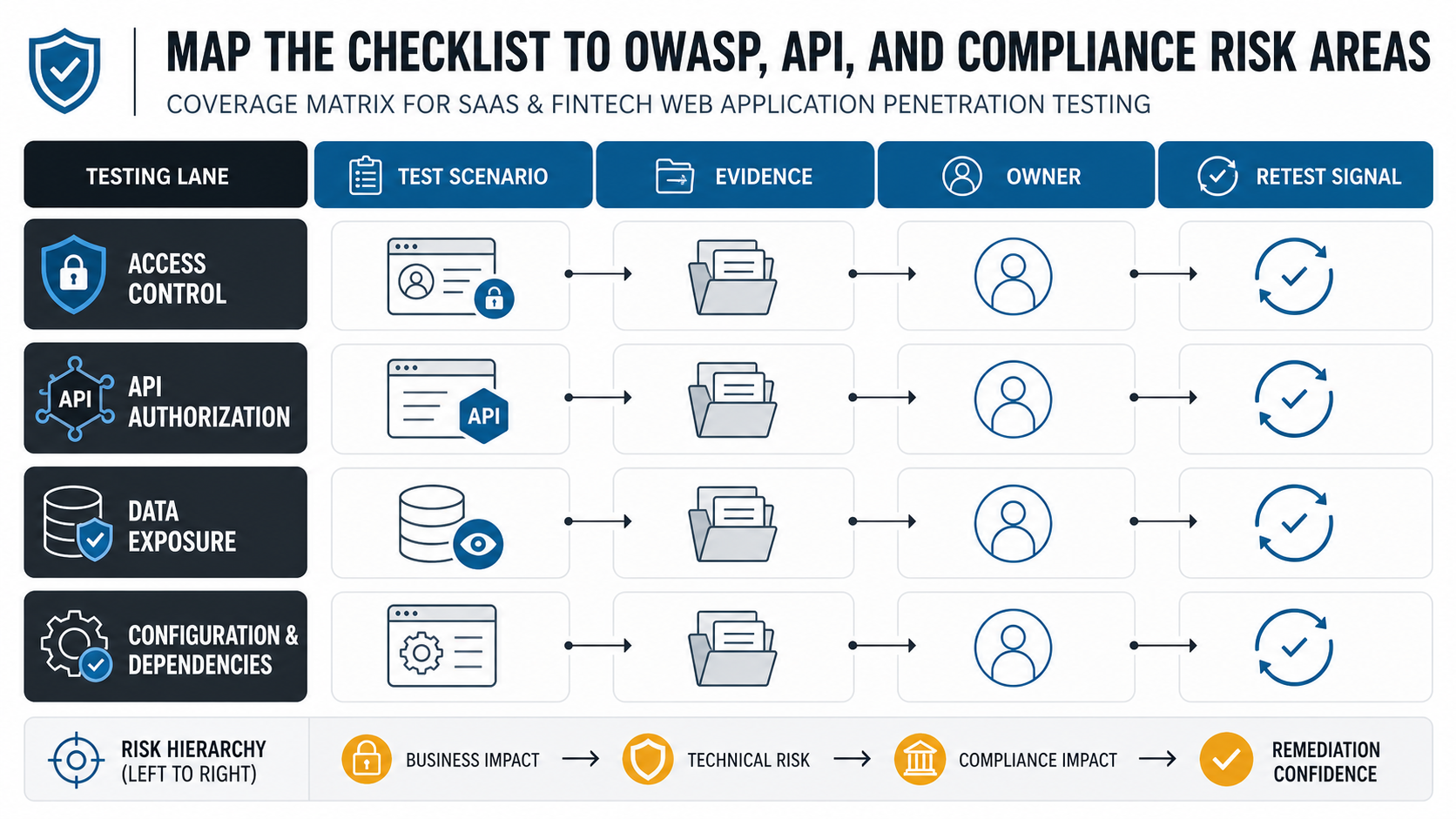
Use OWASP as a coverage baseline, not a substitute for product-specific judgment. The OWASP Top 10 2025 highlights broken access control, security misconfiguration, software supply chain failures, cryptographic failures, injection, insecure design, authentication failures, integrity failures, logging and alerting failures, and mishandled exceptional conditions. The OWASP Web Security Testing Guide remains the practical testing playbook, and the OWASP API Security Top 10 2023 adds API-specific issues such as broken object-level authorization, broken function-level authorization, unrestricted resource consumption, sensitive business-flow abuse, improper inventory management, and unsafe consumption of APIs.
For cardholder-data environments, PCI DSS v4.0.1 keeps penetration testing and segmentation validation in the governance conversation. Even when your app is not directly subject to PCI, the same discipline helps: define test frequency, document methodology, preserve evidence, remediate exploitable findings, and retest before relying on the release gate.
| Coverage Area | Checklist Question | Evidence To Request |
|---|---|---|
| Access control | Can one user access another user's object, tenant, report, or admin action? | Request/response pairs, role matrix, affected object IDs, retest proof |
| API security | Are API routes inventoried, authenticated, rate-limited, and authorization-checked? | Endpoint list, token types, abuse examples, logs, fixed test cases |
| Configuration | Are debug modes, CORS, headers, storage buckets, and error pages hardened? | Config screenshots, headers, public object checks, before/after scans |
| Business logic | Can a user bypass payment, approval, limits, refunds, discounts, or workflow state? | Step sequence, test data, replay details, owner decision |
| Logging and alerting | Would the team notice the attack path and have enough context to respond? | Security logs, alert samples, trace IDs, incident handoff notes |
5. Include Business-Critical Workflows, Not Just Technical Endpoints
Good WAPT coverage follows the money, data, and authority. For ecommerce, that means checkout, coupons, refunds, inventory, seller portals, and order status changes. For SaaS, it means tenant switching, team invites, billing, exports, admin settings, API keys, and support workflows. For FinTech, it means onboarding, KYC, payment initiation, beneficiary changes, transaction history, dispute handling, audit trails, and high-risk approvals.
Pair security testing with release QA so the team can decide what must block launch versus what can enter a managed remediation backlog. NextPage's software QA testing services and functional testing checklist are useful companions when teams need a single go/no-go view across functional behavior, regression risk, and security findings.
6. Agree On Evidence, Reporting, And Severity Rules
Before testing starts, define what a useful finding must contain. At minimum, each finding should include the affected URL or endpoint, role, tenant, data state, reproduction steps, business impact, evidence, severity, likelihood, recommended fix, owner, and retest criteria. Screenshots alone are rarely enough for engineering teams. They need request details, payloads, headers, logs, timestamps, and expected versus actual behavior.
Severity should account for exploitability and business context. A medium technical issue can become high risk when it exposes financial data, bypasses approval, affects all tenants, or enables account takeover. Conversely, a scanner finding may be lower priority when it is blocked by compensating controls and has no realistic exploit path. Capture accepted-risk decisions explicitly so they do not look like forgotten defects.
7. Assign Remediation Owners And Retest Criteria
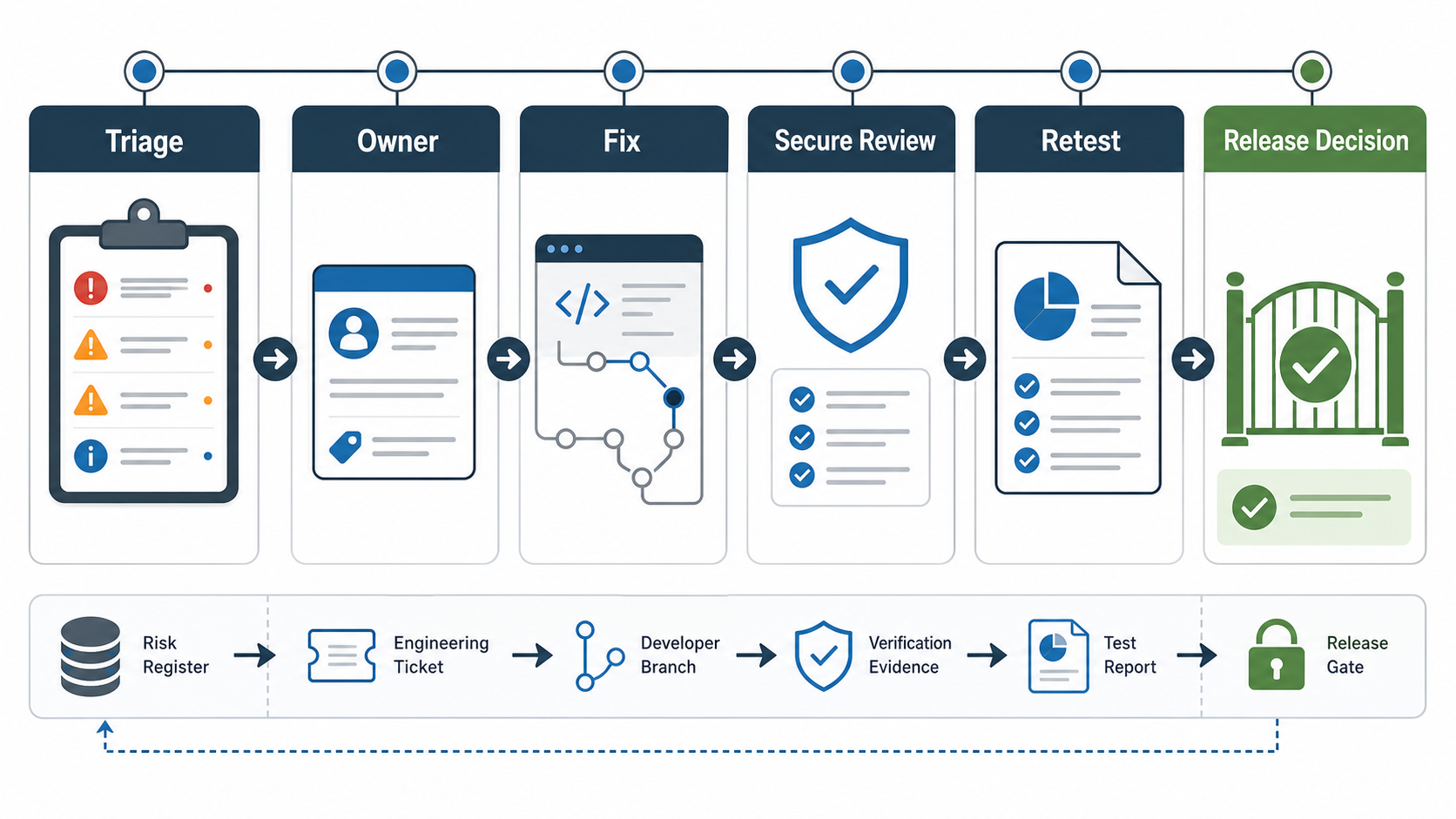
A penetration test is not complete when the report is delivered. It is complete when critical and high-risk findings are fixed, retested, and tied into release guardrails. Assign each issue to an engineering owner, product owner, and security reviewer. Decide whether the fix needs code review, configuration change, dependency update, WAF rule, test automation, monitoring change, or workflow redesign.
Use retest criteria that are specific enough for a tester to validate. "Fixed authorization bug" is weak. "A tenant admin can no longer retrieve another tenant's invoice by changing invoiceId; direct API calls return 403; logs include actor, tenant, object, and trace ID; regression test added for cross-tenant invoice access" is stronger. For broader preparation across apps, APIs, cloud, and release pipelines, use the VAPT readiness checklist as the cross-surface planning layer.
WAPT Launch-Readiness Checklist
- Confirm written authorization, scope, exclusions, test window, emergency contacts, and allowed techniques.
- Prepare staging or approved production-like environments with realistic data and safe third-party sandboxes.
- Create role-based accounts across tenants, plans, admin levels, support flows, API tokens, and edge states.
- Map coverage to OWASP Top 10 2025, OWASP API Security Top 10 2023, WSTG scenarios, business logic, and compliance needs.
- Include critical product workflows, not only public screens and scanner-friendly endpoints.
- Define evidence requirements, severity rules, remediation owners, accepted-risk handling, and retest criteria before findings arrive.
- Block release on unresolved critical/high exploit paths, unactioned sensitive-data exposure, untested payment or identity fixes, and missing retest evidence.
- Convert repeatable checks into regression, API, CI/CD, or monitoring guardrails after the assessment.
How NextPage Can Help
NextPage helps SaaS, FinTech, ecommerce, healthcare, and custom software teams prepare for authorized web application penetration testing without slowing delivery. We can define the test scope, prepare environments and accounts, map coverage to OWASP and business-critical workflows, triage findings with engineering, support remediation, and retest fixes before launch or audit review.
If you need a focused WAPT engagement, start with web application penetration testing services. If your scope includes APIs, cloud configuration, DevSecOps release gates, or broader audit readiness, use security testing services to shape the full assessment plan.