
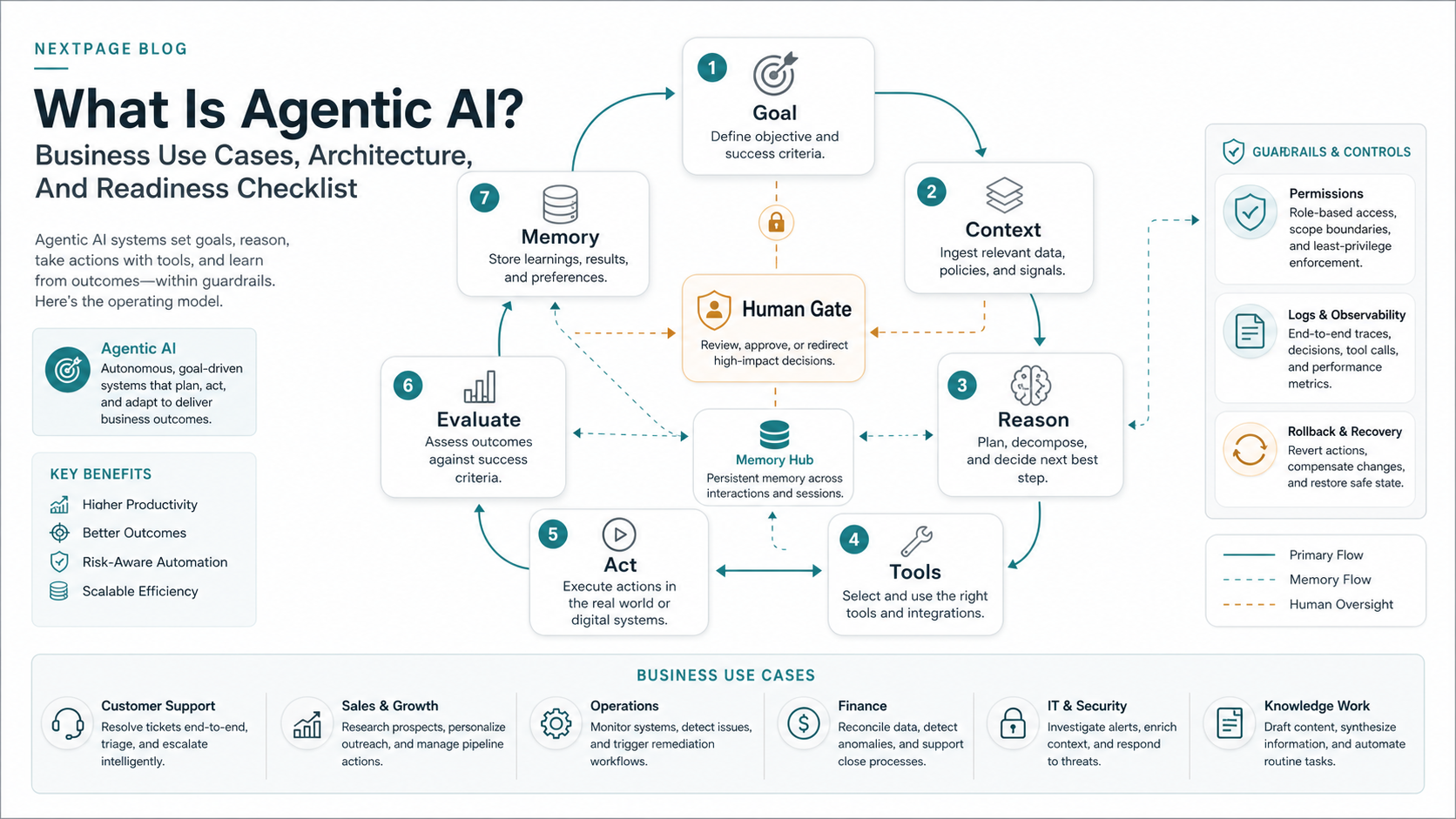
Agentic AI is software that can pursue a business goal, inspect context, decide the next step, use tools, evaluate the result, and continue under defined guardrails. A chatbot waits for a prompt. A fixed automation follows prewritten rules. An agentic AI workflow can plan, call systems, remember state, ask for approval, retry safely, and stop when a policy or confidence threshold is not met.
For business leaders, the practical question is not whether agentic AI sounds advanced. The useful question is whether a specific workflow is valuable, repeatable, data-ready, integration-ready, and governed enough for an AI system to act inside it. If you already have a candidate workflow, start with the AI Agent Readiness Assessment before selecting models or frameworks.
Quick Answer: What Is Agentic AI?
Agentic AI is an AI-enabled system that can complete a goal-oriented workflow by interpreting context, planning actions, using connected tools, and adapting when conditions change. The system may use a large language model for reasoning, retrieval for business context, APIs for action, memory for state, and policy checks for governance.
A simple generative AI assistant might draft a customer email. An agentic AI workflow could read the support case, check the customer's account history, decide whether the issue is covered by policy, draft a reply, create an internal task, and ask a human to approve any refund above a threshold. The difference is not only intelligence. The difference is system access, state, and accountability.
That is why production agentic AI should be planned like a software product, not like a prompt experiment. The strongest first release usually narrows one workflow, limits the agent's tools, logs every action, evaluates outputs against examples, and keeps humans in the loop for irreversible decisions.
Agentic AI vs Generative AI vs Automation
Traditional automation is deterministic. It works well when the path is predictable: if a form is submitted, send an email, update a record, and notify the owner. It struggles when the work requires interpretation, prioritization, exception handling, or judgment across several systems.
Generative AI creates or transforms information. It can summarize documents, draft emails, classify tickets, generate product copy, or answer questions from a knowledge base. It can be extremely valuable without being agentic. Many teams should start with generative AI development when the workflow only needs better drafting, summarization, search, or recommendation support.
Agentic AI combines reasoning with action. It can inspect available context, choose a tool, call that tool, review the result, and decide whether to continue, retry, escalate, or stop. If you are comparing the categories for a roadmap, the companion guide on Generative AI vs AI Agents vs Agentic AI gives a more detailed build-vs-buy decision view.
| Approach | Best Fit | Typical Risk | First Control To Design |
|---|---|---|---|
| Fixed automation | Stable rules and predictable system events | Broken workflow when rules change | Exception routing and monitoring |
| Generative AI | Drafting, summarizing, classifying, and search assistance | Incorrect or unsupported output | Grounding, review, and source visibility |
| AI agent | Task execution across tools with human review | Wrong action or tool call | Permissions, approvals, logs, and rollback |
| Agentic AI system | Multi-step workflow automation with evaluation and memory | Compound errors across systems | Runtime policy, evals, observability, and ownership |
How Agentic AI Works In Production
Most agentic AI systems follow a loop: perceive, reason, act, evaluate, and remember. First, the system gathers context from prompts, documents, databases, tickets, CRMs, calendars, product logs, or other systems. Then it reasons about the goal and selects a plan. Next it uses tools such as APIs, internal apps, workflow engines, search indexes, or code execution environments. After acting, it checks whether the result matches the goal and records useful state for the next step.
The loop can be simple or complex. A single workflow agent might classify a lead and draft a follow-up. A broader agentic system might include a supervisor agent, specialized sub-agents, human approval gates, retrieval systems, job queues, and observability dashboards. In both cases, the agent should have the least access needed to complete the work.
Teams building deeper reasoning, retrieval, or document-heavy workflows often need an LLM development layer around the model. The model is only one component. The surrounding product decides whether the agent has reliable context, secure tool access, measurable quality, and a usable review experience.
Current agent platforms make tool use, guardrails, evals, traces, and sandboxing easier to assemble, but they do not remove the need for workflow design. A production agent still needs a narrow goal, approved data sources, a tool-risk map, examples for evaluation, owner-defined approval thresholds, and a rollback path for bad actions.
Agentic AI Architecture For Business Workflows
A production agentic AI architecture usually includes seven layers. The first is the goal and policy layer, which defines what the agent is allowed to optimize and which actions require approval. The second is the context layer, where retrieval, databases, documents, and user inputs give the system the facts it needs.
The third is the reasoning layer, usually powered by an LLM or a set of models. The fourth is the tool layer, where the agent can call APIs, update systems, create tasks, query data, or trigger workflows. The fifth is memory and state, which tracks progress, prior actions, decisions, and unresolved exceptions. The sixth is evaluation, where test cases, traces, quality checks, and human review measure whether the agent is improving. The seventh is observability: logs, alerts, dashboards, and incident review.
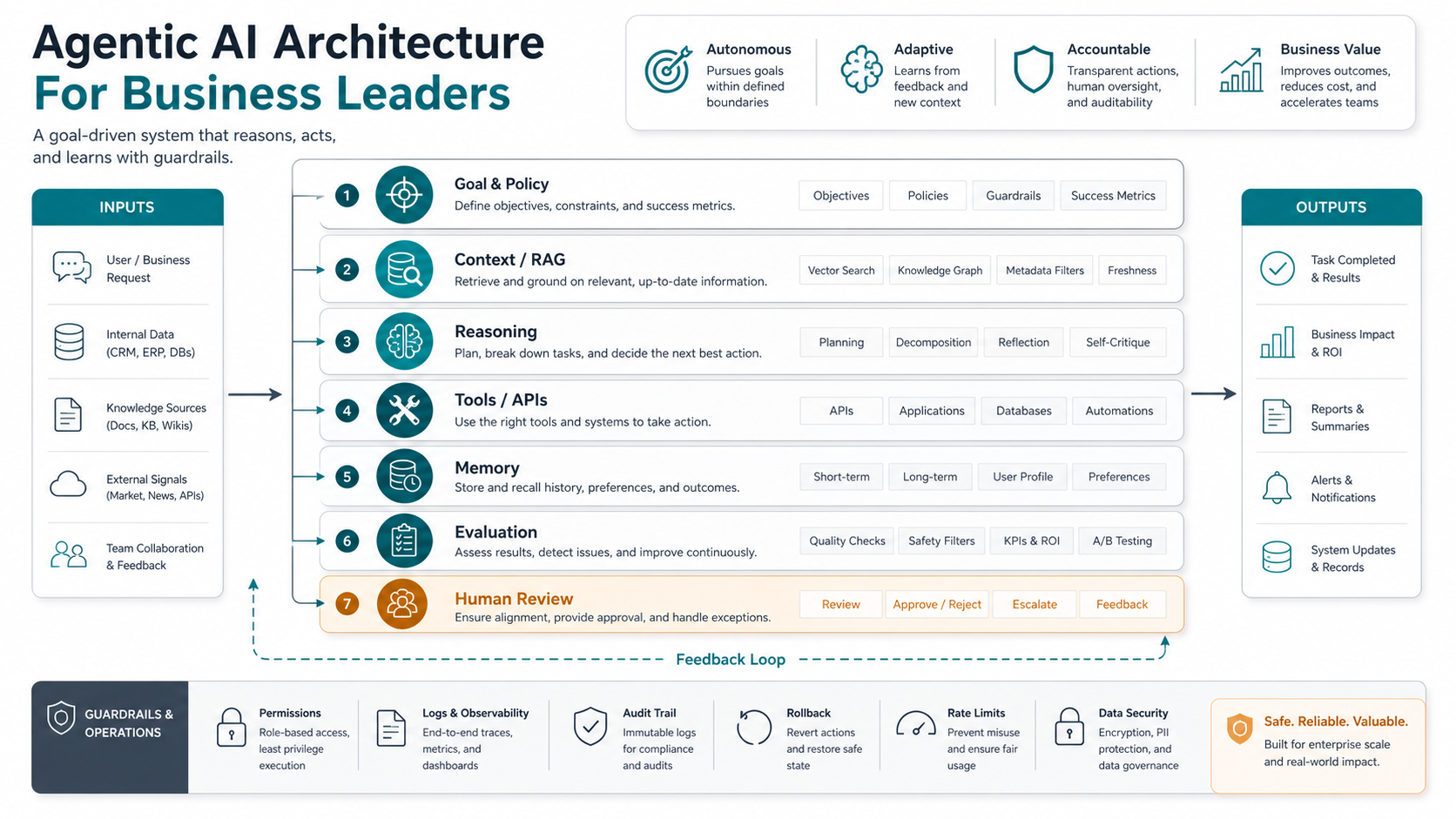
Without observability, agentic systems are hard to trust. Without permissions, they are risky. Without a clear goal, they optimize the wrong thing. Good architecture makes the agent's decisions visible enough for humans to govern without manually doing every step.
For many enterprise workflows, the architecture also needs product-grade surfaces: an admin console, review queue, approval comments, audit history, analytics, feedback controls, and team permissions. That is why agentic AI work often overlaps with custom software development, especially when the workflow must sit inside existing operations rather than live as a standalone demo.
Best Business Use Cases For Agentic AI
The best use cases are repeatable, valuable, and spread across multiple systems. Customer support is a natural fit when an agent can read tickets, retrieve account history, suggest resolutions, create internal tasks, and escalate uncertain cases. Teams with high ticket volume can also explore AI customer service agent development when approved knowledge, CRM data, and helpdesk actions are already available.
Sales operations can use agents to enrich leads, prepare follow-ups, update CRM fields, and flag accounts that need attention. Finance and operations teams can use agentic workflows for invoice review, reconciliation support, exception routing, vendor onboarding, and reporting preparation. HR teams can use agents to coordinate onboarding tasks, check missing documents, answer policy questions, and remind owners when steps are stuck. Product teams can use agents to cluster feedback, create issues, pull supporting evidence, and prepare triage summaries.
Agentic AI is not always the first build. If the task is mostly drafting, summarizing, or answering questions, a copilot or retrieval assistant may be enough. If the workflow has volume and cost but unclear ROI, use the AI Automation ROI Calculator to estimate whether automation is worth exploring.
| Workflow | Good First Agentic Scope | Do Not Automate Yet If |
|---|---|---|
| Customer support | Summarize case, retrieve policy, draft response, create follow-up task | Policies conflict or escalation rules are unclear |
| Sales operations | Enrich lead, research account, draft personalized outreach, update CRM | CRM data is stale or sales stages are inconsistent |
| Finance operations | Extract invoice data, compare against purchase order, route exceptions | Approval authority and exception policy are not documented |
| Product operations | Cluster feedback, attach evidence, draft issue, summarize priority signal | Teams do not agree on prioritization criteria |
| IT and security operations | Enrich alert, check runbook, draft remediation, open incident ticket | Tool access could cause irreversible changes without review |
Agentic AI Readiness Scorecard
Before building, test the workflow against six readiness signals. First, the workflow should be clear: inputs, decisions, owners, success criteria, and exceptions are known. Second, the workflow should be repeatable enough that examples can train the design and evaluate future behavior. Third, the data should be reliable enough for action. Stale records and conflicting documents create bad automation faster than they create efficiency.
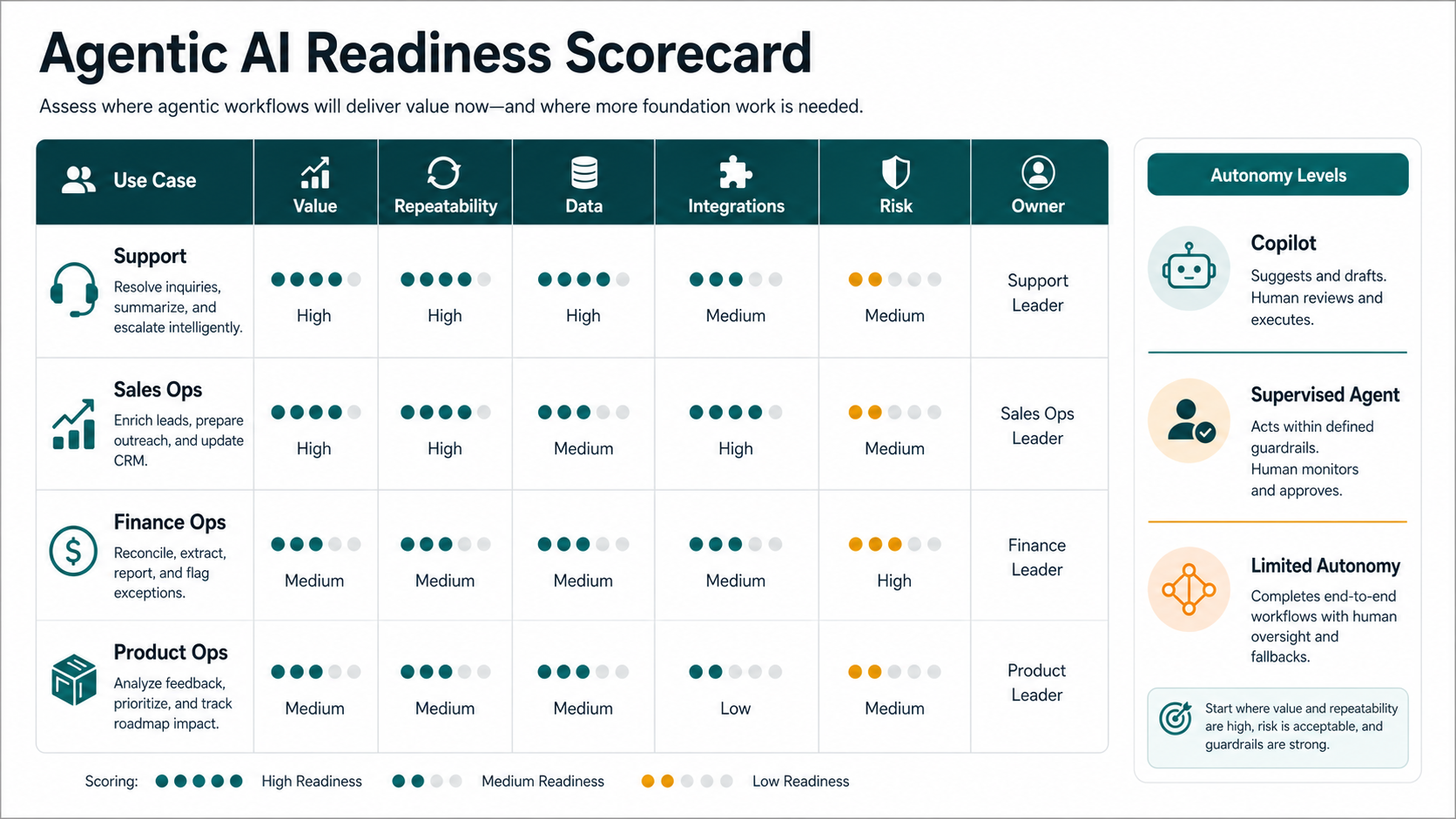
Fourth, the agent needs safe integration access. That means APIs, sandboxes, scoped credentials, audit logs, and rollback paths. Fifth, the governance model must be explicit: which actions can happen automatically, which need approval, and who owns incidents. Sixth, the workflow should have enough measurable value to justify the build.
If several signals are weak, start with a copilot, a retrieval assistant, or a supervised agent. The Workflow Automation Opportunity Finder can help identify a narrower first workflow before you give an agent write access.
Governance, Risks, And Guardrails
The main risks come from autonomy meeting unclear rules. An agent can choose the wrong tool, rely on bad data, repeat a failed action, expose sensitive information, or optimize for a metric that does not match business intent. In multi-agent systems, one bad output can become another agent's input and compound quickly.
Guardrails should be designed before launch. Use least-privilege tool access. Require human approval for irreversible, financial, legal, customer-facing, or low-confidence actions. Log every tool call. Keep prompt, policy, model, tool, and data-source versions traceable. Define retry limits and fallback behavior. Build evaluation scenarios that cover normal cases, edge cases, and adversarial cases.
OpenAI's current agent guidance emphasizes tools, guardrails, memory, evals, tracing, and controlled execution environments. IBM and McKinsey's 2026 agentic AI coverage also points to the same operational problem: organizations can create many agents quickly, but value depends on governance, workflow discovery, reuse, oversight, and measurable business outcomes. The takeaway for buyers is simple: do not buy autonomy before you know who owns it.
For a deeper operating-model checklist, pair this article with Enterprise AI Agent Governance. Governance is not a separate compliance document. It is part of the runtime. The agent should know what it can do, when it must ask, and how to stop cleanly when confidence or policy checks fail.
How To Build An Agentic AI Workflow
- Choose one workflow. Pick a repeated process with measurable delay, cost, error rate, or manual effort.
- Map the current path. Document inputs, systems, decisions, exceptions, owners, and risky actions.
- Define the autonomy boundary. Decide which actions are read-only, which are draft-only, which need approval, and which can be executed automatically.
- Start supervised. Let the agent recommend, draft, or prepare actions before it acts directly.
- Add tool access gradually. Begin with approved context, then scoped write actions, then monitored autonomy.
- Instrument everything. Track quality, tool calls, approvals, failures, handoffs, cost, latency, and user feedback.
- Evaluate before expanding. Use traces, examples, human review, and regression scenarios to prove the agent is stable under real operating conditions.
- Expand only after evidence. Increase autonomy when the workflow performs reliably and the owner understands the remaining risk.
This sequence protects both budget and trust. It also gives teams a clear path from useful assistant to governed agentic workflow. If your architecture decision is still unclear, Domain-Specific LLM Development explains when a RAG system, smaller model, or agent architecture is the better fit.
Cost, ROI, And Rollout Planning
Agentic AI cost depends on workflow scope, model usage, integration depth, review surfaces, security controls, data preparation, evaluation coverage, and rollout support. A narrow supervised agent can start as a small prototype. A production workflow that touches CRM, ERP, billing, helpdesk, data warehouse, and approval systems needs more architecture, testing, observability, and change management.
Plan ROI around operational outcomes rather than model novelty. Useful baselines include hours saved, queue time reduced, first-response time, escalation rate, error rate, review effort, revenue recovered, and customer satisfaction. The first release should compare agent-assisted performance against the current process, not against an idealized automation target.
Rollout should move through staged autonomy: assistant, copilot, supervised agent, limited autonomy, and then broader automation only after evidence. This mirrors the safest pattern in AI Workflow Automation: automate the work only after the process, data, owners, and fallbacks are clear.
How NextPage Helps Build Agentic AI
NextPage builds agentic AI as practical software delivery. We start with workflow selection, data readiness, integration depth, risk level, and business value. From there, the right first release might be a retrieval copilot, a supervised workflow agent, or a broader operating system with policies, logs, approvals, evaluation dashboards, and escalation paths.
Our Agentic AI Development Services focus on governed workflow automation: discovery, architecture, integrations, product UI, evaluation, observability, and rollout. For product teams that need a broader AI roadmap, AI Development Services covers custom AI systems, LLM products, automation layers, and production engineering.
We also bring delivery lessons from complex AI-enabled platforms. The FieldIQ portfolio case study shows how NextPage connected web admin, mobile workflows, media operations, and AI assistance inside a role-aware product rather than treating AI as a disconnected feature. That same product discipline matters for agentic workflows: the agent is only useful when the surrounding system helps people review, trust, and improve it.
If you are evaluating a workflow now, use the AI Agent Readiness Assessment to score workflow clarity, data readiness, integrations, and governance. When the use case is ready, NextPage can help design and build the agent, connect it to business systems, evaluate outputs, and roll it out safely.
Final Takeaway
Agentic AI is not just a smarter chatbot. It is an AI-enabled workflow system that can plan, use tools, remember state, evaluate results, and operate under guardrails. The best first use case is not the most ambitious one. It is the workflow with clear rules, reliable data, safe integrations, measurable value, and a human owner for exceptions.
Treat agentic AI as a governed product system. Start with one workflow, prove value under supervision, measure quality, and expand autonomy only when the evidence supports it.