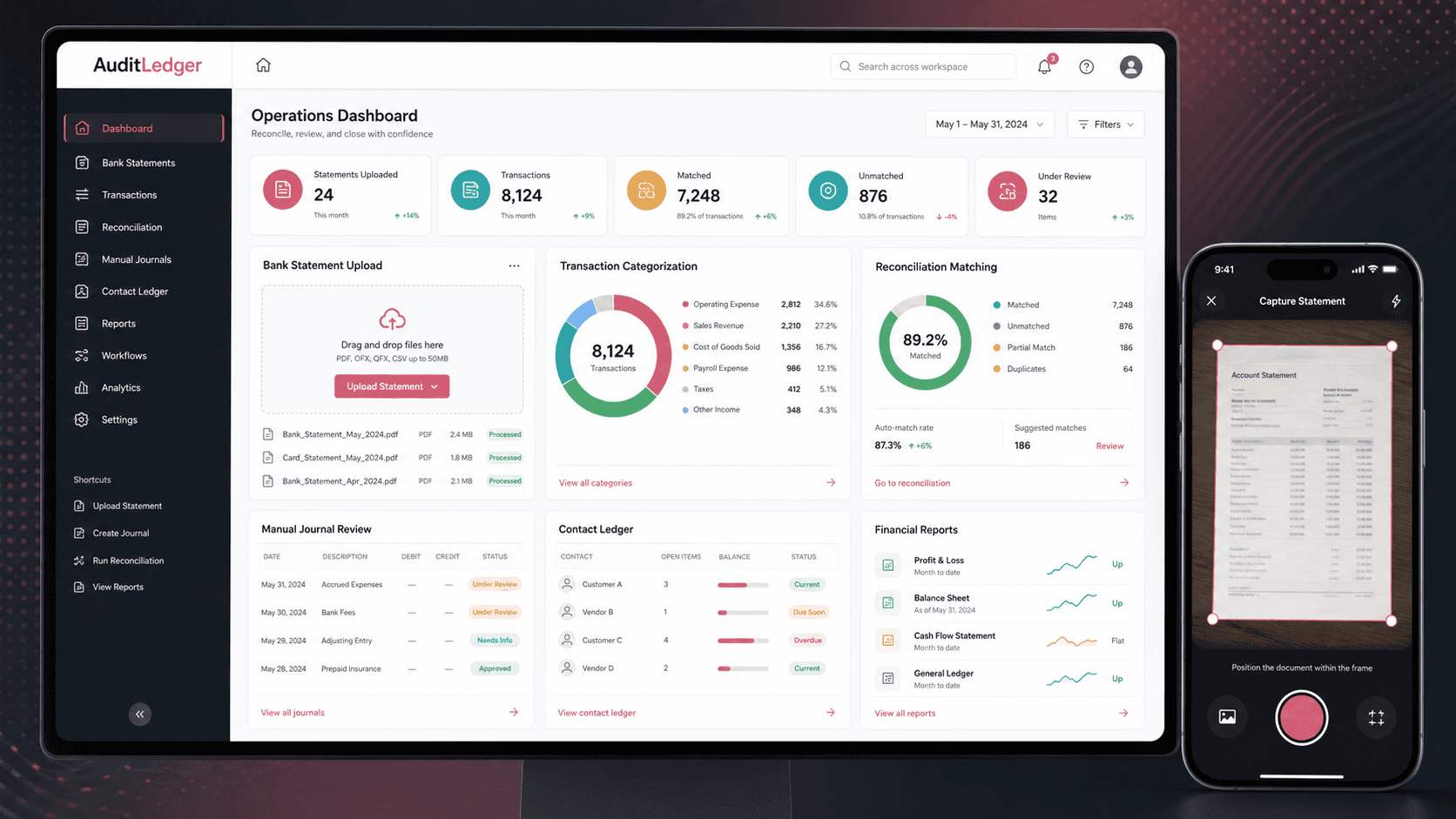
AuditLedger: Financial audit and transaction reconciliation platform
A transaction audit and reconciliation platform that helps finance teams upload bank statements, categorize records, reconcile bank activity, manage manual journals, review contacts, and generate balance-sheet reporting from one mobile-first operations console.
Mobile-first React operations console, financial workflow UX, statement upload, reconciliation, manual journal management, reporting, and mobile scanner product planning
React
mobile-first audit console
8+
finance workflow areas
Scanner
mobile capture layer
Reports
balance-sheet output
Timeline
Financial operations product build across transaction review, reconciliation, reporting, and mobile capture foundations
Finance teams needed cleaner transaction review without spreadsheet drift
The product needed to turn uploaded statements, bank transactions, manual adjustments, categories, contacts, and financial reports into a repeatable workflow. The experience also had to work well for operators who review finance data from compact screens.
Bank statement and transaction uploads needed a structured path from file intake to review
Transactions, categories, contacts, and manual journals had to stay connected across the audit workflow
Reconciliation required a focused matching surface instead of forcing operators through generic tables
Financial reports needed date-aware views that could pull together categorized activity and balances
A mobile-first audit workspace with scanner-ready capture
AuditLedger presents the React app as the main operating console while using the Flutter scanner repository as evidence for a companion mobile capture layer. Together, the public product story becomes a finance operations platform for transaction intake, review, reconciliation, journal control, and reporting.
React Router organizes public login and protected finance workflows for categories, transactions, statements, bank activity, journals, contacts, reconciliation, settings, and reports
Reusable tables, date ranges, search boxes, form controllers, and notification helpers keep repeated review actions consistent
Service modules separate transaction, statement, PDF upload, category, contact, manual journal, and user API behavior
A mobile scanner layer supports the product direction for quick document capture before financial review happens in the operations console
Product surfaces
What the platform brought together
The work spanned core product operations, daily user workflows, data-heavy coordination, and resilient platform management.
Bank statement and transaction intake
Operators can bring financial data into the system through uploaded transactions, uploaded bank statements, and PDF-oriented services before review.
Dedicated routes for uploaded transactions and uploaded bank statements
File upload and PDF service modules for document-oriented intake
Notification and API response helpers for upload progress, errors, and review feedback
Transaction review and categorization
Transaction screens, category screens, details pages, and reusable table controls support repeated finance review work.
Category list and category detail routes for classification workflows
Transaction list and detail routes for record-level review
Search, pagination, date range filters, and table components for high-volume data scanning
Bank reconciliation workspace
Bank transaction and reconciliation routes create a focused path for matching imported activity against accounting records.
Bank transaction workspace with a dedicated reconcile route
Reconciliation page for broader matching and review workflows
Date-aware controls and status feedback for finance operators working through exceptions
Manual journals and contacts
Manual journal and contact modules let teams manage adjustments and related account entities beside transaction workflows.
Manual journal list and detail routes for adjustment workflows
Contact list and contact detail routes for ledger-related records
Shared form controllers for inputs, text areas, selects, validation, and detail screens
Financial reporting and settings
Financial report routes and settings give operators a route from reviewed activity to balance-sheet style reporting and configuration.
Financial reports index and balance-sheet route with end-date context
Settings route for account and workflow configuration
Chart and label-value components for compact financial summaries
Module depth
Dedicated product blocks for the highest-value workflows
For large platforms, the conversion story depends on showing how each major module solves a specific operating problem, not only listing features.
Intake
Statement Upload To Review Queue
The product gives operators a structured path for moving uploaded statements and transaction files into usable finance review surfaces.
Supported by uploaded transaction routes, uploaded bank statement routes, file upload services, PDF services, and notification handling.
Document upload and parsing entry points
Progress and error feedback for operators
Review queues that connect imported data to transaction screens
Control
Reconciliation And Exception Handling
Bank activity, transaction records, and reconciliation routes are separated so teams can work through matches and exceptions without losing context.
Supported by bank transaction pages, a reconcile detail route, reconciliation screens, date controls, and transaction services.
Bank transaction matching workspace
Exception review and detail navigation
Date-aware filtering for period-close workflows
Reporting
From Categorized Records To Financial Reports
Once activity is reviewed, operators can move into financial report and balance-sheet views that make the platform useful beyond intake.
Supported by financial report pages, balance-sheet route parameters, category services, contact records, and manual journal workflows.
Category-backed reporting context
Balance-sheet output by closing date
Manual adjustment workflows alongside reports
Buyer priorities
What mattered most to the people evaluating the platform
Prospective buyers want to know whether the work solved real workflow, adoption, reliability, data, and operations problems. These priorities shaped the product decisions.
Audit readiness
Transaction platforms become more valuable when every import, category, journal, and reconciliation action leads toward reviewable records.
Separate routes keep upload, review, reconciliation, journals, contacts, and reporting easy to find
Reusable table and form controls reduce inconsistent review behavior across finance modules
Operator feedback is handled through a shared notification layer
Mobile-first finance operations
The React app was designed as a mobile-first transaction workspace, while the scanner app gives the public product story a natural capture surface.
Compact navigation supports finance work from smaller screens
A scanner-ready mobile layer can capture statements, receipts, or supporting documents
The operations console remains the source of truth for review and reconciliation
Workflow separation
Finance products need clear separation between data intake, classification, matching, adjustment, entity records, and reporting.
Service files divide category, contact, manual journal, statement, transaction, user, PDF, and file upload behavior
Route structure mirrors the jobs finance teams repeat during closing and audit preparation
Settings and authentication keep the workspace ready for controlled internal use
System model
How the platform connects roles, workflows, and product surfaces
The product architecture brings every role into the same operating model, with shared data moving cleanly between web, mobile, media, and notification layers.
Statement to reconciliation flow
Documents and transaction files move from upload into categorization, bank matching, exception review, manual journals, and reports.
Finance operator workspace
Accountants, finance operators, auditors, and admins each get clear surfaces for review, correction, and reporting.
Capture and review platform
A mobile scanner layer feeds documents into the React operations console, which handles transactions, journals, reconciliation, and reporting.
Technology
The Stack We Used And Why
The stack section is written for buyers who need to understand the product architecture, operational trade-offs, and long-term maintainability of the system.
Operations web app
Used for the mobile-first finance console across login, protected routes, transaction review, bank statements, reconciliation, contacts, journals, settings, and reports.
ReactTypeScriptReact RouterReact Hook FormAxios
Finance review interface
Used to handle table-heavy transaction review, filters, date ranges, charts, notifications, modals, and compact operator workflows.
React TableReact SelectReactstrapChart.jsMoment.jsDate Range Picker
Document and data services
Used to separate API calls for transaction, statement, PDF, category, contact, manual journal, file upload, and user workflows.
Used as the foundation for a companion scanner app that can feed document capture into the audit and reconciliation workflow.
FlutterDartiOSAndroidCamera-ready mobile UX
Why A React Console For Finance Review
The core product needed route-driven operational screens, reusable data tables, date filters, forms, and protected navigation.
React Router maps cleanly to finance work areas such as transactions, statements, reconciliation, journals, contacts, and reports
React Table and shared components make repeated review workflows easier to scan
Axios services keep API behavior out of page components
Why Keep Mobile Capture Separate
Document capture is a different interaction from finance review. Separating scanner capture from the operations console keeps both surfaces simpler.
Flutter gives the capture layer a path to iOS and Android from one codebase
The scanner app can stay focused on capturing documents and sending them to the review workflow
The React console can remain optimized for operator review, reconciliation, and reporting
Why Service-Based API Modules
Finance workflows repeat authentication, upload, list, detail, and mutation behavior across many record types.
Separate service files make transaction, statement, journal, contact, category, and PDF behavior easier to maintain
Runtime configuration keeps environment-specific API settings outside the source code path
Shared notification handling gives operators consistent feedback across modules
Delivery
How the product came together
The work moved from domain modeling to core platform delivery, mobile adoption, and operational hardening.
1
Map finance workflows
Break the product into import, transaction review, categorization, reconciliation, contacts, manual journals, settings, and reports.
2
Build reusable operating controls
Create shared tables, search, date ranges, form controllers, labels, popups, and notifications for repeated finance operations.
3
Connect reconciliation and reporting
Give teams routes for bank transactions, reconcile views, manual journals, and balance-sheet style reporting.
4
Plan the scanner layer
Use the Flutter app foundation as the public-safe evidence for a mobile capture companion that can feed documents into review.
Operational depth
What made the platform usable after launch
The strongest case studies are not only feature lists. They show how the system is operated, monitored, governed, and improved when real users depend on it.
Route coverage mirrors finance work
The React route map directly separates the major finance jobs operators need to complete.
Uploaded transactions, uploaded bank statements, bank transactions, and reconciliation each get their own workflow area
Manual journals and contacts sit beside transaction review rather than being treated as disconnected utilities
Financial reports and balance-sheet routes close the loop from records to reporting
Reusable controls reduce review friction
Shared components support the dense data interactions that show up repeatedly in finance products.
Custom tables, search boxes, tooltips, date ranges, labels, popups, and confirmation controls
Input, select, and textarea controllers built around React Hook Form
Notification events for long-running or exception-prone actions
Service boundaries support growth
The source separates business areas into service modules so the product can expand without collapsing into one API file.
Category, contact, manual journal, statement, transaction, file upload, PDF, and user services
Runtime configuration for base URLs, roles, keys, and environment context
Authentication and private layout boundaries for internal finance users
Results
The measurable and observable lift from the work
The strongest improvements are the ones a buyer can connect to daily work: fewer disconnected tools, safer operations, clearer workflows, and more reliable product behavior.
8+
Finance Workflow Areas
The app covers categories, transactions, uploaded transactions, uploaded bank statements, bank transactions, reconciliation, manual journals, contacts, settings, and financial reports.
2
Product Surfaces
A React finance operations console is paired with a Flutter scanner foundation for mobile document capture.
Reusable
Review Components
Tables, date ranges, search, form controllers, notifications, popups, and chart components reduce repeated UI work.
Structured
Reporting Path
The workflow moves from upload and review into reconciliation, journals, contacts, and balance-sheet style reporting.
Outcome
A stronger operating system for financial audit and transaction reconciliation platform
The platform reduced tool fragmentation and gave each role a clearer path from live activity to day-to-day action.
A mobile-first React financial operations console with protected workflows for categories, transactions, bank statements, reconciliation, manual journals, contacts, settings, and reports
Reusable finance UI components for tables, search, date ranges, form fields, popups, labels, notifications, and chart-backed summaries
Service modules for transaction, statement, PDF, category, contact, manual journal, file upload, and user API behavior
A public-safe scanner-ready product layer that positions the thin Flutter repository as document capture support for the broader audit platform
FAQ
Frequently Asked Questions About AuditLedger
Answers about the financial audit and transaction reconciliation platform scope, platform model, technology choices, operational workflows, and related build patterns.
What Kind Of Finance Platform Does AuditLedger Represent?
AuditLedger represents a financial audit and transaction reconciliation platform for bank statement upload, transaction review, categorization, reconciliation, manual journals, contacts, settings, and balance-sheet style reporting.
Why Pair A Scanner App With A Reconciliation Console?
Document capture and finance review are different jobs. A scanner layer makes it easier to collect statements or supporting documents, while the web console gives operators the denser screens needed for review, matching, adjustments, and reports.
How Does The Platform Support Reconciliation?
The platform separates uploaded bank statements, bank transaction review, reconciliation routes, transaction detail, category management, and manual journals so teams can move from imported data to matched and adjusted records.
Can This Pattern Support Accounting Firms Or Internal Finance Teams?
Yes. The same architecture can support accounting firms, outsourced finance teams, internal controllers, audit preparation teams, and businesses that need better transaction intake, matching, adjustment, and reporting workflows.
Related services
Build a similarly ambitious product without starting from a blank page.
We can help scope the web, mobile, AI, media, and operating layers needed for your own platform.