Portfolio case study

BuildTrail: Construction field reporting and compliance platform

A construction field reporting platform that connects jobsite mobile capture, daily logs, subcontractor activity, visits, corrections, photo evidence, weather context, PDF reporting, and admin review into one operating workflow.

Name changed to respect NDA.

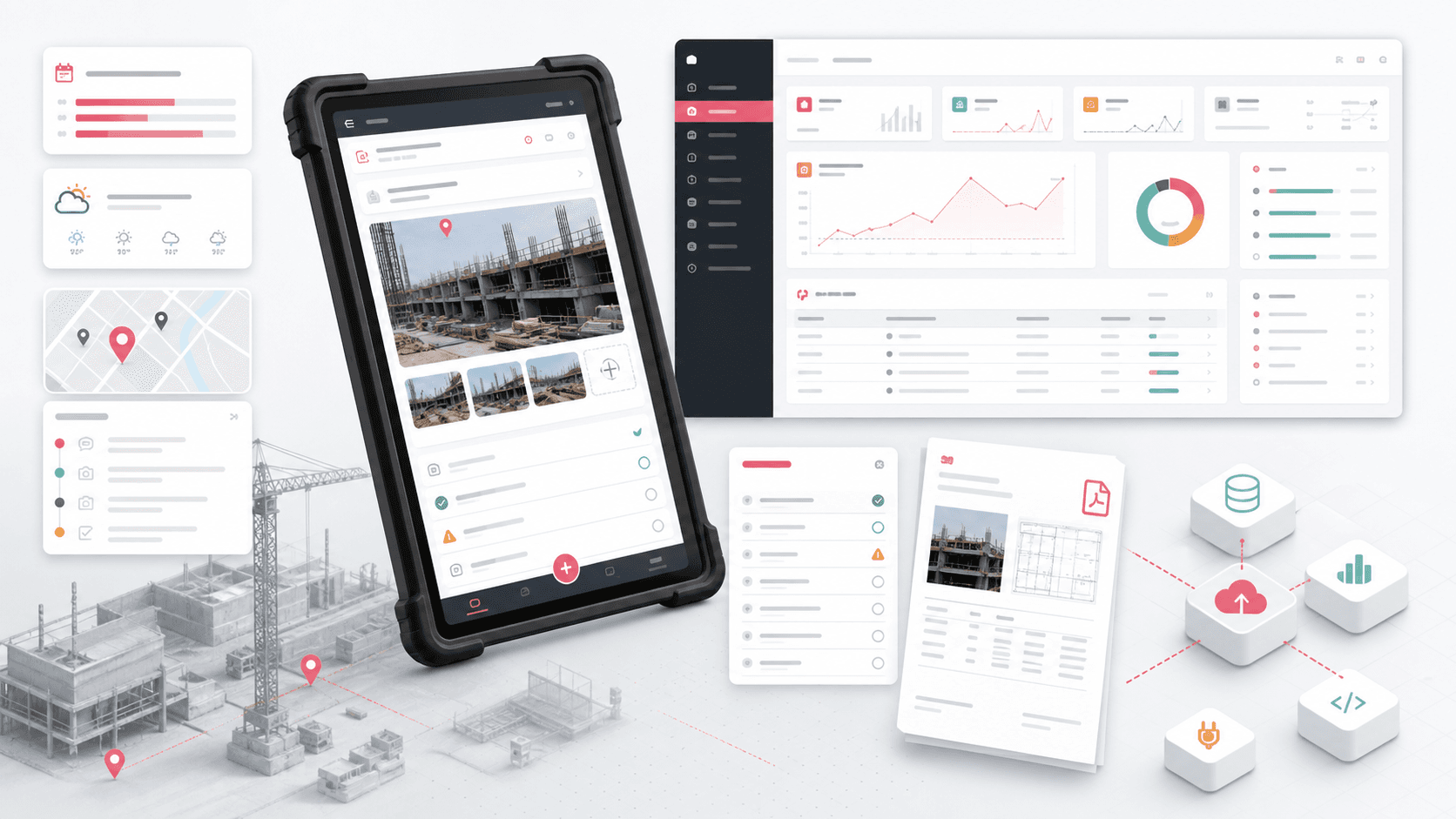
Construction field reporting platform visual with mobile jobsite forms, admin dashboard cards, weather, activity logs, correction checklist, photo evidence, PDF report, and data connectors
Project scope

Product engineering across Android field app, React admin panel, ASP.NET Core API, offline-ready local data, media capture, reporting, and operational workflows

3
connected product layers
Field
mobile-first jobsite capture
PDF
daily report generation
Bilingual
English and French UI support

Timeline

Multi-surface construction reporting product delivery across mobile, web admin, and backend API layers

Jobsite reporting needed to move faster than paperwork

Construction teams needed a practical way to capture daily activity, subcontractor work, visits, corrections, photos, weather, and location context from the field while giving office teams enough structure to review, search, export, and manage project data.

  • Field users needed quick mobile forms for daily reports, activity notes, subcontractors, visits, corrections, photos, weather, and locations
  • Administrators needed project setup, users, activity taxonomy, correction codes, locations, imports, and report review without relying on spreadsheets
  • Evidence such as images, notes, timestamps, weather, and compliance flags had to remain connected to each work log
  • The platform needed a backend API that could serve both mobile capture and browser-based operations

A connected field app, admin panel, and reporting API

BuildTrail paired an Android jobsite app with a React admin panel and ASP.NET Core API so field entries, project configuration, media uploads, and reporting outputs could share the same operational record.

  • Android field app for project selection, daily report folders, work logs, activities, subcontractors, visits, corrections, photos, voice notes, weather, and settings
  • React admin panel for projects, users, locations, activity types, correction codes, daily work log review, search, pagination, imports, and role-aware navigation
  • ASP.NET Core API with controllers and services for projects, users, roles, work logs, activities, subcontractors, visits, corrections, files, imports, and report generation
  • PDF generation, file upload handling, Swagger documentation, logging, profiling, JWT-style bearer headers, and shared API contracts across surfaces

Product surfaces

What the platform brought together

The work spanned core product operations, daily user workflows, data-heavy coordination, and resilient platform management.

Daily jobsite log capture

Field teams can create daily reports that collect the practical evidence needed for construction progress and accountability.

  • Work log creation by project and date with weather and jobsite context
  • Activity entries with notes, locations, completion and compliance states, and photo attachments
  • Daily folders and saved project/location data that keep repeat field entry manageable

Subcontractor, visit, and correction workflows

The app separates the major field-reporting categories so each record captures the right detail without forcing one generic form.

  • Subcontractor activity capture with contractor names, worker counts, time fields, notes, compliance flags, and images
  • Visit logs for tracking site visits, reasons, locations, and daily-report context
  • Correction workflows for deficiency notes, correction codes, inspection state, responsible person, and post-correction compliance

Admin operations and configuration

Office teams can manage the setup data that makes field capture consistent across projects and crews.

  • Project, user, role, location, activity type, and correction code administration
  • Tree-style activity taxonomy with details, imports, samples, search, pagination, and edit flows
  • Role-aware sidebar and dashboard routing for administrator and standard user access

Reporting, media, and evidence trails

The backend turns field entries and media into reviewable daily reports rather than leaving evidence scattered across devices.

  • Multipart image upload handling for activities, subcontractors, corrections, daily folders, and project logos
  • PDF report generation combining work logs, weather, activity entries, subcontractor records, visits, corrections, and image evidence
  • Static file serving, import parsing, logging, profiling, and Swagger documentation for operational support

Module depth

Dedicated product blocks for the highest-value workflows

For large platforms, the conversion story depends on showing how each major module solves a specific operating problem, not only listing features.

Field execution

Daily Reports From The Jobsite

The mobile workflow was designed around the person standing on site, not an office user trying to reconstruct the day later.

Source evidence includes Android activities for daily reports, daily folders, work logs, activities, visits, subcontractor entries, corrections, photo capture, voice input, GPS, weather, and local persistence.

  • Project and date context stays attached to each daily report
  • Field categories have dedicated screens rather than one overloaded form
  • Camera, gallery, crop, and file-provider flows support image evidence
  • Local repositories help keep project, activity, location, correction, and work-log data available on device

Office control

Admin Setup And Review

The browser console gives project leaders the configuration and review tools needed to keep field reporting consistent.

Source evidence includes React routes for projects, users, locations, correction codes, activity types, daily work logs, work-log details, import dialogs, search, pagination, and role-aware navigation.

  • Projects, users, locations, activity types, and correction codes can be managed centrally
  • Daily work logs surface counts for activities, subcontractors, visits, corrections, and submitter context
  • Imports and sample downloads reduce manual setup for codes and locations
  • Role-aware menus separate administrator capabilities from standard user access

Evidence system

API, Files, And PDF Reporting

The API layer keeps mobile capture, admin review, media evidence, imports, and report output tied to the same data model.

Source evidence includes ASP.NET Core controllers, services, request/response models, repositories, file upload services, CSV/Excel import helpers, Swagger, MiniProfiler, NLog, and PDF generation templates.

  • Controllers cover projects, users, roles, work logs, activities, subcontractor activity, visits, corrections, locations, folders, and code libraries
  • Multipart uploads associate images with the correct field record and system object
  • PDF service composes daily report sections and attached image evidence into shareable outputs
  • Swagger, logging, profiling, cache, and static file serving support production operations

Buyer priorities

What mattered most to the people evaluating the platform

Prospective buyers want to know whether the work solved real workflow, adoption, reliability, data, and operations problems. These priorities shaped the product decisions.

Field adoption

Construction reporting succeeds only when site users can capture the day quickly, with the context they already have in hand.

  • Mobile-first flows covered the core jobsite moments instead of requiring desktop entry
  • Photo, voice, location, and weather support reduced the amount of manual typing needed
  • Dedicated categories made daily activity, subcontractor, visit, and correction records easier to complete

Operational consistency

Administrators needed shared taxonomies, project setup, correction codes, and location records so reports stayed comparable across work sites.

  • Central project and user administration gave teams a governed operating model
  • Activity type trees and correction codes improved reporting consistency
  • CSV and Excel import support made setup less dependent on manual re-entry

Defensible reporting

Daily reports are often used for review, coordination, and dispute context, so evidence needed to be structured and exportable.

  • Images, notes, dates, weather, locations, and compliance flags stayed attached to the daily record
  • PDF generation created a shareable output from the operational data
  • Admin review screens made reports easier to search, open, and inspect

System model

How the platform connects roles, workflows, and product surfaces

The product architecture brings every role into the same operating model, with shared data moving cleanly between web, mobile, media, and notification layers.

Field, admin, and API as one reporting model

Mobile capture, browser review, file evidence, setup data, and report outputs connect through one API-backed workflow.

Daily report evidence flow

Site activity moves through capture, media attachment, correction review, admin inspection, and PDF export.

Roles across the construction workflow

Field users, admins, project managers, subcontractors, visitors, and reviewers interact with structured records instead of disconnected notes.

Technology

The Stack We Used And Why

The stack section is written for buyers who need to understand the product architecture, operational trade-offs, and long-term maintainability of the system.

Field mobile app

Used for jobsite capture where camera access, GPS, local persistence, and fast form entry mattered more than browser density.

AndroidJavaKotlin build setupRetrofitSugar ORMMaterial UI components

Admin console

Used for project administration, user management, reporting review, imports, tables, forms, and role-aware operational navigation.

ReactTypeScriptReact RouterMaterial UIReact Hook Formi18next

Backend API

Used to coordinate mobile and admin workflows around project data, media evidence, work logs, roles, imports, and reporting.

ASP.NET CoreC#MVC controllersSwaggerJWT bearer headersMiniProfiler

Data and media

Used to store field records, serve uploaded evidence, parse setup imports, and generate shareable report artifacts.

Repository patternCSV/Excel importMultipart uploadsStatic file servingPDF generation

Operations

Used to make the platform observable and supportable across field and office workflows.

NLogElmahCoreMemory cacheCORS policyAPI versioningSwagger UI

Why Native Android

The field app needed practical device access and local data behavior for camera-heavy jobsite reporting.

  • Native Android support made camera, gallery, cropping, GPS, file provider, and permissions workflows straightforward
  • Local repositories supported repeated field entry and project context on the device
  • Retrofit services kept mobile flows aligned with backend API contracts

Why React For Admin

The admin panel needed tables, filters, forms, imports, routing, and role-aware navigation for office users.

  • React Router modeled the project, user, location, activity type, correction code, and report review routes
  • Material UI and form helpers supported dense operational screens
  • i18next supported multilingual admin labels alongside the mobile app language needs

Why A Dedicated Reporting API

Daily reports combine structured data, files, timestamps, categories, and generated artifacts, so the backend had to own more than CRUD.

  • Controllers separated work logs, activities, visits, subcontractors, corrections, files, and setup data
  • PDF generation turned operational records into shareable daily report outputs
  • Logging, profiling, Swagger, and static file serving made the API easier to operate

Delivery

How the product came together

The work moved from domain modeling to core platform delivery, mobile adoption, and operational hardening.

1

Map the report model

Translate daily construction reporting into projects, work logs, activities, visits, subcontractors, corrections, locations, codes, and files.

2

Build field capture

Create the mobile workflows for daily report entry, image evidence, weather, location, notes, and local data support.

3

Add office operations

Give administrators project setup, users, activity trees, correction codes, location imports, report lists, and detail views.

4

Harden reporting output

Connect API services, file uploads, PDF generation, logging, profiling, and Swagger documentation for maintainable operations.

Operational depth

What made the platform usable after launch

The strongest case studies are not only feature lists. They show how the system is operated, monitored, governed, and improved when real users depend on it.

Offline-aware field structure

The Android codebase included local repositories for core entities so project context and repeat field data could be handled closer to the device.

  • Local persistence for projects, locations, work logs, activities, visits, corrections, files, folders, and subcontractor records
  • Saved project and saved location layouts for repeat field use
  • Settings and language controls for practical jobsite use

Import and taxonomy control

Admin users could configure the controlled vocabulary that keeps daily reports useful across teams.

  • Activity types and correction codes managed through admin routes
  • CSV and Excel imports supported faster setup
  • Tree views and detail tables helped manage nested activity structures

Report generation and supportability

The backend included operational support features around PDF creation, diagnostics, documentation, and static file evidence.

  • PDF composition for work logs, activities, visits, subcontractors, corrections, and image evidence
  • Swagger documentation and API versioning for integration clarity
  • Logging, profiling, cache, CORS, and static file serving for day-to-day operations

Results

The measurable and observable lift from the work

The strongest improvements are the ones a buyer can connect to daily work: fewer disconnected tools, safer operations, clearer workflows, and more reliable product behavior.

1 workflow

Daily Report Spine

Activities, subcontractors, visits, corrections, photos, weather, and locations became part of one daily reporting flow.

3 layers

Connected Platform

The Android app, React admin panel, and ASP.NET Core API each handled a clear part of the construction reporting system.

Evidence

Media-Linked Records

Uploaded images and structured notes stayed attached to the operational records that needed them.

Exportable

PDF Reporting

Daily report data could be composed into shareable report outputs for review and coordination.

Outcome

A stronger operating system for construction field reporting and compliance platform

The platform reduced tool fragmentation and gave each role a clearer path from live activity to day-to-day action.

A mobile field reporting workflow for construction teams to capture daily activity, subcontractor work, visits, corrections, photos, weather, and notes on site

A browser admin console for project setup, user management, locations, activity taxonomies, correction codes, imports, daily work-log review, and report detail inspection

A backend API layer covering project records, users, roles, work logs, activities, subcontractor activity, visits, corrections, files, imports, PDF generation, logging, and Swagger documentation

A public-safe construction operations case study that connects buyer value to field adoption, defensible reporting, admin control, and evidence-backed daily logs

FAQ

Frequently Asked Questions About BuildTrail

Answers about the construction field reporting and compliance platform scope, platform model, technology choices, operational workflows, and related build patterns.

What Kind Of Construction Platform Does This Case Study Represent?

It represents a daily field reporting and compliance platform where jobsite users capture activities, subcontractor work, visits, corrections, photos, weather, and notes while administrators manage projects, setup data, and report review.

Why Build A Mobile App Instead Of Only A Web Dashboard?

Field reporting depends on device-native capture moments such as camera, gallery, GPS, local records, and quick form entry. The web dashboard is better suited to setup, review, imports, and administration.

Can This Pattern Support Other Field Operations Products?

Yes. The same pattern fits inspections, facilities, maintenance, safety audits, property snagging, civil work, field service, and compliance workflows where mobile evidence and admin review need to stay connected.

What Should A Buyer Prepare Before Starting A Similar Build?

Useful inputs include report categories, project and location hierarchy, field roles, correction code taxonomy, photo evidence rules, export format expectations, offline needs, and the review workflow for office teams.

Related services

Build a similarly ambitious product without starting from a blank page.

We can help scope the web, mobile, AI, media, and operating layers needed for your own platform.

Start a project inquiry