Portfolio case study

ScanPilot: Inventory scanning and field stock-control platform

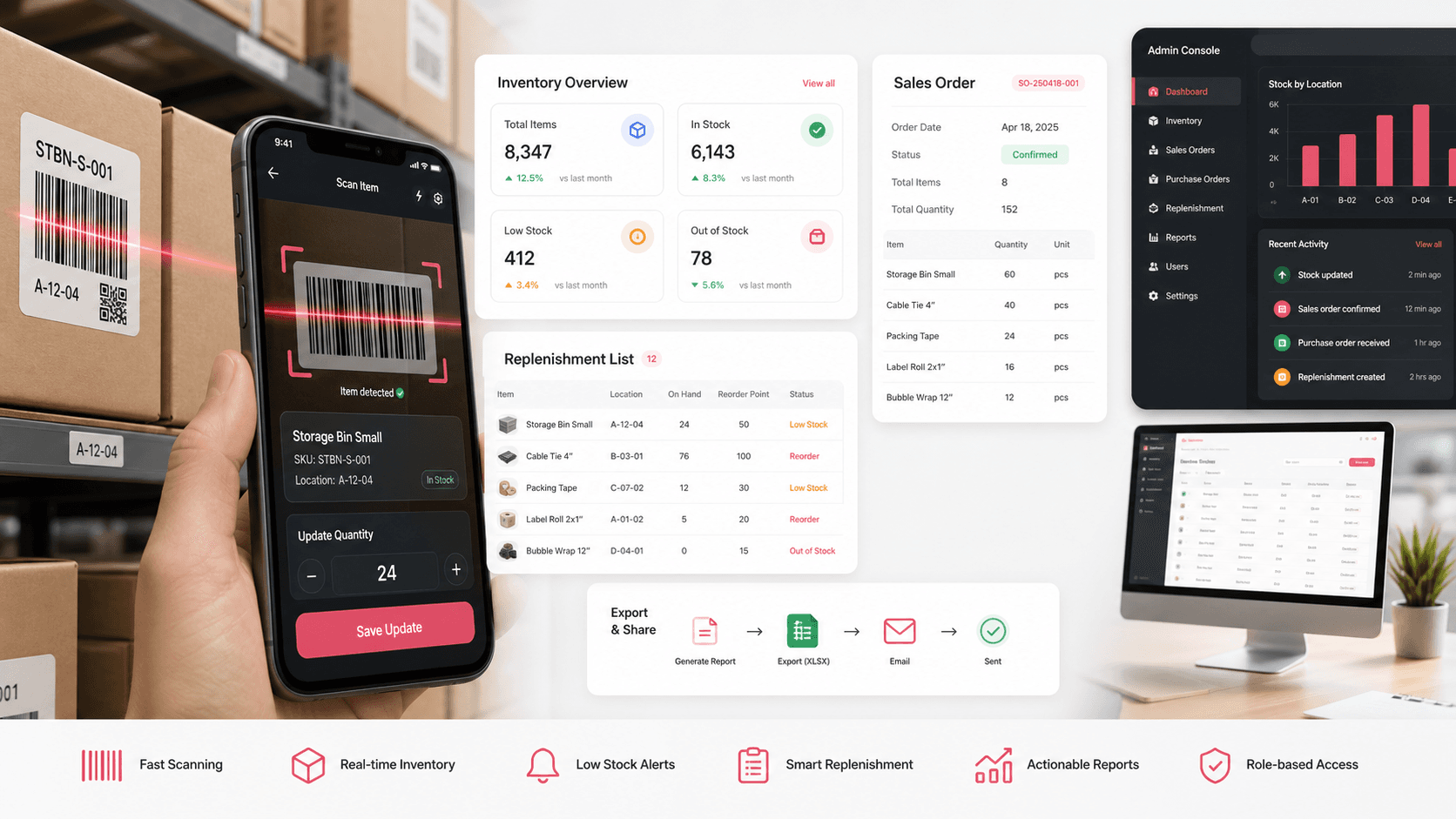
A mobile inventory scanning and sales-order capture app that helps field teams count stock, manage replenishment, record barcode lines, export spreadsheets, collect acceptance signatures, and keep administrators in control of user access.

Name changed to respect NDA.

Inventory barcode scanning platform visual with mobile scanner, stock count cards, replenishment flow, sales order sheet, export action, and admin console panel
Project scope

Product engineering for a Flutter mobile scanning app, local offline data model, export and email workflows, user authentication, observability, and React administration console

3
field workflows
Offline
SQLite-backed capture
CSV/XLS
export and email delivery
Admin
user and status control

Timeline

Mobile-first inventory operations build with supporting administration layer

Inventory teams needed faster stock capture outside the desk

The operation depended on barcode-driven physical counts, replenishment checks, and sales order entry that could happen on a mobile device, survive field conditions, and still produce structured files for downstream business systems.

  • Field users needed barcode scanning, quantity entry, notes, photo capture, and history without a heavy desktop workflow
  • Sales order capture needed headers, line items, customer details, acceptance signatures, and spreadsheet output
  • Export and email delivery had to bridge mobile work with back-office processes
  • Administrators needed a small protected console for user lookup, status filtering, and account support

A focused scanner app with local capture and operational exports

ScanPilot pairs a Flutter mobile workflow with a React admin layer so teams can capture inventory events in the field, store records locally, generate files, send them through API-backed email workflows, and keep user access manageable.

  • Mobile home flow separates physical count, replenishment, and sales order capture into clear operator paths
  • Barcode scanning, date and time stamps, quantities, notes, images, and scan history are stored in local SQLite tables
  • Sales order header, line detail, acceptance signature, spreadsheet generation, and email delivery support order handoff
  • Admin routes provide protected login, user search, pagination, status filtering, user detail editing, and role-aware shell behavior

Product surfaces

What the platform brought together

The work spanned core product operations, daily user workflows, data-heavy coordination, and resilient platform management.

Physical count and replenishment scanning

Field operators can scan barcodes, capture quantities, add notes and photos, and review history before exporting the count.

  • Dedicated physical count and replenishment paths with shared scanner patterns
  • Timestamped barcode, quantity, note, image, flag, and user fields in local storage
  • Scan history, deletion, CSV/XLS export, and email delivery workflows

Sales order field capture

Mobile sales order flows turn customer and branch context into line-item records that can be accepted and exported.

  • Order headers for branch, customer, location, order-by, phone, customer PO, and approver information
  • Barcode-driven line details with quantities, notes, timestamps, and local persistence
  • Customer acceptance screen with signature capture and spreadsheet generation

Export, email, and file handoff

Operational data moves out of the app through structured files and API-backed delivery instead of manual retyping.

  • CSV and Excel generation for count and order data
  • Multipart upload and email delivery paths with token-aware API headers
  • Audio feedback and success states to keep field operators confident after sending

User administration and support

The admin panel gives operations staff a lightweight way to search users, filter by status, and inspect account details.

  • Protected React admin routes for user list and user detail screens
  • Search, pagination, status filtering, notifications, and loading states
  • Shared API helpers, runtime configuration, local session data, and role-aware layout controls

Module depth

Dedicated product blocks for the highest-value workflows

For large platforms, the conversion story depends on showing how each major module solves a specific operating problem, not only listing features.

Field execution

Barcode Capture Without Spreadsheet Drift

The mobile flow keeps scan, quantity, note, photo, timestamp, and user context together so field data stays structured before it reaches the office.

Supported by Flutter scanner screens, SQLite models for physical count and replenishment, scan history, image capture, and export screens.

  • Physical count and replenishment use the same operator mental model
  • Local tables prevent lost work when the field workflow is interrupted
  • Export screens convert scan history into files that can be emailed or uploaded

Order handoff

Sales Orders Move From Counter To Acceptance

Sales order headers, barcode line entry, customer sign-off, and spreadsheet output give field teams a complete handoff path.

Supported by order header, order detail, sales history, acceptance, signature, and Excel generation screens in the mobile source.

  • Customer and branch details stay attached to scanned order lines
  • Acceptance signatures become part of the exported order record
  • Order files can be sent through the same delivery workflow as inventory exports

Operations control

Admin Support Stays Intentionally Lightweight

The React console focuses on the account and status operations needed to support the scanner app without overbuilding a full ERP replacement.

Supported by protected admin routes, user list and detail views, status APIs, search controls, pagination, notifications, and shared request helpers.

  • Admins can find and inspect user records quickly
  • Status filtering helps support teams triage active and pending accounts
  • Runtime API configuration keeps the admin console deployable across environments

Buyer priorities

What mattered most to the people evaluating the platform

Prospective buyers want to know whether the work solved real workflow, adoption, reliability, data, and operations problems. These priorities shaped the product decisions.

Field speed

The app needed to reduce repeated typing while keeping operators confident that each count, replenishment, or order line was recorded.

  • Barcode scanner entry reduces manual SKU capture
  • Date, time, quantity, notes, and images sit on the same record
  • Audio and success feedback make send/export states clear

Data handoff

Field work only creates value when the back office can use it, so export and email flows were treated as core product behavior.

  • CSV and Excel generation support familiar operational review
  • Multipart upload and email delivery reduce file-transfer friction
  • Token-aware API requests let authenticated and default-token modes share delivery paths

Operational reliability

Inventory workflows happen away from stable desks, so local persistence, crash reporting, and simple admin controls mattered.

  • SQLite-backed tables preserve scan work locally
  • Firebase Crashlytics and Bugsee support issue visibility
  • Admin user and status screens give support staff a place to resolve account problems

System model

How the platform connects roles, workflows, and product surfaces

The product architecture brings every role into the same operating model, with shared data moving cleanly between web, mobile, media, and notification layers.

Three field workflows, one scanner foundation

Physical count, replenishment, and sales order capture share scanner, storage, export, and handoff behavior.

Mobile capture with admin support

The mobile app handles field execution while the admin console supports user and status operations.

Roles stay simple

Operators, support administrators, and business reviewers each get the surface they need for inventory handoff.

Technology

The Stack We Used And Why

The stack section is written for buyers who need to understand the product architecture, operational trade-offs, and long-term maintainability of the system.

Mobile app

Used for barcode scanning, physical count, replenishment, sales order capture, file generation, email delivery, and field-friendly operator flows.

FlutterDartProviderDioSharedPreferencesQR code scanner

Local data and exports

Used to preserve mobile records, generate operational files, collect signatures, and move data into back-office workflows.

SQLitesqfliteCSVSyncfusion XLSIOPath ProviderSignature capture

Admin console

Used for user lookup, status filtering, account detail workflows, protected routes, and operations support.

ReactTypeScriptReact RouterMaterial UIAxiosReact Hook Form

API and observability

Used for authenticated requests, file delivery, email workflows, app settings, and production support visibility.

REST APIsBearer tokensMultipart uploadFirebase CrashlyticsBugsee

Why Flutter For The Scanner

The product needed a cross-platform mobile workflow with camera access, local storage, file generation, and field-oriented UI patterns.

  • Flutter kept the scanning experience consistent across iOS and Android
  • Dart packages covered barcode scanning, files, audio feedback, signatures, and local persistence
  • A single app codebase made it easier to evolve physical count, replenishment, and sales order paths together

Why Local Storage Was Central

Inventory work can be interrupted, so every scan needed a durable local record before export or upload.

  • SQLite tables model users, physical counts, replenishment counts, sales order headers, and sales order lines
  • Local history screens gave operators a way to review and delete records
  • Exports could be generated from captured data without requiring every step to happen online

Why The Admin Layer Stayed Small

The primary value lived in mobile field execution, so the web console focused on the support controls needed around the app.

  • User search and detail screens covered the most important account-support needs
  • Status filters gave administrators a quick operational view
  • Shared API utilities and runtime configuration kept deployment flexible

Delivery

How the product came together

The work moved from domain modeling to core platform delivery, mobile adoption, and operational hardening.

1

Map inventory moments

Separate physical count, replenishment, and sales order journeys while preserving a common scanner and data model.

2

Build the mobile capture core

Implement scanning, quantities, notes, images, local tables, history screens, and field-friendly feedback.

3

Connect export and handoff

Generate structured files, collect signatures where needed, and send files through email/API workflows.

4

Add admin support

Create a protected React console for user search, account details, status filtering, and operational support.

Operational depth

What made the platform usable after launch

The strongest case studies are not only feature lists. They show how the system is operated, monitored, governed, and improved when real users depend on it.

Offline-friendly record capture

Local tables give operators a buffer between scanning work and downstream delivery.

  • Separate tables for physical counts, replenishment counts, sales order headers, and sales order entries
  • History screens make captured work visible before export
  • Local user/session values support both authenticated and default-token modes

Spreadsheet-first delivery

The system met the organization where it already worked by producing operational spreadsheets and email handoffs.

  • Count exports can be sent to a recipient address from the app
  • Sales order exports include customer and acceptance context
  • API-backed file delivery keeps handoff consistent across workflow types

Production support signals

Crash and feedback tooling helped the team support mobile behavior after release.

  • Firebase initialization and Crashlytics error recording
  • Bugsee launch options with shake-to-report behavior
  • Admin user views for account-level support

Results

The measurable and observable lift from the work

The strongest improvements are the ones a buyer can connect to daily work: fewer disconnected tools, safer operations, clearer workflows, and more reliable product behavior.

3 workflows

Field Capture Coverage

Physical counts, replenishment, and sales order capture were handled inside one mobile scanner app.

5 tables

Structured Local Records

The local database modeled users, physical counts, replenishment counts, sales order headers, and sales order line entries.

2 surfaces

Mobile And Admin Alignment

The scanner app handled execution while the React console supported user and status operations.

Files ready

Back-office Handoff

CSV/XLS generation, file upload, and email delivery helped turn mobile work into usable operations data.

Outcome

A stronger operating system for inventory scanning and field stock-control platform

The platform reduced tool fragmentation and gave each role a clearer path from live activity to day-to-day action.

A focused mobile scanner app for physical count, replenishment, and sales order workflows

Local persistence for barcode records, quantities, notes, images, users, and order data

Export and email delivery paths that bridge field capture with back-office review

A lightweight admin console for user search, status filtering, and account support

FAQ

Frequently Asked Questions About ScanPilot

Answers about the inventory scanning and field stock-control platform scope, platform model, technology choices, operational workflows, and related build patterns.

What Kind Of Inventory App Does This Case Study Represent?

It represents a mobile barcode scanning app for field inventory counts, replenishment checks, sales order capture, local storage, spreadsheet export, email handoff, and user administration.

Why Use A Custom Mobile App Instead Of A Shared Spreadsheet?

A custom app can attach scanner input, timestamps, quantities, notes, photos, user context, signatures, and export behavior to one structured workflow instead of asking operators to maintain fragile spreadsheets manually.

Can This Pattern Support Warehouse Or Distributor Operations?

Yes. The same pattern can support warehouse counting, distributor stock checks, branch replenishment, delivery handoff, field sales order capture, and mobile audit workflows.

What Should A Buyer Prepare Before Building A Similar Scanner App?

The most useful inputs are barcode formats, count and order fields, offline requirements, export templates, recipient workflows, admin roles, and examples of the downstream systems that consume the files.

Related services

Build a similarly ambitious product without starting from a blank page.

We can help scope the web, mobile, AI, media, and operating layers needed for your own platform.

Start a project inquiry