Portfolio case study

SoundCrate: Mobile music streaming and mixtape player app

A native iOS and Android music streaming app for mixtapes, playlists, catalog discovery, favorites, downloads, profile access, and persistent audio playback across mobile devices.

Name changed to respect NDA.

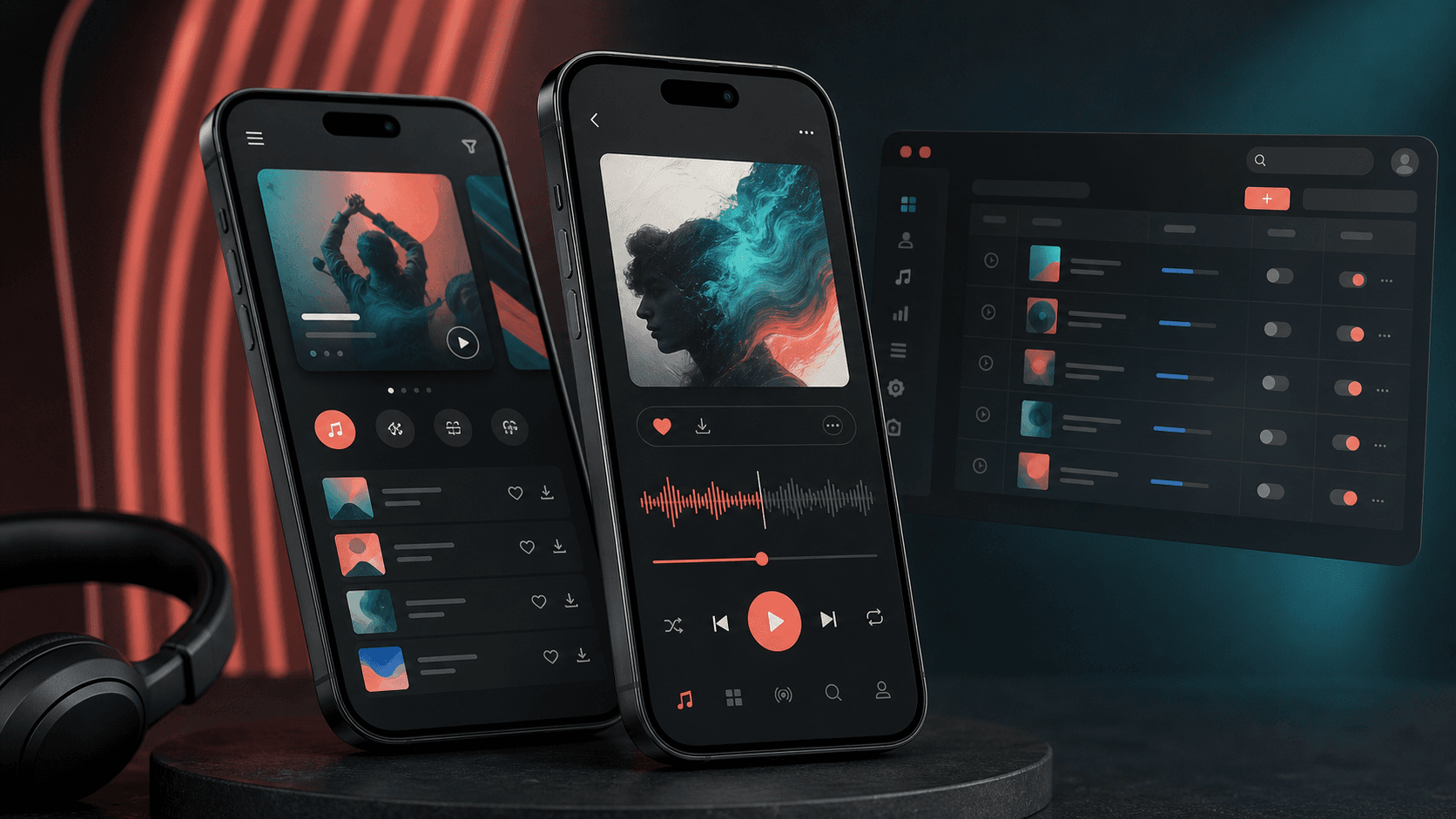
Mobile music streaming app visual with playlist cards, playback controls, favorites, downloads, and catalog discovery surfaces
Project scope

Native mobile app engineering across iOS, Android, streaming playback, catalog discovery, playlists, favorites, downloads, authentication, and API integration

2
native mobile apps
Streaming
background audio playback
Playlists
personal library workflows
Offline
download and saved music flows

Timeline

Cross-platform native mobile music player delivery

Music discovery needed to feel fast, personal, and continuous

The product needed native mobile experiences where listeners could browse mixtapes and songs, search a large catalog, keep favorites, build playlists, download tracks, and keep playback alive while moving around the app.

  • Listeners needed structured access to mixtapes, songs, artists, albums, categories, and curated sections
  • Audio playback had to continue through detail views, mini-player states, notifications, and background activity
  • User accounts needed favorites, recently played items, playlists, downloads, profile data, and login-aware actions
  • The iOS and Android apps needed to connect to the same catalog and account APIs while still feeling native on each platform

A pair of native music apps built around playback and personal libraries

SoundCrate brings catalog browsing, playlist creation, favorite tracking, downloads, profile access, and streaming controls into native iOS and Android apps with API-backed content and mobile-first player behavior.

  • Native iOS screens for home discovery, all songs, search, playlists, playlist details, favorites, profile, downloads, preview, and full player playback
  • Native Android activities and fragments for dashboard discovery, all songs, playlist creation, playlist tracks, favorites, downloads, search results, artist lists, profile, login, signup, and forgot-password flows
  • Audio player layers for queue control, current item state, play/pause, previous/next, seek, buffering state, mini-player behavior, and notification controls
  • API-backed models and repositories for published tracks, mixtape responses, favorites, playlists, search results, users, recent content, and account-specific music actions

Product surfaces

What the platform brought together

The work spanned core product operations, daily user workflows, data-heavy coordination, and resilient platform management.

Music catalog discovery

Listeners can move through curated shelves, genres, artists, albums, mixtapes, recent songs, and searchable track lists without leaving the mobile context.

  • Home, dashboard, see-all, all-songs, search, artist-list, category, and menu browsing surfaces
  • Adapters and models for featured, newest, recent, classic, reggae, hip hop, blends, radio mixes, old school, and artist-led content
  • Reusable catalog cards and pagination helpers for larger music libraries

Playback and mini-player experience

The app keeps listening continuity at the center with full-screen players, mini-player states, media queues, seek controls, and background playback.

  • iOS player, mini-player, current media item, queue, timer, state-change, and route navigation flows
  • Android ExoPlayer and media-service workflows for play, pause, previous, next, seek, shuffle, buffering, completion, and audio focus
  • Notification controls and media button handling so listeners can control music outside the main app screen

Personal playlists and library actions

Account-aware actions let users save music, create playlists, add or remove tracks, review recent activity, and return to favorite content.

  • Playlist list, playlist detail, create playlist, search playlist, add-to-playlist, remove-track, and playlist-track flows
  • Favorites, recently played, downloads, profile songs, and account-specific filtering across mixtapes and tracks
  • Login-aware gates around favorites, playlist additions, profile data, downloads, and saved library state

Cross-platform API integration

Both native apps use structured API clients and content models to keep catalog, profile, playlist, favorite, and search behavior aligned.

  • Swift API manager, endpoint definitions, response models, reachability checks, and server-request helpers
  • Android Retrofit interfaces, repositories, use cases, response models, shared preferences, and utility helpers
  • Shared product concepts across iOS and Android while preserving native navigation, layout, and player patterns

Buyer priorities

What mattered most to the people evaluating the platform

Prospective buyers want to know whether the work solved real workflow, adoption, reliability, data, and operations problems. These priorities shaped the product decisions.

Listener retention

Music apps win when discovery, playback, and personal libraries remove friction from repeat listening.

  • Favorites, downloads, recent plays, playlists, and profile tabs gave users reasons to return
  • Mini-player and notification controls kept listening active while users browsed
  • Search and category browsing helped listeners quickly recover the track or mixtape they wanted

Native performance

Playback and media controls needed direct platform access instead of a generic web shell.

  • Swift and Java implementations gave each platform native audio, navigation, and background behavior
  • Android service and notification handling supported long-running playback expectations
  • iOS player state and mini-player flows kept the interface responsive around queue changes

Catalog operations

A mixtape product depends on API-driven catalog structure, reliable content models, and listener actions that stay synced.

  • Published track, mixtape, playlist, favorite, search, and user models kept app data organized
  • Repository and API-manager layers separated network behavior from screen code
  • Pagination, adapters, and reusable cells supported larger content collections

System model

How the platform connects roles, workflows, and product surfaces

The product architecture brings every role into the same operating model, with shared data moving cleanly between web, mobile, media, and notification layers.

Discovery to playback workflow

Listeners move from catalog browsing to search, playlist actions, full-screen playback, favorites, and downloads.

Two native apps, one music catalog

The iOS and Android apps share catalog, account, playlist, favorite, and search concepts while keeping platform-native media behavior.

Listener library controls

Guest listeners, signed-in users, playlist builders, downloaders, and returning fans each get the controls they need.

Technology

The Stack We Used And Why

The stack section is written for buyers who need to understand the product architecture, operational trade-offs, and long-term maintainability of the system.

iOS app

Used for native Apple-device music discovery, player controls, mini-player navigation, playlists, downloads, favorites, and profile workflows.

SwiftUIKitStoryboardsAVFoundationAlamofireSDWebImage

Android app

Used for native Android catalog browsing, fragments and activities, background playback, notification controls, playlists, favorites, and downloads.

AndroidJavaExoPlayerRetrofitRecyclerViewMedia notifications

Audio playback

Used to keep streaming, queue state, seek controls, buffering state, shuffle, mini-player, and notification playback consistent.

AVAudioPlayer patternsExoPlayerMediaPlayerForeground servicesAudio focus

Catalog and account APIs

Used to power login, signup, playlists, favorites, published tracks, search, recently played content, and profile-specific music data.

REST APIsJSON modelsRepository patternShared preferencesReachability checks

Mobile UI system

Used to create a music-first app interface with reusable cells, adapters, custom labels, icons, fonts, and media artwork loading.

UIKit cellsAndroid adaptersCustom fontsImage cachingResponsive mobile layouts

Why Native iOS And Android

A music player needs deep control over audio playback, notifications, background behavior, and device-specific media expectations.

  • Native iOS supported player transitions, mini-player states, and UIKit-driven music library screens
  • Native Android supported services, media notifications, audio focus, and ExoPlayer playback behavior
  • Separate native apps let each platform feel familiar while sharing the same product model

Why A Dedicated Player Layer

Playback is the core product experience, so player state, queue management, and controls needed dedicated ownership.

  • Queue and current-item models helped playback continue across screens
  • Mini-player and notification states kept music controls accessible
  • Buffering, seek, next, previous, and completion states were handled as product workflows, not only UI events

Why API-backed Libraries

Personal music features depend on server-backed state so playlists, favorites, recent plays, and downloads can stay tied to a listener account.

  • Catalog endpoints supported discovery sections, search results, playlist tracks, and published music data
  • Account-aware endpoints supported favorites, recently played content, downloads, and playlist changes
  • Repository and API manager patterns kept app screens from becoming direct network clients

Delivery

How the product came together

The work moved from domain modeling to core platform delivery, mobile adoption, and operational hardening.

1

Map the listening journey

Define how users discover music, start playback, move between screens, save tracks, and return to personal library sections.

2

Build native discovery surfaces

Create iOS and Android browsing, search, category, artist, all-song, and detail screens around reusable music content models.

3

Implement playback continuity

Add player queues, mini-player behavior, background services, notifications, and media controls that support real listening sessions.

4

Connect personal library workflows

Wire favorites, playlists, downloads, profile tabs, recently played content, login gates, and API-backed account state.

Operational depth

What made the platform usable after launch

The strongest case studies are not only feature lists. They show how the system is operated, monitored, governed, and improved when real users depend on it.

Playback remains accessible

Music controls stay close to the listener through full-screen player views, mini-player surfaces, and Android notification actions.

  • Play, pause, next, previous, seek, and buffering states are handled in dedicated player code
  • Android foreground service and notification actions support background listening
  • iOS mini-player and player route flows keep playback attached to navigation

Personal library state is account-aware

Saved music actions are tied to user state so listeners can build a repeatable library instead of browsing from scratch every time.

  • Favorites and playlist additions check login state before mutating account data
  • Recently played, favorites, and downloads have dedicated profile-oriented data stores
  • Search filters help listeners recover saved or recently heard music faster

Catalog scale is handled with reusable lists

The apps use adapters, cells, models, and pagination helpers to keep larger music collections manageable.

  • Reusable iOS table and collection cells support music rows and discovery cards
  • Android RecyclerView adapters cover categories, artists, playlists, songs, and curated sections
  • Pagination listeners and response models prepare the app for larger catalog responses

Results

The measurable and observable lift from the work

The strongest improvements are the ones a buyer can connect to daily work: fewer disconnected tools, safer operations, clearer workflows, and more reliable product behavior.

2 native apps

Platform Coverage

The product shipped dedicated iOS and Android implementations instead of a generic cross-platform shell.

Always-on player

Listening Continuity

Mini-player, queue, notification, and background-service patterns kept playback available across app states.

Personal library

Retention Surface

Favorites, playlists, downloads, recent plays, and profile areas gave listeners repeat-use workflows.

API-backed catalog

Content Operations

Structured models and repository/API layers connected mobile screens to playlists, tracks, artists, search, and account actions.

Outcome

A stronger operating system for mobile music streaming and mixtape player app

The platform reduced tool fragmentation and gave each role a clearer path from live activity to day-to-day action.

Native iOS and Android music apps for browsing, searching, streaming, saving, and downloading mixtape content

A playback architecture with queue state, mini-player behavior, Android notification controls, and background listening support

Personal library workflows for playlists, favorites, downloads, recent plays, profiles, login, signup, and account-aware actions

A public-safe mobile entertainment portfolio page that avoids real project names, repository names, private endpoints, source screenshots, signing assets, and brand identifiers

FAQ

Frequently Asked Questions About SoundCrate

Answers about the mobile music streaming and mixtape player app scope, platform model, technology choices, operational workflows, and related build patterns.

What Kind Of App Does SoundCrate Represent?

SoundCrate represents a native iOS and Android music streaming app for mixtapes, catalog discovery, playlists, favorites, downloads, profile access, and persistent audio playback.

Why Build A Music Player As Native Mobile Apps?

Native development gives stronger control over background playback, media notifications, audio focus, mini-player behavior, device navigation, and app-store-ready mobile experiences.

Can This Pattern Support Podcasts Or Audio Learning Apps?

Yes. The same architecture can support podcasts, lessons, meditation audio, paid audio libraries, creator catalogs, and any product where discovery, queues, saved items, and playback continuity matter.

What Should A Buyer Prepare Before Building A Similar Product?

Useful inputs include catalog structure, streaming source rules, account workflows, playlist behavior, offline/download policy, notification requirements, search filters, and rights or monetization constraints.

Related services

Build a similarly ambitious product without starting from a blank page.

We can help scope the web, mobile, AI, media, and operating layers needed for your own platform.

Start a project inquiry