Portfolio case study

WorkLedger: Workforce time tracking and billing operations web app

A workforce time tracking and billing operations platform that connects employee records, weekly timesheets, job costing, invoice details, rate management, approvals, reporting, and admin controls in one back-office system.

Name changed to respect NDA.

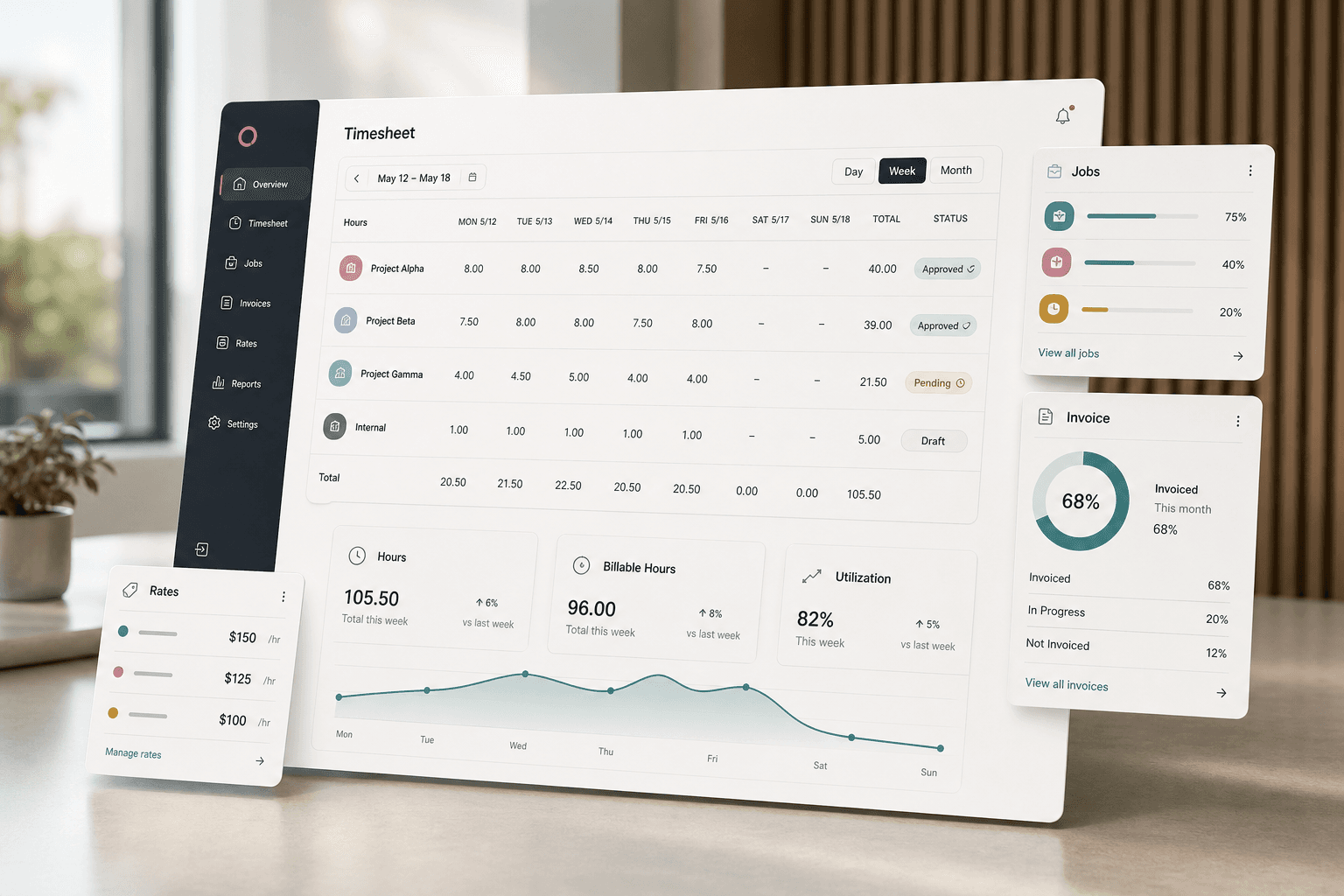
Workforce operations dashboard visual with weekly timesheets, job cards, invoice status panels, employee rates, and approval indicators
Project scope

Back-office web application, admin workflows, database API integration, reporting, and operational tooling

7
core operations modules
2
role-aware user modes
1
central weekly timesheet workflow
API
database-backed business records

Timeline

Legacy ASP.NET MVC operations platform build and workflow consolidation

Time, job, and billing data needed one reliable operations layer

Service teams were managing employee records, work hours, job details, rates, clients, companies, invoices, and reports as related but fragmented back-office tasks. The product needed to keep those records connected while giving administrators enough control to manage approvals and billing context.

  • Weekly hours, expenses, mileage, print copies, and job assignments needed to be captured consistently
  • Client, company, employee, job, salary, and rate records needed searchable admin workflows
  • Invoice and job details needed to stay tied to projects, fees, stages, and responsible staff
  • Operational updates needed audit-friendly history records instead of silent overwrites

A connected admin platform for timesheets, jobs, rates, and invoices

WorkLedger centralizes the daily back-office flow around role-aware access, weekly timesheet entry, employee and rate management, client/job records, invoice details, server settings, and reporting-ready data.

  • Timesheet screens capture daily hours, mileage, expenses, copies, employees, jobs, project context, and week dates
  • Client, company, employee, salary, and rate modules keep master records maintainable from the admin console
  • Job and invoice workflows connect client projects, job numbers, estimated fees, fee stages, invoice numbers, and invoice amounts
  • REST-backed table operations and history models preserve changes across operational records

Product surfaces

What the platform brought together

The work spanned core product operations, daily user workflows, data-heavy coordination, and resilient platform management.

Weekly timesheet capture

Employees and administrators can enter and review work by week, job, project, and expense category.

  • Daily hour fields for Monday through Sunday with week start dates
  • Mileage, expense, and print-copy capture alongside job and employee assignment
  • Employee and project lookup data pulled into the timesheet workflow

Job, client, and company records

Operational records stay searchable and connected so billing context does not drift away from the work performed.

  • Client and company management with list, save, edit, delete, and search workflows
  • Job records covering project, job number, job status, responsible partner, lead surveyor, check date, and estimated fees
  • Cross-module lookups that join job records to client names and company context

Rates, salaries, and employee administration

Workforce cost inputs can be managed alongside employee identity and permission data.

  • Employee records with payroll, contact, password, and company assignment fields
  • Rate records for salary, mileage, phone allowance, annual leave allowance, hours per day, and effective dates
  • Role-aware navigation separating employee access from administrative rate and server controls

Invoice and reporting readiness

Project and fee data flows into invoice details, searches, and report-ready operational tables.

  • Invoice detail capture for invoice number, amount, fee stage, and linked job
  • Searchable job and invoice lists with client/project context
  • History tables for job, client, company, employee, employee-rate, and timesheet changes

Buyer priorities

What mattered most to the people evaluating the platform

Prospective buyers want to know whether the work solved real workflow, adoption, reliability, data, and operations problems. These priorities shaped the product decisions.

Operational accuracy

The platform reduces manual reconciliation by keeping time, job, rate, client, and invoice records in the same workflow.

  • Timesheets reference employees, jobs, projects, and week records directly
  • Invoices retain project and fee context instead of living as detached records
  • History tables support operational review after edits

Back-office control

Administrators need to maintain master data without exposing every management screen to every employee.

  • Role-aware menu controls separate administrative modules from employee workflows
  • Server settings and rate lists sit behind administrative navigation
  • Searchable list screens reduce the friction of finding records at scale

Modernization readiness

The source platform is a legacy MVC implementation, but the product model maps cleanly to a modern SaaS operations architecture.

  • MVC controllers and Razor views identify stable domain modules for modernization
  • REST-backed table access can be replaced with typed APIs and permissioned services
  • Existing workflows provide a practical migration map for a modern dashboard and reporting layer

System model

How the platform connects roles, workflows, and product surfaces

The product architecture brings every role into the same operating model, with shared data moving cleanly between web, mobile, media, and notification layers.

Time to invoice workflow

Weekly hours, expenses, job assignments, rate data, and invoice details move through one operational flow.

Operations roles and controls

Employee and administrator experiences share one platform while exposing different record-management capabilities.

Legacy MVC to modern SaaS path

The existing MVC app maps to a modern API, database, dashboard, reporting, and deployment architecture.

Technology

The Stack We Used And Why

The stack section is written for buyers who need to understand the product architecture, operational trade-offs, and long-term maintainability of the system.

Web application

Used for the operational admin console, Razor views, forms, searchable lists, authentication, and role-aware navigation.

ASP.NET MVCC#Razor ViewsBootstrapjQuery

Business data layer

Used to read and write operational tables for employees, clients, companies, jobs, timesheets, invoices, rates, weeks, server settings, and history records.

REST API IntegrationMySQL-backed TablesRestSharpJSON Serialization

Operations tooling

Used to support logging, monitoring hooks, email server configuration, authentication, and production diagnostics.

NLogApplication InsightsASP.NET IdentitySMTP Configuration

Modern target stack

A suitable modernization direction for the same product category with stronger maintainability, reporting, and deployment practices.

Next.jsTypeScriptPostgreSQLPrismaRole-Based Access ControlCloud Hosting

Why Keep The Domain Model Central

Time tracking and billing platforms succeed when employee, job, rate, and invoice records share one source of operational truth.

  • Timesheet forms pull directly from employee and job records
  • Invoice records inherit job and client context
  • Rate changes and history records protect downstream billing accuracy

Why Modernization Matters

The existing MVC structure gave a working operations map, while a modern rebuild could improve security, reporting, responsiveness, and maintainability.

  • Legacy controllers become clear service boundaries
  • Razor list and save screens become reusable dashboard workflows
  • Table-based REST calls can evolve into typed APIs with stronger validation

Delivery

How the product came together

The work moved from domain modeling to core platform delivery, mobile adoption, and operational hardening.

1

Model the back-office records

Define the operational relationship between employees, clients, companies, jobs, weeks, rates, timesheets, invoice details, and history tables.

2

Build the working admin console

Create list, search, save, edit, and delete workflows for the operational records that keep the business running.

3

Connect time to billing context

Tie weekly work capture to job records, employee rates, fee stages, invoice amounts, and project reporting.

4

Prepare for modernization

Use the legacy implementation as a migration map for stronger typed APIs, permissions, analytics, and cloud deployment.

Operational depth

What made the platform usable after launch

The strongest case studies are not only feature lists. They show how the system is operated, monitored, governed, and improved when real users depend on it.

History-aware record updates

Job, employee-rate, client, company, employee, and timesheet history models preserve the shape of operational changes for later review.

  • Separate history tables mirror key business records
  • Create and amend fields capture the actor and timestamp context
  • History records make a future audit/reporting layer easier to introduce

Search and lookup ergonomics

Operational users need fast record discovery more than decorative screens, so the app centers list views and select-based lookup flows.

  • Employee, client, company, job, invoice, and rate lists are searchable
  • Timesheet and invoice forms hydrate related dropdowns from live records
  • Navigation keeps core back-office modules close to the user

Results

The measurable and observable lift from the work

The strongest improvements are the ones a buyer can connect to daily work: fewer disconnected tools, safer operations, clearer workflows, and more reliable product behavior.

Unified

Operations Records

Employee, company, client, job, timesheet, rate, week, and invoice data share one administrative workspace.

Weekly

Time Capture Rhythm

Daily hours and expenses roll into a week-based timesheet workflow that aligns with approval and billing cycles.

Traceable

Business Updates

History models capture changes to key operational records for audit-friendly review and modernization planning.

Ready

SaaS Modernization Path

The legacy MVC system provides clear module boundaries for a modern workforce operations product.

Outcome

A stronger operating system for workforce time and billing operations platform

The platform reduced tool fragmentation and gave each role a clearer path from live activity to day-to-day action.

A web-based operations platform for weekly timesheets, job records, clients, companies, employees, salaries, rates, invoices, email server settings, and reporting-ready data

Role-aware navigation that separates employee workflows from administrative record and configuration screens

REST-backed business record workflows with list, search, save, edit, delete, lookup, and history patterns

A public-safe modernization case study that connects legacy MVC evidence to a complete workforce operations SaaS story

FAQ

Frequently Asked Questions About WorkLedger

Answers about the workforce time and billing operations platform scope, platform model, technology choices, operational workflows, and related build patterns.

What Kind Of Product Does WorkLedger Represent?

WorkLedger represents a workforce time tracking and billing operations platform where teams manage weekly timesheets, job records, clients, employees, rates, invoices, and reporting-ready back-office data.

Why Does Time Tracking Need Job And Invoice Context?

Hours become more useful when they are tied to the employee, job, project, client, fee stage, expenses, and invoice details that finance and operations teams need for billing decisions.

Can A Legacy MVC Operations App Be Modernized Gradually?

Yes. Existing controllers, views, models, and table workflows can be mapped into modern API boundaries, role-based dashboards, validation rules, analytics, and cloud deployment without losing the operational domain knowledge.

Related services

Build a similarly ambitious product without starting from a blank page.

We can help scope the web, mobile, AI, media, and operating layers needed for your own platform.

Start a project inquiry