
Quick Answer: Where Generative AI Fits In Business
Generative AI for business works best when it improves a repeated knowledge workflow with clear data, measurable value, and human review. Good early candidates include customer support copilots, internal knowledge assistants, proposal drafting, document summarization, content operations, software delivery support, and operations research. Weak first candidates are vague chatbots, autonomous decisions with unclear accountability, or workflows where the source data is stale, sensitive, or poorly owned.
The practical question is not whether a model can generate fluent output. The question is whether the workflow has enough volume, trusted context, review capacity, and business impact to justify a production system. A strong first release should improve one workflow, cite or trace the knowledge it used, keep sensitive actions behind approval, and measure whether quality, speed, cost, or customer experience improved.
For teams already past category education, the implementation path usually starts with generative AI development discovery: workflow fit, data readiness, architecture, evaluation, governance, rollout, and ROI.
Business Use Cases That Are Worth Building
The best business GenAI use cases are workflow accelerators where a model can retrieve, draft, summarize, classify, transform, or recommend while people retain judgment for important decisions. A support copilot can draft answers, but refunds, complaints, and policy exceptions may still need a person. A sales assistant can prepare account context, but pricing and contractual commitments need accountable review.
| Use Case | What GenAI Does | Best First Metric | Review Boundary |
|---|---|---|---|
| Customer support copilot | Retrieves approved answers, drafts responses, summarizes account history | Handle time, answer acceptance, escalation quality | Refunds, complaints, legal or policy exceptions |
| Internal knowledge assistant | Answers employee questions from docs, tickets, CRM notes, and policies | Search time saved and source accuracy | Unverified or stale source material |
| Sales and proposal support | Creates account briefs, drafts proposals, adapts case studies | Proposal cycle time and edit rate | Pricing, terms, promises, and custom commitments |
| Content operations | Creates first drafts, summaries, variations, translations, and metadata | Production throughput and review effort | Brand claims, regulated claims, and final publishing |
| Software and data workflows | Explains requirements, drafts tests, summarizes data, maps defects | Cycle time, quality, and defect reduction | Production merges, security changes, data deletion |
Use cases become stronger when the organization already has examples of good output. Support transcripts, proposal templates, reviewed policies, code standards, and approved product messaging help the team create an evaluation set before launch.
How To Pick The First Generative AI Workflow
Score candidate workflows by business value, volume, output quality standard, data availability, review capacity, integration depth, and risk. High-volume work with clear source material and low external consequence is usually a better pilot than a broad autonomous decision workflow. The first implementation should prove that the organization can connect data, evaluate outputs, manage permissions, and drive adoption.
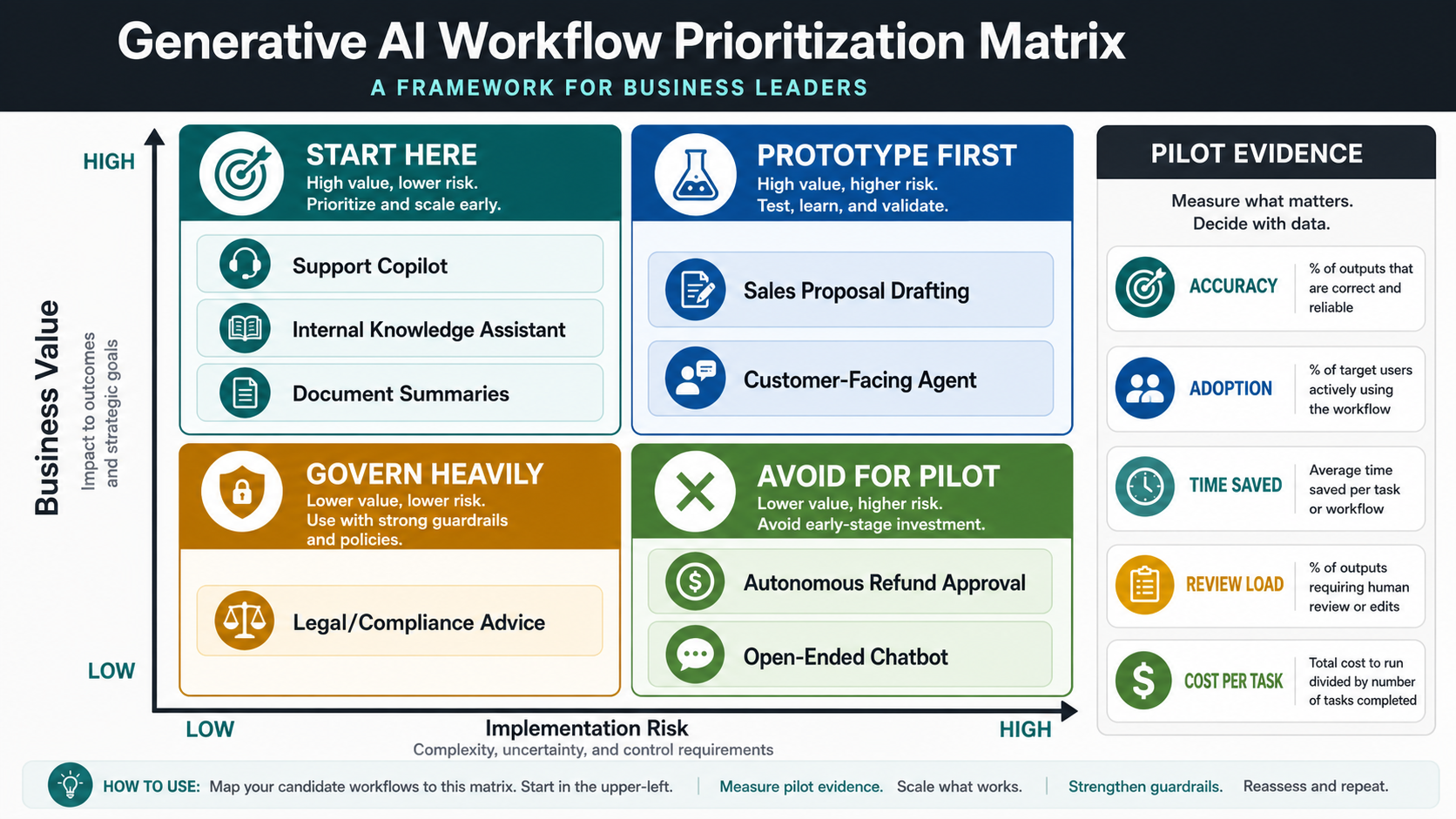
Use a simple filter before committing budget. If the workflow depends on private business context, plan retrieval or integration. If the output changes money, access, customer rights, medical advice, legal position, compliance obligations, or production systems, add approval gates. If the task needs deterministic results, put conventional software rules around the model instead of asking the model to behave like a database.
If the workflow may require tool use, approvals, or multi-step action, use the AI Agent Readiness Assessment before treating it as an agent project. The distinction between chatbot, GenAI assistant, AI agent, and agentic workflow is also covered in Generative AI vs AI Agents vs Agentic AI.
Reference Architecture For Business GenAI
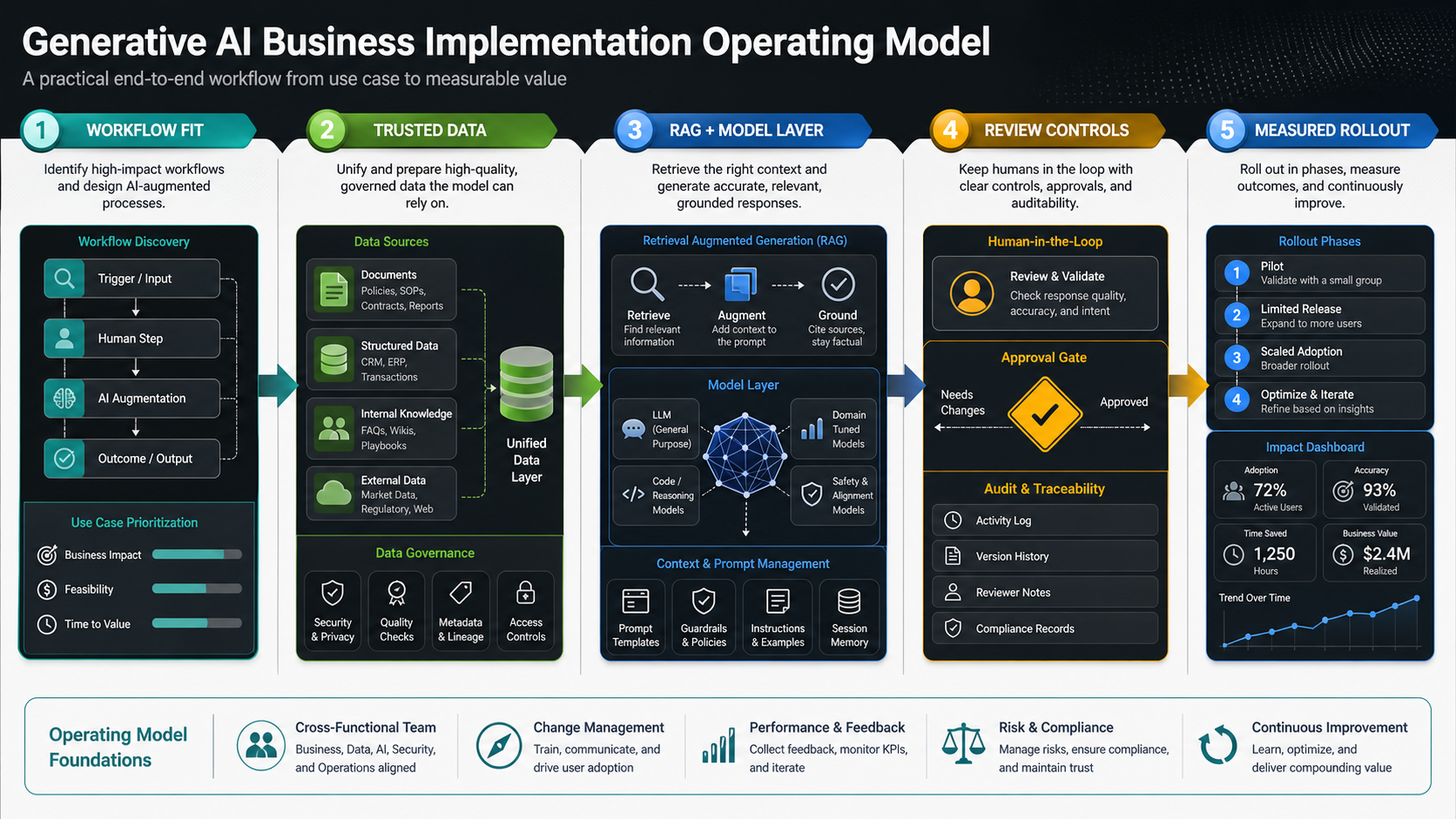
A production generative AI system is more than a model API. It usually includes source connectors, document processing, permission-aware retrieval, embeddings and search, prompt templates, model routing, tool calls, user interfaces, review queues, evaluation examples, telemetry, cost controls, and monitoring. The model layer matters, but the operating layer decides whether people can trust and improve the workflow.
For many business workflows, retrieval-augmented generation is the right starting point. RAG connects the model to approved documents, product data, policies, tickets, CRM context, or operational data without retraining the model on everything the company knows. It can reduce hallucination risk, expose citations, and keep answers closer to current business knowledge. For teams building private knowledge assistants, LLM development should treat retrieval quality, chunking, permissions, prompt design, and evaluation as engineering requirements.
Agents are useful when the workflow requires planning, tool use, or multi-step action. They also raise the control bar. Any agent that can write records, send messages, trigger workflows, or change customer state needs scoped permissions, action previews, approval gates, rate limits, logs, and rollback paths. That is where AI agent development becomes a product and governance problem, not just a prompt problem.
For teams comparing API-first, RAG, fine-tuning, agents, and private deployment, the Generative AI Architecture Decision Guide is the closest supporting article.
Build, Buy, Or Integrate?
Buy when the workflow is standard, the vendor already integrates with your core systems, and the tool gives you acceptable security, audit, and data controls. Build when the workflow is differentiated, data access is complex, or the assistant needs to sit inside your product, operations platform, CRM, support workflow, or internal tooling. Integrate when a foundation model or vendor handles part of the system but your team still needs custom retrieval, approvals, analytics, and user experience.
Most production systems are integrated builds. A company may use a foundation model, vector search, document extraction, and cloud tooling while still owning the workflow interface, permission model, evaluation harness, and integration with business systems. For broader workflows that mix predictive AI, GenAI, automation, and application engineering, AI development services may be the better planning path.
Use the Custom Software Cost Estimator when stakeholders need a directional budget before a detailed technical scope. The surrounding workflow, integrations, controls, and review interfaces often drive more cost than the model call itself.
Data Readiness And Security Checks
Before implementation, map the data the assistant needs and the data it must never expose. Business GenAI often touches documents, knowledge bases, tickets, chats, CRM records, product catalogs, analytics, code repositories, policies, and account data. Each source needs an owner, freshness expectation, access rule, retention rule, and deletion process.
- Permissions: The assistant should not reveal information a user could not access directly.
- Freshness: Teams need a clear indexing schedule and a way to retire stale documents.
- Source quality: Poor internal docs produce poor grounded answers, even with a strong model.
- Sensitive data: Prompts, retrieved context, files, and logs must follow privacy and security requirements.
- Auditability: Important outputs need traces showing source documents, model version, prompt version, and reviewer action.
NIST's Generative AI Profile for the AI Risk Management Framework, released on July 26, 2024, is a useful cross-sector reference for mapping GenAI risks, measurement, and governance. IBM's 2025 breach research also reinforced the security gap around shadow AI and missing access controls, which is why business GenAI projects should define permission boundaries before a pilot spreads informally.
For agentic or tool-using systems, the Secure AI Agent Development Checklist is a useful companion because it focuses on tool permissions, approval gates, audit logs, and safe failure modes.
Evaluation Before Launch
Business teams should evaluate GenAI with examples, not impressions. Create a test set of real prompts, expected source documents, good answers, bad answers, edge cases, and forbidden responses. Score outputs on factuality, source use, completeness, tone, safety, latency, cost, and usefulness inside the actual workflow.
Evaluation should include people who know the work. Support leads can judge whether an answer would reduce or increase escalations. Sales leads can judge whether a proposal draft is accurate enough to save time. Engineers can judge whether a code assistant follows internal patterns. Compliance or operations teams can define outputs that must never be automated.
Track production metrics after launch. Useful measures include adoption rate, answer acceptance, edit distance, escalation rate, time saved, cost per resolved task, hallucination reports, override rate, and satisfaction. McKinsey's 2025 State of AI work points to the same operating reality: value depends on workflow redesign, measurement, adoption, and governance, not model access alone.
ROI And Operating Cost Planning
GenAI ROI should start with a baseline. Measure how many times the workflow runs, who performs it, how long it takes, how often work is reworked, what quality issues occur, and what the current process costs. Then estimate the assistive version: time saved, review load, model and infrastructure cost, integration maintenance, quality improvement, and adoption rate.
Use the AI Automation ROI Calculator for a directional payback model, but avoid pretending every fluent answer is saved labor. Human review, source maintenance, monitoring, and exception handling are part of the operating cost. The best GenAI workflows create value because they reduce repeated knowledge work while making quality easier to inspect.
| Metric | Why It Matters | Risk If Ignored |
|---|---|---|
| Adoption rate | Shows whether users actually bring the assistant into the workflow | A good demo becomes unused software |
| Human edit rate | Shows how much correction the output needs | Hidden review work erases savings |
| Source accuracy | Shows whether RAG retrieves the right evidence | Confident answers cite weak or stale material |
| Escalation quality | Shows whether handoffs include enough context | Humans repeat work after AI involvement |
| Cost per resolved task | Combines model, infrastructure, and labor cost | Usage scales without economic control |
Implementation Checklist
Use this checklist before moving from idea to build:
- Define the workflow. Name the repeated task, user, trigger, input, output, decision owner, and success metric.
- Map the data. Identify source systems, permissions, freshness, sensitive fields, and missing knowledge.
- Choose the pattern. Decide whether the first release needs API-only generation, RAG, fine-tuning, agents, deterministic rules, or a simpler integration.
- Design review gates. Separate draft-only actions from recommendations, approved execution, and any fully automated low-risk action.
- Create evaluation examples. Build test prompts, expected answers, unacceptable outputs, and edge cases before launch.
- Ship into the workflow. Put the assistant where people already work instead of making them visit a disconnected demo.
- Monitor and improve. Review quality, adoption, cost, latency, source gaps, and failure modes every release cycle.
A good pilot should end with an operating decision: scale, revise, or stop. If the workflow saves time but creates too much review burden, the architecture or scope needs work. If the output is useful but adoption is weak, the problem may be UX or change management rather than model quality.
Common Mistakes To Avoid
The most common mistake is starting with a model choice instead of a workflow. Model selection matters, but it should follow the business task, data sensitivity, latency needs, cost tolerance, and evaluation standard. Another mistake is expecting a chatbot UI to solve every problem. Many GenAI workflows work better as embedded drafting tools, review panels, triage queues, or background summarization jobs.
- Scaling before measurement: a polished demo can hide weak permissions, unclear ownership, expensive calls, and missing edge cases.
- Using stale knowledge: if internal docs conflict, RAG will surface the conflict instead of solving it.
- Skipping human review design: sensitive outputs need approval, feedback, and audit trails before automation.
- Ignoring adoption: useful AI still fails if it sits outside the user's normal workflow.
- Overbuilding autonomy: many first releases need a copilot, not a broad agent with tool access.
How NextPage Can Help
NextPage builds generative AI systems around business workflows: discovery, use case selection, data and integration mapping, RAG architecture, LLM orchestration, agent design, evaluation harnesses, review interfaces, production deployment, and continuous improvement. The goal is not to add AI theater. The goal is to make one workflow measurably faster, more consistent, or easier to scale.
A practical first engagement can focus on a support copilot, internal knowledge assistant, sales proposal helper, content operations workflow, document summarizer, product operations assistant, or supervised agent workflow. From there, the roadmap can define what data is ready, what needs cleanup, where human review belongs, and which release is safe to automate.
If your team is planning a generative AI workflow, start by naming the job, the data, the review boundary, and the metric. The technology choice becomes much clearer after those decisions are explicit.