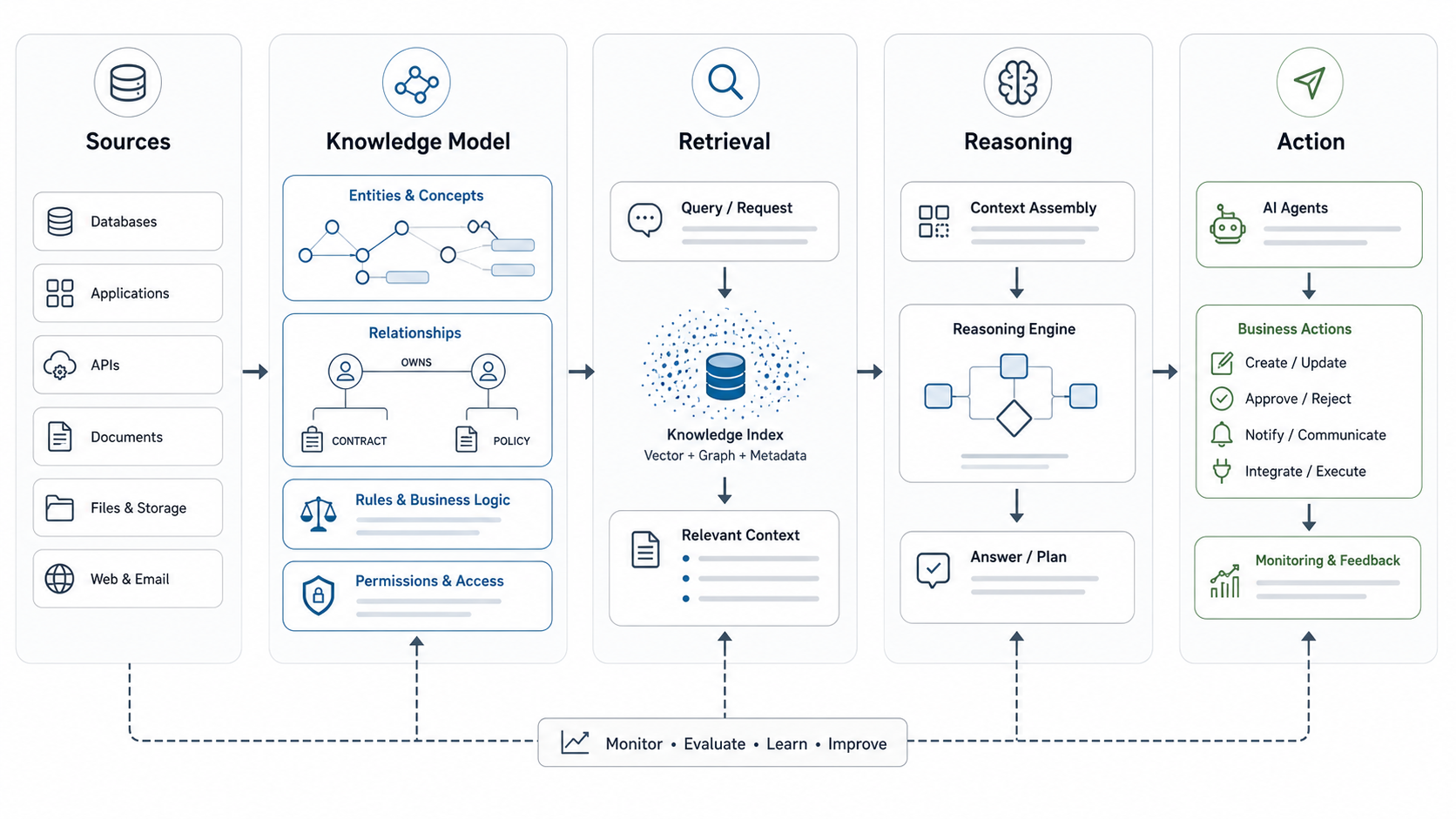

Quick Answer: Knowledge Representation Makes AI Context Usable
Knowledge representation in AI is the discipline of structuring facts, relationships, rules, procedures, and context so a machine can retrieve, reason over, and act on them. For business teams, the practical question is simple: how should your product, process, policy, customer, and operational knowledge be shaped so an AI system can use it safely?
That matters because most useful AI systems are not powered by a model alone. A support assistant needs approved answers, account context, escalation rules, and source citations. A RAG system needs retrievable evidence and metadata. An AI agent needs permissions, tool instructions, state, memory boundaries, and review gates. Knowledge representation is the layer that turns scattered content into dependable working context.
The reference article explains common knowledge representation types and approaches. This NextPage guide reframes the topic for teams building real business systems: what to represent, which pattern to choose, how it connects to RAG and AI agents, and how to avoid brittle automation.
What Business Knowledge Should Be Represented?
Start with the decisions or tasks the AI system must support. A knowledge model for a customer support assistant is different from one for underwriting, procurement, product onboarding, compliance review, or internal IT automation. The useful unit is not the document; it is the answer, rule, relationship, exception, and action boundary the workflow requires.
Most business AI systems need a mix of five knowledge types:
- Factual knowledge: products, policies, prices, accounts, vendors, services, SLAs, requirements, and definitions.
- Relational knowledge: how entities connect, such as customers to contracts, products to modules, claims to policies, or tickets to systems.
- Procedural knowledge: steps, approvals, handoffs, playbooks, troubleshooting flows, and operating checklists.
- Constraint knowledge: rules, permissions, compliance boundaries, rate limits, escalation triggers, and prohibited actions.
- Contextual knowledge: user role, geography, contract state, source freshness, confidence, and business priority.
A strong representation strategy makes these layers explicit. Weak systems hide them inside prompts, unstructured PDFs, spreadsheet columns, or tribal knowledge. That is why AI prototypes often look impressive in demos but fail in production when a workflow has edge cases, permissions, or outdated source material.
How Knowledge Representation Supports RAG
Retrieval-augmented generation, or RAG, gives a language model external evidence before it answers. But retrieval quality depends on how knowledge is represented. If content is chunked poorly, lacks metadata, mixes old and new policies, or ignores entity relationships, the model may retrieve plausible but incomplete context.
Useful RAG design goes beyond uploading documents. It usually includes content normalization, semantic chunking, titles, source URLs, update dates, access rules, entity tags, and evaluation examples. For complex domains, it may also include a knowledge graph or ontology so the system can understand that a product feature belongs to a plan, a customer belongs to a region, or a procedure applies only when a condition is true.
For production RAG products, NextPage combines enterprise RAG implementation with LLM development work across ingestion, retrieval, grounding, evaluation, permissions, monitoring, and workflow integration. The model choice matters, but the represented knowledge usually determines whether the system is useful.
Current platform patterns make the same point. Grounded AI systems increasingly expose source chunks, retrieval metadata, citation support, metadata filtering, and knowledge-base retrieval configuration as first-class controls. That means the knowledge model should define document ownership, freshness, jurisdiction, sensitivity, access scope, and evaluation examples before teams tune prompts or switch models.
AI Agents Need Context and Boundaries
AI agents add another layer. They do not only answer; they select steps, call tools, update records, trigger workflows, or prepare handoffs. That means the knowledge representation must include action boundaries, not just facts.
A sales research agent needs definitions of lead fit, data sources, CRM fields, allowed enrichment actions, and handoff criteria. A support triage agent needs issue categories, severity rules, account entitlements, escalation paths, and confidence thresholds. An operations agent needs system permissions, audit logging, rollback paths, and approvals before customer-impacting changes.
This is where many agent projects become risky. Teams describe desired behavior in a long prompt but do not represent the business rules, system relationships, and exception handling in a structured way. Before investing in an agent build, the AI Agent Readiness Assessment helps score whether the workflow, data, integrations, and governance are ready.
Agent knowledge also needs security shape: tool allowlists, approval gates, audit logs, prompt-injection defenses, and rollback paths. Use the secure AI agent development checklist when the system will read private data, call tools, or affect customer-facing records.
Choose the Right Representation Pattern
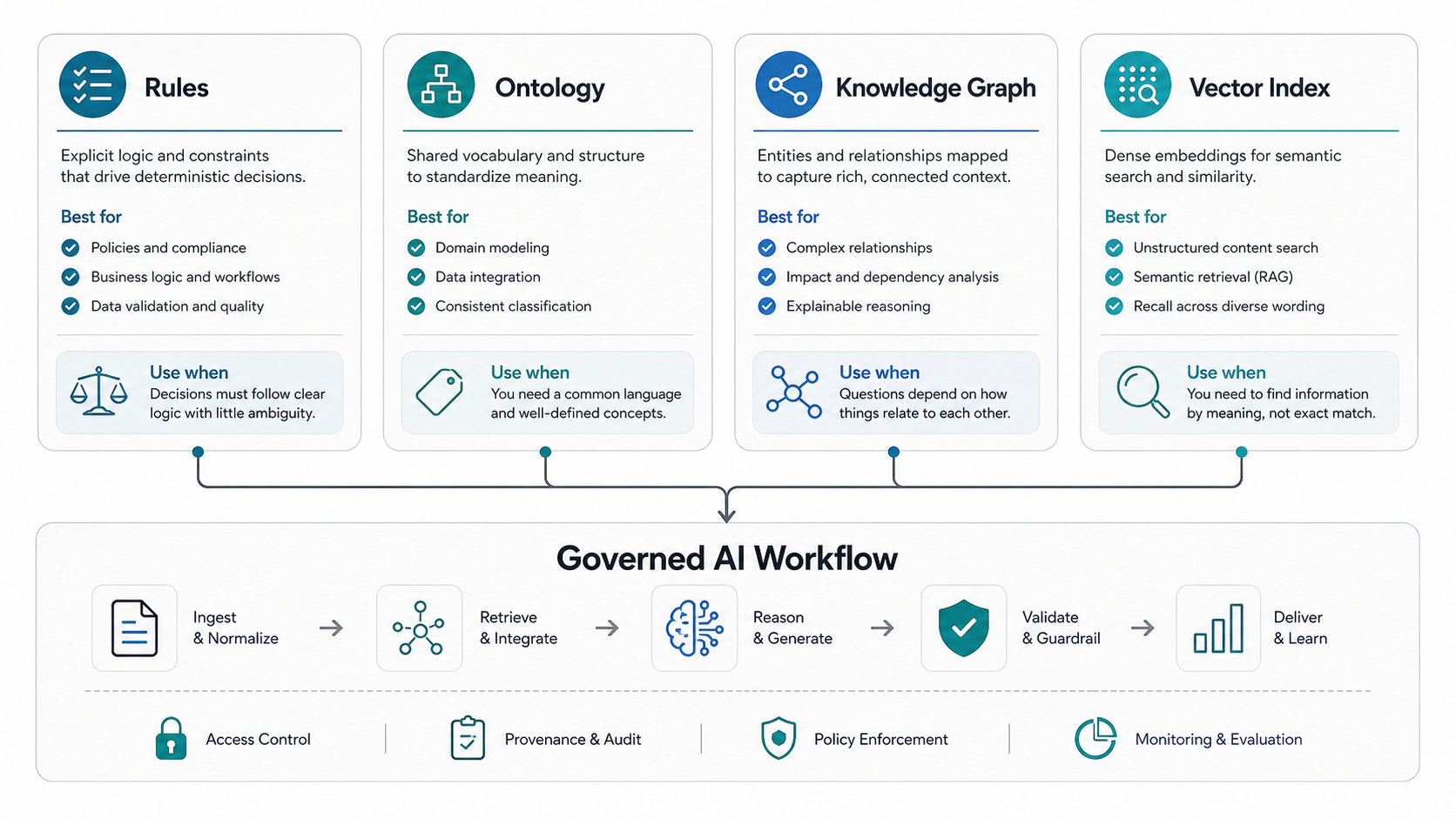
There is no single best representation pattern. Good architecture matches the pattern to the workflow risk and the type of knowledge involved.
| Pattern | Best fit | Common business example | Watch out for |
|---|---|---|---|
| Rules | Clear decisions, eligibility, escalation, permissions, and compliance checks | Route enterprise accounts to a senior queue when contract value and severity pass thresholds | Rule sprawl and hidden exceptions |
| Ontology | Shared vocabulary, categories, taxonomies, and domain definitions | Define product families, plan types, issue categories, document classes, and risk levels | Over-modeling before workflows are clear |
| Knowledge graph | Relationships between entities, dependencies, lineage, and multi-hop reasoning | Connect customer, contract, feature, support ticket, release, and renewal data | Stale relationships and weak source ownership |
| Vector index | Semantic search across documents, conversations, transcripts, and long-form content | Retrieve relevant policy sections, implementation notes, FAQs, and troubleshooting guides | Poor chunking, missing metadata, and permission leakage |
Hybrid designs are common. A RAG assistant may use vectors for document retrieval, an ontology for categories, a graph for entity relationships, and rules for permission checks. A workflow agent may use all four plus a human approval queue. If the domain has stable vocabulary, strict terminology, or repeatable decisions, compare this architecture with the domain-specific LLM development path before assuming a generic chatbot is enough.
Designing a Knowledge Layer for Business AI
A practical knowledge layer starts with workflow mapping. Identify the users, the questions they ask, the systems they touch, the records they need, and the decisions they are allowed to make. Then define what the AI can read, recommend, draft, or execute.
- Map the workflow. Document the task, inputs, outputs, approvals, and exception paths.
- Inventory sources. List databases, documents, websites, tickets, CRM records, product docs, policies, and spreadsheets.
- Classify knowledge types. Separate facts, relationships, procedures, constraints, and context.
- Choose representation patterns. Use vectors for retrieval, rules for boundaries, ontologies for vocabulary, and graphs for relationships where needed.
- Add governance metadata. Track source, owner, freshness, access level, jurisdiction, and confidence.
- Evaluate with real examples. Test correct answers, edge cases, outdated sources, permission boundaries, and unsafe actions.
The output should not be a static documentation project. It should be a maintained operating layer that supports product features, internal automation, analytics, and continuous improvement.
Examples in Business Systems
In a customer support assistant, knowledge representation might include product documentation, plan entitlement rules, account status, source citations, escalation thresholds, and a taxonomy of issue types. The assistant can draft responses, but billing disputes and cancellation risks can route to people.
In an internal knowledge assistant, representation might include department-specific permissions, document freshness, owner metadata, related projects, and glossary terms. The system can answer from approved sources while avoiding private or outdated content.
In an operations agent, representation might include system dependencies, runbooks, access rules, retry limits, incident severity, and approval gates. The agent can gather diagnostics and prepare a change, but production-impacting actions can require human confirmation.
In a product analytics or CRM workflow, representation might connect customers, segments, usage events, renewals, tickets, and feature requests. This makes AI recommendations more explainable because the system can show which relationships and source records shaped the answer.
Knowledge Layer Governance Checklist
A production knowledge layer should make trust decisions visible. Teams need to know which source won, why retrieval returned it, whether the user was allowed to see it, when it was last approved, and what the AI system did with it.
| Governance control | What to represent | Why it matters |
|---|---|---|
| Source ownership | Business owner, system owner, approval status, and review cadence | Prevents stale or unofficial knowledge from becoming the answer source |
| Access policy | Role, team, geography, customer segment, sensitivity level, and allowed use | Reduces permission leakage in RAG and agent workflows |
| Retrieval evidence | Chunk title, source URL, document version, retrieval score, and citation span | Helps reviewers understand why the answer was grounded in a source |
| Action boundary | Allowed tools, prohibited actions, approval thresholds, and rollback route | Keeps agent behavior inside the workflow risk boundary |
| Evaluation set | Expected answers, edge cases, restricted prompts, stale-source tests, and override reasons | Turns quality checks into an operating system instead of a one-time launch task |
This checklist is useful before a pilot and after launch. It gives product, security, operations, and compliance teams a shared way to inspect the knowledge layer instead of debating model output in isolation.
Governance and Evaluation
Knowledge representation is also a governance problem. A system that retrieves the wrong source, ignores permissions, or treats draft content as approved content can create operational risk. Representation should include ownership, freshness, approval status, sensitivity, and allowed use.
Evaluation should be built before launch. Create test sets for common questions, ambiguous prompts, missing context, restricted content, stale documents, and unacceptable actions. Track retrieval precision, citation quality, answer helpfulness, escalation rate, override rate, and time saved. This is the difference between a demo and a system your team can trust.
For broader planning across assistants, copilots, and automation workflows, NextPage's AI development services connect model design with data engineering, product UX, security, and production operations.
Implementation Roadmap
A sensible roadmap starts narrow. Choose one workflow where better knowledge access would reduce time, errors, rework, or handoff friction. Build the first representation layer around that workflow, then expand once source ownership and evaluation are stable. The AI implementation roadmap is a useful companion when the team needs to connect use-case discovery, data readiness, workflow design, and production rollout.
- Week 1 to 2: select the workflow, users, sources, success metric, and risk boundary.
- Week 3 to 4: create the source inventory, metadata model, chunking approach, and initial retrieval tests.
- Week 5 to 6: add rules, taxonomy, or graph relationships where the workflow needs structure beyond search.
- Week 7 to 8: build the assistant or agent interface, add review gates, and evaluate with real scenarios.
- After launch: monitor usage, retrieval quality, unsupported questions, source freshness, and workflow outcomes.
If the use case involves generative workflows, agents, or copilots, generative AI development should include retrieval design, prompt and tool governance, observability, and human review rather than only model integration.
How NextPage Can Help
NextPage helps teams turn business knowledge into production AI systems: knowledge audits, RAG architecture, source ingestion, entity and metadata modeling, workflow agents, evaluation harnesses, permissions, and review interfaces. The goal is not to make AI sound knowledgeable. The goal is to make it useful inside a real workflow.
If your team is comparing AI assistants, RAG, and agents, start with the operating question: what knowledge must the system trust, retrieve, explain, and act on? The answer will shape the architecture more than the model name. For a related decision guide, see Generative AI vs AI Agents vs Agentic AI.