
Quick Answer: Mobile App Integrations Checklist
A mobile app integrations checklist should separate integrations that make the first release usable from integrations that add cost, compliance, vendor risk, support load, or testing complexity. For most MVPs, authentication, analytics, crash reporting, basic notifications, payments only when revenue must happen in-app, and a small admin workflow come before advanced chat, video calls, loyalty systems, marketplace logic, or deep CRM automation.
The practical question is not whether payments, maps, push notifications, chat, video, or in-app purchases are possible. The question is which integration proves the business model, which one protects the user experience, and which one creates operational risk before the team is ready to support it.
In 2026, the checklist also needs a policy and dependency lens. App-store billing rules, Google Play purchase requirements, Apple review guidance, Firebase Cloud Messaging behavior, Google Maps Platform quotas, privacy disclosures, and vendor SDK deprecations can all change the estimate after the UI looks simple. Treat each integration as a product workflow plus a compliance, backend, QA, monitoring, and support obligation.
If the product scope is still fluid, use the MVP Scope Builder to divide integrations into build-now, prove-first, and later-phase work. For broader app delivery planning, NextPage's mobile app development service page explains how backend APIs, authentication, notifications, admin panels, analytics, and third-party integrations fit into a launch-ready app.
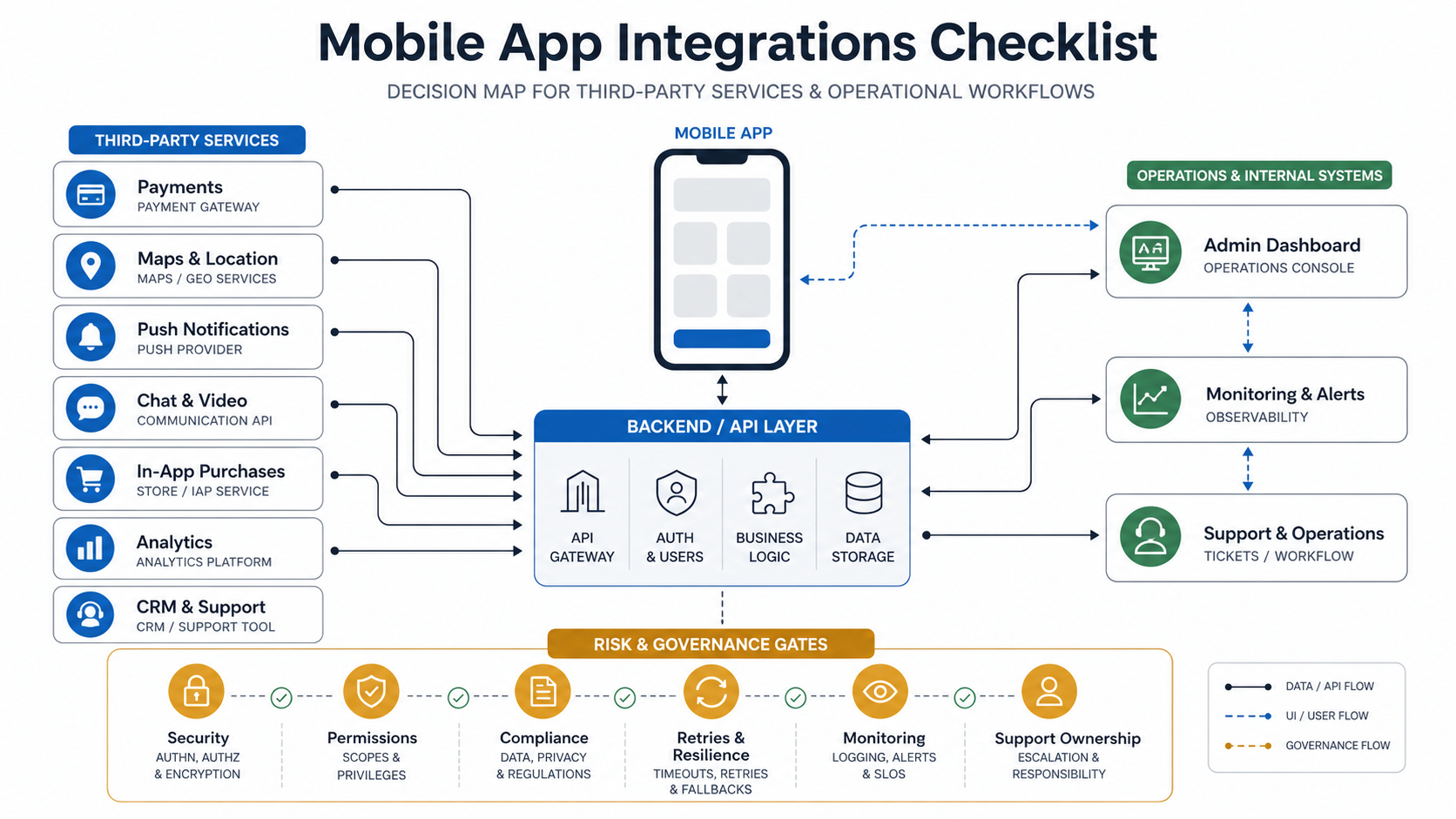
What To Confirm Before You Integrate Anything
Integration work becomes expensive when teams start with vendor SDKs instead of product decisions. Before choosing tools, confirm the workflow that the integration must support, the user state it depends on, the data it creates, and the failure mode the team can tolerate.
- User journey: which exact step needs the integration, and what happens if it fails?
- Account and identity model: does the integration depend on verified users, roles, KYC, subscriptions, wallet state, location permission, or device identity?
- Backend ownership: which events must pass through your backend instead of being handled only on-device?
- Admin workflow: who reviews transactions, refunds, disputes, reports, moderation queues, booking changes, or support tickets?
- Security and compliance: what sensitive data is involved, where is it stored, and which vendor controls must be documented?
- Monitoring: what logs, webhooks, alerts, and dashboards prove the integration is working after launch?
This is where many teams underestimate app cost. The custom software development cost guide is useful because integrations often add budget through workflow complexity, vendor edge cases, QA coverage, and long-term maintenance rather than just screen count.
Platform choice also matters. A shared codebase can still require native modules, store-specific billing behavior, notification permissions, and real-device QA. If the app will ship on both iOS and Android, compare integration complexity against NextPage's cross-platform app development services, Android app development, and Swift app development guidance before assuming one SDK path covers every requirement.
Integration Checklist By Feature
Use the checklist below to decide what belongs in the MVP and what needs more discovery before engineering starts.
| Integration | Build when it proves | Questions to answer first |
|---|---|---|
| Payments | The app must accept orders, bookings, deposits, subscriptions, or wallet-funded actions in the first release. | Who handles refunds, failed payments, taxes, invoices, reconciliation, disputes, and webhook retries? |
| Maps and geolocation | Location is central to discovery, delivery, routing, fleet movement, check-ins, or service availability. | Do you need background location, geofencing, address validation, route optimization, or only basic map display? |
| Push notifications | The app needs time-sensitive reminders, operational alerts, transaction updates, or retention loops. | What events trigger messages, how are permissions requested, and how will users control notification preferences? |
| Chat and messaging | Users, operators, sellers, drivers, coaches, or support teams need structured conversation inside the product. | Do you need moderation, attachments, read receipts, translation, escalation, templates, or audit history? |
| Audio and video | The core service requires consultations, tutoring, coaching, inspections, interviews, telehealth, or live assistance. | What are the quality, recording, consent, bandwidth, device, scheduling, and fallback requirements? |
| In-app purchases | Digital content, premium features, subscriptions, credits, or memberships must be sold through app store billing. | Which entitlements exist, how are receipts validated, and how will subscriptions sync across devices and platforms? |
| Analytics and attribution | The team must learn which onboarding, purchase, retention, or referral flows work after launch. | Which events define activation, conversion, churn, revenue, and operational health? |
| CRM and support | Customer issues, sales follow-up, account changes, or lifecycle campaigns must leave the app and reach teams. | What gets created automatically, what stays manual, and how are duplicates or stale records avoided? |
| Admin workflows | Operations teams need to approve, refund, moderate, assign, edit, export, or audit mobile activity. | Which tasks are safety-critical, revenue-critical, or compliance-sensitive enough to need role-based controls? |
Integration Priority Scorecard For MVP Decisions
After the basic checklist, score each integration against five criteria: revenue criticality, user trust, vendor risk, operational load, and release evidence. This keeps the conversation away from feature enthusiasm and toward what the first release can safely prove.
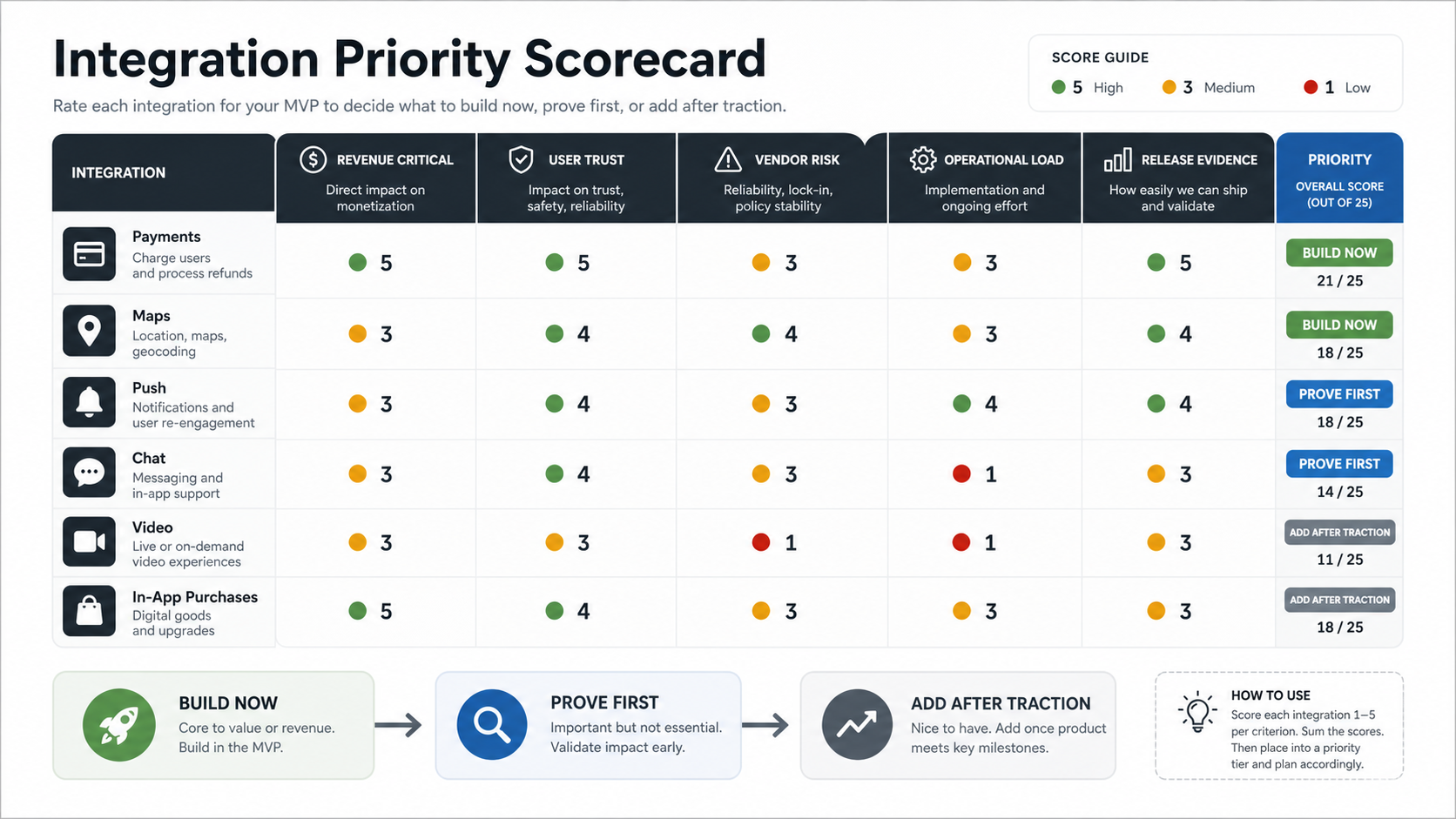
| Priority signal | What to ask | How it changes scope |
|---|---|---|
| Revenue criticality | Does the app fail commercially if this integration waits? | Revenue-critical payments or subscriptions may move into version one, but reconciliation and advanced promotions can still be phased. |
| User trust | Will users lose confidence if this workflow is manual or delayed? | Identity, transaction status, support visibility, and notification preferences need clear fallback states. |
| Vendor risk | How stable are the API, pricing, policy rules, SDKs, and sandbox environments? | Higher vendor uncertainty needs discovery, abstraction, monitoring, and exit planning before build estimates are firm. |
| Operational load | Who will handle refunds, disputes, moderation, missed events, or failed syncs? | Integrations with heavy operations need admin workflows and support playbooks, not only mobile screens. |
| Release evidence | Can the team prove the workflow under real device, network, permission, and store-review conditions? | Hard-to-prove integrations should move through prototype, sandbox, and pilot gates before broad rollout. |
When the score is unclear, run the feature set through the MVP Scope Builder and document which assumptions must be proven before the integration becomes build-ready.
MVP Sequencing Matrix
A clean integration roadmap does not treat every third-party service as equal. Some integrations are foundation work, some need a prototype, and some should wait until real users prove the need.
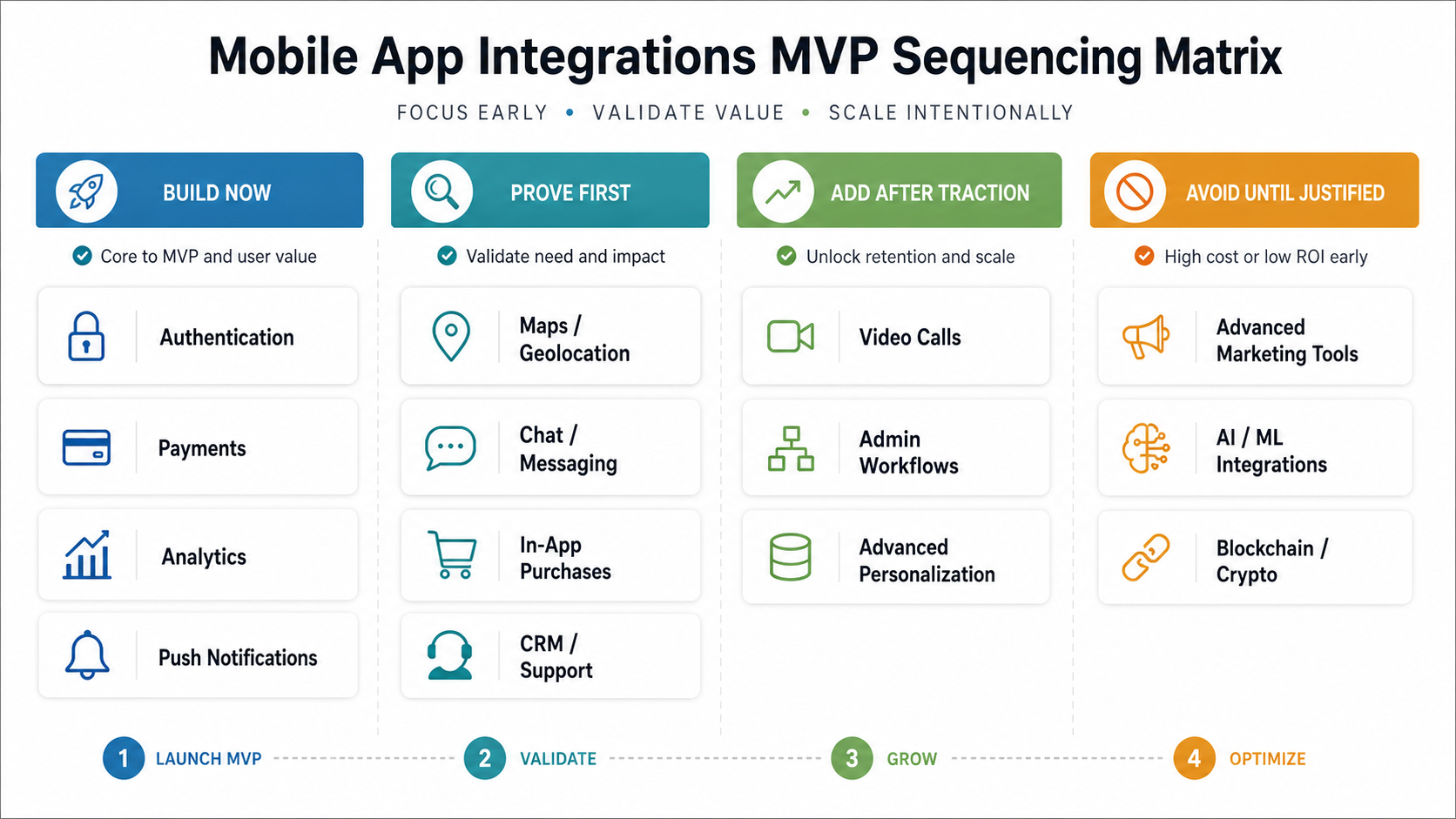
| Phase | Typical integrations | Decision rule |
|---|---|---|
| Build now | Authentication, analytics, crash reporting, basic admin, core API, simple notifications. | Required to run the product, measure usage, or support the first user workflow. |
| Prove first | Payments, maps, CRM sync, support tooling, complex push journeys. | Important, but scope depends on business model, data rules, vendor choice, and operating process. |
| Add after traction | Chat, video, loyalty, personalization, automation, advanced reporting. | Useful once adoption shows enough volume to justify moderation, support, and maintenance. |
| Avoid until justified | Multiple payment vendors, redundant chat systems, background tracking, custom real-time media, heavy marketplace tooling. | High complexity without clear launch evidence or support readiness. |
The mobile app development RFP checklist can help turn this sequencing into vendor questions, estimate assumptions, acceptance criteria, and red flags before a build partner starts quoting.
Architecture And Data Flow Considerations
Mobile integrations should not live as isolated SDKs scattered across screens. A resilient architecture keeps the app, backend, vendor services, admin console, data pipeline, and support workflow connected through clear ownership boundaries.
- Use the backend for trusted decisions: payment confirmation, entitlement validation, sensitive business rules, audit logs, refunds, and irreversible account changes should not depend only on the app client.
- Design for retries: webhooks, push delivery, map lookups, receipt checks, chat messages, and support syncs need idempotency, retry rules, and failure queues.
- Normalize vendor events: do not let every downstream workflow depend on one vendor's raw payload shape.
- Separate user-visible state from vendor state: tell users when an action is pending, failed, under review, refunded, processing, or awaiting confirmation.
- Plan observability early: log integration calls, webhook receipt, queue depth, error categories, latency, and admin interventions.
Policy, Privacy, And SDK Change Control
Mobile integrations also need a change-control plan because app-store billing rules, privacy disclosures, SDK requirements, and vendor APIs can shift after the first release. Treat payment providers, analytics SDKs, maps, messaging, video, attribution, and push vendors as dependencies with owners, release notes, renewal dates, and regression checks.
| Change area | What to verify before launch | Owner |
|---|---|---|
| Store billing and subscriptions | Confirm whether the workflow uses app-store billing, external payment, marketplace payout, wallet credit, or subscription entitlement rules. | Product and finance |
| Privacy and SDK disclosures | Document data collected by analytics, attribution, crash, chat, video, and payment SDKs, including whether a privacy manifest or vendor disclosure is needed. | Engineering and compliance |
| Permissions and user controls | Review location, notifications, microphone, camera, contacts, tracking, and background access prompts against the actual user value. | Product and QA |
| Vendor policy drift | Track API versioning, pricing changes, rate limits, sandbox behavior, webhook payload changes, and deprecation dates. | Technical owner |
| Release evidence | Retest payment, push, map, chat, video, purchase, analytics, and support workflows on real devices after SDK or policy updates. | QA lead |
This section should be reviewed whenever Apple, Google, payment processors, mapping vendors, messaging providers, or analytics SDKs change policy. The goal is not legal advice; it is an engineering control so integration risk does not surprise the product team during review, launch, or the first production incident.
For paid digital goods and subscriptions, validate whether Apple in-app purchase, StoreKit entitlements, Google Play Billing, user-choice billing rules, or external purchase links apply in the target storefronts. For push, remember that Firebase Cloud Messaging is cross-platform, but iOS delivery still depends on Apple Push Notification service configuration and real-device testing. For maps and location, check current SKU pricing, quota limits, and fallback behavior before estimating high-volume search, routing, geocoding, or background tracking.
API And Vendor Readiness Handoff
Mobile integration scope becomes easier to estimate when product, engineering, vendors, QA, and support share one handoff pack. The handoff should explain the workflow owner, API documentation status, sandbox access, authentication method, webhook events, data fields, rate limits, failure states, admin actions, monitoring, and release evidence.
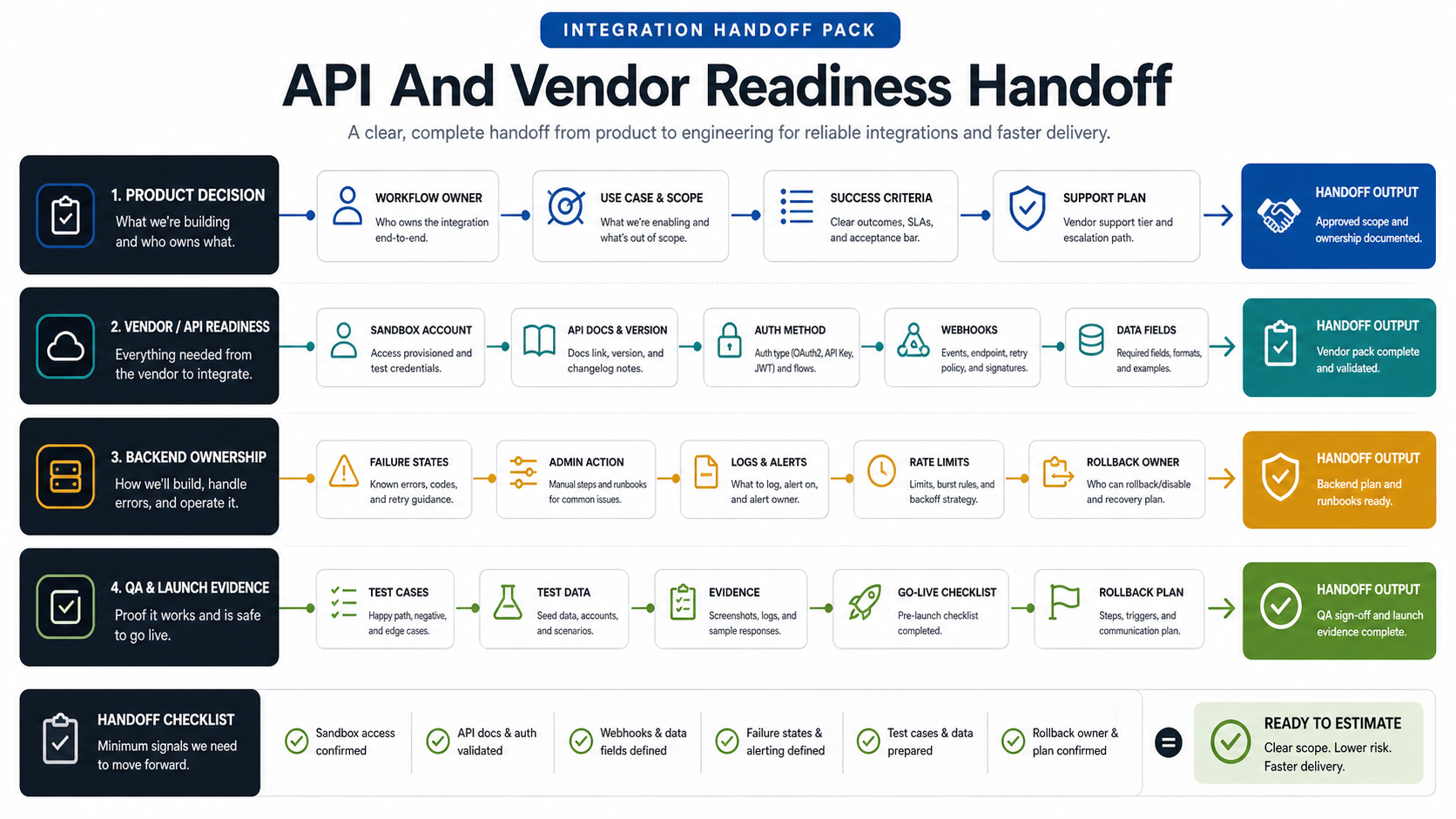
If the app connects customer-facing mobile workflows to dashboards, admin approvals, payments, inventory, reporting, or support queues, the work often overlaps with web app development because the mobile client is only one interface on top of backend operations. For a public example of mobile app, admin, checkout, chat, notification, and vendor operations working together, review the VenueCart portfolio case study.
| Handoff area | Minimum evidence before build | Owner to name |
|---|---|---|
| Product decision | Use case, success metric, user role, acceptance criteria, and what is out of scope. | Product owner |
| Vendor/API readiness | API docs, sandbox account, test credentials, auth method, webhook list, rate limits, and policy constraints. | Vendor owner or client technical contact |
| Backend ownership | Trusted decisions, event normalization, retries, idempotency, logs, alerts, admin actions, and rollback rules. | Backend lead |
| QA and launch evidence | Happy paths, failure states, weak network tests, device coverage, test data, support runbooks, and go-live checklist. | QA lead and support owner |
For connected products with devices, BLE, telemetry, or edge workflows, the IoT mobile app development roadmap shows how mobile state, cloud ingestion, device pairing, offline behavior, and QA planning add extra integration decisions.
If the handoff is still vague, map it against the mobile app development process and a realistic mobile app development timeline. That prevents teams from compressing vendor discovery, API contract review, device QA, store submission, and stabilization into the same sprint as feature implementation.
QA, Risk, And Release Checklist
Integrations create failure modes that do not appear in a static prototype. Test denied permissions, expired cards, payment disputes, location uncertainty, poor networks, duplicate webhooks, vendor downtime, revoked tokens, app upgrades, background restrictions, and store review rules.
| Risk area | What to test | Why it matters |
|---|---|---|
| Permissions | Location, camera, microphone, notifications, contacts, and permission changes after install. | The app must recover gracefully when users deny access or later revoke it. |
| Payments and purchases | Success, failure, refund, dispute, subscription renewal, receipt validation, and webhook delay. | Revenue and entitlement bugs quickly become trust and support issues. |
| Real-time communication | Message delivery, blocked users, missed calls, reconnection, device switching, and moderation. | Chat and video are operational workflows, not just UI features. |
| Offline and weak networks | Retry queues, stale map data, delayed sync, duplicate submissions, and conflict resolution. | Mobile users move through unreliable environments. |
| Monitoring and support | Error alerts, admin visibility, support ticket context, and escalation ownership. | Teams need to know when the integration fails before users report it repeatedly. |
Use NextPage's mobile app testing checklist to expand these cases into device, OS, permission, network, analytics, notification, crash, and store-readiness coverage before launch. For high-risk payment, notification, or subscription changes, add a focused regression testing checklist so existing revenue and support workflows are retested before release.
When a release has many third-party dependencies, consider independent mobile app testing services for device coverage, permission flows, weak-network testing, payment callbacks, push delivery, analytics events, and store-readiness evidence. The functional testing checklist for web and mobile apps can also help convert integration risks into acceptance tests.
Cost Drivers And Vendor Questions
Integration estimates vary because the same feature name can hide very different scope. A payment integration for one-time card checkout is not the same as split payouts, tax logic, refunds, subscriptions, coupons, wallet credits, and reconciliation dashboards. A map integration for store search is not the same as live driver tracking, geofencing, routing, ETA prediction, and location history.
Ask vendors these questions before accepting a timeline:
- Which integration events will be handled on-device, in the backend, in queues, and in the admin panel?
- Which vendor SDKs and APIs are assumed, and what happens if the business later changes vendors?
- Which failure states are included in the estimate?
- Which webhooks, audit logs, dashboards, and support workflows are included?
- Which test environments, sandbox accounts, app store rules, and production credentials are required from the client?
- Which integrations are excluded from the MVP and why?
For early budget framing, the Custom Software Cost Estimator can help model how integration count, roles, complexity, and platform choices affect the build range. For more detailed budget assumptions, compare the scope against the custom software development cost guide before treating the first vendor quote as final.
How NextPage Helps With Mobile App Integrations
NextPage helps teams turn mobile integration ideas into buildable product scope. We map user journeys, backend ownership, vendor decisions, payment and subscription flows, notifications, location behavior, chat or video needs, analytics events, admin workflows, support handoffs, and QA coverage before implementation begins.
For a useful discovery call, bring the product goal, target platforms, must-have integrations, monetization model, user roles, vendor preferences, launch deadline, admin needs, support process, and any compliance constraints. We will help decide what belongs in the first release, what needs a prototype, and what should move to a later phase.