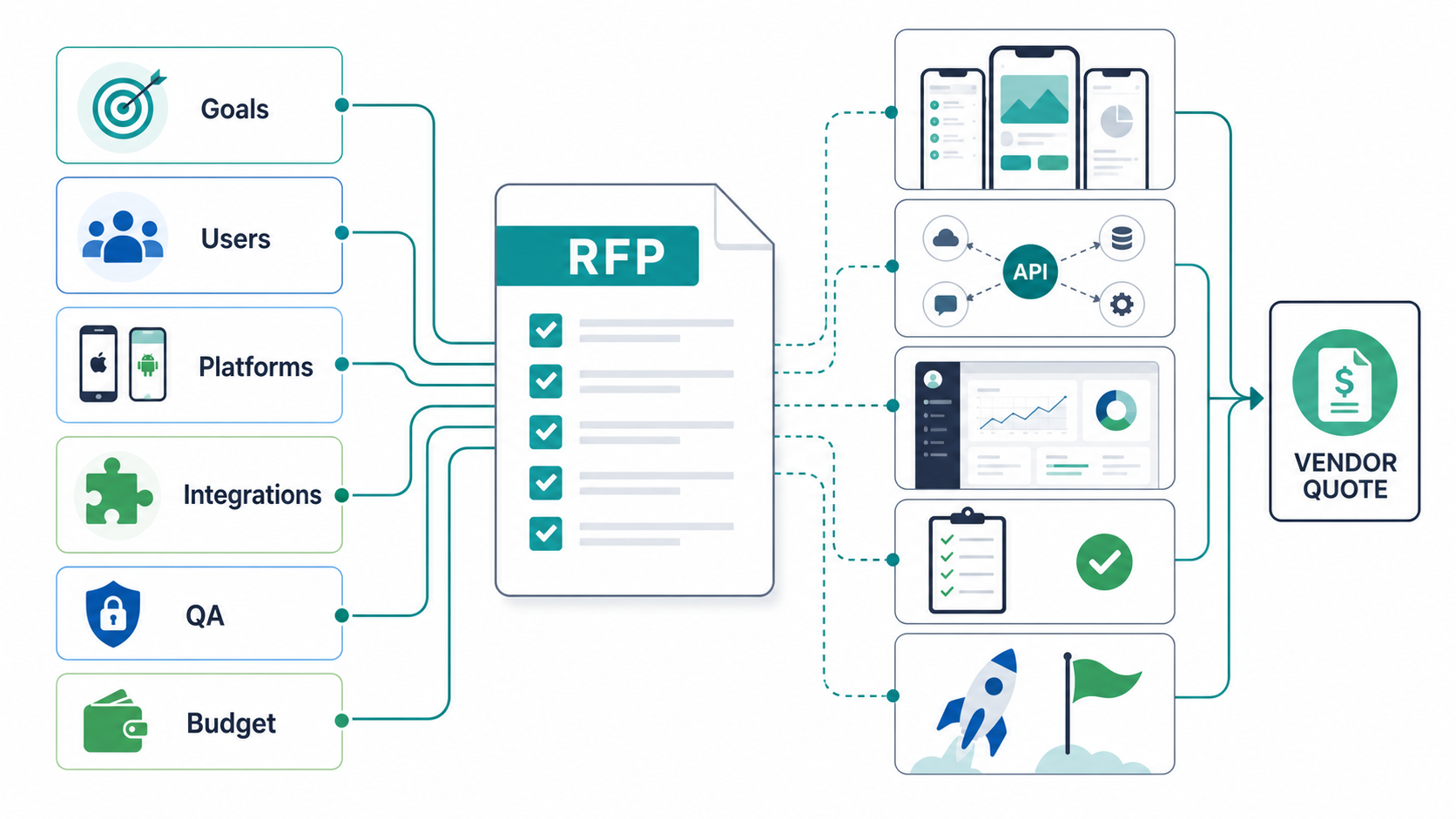

Quick Answer: What Should a Mobile App Development RFP Include?
A mobile app development RFP should give vendors enough context to estimate the product responsibly: business goals, target users, app platforms, core workflows, integrations, backend and admin needs, data and security expectations, analytics, QA coverage, launch support, and budget or timeline constraints. The best RFPs also ask vendors to explain tradeoffs, assumptions, risks, and post-launch ownership instead of asking for a flat quote against a vague feature list.
If your RFP only lists screens, vendors will price the visible interface and miss the operational system behind it. A better checklist turns the app idea into a decision package: what must be true for version one to succeed, what can wait, what systems the app must connect to, and how each vendor will prove the plan is realistic.
Before you send the document, make sure it can answer four procurement questions: what outcome the app must create, which release scope is actually required, which assumptions could change the estimate, and how proposals will be scored. That framing turns the RFP into a buyer decision tool instead of a document that simply invites cheaper guesses.
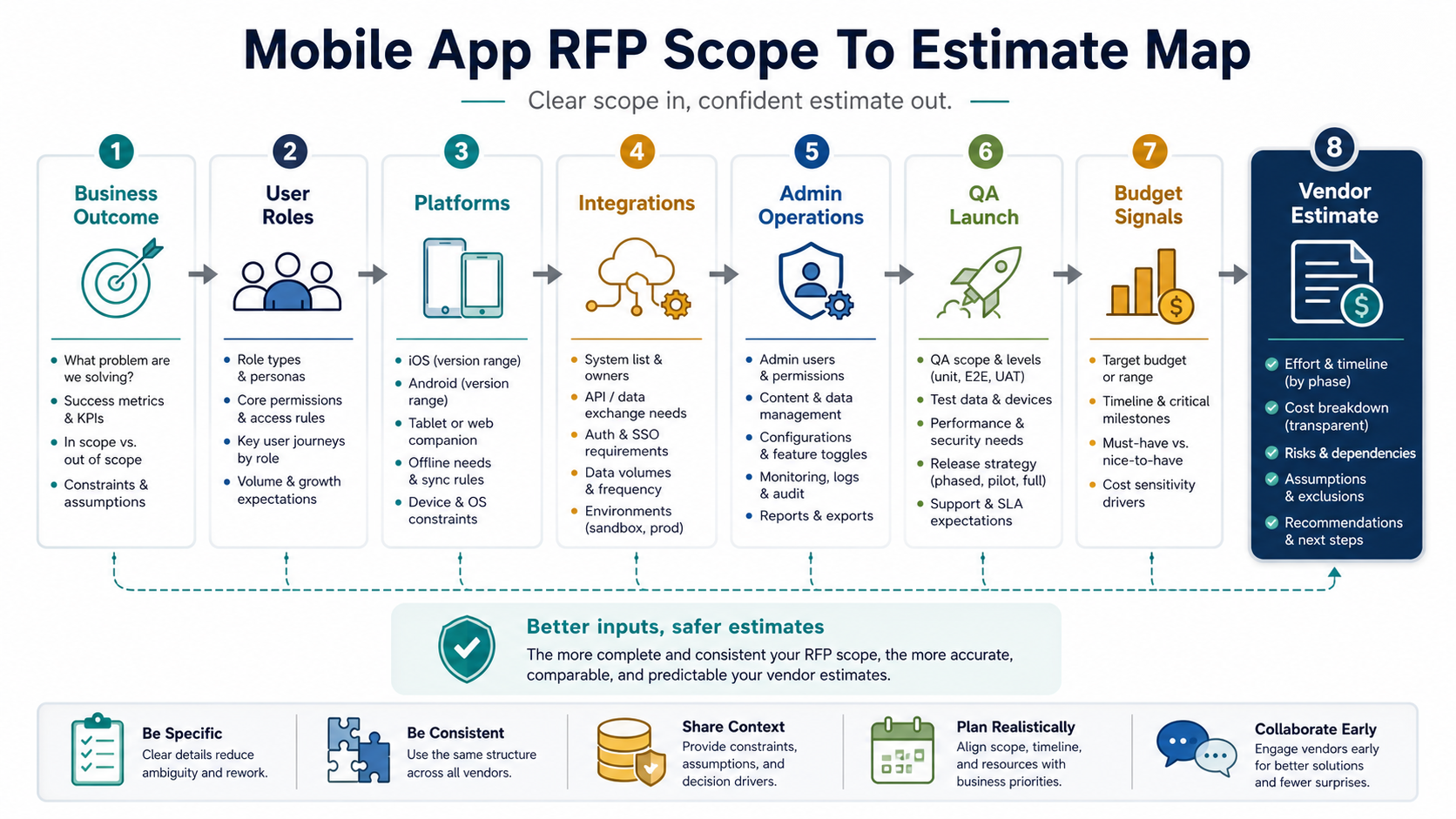
1. Start With the Business Outcome, Not the Feature List
Open the RFP with the business problem, the target audience, and the first measurable outcome. A consumer marketplace, a field operations app, a booking product, and an internal workflow app may all need iOS and Android screens, but they create different architecture, analytics, support, and risk requirements.
State the outcome in plain language: reduce manual dispatch work, increase repeat orders, help field teams submit reports faster, improve appointment conversion, or validate a new revenue model. Then connect the outcome to launch metrics such as activation, completed bookings, order value, task completion time, retention, crash-free sessions, or support volume.
This early clarity helps a mobile app development partner recommend a practical first release instead of treating every requested feature as equally important.
2. Define Users, Roles, and Critical Workflows
List every user group that touches the product: customers, admins, vendors, drivers, service providers, support agents, managers, or field staff. For each role, describe the top workflows they must complete in version one and what happens when a workflow fails.
A strong workflow section includes happy paths and exception paths. For example, a booking app should cover search, availability, payment, reschedule, cancellation, refund, notification, support, and admin override. A field app should cover offline capture, sync conflicts, manager review, attachments, location data, and failed uploads.
| RFP Area | What to Include | Why Vendors Need It |
|---|---|---|
| User roles | Role list, permissions, approval paths, and handoffs | Determines auth, admin, data model, and QA scope |
| Core workflows | Step-by-step user journeys and expected outcomes | Prevents estimates based only on screen count |
| Edge cases | Failed payments, no network, duplicate submissions, canceled orders, rejected approvals | Reveals real engineering and testing effort |
| Operational owners | Who manages content, users, disputes, refunds, inventory, or reports | Clarifies backend and admin requirements |
3. Explain the Platform Strategy: iOS, Android, Cross-Platform, or PWA
Your RFP does not need to decide the final technology stack, but it should explain the expected platform coverage. Do you need native iOS and Android from day one, a shared cross-platform codebase, a mobile-first web app, or a phased rollout?
Include device constraints, OS version expectations, tablet needs, offline behavior, camera or Bluetooth access, push notifications, location tracking, payments, in-app subscriptions, accessibility expectations, and app-store timing. If you are unsure, ask vendors to compare platform options. The native vs cross-platform mobile app development guide is a useful primer before you write this section.
4. Document Integrations, APIs, and Backend Expectations
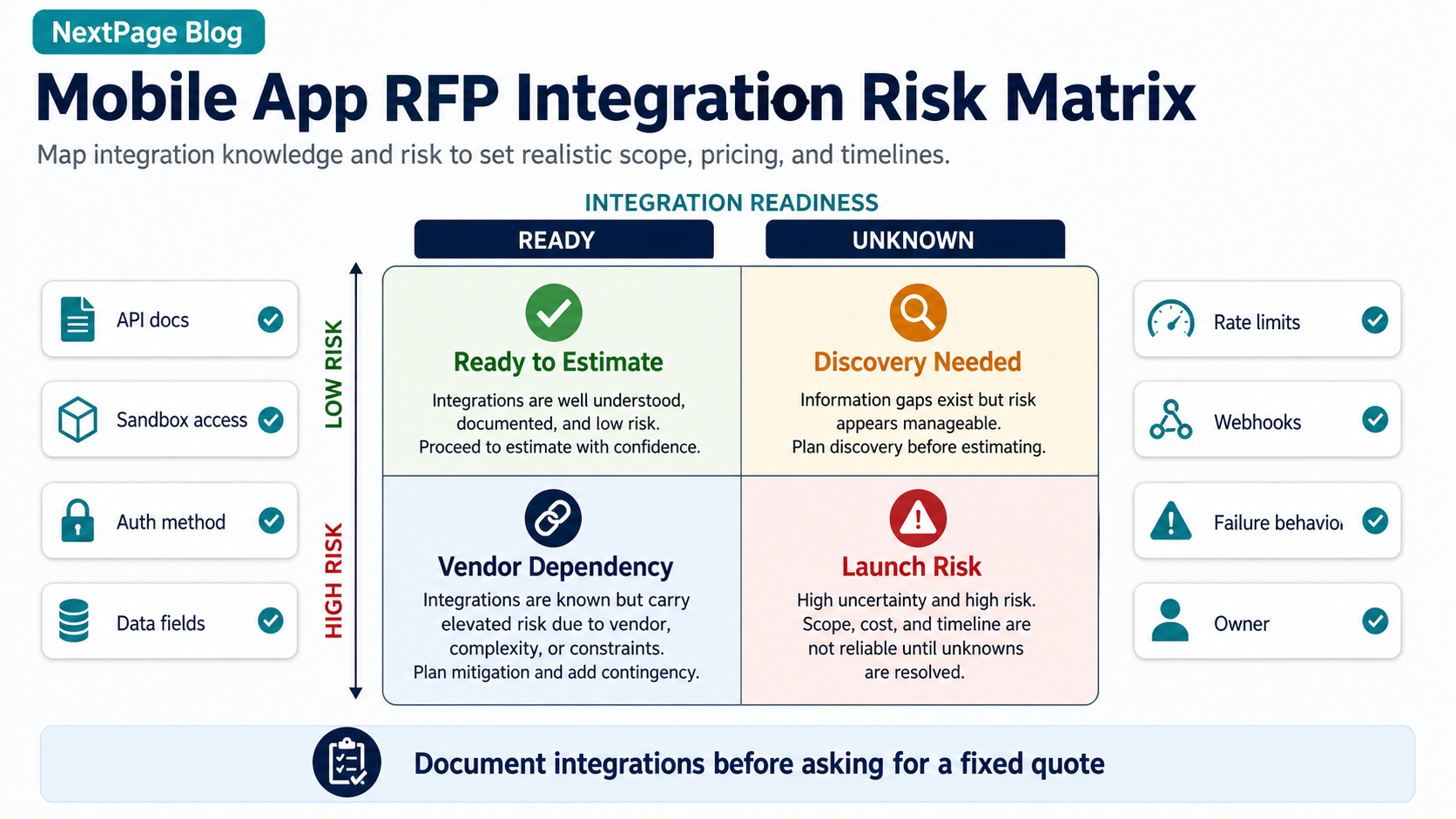
Many mobile app estimates fail because the backend is under-described. The RFP should identify the systems the app must read from or write to: CRM, ERP, payment gateway, identity provider, inventory system, maps, messaging, analytics, support desk, marketing automation, or an existing database.
For each integration, provide the owner, API documentation status, sandbox availability, authentication method, data fields, rate limits, webhook needs, and fallback behavior if the third party fails. If these details are unknown, say so and ask vendors to include discovery time. Use a separate mobile app integrations checklist when payments, maps, push notifications, chat, video, or in-app purchases are part of the first release.
Also separate integrations that are launch blockers from integrations that can wait. Payments, identity, order status, or field-work sync may be part of the first usable product. Marketing automation, advanced personalization, and deeper reporting can often move to a later phase if the RFP makes the tradeoff visible.
Backend-heavy mobile products often overlap with custom software development, because the app is only one interface on top of user management, workflows, data, reporting, notifications, and operational tooling.
5. Do Not Forget Admin, Reporting, and Support Tools
Most buyers remember customer-facing screens and underestimate the admin side. Your RFP should define who will manage users, content, orders, refunds, disputes, service areas, pricing, inventory, notifications, roles, audit logs, and reports after launch.
Admin requirements change cost and timeline because they add workflows, permissions, data tables, QA coverage, and support procedures. A vendor that ignores admin tooling may look cheaper at proposal stage, but the missing work usually appears during delivery or immediately after launch.
6. Set Data, Security, and Compliance Expectations
Describe what data the app collects, where it is stored, who can access it, and what regulations or internal policies apply. At minimum, ask vendors about authentication, authorization, session handling, encryption, secrets management, logging, data retention, consent, audit trails, and secure file handling.
If the app handles health, finance, children, workplace, location, payment, or identity data, be explicit. Security expectations affect architecture, QA, cloud setup, and release evidence. Treat vague claims like "secure by default" as a red flag unless the vendor can explain the controls and testing plan, including how mobile permissions, authentication, and data handling will be tested before release.
For sensitive apps, ask whether the proposal includes threat modeling, secure API review, dependency checks, device permission review, logging boundaries, and remediation ownership. If the app is nearing audit, investor diligence, or a regulated launch, align the RFP with a mobile app security hardening review before comparing final vendor commitments.
7. Include Analytics, Events, and Success Measurement
Analytics should not be bolted on after launch. Define the events, funnels, properties, dashboards, and review cadence needed to understand whether the app is working. Useful RFP details include signup source, onboarding progress, search, add-to-cart or booking starts, payment attempts, task completion, feature usage, crashes, retention, and support triggers.
If the app must support marketing or sales attribution, mention UTMs, campaign landing pages, CRM handoff, lead quality, or app install source. Vendors should explain how analytics will be implemented, tested, and reviewed after release.
8. Require QA, Launch, and Maintenance Evidence
Ask vendors how they will test the app before launch. Mobile QA should cover supported devices and OS versions, permissions, push notifications, poor-network behavior, interrupted sessions, app updates, payment callbacks, accessibility basics, analytics events, crash reporting, and app-store readiness. If the proposal mixes exploratory checks and automation claims, compare it with the manual vs automation testing framework so the vendor explains what should be automated, what needs human review, and what evidence you will receive before launch.
The RFP should also ask for release ownership: store submission support, staged rollout, rollback or hotfix plan, monitoring, support handoff, dependency updates, and operating-system compatibility. If your internal team needs independent release evidence, route QA scope through mobile app testing services before final acceptance. The mobile app QA and launch checklist can help you define release evidence, while the post-launch mobile app maintenance checklist shows why this matters after the first version goes live.
If timeline is a hard constraint, ask vendors to map their proposal against a realistic mobile app development timeline. That makes it easier to spot proposals that compress discovery, design, QA, store review, or stabilization into an impossible launch window.
9. Ask Vendor Questions That Reveal Real Delivery Readiness
The best RFP questions make vendors show their thinking. Ask for assumptions, risks, tradeoffs, delivery model, team roles, communication cadence, acceptance criteria, QA evidence, integration dependencies, change-control process, and post-launch support model.
| Question | Good Answer | Red Flag |
|---|---|---|
| What assumptions drive your estimate? | Specific assumptions about roles, integrations, devices, backend, QA, and launch support | Generic quote with no assumptions |
| What would you remove from version one? | Clear MVP tradeoffs tied to risk and user value | Everything is treated as mandatory |
| How will you test the app? | Device matrix, regression plan, analytics checks, crash monitoring, and release evidence | Testing is described only as "QA included" |
| Who owns post-launch issues? | Named support window, severity process, monitoring, and maintenance plan | No plan after app-store approval |
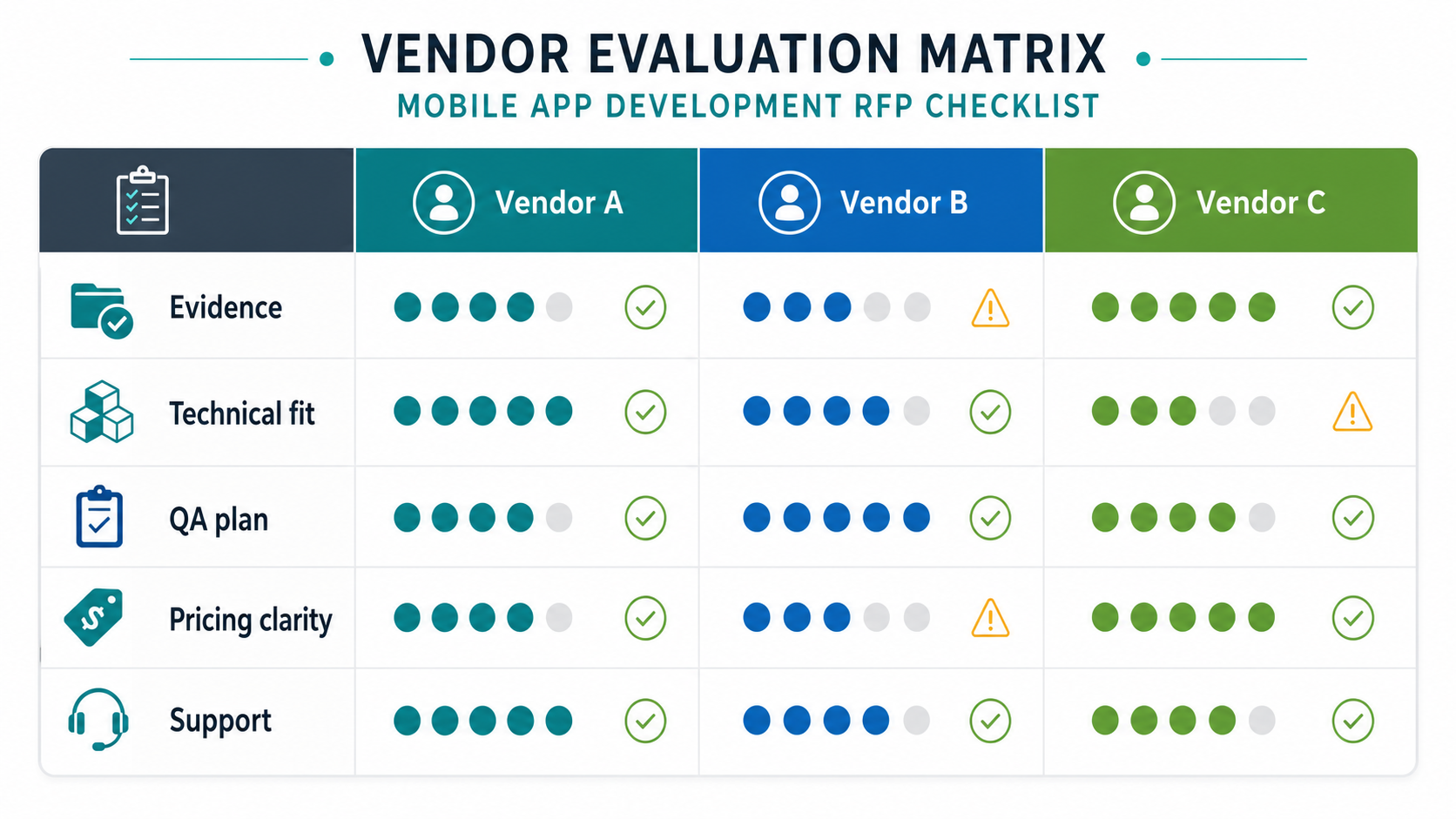
10. Score Proposals With a Weighted Evaluation Rubric
Do not wait until proposals arrive to decide what "best" means. Add a scoring rubric to the RFP so vendors know how you will compare responses and internal stakeholders do not default to the lowest headline price.
| Scoring Area | What to Look For | Suggested Weight |
|---|---|---|
| Outcome and scope fit | Clear MVP recommendation, assumptions, tradeoffs, and version-one boundaries | 25% |
| Technical readiness | Platform strategy, integration plan, backend ownership, security controls, and analytics approach | 25% |
| Delivery evidence | Team roles, sprint cadence, QA evidence, launch plan, and comparable mobile product experience | 20% |
| Commercial clarity | Pricing assumptions, change-control rules, maintenance model, and support ownership | 20% |
| Proof and references | Relevant case studies, architecture examples, and operational product judgment | 10% |
The exact weights can change, but the principle should not: score the plan, not just the pitch deck. Ask every shortlisted vendor to attach the evidence behind the score: a comparable mobile release, a sample sprint plan, a device and OS test matrix, an integration assumption log, a support handoff outline, and the first risks they would resolve in discovery. If a vendor cannot explain assumptions, risks, ownership, or evidence, the proposal is not ready for selection.
11. Share Budget Signals Without Forcing a Fake Fixed Price
You do not need to reveal every financial detail, but vendors need enough budget context to recommend the right scope. State whether you are looking for a lean MVP, a growth-stage product, or a complex multi-role platform. Mention must-have launch timing, phased release preferences, and areas where quality cannot be compromised.
Before sending the RFP, use the Custom Software Cost Estimator to pressure-test how platform count, integrations, admin tooling, QA depth, and support expectations affect budget. For mobile-specific budget bands, compare your assumptions against the mobile app development cost guide, then use the MVP Scope Builder to separate launch-critical workflows from later roadmap items.
12. Set The RFP Timeline, Shortlist Rules, And Decision Owner
A strong RFP tells vendors how the buying process will run. Include the question deadline, answer date, proposal due date, demo or workshop window, shortlist criteria, decision owner, and expected start date. This prevents vendors from overinvesting in sales theater when you need comparable technical plans.
For complex mobile products, add one structured clarification round before final scoring. Give vendors the same answers, ask them to update assumptions in writing, and compare revised proposals against the same rubric. That step is often where integration risk, discovery needs, platform tradeoffs, and support ownership become visible.
| RFP Stage | Buyer Output | Vendor Output |
|---|---|---|
| RFP release | Outcome, scope, constraints, timeline, scoring rubric | Receipt confirmation and clarification questions |
| Clarification round | Shared answers and updated constraints | Assumption log and risk notes |
| Proposal review | Weighted scorecard and shortlist decision | Delivery plan, team model, estimate, QA evidence, support plan |
| Final workshop | Decision owner, success criteria, procurement path | Validated scope, first sprint plan, contract assumptions |
Mobile App Development RFP Checklist
- Business goal, target audience, first success metric, and launch constraint are clear.
- User roles, permissions, critical workflows, and exception paths are documented.
- Platform expectations cover iOS, Android, cross-platform, PWA, devices, OS versions, and offline needs.
- Integrations identify owners, API readiness, data fields, authentication, and failure handling.
- Backend, admin, reporting, content, support, and operational workflows are included.
- Security, privacy, compliance, retention, audit, and access-control needs are explicit.
- Analytics events, dashboards, attribution, and post-launch review cadence are defined.
- QA covers devices, permissions, payments, network states, accessibility, analytics, crash monitoring, and app-store readiness.
- Vendor questions require assumptions, risks, tradeoffs, delivery model, evidence, and support plan.
- Proposal scoring weights are clear enough for stakeholders to compare vendors consistently.
- Budget and timeline signals are realistic enough to support phased recommendations.
Common RFP Red Flags to Fix Before You Send It
Rewrite the RFP if it asks vendors to quote dozens of features with no priority, hides integration uncertainty, ignores backend/admin work, skips QA expectations, or demands a fixed price without discovery. These gaps encourage vendors to guess, and the cheapest guess is rarely the safest plan.
Also watch for vendor-side red flags: no questions, no assumptions, no tradeoff discussion, no named team roles, no QA evidence, no app-store process, no maintenance plan, and no explanation of how scope changes will be handled. The custom software development company checklist can help you compare those answers across vendors.
A second red flag is proposal mismatch. If one vendor prices a six-month product build and another prices a four-week prototype, the RFP probably has unresolved scope ambiguity. Ask vendors to restate the mobile app development process they are assuming before you compare totals.
How NextPage Can Help With Mobile App RFP Planning
NextPage can turn an early mobile app idea into a scoped RFP, discovery workshop, MVP plan, or build-ready product brief. The goal is to give vendors enough detail to estimate honestly while keeping version one focused on the workflows that prove business value.
For proof of the product-and-operations thinking behind that planning, review the Moderly mobile community platform case study, where the mobile experience, GraphQL product workflows, moderation, reporting, and role-aware operations console had to be planned together.
If you are preparing a mobile app RFP now, start by estimating the rough scope with the Custom Software Cost Estimator. When you need hands-on planning or delivery, the mobile app development team can help define the roadmap, platform strategy, backend, QA plan, and launch support.