
Quick Answer: Mobile App Maintenance Checklist
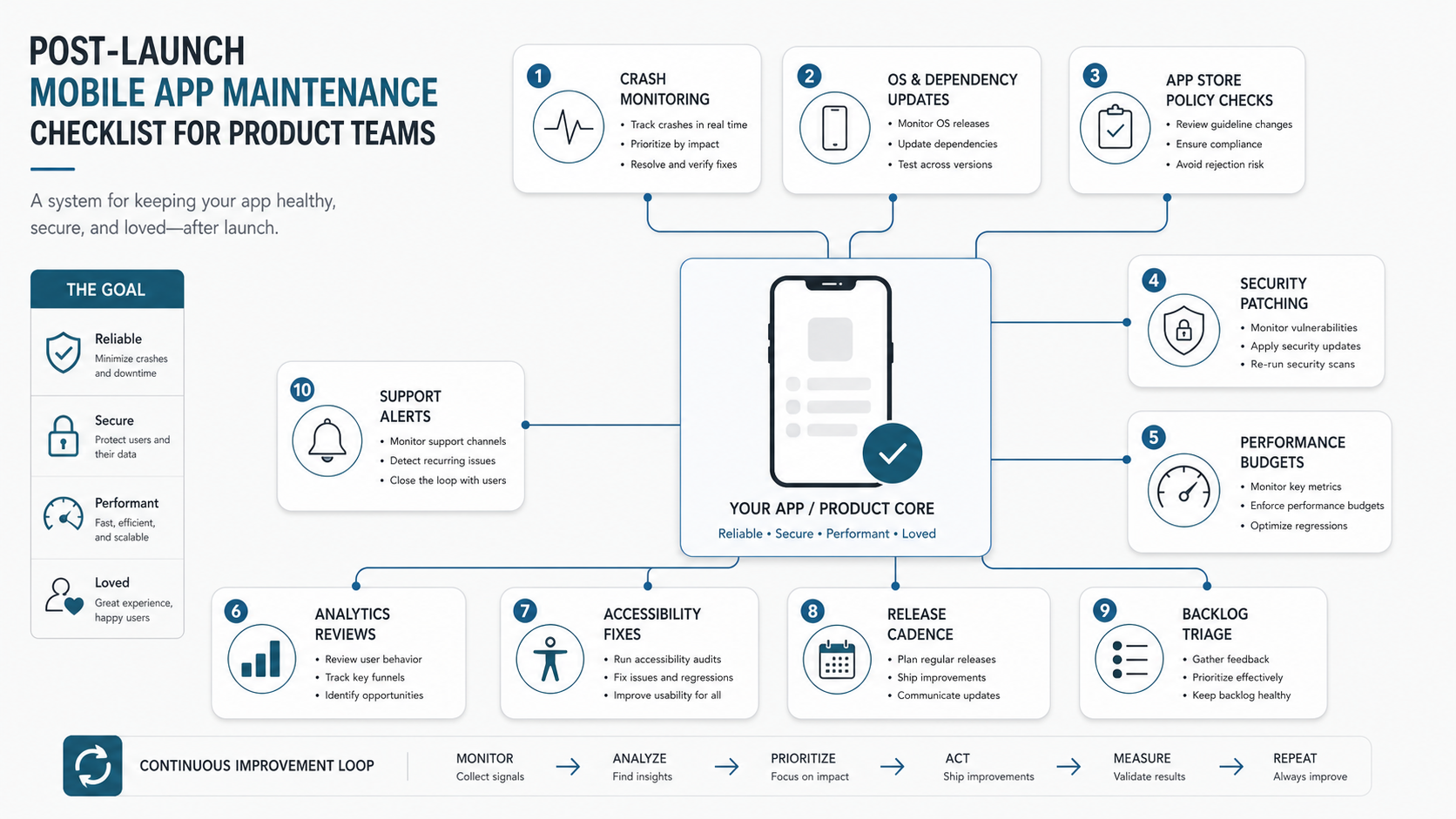
A mobile app maintenance checklist is the operating plan that keeps an app secure, compatible, useful, and profitable after launch. It should cover crash monitoring, OS and device changes, dependency upgrades, app store policy updates, performance budgets, analytics reviews, accessibility fixes, security patches, release cadence, support trends, and backlog triage.
The best checklist is not a generic task list. It defines owners, review cadence, thresholds, evidence, and escalation rules. A founder should know which warning signs require a hotfix this week, which improvements belong in the next release, and which technical debt should wait until there is business evidence.
If you are still planning the first version, NextPage's mobile app development team can help design the product around long-term maintenance from day one. If the app is already live and you need to budget support, compare the workstreams against our software maintenance cost guide.
What Product Teams Should Track After Launch
The OrangeMantra reference page includes post-deployment maintenance inside a broader mobile application development process. That point is important because launch is not the finish line. After users install the app, the product has to survive operating system changes, new device behavior, store review rules, payment SDK changes, analytics drift, performance regressions, accessibility gaps, and changing user expectations.
Track these maintenance areas every month:
- Stability: crash-free users, fatal errors, non-fatal exceptions, app not responding events, failed background jobs, and failed API calls.
- Compatibility: iOS and Android version changes, device coverage, browser engine changes for PWAs, screen sizes, permissions, push notification behavior, and platform deprecations.
- Security: vulnerable dependencies, expired certificates, leaked secrets, weak authentication flows, payment SDK notices, privacy disclosures, and session handling.
- Performance: launch time, screen load time, battery use, memory pressure, image payloads, API latency, offline recovery, and crash impact after releases.
- Product health: retention, funnel drop-offs, feature adoption, support tickets, store reviews, conversion, subscription churn, and backlog evidence.
- Experience quality: accessibility, localization, empty states, form errors, onboarding friction, app store listing accuracy, and notification relevance.
The checklist should turn each area into an action. For example, a crash spike after a new release needs rollback criteria and monitoring ownership. A support-ticket trend needs product triage. A dependency vulnerability needs a patch window, regression testing, and deployment ownership.
Weekly, Monthly, Quarterly, and Release-Triggered Cadence
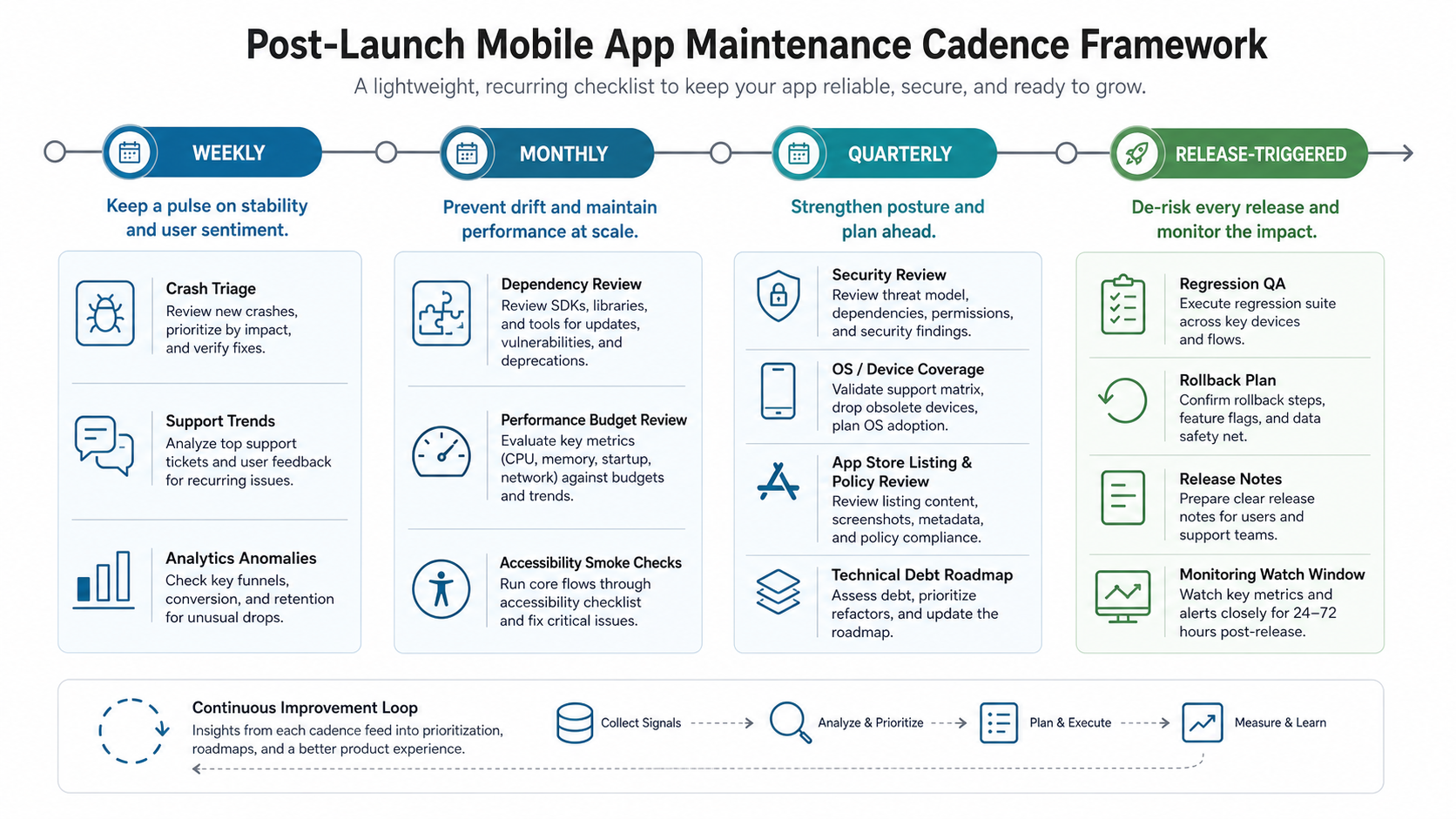
A maintenance plan works when the team knows when to look at each signal. Reviewing every possible metric daily creates noise. Ignoring maintenance until users complain creates emergencies. Split the work by cadence so product, engineering, QA, support, and leadership can operate from the same rhythm.
| Cadence | Checks | Evidence to review |
|---|---|---|
| Weekly | Crash triage, support trends, analytics anomalies, failed API calls, store review changes, and release watch items. | Crash dashboard, support queue, funnel dashboard, uptime logs, recent release notes. |
| Monthly | Dependency review, performance budget, accessibility smoke check, device coverage, notification health, and backlog cleanup. | Dependency scan, performance traces, device/OS mix, accessibility checklist, backlog labels. |
| Quarterly | Security review, app store policy review, technical debt roadmap, analytics taxonomy audit, retention analysis, and roadmap reprioritization. | Security findings, store policy notes, debt register, analytics plan, product KPI trends. |
| Release-triggered | Regression QA, rollback plan, release notes, monitoring watch window, feature flag review, and post-release support ownership. | QA sign-off, release checklist, rollback criteria, monitoring alerts, support macro updates. |
Use the MVP Scope Builder when backlog triage gets too broad. The same discipline that narrows an MVP can separate urgent maintenance, valuable product improvements, and ideas that should wait for stronger evidence.
OS Updates, Dependencies, and App Store Policy
Mobile products sit on platforms that change without asking for your roadmap. Apple and Google update operating systems, privacy controls, SDK rules, build requirements, billing policies, permission prompts, and review guidelines. A healthy maintenance plan watches those changes before a forced update breaks login, payments, push notifications, maps, background location, camera access, or analytics.
Build an owner map for platform upkeep:
- OS compatibility: test beta OS versions where possible, track device mix, and schedule compatibility fixes before users upgrade at scale.
- Dependencies: review SDKs, libraries, frameworks, and plugins for security notices, deprecations, size growth, build failures, and license changes.
- Store policy: check app privacy labels, permission explanations, billing rules, age ratings, screenshots, claims, and data collection disclosures.
- Certificates and credentials: track signing certificates, push credentials, OAuth app secrets, payment keys, and expiry dates in a visible calendar.
- Build pipeline: keep CI, automated tests, release signing, environment variables, and deployment permissions current enough that a hotfix is possible.
Many post-launch emergencies are not caused by a new feature. They happen because an app cannot be rebuilt quickly when a platform rule changes. Treat build reproducibility as part of maintenance, not a developer convenience.
Crash, Performance, Analytics, and Support Signals
The most useful maintenance signals connect technical health to user impact. A crash that affects one internal test device may not beat a payment funnel bug that affects 6 percent of new users. A slow screen may matter more when it sits inside onboarding or checkout than when it sits behind a low-use settings view.
| Signal | Warning sign | Action |
|---|---|---|
| Crash monitoring | Crash-free users drop, a new release creates a top crash, or a crash affects conversion-critical flows. | Assign severity, reproduce, hotfix or roll back, and watch the next release window. |
| Performance | Launch time, screen load time, API latency, or memory use moves beyond the agreed budget. | Profile the affected flow, reduce payloads, optimize heavy screens, and verify on lower-end devices. |
| Analytics | Event volume changes without a product reason, funnels shift sharply, or retention moves after a release. | Check instrumentation, compare cohorts, and decide whether this is a bug, behavior change, or product opportunity. |
| Support | Repeated tickets mention the same screen, failed payment, login problem, notification issue, or app store review complaint. | Convert support themes into backlog items with examples, severity, owner, and success metric. |
| Accessibility | Screen readers, contrast, tap targets, keyboard/focus order, or dynamic text break in key flows. | Run smoke checks on release candidates and fix issues that block task completion. |
Budget planning should include monitoring and support, not just feature development. The eCommerce app development cost guide is ecommerce-specific, but its hidden-cost section is relevant to most app teams because hosting, storage, monitoring, messaging, support, and store accounts all continue after launch.
Release Management, Rollback, and QA Ownership
Maintenance breaks down when releases are treated as one developer's final step. Every production release needs a small operating model: who approves the release, who watches metrics, who answers support, who decides rollback, and who owns follow-up defects. This does not need heavyweight process, but it does need explicit ownership.
Before each release, confirm:
- The release has a named owner and a clear scope.
- Regression checks follow a mobile app testing checklist across login, onboarding, payments, core workflows, notifications, offline or poor-network states, and analytics events.
- Feature flags, remote config, and rollback options are documented.
- Store release notes, support responses, and internal change notes match what actually shipped.
- Monitoring dashboards are checked during the watch window after rollout begins.
- Known risks and deferred issues are written down rather than hidden in chat.
For teams using outside developers, make this release model part of the engagement. Ongoing support should include QA, monitoring, dependency upkeep, documentation, and product triage, not only emergency bug fixes.
Backlog Triage and Maintenance Cost Decisions
Post-launch backlogs mix bugs, technical debt, feature requests, support complaints, analytics ideas, compliance needs, and founder opinions. Without triage rules, maintenance time gets consumed by the loudest request instead of the highest-value work.
Use a simple scoring model:
- User impact: How many users are affected and how important is the workflow?
- Business impact: Does the issue affect revenue, retention, acquisition, compliance, support cost, or trust?
- Technical risk: Will delay make future changes harder, riskier, or more expensive?
- Effort and dependency: Can it be fixed safely now, or does it require a larger architecture or design decision?
- Evidence quality: Is the request supported by analytics, support data, crash logs, customer interviews, or only assumption?
If you need to estimate whether a maintenance sprint is small support work or a larger modernization effort, use the Custom Software Cost Estimator. It helps separate minor fixes from integration, redesign, infrastructure, or rebuild work that needs a larger plan.
How NextPage Helps Maintain Mobile Apps
NextPage helps product teams turn a live app into a manageable operating system. We audit stability, performance, dependencies, analytics, release workflow, security posture, support signals, and backlog quality before recommending fixes or new features.
For a useful maintenance audit, bring the app store links, crash dashboard access, analytics events, recent release notes, support themes, dependency list, known technical debt, and the next business goal. We will help identify urgent risks, create a release cadence, estimate the support budget, and define the roadmap items that deserve engineering time.