
Quick Answer: What Are AI Agents for HR?
AI agents for HR are controlled software systems that can read HR context, reason over policies and candidate data, trigger approved actions in connected tools, and escalate sensitive decisions to people. In recruiting, that can mean parsing resumes, ranking candidate fit against structured criteria, coordinating interview slots, drafting candidate messages, preparing onboarding tasks, answering policy questions, and keeping an audit trail for review.
The important word is controlled. A good HR agent should not become an unreviewed hiring authority. It should work inside clear permissions, approved criteria, human review points, bias checks, and data-retention rules. For most teams, the best first version is a narrow workflow assistant that reduces admin work while leaving judgment, exceptions, and employment decisions with HR leaders and hiring managers.
If you are still deciding whether your workflow is ready, start with the AI Agent Readiness Assessment. It helps score workflow clarity, data readiness, integration access, and human-review controls before you invest in an HR agent build.
Where HR Agents Fit in the Talent Workflow
HR teams already use applicant tracking systems, calendars, email, HRIS platforms, document tools, onboarding checklists, and chat channels. The agent layer sits between those systems and the repeated work people do across them. It watches for an event, gathers context, proposes the next action, performs low-risk steps when approved, and records what happened.
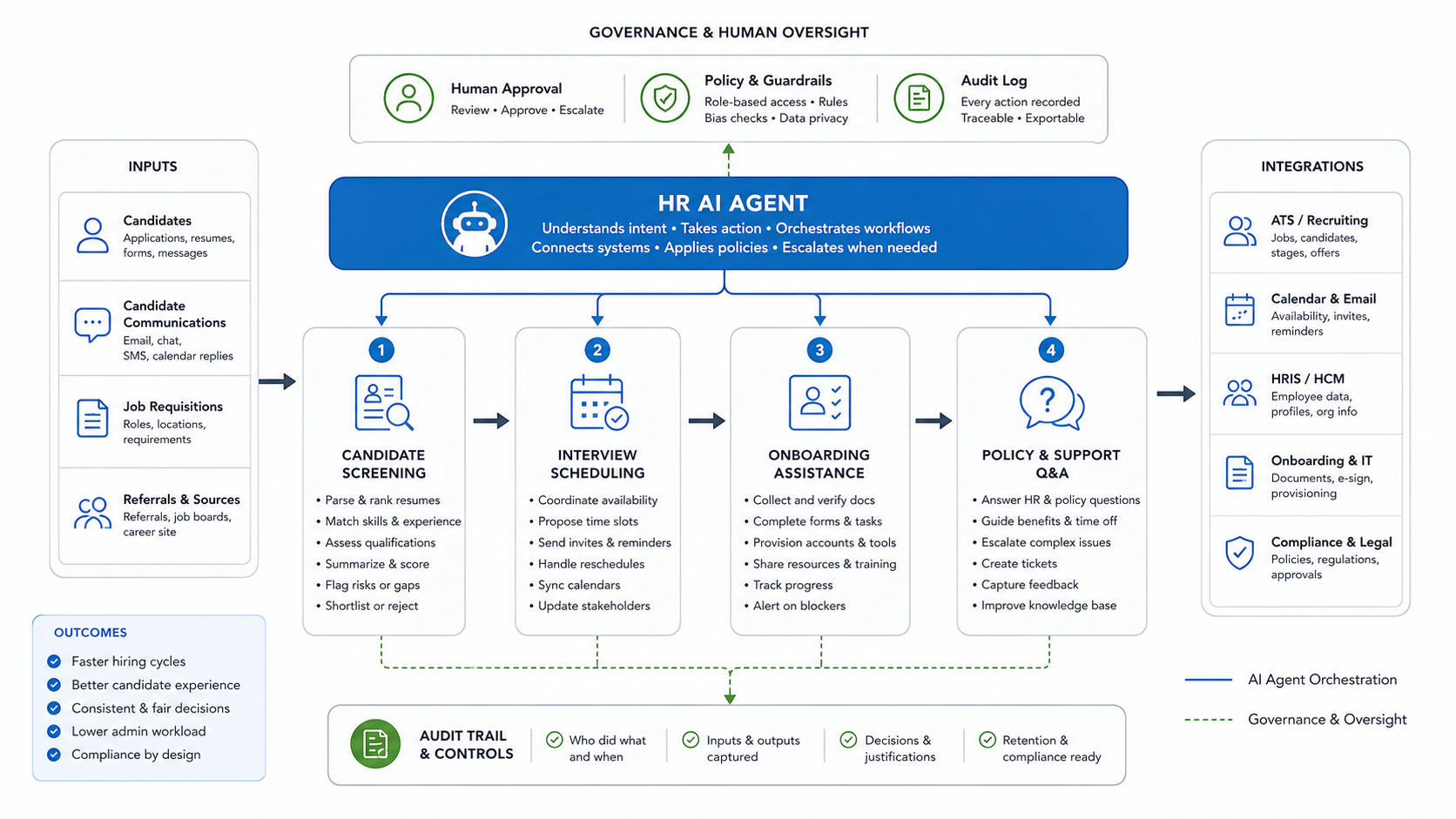
This is different from a simple chatbot. A chatbot answers questions. An HR agent may retrieve information, compare a candidate profile to a role scorecard, draft a recruiter note, check interviewer availability, open an onboarding task, or flag an exception for review. If your team is still comparing agent patterns, the guide to types of AI agents for business workflows explains the difference between reactive, goal-based, utility-based, and learning agents in practical terms.
High-Value HR and Recruiting Use Cases
The strongest HR agent use cases are repetitive, high-volume, policy-bound, and easy to supervise. They remove coordination work without hiding the reasoning behind important decisions.
| Workflow | What the Agent Can Do | Human Review Point |
|---|---|---|
| Resume screening | Extract skills, experience, location, salary signals, and role-specific criteria from resumes and applications. | Recruiter approves shortlist logic, reviews edge cases, and confirms rejection decisions. |
| Interview scheduling | Compare availability, propose slots, send reminders, handle reschedules, and update ATS stages. | Recruiter approves panel changes, priority candidates, and unusual scheduling constraints. |
| Candidate communication | Draft personalized updates, collect missing documents, answer process questions, and route sensitive replies. | Recruiter reviews messages for tone, legal risk, and candidate experience. |
| Onboarding | Create tasks, collect forms, trigger IT provisioning, share first-week resources, and track blockers. | HR approves policy exceptions, access requests, and role-specific onboarding plans. |
| Policy and benefits Q&A | Answer from approved policies, summarize leave or benefit rules, and open tickets when confidence is low. | HR reviews complex cases, legal questions, and employee-specific decisions. |
Use a tool such as the Workflow Automation Opportunity Finder to rank candidate workflows before implementation. A scheduling assistant with clear rules may be a better first release than a screening agent that touches sensitive employment decisions.
Resume Screening Needs Structured Criteria and Bias Controls
Screening is usually the first use case executives ask about, and it is also the one that needs the most discipline. The agent should compare candidates against a documented job scorecard, not infer hidden preferences from past hiring patterns. It should explain why it surfaced a candidate, cite the resume fields used, and identify missing evidence instead of making unsupported claims.
Practical controls include approved job criteria, protected-attribute suppression where appropriate, adverse-impact review, recruiter override, candidate appeal paths when relevant, and periodic calibration. The U.S. Equal Employment Opportunity Commission has published technical assistance on algorithmic decision tools under employment selection procedures, so teams should treat automated screening as a governed workflow rather than a convenience feature.
For 2026 planning, treat regional employment-AI rules as product requirements, not legal footnotes. New York City's automated employment decision tool rules put bias audits, candidate notices, and alternative-process expectations into the workflow. The EU AI Act high-risk system guidance reinforces the need for risk assessment, data governance, activity logging, technical documentation, clear deployer instructions, human oversight, robustness, cybersecurity, and accuracy. The UK Information Commissioner's Office has also made automated recruitment decisions a current regulatory focus, so privacy notices, data minimization, human intervention, and unfair-outcome testing belong in the product backlog.
A safe screening agent produces a recommendation package, not a final employment decision. It can say, "This candidate appears to match five of seven required criteria, lacks evidence for one required certification, and should be reviewed by a recruiter." It should not silently reject candidates or optimize for proxy signals that were never approved.
2026 HR AI Jurisdiction Readiness Matrix
HR AI agents now need a launch plan by jurisdiction, not one global toggle. A recruiting assistant that only drafts interviewer reminders is different from a system that scores candidates, recommends shortlists, or routes rejection workflows. Before expanding an HR agent across regions, classify each workflow by impact level, decision authority, candidate notice needs, audit evidence, and human review path.
| Jurisdiction Signal | Product Requirement | Implementation Evidence |
|---|---|---|
| NYC automated employment decision tool rules | Determine whether the workflow substantially assists hiring or promotion decisions, then plan bias audit, public summary, candidate notice, and alternative-process handling where required. | AEDT classification record, audit owner, notice template, candidate support path, and annual review date. |
| EU AI Act high-risk employment planning | Treat recruiting, selection, worker management, and access-to-work decisions as high-risk candidates until counsel and product owners classify the exact workflow. | Risk assessment, data governance notes, logging, human oversight, accuracy/robustness checks, and deployer instructions. |
| UK recruitment data-protection expectations | Show candidates how automated decisions or recommendations are used, minimize data, keep human intervention available for meaningful decisions, and test for unfair outcomes. | Privacy notice, DPIA or AI risk assessment, data-retention rule, explainability note, and candidate escalation channel. |
| U.S. adverse-impact and validation evidence | Monitor whether the selection process creates adverse impact and keep validity evidence for any AI-assisted selection procedure that materially affects candidates. | Scorecard version, selection-rate monitoring, validation evidence, reviewer override log, and vendor-control file. |
This matrix should be owned before production rollout. It gives HR, legal, security, and engineering one shared checklist for deciding whether the agent can draft, recommend, execute, or only route work for review. It also prevents a low-risk scheduling pilot from accidentally becoming an unapproved selection system after new integrations are added.
HR Agent Control Map: What Must Stay Governed
Before an HR agent touches real candidates or employees, define the control map around the workflow. The agent should know which data sources it can read, which role scorecard it must apply, when confidence is too low, who approves the next step, and how the decision trail is stored. This keeps automation useful without turning the model into an unaccountable hiring system.
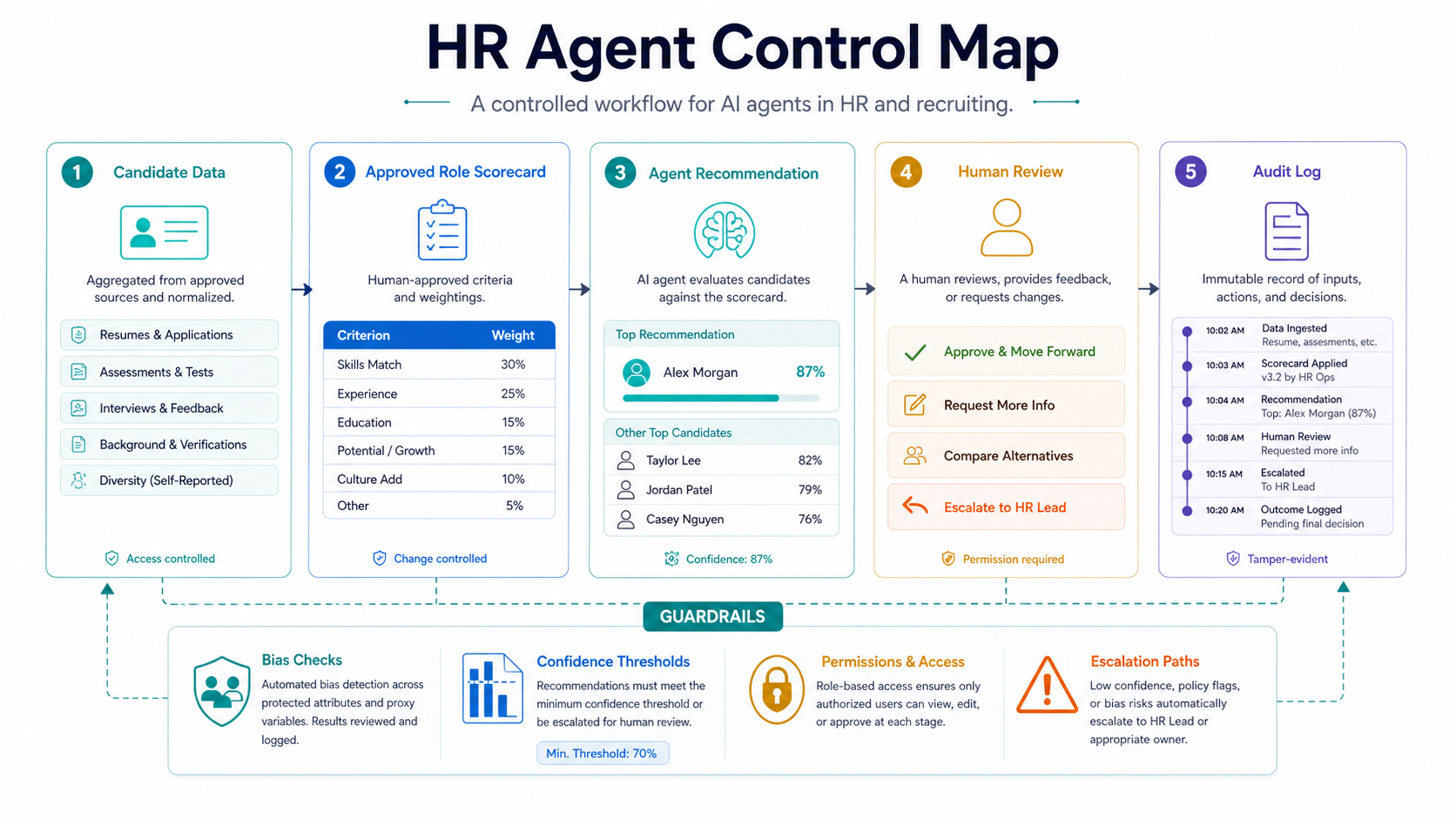
| Control Area | What to Define | Why It Matters |
|---|---|---|
| Data boundaries | Approved ATS fields, HRIS records, policy documents, resumes, assessments, and retention rules. | Prevents the agent from using irrelevant, stale, or sensitive context without purpose. |
| Role scorecard | Required criteria, weighted evidence, disallowed proxies, and reviewer override rules. | Keeps screening tied to documented job needs instead of hidden historical patterns. |
| Confidence thresholds | When the agent can draft, when it must ask for more data, and when it must escalate. | Stops uncertain outputs from moving quietly into hiring or employee decisions. |
| Approval gates | Which actions need recruiter, HR, legal, security, or manager review. | Preserves accountability for decisions that affect people, access, pay, or compliance. |
| Audit evidence | Inputs, sources, prompt/model version, recommendation, reviewer, override, and final action. | Makes the workflow inspectable after complaints, audits, or quality reviews. |
This is also where a generic proof of concept becomes a production software plan. If the agent needs custom roles, approvals, integrations, or operational dashboards, treat the work as governed custom software development, not only model prompting. For proof patterns, NextPage's FieldIQ portfolio case study shows how role-aware workflows and AI assistance can sit inside a controlled operations platform.
Scheduling Agents Improve Candidate Experience Fast
Interview scheduling is a strong early win because the rules are visible and the risk is lower than automated selection. The agent can read interviewer availability, candidate time zones, panel requirements, location constraints, and stage urgency. It can propose slots, send calendar holds, handle reschedule requests, and update the ATS after confirmation.
The business value is not only recruiter time saved. Candidates get faster responses, fewer back-and-forth emails, and clearer reminders. Hiring managers get fewer missed interviews and fewer manual nudges. The agent should still escalate conflicts such as senior leadership interviews, urgent offer-stage candidates, or repeated candidate no-shows.
Onboarding and Employee Support Are Agent-Friendly Workflows
Onboarding has a defined start event, predictable tasks, many systems, and clear exceptions. That makes it a good fit for agent orchestration. An onboarding agent can prepare task lists, collect signed documents, trigger IT requests, remind managers about first-week steps, and flag blocked items before day one.
Employee support is another practical area. A policy Q&A agent can answer common questions about leave, benefits, expenses, remote work, and equipment from approved documents. For production systems, retrieval quality matters. Teams building policy assistants should borrow patterns from LLM development and AI chatbot development: controlled knowledge ingestion, source citations, confidence thresholds, escalation paths, and regular content refreshes.
Reference Architecture for an HR AI Agent
A production HR agent is usually a workflow system, not a single model prompt. The architecture should separate intake, retrieval, reasoning, action execution, approval, monitoring, and audit logs.
| Layer | Purpose | Examples |
|---|---|---|
| Intake | Receives events and user requests. | New application, candidate reply, onboarding start, HR chat question. |
| Context and retrieval | Finds relevant records and approved knowledge. | ATS profile, job scorecard, policy documents, HRIS fields, onboarding checklist. |
| Reasoning and rules | Applies workflow logic and model-assisted interpretation. | Candidate evidence summary, scheduling constraints, policy answer, risk classification. |
| Action tools | Performs approved operations in connected systems. | Create ticket, update ATS stage, send email draft, add calendar invite, create onboarding task. |
| Human approval | Requires review for sensitive or uncertain steps. | Shortlist approval, rejection message, policy exception, access request. |
| Observability | Records decisions, inputs, outputs, overrides, and errors. | Audit trail, model version, prompt version, source documents, reviewer notes. |
This is why HR agent work often overlaps with AI workflow automation. The model is only one part of the system. The real product is the controlled path from request to action to review.
Systems an HR Agent Usually Needs to Connect
Most useful HR agents need integration access. Without it, they become another isolated chat window. Common systems include an ATS, HRIS or HCM, calendar, email, identity provider, document signing platform, payroll or benefits systems, ticketing tools, and internal knowledge bases.
Do not connect everything in phase one. Pick the minimum integration set that makes the first workflow useful. For example, scheduling may need ATS read/write access, calendar availability, email templates, and candidate communication logs. Onboarding may need HRIS data, document storage, e-signature status, ticketing, and IT provisioning.
When the agent touches several operational systems, involve engineering early. NextPage's generative AI development and AI development services work treats integrations, permissions, evaluation, and monitoring as part of the product scope, not post-launch cleanup.
Compliance, Privacy, and Governance Checklist
HR data is sensitive. The agent should be designed around privacy, security, and employment-law risk from the beginning. NIST's AI Risk Management Framework is a useful governance reference because it frames AI risk around validity, reliability, safety, security, transparency, explainability, privacy, and accountability.
- Define which decisions the agent may support and which decisions require human ownership.
- Use approved job criteria and keep scorecards versioned.
- Log inputs, outputs, source documents, model versions, reviewer decisions, and overrides.
- Restrict access by role, region, business unit, and employment process.
- Mask or minimize sensitive data where it is not needed for the task.
- Set retention rules for candidate data, prompts, logs, and generated summaries.
- Test outputs for bias, hallucination, stale policy references, and inconsistent scoring.
- Escalate low-confidence, high-impact, or legally sensitive cases to qualified HR staff.
- Keep a jurisdiction matrix for audit, notice, accommodation, retention, and human-review duties before the same agent is used across regions.
Before launch, compare the workflow against an enterprise AI readiness checklist. Governance is easier to build before the first pilot than to retrofit after managers start depending on the agent.
HR Agent Pilot Readiness Scorecard
Do not scale an HR agent because a demo looks impressive. Score the first workflow against risk, clarity, data quality, integration effort, human review load, and measurable business value. Interview scheduling and onboarding coordination usually score better for a first pilot than autonomous screening because the rules are clearer and the harm of a wrong action is lower.
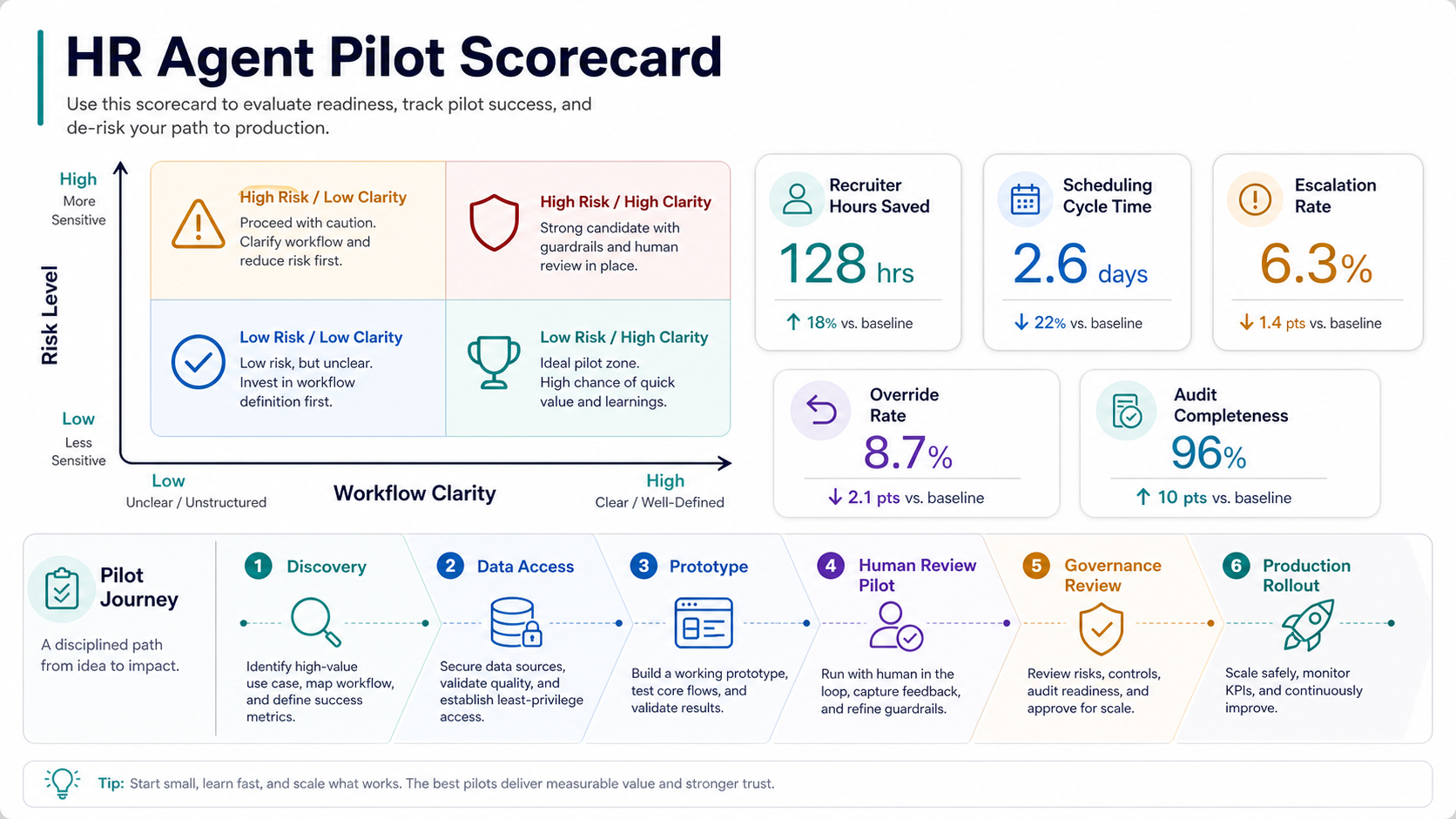
| Scorecard Area | Green Signal | Fix Before Scaling |
|---|---|---|
| Workflow clarity | The team can describe the trigger, owner, next action, exception path, and success metric. | The workflow changes by recruiter, role, region, or manager preference with no documented rule. |
| Data quality | Candidate, job, calendar, policy, and HRIS data are current enough for the task. | Records are duplicated, missing, stale, or spread across tools with unclear ownership. |
| Review capacity | Recruiters or HR staff can review recommendations and overrides during the pilot. | The pilot creates a queue that people cannot inspect fast enough to learn from. |
| Risk boundary | The first release drafts, summarizes, schedules, or routes work with human approval. | The agent silently rejects candidates, changes employee records, or grants access. |
| Measurement | Cycle time, hours saved, escalation rate, override rate, candidate experience, and audit completeness are tracked. | The only metric is model accuracy or anecdotal user excitement. |
For financial framing, pair the pilot scorecard with the AI Automation ROI Calculator. For broader procurement and delivery planning, the custom software development company checklist can help evaluate whether a partner can handle discovery, integration, governance, QA, and post-launch ownership.
A Practical Implementation Roadmap
Start small and widen only after real evidence. A sensible roadmap looks like this:
- Workflow discovery: document the current process, users, systems, policies, decision points, and pain metrics.
- Risk classification: separate low-risk coordination work from higher-risk screening and employment decisions.
- Data and access review: confirm source quality, permissions, retention rules, and integration feasibility.
- Prototype: build a narrow agent that works with sample data and visible human approval.
- Pilot: run with one hiring team, one geography, or one role family and measure cycle time, quality, and exceptions.
- Governance review: inspect logs, overrides, bias signals, and candidate experience before scaling.
- Production rollout: add monitoring, support ownership, model/version controls, and system-level SLAs.
If cost is part of the decision, estimate time saved, payback, and process complexity before building. For budget planning, the guide to AI agent development cost explains why integrations, data readiness, review controls, and monitoring often drive more effort than the model itself.
Metrics to Track After Launch
Track both efficiency and quality. A fast HR agent that creates inconsistent decisions is not a win. Useful metrics include recruiter hours saved, time to first candidate response, interview scheduling cycle time, onboarding task completion rate, policy-ticket deflection, escalation rate, override rate, candidate satisfaction, data-quality exceptions, and audit-log completeness.
For screening workflows, add fairness and quality checks: shortlist diversity review where legally appropriate, scoring consistency, false positives, false negatives, reviewer disagreement, candidate accommodation requests, notice completion, and outcome drift by role family. The goal is not to automate HR judgment away. The goal is to make repeated work faster, clearer, and easier to inspect.
Track audit evidence as an operating metric. A pilot is not ready to scale if the team cannot explain which scorecard version ran, which sources were used, which recommendation changed after review, which candidate notice was sent, and which exceptions were escalated. Those records are what turn an HR agent from a demo into defensible software.
How NextPage Helps Build HR AI Agents
NextPage helps teams design and build practical AI agents for HR workflows. We can map your recruiting or onboarding process, score readiness, identify safe first workflows, design the agent architecture, connect the required systems, create human-review controls, and launch a measured pilot with audit-ready evidence.
If you are exploring AI agents for HR, start with an HR workflow automation assessment and a scoped AI agent development plan. We will help you decide which workflow should be automated first, what data and integrations are required, where human approval belongs, and what a responsible pilot should prove before production rollout.