
Quick Answer: AI Agents For Production Scheduling
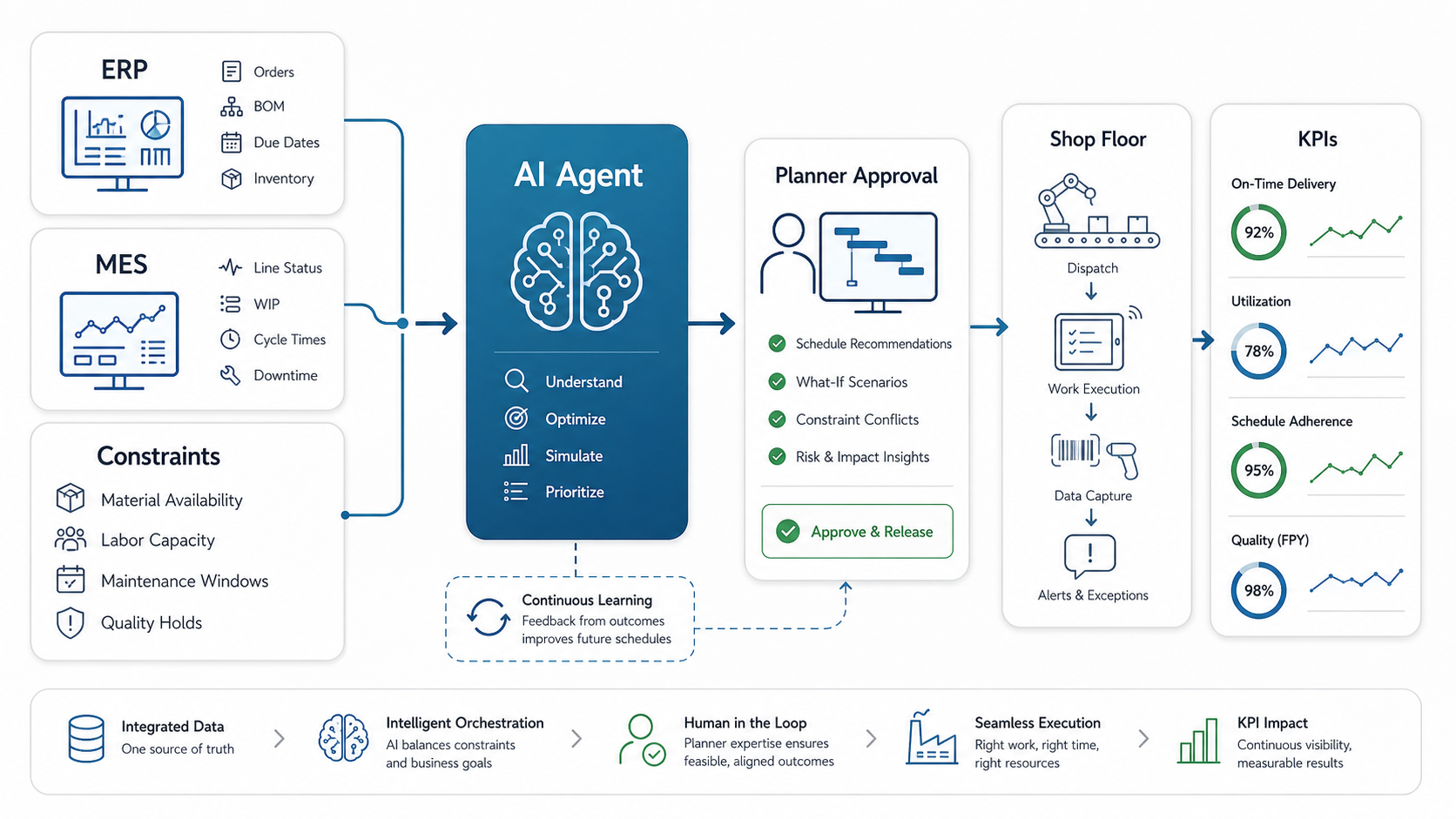
AI agents for production scheduling help manufacturing teams re-plan work when orders, materials, labor, machines, quality holds, or maintenance windows change. The strongest first release does not replace the production planner. It reads the current schedule, checks ERP and MES context, ranks conflicts, proposes feasible options, explains tradeoffs, and routes the recommendation to a human approver before any ERP, MES, APS, or shop-floor instruction is updated.
The value is highest when planners spend too much time reconciling spreadsheets, ERP dates, MES status, material shortages, downtime, supervisor notes, and customer commitments. A controlled agent can compress that investigation loop, but only when the plant has clear workflow rules, trusted operational data, integration access, and approval boundaries. Before building, use an AI Agent Readiness Assessment to test whether the scheduling workflow has enough clarity, data, and governance for a safe pilot.
For most plants, the practical goal is not full autonomy in the first release. The first goal is faster exception handling: identify the bottleneck, show which constraints matter, recommend two or three schedule options, explain the impact on orders and resources, and let a planner approve the next action.
Where AI Agents Fit In Production Scheduling
Traditional production scheduling tools are good at representing orders, routings, capacities, dates, and resources. The operational gap appears when reality changes faster than the schedule model. A supplier shipment slips, a high-priority order arrives, a line goes down, a maintenance task cannot move, or a quality hold blocks a batch. The planner must then search across systems, compare tradeoffs, and communicate the new plan to supervisors.
An AI scheduling agent fits into that messy middle layer. It watches for exceptions, gathers context, reasons over constraints, drafts a response, and triggers the right approval or update workflow. That is why the work is closer to AI workflow automation than to a standalone chatbot. The agent must connect data, decisions, actions, review steps, and monitoring into one governed flow.
Good use cases include same-day re-sequencing, material-shortage response, changeover minimization, maintenance-window coordination, rush-order impact analysis, and supervisor escalation. Weak use cases are vague requests such as "optimize production" without a named schedule decision, owner, constraint set, or success metric.
If the scheduling workflow touches a broader plant modernization program, connect it to the commercial and technical roadmap for AI agents for manufacturing workflows rather than treating it as an isolated model experiment.
Define The System Boundary Before Choosing The Agent
The most important design decision is the boundary between planning, manufacturing operations, and plant-floor control. ISA-95 is useful here because it separates enterprise planning systems from manufacturing operations and control layers. In practical terms, ERP and APS may own demand, inventory, due dates, and planned schedules. MES, QMS, WMS, CMMS, SCADA, and operator apps own execution status, quality holds, inventory movement, maintenance windows, and machine signals.
A production scheduling agent should not blur those ownership lines. It should make the handoff more reliable. The agent can read from multiple systems, create a normalized scheduling context, rank options, and request approval. Write-back should stay bounded: which system can be updated, which field can change, who approves the change, what evidence is logged, and how the team rolls back if the recommendation is wrong.
This is also why off-the-shelf agent demos rarely survive the first plant review. The model is only one part of the system. The hard parts are data contracts, exception ownership, schedule authority, auditability, and integration behavior when one system is late or stale.
Reference Architecture For A Scheduling Agent
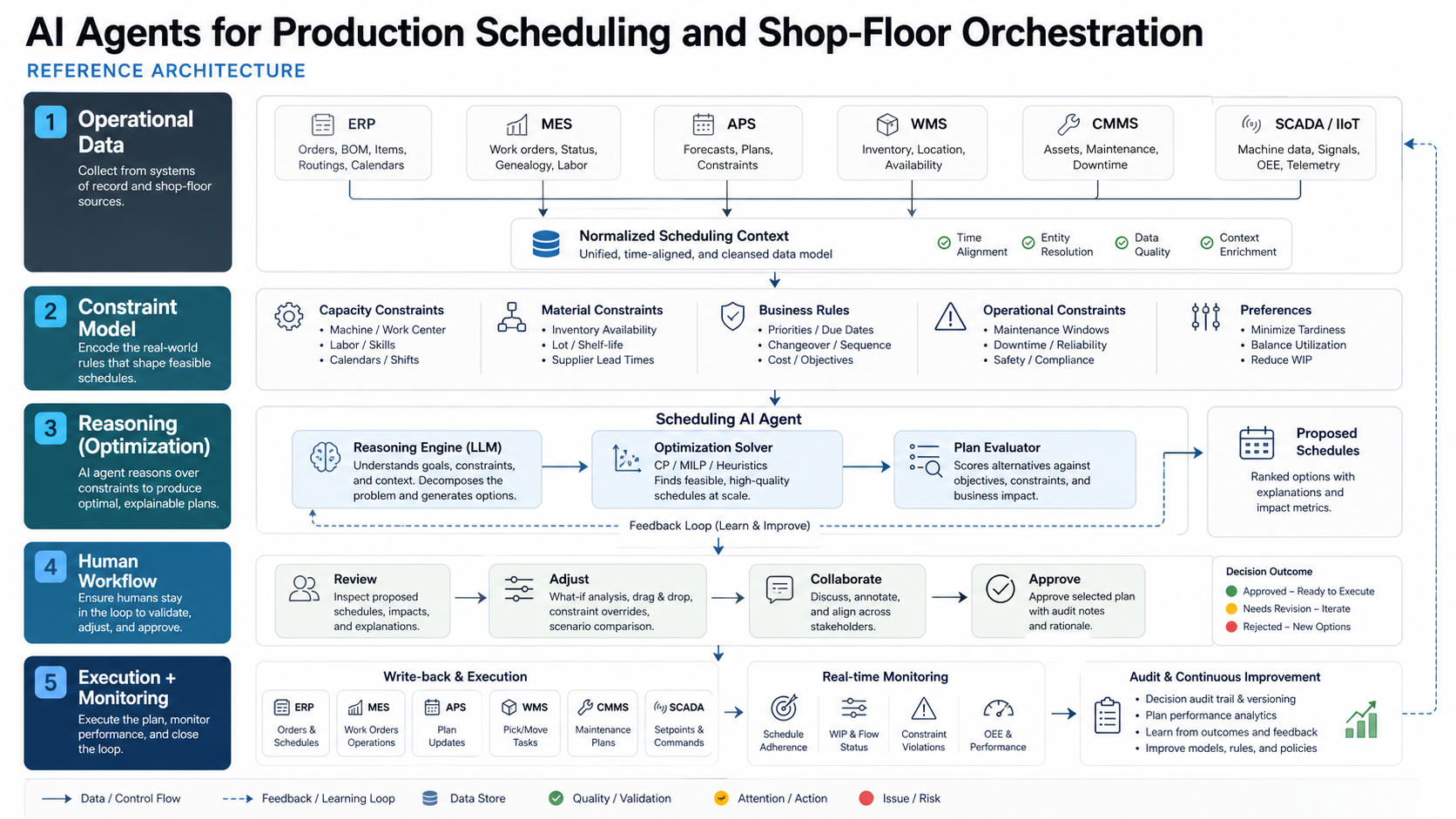
A production scheduling agent usually needs five layers. The first layer is operational data: ERP orders, MES progress, APS schedules, inventory, quality holds, CMMS work orders, labor rosters, and machine telemetry. The second layer normalizes these signals into a scheduling context that the agent can reason over. The third layer contains rules, constraints, optimization services, model outputs, and business policies. The fourth layer is the agent workflow: detect, investigate, recommend, explain, approve, update, and monitor. The fifth layer is observability, governance, and rollback.
NextPage usually treats the agent as an orchestration layer around existing systems, not as a replacement for ERP or MES. That matters because production schedules are operational commitments. The agent should know when it can recommend, when it can draft an update, when it must ask for approval, and when it must stop because the data is stale or a constraint is unresolved. Our AI development services approach starts from that workflow boundary before choosing models or agent frameworks.
| Layer | What It Does | Typical Systems |
|---|---|---|
| Operational data | Provides orders, capacity, materials, work status, labor, downtime, and quality signals | ERP, MES, APS, WMS, CMMS, SCADA |
| Constraint model | Defines what the schedule cannot violate and what tradeoffs matter | Routings, calendars, skills, quality rules, material availability |
| Reasoning and optimization | Ranks options and explains tradeoffs | Rules engine, solver, forecasting model, LLM agent |
| Human workflow | Routes approvals and exceptions | Planner dashboard, supervisor alerts, ticketing, notifications |
| Execution and monitoring | Updates the schedule and tracks outcomes | MES dispatch, ERP dates, KPI dashboard, audit log |
Data And Constraint Contract
Scheduling agents fail when they see only the planned schedule and not the constraints that make the schedule possible. A useful readiness checklist should cover order priority, due dates, routing steps, setup times, material availability, machine capacity, tool availability, labor skills, shift calendars, maintenance windows, quality holds, inspection requirements, and downstream shipping commitments.
Data freshness is just as important as data coverage. If inventory updates once per day, but supervisors expect same-shift recommendations, the agent must either use a fresher source or mark the recommendation as uncertain. If maintenance windows live in a planner spreadsheet outside the CMMS, the pilot must decide whether to integrate the spreadsheet, migrate the data, or limit the first use case. The broader Enterprise AI Readiness Checklist is useful here because scheduling agents touch workflow clarity, integration permissions, data governance, and human review at the same time.
The data contract should say which source wins when systems disagree. For example, ERP may show enough inventory, but MES may show a quality hold. APS may show a feasible sequence, but CMMS may reserve the bottleneck machine for preventive maintenance. A scheduling agent needs a declared conflict policy instead of averaging contradictory signals.
- Order data: due date, customer priority, batch size, routing, promised ship date, and change history.
- Resource data: machine capacity, tooling, setup rules, labor skills, crew availability, and line calendars.
- Material data: on-hand stock, allocated stock, inbound purchase orders, substitutions, and lot constraints.
- Operations data: current work-in-progress, cycle time, downtime, scrap, rework, and quality holds.
- Maintenance data: planned service windows, asset risk, open work orders, and safety lockouts.
- Decision policy: who can approve changes, which orders cannot move, and when supervisors must be notified.
Autonomy Ladder: Recommendations Before Write-Back
The safest implementation path is recommendations before autonomy. Start with a planner-facing workflow where the agent explains what changed, why the current plan is at risk, which constraints are driving the risk, and which schedule options are available. The agent should produce a clear recommendation with a confidence note and a list of affected orders, machines, teams, and dates.
Only after the plant trusts recommendation quality should the system draft updates into MES or ERP. Even then, the first production version should keep explicit approval gates for high-impact changes: customer date moves, overtime, maintenance deferrals, material substitutions, priority overrides, or cross-line moves. This keeps accountability with the planner while reducing investigation time.
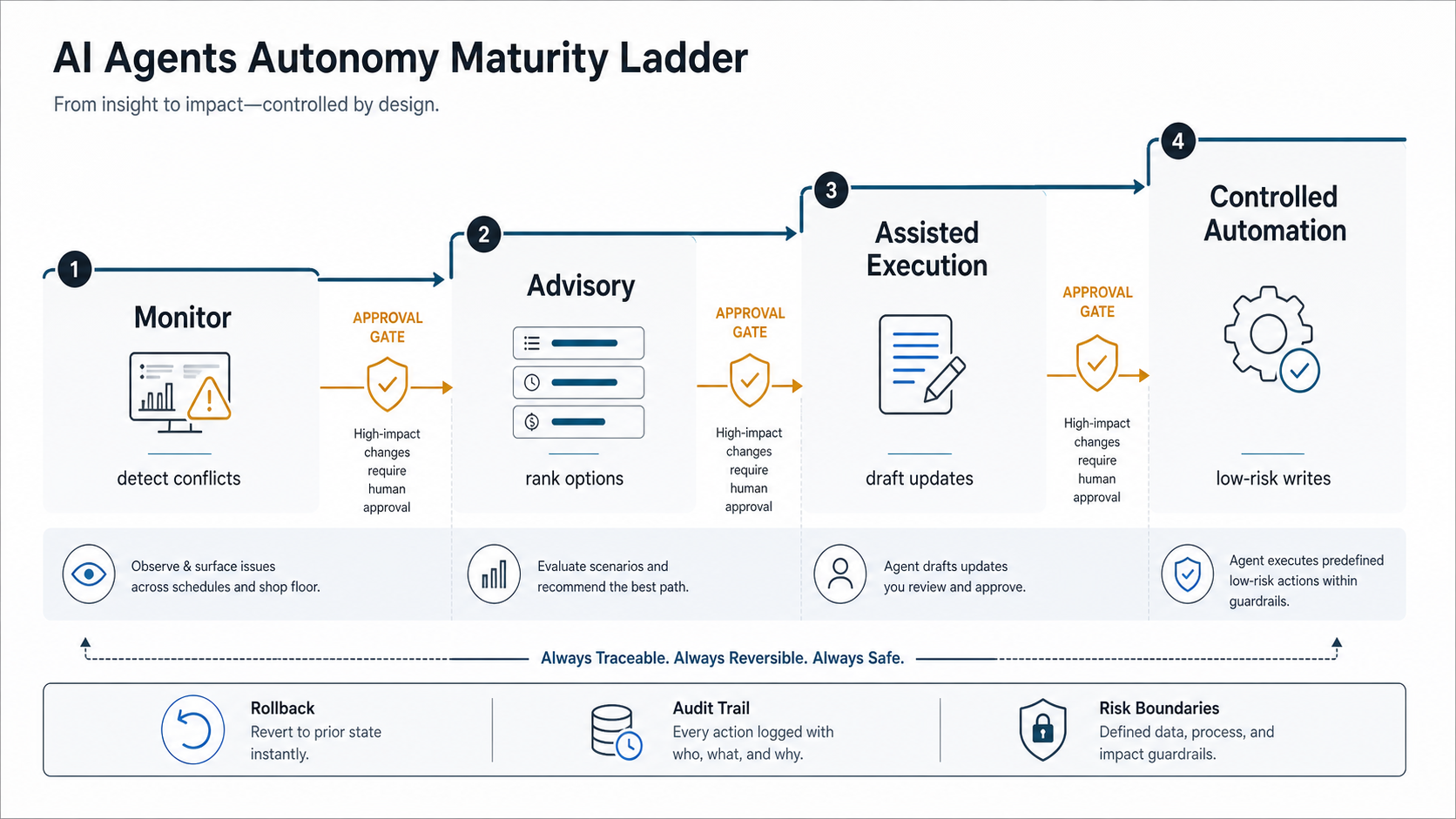
A good workflow has four decision states. In monitor mode, the agent watches for conflicts. In advisory mode, it recommends options but cannot write changes. In assisted execution mode, it drafts updates after approval. In controlled automation mode, it can apply low-risk changes within a bounded policy and escalate exceptions. Moving between these states should be a governance decision, not an engineering shortcut.
For a first pilot, pair the autonomy ladder with a business-case estimate from the AI Automation ROI Calculator. Use conservative inputs: planner hours spent per week on re-planning, number of affected supervisors, downtime or overtime costs tied to avoidable changes, and the expected automation percentage.
ERP, MES, CMMS, And Shop-Floor Integration Map
Production scheduling agents are integration-heavy. ERP may own customer demand, materials, and financial commitments. MES may own dispatch, work-in-progress, and line status. CMMS may own preventive maintenance windows and open asset work orders. WMS may own inventory movements. Supervisors may still rely on shift boards and messaging groups. The agent has to respect that ownership instead of creating another disconnected planning surface.
The Manufacturing Software Development service page is relevant because scheduling agents need the same integration discipline as ERP, MES, QMS, CMMS, and WMS workflows. If routings, inventory, and production calendars are unreliable, AI will expose that weakness quickly. Similarly, maintenance signals should connect to scheduling before downtime becomes urgent. A related predictive maintenance software roadmap can feed machine-risk signals into scheduling decisions so planners can avoid risky asset loading or reserve time for service windows.
| Integration | Read From | Write Back | Control Point |
|---|---|---|---|
| ERP | Orders, dates, inventory, routings, purchase orders | Promise-date notes, schedule changes, exception status | Planner approval for customer-impacting changes |
| MES | Line status, WIP, completion, downtime, scrap | Dispatch sequence, work instructions, supervisor alerts | Supervisor approval for line-level changes |
| CMMS | Maintenance windows, asset work orders, risk notes | Schedule conflict notes or coordination tasks | Maintenance lead review |
| Shop-floor apps | Shift status, operator notes, local constraints | Approved dispatch updates and escalation messages | Audit trail and acknowledgement |
Pilot Roadmap For Plant Teams
A scheduling-agent pilot should be narrow enough to measure. Pick one line, one product family, one bottleneck resource, or one recurring exception type. For example, a plant might start with material-shortage re-planning for a packaging line, or maintenance-window coordination for a high-value machine cell. The goal is to prove that the agent reduces investigation time and improves schedule reliability without increasing operational risk.
- Choose the workflow: define the exact scheduling exception, owner, systems, and success metric.
- Map current work: document how planners detect, investigate, decide, communicate, and update the schedule today.
- Assess data access: confirm APIs, exports, data freshness, permissions, and missing fields.
- Build advisory mode: rank conflicts, generate options, and explain tradeoffs without writing changes.
- Add approval workflow: route recommendations to the planner and supervisor with audit logging.
- Connect controlled writes: update MES or ERP only after explicit approval and rollback support.
- Measure and expand: compare re-planning time, schedule adherence, exception volume, and user trust before scaling.
If the pilot will become a production scheduling application rather than a narrow agent workflow, treat it as custom operational software. NextPage can help scope the data model, integration surface, planner UI, approval workflow, and production hardening through custom software development.
KPIs, Risks, And Governance
The strongest KPI is not model accuracy by itself. Plant leaders should track operational outcomes: schedule adherence, average time to re-plan, number of manual handoffs, changeover loss, bottleneck utilization, missed material exceptions, overtime triggered by schedule changes, planner workload, and supervisor override rate. If the agent is technically impressive but planners ignore its recommendations, the pilot is not ready to scale.
Governance should follow a practical AI risk management pattern: define the context of use, map the affected people and systems, measure recommendation quality, manage operational risk, and keep humans accountable for high-impact decisions. NIST AI RMF is a useful external reference because it frames AI risk around trustworthiness, measurement, monitoring, and governance rather than model demos alone.
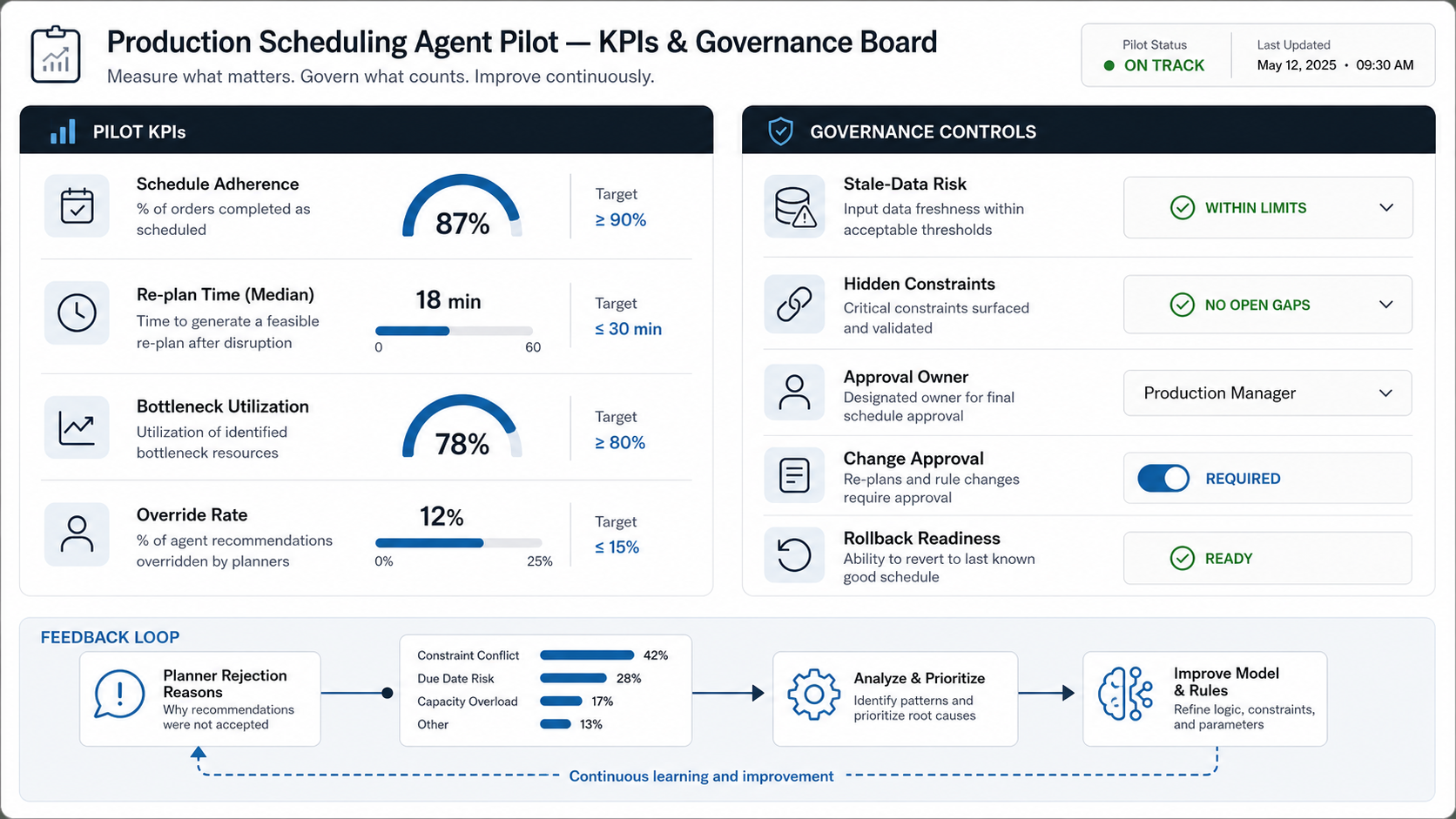
Key risks include stale data, hidden constraints, over-automation, poor explanations, weak rollback, and unclear accountability. Every recommendation should show the data timestamp, assumptions, affected orders, constraints considered, tradeoffs, and approval owner. Every write-back should be logged. Every automated action should have a policy boundary and a rollback path.
Governance should also include a feedback loop. When planners reject a recommendation, they should be able to select a reason: missing material context, wrong priority, labor constraint, maintenance conflict, customer commitment, quality hold, or business judgment. That feedback is often more valuable than another model experiment because it reveals the real operating rules the system must learn.
Build Guidance For Manufacturers
Use an existing APS, ERP, or MES capability when the main need is better planning configuration, cleaner master data, or standard dispatching. Do not build an AI agent to compensate for missing routings, bad calendars, or unowned material data.
Build a custom AI scheduling workflow when the plant has a repeated exception pattern that crosses systems and requires judgment: material shortages, maintenance conflicts, rush-order impacts, quality holds, bottleneck overload, or supervisor escalation. The build should combine deterministic rules, optimization logic, AI-assisted explanation, workflow approvals, and audit trails. If the agent has to connect private plant data, use role-based access, logging, and evaluation from the first release.
Teams comparing agent types can also review Generative AI Vs AI Agents Vs Agentic AI before committing to a build pattern. The naming matters less than the authority boundary: what the system can read, what it can decide, what it can write, and who is accountable.
How NextPage Helps
NextPage helps manufacturing and operations teams turn AI-agent ideas into controlled software pilots. For production scheduling, that means we start with the scheduling workflow, not with an agent demo. We map the current planning process, data sources, integration options, approval rules, KPI baseline, and rollout risk before choosing the architecture.
A practical engagement can include readiness assessment, integration discovery, scheduling-agent prototype, planner dashboard, approval workflow, MES or ERP write-back, KPI reporting, and production hardening. The deliverable is a system your team can test against real scheduling exceptions, not a generic AI interface disconnected from the plant.
If your team is evaluating AI agents for production scheduling, start with one recurring exception and one measurable planning pain. NextPage can help assess readiness, design the pilot architecture, and build the agent workflow with the right human controls from the beginning.