
Quick Answer: AI Customer Support Automation ROI
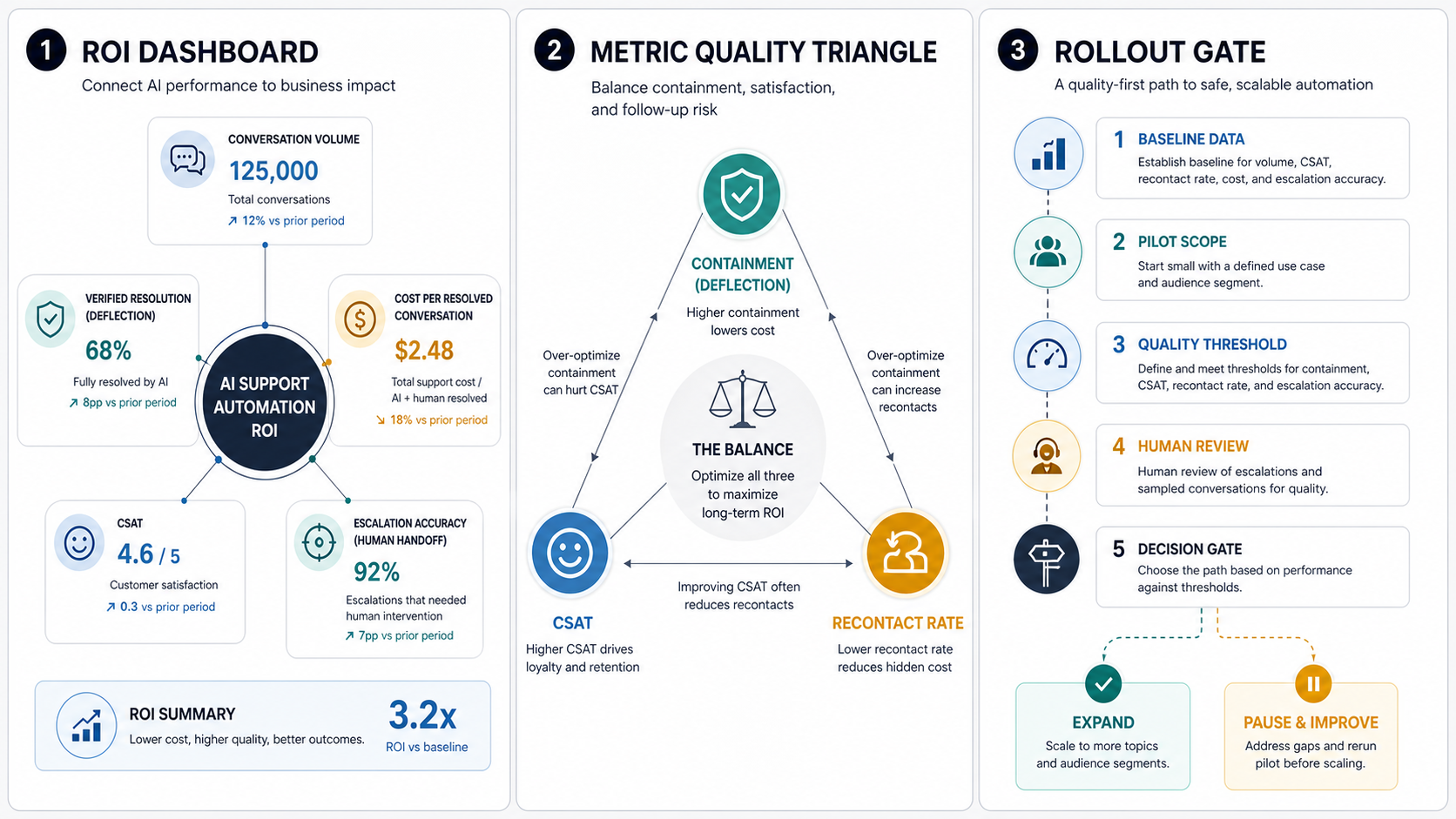
AI customer support automation ROI is the measurable business value created when AI helps resolve, route, summarize, or prepare customer conversations without lowering customer trust. In 2026, the useful calculation is not simply "tickets deflected." A stronger model compares baseline support cost and customer experience against verified resolution, containment quality, escalation accuracy, CSAT, 72-hour recontact or reopen rate, resolution time, agent-assist savings, implementation cost, and risk controls.
For most teams, the first question should be: which support workflow can be automated safely enough to save time, improve speed, or reduce avoidable escalations? NextPage's AI Automation ROI Calculator can estimate savings from repeated support work, but the final business case should include quality metrics and human-review thresholds before a rollout expands.
Why Ticket Deflection Alone Is Not ROI
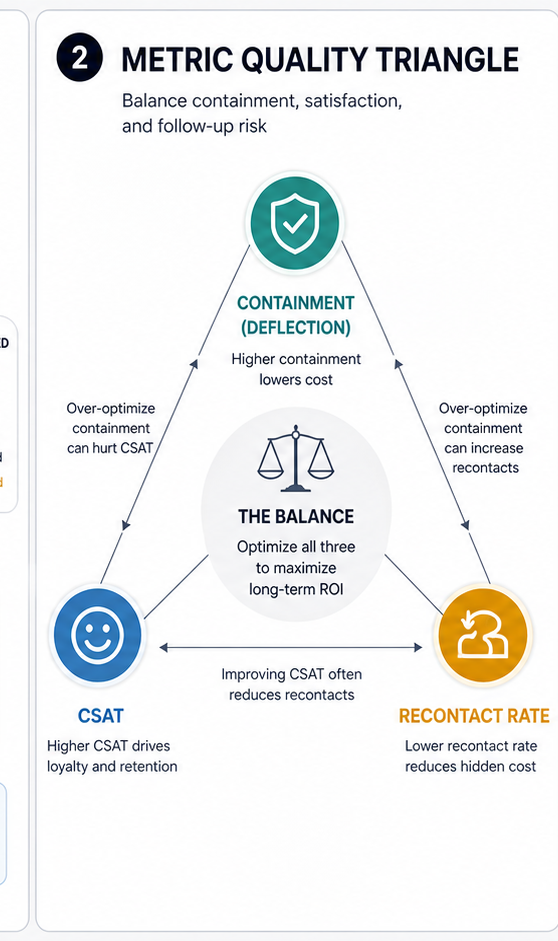
Deflection is easy to count, but it can hide bad automation. A support bot that prevents customers from reaching a person may reduce visible ticket volume while increasing frustration, repeat contacts, refunds, negative reviews, or hidden churn. That is why ROI needs quality controls around the automated answer, not just volume moved away from agents.
A better view separates deflection from containment, then validates both with outcome checks. Deflection means the customer did not create or continue a human ticket. Containment means the customer stayed inside the automated path. Verified resolution means the customer got the right answer or action and did not reopen, recontact within the agreed window, complain, or escalate. The difference matters because high deflection with poor verified resolution is a support debt, not a savings win.
The companion post on AI agents for customer support explains the architecture and human-review design behind safe support automation. This ROI guide focuses on the measurement layer: which metrics prove the automation is working, when to pause expansion, and how to justify the next investment.
The ROI Formula
A practical ROI model starts with a baseline, then adds implementation and operating cost. Use this formula as the first pass:
Net annual value = annual labor savings + avoided rework + capacity value + experience value - implementation cost - operating cost - review cost.
That formula is useful only when each input is grounded in current support data. Gather conversation volume by channel, average handle time, agent cost, escalation rate, reopen rate, 72-hour repeat-contact rate, first response time, resolution time, current CSAT, and backlog patterns. Then estimate which conversation types are safe to automate, which should become agent-assist workflows, and which require human approval before an action reaches the customer.
| Input | What to measure | Why it matters |
|---|---|---|
| Conversation volume | Monthly chats, tickets, emails, and calls by issue type | Shows whether automation has enough repeat volume to justify the build |
| Agent time | Average handle time and after-call work for each workflow | Converts automation potential into capacity and cost impact |
| Verified resolution | Resolved without reopen, 72-hour recontact, complaint, bad handoff, or agent cleanup | Prevents false savings from poor deflection or forced closure |
| Escalation accuracy | Correctly routed urgent, complex, VIP, compliance, or emotional cases | Protects customers and agents from automation overreach |
| Operating cost | Model, hosting, retrieval, monitoring, human review, and maintenance cost | Keeps the business case honest after launch |
Financial Impact Metrics
Financial metrics should show whether automation reduces avoidable work or creates capacity without degrading service. Start with cost per conversation, cost per resolved conversation, agent hours saved, after-contact work reduced, backlog reduction, and peak-load coverage. Then compare those gains with build cost, integration cost, knowledge-base cleanup, QA, monitoring, and ongoing prompt or policy maintenance.
For chatbot-specific budgeting, the AI chatbot development cost guide explains why support automation gets more expensive when it needs authenticated customer context, RAG, CRM updates, agent handoff, analytics, and role-based permissions. Those costs should be in the ROI model from the beginning rather than treated as surprises after a pilot.
Do not count every automated conversation as a full agent replacement. Many automations create partial savings: drafting replies, summarizing context, tagging issues, suggesting macros, or collecting missing information before a human joins. Those are valuable, but they belong in an agent-assist savings line rather than a deflection line.
Customer Experience Metrics
Customer experience metrics protect the business case from automation that looks efficient but feels worse. Track CSAT, customer effort score, reopen rate, repeat contact rate, first response time, time to resolution, abandoned conversations, transfer count, sentiment changes, and complaint patterns. These metrics should be segmented by issue type, customer tier, language, channel, and automation path.
First response time usually improves quickly with AI, but resolution quality is the harder metric. A fast answer is not useful if it misses account context, misunderstands the policy, or routes the customer in circles. For this reason, ROI dashboards should show both speed and resolution quality, not speed alone.
Teams should also inspect negative outcomes manually. Sample low-CSAT automated conversations, reopened cases, and escalations after bot interaction. The review will reveal whether the automation needs better retrieval, stronger intent routing, clearer handoff rules, or narrower scope. If the biggest gaps are missing CRM fields, helpdesk events, knowledge-base ownership, or analytics instrumentation, use the AI customer service agent integration checklist before treating the pilot as a pure model problem.
Benchmark Lens: Quality Before Deflection
Current AI support reporting has moved away from treating deflection as the headline metric. Zendesk now frames cost per resolution as a stronger ROI measure than cost per contact because it rewards solved issues instead of suppressed volume. Fin and Intercom reporting separates deflection, automation, resolution, involvement, handoffs, and customer sentiment. Rasa's contact-center guidance similarly separates deflection, containment, automation, solution rate, and CSAT or NPS.
That shift matters for buyers. A vendor can show a high deflection rate while customers still return within 24-72 hours, leave poor CSAT, or require a human agent to clean up the issue. For a defensible business case, treat containment, CSAT, recontact rate, and escalation accuracy as one quality system. The ROI number should improve only when the automation resolves the right work, hands off the risky work, and keeps customer trust intact.
| Metric | 2026 Buyer Question | Expansion Gate |
|---|---|---|
| Verified resolution | Was the customer problem actually solved without agent cleanup? | Expand only when resolution quality is sampled and confirmed. |
| Cost per resolved conversation | Does the total cost fall after software, QA, knowledge, review, and rework? | Include operating cost and failed-automation cleanup. |
| Recontact or reopen rate | Do customers come back because the automated answer was incomplete? | Pause if recontacts rise while containment rises. |
| Escalation accuracy | Does the AI hand off money, privacy, VIP, legal, safety, and emotional cases? | Require sampled review before adding riskier intents. |
Deflection, Containment, And Escalation
Deflection rate is useful only after the team defines what "resolved" means. For low-risk FAQs, a resolved answer may be enough. For account-specific issues, refunds, billing exceptions, safety concerns, or angry customers, the best automated outcome may be a fast handoff with complete context. That still creates value because it shortens intake and improves agent readiness.
Measure escalation precision by comparing the automation's routing decisions with human review. Good escalation design identifies when the AI is uncertain, when the customer is frustrated, when the case touches money or compliance, when the customer is high value, or when the workflow requires an action the AI should not take. Poor escalation design either overwhelms agents with unnecessary handoffs or traps customers in the automated path.
If the support workflow needs a conversational front end, retrieval from help content, and handoff into existing tools, NextPage's AI chatbot development service page covers the kind of support, sales, and internal-workflow bot build that usually sits underneath this ROI model.
Verified Resolution And Recontact Metrics
The most defensible ROI dashboards separate five metrics that are often blended together: deflection rate, containment rate, automated resolution rate, agent-assist savings, and verified recontact rate. Deflection and containment show where the conversation went. Automated resolution and recontact checks show whether the customer actually got a durable outcome.
| Metric | Use it for | Do not use it for |
|---|---|---|
| Deflection rate | Measuring how much demand avoids a human queue | Claiming customer problems were solved |
| Containment rate | Measuring how often an automated channel keeps the conversation | Ignoring abandoned, frustrated, or repeated contacts |
| Automated resolution rate | Measuring confirmed outcomes completed by AI | Counting unresolved conversations that simply closed |
| Agent-assist savings | Capturing time saved from summaries, drafts, tagging, routing, and intake | Treating partial support as full ticket replacement |
| 72-hour recontact or reopen rate | Finding hidden support debt after an automated interaction | Replacing CSAT, quality review, or escalation analysis |
If your team wants to model the financial side before instrumenting every quality metric, start with the AI Automation ROI Calculator, then add verified-resolution and recontact checks before presenting the number as a production business case.
Support Automation ROI Scorecard
A scorecard keeps the pilot grounded. Instead of asking whether AI "works," score each workflow across four groups: financial impact, customer experience, operational control, and risk guardrails. The workflow should pass all four groups before expanding to more channels, products, or customer segments.
| Scorecard group | Pass signal | Pause signal |
|---|---|---|
| Financial impact | Measurable agent time saved, lower cost per resolved conversation, or reduced backlog | Automation cost exceeds savings or shifts work into manual cleanup |
| Customer experience | CSAT stable or improving, fewer repeat contacts, faster resolution | CSAT drops, reopen rate rises, or customers request agents more often |
| Operational control | Clear handoff rules, readable audit trail, reliable tagging, monitored exceptions | Agents cannot see context, routing is inconsistent, or exceptions are hidden |
| Risk guardrails | Low hallucination rate, approved knowledge sources, human review for high-risk actions | Wrong policy answers, unsupported promises, unsafe account actions, or weak logging |
CRM, Helpdesk, And Analytics Readiness Gate
Before expanding support automation, confirm that the systems around the AI can prove what happened. The minimum evidence layer should connect helpdesk ticket IDs, CRM customer context, knowledge-source version, automation path, escalation reason, human override, CSAT outcome, reopen status, and cost-per-resolution data. Without those fields, the ROI dashboard becomes a guess.
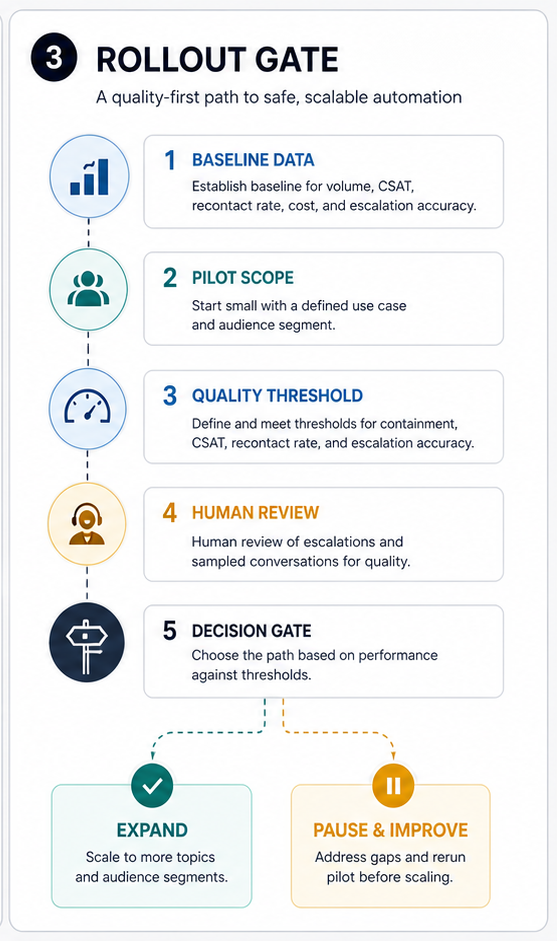
Use this gate before adding more intents, products, channels, languages, or customer segments. Teams that are still unsure whether a workflow is ready can run the AI Agent Readiness Assessment to check workflow clarity, data readiness, integrations, and human-review controls. If the workflow needs custom support assistants, approved-knowledge retrieval, escalation design, CRM/helpdesk updates, or production monitoring, scope it through AI customer service agent development rather than treating it as a chatbot experiment.
Risk Guardrails And Human Review
Support automation touches customer trust, private data, refunds, account access, and sometimes regulated information. Governance is not an afterthought. Define which data the AI can see, which actions it can prepare, which actions require approval, when it must escalate, and how humans can audit or reverse decisions.
The governance pattern should include role-based permissions, approved knowledge sources, retrieval freshness checks, confidence thresholds, escalation triggers, conversation logging, red-team tests, rollback paths, and human review for sensitive workflows. The enterprise AI agent governance guide goes deeper on permissions, monitoring, and rollback planning when AI systems can interact with business tools.
Hallucination risk should be measured like an operational defect. Track unsupported answers, policy mismatches, invented commitments, incorrect account assumptions, and missed escalation cues. If those defects appear in high-risk categories, narrow the automation scope before expanding.
Implementation Cost Drivers
Implementation cost depends on how much the AI must know, where it must act, and how tightly it must be governed. A simple FAQ assistant can be small. A production support automation workflow may need identity-aware retrieval, helpdesk integration, CRM context, order data, entitlement checks, multilingual support, escalation routing, agent-assist notes, analytics, monitoring, and admin controls.
Cost also rises when the source knowledge is weak. Outdated help articles, inconsistent policies, missing product data, and undocumented exception handling force the project to include content cleanup and process design. That work is not waste. It is often what makes the automation reliable enough to produce ROI.
For broader workflow planning, the AI workflow automation guide explains how to think about triggers, retrieval, rules, approvals, and monitoring across business operations. Support automation is one high-volume version of that same pattern.
Pilot Roadmap
Start with a narrow workflow where the answer pattern is repeatable and the value is visible. Good candidates include order-status questions, appointment changes, password or account-access guidance, product setup FAQs, warranty intake, triage forms, return-policy explanations, or agent-assist summaries. Avoid starting with angry customers, billing exceptions, legal issues, sensitive personal data, or high-value escalations.
| Phase | Goal | Output |
|---|---|---|
| 1. Baseline | Measure current volume, handle time, CSAT, reopen rate, escalation rate, and cost | Workflow-specific ROI baseline |
| 2. Scope | Select low-risk intents and define what the AI may answer, collect, summarize, or route | Automation boundaries and handoff rules |
| 3. Build | Connect approved knowledge, support tools, analytics, and human-review queues | Pilot-ready automation workflow |
| 4. Measure | Compare containment, CSAT, speed, escalation precision, defects, and cost | ROI scorecard and defect log |
| 5. Expand | Add channels or intents only after the pilot passes quality and risk thresholds | Controlled rollout plan |
The best pilots are designed to prove or disprove the business case quickly. If the team cannot measure baseline effort or customer outcomes, fix measurement before expanding automation. For larger AI programs, pair this pilot plan with the generative AI implementation timeline so discovery, MVP, hardening, launch, and scale each have clear evidence gates.
When NextPage Can Help
NextPage helps teams evaluate and build AI support automation around real operating metrics. The work starts with support data, workflow scope, customer-risk boundaries, integration needs, and measurable ROI targets. From there, we can design the automation architecture, connect support tools, build human-review controls, and create the dashboard that shows whether the pilot is ready to scale.
If your team is building the business case, start with one workflow and a scorecard. NextPage can run an AI support automation ROI and readiness review, identify the safest high-value pilot, and build the automation through AI automation services that keep human review, measurement, and customer trust in the loop.