
Quick Answer: AI Marketing Agents
AI marketing agents are goal-driven software workflows that can plan campaigns, draft briefs, adapt content, personalize journeys, trigger actions in marketing tools, analyze results, and recommend the next move. They are different from a chatbot or a writing assistant because they work across data, tools, permissions, and review gates instead of only producing one answer at a time.
The best 2026 use cases are not "let the agent run marketing." The useful pattern is narrower: choose one repeatable workflow, connect trusted data, define what the agent can and cannot do, keep humans in high-impact decisions, and measure whether the workflow improves cycle time, conversion quality, cost per outcome, and brand consistency.
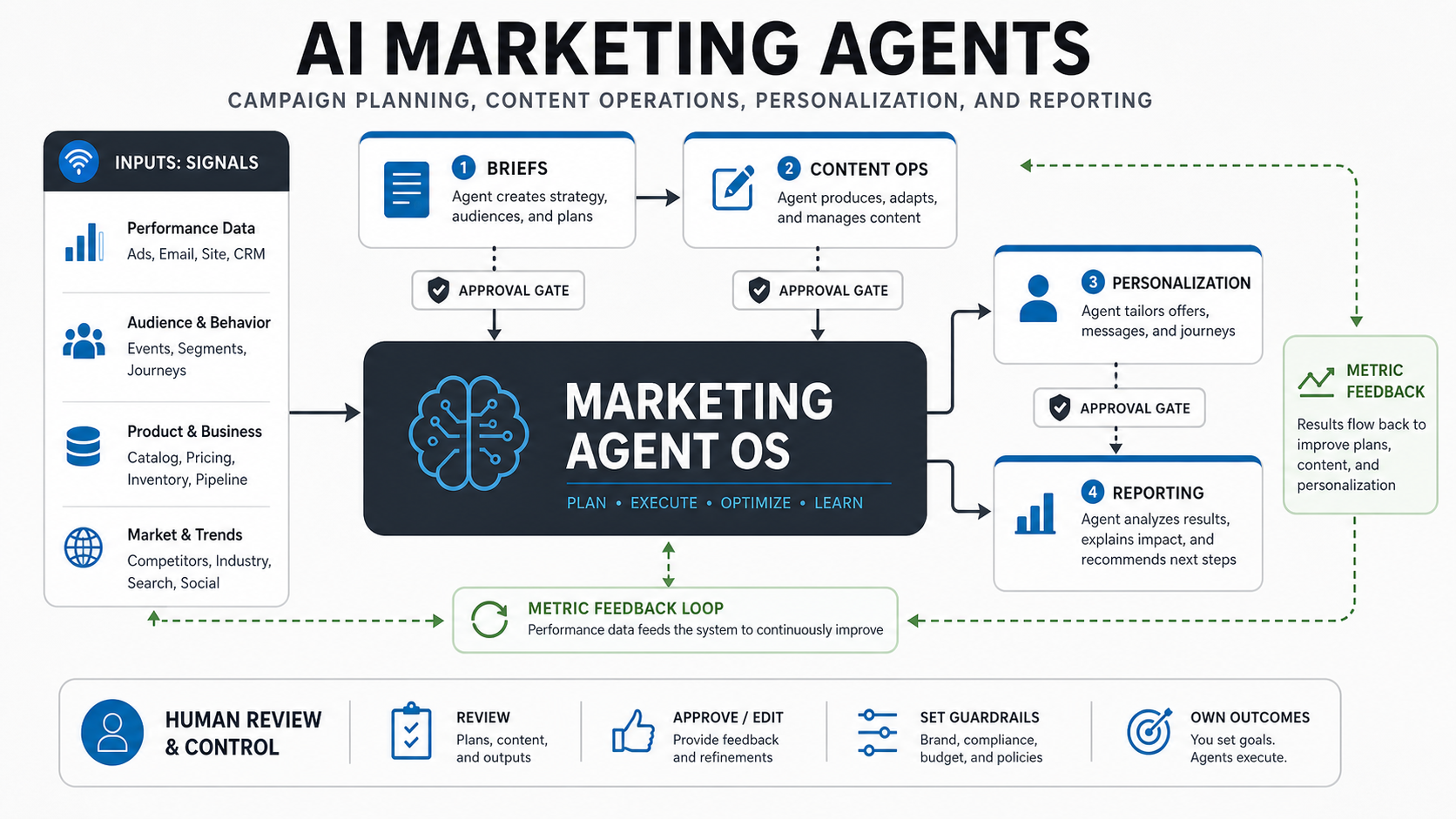
For most teams, the right starting point is a governed pilot around campaign planning, content operations, lifecycle personalization, lead follow-up, reporting, or CRM cleanup. If your workflows need custom data access, private business rules, CRM/CDP integration, approval paths, and audit trails, treat the project as agentic AI development services, not a simple prompt experiment.
What AI Marketing Agents Do In 2026
Marketing teams are moving from standalone generative AI tools toward connected agent workflows. Current vendor direction from Salesforce, Adobe, and HubSpot shows the same pattern: agents are being placed inside campaign planning, content production, customer experience orchestration, CRM-native workflows, and always-on personalization. That shift raises the bar for implementation because agents now touch customer data, brand decisions, budgets, audiences, and reporting.
An AI marketing agent can gather campaign context, compare audience segments, turn strategy into channel briefs, draft content variants, check brand rules, push tasks into a CMS or marketing automation platform, summarize test performance, and recommend budget or creative changes. But it should only perform those actions inside the permissions and review model the business defines.
The most important 2026 shift is that major CRM and experience platforms are packaging these capabilities as agentic marketing surfaces rather than isolated AI writing tools. Salesforce is positioning Marketing Cloud Next and Agentforce around campaign creation, content, conversations, and customer data. Adobe is pushing agent orchestration across customer-experience workflows. HubSpot Breeze keeps agents close to CRM data, customer conversations, and deal history. That platform direction makes governance, integration architecture, and workflow measurement more important than prompt quality alone.
A practical agent setup usually has five moving parts:
| Layer | What It Does | Why It Matters |
|---|---|---|
| Signal layer | CRM, CDP, web analytics, ad data, product usage, support signals, and sales notes | The agent needs trusted context rather than generic assumptions. |
| Reasoning layer | Plans, prioritizes, drafts, classifies, recommends, and explains tradeoffs | This is where prompts, retrieval, model choice, and evaluation shape output quality. |
| Tool layer | CMS, email, ads, CRM, analytics, ticketing, and workflow APIs | Without tool access, the agent is only an assistant; with tool access, it needs controls. |
| Control layer | Permissions, brand rules, compliance checks, budget caps, escalation paths, and logs | Marketing agents affect customers, spend, and reputation. |
| Measurement layer | Cycle time, conversion lift, content quality, cost per outcome, escalation rate, and exceptions | ROI needs a baseline and a rollout gate, not only productivity anecdotes. |
NextPage usually starts this type of work by mapping workflows and system boundaries through AI development services, then deciding whether the agent should remain advisory, trigger drafts for review, or execute approved actions in connected tools.
Best Use Cases For AI Marketing Agents
The strongest AI marketing agent candidates are repeatable, data-backed, time-consuming, and measurable. They should have a clear owner, a defined outcome, enough historical examples, and a safe way to review or roll back results.
| Use Case | Agent Role | Human Decision To Keep | Useful Metric |
|---|---|---|---|
| Campaign planning | Summarize audience signals, create campaign briefs, suggest channel mix, and identify missing assets | Campaign strategy, offer, budget, and audience priority | Planning cycle time and brief acceptance rate |
| Content operations | Draft variants, localize approved claims, create repurposing plans, and check brand rules | Final creative direction, legal claims, and launch approval | Approved output per week and revision rate |
| Lifecycle personalization | Suggest segments, messages, triggers, and next-best actions from CRM/CDP signals | Audience inclusion/exclusion, sensitive attributes, and offer rules | Conversion lift, unsubscribe rate, and complaint rate |
| Lead follow-up | Prioritize leads, summarize context, draft outreach, and trigger CRM tasks | Qualification rules, high-value account handling, and escalation | Speed to lead, meeting rate, and sales acceptance |
| Reporting and insights | Explain campaign movement, anomalies, budget pacing, and recommended tests | Budget changes, attribution assumptions, and leadership narrative | Decision speed and forecast accuracy |
If the team is unsure where to start, the Workflow Automation Opportunity Finder can help rank repetitive marketing and operations workflows by volume, risk, measurability, and automation fit before you invest in a custom agent.
Where AI Marketing Agents Should Not Run Alone
AI marketing agents should not autonomously change pricing, discounts, regulated claims, high-spend ad budgets, customer eligibility, consent settings, or brand-sensitive messaging without a review gate. They also should not be allowed to scrape private CRM notes, merge customer profiles, or use protected attributes unless the data owner has explicitly approved that access.
High-risk workflows need stricter controls:
- Budget movement: require spend caps, pacing rules, and manager approval before reallocating media spend.
- Customer targeting: block sensitive traits, consent violations, and segments that cannot be explained.
- Claims and offers: route legal, medical, financial, or regulated statements through human review.
- Customer communication: keep escalation paths for angry customers, vulnerable groups, refunds, cancellations, or enterprise accounts.
- Attribution and reporting: make assumptions visible so leaders do not treat model-generated explanations as audited truth.
This is where AI workflow automation discipline matters. The goal is not to remove humans from marketing. The goal is to remove repetitive coordination while keeping ownership, review, and learning loops clear.
2026 Platform Signals For AI Marketing Agents
Use platform announcements as useful direction, not as proof that every marketing workflow is ready for autonomy. The pattern is clear: CRM-native agents are getting closer to segmentation, campaign generation, content production, customer conversations, and reporting. The risk is also clear: the more actions an agent can trigger, the more the team needs data boundaries, budget controls, consent rules, brand review, and audit logs.
| Platform Signal | What It Means For Buyers | Implementation Guardrail |
|---|---|---|
| CRM-native marketing agents | Campaign planning, lead follow-up, and reporting can use account and deal context faster. | Validate field quality, owner rules, consent, and sales handoff logic before enabling actions. |
| Experience orchestration agents | Personalization can span web, email, product, service, and ad signals. | Define source-of-truth audiences, suppression rules, and escalation paths for sensitive segments. |
| Outcome-based agent pricing | Vendors are trying to connect spend to completed actions or business tasks. | Measure accepted outputs, exception rates, and downstream conversion, not only completed tasks. |
| Custom agent workflows | Teams can connect proprietary product, margin, CRM, and analytics data across tools. | Start with one governed workflow and use AI automation services patterns for permissions, logs, and release gates. |
This is also why the supporting topic cluster matters. A team planning AI marketing agents should understand broader AI search, personalization, and automation trends, then choose whether the first build belongs inside a platform-native assistant, a custom agent, or a simpler workflow automation sprint.
Platform-Native Vs Custom AI Marketing Agents
Many teams should start with platform-native agents because they are already close to CRM, marketing automation, content, and reporting data. A Salesforce, Adobe, HubSpot, or similar platform agent can be a good fit when the workflow stays mostly inside that platform, the data model is clean, and the team only needs configuration, prompts, templates, approvals, and reporting views.
Custom agents become more useful when the workflow crosses several systems or depends on proprietary business logic. Examples include combining product usage data with CRM stages, generating channel-specific content from an internal knowledge base, routing account-level personalization through sales approval, connecting a custom pricing engine, reconciling ad spend with internal margin data, or creating a measurement layer that existing marketing tools cannot represent cleanly.
| Decision | Platform-Native Agent Fits When | Custom Agent Fits When |
|---|---|---|
| Data access | Most useful data is already in one platform | Signals live across CRM, product, warehouse, support, finance, and custom apps |
| Workflow shape | The process follows a standard marketing or CRM pattern | The process has custom handoffs, approval paths, scoring rules, or exception logic |
| Control needs | Built-in permissions and review states are enough | You need custom audit logs, risk gates, budget rules, or customer-specific controls |
| Differentiation | The workflow is mostly operational efficiency | The workflow is tied to proprietary customer insight, pricing, product behavior, or service model |
| Integration | Native connectors cover the core actions | APIs, webhooks, data warehouse jobs, or custom admin tools are required |
A practical approach is to use platform-native capabilities for simple drafting, summarization, CRM enrichment, and reporting assistants, then build custom agent workflows only where the business case is measurable and the platform boundary is too limiting. This avoids overbuilding while still protecting the workflows that create competitive advantage.
For teams already evaluating several agent ideas, the first architecture conversation should include build-versus-configure decisions. Which tasks can be handled by existing platform features? Which need custom retrieval, integrations, or evaluation? Which actions should never happen without human review? The answer shapes budget, timeline, risk, and long-term maintainability. When the workflow depends on proprietary scoring, custom dashboards, private knowledge, or multi-system approvals, a custom software development path may be more defensible than forcing the process into a single marketing platform.
Architecture For AI Marketing Agents
A production-grade AI marketing agent architecture has to connect business context to action without creating a hidden, ungoverned automation layer. The agent should know what data it can read, what tools it can call, what decisions require approval, how outputs are logged, and which metrics decide whether the pilot expands.
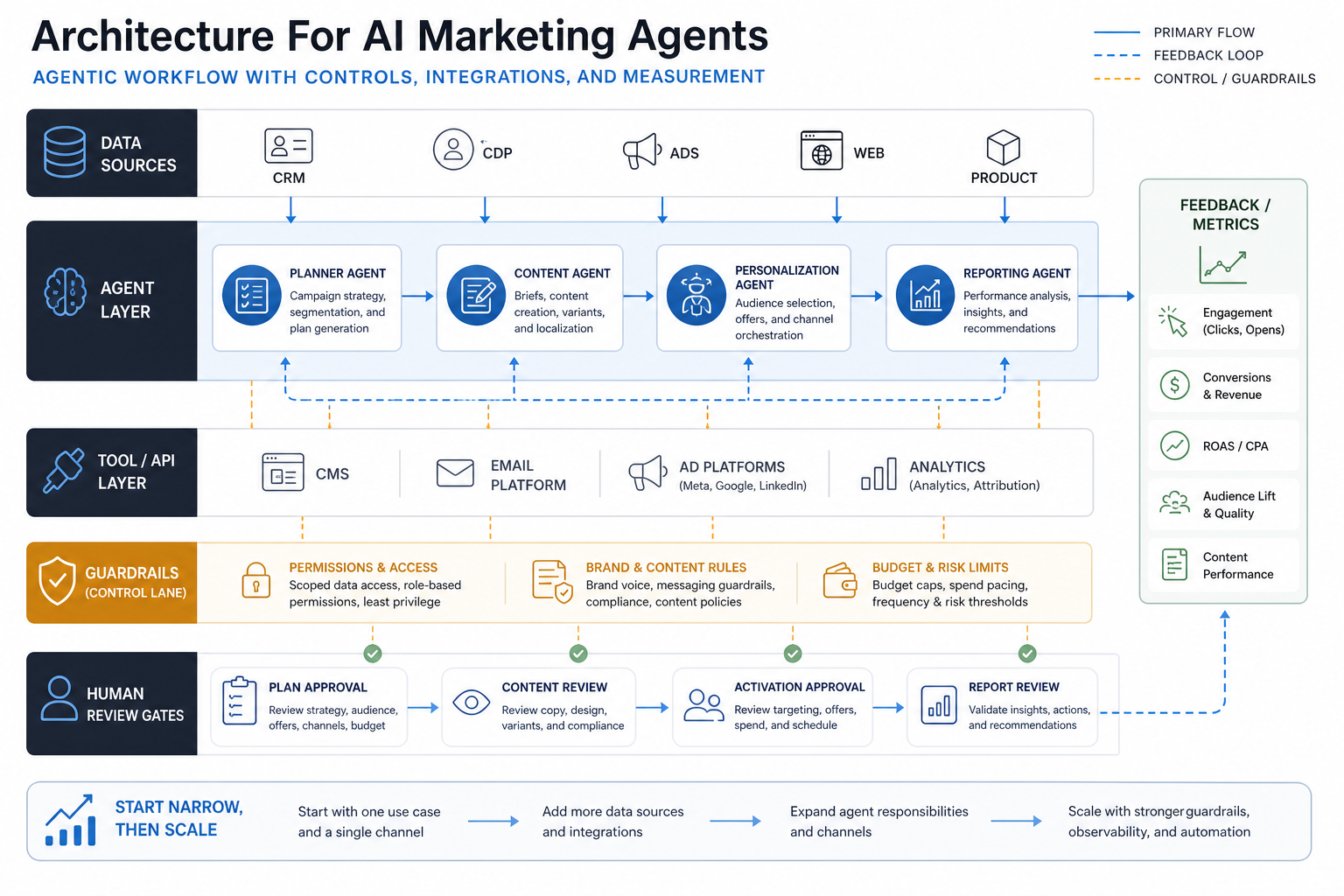
Most marketing stacks already have a complicated mix of CRM, CDP, email platform, CMS, ad accounts, analytics, product events, spreadsheets, and agency workflows. The agent should not become another black box on top of that stack. It should operate through explicit connectors, scoped permissions, and clear owners.
For example, a campaign planning agent may read CRM opportunity notes, web conversion trends, paid-search terms, and product usage signals. It may draft a campaign brief and suggest target segments. It should not publish ads, change offer rules, or email an enterprise segment until a named owner approves the brief, audience, budget, and compliance checks.
Teams that need agents to operate across CRM and marketing systems should pair the AI plan with CRM integration and workflow automation. If the CRM data model itself is messy, a custom CRM development or cleanup phase may be more valuable than adding an agent on top of unreliable fields.
Governance And Human Review
Governance for AI marketing agents starts with one question: what could go wrong if this action happened at scale? The answer determines permissions, logging, approvals, rollback, and measurement.
Use a simple control model:
| Control | Decision | Owner |
|---|---|---|
| Data access | Which customer, account, campaign, and product signals can the agent read? | Data owner and marketing operations |
| Action rights | Can the agent draft, schedule, publish, update CRM records, or only recommend? | Marketing operations and system owner |
| Brand rules | Which claims, tone rules, examples, and proof points are allowed? | Brand/content lead |
| Risk gates | Which actions require review because they affect spend, compliance, customers, or reputation? | CMO, legal/compliance, or business owner |
| Evidence log | What input, output, approval, and metric data must be retained? | Marketing operations and analytics |
The AI Agent Readiness Assessment is useful before implementation because it forces teams to score process stability, data access, owner clarity, integration readiness, and risk controls before they connect an agent to production tools.
CRM, CDP, And Analytics Handoffs
AI marketing agents only improve personalization when the handoff between customer data and campaign action is clean. A personalization agent needs reliable identity resolution, consent status, event definitions, lifecycle stage, channel preference, suppression rules, and a way to learn from outcomes.
Weak data creates weak personalization. If account stages are stale, product events are missing, or campaign results are spread across dashboards and spreadsheets, the agent will appear confident while making shallow recommendations. Before scaling the agent, define the source of truth for audiences, offers, product usage, and attribution.
For content-heavy teams, the same principle applies to knowledge and brand assets. A content operations agent can help reuse approved claims, product positioning, case proof, and segment messaging, but only if those assets are retrievable, versioned, and governed. This is where generative AI development often overlaps with marketing operations: retrieval quality and workflow design matter as much as model selection.
How To Measure ROI
AI marketing agent ROI should be measured against a baseline workflow. Do not start with model cost alone. Start with the business motion: how long it takes to plan a campaign, how many revisions content needs, how fast leads receive relevant follow-up, how much time reporting consumes, and how often campaigns miss quality or compliance gates.
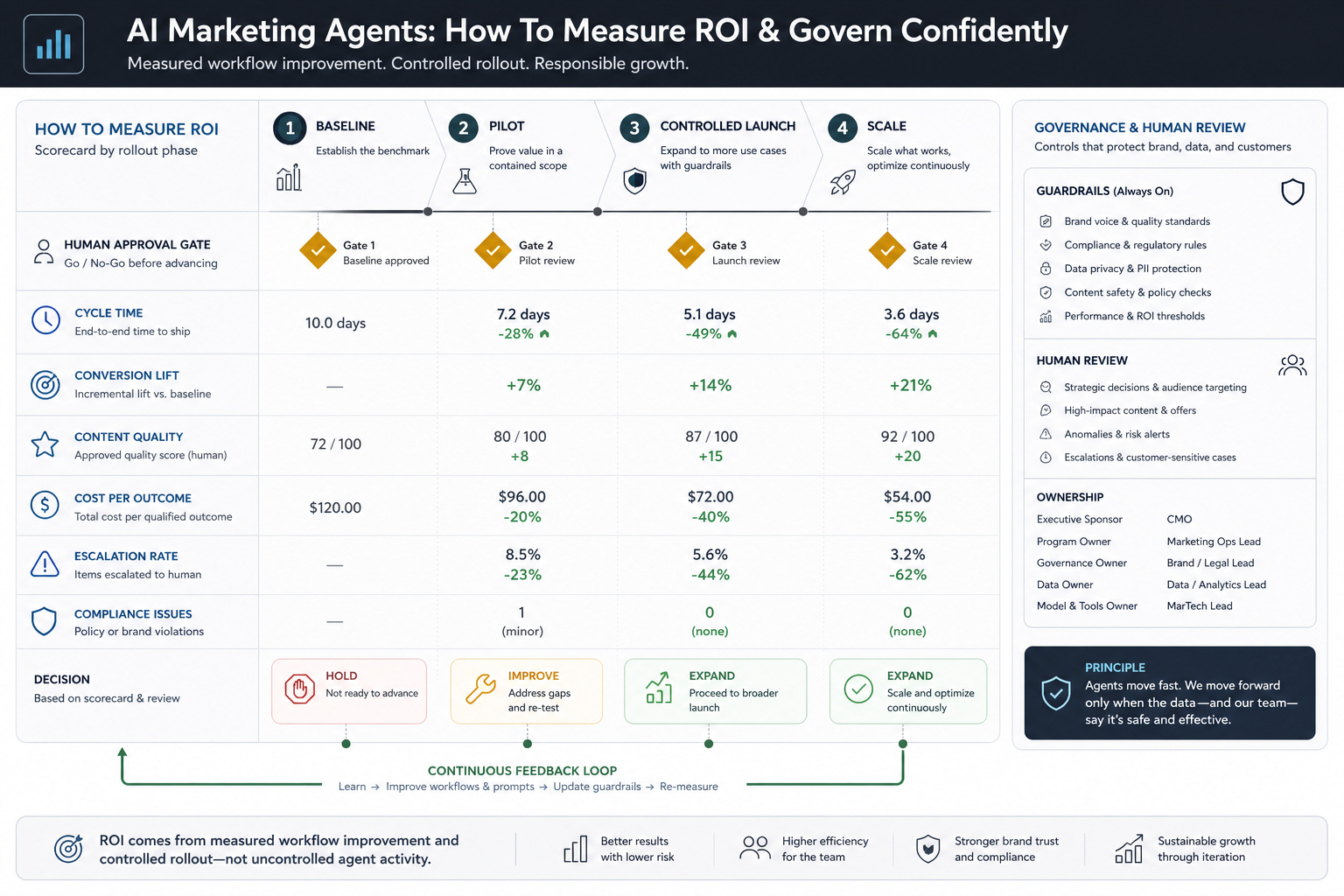
Use a scorecard with both efficiency and quality metrics:
- Cycle time: time from brief request to approved campaign plan, asset package, or report.
- Conversion quality: lift by segment, lead quality, sales acceptance, retention, or pipeline influence.
- Content quality: approval score, revision rate, off-brand incidents, and duplicate work avoided.
- Cost per outcome: cost per qualified lead, activated account, retained customer, or approved asset.
- Risk and exceptions: escalations, suppressed sends, compliance issues, hallucinated claims, and manual overrides.
The AI Automation ROI Calculator can help convert time saved, review effort, exception rate, and outcome lift into a business case before the pilot expands.
One useful operating rule is to measure the agent at the workflow level, not the task level. A writing agent that creates drafts faster may still fail if approval queues grow, campaign setup still requires manual copying, or sales rejects the resulting leads. The scorecard should follow the full path from request to approved action to business outcome so the team can see whether the agent improved the system or only moved work to a different person.
Implementation Roadmap
A practical AI marketing agent rollout has four phases.
1. Map The Workflow
Pick one workflow with enough volume and a clear owner. Document current steps, systems, handoffs, decisions, risks, quality checks, and baseline metrics. Good first pilots include campaign brief generation, lifecycle content adaptation, reporting summaries, lead follow-up drafting, or CRM cleanup recommendations.
2. Design The Agent Boundary
Define what the agent can read, what it can write, what tools it can call, and what requires approval. Keep the first version narrow enough that quality can be judged. A pilot that touches one channel and one segment is usually safer than a broad autonomous campaign engine.
3. Connect Data And Tools
Connect the minimum viable data sources and APIs. Add retrieval for approved content and product facts. Configure logs, approval states, and exception handling. Test with historical examples before the agent touches live workflows.
4. Pilot, Measure, And Expand
Run a controlled pilot against the baseline. Review outputs, exceptions, and metrics weekly. Expand only when the agent improves the workflow without creating brand, compliance, customer, or reporting risk.
Document each expansion decision clearly. A useful expansion memo records the baseline, pilot evidence, rejected failure modes, data access changes, new tool permissions, review owner, rollback path, and the metric that justifies moving from advisory mode to action mode.
Readiness Checklist Before Rollout
Before you connect an AI marketing agent to production systems, confirm these items:
- The workflow has one accountable business owner and one system owner.
- The agent has a narrow goal, clear inputs, and measurable output quality.
- CRM, CDP, analytics, and content sources are trusted enough for the pilot.
- Permissions are scoped by data type, account segment, channel, and action.
- Brand, compliance, privacy, budget, and customer-impact gates are explicit.
- Every agent action or recommendation can be logged and reviewed.
- The team has a rollback plan for bad outputs, wrong segments, or integration failures.
- ROI is measured against baseline cycle time, quality, conversion, cost, and exception metrics.
If several of those checks are weak, do not start with a full agent. Start with advisory recommendations, reporting summaries, or controlled drafts. Then add tool actions after the team has enough confidence in the data, model behavior, and review process.
When NextPage Can Help
NextPage helps teams turn promising AI marketing ideas into controlled production workflows. We can map the campaign, content, CRM, analytics, and personalization process; design the agent boundary; build retrieval and integration layers; implement approval gates; connect CRM/CDP and marketing tools; and create measurement dashboards for pilot and rollout decisions.
The strongest projects usually combine marketing operations with engineering discipline: workflow discovery, data readiness, API integration, prompt and retrieval design, evaluation sets, logging, security review, and practical release gates. If you are comparing a platform-native agent with a custom workflow, NextPage can help decide where the platform is enough and where custom software or integration work is justified.
Use the readiness assessment to check whether the workflow is ready, use the ROI calculator to size the business case, and bring NextPage in when you need a governed implementation that connects models, data, tools, and people without losing control of brand, spend, or customer experience.