
Quick Answer: What Does AI Wearable App Development Require?
AI wearable app development is the process of turning signals from smartwatches, rings, bands, sensors, or custom devices into useful product decisions. The hard part is not adding an AI label. The hard part is building a reliable path from noisy sensor data to a consented, explainable, battery-aware, privacy-safe user experience.
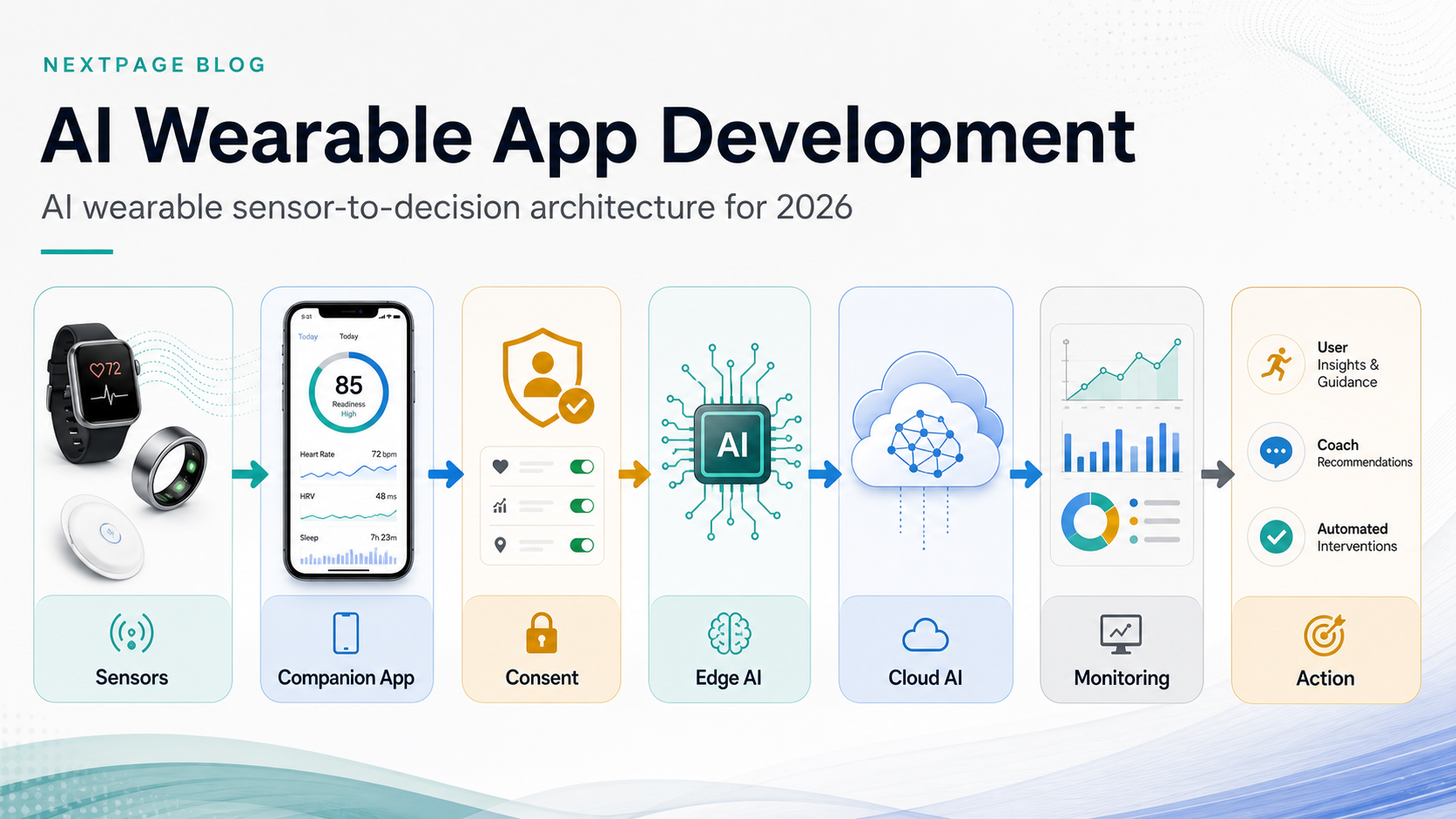
A practical AI wearable MVP usually needs five layers: device and sensor integration, a companion mobile app, a consented health or activity data layer, an inference architecture that decides what runs on-device versus in the cloud, and a product workflow that turns predictions into coaching, alerts, summaries, or care-team actions. If the idea is still early, start by checking data readiness and governance with NextPage's AI Agent Readiness Assessment, then narrow the first release with the MVP Scope Builder around one measurable outcome, one device family, and one validated sensor workflow.
What Makes AI Wearable Apps Different From Standard Mobile Apps?
Standard mobile apps often wait for user input. Wearable-connected apps continuously receive context: heart rate, movement, sleep, temperature, location, device state, workout sessions, or environmental signals. That data can be powerful, but it is also noisy, incomplete, personal, and expensive to process poorly.
The product team has to decide what the wearable owns, what the phone owns, and what the cloud owns. A watch may handle lightweight detection, a phone may combine device streams and user context, and the backend may run deeper analytics, model evaluation, cohort reporting, or admin workflows. NextPage's IoT Mobile App Development Roadmap is a useful companion because pairing, offline state, BLE behavior, cloud ingestion, and QA are usually part of wearable delivery.
The other difference is trust. A bad ecommerce recommendation is annoying. A bad health, fitness, fatigue, or safety recommendation can create user anxiety or operational risk. AI wearable app development therefore needs clearer boundaries, fallbacks, disclaimers, and human review paths than a normal engagement feature.
Search Intent And What Most Competitor Pages Miss
The current search results for wearable app development are mostly service pages. They list Apple Watch, Wear OS, HealthKit, Health Connect, BLE, IoT dashboards, AI coaching, biometric processing, compliance, and maintenance. That is useful for vendor discovery, but it rarely helps a founder or product manager answer the real planning questions: Which AI feature should be first? Which sensor streams are reliable enough? What is safe to process at the edge? What needs consent? What should be excluded from the MVP?
NextPage's angle is more specific: use the wearable as a decision system, not just a device integration. Teams that need implementation support can compare this planning model with NextPage's wearable app development services, where the device, companion app, data pipeline, QA matrix, and product workflow are scoped together. The build plan should start with the user decision the app improves, then work backward to data quality, permission model, model choice, latency requirement, and validation metric. That is how teams avoid spending the first release on impressive but unproven AI features.
Sensor Fusion: The Core Of Useful Wearable AI
Sensor fusion means combining multiple signals to produce a more useful interpretation than any single sensor can provide. For example, movement plus heart rate plus time of day may produce a better training-readiness signal than step count alone. Sleep duration plus resting heart rate plus temperature trend may support a wellness insight better than a single nightly score.
In practice, sensor fusion has three product jobs. First, it improves confidence by cross-checking signals. Second, it fills gaps when a device stream is missing or delayed. Third, it lets the app create higher-level features such as activity recognition, fatigue indicators, anomaly detection, recovery scoring, personalization, or behavior nudges.
The MVP mistake is trying to fuse every possible data stream from day one. Start with the smallest set of signals that directly support the product promise. If the app is a running coach, heart rate, workout events, pace, and recovery context may be enough. If the app is a workplace safety tool, movement, posture, location zone, device battery, and alert acknowledgement may matter more. Each additional sensor adds QA cases, battery impact, permission complexity, and model uncertainty.
Privacy, Permissions, And Platform Rules
Wearable data often includes health, fitness, location, biometric, or behavioral information. On Apple platforms, HealthKit apps must handle user authorization carefully, avoid reading or writing health data without explicit consent, and provide a privacy policy. On Android, Health Connect is the current platform direction for health and fitness data sharing, with granular permissions, record-level data types, and platform-controlled access. Google Play policy is also moving body sensor access toward more specific health permissions, with review requirements for personal and sensitive data.
That means privacy is not a legal appendix at the end of the project. It shapes the product architecture. The app should request only the permissions needed for the feature, explain why each data type matters, keep consent revocable, avoid storing raw data when derived features are enough, and separate user-facing insights from internal analytics. Teams planning AI features should also decide whether data is used only for the individual user experience or for model improvement, reporting, research, or care workflows.
For production AI systems, NextPage's AI development services work treats data sensitivity, latency, monitoring, and governance as architecture inputs. That mindset is especially important for wearable apps because sensor data can feel intimate even when the feature is positioned as fitness or productivity.
Edge AI Vs Cloud AI: Where Should Inference Run?
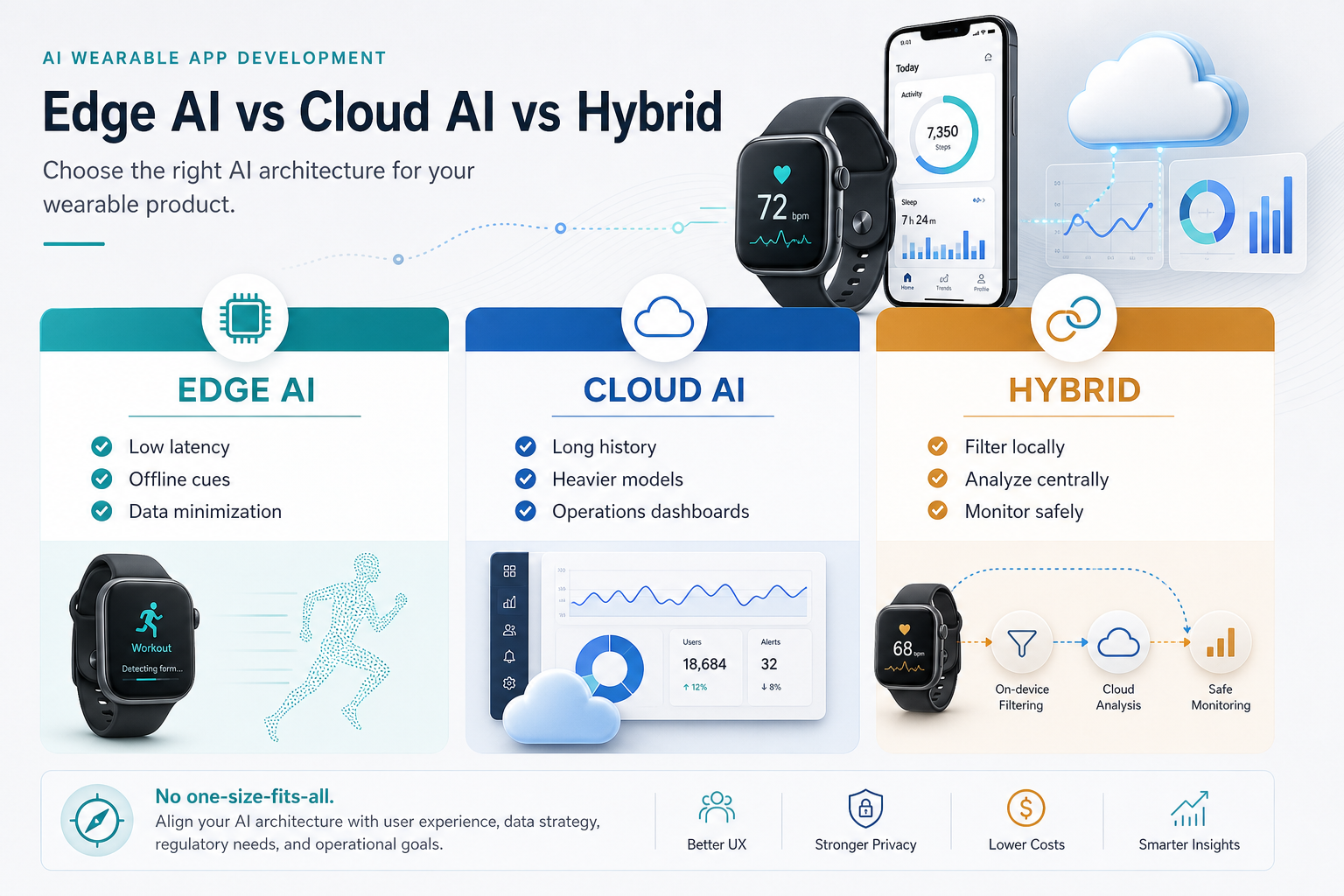
Edge AI runs close to the user, usually on the wearable or phone. It is useful when latency, offline use, battery-aware sampling, or privacy matter. Examples include simple activity classification, on-device reminders, local filtering, wake-word style interaction, or real-time coaching cues that should not wait for a server round trip.
Cloud AI is useful when the model is larger, the computation is heavier, data needs to be joined across systems, or the team needs centralized monitoring and retraining. Examples include weekly insight generation, cohort analysis, long-term trend detection, personalized plans, admin dashboards, and integration with CRM, EHR, coaching, or operations systems.
The right answer is often hybrid. Use the device or phone to collect, filter, cache, and protect the immediate experience. Use the cloud for deeper analytics, account-level history, model evaluation, and operational workflows. The architecture should make this explicit because moving inference later can affect latency, cost, privacy policy, model observability, and app-store review. NextPage's AI features for mobile apps guide is a useful companion when deciding which intelligence belongs on-device, in a backend workflow, or behind a supervised human review path.
AI Wearable MVP Feature Prioritization
A strong MVP does not prove every AI idea. It proves one user outcome with enough accuracy, trust, and repeat use to justify the next release. The easiest way to prioritize is to score each feature by user value, data availability, model risk, latency need, consent friction, and support burden.
| Feature | Good MVP Version | Higher-Risk Version | Validation Metric |
|---|---|---|---|
| Real-time coaching | Rule-assisted cues during a known activity | Adaptive coaching across many workouts and conditions | Completion rate, ignored cue rate, user rating |
| Anomaly alerts | Low-stakes wellness or device-state alerts | Medical, safety, or emergency alerts without review | False positive rate, acknowledged alerts, escalation outcomes |
| Personalization | Simple recommendations from preferences and history | Opaque model-driven plans with no explanation | Retention, recommendation acceptance, override rate |
| Predictive insights | Weekly trend summaries and confidence bands | Specific predictions from sparse or noisy data | Prediction calibration, user trust, repeat usage |
| Care or coach dashboard | Aggregated trends and review workflow | Automated decisions with limited accountability | Review time saved, intervention quality, audit completeness |
If the roadmap includes LLM summaries, coaching assistants, or workflow agents, use generative AI development only where the language layer has reliable context and clear guardrails. A conversational assistant should not hide weak sensor quality or make unsupported health claims.
Reference Architecture For An AI Wearable Product
A production-ready architecture usually includes the wearable app or firmware layer, the mobile companion app, a consent and permissions layer, local storage, sync jobs, event ingestion, model services, analytics, admin tooling, notifications, and monitoring. Each layer needs a failure mode. What happens when Bluetooth disconnects? What happens when Health Connect permission is revoked? What happens when the model is uncertain? What happens when the user is offline? If the stack is still unsettled, use the Mobile App Technology Stack Guide to compare native, cross-platform, backend, integration, and AI architecture choices before a wearable roadmap is priced.
The companion mobile app is often the control center. It handles onboarding, device pairing, permissions, user preferences, explainability, notifications, sync status, and account settings. The backend should avoid becoming a dumping ground for raw data. Store the data needed for the product, retention, debugging, and compliance, then document what is not stored.
For teams still estimating budget and release shape, NextPage's mobile app development team can map the mobile, backend, data, and QA scope together. Wearable apps fail when device integration is priced separately from the product workflow it must support.
Data Quality And Model Evaluation
Wearable models are only as good as their input data. Sampling frequency, device fit, firmware behavior, missing values, user demographics, workout context, and sensor drift can all change output quality. A model that works in a lab may fail during a commute, workout, night shift, or low-battery state.
Plan evaluation before launch. Define what counts as a correct event, who labels edge cases, how uncertainty is displayed, and when the system should say nothing. Track false positives and false negatives separately because their product cost is different. In a coaching app, a false positive may be mildly annoying. In a safety or health-monitoring workflow, it may require a review queue, escalation policy, or stronger disclaimers.
A useful AI wearable dashboard should show model confidence, input freshness, sync status, and user feedback. Those signals help the product team improve the model without guessing from aggregate retention numbers. For production model work, NextPage's machine learning development services focus on evaluation data, model monitoring, fallback states, and release evidence rather than treating the model as a one-time feature.
AI Wearable Release Validation Gates
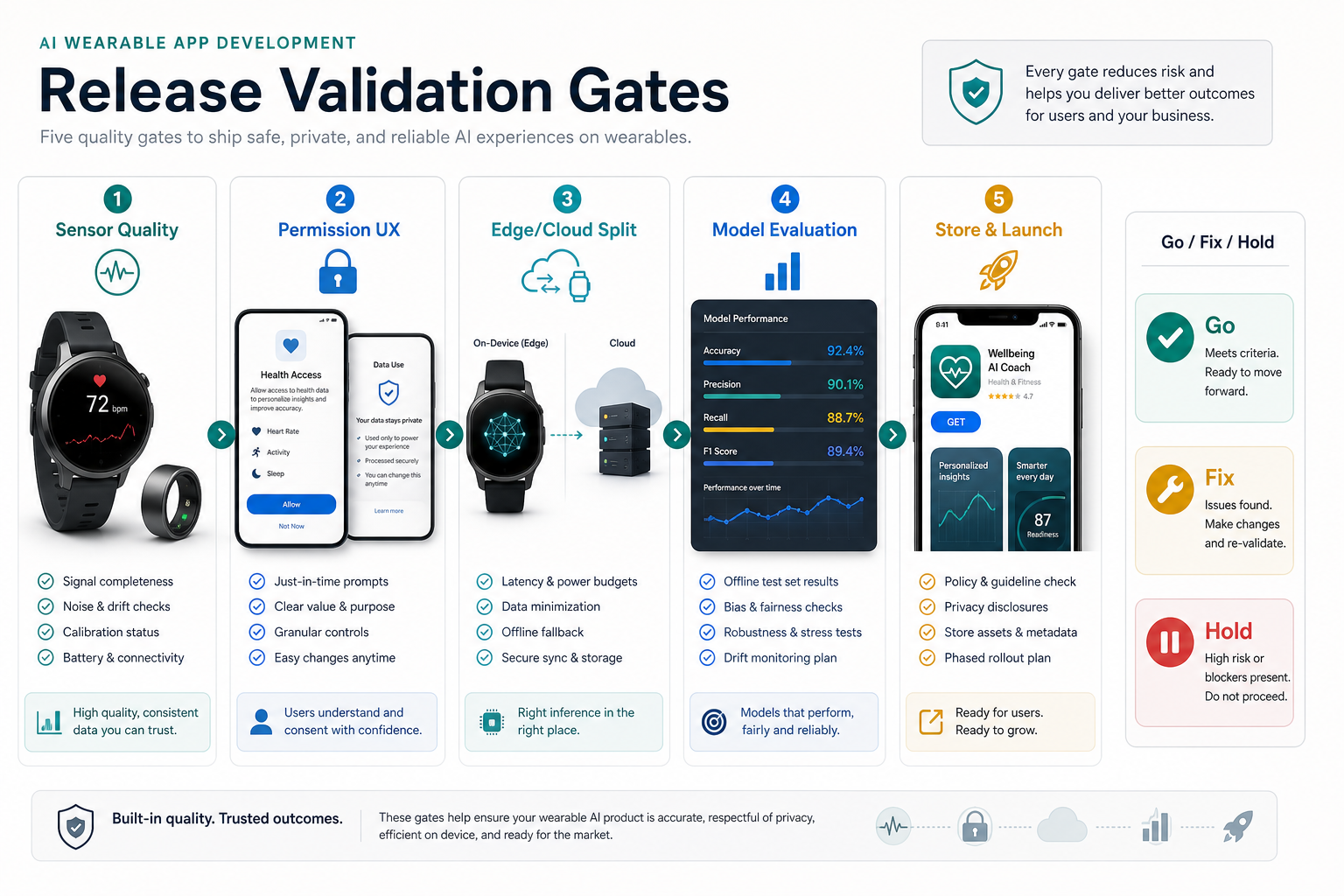
Wearable AI should not move to production because a demo looks convincing. It should pass a release gate that connects product promise, sensor reliability, permission UX, inference placement, model behavior, and store-readiness evidence. The gate should produce one of three decisions: go, fix, or hold.
| Gate | Evidence To Review | Hold Condition |
|---|---|---|
| Sensor quality | Completeness, drift checks, device fit, battery impact, and offline behavior | Core signal is too sparse or unstable for the promised insight |
| Permission UX | Just-in-time prompts, privacy copy, revocation flow, and data-use explanation | Users cannot understand why a health, location, Bluetooth, or notification permission is needed |
| Edge/cloud split | Latency budget, data minimization, sync design, model size, and observability | Inference location creates unacceptable privacy, cost, battery, or reliability tradeoffs |
| Model evaluation | False positives, false negatives, confidence thresholds, bias checks, and user feedback | The product cannot explain uncertainty or recover from wrong recommendations |
| Store and launch | Policy review, disclaimers, support paths, phased rollout, crash monitoring, and rollback | Claims, data use, or failure handling are not aligned with app-store and user-risk expectations |
Real-device QA is part of this gate, not a late regression sweep. NextPage's mobile app testing services cover device matrices, app-store release paths, API validation, automation, and exploratory testing that wearable products need before they trust sensor-driven features in the field.
Security And Compliance Considerations
Security for wearable apps starts with least-privilege access, encrypted transport, secure token storage, revocable permissions, audit logs for sensitive workflows, and data retention controls. If the product touches healthcare delivery, employee monitoring, children, research, insurance, or regulated clinical workflows, legal and compliance review must happen before the MVP is finalized.
Do not assume every wellness app is regulated, and do not assume every wearable health workflow is low risk. The distinction depends on claims, users, geography, data use, clinical involvement, and what action the app recommends. The product copy, onboarding, notifications, and model output should match the actual evidence behind the feature.
Team, Timeline, And Cost Drivers
An AI wearable MVP usually needs product strategy, UX, mobile engineering, backend engineering, device or BLE expertise, data engineering, ML engineering, QA, and DevOps. A lean team can combine some roles, but the responsibilities remain. The biggest cost drivers are device variety, background sync reliability, data permissions, model evaluation, dashboard depth, compliance, and post-launch monitoring.
A narrow MVP may focus on one wearable ecosystem, one user role, one sensor category, and one AI-assisted outcome. A production platform may include multiple devices, multiple user roles, admin workflows, model monitoring, support tools, and integrations with care, fitness, or enterprise systems. Use NextPage's AI Automation ROI Calculator to sanity-check whether the expected value justifies the model and operations effort, and use a scoped MVP estimate before adding multi-device support, coach dashboards, or regulated workflow integrations.
AI Wearable App Development Checklist
- Define the user decision: coaching, alerting, triage, summary, personalization, or operational action.
- Pick the minimum sensor set: use only the streams needed for the first validated outcome.
- Map permissions early: HealthKit, Health Connect, location, Bluetooth, notifications, and account deletion all affect UX.
- Decide edge versus cloud: document latency, privacy, offline, battery, and observability tradeoffs.
- Design uncertainty states: the app needs a graceful answer when data is stale, missing, or low confidence.
- Build QA around real devices: simulators do not expose enough pairing, battery, sensor, and background behavior.
- Measure trust: track accepted recommendations, ignored alerts, feedback, churn, and support tickets.
How NextPage Helps With AI Wearable App Development
NextPage helps teams turn wearable AI ideas into buildable product plans. That can mean scoping the MVP, mapping the sensor-to-cloud architecture, designing consent and privacy flows, building the mobile companion app, setting up data pipelines, evaluating AI features, and planning QA across real devices.
The best first engagement is usually not a full platform build. It is a focused architecture and MVP review: what data exists, what user outcome matters, which AI feature is safe enough for version one, and what evidence will justify the next release. That keeps the first build useful, measurable, and easier to defend to stakeholders.