
Quick Answer: Android App Development Cost In 2026
Android app development cost in 2026 usually depends on the release you are trying to launch, not just the number of screens. A narrow Android MVP with one core workflow, basic authentication, a simple backend, limited integrations, and internal Play testing can stay in a lean planning band. A production Android app with Kotlin-native UX, backend APIs, admin tools, payments, analytics, release QA, Play Store preparation, and post-launch support needs a larger budget. Marketplace, regulated, AI-enabled, IoT, real-time location, or enterprise Android apps need deeper architecture, device testing, security, and operations planning.
Use public cost ranges as directional context, then build the estimate from the work package: product scope, native Kotlin or cross-platform stack, backend depth, integrations, QA matrix, Play Store launch requirements, monitoring, and maintenance. If you need a first-pass number before a scoping call, start with NextPage's Custom Software Cost Estimator, then refine the result around Android-specific release and support risks.
If the product should be Android-first, compare the estimate with NextPage's Android app development company scope and the implementation depth behind Kotlin app development services. Those pages show why production Android cost includes architecture, testing, launch, and maintenance, not only UI screens.
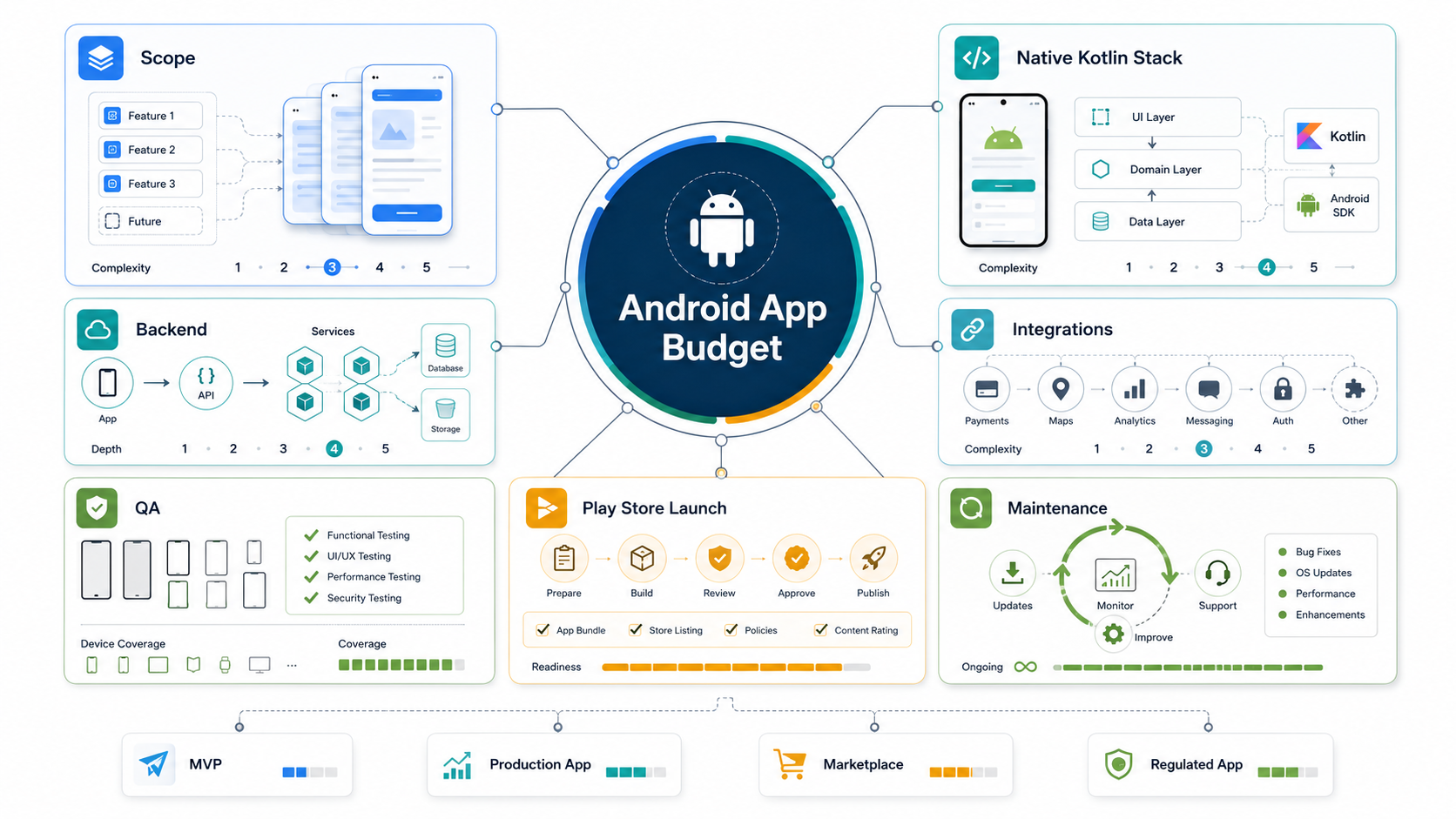
What Changes The Android Budget?
The biggest Android cost drivers are the decisions hidden behind the visible app screens. A login screen can be simple email authentication or a full identity system with SSO, MFA, role permissions, account deletion, privacy flows, and audit records. A map screen can be a static address view or a real-time location workflow with geofencing, dispatch, route optimization, poor-network handling, and battery constraints.
The same pattern applies to backend and operations. Android-only frontend work is only part of the estimate. Most production apps also need APIs, databases, admin dashboards, notifications, analytics events, crash reporting, cloud environments, privacy handling, release notes, store metadata, and a support path for the first users. NextPage's mobile app development team estimates these pieces as one product system instead of pricing Android screens in isolation.
Android Cost Bands By Release Scope
The table below is a planning framework, not a quote. Geography, team seniority, design maturity, API readiness, compliance needs, and stakeholder speed can shift the range.
| Release scope | Typical Android build | Budget signal | Timeline signal |
|---|---|---|---|
| Prototype | Clickable UX, technical proof, no production data, limited backend | Lowest spend; useful before engineering commitment | 2-6 weeks |
| Lean Android MVP | One core workflow, basic auth, simple backend, one or two integrations, Play internal testing | Lower to mid range when scope is disciplined | 8-14 weeks |
| Production Android app | Custom UX, Kotlin frontend, backend APIs, admin tools, payments or notifications, analytics, release QA | Mid to high range because launch quality matters | 4-7 months |
| Marketplace or operations app | Multiple roles, transactions, moderation, support tooling, reporting, real-time states | Higher because permissions and edge cases multiply | 6-10 months |
| Regulated, AI, IoT, or enterprise app | Sensitive data, model workflows, device integrations, SSO, audit logs, compliance, high availability | Highest range because architecture and QA are deeper | 8-12+ months |
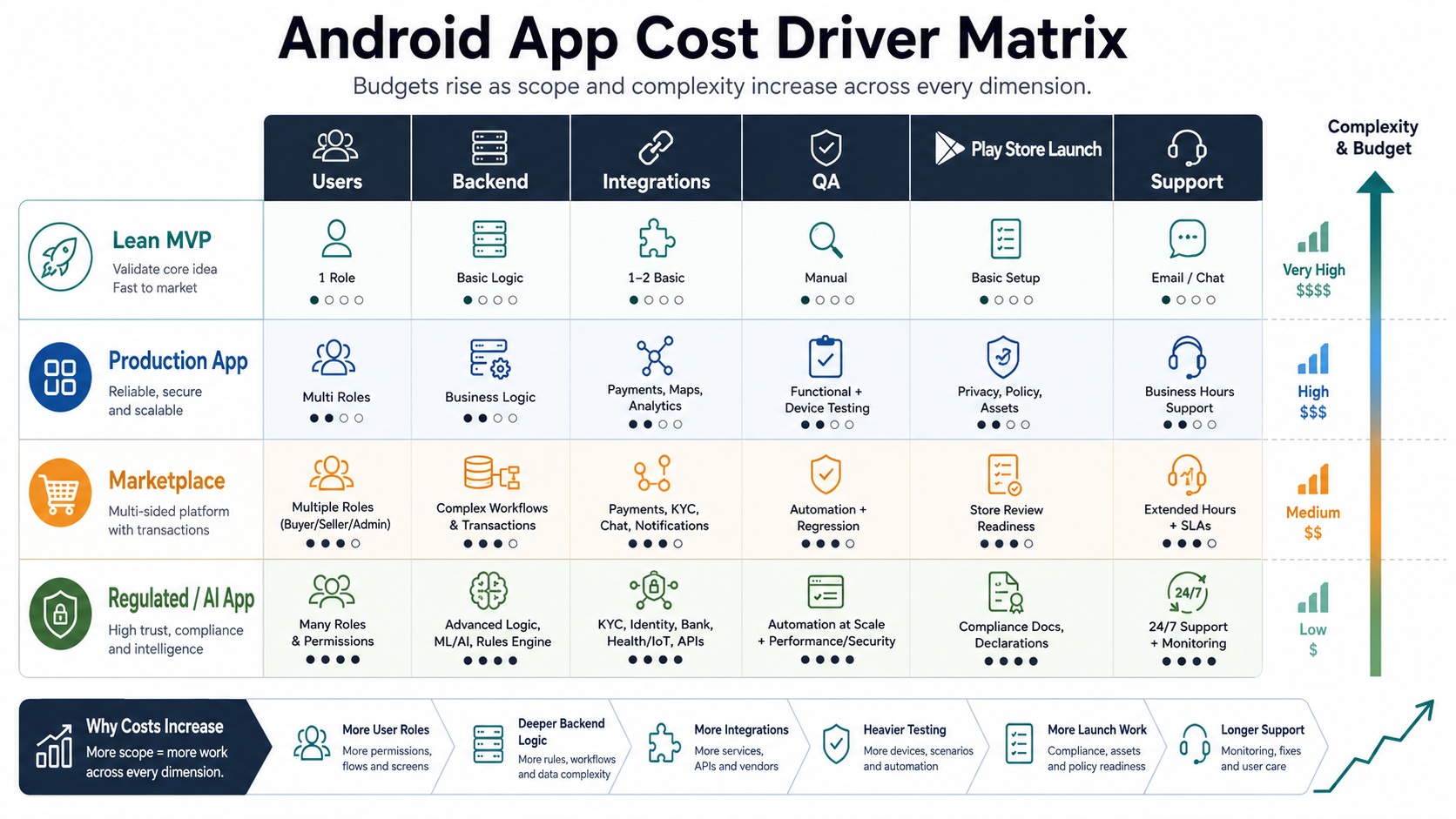
Android App Budget Ranges To Use For Planning
Most buyers still need a number before they can decide whether to fund discovery. A practical planning range for a disciplined Android MVP is often around $25,000 to $60,000 when the app has one primary workflow, a simple backend, limited integrations, and modest launch support. A production Android app commonly moves into the $60,000 to $150,000 range when it needs custom design, robust backend APIs, admin workflows, payments, analytics, QA automation, Play Store release work, and maintenance planning.
More complex Android products can exceed $150,000 to $300,000+, especially when they include marketplace roles, real-time location, logistics workflows, regulated data, AI features, IoT devices, enterprise SSO, data migration, reporting, moderation, or high availability. Those ranges are not vendor promises. They are useful guardrails for separating a serious production estimate from a thin screen-count quote.
| Budget band | Usually fits | Watch the risk |
|---|---|---|
| $25,000-$60,000 | Focused MVP, one main user journey, simple backend, limited integrations | Scope must stay narrow; launch support and admin tooling may be light |
| $60,000-$150,000 | Production Android app with custom UX, backend, analytics, QA, and Play Store launch | Integration and device testing assumptions must be explicit |
| $150,000-$300,000+ | Marketplace, operations, AI, IoT, or regulated Android product | Architecture, support workflows, security, and maintenance can dominate cost |
If a quote is far below the planning band, ask what is excluded: backend ownership, admin tools, device matrix, Play Console work, store assets, crash monitoring, accessibility, security, maintenance, or post-review fixes. If a quote is far above the band, ask whether the vendor is assuming native iOS too, custom data migration, enterprise integrations, formal compliance work, or long-term support.
Release Scope Cost Model
The safest way to read Android estimates is to match the release model to the business outcome. A prototype proves direction. A lean MVP validates one workflow. A production app supports real users. A marketplace or operations app coordinates several roles. A regulated, AI, IoT, or enterprise app needs extra reliability, monitoring, governance, and support evidence.
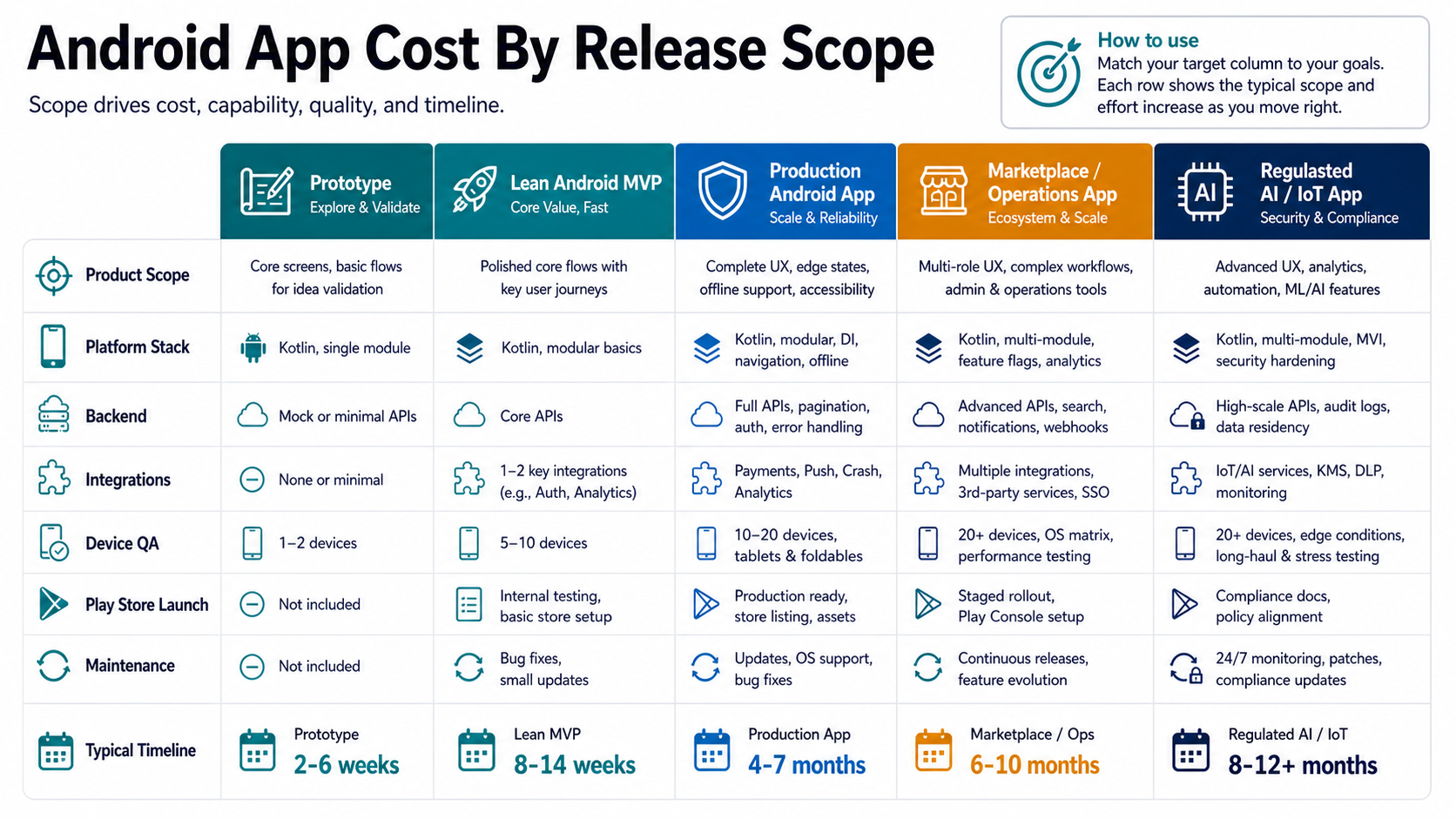
This matters because two Android projects can both say "payments, notifications, and analytics" while carrying very different delivery work. In an MVP, payments may be a single checkout path. In a production marketplace, payments may involve wallets, refunds, invoices, dispute handling, tax rules, reconciliation, reporting, and support tooling.
Native Kotlin, Cross-Platform, Or PWA?
Native Android development with Kotlin is often the right choice when performance, device APIs, background behavior, offline work, camera, Bluetooth, location, payments, or Android-first UX matter. It can reduce platform compromises and gives the team direct access to current Android SDK behavior, but the estimate covers Android only. If iOS is needed later, you either build a separate iOS app or plan shared backend and design systems carefully.
Flutter or React Native can reduce duplicated mobile work when the product can share most UI and business logic across iOS and Android. Cross-platform is not automatically cheaper in every case; complex native modules, heavy animations, offline sync, Bluetooth, media processing, or platform-specific release work can reduce the savings. If the product is mostly content, forms, dashboards, or internal workflow, a responsive web app or PWA may be enough for the first release.
Use NextPage's Native Vs Cross Platform Mobile App Development guide when the budget decision is really a platform-strategy decision. If the release is still uncertain, the MVP Scope Builder can separate version-one features from later-phase bets before engineering starts.
Feature Cost Drivers
| Feature area | Lower-cost version | Higher-cost version |
|---|---|---|
| Accounts | Email login, basic profile, account deletion | SSO, MFA, multiple roles, audit trail, admin impersonation controls |
| Backend | Simple CRUD APIs and a few tables | Complex domain model, search, reporting, event history, backups, import/export |
| Payments | Simple checkout or subscription | Wallets, split payments, refunds, taxes, invoices, disputes, reconciliation |
| Notifications | Basic push and email | Preferences, segmentation, templates, delivery tracking, escalation logic |
| Location | Address display or simple map | Real-time tracking, geofencing, dispatch, route optimization, privacy controls |
| AI | Assisted copy or classification with human review | RAG, agents, personalization, evaluation datasets, monitoring, fallback workflows |
Integration scope deserves special attention because external APIs often create hidden cost. Payment gateways, maps, chat, video, CRM, ERP, analytics, identity, and logistics APIs can have approval steps, rate limits, missing sandbox data, delayed credentials, and support handoffs. Use the Mobile App Integrations Checklist before treating an integration as a fixed line item.
How To Reduce Android Development Cost Without Underbuilding
The best cost reduction is not choosing the cheapest hourly rate. It is removing uncertainty before expensive engineering starts. Start by naming the one workflow that proves the business case, then move nice-to-have personalization, advanced analytics, deep integrations, and secondary roles into a later release. If the MVP cannot explain who uses the app, what action they take, what data changes, and what success metric improves, the budget will drift.
Use native Android only where it creates product value. If the first release is mostly content, forms, dashboards, or internal review workflows, a responsive web app or PWA may validate demand faster. If Android-specific device APIs, performance, offline behavior, background tasks, Bluetooth, camera, or Play distribution are central, native Kotlin is usually easier to defend. The platform decision should follow the product risk, not the other way around.
Cost also drops when integrations are staged. For example, launch with one payment gateway instead of three, one analytics stack instead of parallel tools, one CRM export instead of a deep two-way sync, or manual moderation before automated trust scoring. The key is to document what is manual in version one so the team does not accidentally build enterprise-grade automation before product-market fit.
Play Store Launch Requirements To Budget
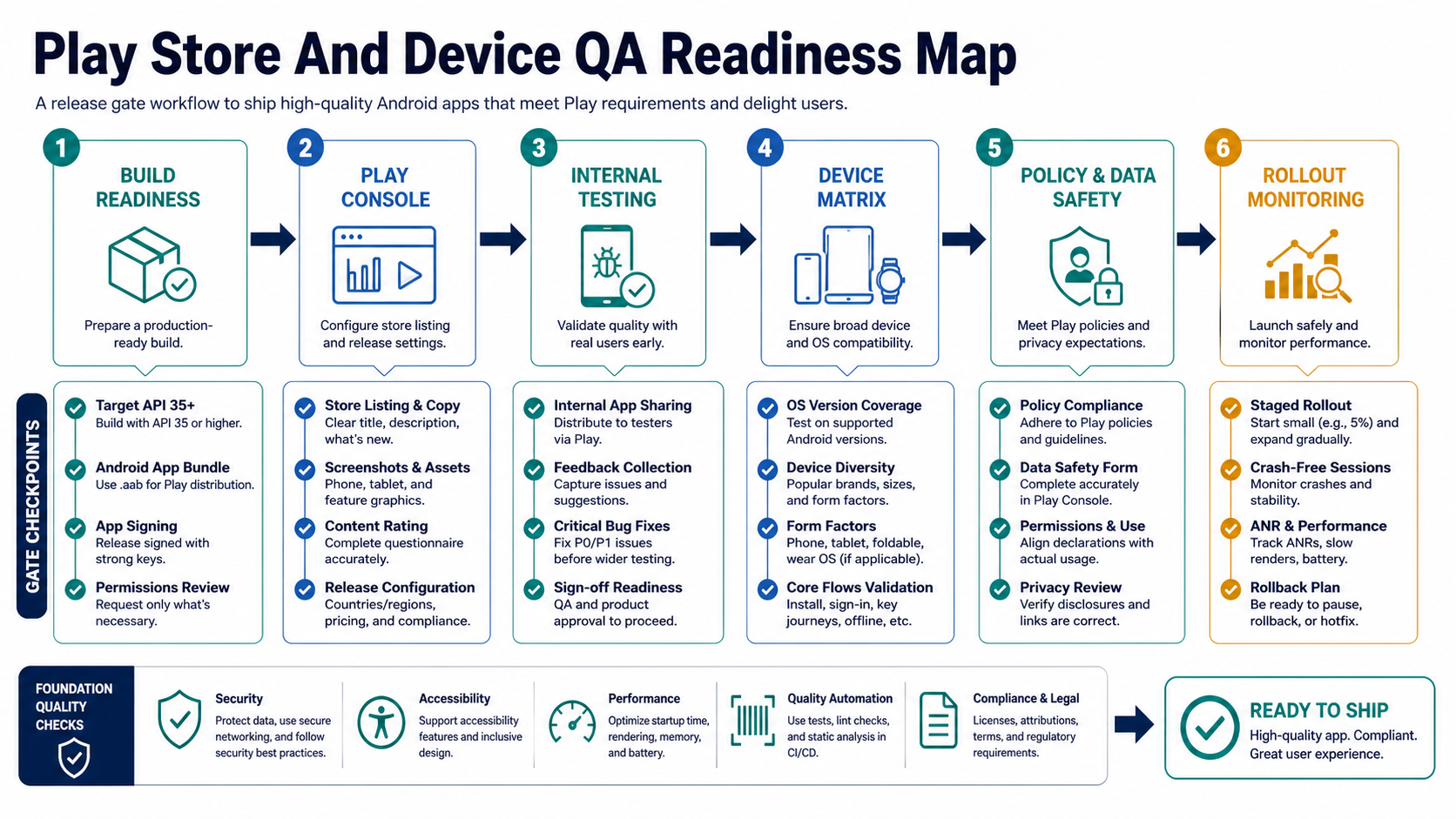
Android launch work is real delivery work. Current Google Play guidance says that from August 31, 2025, new apps and app updates submitted to Google Play must target Android 15/API level 35 or higher, with separate requirements for Wear OS, Android Automotive OS, and Android TV. Google Play also uses Android App Bundles to generate optimized APKs for device configurations. Those requirements affect estimates because teams need build configuration, app signing, policy checks, release tracks, store assets, testing evidence, and rollout monitoring.
A team that only prices feature development may surprise you later with extra work for store assets, permissions review, device compatibility, app signing, pre-launch reports, policy fixes, and post-review iterations. NextPage's Mobile App QA and Launch Checklist is a useful release gate before the final production push.
Device QA, Security, And Accessibility
Android device fragmentation is not only a QA concern. It changes cost because the app may need to work across phone sizes, tablets, foldables, older OS versions, OEM behavior, background restrictions, battery modes, camera implementations, notification channels, and unreliable networks. The device matrix should match the real user base, not an arbitrary list.
Security and accessibility also need explicit scope. Apps that handle payments, health data, HR data, identity, marketplace transactions, or field operations should budget for secure networking, permission minimization, storage rules, dependency review, abuse cases, account deletion, accessibility checks, and regression coverage. Use NextPage's Mobile App Testing Checklist Before Launch when release evidence is a serious requirement.
Android Team And Timeline
A lean Android app can be built by a compact team, but the responsibilities still exist. Product scope, UX, Android engineering, backend engineering, QA, release management, and cloud operations all need an owner. Compressing the team can reduce monthly burn, but it usually lengthens calendar time or increases rework if one person is carrying too many responsibilities.
| Role | What they protect | When they matter most |
|---|---|---|
| Product lead | Scope, acceptance criteria, tradeoffs | Any build with multiple stakeholders |
| UX/UI designer | Onboarding, forms, empty states, repeated-use clarity | Consumer apps, marketplaces, operational apps |
| Android engineer | Kotlin UI, permissions, state, device behavior, Play readiness | Every production Android app |
| Backend engineer | APIs, data model, auth, admin tools, integrations | Apps with accounts, workflows, payments, or reports |
| QA engineer | Device matrix, regression, release evidence, edge cases | Apps with payments, roles, integrations, or production users |
| DevOps/cloud engineer | Environments, monitoring, backups, performance | Apps that need reliable backend operations |
What To Include In An Android Estimate
A useful Android estimate should separate discovery, design, app frontend, backend, integrations, admin, QA, launch, and maintenance. It should also show assumptions: target devices, minimum supported Android version, API owners, analytics events, payment rules, privacy requirements, support window, and what is excluded from version one.
- Scope: core workflow, user roles, screens, permissions, edge cases, acceptance criteria.
- Stack: Kotlin/native Android, Flutter, React Native, backend framework, database, cloud, analytics.
- Integrations: payment, maps, push, chat, CRM, ERP, identity, vendor APIs, sandbox status.
- Quality: device matrix, OS coverage, performance targets, accessibility, crash thresholds, security review.
- Launch: Android App Bundle, Play Console setup, store listing, policy checks, testing tracks, release notes.
- Maintenance: dependency updates, OS/API changes, crash fixes, analytics reviews, support tooling.
For cost comparisons, check adjacent benchmarks like taxi app development cost, Swift app development cost, and web app development cost. They help separate mobile-specific cost from marketplace, iOS, and backend platform cost.
Vendor Questions Before You Approve The Budget
Before approving an Android estimate, ask the vendor to show the assumptions behind the number. A useful estimate should name the minimum supported Android version, target API plan, device matrix, Play Console ownership, backend responsibilities, admin workflows, integration owners, analytics events, security scope, accessibility checks, release process, and maintenance window. If those assumptions are missing, the quote is not comparable.
- Scope evidence: What user journeys are included, what is excluded, and which edge cases are deferred?
- Architecture evidence: Is the app modular, testable, observable, and ready for version two?
- Release evidence: Who handles target API updates, Android App Bundle packaging, app signing, internal testing, and staged rollout?
- Quality evidence: Which devices, OS versions, network states, and regression tests are covered before launch?
- Support evidence: What happens after the first crash spike, policy rejection, SDK update, or payment bug?
These questions keep the conversation practical. The goal is not to make every Android MVP expensive. The goal is to stop low estimates from hiding production work that the buyer will still have to pay for later.
Hidden Costs That Surprise Android Teams
Android budgets often miss admin tooling, support workflows, offline states, push notification failures, policy review, device fragmentation, dependency upgrades, and post-launch monitoring. These are not glamorous features, but they determine whether the app survives real usage. A marketplace app needs moderation and dispute tools. A field app needs poor-network behavior. A payment app needs reconciliation. A healthcare or HR app needs privacy, retention, and audit decisions.
Maintenance should be budgeted from day one because Android, Google Play, third-party SDKs, and device behavior keep changing. The Post-Launch Mobile App Maintenance Checklist can help teams plan crash monitoring, OS updates, SDK reviews, analytics, security patches, and support response after launch.
How NextPage Estimates Android Apps
NextPage estimates Android apps by mapping the operating workflow first, then translating it into release scope, platform strategy, backend architecture, integrations, QA depth, Play Store launch work, and post-launch ownership. That gives founders and product leaders a budget they can defend because it names the assumptions behind the number.
For a narrow MVP, the answer may be a disciplined Kotlin app with a small backend and limited integrations. For a production product, the answer may include admin tools, analytics, QA evidence, release management, and maintenance capacity. For marketplace, AI, regulated, or enterprise apps, the estimate should include architecture, evaluation, compliance, monitoring, support, and phased delivery.
Start with the Custom Software Cost Estimator, then review the result with a team that can challenge the scope, expose hidden Android risks, and turn the estimate into a practical build plan.