
Quick Answer: Which Smart TV Platform Should You Build First?
Choose the first smart TV app platform by matching your audience, content model, monetization plan, playback requirements, and QA budget. Android TV and Google TV are often strong first choices when you want broad device coverage and an Android-based engineering model. Roku can be important for North American streaming audiences. Samsung Tizen and LG webOS matter when living-room reach on major TV brands is a priority. Apple TV is a good fit when your audience already expects premium iOS-style product quality and AirPlay-friendly behavior.
The practical answer is rarely one platform forever. Most teams should launch in phases: pick one or two platforms that match the initial audience, prove playback quality and retention, then expand once the remote-control UX, account model, analytics, and support workflow are stable. Treat this as a product roadmap decision, not only a technology choice. If you are already scoping the build, NextPage's mobile app development team can help plan the connected TV experience alongside mobile, web, backend, and content operations.
Why Platform Choice Changes The Whole Launch
A smart TV app is not just a mobile app stretched onto a large screen. The viewer sits farther away, navigates with a remote, expects instant playback, may use a low-power device, and may abandon the experience if sign-in or discovery feels awkward. Platform choice affects UI patterns, player libraries, DRM support, ad insertion, app review, analytics, device testing, support scripts, and release cadence.
The reference service page for this queue item emphasizes multi-platform smart TV development, Android TV apps, streaming libraries, OTT integration, TV UI/UX, testing, and store deployment. This article turns that broad service coverage into a buyer-facing selection guide so product teams can decide what to build first and where to delay scope.
Before comparing platforms, define the product shape: subscription video, AVOD, FAST channel, sports/live events, education, fitness, enterprise training, creator network, or companion TV experience. The same device ecosystem can be attractive for one model and expensive for another.
Platform Development Models To Confirm Before Estimating
Each smart TV ecosystem has its own development model, certification path, and operational constraints. Android TV and Google TV follow the Android TV app-quality and Play distribution model. Fire TV uses Fire OS, which is based on AOSP, and can support Android, HTML5, and React Native app paths. Roku app teams work with Roku-specific channel patterns such as SceneGraph. Samsung Tizen and LG webOS use TV web/native tooling and their own certification expectations. Apple TV requires tvOS product decisions and Apple-specific interaction polish.
That means a platform comparison should never stop at market reach. Ask what runtime the team will build in, how the app will handle remote focus, whether the player stack works on that platform, what billing or ad rules apply, how store review works, and how many real devices must be tested before launch. This is where a TV roadmap can diverge from a normal mobile app development cost estimate.
| Platform Family | Development Reality | Estimate Implication |
|---|---|---|
| Android TV / Google TV | Android-based TV app quality, focus handling, Play policy, and device fragmentation. | Budget for Android TV-specific UX, playback QA, store readiness, and lower-powered hardware checks. |
| Amazon Fire TV | Fire OS is AOSP-based and can support Android, HTML5, or React Native routes. | Plan Amazon-specific device testing, Appstore submission, remote behavior, and monetization details. |
| Roku | Roku channel work uses platform-specific app patterns and SceneGraph UI. | Expect separate Roku skills, channel certification effort, and dedicated device QA. |
| Samsung Tizen / LG webOS | TV web/native app tooling, OEM runtime differences, and brand-specific review flows. | Budget for TV-browser/runtime differences, lifecycle behavior, and certification discipline. |
| Apple tvOS | Native tvOS expectations, Siri Remote behavior, Apple ecosystem polish, and App Store review. | Plan for premium UX polish, Apple-specific media behavior, and a narrower but high-expectation audience. |
Smart TV Platform Comparison Table
Use this table as a planning starting point. The exact launch order depends on your audience data, content rights, ad stack, DRM, analytics, and support capacity, but these patterns help frame the decision.
| Platform | Best Fit | Engineering Model | Main Watchout |
|---|---|---|---|
| Android TV / Google TV | Broad global device coverage, operator devices, Android-aligned teams | Android app development with TV-specific UX, focus handling, playback, and store rules | Device fragmentation and performance variation across TV hardware |
| Roku | Streaming-first audiences, especially where Roku household reach is important | Roku channel development with platform-specific UI, playback, and certification needs | Separate skills and patterns from Android/iOS app teams |
| Amazon Fire TV | Households using Fire TV sticks, Prime Video-adjacent behavior, Android-based delivery | Android-derived TV app work with Amazon distribution, billing, and device testing concerns | Amazon-specific store, device, and monetization considerations |
| Samsung Tizen | Major smart TV brand reach and premium living-room placement | TV web app model with Samsung platform APIs, player integration, and certification | TV-browser/runtime differences and certification discipline |
| LG webOS | Large-screen living-room reach on LG TVs | webOS TV app model with TV-focused web technologies and LG review process | Platform-specific QA and remote UX details |
| Apple TV | Premium audience, Apple ecosystem users, high expectations for polish | tvOS app development with Apple design, account, media, and review expectations | Higher polish bar and a narrower device ecosystem than some alternatives |
If you are still comparing the software budget behind each route, use the Custom Software Cost Estimator to model platform count, backend complexity, integrations, analytics, QA, and release risk before asking for a fixed quote. The same planning should include companion web/mobile needs, API integrations, and content operations; the mobile app integrations guide is useful when the TV app depends on CRM, payments, analytics, CMS, or entitlement systems.
1. Audience Fit Comes Before Technology Preference
The strongest first platform is the one your audience already uses. Media companies often have clues from web analytics, mobile app device data, ad platform segments, customer surveys, support tickets, app-store searches, and streaming partner data. If most viewers are on Android phones and low-cost streaming devices, Android TV and Fire TV may deserve early attention. If your brand has strong US streaming demand, Roku may need to be near the front. If premium living-room reach matters, Samsung, LG, and Apple TV can be more strategic.
Do not rely only on global market-share headlines. A regional sports app, meditation app, education library, or enterprise training platform may have a very different device mix than a mainstream entertainment service. Platform sequence should follow the users you can acquire and retain, not the platforms that sound impressive in a pitch deck.
2. Engineering Effort And Team Fit
Engineering fit matters because each platform brings a different runtime, design pattern, testing approach, and review process. Android TV, Google TV, and Fire TV can feel closer to Android app teams, but TV navigation, media playback, focus states, and device performance still require specialized work. Roku, Tizen, webOS, and tvOS each add their own platform conventions.
Teams with existing mobile engineers may assume smart TV will be a small extension, but platform strategy should still be treated as a product architecture choice. That is risky. A TV app needs large-screen layout systems, remote-first navigation, fast poster-grid performance, reliable playback recovery, account linking, search, captions, parental controls when relevant, and a supportable release workflow. The difference between native and cross-platform thinking also matters; the broader guide to native vs cross-platform mobile app development is useful context even though TV platforms introduce their own constraints.
3. Remote UX Is The Hidden Product Constraint
Remote-control UX is where many TV apps lose users. Every screen needs predictable focus movement, visible selected states, simple back behavior, minimal typing, and forgiving sign-in. A beautiful mobile interaction can become frustrating when it requires repeated directional clicks from ten feet away.
Plan the product around TV habits: resume watching, continue lists, simple content rails, voice/search where available, deep links, watchlist, quick profile switching, subtitles, audio tracks, and error messages people can understand from across the room. If the app needs login, use device-code activation or QR-assisted sign-in rather than making viewers type long passwords with a remote.
4. Playback, DRM, Ads, And Analytics Drive The Real Complexity
The player is the core of a streaming app. Platform choice affects adaptive streaming format support, DRM integration, subtitles, audio tracks, live playback, ad insertion, resume points, offline behavior for companion devices, and analytics events. A catalog app with short free videos is much simpler than a subscription service with live channels, premium rights, multi-audio content, and ad measurement.
Teams should map the playback stack before choosing every platform. Decide how content is encoded, how streams are authorized, how sessions are tracked, which DRM providers are required, how ads are inserted, and how playback errors reach support. This is also where backend and web app architecture matter. A durable custom software development cost estimate should include content operations, entitlement rules, payment flows, analytics, and admin tooling, not only TV screens.
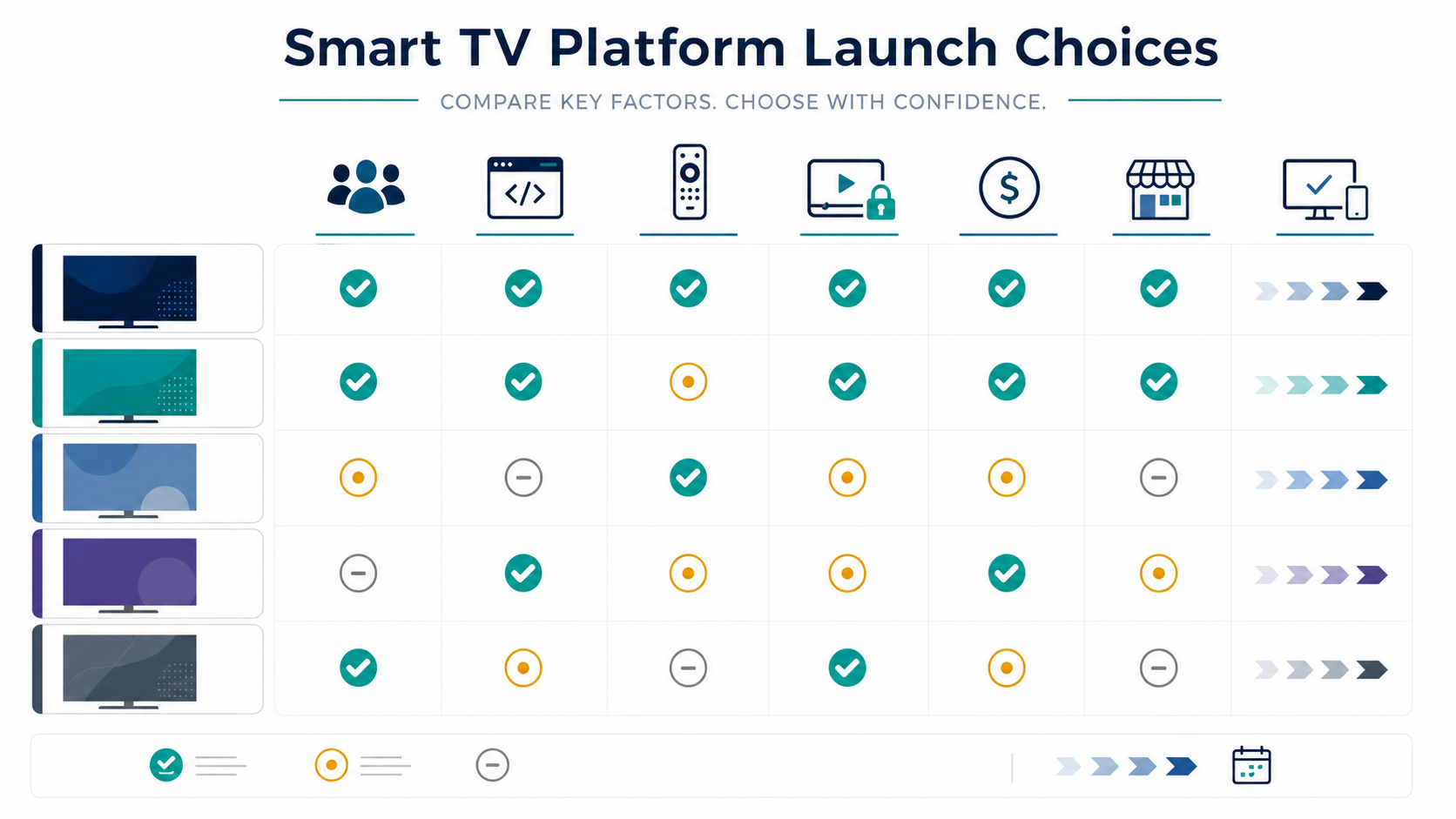
Smart TV Platform Decision Matrix
Score each platform against the criteria that matter to the business. Give higher weight to audience reach and playback fit than to personal team preference. A phased launch beats a broad launch that cannot be tested, supported, or improved.
| Decision Factor | Questions To Ask | Why It Matters |
|---|---|---|
| Audience reach | Which devices do target viewers own and use for long-form video? | Prevents building for platforms that do not move adoption. |
| Content rights | Are all rights cleared for every platform, region, ad model, and device type? | Avoids launching an app that cannot legally show the full catalog. |
| Playback requirements | Do you need live, DRM, captions, multi-audio, ads, analytics, or low-latency streams? | Shapes player architecture and certification effort. |
| Monetization | Will revenue come from subscription, ads, rentals, purchases, sponsorship, or bundles? | Affects billing integration, store policies, and measurement. |
| QA burden | How many device generations, remotes, regions, and network conditions must be tested? | Controls release confidence and support cost. |
| Team capability | Which platform skills already exist, and where will you need specialist help? | Reduces delivery risk and rework. |
A Practical Smart TV Launch Sequence
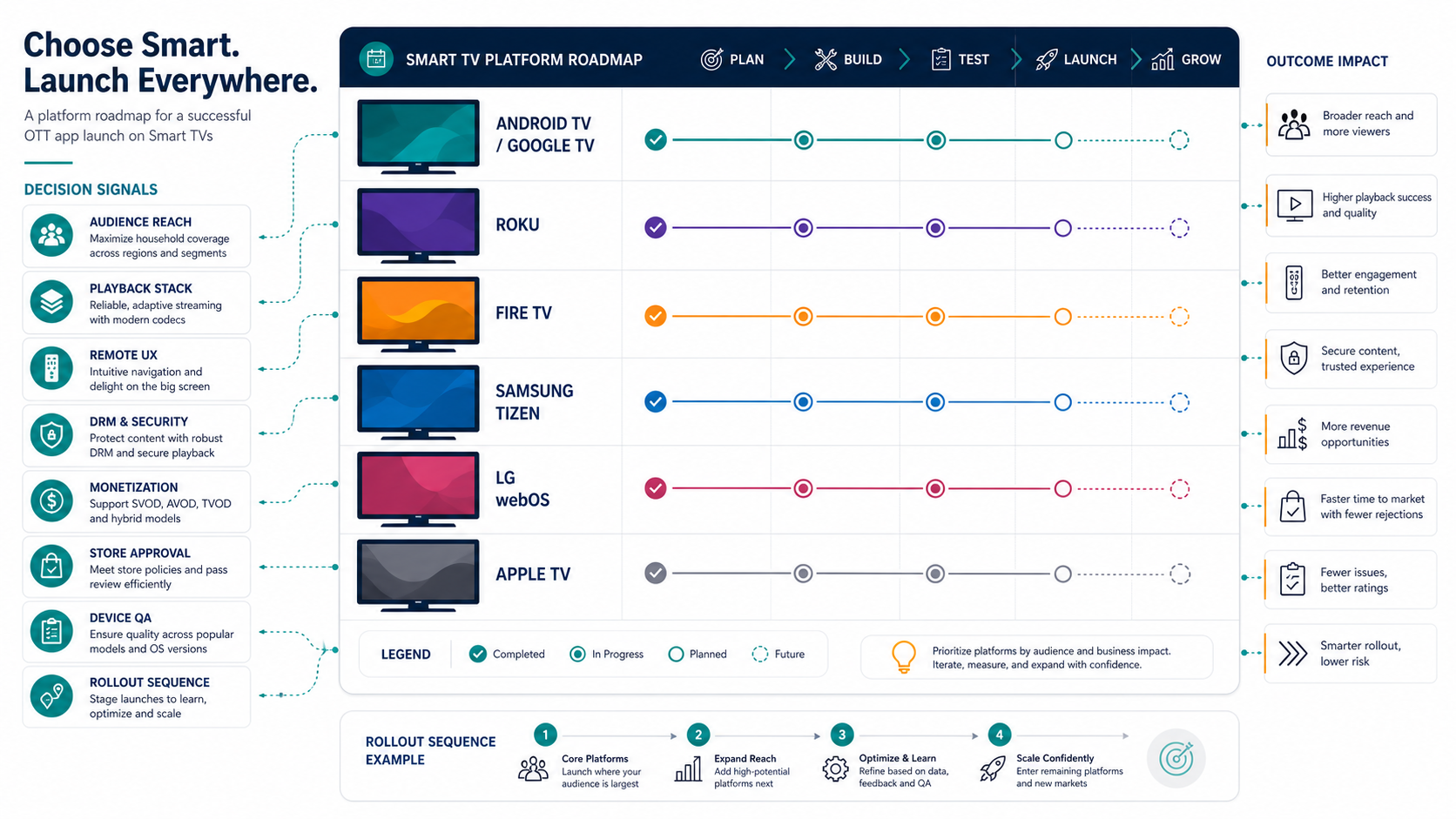
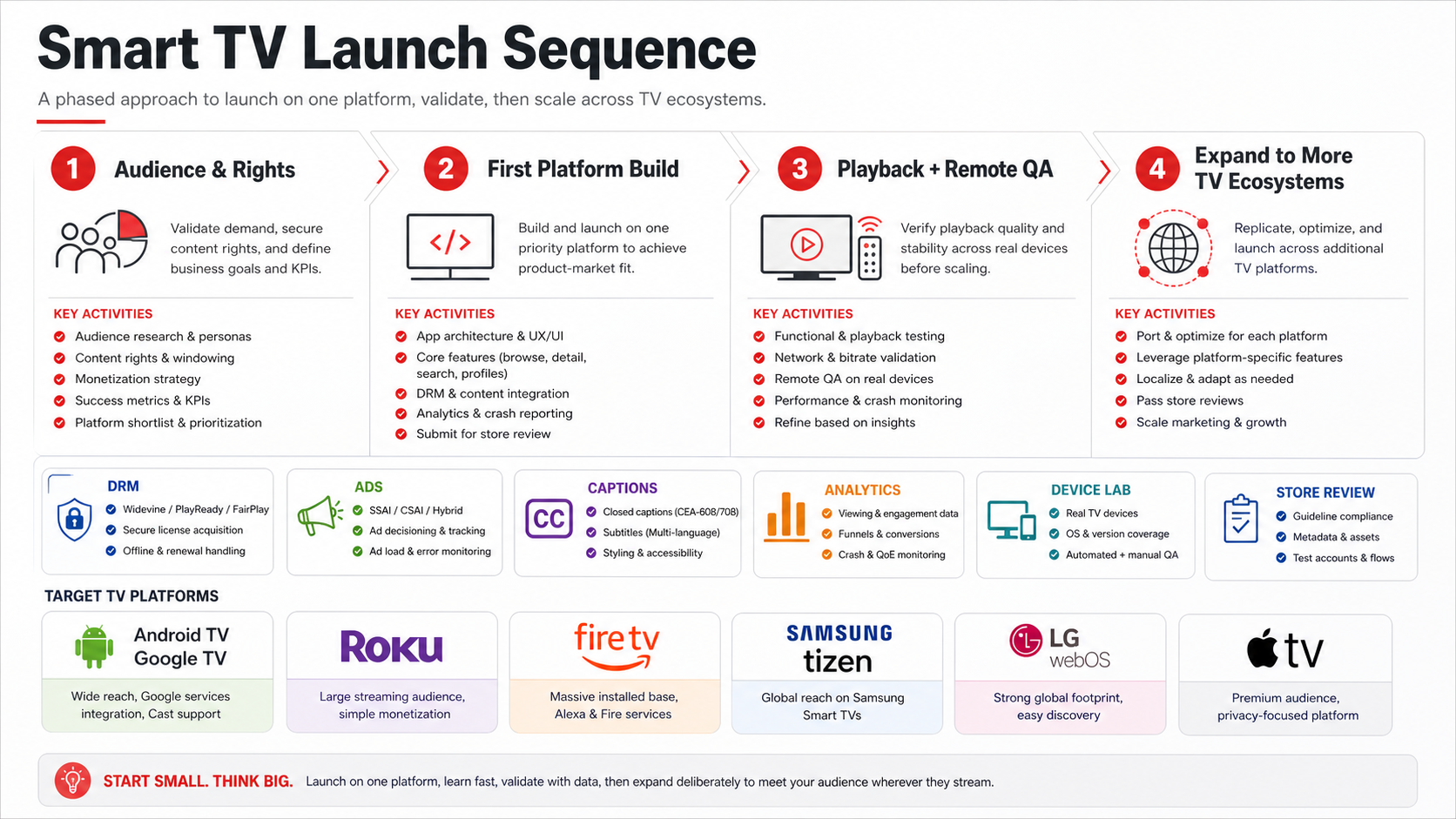
The safest roadmap is usually not "build every TV platform at once." Start by validating audience demand and content rights, then launch one priority platform, prove the playback and remote-control experience on real hardware, and expand only when support, analytics, and release operations are stable.
| Phase | Decision Gate | Evidence Needed |
|---|---|---|
| Audience and rights | Which platforms are worth funding first? | Device data, target regions, content rights, monetization model, and partner constraints. |
| First platform build | Can the product loop work on one TV ecosystem? | Browse, search, detail, playback, account, analytics, support, and store-submission readiness. |
| Playback and remote QA | Is the living-room experience reliable enough to market? | Real-device playback, captions, ads, DRM, app resume, remote back behavior, and error recovery. |
| Expansion | Which TV ecosystem should be added next? | Retention, support tickets, ad/subscription performance, platform requests, and device-lab capacity. |
This sequence is especially useful for OTT teams comparing platform cost. The OTT app development cost guide goes deeper into backend, player, subscription, ad, and content-operation budget drivers.
5. Monetization And Store Approval
Subscription, advertising, rentals, purchases, bundles, sponsorships, and free-with-login models all change platform effort. Some platforms require specific billing flows, disclosure patterns, privacy details, age ratings, or content policies. Others add certification checklists around remote behavior, crashes, playback failures, brand assets, and metadata.
Do not leave store approval until the end. Prepare app name, descriptions, screenshots, preview assets, privacy details, support contacts, test accounts, content-rating information, and release notes while engineering is still underway. A store rejection late in the schedule can delay marketing, partnership, and content launch plans.
6. QA Device Lab And Release Readiness
Smart TV QA needs real devices. Emulators and simulators help during development, but playback, memory, network behavior, remote responsiveness, app resume, HDMI/display quirks, and device-specific crashes must be tested on living-room hardware. Each added platform increases the matrix.
At minimum, test app launch, sign-in, profile selection, browsing, search, playback start, resume, pause, seek, captions, audio tracks, bitrate changes, network interruption, app background/foreground, remote back behavior, payment handoff, analytics events, and error states. The Mobile App QA And Launch Checklist is a useful baseline for release evidence; TV apps need an additional device-lab layer for remotes, playback, and certification.
QA And Store-Review Evidence Buyers Should Ask For
A smart TV estimate should include the evidence needed to pass review and survive real viewers, not only the screens that will be designed. Ask the team to define the device lab, remote-navigation test cases, playback telemetry, crash monitoring, accessibility checks, test accounts, store assets, and release owner before build work is considered complete.
| Evidence Area | What To Verify | Why It Changes Platform Choice |
|---|---|---|
| Remote UX | Focus order, selected states, back behavior, QR/device-code sign-in, and keyboard avoidance. | Remote friction can erase the value of broad platform coverage. |
| Playback | Startup time, bitrate switching, seek, resume, captions, audio tracks, ads, DRM, and error states. | The player stack often decides whether a platform is ready for launch. |
| Device lab | Low-end sticks, older smart TVs, region-specific devices, Wi-Fi instability, app resume, and memory limits. | One extra ecosystem can multiply hardware and support coverage. |
| Store review | Metadata, screenshots, privacy details, ratings, test credentials, brand assets, and support contacts. | Late rejections can delay marketing and partner commitments. |
| Accessibility | Captions, readable contrast, focus visibility, text size, motion sensitivity, and non-color-only states. | TV accessibility issues are harder to fix after the UI system is built. |
For a checklist baseline, pair TV-specific cases with the Smart TV App Testing Checklist, the Mobile App QA And Launch Checklist, and the App Accessibility Checklist.
Recommended Rollout Sequences
For most teams, the best rollout is phased. Launching six TV ecosystems at once can look strong commercially, but it also multiplies QA, analytics gaps, support, review risk, and release coordination. Use a sequence that matches the business model.
| Business Model | Likely First Platforms | Expansion Logic |
|---|---|---|
| Subscription OTT library | Android TV / Google TV plus Roku or Fire TV, depending on audience | Add Samsung, LG, and Apple TV after playback and retention are proven. |
| Premium niche media brand | Apple TV plus Samsung or Android TV | Expand based on subscriber device surveys and support data. |
| Ad-supported video or FAST-style experience | Roku, Fire TV, Samsung, or LG depending on inventory and partner reach | Prioritize platforms with ad-stack fit and measurable viewing time. |
| Education, fitness, or training | Android TV / Google TV and Apple TV for account continuity and casting-adjacent behavior | Add TV brand platforms when living-room usage justifies device-lab cost. |
| Enterprise or internal video app | Android TV or managed device ecosystem | Optimize deployment control, authentication, and supportability over broad store reach. |
What To Scope Before Asking For An Estimate
A useful estimate needs more than a list of platforms. Document the catalog size, content formats, live vs on-demand needs, authentication, profiles, payments, ads, DRM, analytics, CMS/admin needs, search, recommendations, localization, accessibility, support workflow, and device matrix. Those items are the real budget drivers.
NextPage usually starts with a platform scope workshop: audience/device assumptions, content model, monetization, playback architecture, release sequence, companion app dependencies, and QA evidence. That makes the estimate more reliable and helps avoid paying for platform coverage before the first product loop is proven.
Common Mistakes To Avoid
- Starting with every platform: Broad coverage without QA depth creates support risk and delayed releases.
- Reusing mobile UX: TV needs focus states, remote navigation, large-screen hierarchy, and simple sign-in.
- Underestimating playback: DRM, ads, subtitles, analytics, and live streams can dominate the build.
- Ignoring content operations: A TV app needs usable metadata, posters, rails, categories, preview assets, and admin workflows.
- Skipping store-readiness work: Certification assets, test accounts, privacy details, and support paths should be prepared early.
- Testing only happy paths: Real devices, slow networks, app resume, failed streams, and remote back behavior decide user trust.
How NextPage Helps
NextPage helps teams plan and build connected TV apps as part of a broader digital product system. That includes smart TV UX, mobile and web companion experiences, backend APIs, content operations, payment and entitlement flows, analytics, testing, and release support. The goal is not only to get an app into stores; it is to make the living-room experience reliable enough that viewers keep using it.
If you are deciding between Android TV, Roku, Fire TV, Tizen, webOS, and Apple TV, start with a platform selection and scope review. We can help map the audience, pick the first release platforms, estimate the build, design the QA matrix, and decide when a broader mobile app development or OTT product roadmap should move alongside the living-room launch.