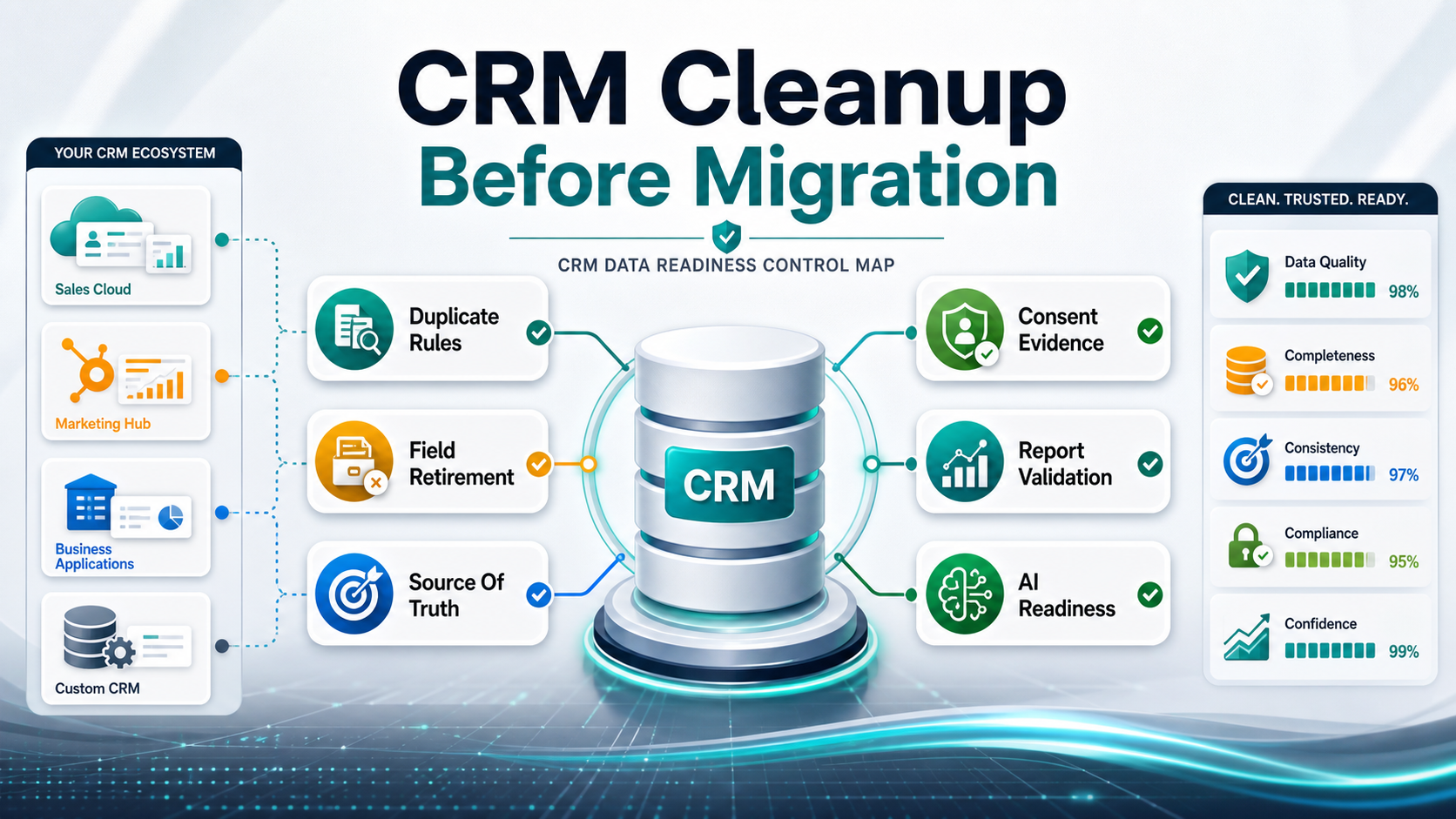

CRM data cleanup before migration is the work that makes the new CRM trustworthy on day one. Before records move, teams should fix duplicate accounts and contacts, retire unused fields, decide source-of-truth rules, preserve consent and audit values, validate pipeline continuity, reconcile reports, and document exceptions that still need business approval.
The goal is not perfect data. The goal is controlled data: records that have owners, rules, known gaps, validation evidence, and a migration path that sales, marketing, customer success, finance, and IT can trust.
Quick Answer: CRM Data Cleanup Before Migration
Before a CRM migration, clean the data that affects customer identity, revenue workflows, outreach permission, and reporting. Start with duplicate account/contact rules, field disposition, source-of-truth ownership, consent preservation, stale record handling, integration dependencies, report reconciliation, and exception signoff. If those areas are not ready, a new CRM will inherit the old confusion with a cleaner interface, and platform-specific import rules will make the defects harder to reverse after launch.
| Cleanup Area | Decision To Make | Evidence Before Migration |
|---|---|---|
| Duplicate rules | Which record wins when accounts, contacts, leads, or opportunities overlap? | Match logic, merge examples, exception queue, owner approval. |
| Field disposition | Which fields migrate, transform, archive, retire, or need manual review? | Field inventory with usage, owner, data type, rule, and target field. |
| Source of truth | Which system controls company, contact, consent, ownership, billing, and support data? | System-of-record matrix and conflict-resolution rules. |
| Consent and audit | How are opt-in, suppression, region, timestamp, source, and deletion flags preserved? | Sample record validation and compliance owner signoff. |
| Pipeline continuity | How do stages, owners, amounts, close dates, activities, and next steps remain usable? | Sales sample review and pipeline report comparison. |
| Reporting gaps | Which dashboards must reconcile before launch? | Source-vs-target report pack with tolerance thresholds. |
Use the broader CRM migration checklist after this cleanup plan is in motion. Cleanup answers whether the records are worth migrating; the migration checklist answers how to move and validate them safely.
Why CRM Cleanup Comes Before Migration
A CRM migration changes more than storage. It changes how teams trust account ownership, lead routing, pipeline stages, renewal context, customer health, support history, marketing suppression, and leadership dashboards. If the source CRM already has duplicate companies, stale contacts, unclear lifecycle values, abandoned fields, and spreadsheet-only corrections, migration will amplify the problem.
Cleanup before migration reduces rework in field mapping, UAT, training, reporting, and post-launch support. It also creates a defensible record of why some data moved, why some data was transformed, and why some data was archived. That decision trail matters when business users challenge the new CRM after go-live.
The same discipline appears in general data programs: inventory first, map intentionally, validate with owners, and keep rollback evidence. NextPage's data migration checklist is the companion framework when the CRM move is part of a larger application or database migration.
CRM Cleanup Worksheet: What To Fix Before Migration
Use a cleanup worksheet so decisions do not sit in chat threads or one admin's memory. Each row should define the data issue, business impact, rule, owner, sample records, exception policy, migration action, and validation evidence.
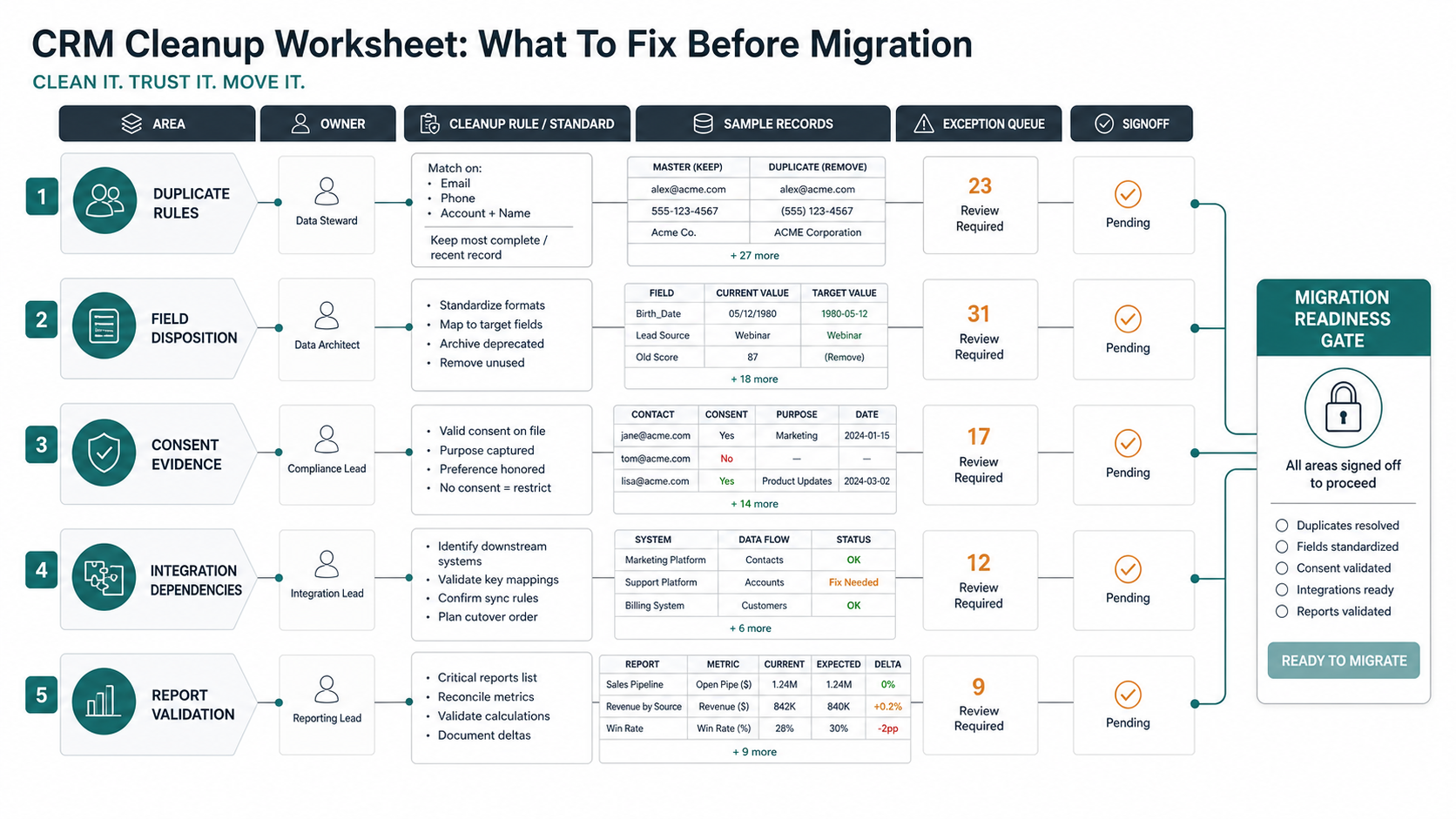
| Worksheet Column | What To Capture | Why It Matters |
|---|---|---|
| Data issue | Duplicate accounts, stale contacts, invalid picklist values, missing consent, broken owner, or report mismatch. | Gives the team a shared language for defects. |
| Business impact | Lead routing errors, forecast risk, campaign compliance, support gaps, or customer visibility issues. | Prioritizes work by operational risk. |
| Rule | Merge, transform, archive, retain, enrich, suppress, or manual review. | Prevents ad hoc cleanup choices. |
| Owner | RevOps, CRM admin, marketing ops, sales leadership, support, finance, or IT. | Stops data migration teams from guessing business meaning. |
| Evidence | Sample records, count changes, dashboard comparison, consent sample, or integration smoke test. | Shows readiness before cutover. |
1. Define Duplicate Rules Before Export
Duplicate cleanup should happen before the final export because duplicate decisions influence account hierarchy, owner assignment, opportunity history, lifecycle status, and reporting. Start with account and contact matching rules, then decide how leads, opportunities, support cases, activities, and custom objects inherit merged identity.
Common duplicate signals include company domain, normalized company name, parent account, billing address, tax ID, contact email, phone, region, owner, and open opportunity status. The winning record may be the one with the active opportunity, newest customer activity, verified billing details, richer consent evidence, or strategic-account owner approval.
| Duplicate Type | Suggested Rule | Manual Review Trigger |
|---|---|---|
| Company/account | Match domain plus normalized name, then preserve parent-child relationship. | Strategic account, active deal, multiple regions, or conflicting billing data. |
| Contact | Match email, then review personal email and role-based inbox cases. | Different companies, conflicting consent, active support case, or executive contact. |
| Lead/contact overlap | Convert or merge when email and company match an existing contact. | Different lifecycle stage, conflicting source attribution, or active campaign rule. |
| Opportunity | Merge only with sales-owner approval and preserved activity history. | Different stage, amount, close date, product line, or forecast category. |
2. Retire Fields Before Mapping Them
Do not map every field simply because it exists. Field retirement is one of the easiest ways to make the target CRM cleaner than the source. Inventory each field with label, API name, object, data type, owner, usage, report dependency, automation dependency, last populated date, value quality, privacy sensitivity, and migration decision.
Classify each field as migrate, transform, archive, retire, or review. Retire fields with no owner, no dashboard use, no automation dependency, obsolete campaign meaning, undocumented abbreviations, or values that users no longer trust. Archive fields that are historically useful but should not clutter daily CRM work.
If field sprawl reflects a deeper platform mismatch, compare CRM configuration against custom workflow needs. The custom CRM development cost guide helps frame when a CRM should be customized, integrated, or supplemented with a purpose-built workflow layer.
3. Decide Source Of Truth And Ownership
CRM data cleanup fails when the team cannot decide which system wins. The CRM may store customer-facing history, but billing may own legal entity data, marketing automation may own subscription state, the support desk may own case status, product analytics may own usage signals, and the data warehouse may calculate revenue metrics.
Create a system-of-record matrix for account identity, contact identity, consent, lifecycle stage, account owner, customer segment, billing status, product usage, support tier, renewal date, and churn risk. Define how conflicts are resolved and who approves exceptions.
When the current CRM depends on brittle scripts, unsupported plugins, or undocumented integrations, run a risk review before migration. The Legacy Software Modernization Scorecard helps decide whether the old CRM layer needs stabilization before data cleanup can be trusted.
4. Preserve Consent, Suppression, And Audit Fields
Consent data should not be treated like optional notes. Before migration, identify opt-in status, opt-in source, opt-in timestamp, unsubscribe status, suppression reason, region, consent basis, deletion request, do-not-contact markers, audit fields, and ownership restrictions. Then test whether those values survive transformations and dedupe rules.
Conflicting consent is a high-risk duplicate problem. If one contact record is opted in and another is suppressed, do not merge automatically without a rule. Preserve the most restrictive state unless the compliance owner explicitly approves a different policy.
| Consent Field | Cleanup Risk | Migration Evidence |
|---|---|---|
| Opt-in source | Flattened into notes or overwritten by import defaults. | Sample source and target contacts with source and timestamp intact. |
| Suppression status | Lost during duplicate merges or list recreation. | Suppression count comparison and campaign exclusion test. |
| Region | Mapped inconsistently, affecting outreach and privacy rules. | Regional sample checks and allowed-value mapping. |
| Audit fields | Created/updated history overwritten by migration user. | Migration log plus retained source audit export where required. |
5. Protect Pipeline, Lifecycle, And Customer Success Continuity
Sales teams will judge migration by whether they can work on Monday morning. That means open opportunities, owners, close dates, next steps, activities, products, quotes, renewal dates, customer health, onboarding status, and support context must remain usable.
Map lifecycle and pipeline values carefully. Old values may not align with target CRM stages, but forcing them into a new list without business review can change forecasts and conversion reporting. Define retired values, translated values, and manual-review cases.
CRM data often feeds downstream workflows such as churn prediction, customer success prioritization, billing follow-up, and product engagement. The churn prediction software guide shows why CRM, product, billing, and support data need clear ownership before automation is useful.
Platform-Specific CRM Cleanup Checks
Generic cleanup rules are not enough when the destination CRM has its own object model, import limits, association rules, duplicate controls, automation behavior, and reporting assumptions. Validate cleanup decisions against the target platform before the final export.
| Target CRM | Cleanup Risk | Evidence Before Migration |
|---|---|---|
| Salesforce | Duplicate rules, matching rules, external IDs, lookup relationships, required fields, field-level security, and automation side effects can change how records load or merge. | Activated matching-rule test, external-ID sample load, failed-row review, owner-approved account-contact-opportunity samples, and field-security smoke test. |
| HubSpot | Association labels, unique-value properties, lifecycle values, import file formatting, and contact-company-deal associations can break if cleanup only reviews flat CSV fields. | Import preview, association-label sample, unique identifier check, lifecycle value map, and failed-row export review. |
| Dynamics 365 / Dataverse | Tables, business units, security roles, Dataverse lookups, dual-write maps, and environment synchronization can create cleanup dependencies outside the CRM screen. | Sandbox load, lookup relationship test, security-role check, dual-write sync error review, and report reconciliation by business unit. |
| Custom CRM | Custom object models, API constraints, permissions, audit history, attachments, and downstream integrations may need transformation rules that packaged CRMs hide. | API test load, transformation logs, permission smoke test, integration replay, rollback script, and business-owner signoff on sample records. |
If cleanup exposes product gaps rather than only dirty data, separate the migration plan from the software decision. Some teams need CRM data migration services; others need custom software development around the CRM so ownership, workflows, and reporting stay controlled.
6. Validate Reports Before Cutover
Reporting validation should start before migration because it exposes data definitions that users assume are obvious. Compare source and target counts by account owner, segment, lifecycle, lead source, open opportunity stage, campaign source, renewal date, customer health, support tier, and region. Agree on tolerance thresholds before the final cutover window.
Do not only validate row counts. Validate the dashboards that leaders use for pipeline, forecast, activity, conversion, retention, customer health, campaign ROI, and support backlog. If the target CRM produces a different number, decide whether the old report was wrong, the new mapping is wrong, or the business definition changed.
ERP teams face a similar evidence problem when finance and operations reports must reconcile after a system move. The ERP data migration checklist is useful when the CRM migration is part of a wider operating-system cleanup.
7. Prepare CRM Data For AI And Automation
AI-ready CRM data needs more than complete fields. It needs source clarity, permission boundaries, lifecycle meaning, recency, history, integration context, and business-owner confidence. If customer records contain duplicates, unclear consent, abandoned stages, and conflicting owner rules, AI sales assistants, churn models, routing automations, and summarization tools will inherit those defects.
Before using CRM data for AI, define which records can be used, which fields are sensitive, what retention rules apply, who can see generated outputs, and how bad recommendations will be reviewed. The enterprise AI readiness checklist gives a broader governance model for data, workflows, security, evaluation, and ownership.
Post-Cutover CRM Data Governance
Cleanup should not end when the new CRM launches. The first 30 to 90 days should include a governance cadence that watches duplicate creation, required-field exceptions, consent drift, report variance, integration errors, and automation side effects. Otherwise, the same issues that caused migration risk will start accumulating again.
| Governance Check | Owner | Cadence | Trigger To Fix |
|---|---|---|---|
| Duplicate monitor | RevOps or CRM admin | Weekly during hypercare, then monthly | New duplicate rate exceeds the agreed threshold or strategic accounts appear in the queue. |
| Consent and suppression audit | Marketing ops and compliance | Weekly during campaign restart | Suppression counts differ from source evidence or regional rules are missing. |
| Report drift review | Sales, success, finance, and analytics | Weekly for executive dashboards | Pipeline, conversion, renewal, or customer-health metrics exceed tolerance. |
| Integration error queue | IT or platform engineering | Daily during the first two weeks | Failed syncs, orphaned records, or duplicated workflow actions affect customer work. |
| Field governance | CRM admin and data stewards | Monthly | New custom fields are created without owner, purpose, allowed values, or reporting impact. |
Use the governance period to close migration exceptions, not to reopen every product decision. The custom software cost estimator can help frame follow-on workflow, integration, or reporting work when the cleanup backlog reveals build scope.
How To Turn Findings Into A Cleanup Backlog
Not every issue should block migration. Turn cleanup findings into a backlog with severity, owner, decision needed, affected records, migration action, due date, and acceptance evidence. Separate launch blockers from post-launch improvements.
| Backlog Level | Examples | Action |
|---|---|---|
| Blocker | Missing consent states, broken owner rules for open opportunities, unreconciled pipeline reports. | Fix before production migration or pause cutover. |
| High | Duplicate strategic accounts, invalid lifecycle values, integration field mismatch. | Fix before final rehearsal or require executive exception. |
| Medium | Stale contacts, low-use fields, incomplete non-critical enrichment. | Clean in sprint or archive with clear policy. |
| Low | Cosmetic field labels, historical notes cleanup, old campaign naming. | Schedule after launch if it does not affect adoption or reporting. |
How NextPage Helps With CRM Data Cleanup
NextPage helps teams turn CRM cleanup into an evidence-based migration workstream, from source audit through post-cutover governance. We audit source CRM data, profile duplicates, inventory fields, map source-of-truth rules, preserve consent and audit data, review integrations, reconcile reports, and build the cleanup backlog needed before migration starts.
The practical output is a CRM data quality audit: duplicate rule recommendations, field disposition list, source-of-truth matrix, consent preservation checks, integration dependency map, report validation pack, governance queue, and migration-readiness summary. For delivery patterns that need structured operational review, the ClearRoute case study shows how field evidence, workflow state, and stakeholder review can be made auditable. That gives RevOps, CRM admins, sales, support, marketing, and IT a shared plan before production cutover pressure begins.