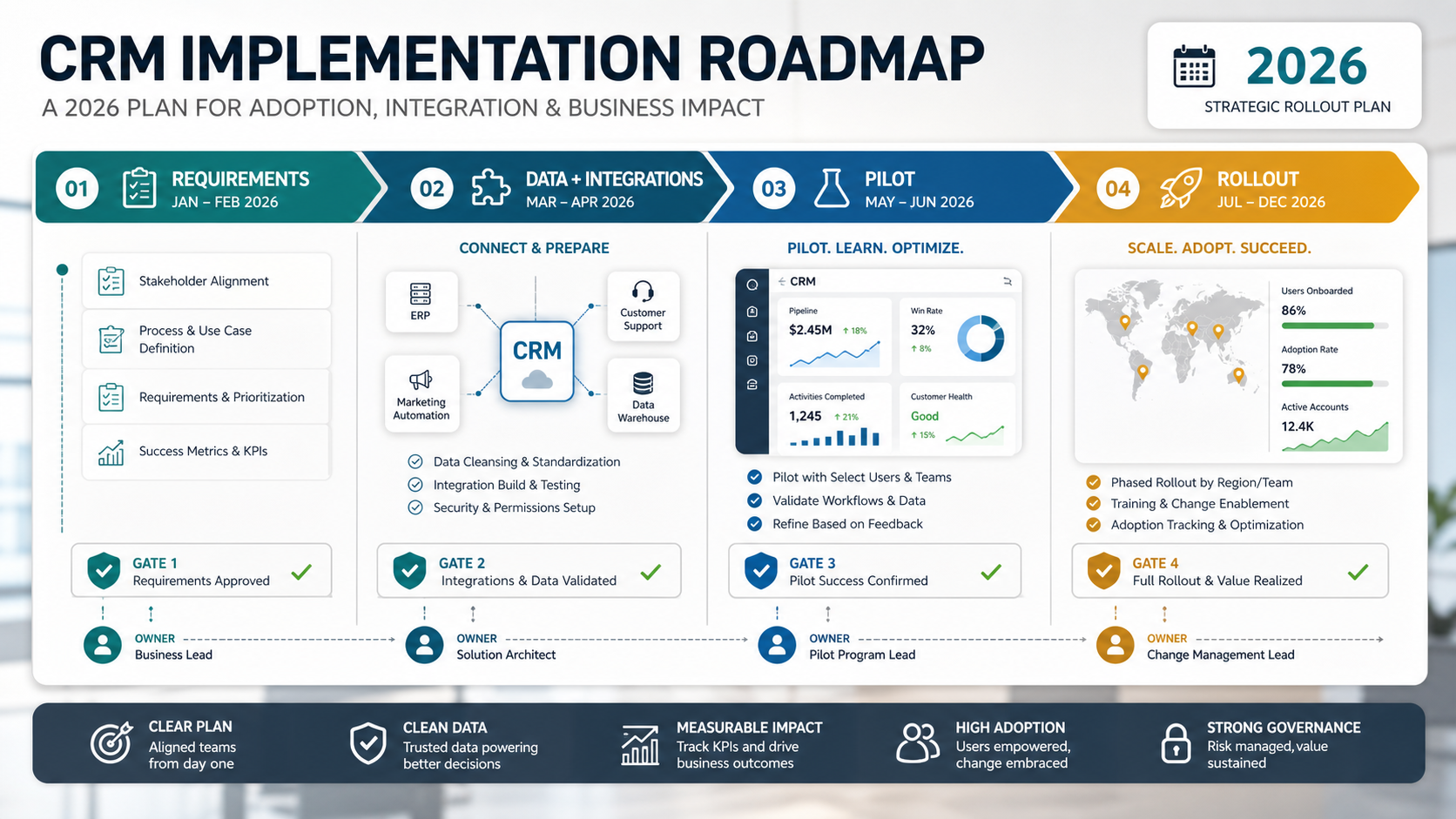

A CRM implementation roadmap should turn customer operations into a working system before anyone starts configuring fields. In 2026, the practical sequence is still disciplined rather than flashy: define workflows, map the CRM data model, clean and migrate customer records, plan integrations, design dashboards around business decisions, run a pilot, train each role, cut over with evidence, and measure adoption after launch.
The mistake is treating CRM implementation as a software setup task. A CRM rollout changes how sales, support, marketing, finance, and leadership use customer data every day. If requirements, ownership, dashboards, and integrations are fuzzy, the new CRM simply gives old process debt a cleaner interface.
Use this roadmap when you are replacing spreadsheets, consolidating tools, implementing Salesforce, HubSpot, Dynamics, Zoho, or planning a custom CRM layer. If the standard platform cannot support your lifecycle, reporting model, integrations, or operating screens cleanly, evaluate custom CRM development services before configuration decisions become expensive to unwind.
Quick Answer: CRM Implementation Roadmap
A strong CRM implementation roadmap has six phases: discovery and requirements, CRM data model design, data cleanup and migration planning, integration and automation design, dashboards and reporting, and rollout with adoption support. Each phase should produce evidence: workflow maps, owner decisions, field rules, integration runbooks, dashboard definitions, UAT results, training materials, and post-launch adoption metrics.
| Phase | Key Decision | Evidence Before Moving On |
|---|---|---|
| Requirements | Which sales, support, marketing, and management workflows must the CRM run? | Role-based workflow map and prioritized backlog. |
| Data model | How should accounts, contacts, leads, deals, activities, tickets, and custom objects relate? | Object model, field rules, ownership matrix, and permission notes. |
| Migration | Which customer data moves, transforms, archives, or needs cleanup first? | Data inventory, mapping workbook, duplicate rules, and sample validation. |
| Integrations | Which systems create, update, or consume CRM data? | Dependency map, API/runbook notes, and smoke-test plan. |
| Dashboards | Which decisions must leadership and teams make from CRM reports? | KPI dictionary, dashboard mockups, and reconciliation thresholds. |
| Rollout | How will users move from old habits to the new operating model? | Pilot feedback, UAT signoff, training plan, cutover checklist, and support loop. |
If your main question is whether custom CRM software is justified, start with NextPage's custom CRM development cost guide, then use this roadmap to plan the delivery work. If data movement is central to the rollout, pair it with the CRM migration checklist.
CRM Implementation Roadmap Overview
Most CRM implementation pages explain the same high-level stages: choose a CRM, migrate data, train users, and launch. That is useful but incomplete. Buyers need to know what should be decided in each stage, who signs off, which risks are visible early, and what evidence proves the project is ready for the next step.
The roadmap below is designed for teams that care about adoption, reporting, and workflow fit. It assumes the CRM is not just a contact database. It may support lead routing, pipeline management, renewal tracking, customer service, account health, campaign attribution, quotes, onboarding, executive dashboards, and future AI workflows.
If the issue is messy source data, use the CRM data cleanup before migration guide before configuration decisions harden. For complex migration work, NextPage's CRM data migration services page explains how source audits, object mapping, duplicate cleanup, consent preservation, and validation evidence fit into the roadmap.
CRM Implementation Timeline And Owner Matrix
A CRM implementation timeline should be sized by workflow complexity, data quality, integration depth, dashboard expectations, and change-management load. A small team with clean data and limited integrations may finish a focused rollout in four to eight weeks. A multi-team implementation with migration, ERP or billing sync, custom objects, role-based permissions, and executive dashboards often needs 10 to 20 weeks or more.
| Workstream | Primary Owner | Typical Evidence | Risk If Skipped |
|---|---|---|---|
| Business workflows | Sales/service/operations leaders | Role maps, handoff rules, acceptance criteria | The CRM mirrors old process confusion. |
| Data model | RevOps, CRM admin, IT | Object model, field dictionary, ownership matrix | Reports, permissions, and automation become unreliable. |
| Migration | Data owner and implementation lead | Mapping workbook, sample load, duplicate rules | Users lose trust in records on day one. |
| Integrations | IT or engineering | Dependency map, API notes, smoke tests | Leads, tickets, invoices, or reports break after launch. |
| Dashboards | Leadership and analytics owner | KPI dictionary, dashboard mockups, reconciliation checks | Executives reject the CRM as a source of truth. |
| Adoption | Department champions | Training plan, pilot feedback, usage metrics | Users treat the CRM as extra admin work. |
1. Start With Requirements, Not Software Screens
CRM requirements should describe decisions and handoffs, not only fields and screens. Start by interviewing the roles that depend on customer data: sales reps, sales managers, customer support, customer success, marketing operations, finance, leadership, and CRM administrators. Ask what they need to know, what they need to update, what they need to approve, and where work currently gets stuck.
Break requirements into workflows. For sales, that may include lead capture, qualification, assignment, opportunity stages, quotes, follow-ups, lost-deal reasons, and forecast updates. For support, it may include ticket escalation, SLA context, account history, and renewal risk. For marketing, it may include source attribution, consent, list segmentation, and campaign handoff. For leadership, it may include pipeline quality, conversion, retention, and customer health.
| Requirement Type | Good Question | Weak Version To Avoid |
|---|---|---|
| Workflow | What happens from inbound lead to qualified opportunity? | We need lead fields. |
| Ownership | Who owns a record when sales, support, and finance all touch it? | Everyone can update accounts. |
| Decision support | Which dashboard changes a weekly management decision? | We need reports. |
| Automation | Which rule saves time without hiding accountability? | Automate follow-ups. |
| Compliance | Which fields affect consent, access, audit, or deletion requests? | Add privacy fields. |
Every requirement should end in a configured workflow, a data rule, a dashboard definition, or a testable acceptance criterion. That keeps the roadmap from drifting into a generic implementation checklist.
2. Design The CRM Data Model And Ownership Rules
The CRM data model is where many implementations quietly fail. Decide how accounts, contacts, leads, deals, activities, cases, products, subscriptions, locations, and custom objects should relate before building screens. If the object model is wrong, dashboards become unreliable, integrations become fragile, and users start exporting data to spreadsheets again.
Use a simple owner matrix for each object and field. Sales operations may own pipeline stages, marketing operations may own consent and source fields, customer success may own account health, finance may own billing status, and IT may own integrations. CRM admins can configure the system, but business owners must define the meaning of the data.
Field design should be strict enough to support reporting but not so heavy that users avoid the CRM. Required fields should answer a real workflow need. Picklists should have owners. Free-text fields should not be used when the value drives automation, dashboards, routing, or compliance.
If the CRM needs custom workflows, portals, or operational screens around standard CRM data, that is a custom software development decision, not merely a configuration detail. Treat it explicitly so scope, cost, testing, and ownership are visible.
3. Map Integrations Before Automations
CRM integrations should be mapped before automation rules are built. Forms, website leads, marketing automation, email, calendars, call tools, support desks, billing systems, ERP, product analytics, data warehouses, Slack alerts, and reporting tools can all create or consume CRM records. If those dependencies are unclear, automations may write bad data faster.
Create an integration inventory with system name, owner, direction, trigger, objects touched, authentication method, failure behavior, retry rules, monitoring, and test evidence. Then sequence integrations by launch necessity. A lead form and billing sync may be go-live critical; an enrichment tool or advanced BI feed may belong in phase two.
| Integration | Launch Risk | Test Evidence |
|---|---|---|
| Website forms | Leads fail to enter the CRM or arrive without source and consent. | Test submissions by source, region, and campaign. |
| Marketing automation | Lifecycle and suppression states diverge. | Segment sync, consent sample, and unsubscribe test. |
| Support desk | Sales cannot see customer issues or renewal risk. | Account-ticket matching and role visibility check. |
| Billing or ERP | Revenue, renewal, and account status are unreliable. | Sample customer reconciliation and failed-sync handling. |
| BI or warehouse | Leadership reports do not match trusted numbers. | Metric dictionary and source-vs-target dashboard comparison. |
Once integration dependencies are clear, automation can be designed safely. NextPage's CRM integration and workflow automation services are relevant when teams need lead routing, service handoffs, lifecycle updates, enrichment, alerts, and reporting jobs to run across tools instead of inside one CRM screen. For AI-supported workflows, the AI agents for sales guide explains why CRM hygiene, approval points, and handoff rules need to be in place first.
4. Design Dashboards Around Decisions
Dashboards should be designed around decisions, not visual preferences. Before building reports, define who will use each dashboard, how often they will review it, what action they should take, which data sources feed it, and what tolerance is acceptable after migration or rollout.
A sales manager may need pipeline movement, stale opportunities, win/loss reasons, activity quality, and forecast changes. A support leader may need open cases by segment, SLA risk, repeat issues, and customer health. A founder may need revenue pipeline, conversion by source, churn risk, and implementation blockers. Each dashboard needs a metric definition, owner, refresh cadence, and reconciliation method.
This is where many CRM projects become too optimistic. If teams cannot agree on what a qualified lead, active opportunity, renewal risk, or customer health score means, the dashboard will not fix the disagreement. Capture the KPI dictionary before launch, and test dashboards with real sample records before the pilot.
When dashboards are tied to internal operations rather than only CRM records, the implementation may overlap with internal tooling. NextPage's custom dashboard development services page is useful when leaders need CRM, Salesforce, customer-health, pipeline, and operations dashboards connected to actual decision rhythms. The supporting internal tool development guide helps when teams need role-specific operational screens beside the CRM.
Build Vs Configure Decision
Not every CRM implementation should become a custom build. Configure the CRM when standard objects, permissions, automations, and dashboards support the workflow with minimal workarounds. Build a custom layer when the business needs specialized screens, approval flows, customer portals, quote logic, field-service workflows, proprietary scoring, or dashboards that combine CRM data with operational systems.
| Decision Signal | Configure Standard CRM | Build Custom CRM Layer |
|---|---|---|
| Workflow fit | Standard lead, opportunity, ticket, and account flows are enough. | Teams need custom handoffs, approvals, queues, or role-specific operations. |
| Data model | Objects and relationships map cleanly to platform defaults. | Custom objects, lifecycle states, or permissions drive the business model. |
| Integrations | Native connectors cover core needs. | Multiple systems need API orchestration, validation, retries, or reconciliation. |
| Reporting | Standard dashboards answer the main decisions. | Dashboards must blend CRM, billing, support, product, or warehouse data. |
| Cost control | Licenses and configuration stay proportionate. | Workarounds, manual admin, or platform limits are already creating hidden cost. |
5. CRM Rollout Plan: Pilot, Cutover, Training, And Adoption
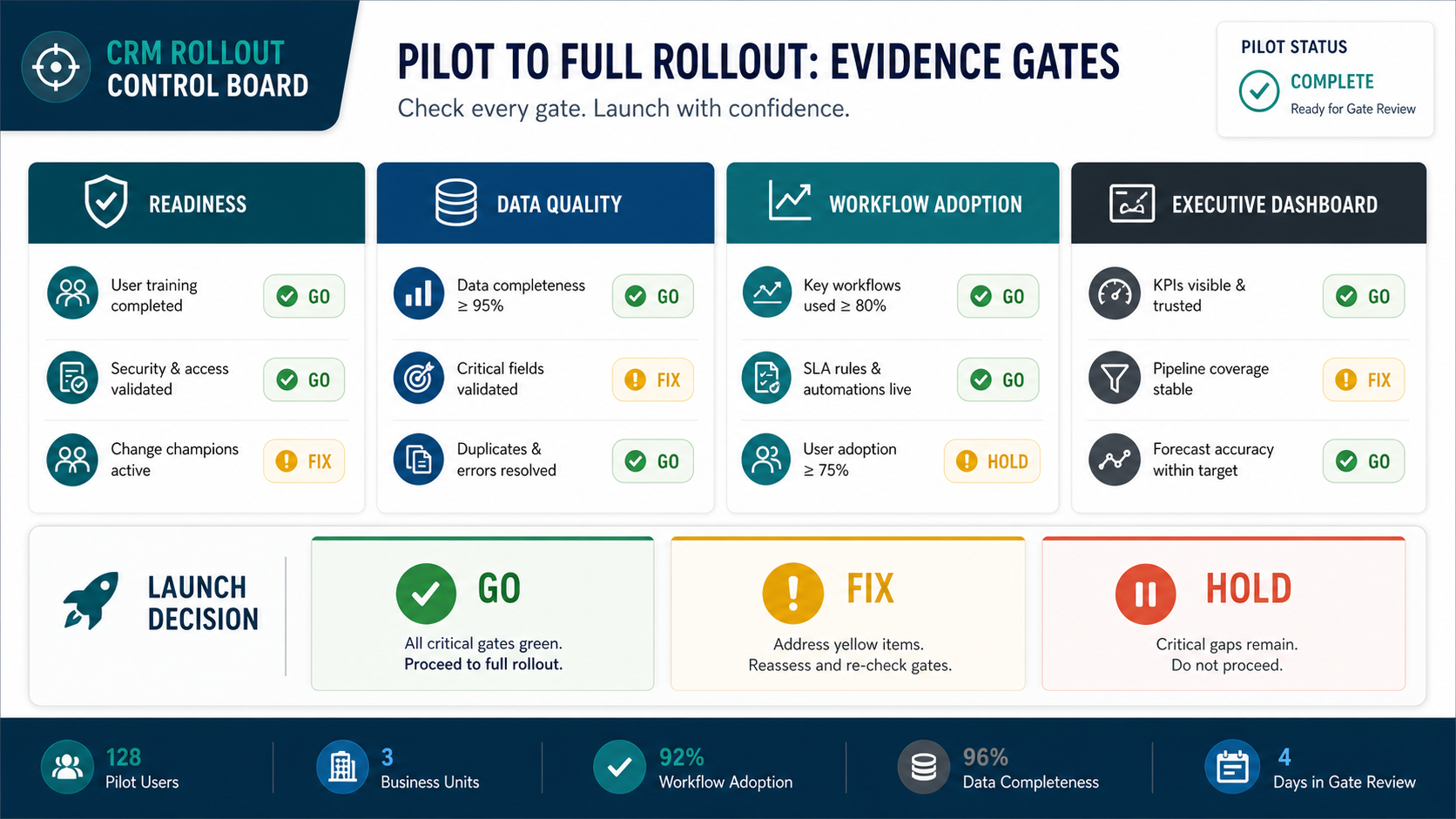
A CRM rollout plan should move in controlled phases. Start with a pilot group that represents real workflows and edge cases. Load sample data, test integrations, validate dashboards, run role-based UAT, and collect friction before company-wide launch. The pilot is not a demo; it is a pressure test for the operating model.
Training should match roles. Sales reps need account, contact, opportunity, task, and follow-up workflows. Managers need pipeline inspection, forecast updates, dashboard interpretation, and coaching views. Support and success teams need customer history, case context, account health, and escalation rules. Admins need permission, automation, import, and troubleshooting controls.
| Rollout Stage | What Happens | Exit Criteria |
|---|---|---|
| Pilot | Representative users test daily workflows with real scenarios. | Major blockers fixed and pilot feedback triaged. |
| UAT | Business owners validate records, dashboards, permissions, and handoffs. | Signed UAT evidence with accepted exceptions. |
| Cutover | Final data load, integration switch, automation enablement, and communications. | Go-live checklist complete with rollback trigger defined. |
| Hypercare | Daily support, issue triage, report checks, and adoption coaching. | Critical issues resolved and usage stabilizes. |
| Optimization | Phase-two automation, dashboards, and workflow improvements. | Backlog prioritized by adoption and business value. |
6. Measure Adoption And Improve After Launch
CRM implementation is successful only when teams trust and use the system. Track logins, record updates, task completion, activity capture, duplicate creation, owner changes, failed integrations, dashboard variance, stale opportunities, support tickets, and user feedback. These are not vanity metrics; they show whether the new CRM is becoming the system of record.
Post-launch optimization should be planned before launch. Schedule one-week, two-week, and 30-day reviews. Separate bugs from training gaps, unclear process, bad field design, missing integrations, and genuine enhancement requests. The best CRM roadmap keeps phase one disciplined and gives phase two a clear backlog instead of trying to solve every request before go-live.
If you are still estimating budget or team shape, use the Custom Software Cost Estimator to pressure-test scope. CRM implementation cost is driven by workflow complexity, data quality, integration depth, reporting expectations, custom screens, and the amount of change management required.
CRM Implementation Checklist For Buyers
Use this checklist before signing off on a CRM implementation plan or vendor proposal:
- Have the key workflows been mapped by role and business outcome?
- Does every critical object and field have an owner?
- Are duplicate rules, source-of-truth decisions, and consent fields documented?
- Have integrations been inventoried with owner, trigger, failure behavior, and test plan?
- Are dashboards connected to decisions and metric definitions?
- Is there a pilot group with real scenarios and decision authority?
- Does UAT include sales, support, marketing, finance, leadership, and CRM admins?
- Is there a cutover plan with rollback criteria and communication timing?
- Does training match roles instead of giving everyone the same walkthrough?
- Are post-launch adoption metrics and support responsibilities defined?
For broader budget planning, compare CRM-specific work against the custom software development cost guide. It helps separate configuration, integration, custom build, and long-term maintenance drivers.
How NextPage Helps With CRM Implementation
NextPage approaches CRM implementation as a customer-operations system, not just a software setup. We help teams map requirements, define the CRM data model, clean and migrate data, design integrations, build dashboards, plan rollout, and decide when standard CRM configuration is enough versus when a custom workflow layer is needed.
The practical output is an implementation roadmap with owners, artifacts, risks, and evidence gates. That gives sales, support, marketing, finance, leadership, and IT a shared plan before configuration work becomes expensive to unwind.
If your team is preparing a CRM implementation, start with the workflows and dashboard decisions. The fastest way to reduce risk is to discover unclear ownership, messy customer data, integration dependencies, and adoption blockers before the go-live date is already fixed.