
Quick Answer: Dynamic Pricing Software For Retail
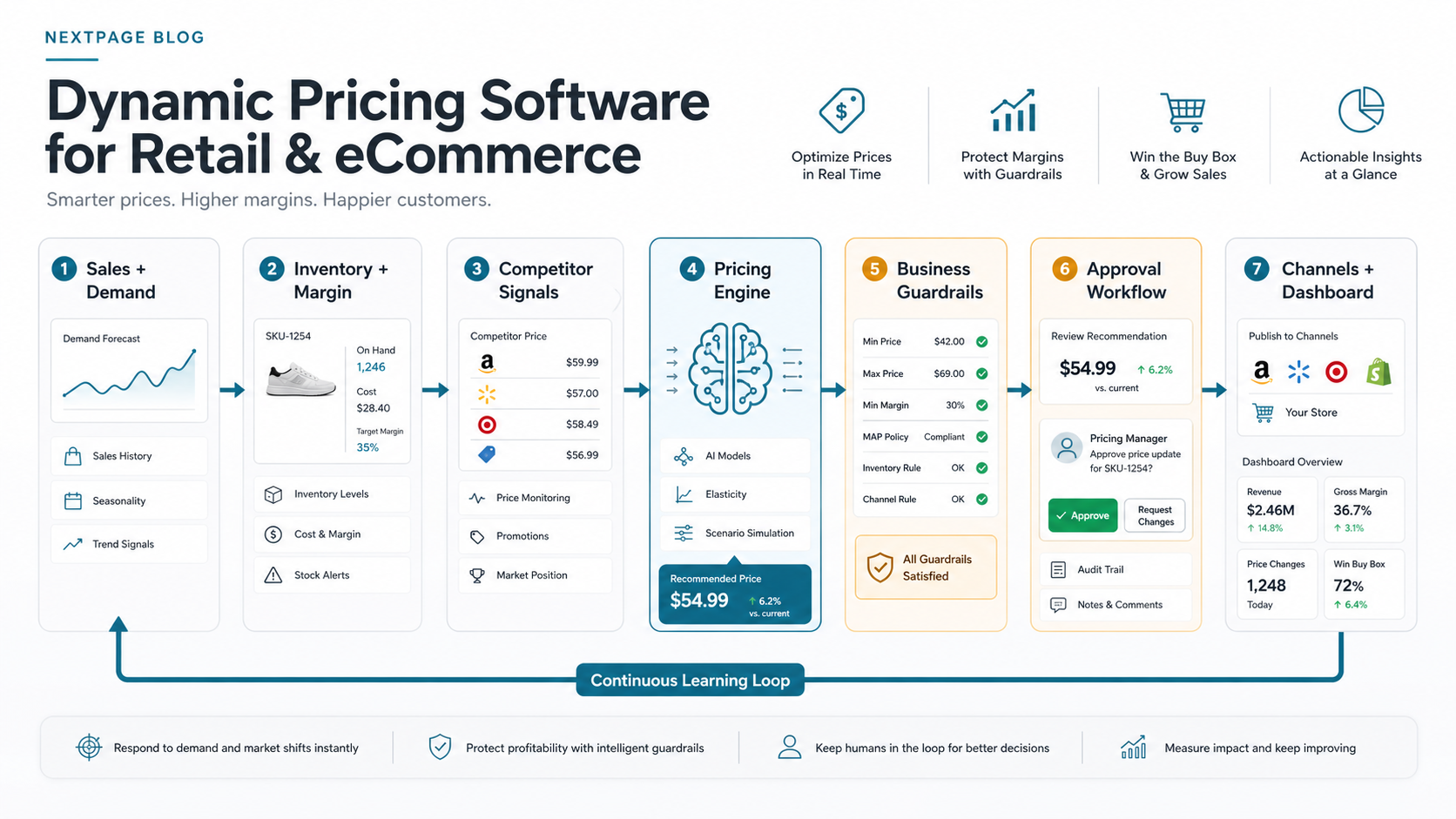
Dynamic pricing software helps retail and eCommerce teams adjust product prices with more discipline than manual spreadsheets, static rules, or one-variable repricing tools. A useful system reads demand, inventory, competitor movement, costs, margin targets, promotion calendars, marketplace rules, and customer response signals, then recommends price actions that a team can approve, test, publish, measure, and roll back.
The goal is not to let an algorithm chase every competitor move. The goal is to create a pricing operating loop: collect reliable signals, simulate outcomes, apply business guardrails, route exceptions to pricing owners, publish approved changes to the right channels, and learn from revenue, margin, conversion, and inventory results. NextPage treats this as production AI for retail and eCommerce plus workflow software, not a detached model experiment.
For most teams, the safest first release is a recommendation dashboard or supervised pilot. Start with one category, one pricing motion, and a few measurable KPIs before automating broad catalog updates.
Dynamic Pricing Vs Repricing Vs Personalized Pricing
Buyers often use pricing terms interchangeably, but the implementation risk is different. Repricing usually reacts to one or two market variables, such as competitor price or marketplace position. Dynamic pricing is broader: it combines internal and external signals, evaluates tradeoffs, and updates recommendations based on rules, models, and business goals. Personalized pricing changes price by individual customer behavior and can create trust, fairness, and privacy concerns if the business is not careful.
| Approach | Typical Logic | Where It Fits | Main Risk |
|---|---|---|---|
| Rule-based repricing | If competitor price changes, adjust within a band | Marketplace sellers and narrower catalog rules | Race-to-the-bottom pricing if margin and brand rules are weak |
| Dynamic pricing | Combine demand, inventory, cost, competitor, margin, and campaign signals | Retailers with many SKUs, channels, and pricing goals | Operational volatility if guardrails and approvals are missing |
| Price optimization | Model price elasticity and scenario outcomes to recommend optimal ranges | Teams balancing revenue, margin, stock, and customer response | Black-box recommendations that teams do not trust |
| Personalized pricing | Vary offers by customer-level behavior or segment | Highly controlled loyalty or negotiated B2B contexts | Customer trust, privacy, and fairness concerns |
The distinction matters because a retailer may not need full autonomy on day one. Many teams first need cleaner signal collection, explainable rules, review queues, and measurement. Once those foundations work, AI-assisted optimization can be added without turning pricing into an unmanaged black box.
Why Manual Price Changes Break Down
Retail prices now move across storefronts, marketplaces, mobile apps, store POS, wholesale portals, promotion channels, and search results. Manual pricing can work for a small catalog, but it breaks down when category managers need to react to inventory aging, stockouts, competitor movement, supplier costs, ad campaigns, marketplace fees, and brand restrictions at the same time.
The real pain is usually not a lack of pricing instinct. It is the delay between signal and action. By the time a pricing analyst exports reports, compares competitor prices, checks inventory, calculates margin, gets approval, and updates each channel, the opportunity may have moved. Dynamic pricing software reduces that delay while keeping commercial judgment visible.
The strongest use cases are not only airline-style real-time pricing. Most retailers start with controlled scenarios: markdown timing, clearance pricing, competitor response bands, inventory-based promotions, marketplace price parity, bundle pricing, demand-sensitive tests, or margin protection for volatile cost categories.
Pricing Signals The Software Should Understand
A dynamic pricing system is only as good as the signals it can trust. Start by mapping the decision you want to improve, then decide which signals are mandatory for a pilot and which can wait for later phases.
| Signal | Why It Matters | Example Pricing Action |
|---|---|---|
| Demand and conversion | Shows whether shoppers respond to current price and offer position | Raise price when conversion remains healthy, or test a markdown when demand softens |
| Inventory and sell-through | Connects price to stock risk, fulfillment constraints, and aging inventory | Protect scarce stock or accelerate clearance for slow movers |
| Competitor and marketplace prices | Helps teams avoid drifting too far above or below market context | Stay inside a competitive band for priority SKUs |
| Margin and cost | Prevents revenue growth from hiding profit erosion | Block recommendations below contribution margin thresholds |
| Promotions and campaigns | Connects price to marketing calendars and demand spikes | Coordinate discount depth with planned email, ad, or marketplace events |
| Customer and channel context | Prevents one channel tactic from damaging another channel economics | Use channel-specific rules for marketplace fees, loyalty offers, or B2B accounts |
Demand forecasting is often the companion layer. A price recommendation becomes more useful when the team can see expected demand, inventory impact, and confidence level. If forecasting is still immature, read the NextPage guide to demand forecasting software for retail and eCommerce before expanding pricing automation across the catalog. For broader forecasting and scenario work, NextPage also supports predictive analytics services that connect models to operational decisions.
Reference Architecture For AI Pricing Software
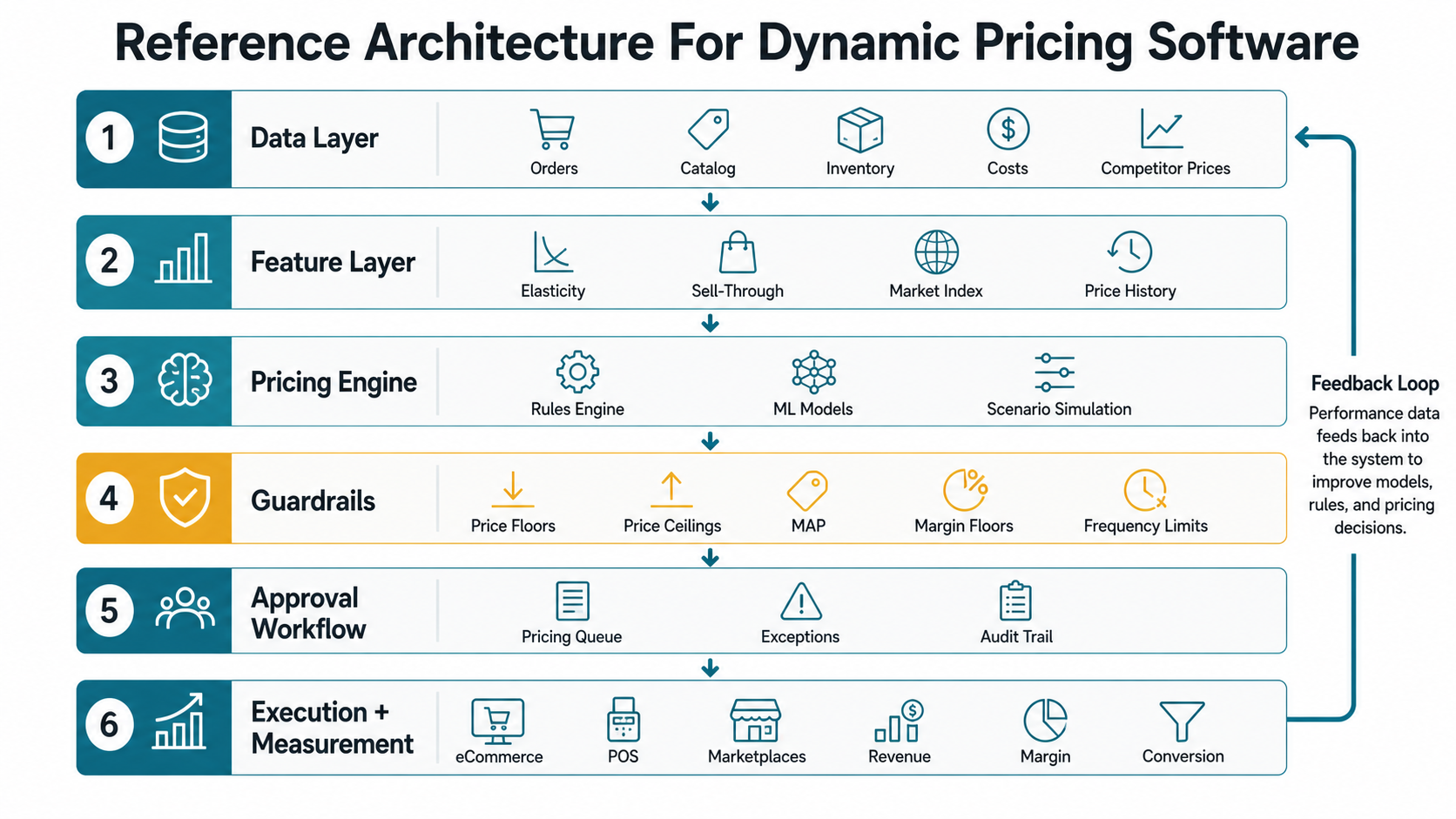
A pricing platform is usually an integration and workflow project before it is an AI project. The system needs clean product data, sales history, inventory feeds, competitor inputs, promotion calendars, order economics, and channel-specific constraints. It also needs a reliable path back into eCommerce, POS, ERP, marketplace, and analytics systems.
A practical architecture has six layers. The data layer collects sales, catalog, inventory, price, promotion, and competitor data. The feature layer converts raw events into pricing signals such as elasticity bands, stockout risk, sell-through velocity, and discount history. The pricing engine scores scenarios. The rules layer applies floors, ceilings, margin thresholds, brand restrictions, channel limits, and compliance rules. The approval layer gives humans queues, exceptions, and audit trails. The measurement layer compares recommendations against actual revenue, margin, conversion, and inventory outcomes.
For teams building inside a broader commerce platform, scope the pricing layer alongside eCommerce features, checkout, catalog, promotions, and admin tooling. The budget drivers often resemble the integration and workflow drivers described in eCommerce app development cost planning.
Guardrails And Readiness Scorecard
Dynamic pricing becomes risky when it optimizes one metric without context. Guardrails turn the system from a black-box price changer into a controlled decision tool. They should be visible, versioned, tested, and owned by the business.
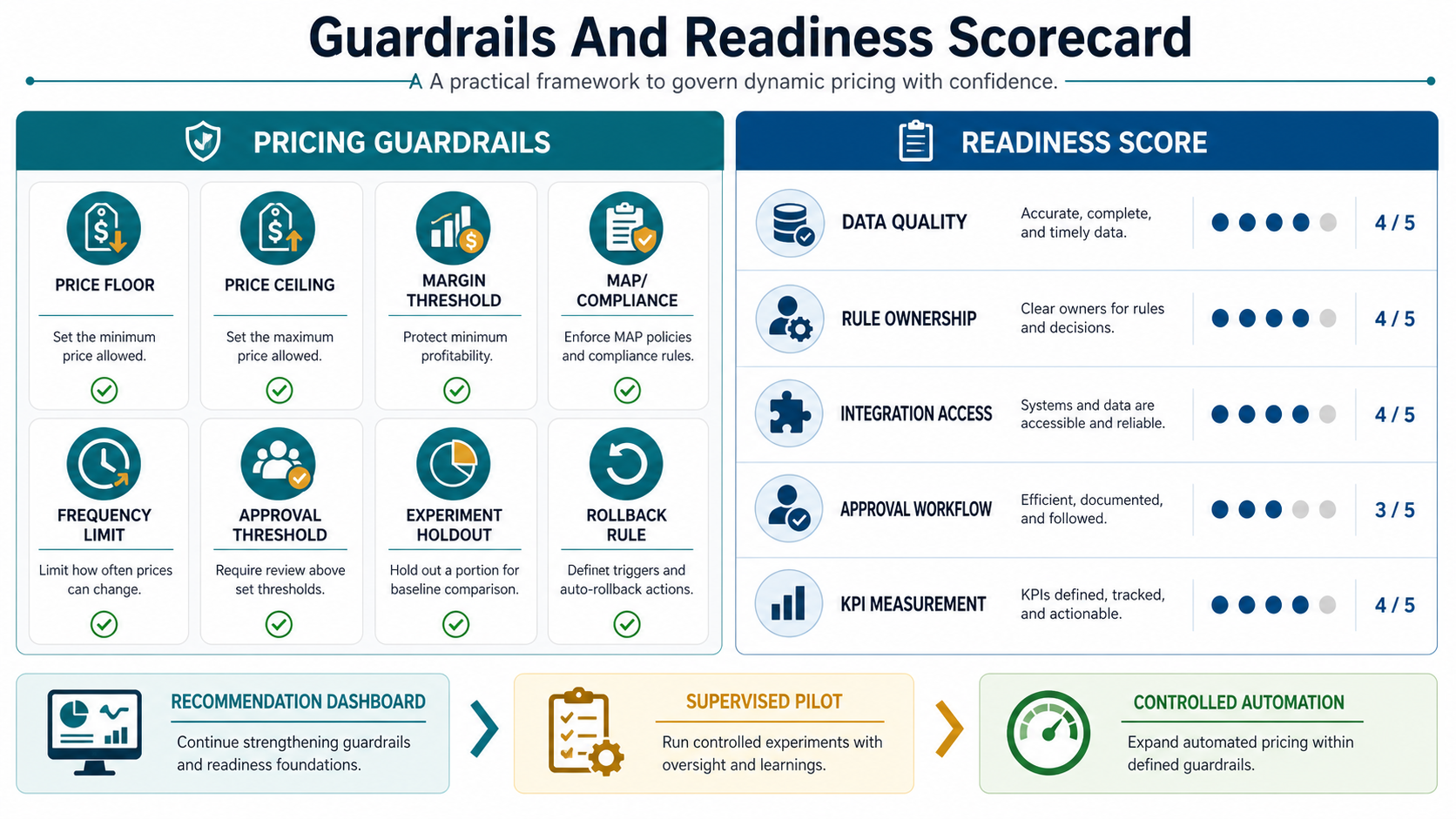
- Price floors and ceilings: minimum and maximum values by SKU, category, brand, channel, and customer segment.
- Margin protection: contribution margin, shipping cost, marketplace fee, supplier cost, and return-rate constraints.
- Change frequency limits: rules that prevent price volatility from damaging trust or confusing support teams.
- Human approval thresholds: automatic queueing for high-value SKUs, large percentage changes, low-confidence recommendations, or protected categories.
- Experiment controls: test groups, holdout groups, rollback criteria, and promotion calendar awareness.
- Audit trails: who approved a price, why it changed, what rule fired, and what happened afterward.
Before funding a broad rollout, score readiness across data quality, rule ownership, integration access, approval workflow, and KPI measurement. A low score does not mean the idea is bad. It means the first release should be narrower and more supervised. Teams considering agent-like pricing workflows can also use the AI Agent Readiness Assessment to pressure-test workflow clarity, data readiness, integration access, and human-review controls.
A Practical Pilot Roadmap
Start with a small, measurable pilot instead of trying to price every product dynamically. A good pilot might cover 50 to 200 SKUs in one category, one channel, and one pricing motion such as markdown timing, stock-based promotion, or competitor response bands.
| Phase | Focus | Deliverable |
|---|---|---|
| Weeks 1-2 | Decision framing and data audit | SKU set, pricing motion, baseline KPIs, source-system map, rule inventory |
| Weeks 3-5 | Recommendation prototype | Pricing dashboard, rule engine, scenario comparison, exception queue |
| Weeks 6-8 | Supervised pilot | Approved recommendations used in one channel with rollback criteria |
| Weeks 9-12 | Expansion decision | Outcome review, integration backlog, model/rule refinements, rollout plan |
The pilot should produce evidence, not just a demo. Measure planner adoption, approval time, recommendation quality, data issues, business outcomes, and support burden.
KPIs To Track Before And After Launch
Dynamic pricing ROI should be measured with business and operational metrics. Model score matters, but the business case comes from fewer manual pricing cycles, better margin protection, faster markdown decisions, improved sell-through, and clearer experimentation.
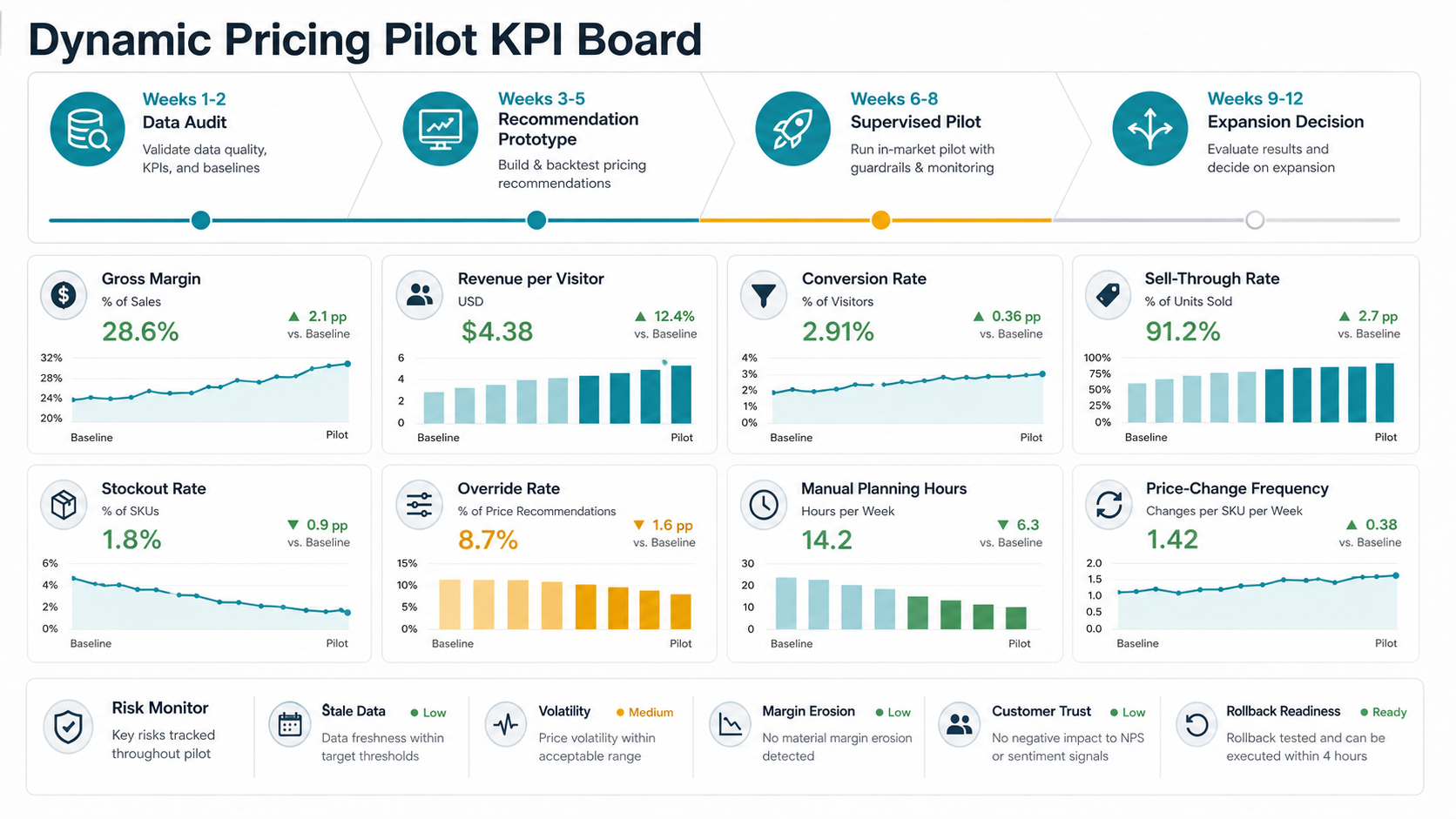
- Gross margin: margin movement by category, SKU group, and channel.
- Revenue per visitor or session: whether price actions improve commercial outcomes without masking margin loss.
- Conversion rate: buyer response by product, channel, and promotion context.
- Sell-through and aged stock: whether pricing helps move inventory before it becomes a markdown problem.
- Stockout rate: whether aggressive pricing creates avoidable availability issues.
- Manual planning time: hours saved in report consolidation, price review, and approval follow-up.
- Override rate: how often humans reject recommendations and why.
- Price-change frequency: whether automation is creating unhealthy volatility by SKU, category, or channel.
For an early business case, use the AI Automation ROI Calculator to estimate the value of reducing repeated pricing analysis work, then compare that with the integration, dashboard, and governance effort required for production.
Build Vs Buy: When Custom Pricing Software Makes Sense
Buying a pricing platform can make sense when your channels, catalog, and pricing logic fit standard connectors. Custom or hybrid software becomes more attractive when pricing is tied to proprietary inventory rules, marketplace fee logic, supplier constraints, regional operations, B2B contract terms, unusual bundle logic, or existing internal dashboards.
Custom pricing software is also useful when the recommendation must sit inside a wider operating workflow: replenishment, campaign planning, procurement, marketplace operations, or category review. In those cases, the price engine is only one part of the product. The surrounding user experience, permissions, integrations, audit trail, and reporting often decide whether the system is adopted.
For budget planning, compare your pilot scope against the main drivers in custom software development cost, then run a first-pass estimate with the Custom Software Cost Estimator. If the decision is still unclear, use the Build vs Buy Decision Tool to compare SaaS, configuration, integration, and custom software paths.
How To Select Dynamic Pricing Software
Current pricing software pages tend to emphasize real-time market response, competitor data, explainability, AI recommendations, and pricing-team control. Use those as evaluation criteria, but add the operating details that determine whether the platform will work in your business.
| Selection Area | What To Ask | Why It Matters |
|---|---|---|
| Data quality | How does the system handle missing costs, duplicate SKUs, stale competitor data, and promotion conflicts? | Bad input creates confident but wrong recommendations |
| Explainability | Can pricing teams see which signals and rules caused a recommendation? | Teams ignore recommendations they cannot defend |
| Guardrails | Can rules vary by SKU, category, brand, channel, marketplace, and customer type? | Retail pricing rarely has one global policy |
| Workflow | Can humans approve, reject, schedule, comment, and roll back changes? | Adoption depends on usable operating controls |
| Integrations | Can the tool read and write to eCommerce, POS, ERP, marketplaces, BI, and data warehouse systems? | Disconnected pricing tools create duplicate work |
| Measurement | Can teams compare recommendation, approved price, published price, and outcome? | Pricing maturity comes from learning, not only automation |
Do not choose only by feature checklist. Choose by workflow fit. If your pricing motion depends on proprietary data, unusual approval rules, or deep commerce integrations, pair vendor evaluation with custom software development planning so the final system fits the operating model.
Common Risks And How To Reduce Them
Dynamic pricing touches revenue and customer trust, so risk management belongs in the first release. The most common failure is automating price changes before data quality, rules, and ownership are ready.
- Bad data creates bad recommendations: monitor data freshness, missing costs, wrong inventory, and duplicate SKUs.
- Margin erosion hides behind revenue: make contribution margin and fee logic visible in every recommendation.
- Customers notice volatility: limit price-change frequency and apply special rules for loyalty, subscriptions, and protected categories.
- Teams do not trust black boxes: show why the recommendation changed and what signal influenced it.
- Experiments become noise: define test windows, holdouts, and rollback criteria before launch.
- Automation ignores operations: connect pricing to stock, fulfillment, campaign, and support realities.
Think of dynamic pricing as AI workflow automation: data enters, rules and models recommend action, humans review exceptions, systems execute approved changes, and outcomes feed the next cycle.
How NextPage Helps Retail Teams Build Pricing Software
NextPage helps retail and eCommerce teams turn pricing ideas into scoped, testable software. We map the pricing workflow, audit source data, define pilot KPIs, design the integration architecture, build dashboards and approval queues, and connect pricing recommendations to eCommerce, marketplace, inventory, and analytics systems.
Our work covers the platform around the AI layer: source-system integrations, admin UI, role-based access, audit trails, API design, reporting, and production support. If your team is deciding whether to buy, customize, or build dynamic pricing software, start with a small supervised pilot and clear guardrails. You can also review NextPage's software and AI portfolio for examples of how we structure workflow platforms, dashboards, automation, and production-ready product delivery.
Book a dynamic pricing readiness consultation with NextPage.