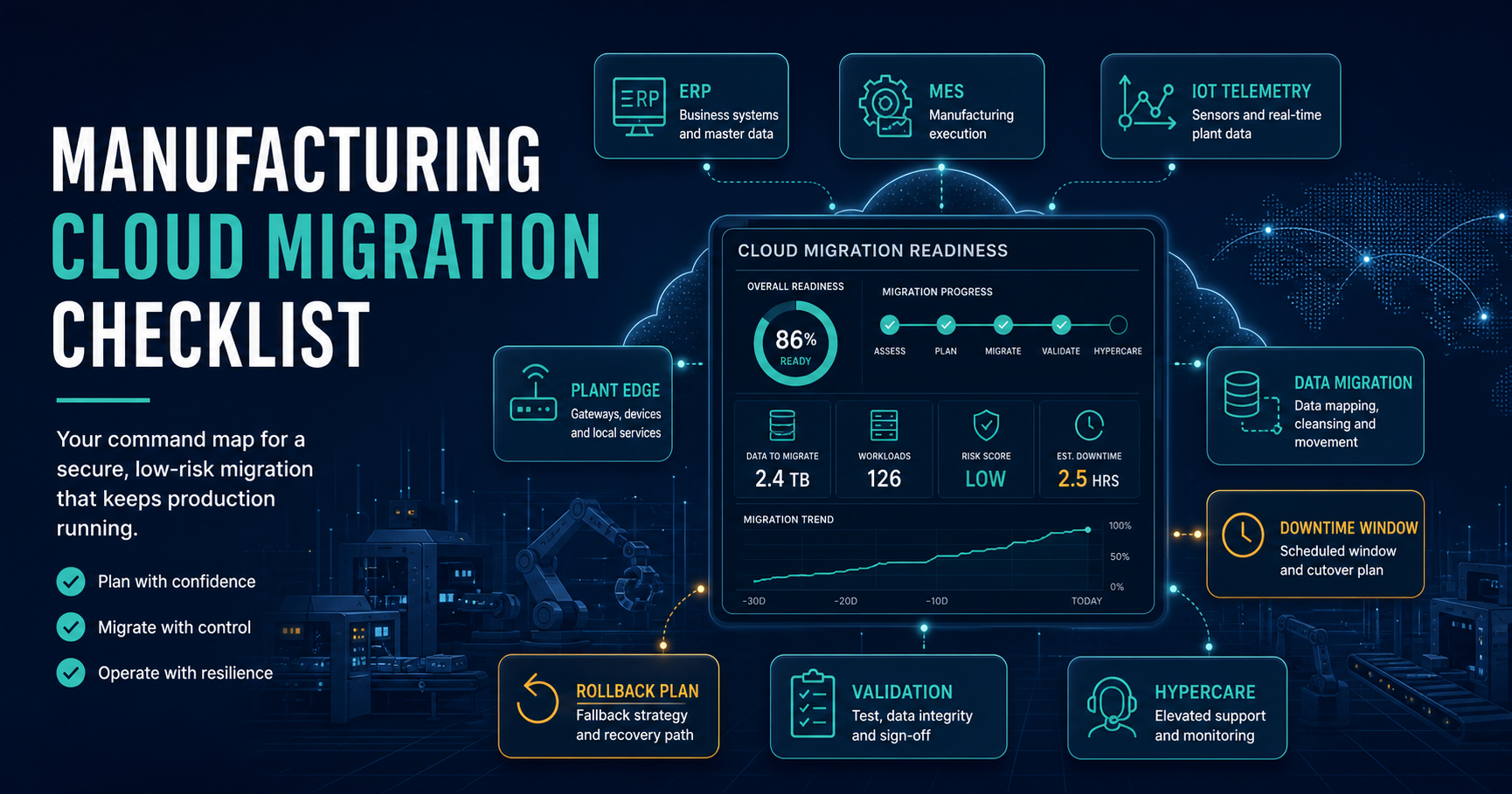

A manufacturing cloud migration checklist has to do more than list servers and applications. It has to protect production schedules, shop-floor integrations, ERP transactions, MES events, IoT telemetry, reporting workloads, security controls, and the rollback path if a cutover does not hold.
The practical question is not only which workloads can move to cloud. It is which workloads can move without losing material traceability, delaying orders, breaking machine integrations, or leaving plant teams without usable reports during a shift. That is why the checklist should start with operational dependency mapping, then turn each workload into a readiness decision: migrate now, keep local, run hybrid, modernize first, or defer.
Quick Answer: What Should A Manufacturing Cloud Migration Checklist Include?
A manufacturing cloud migration checklist should include production goals, ERP and MES inventory, shop-floor dependency mapping, plant network constraints, IoT and historian data flows, integration contracts, data migration rules, downtime windows, validation tests, security controls, rollback criteria, owner signoff, training, and post-migration stabilization. The output should be a readiness score for each workload and a cutover plan that plant, IT, operations, and finance leaders can approve.
If the assessment shows that applications, data flows, and infrastructure components must move together, treat the work as a structured cloud migration assessment instead of a one-application lift-and-shift exercise. When the migration includes custom plant systems, APIs, or shop-floor workflows, connect the cloud plan to application migration services so the team validates code, data, integrations, and release operations together.
What Changes In Manufacturing Cloud Migration In 2026?
Manufacturing cloud migration is no longer only a hosting move. ERP, MES, PLM, historians, IIoT platforms, data lakes, quality systems, and analytics workflows now form a connected operational fabric. AWS Prescriptive Guidance for MES modernization highlights the need to consider ERP and PLM interfaces, PLC, SCADA, historian, IIoT, data analytics, microservices, edge computing, and resiliency together. Google Cloud's Manufacturing Data Engine also frames manufacturing analytics around streamed shop-floor data, Pub/Sub, Dataflow, BigQuery, and KPI dashboards inside the customer's cloud tenant.
For manufacturers, that means the checklist must separate three decisions. First, which systems can move to cloud as-is. Second, which systems need modernization before migration. Third, which production workflows should remain local or hybrid because latency, safety, uptime, protocol support, or plant autonomy matter more than centralization.
1. Define The Migration Scope Around Production Impact
Start by listing the production outcomes the migration must protect: order release, inventory accuracy, batch records, quality checks, machine availability, shipping deadlines, traceability, production reporting, maintenance workflows, and finance close. This keeps the migration grounded in plant operations instead of infrastructure preferences.
For each workload, document whether it directly affects production, indirectly supports production, or can be moved with minimal operational impact. ERP order management, MES execution, warehouse scans, label printing, PLC-connected middleware, quality data collection, and plant dashboards deserve different handling than a read-only management report.
| Workload | Production Risk | Planning Question |
|---|---|---|
| ERP core modules | High | Which transactions must be available during shifts? |
| MES and shop-floor execution | High | Which machines, terminals, operators, and quality checks depend on real-time access? |
| IoT and historian pipelines | Medium to high | Can telemetry buffer locally if cloud services are unavailable? |
| Analytics and reporting | Medium | Which reports are operational versus management-only? |
| Collaboration and document systems | Lower | Can these move before core production systems? |
2. Build A Complete ERP, MES, And Plant-System Inventory
The inventory should include applications, databases, file shares, interfaces, scheduled jobs, custom scripts, device gateways, reporting tools, authentication methods, backup jobs, and external partner connections. Include versions, support status, business owner, technical owner, data owner, uptime requirement, peak usage period, plant location, network zone, and known pain points.
Manufacturing ERP is often surrounded by spreadsheets, barcode systems, EDI workflows, warehouse devices, finance exports, label printers, and custom reports. If the ERP migration is part of a broader modernization, use the same module and integration discipline described in a manufacturing ERP implementation guide: move only what the business can validate, and avoid widening the release until dependencies are visible.
- Application inventory: ERP, MES, WMS, QMS, CMMS, SCADA-adjacent middleware, reporting, portals, and integration services.
- Data inventory: master data, orders, BOMs, routings, inventory, batch records, quality results, machine telemetry, documents, and audit logs.
- Infrastructure inventory: servers, databases, storage, network zones, VPNs, firewalls, device gateways, backup targets, and monitoring tools.
- Ownership inventory: plant owner, business process owner, IT owner, vendor contact, approval authority, and support escalation path.
3. Map Dependencies Before Choosing A Migration Wave
Dependency mapping is the step that prevents a cloud migration from becoming an outage with a new hosting bill. Track upstream and downstream systems, data frequency, protocol, failure behavior, retry logic, batch windows, authentication, network path, data owner, and support owner.
Manufacturing systems can have hidden timing assumptions. A warehouse scan may trigger inventory movement, label generation, quality hold logic, and shipping status updates in sequence. A report may depend on a nightly ERP export. A machine interface may depend on a local database. A migration wave should not split those dependencies unless the team has tested a temporary bridge.
Older manufacturing applications may also need modernization before they can move cleanly. If custom modules, unsupported runtimes, brittle integrations, or missing APIs make migration risk too high, connect those findings to a legacy application modernization roadmap or run the legacy software modernization scorecard before forcing a risky move.
4. Separate Data Migration From Application Hosting
Manufacturing cloud migration usually includes data movement, data cleansing, historical retention, synchronization, reconciliation, and reporting redesign. Treat that as its own workstream. Moving an application without trustworthy data rules can create order mismatches, inventory errors, duplicate vendors, broken traceability, or reporting disputes after go-live.
Define source systems, target stores, field mappings, transformation rules, retention requirements, archive strategy, reconciliation methods, approval owners, and rollback data handling. For high-risk data, rehearse the migration more than once and compare record counts, balances, sample transactions, exception logs, and downstream report outputs.
A strong data migration checklist is especially important when ERP, MES, warehouse, quality, and analytics systems all depend on the same master data. If the ERP data model itself is changing, the ERP data migration checklist gives a deeper evidence model for mapping, validation, and cutover.
5. Review Plant Network And Edge Readiness
Plant network readiness is different from office network readiness. Review latency between plant devices and cloud services, local buffering needs, offline mode, firewall rules, VPN or private connectivity, DNS dependencies, identity provider access, certificate management, endpoint security, and monitoring coverage.
Do not assume every machine-adjacent workflow should depend on real-time cloud connectivity. Some workloads need local edge processing, store-and-forward queues, or a phased hybrid design. Decide what must remain local for safety, uptime, autonomy, or latency reasons, and what can move to cloud without affecting the shift.
| Area | Readiness Check | Evidence |
|---|---|---|
| Connectivity | Can the plant reach cloud services with stable latency by shift and route? | Network tests by plant, shift, and route. |
| Offline behavior | Can critical events buffer during WAN or cloud outages? | Store-and-forward test results. |
| Security zones | Are production networks segmented correctly from office and cloud access? | Firewall rules and access review. |
| Device integrations | Are gateways and middleware migration-ready? | Protocol, owner, and failure-mode documentation. |
| Local services | Which printing, scanning, historian, PLC, or operator workflows need local continuity? | Local dependency map and fallback procedure. |
Migration Waves And Validation Gates
Use controlled waves instead of one large move. A practical sequence is discovery and inventory, low-risk applications, reporting or analytics, non-critical integrations, one plant pilot, then ERP/MES cutover only after evidence gates pass. Each wave should have a named owner, rollback trigger, validation pack, and stabilization window.
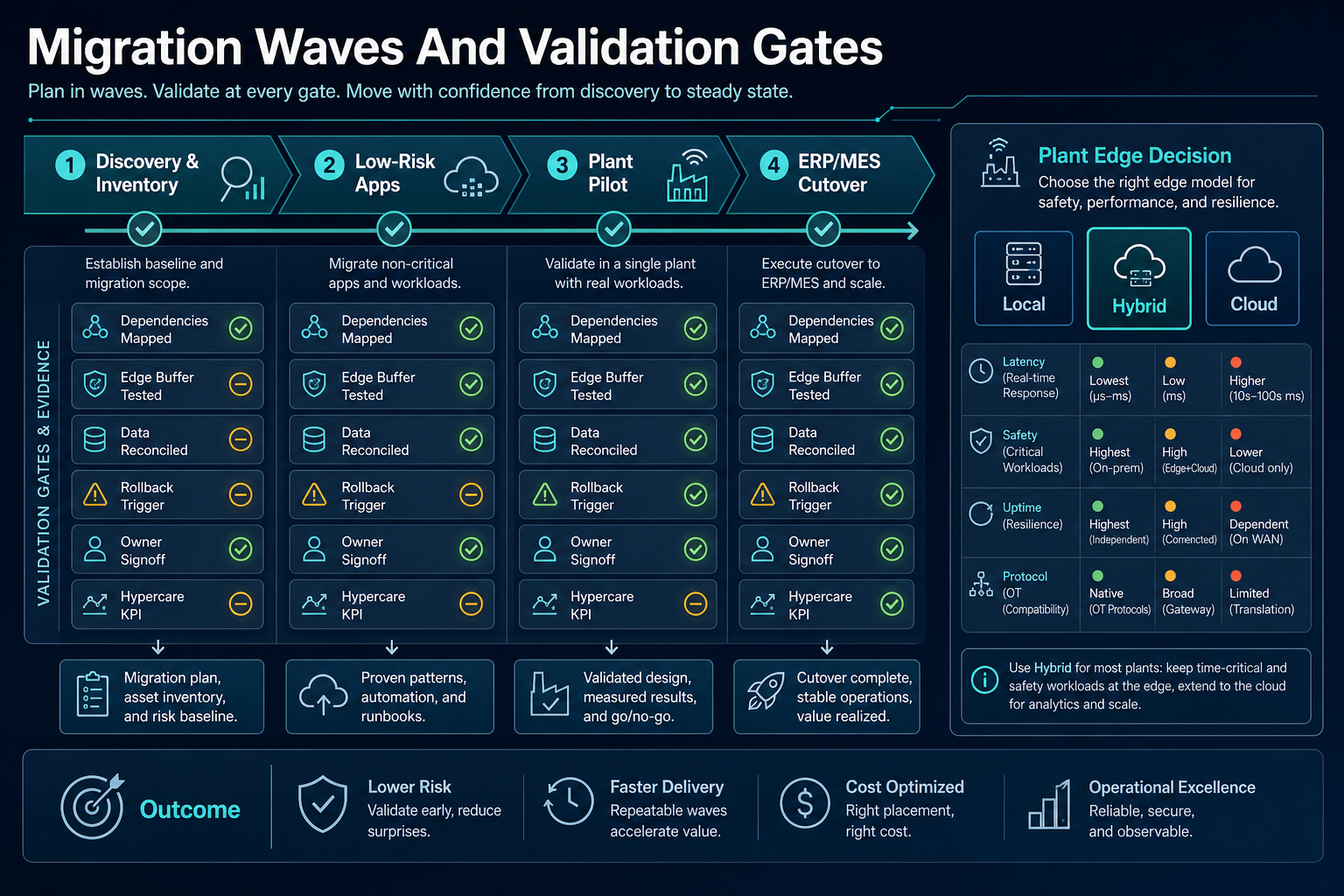
| Wave | Best Fit | Go/No-Go Evidence |
|---|---|---|
| Discovery and inventory | All plants, systems, data flows, and owners. | Inventory, dependency map, risk baseline, and migration scope. |
| Low-risk apps | Collaboration, read-only dashboards, non-critical support tools. | Access, backup, monitoring, support path, and user validation. |
| Plant pilot | One representative plant, line, or workload family. | Network tests, edge buffering, data reconciliation, operator acceptance, rollback rehearsal. |
| ERP/MES cutover | Core production systems with mapped dependencies. | Freeze window, final sync, validation pack, owner signoff, rollback point, hypercare coverage. |
6. Plan Downtime Windows Around Production Reality
Downtime planning should start with the production calendar. Maintenance windows, changeovers, planned shutdowns, seasonal demand, supplier deadlines, customer commitments, finance close, and inventory counts all affect when a cutover can safely happen.
Create a cutover runbook with start time, freeze rules, final sync, validation steps, approval gates, communication plan, fallback trigger, rollback owner, support bridge, and post-go-live monitoring. The runbook should be rehearsed with the people who will execute it, not only the project team.
For each cutover step, define the latest safe rollback point. Include database restore rules, DNS or routing reversal, queued event handling, user access reset, plant communication, and data reconciliation after rollback.
7. Validate Security, Compliance, And Access Controls
Cloud migration changes where data lives, who can access it, how systems authenticate, how logs are stored, and how recovery is performed. Manufacturing teams should review identity and access management, privileged access, vendor access, network segmentation, encryption, secrets, backup protection, audit logs, retention requirements, and incident response.
Pay special attention to production data that supports quality, traceability, safety, regulated exports, supplier records, or customer contractual requirements. The checklist should show which controls are inherited from the cloud platform, which controls are configured by the implementation team, and which controls remain the customer's operating responsibility.
8. Build Validation Tests Before Go-Live
Validation should prove that migrated workloads support real manufacturing workflows. Test order release, work order execution, material issue, machine data capture, quality hold, label print, inventory adjustment, shipping confirmation, reporting refresh, user permissions, backup restore, and incident response.
Use test data that resembles production volume and edge cases. Include slow network behavior, unavailable downstream systems, expired credentials, duplicate messages, delayed telemetry, failed jobs, and partial data loads. A migration is not ready because the login page works; it is ready when the production workflow can survive normal operating exceptions.
Manufacturing Cloud Migration Readiness Scorecard
Before assigning a workload to a migration wave, score it against the checks below. Anything marked blocked should either move to a later wave or receive a mitigation plan before cutover.
- Business owner and plant owner are named.
- System inventory includes application, database, file, job, and integration dependencies.
- ERP, MES, IoT, reporting, and warehouse data flows are documented.
- Production impact is rated by shift, plant, product line, and customer commitment.
- Downtime window is approved by operations, IT, and business owners.
- Data migration mapping, cleansing, reconciliation, and rollback rules are defined.
- Plant network, edge buffering, offline mode, and connectivity risks are tested.
- Identity, access, secrets, audit logs, encryption, and backup controls are reviewed.
- Cutover runbook includes freeze, final sync, validation, approval, communication, and rollback.
- Hypercare coverage is staffed for the first production cycles after go-live.
9. Stabilize Operations After The Move
Post-migration stabilization should include production monitoring, job monitoring, incident triage, user feedback, performance baselines, data reconciliation, support tickets, vendor escalation, and cost tracking. Compare the first days and weeks against the migration goals instead of declaring success after the first login.
Track issues by production impact, not only technical category. If a report is slower but not operationally critical, it may wait. If a minor integration delay blocks shipping, it becomes urgent. The support model should reflect how the plant actually runs.
| Metric | What To Watch | Owner |
|---|---|---|
| Operational continuity | Missed orders, delayed production events, blocked scans, late labels, failed quality holds. | Plant operations owner. |
| Integration health | Failed jobs, retry queues, delayed messages, stuck events, unreconciled records. | Integration owner. |
| Data confidence | ERP/MES/report mismatches, inventory variance, master-data exceptions. | Data owner. |
| Cloud operations | Latency, availability, backup success, incident response, cost anomalies. | Platform owner. |
| User adoption | Support tickets, training issues, manual workarounds, unresolved change requests. | Business process owner. |
How NextPage Helps Manufacturing Teams Migrate Safely
NextPage helps manufacturing teams plan cloud migration around production realities, not only infrastructure targets. We map ERP, MES, IoT, reporting, plant network, data, security, and cutover dependencies, then turn the assessment into migration waves that can be validated with owners before go-live.
For broader modernization work, our manufacturing software development company team can help rebuild brittle plant workflows, dashboards, integrations, and automation layers around the migration plan. For proof of how we structure operational evidence loops, the ClearRoute portfolio case study shows how field capture, processing, review, and operations controls can be connected into one reliable workflow.
The safest next step is a short readiness audit before committing to migration scope. Inventory the systems, map dependencies, rate production risk, identify data and network blockers, and build a cutover plan that operations can approve. If your ERP, MES, IoT, reporting, or plant integrations are part of the move, start with a cloud migration readiness audit that turns the checklist into a practical migration roadmap.